CVE-2026–64857 — Session Fixation in Tirreno Authentication
The login flow kept the same session identifier before and after authentication, so an attacker who knew a victim's pre-login session ID could reuse that session once the victim logged in. The author confirmed the identifier remained unchanged on the public demo environment.

medium.com
Published on medium.com
Cybersecurity
The full write-up lives on its author's site
It belongs to its author, so we link to it rather than copy it. The other two tabs are our own rewrites, checked against it.
Context
Tirreno is an open-source analytics platform. The finding concerns its authentication flow, specifically the login controller at app/Controllers/Pages/Login.php. The affected versions are those below 0.10.0, and the issue was fixed in 0.10.0. The weakness is classified as CWE-384, session fixation, and the author rates it Moderate.
In a normal login flow, the application authenticates the user and then issues a fresh session identifier for the authenticated state. Tirreno instead authenticated the user and stored the authenticated state in the session that already existed, without regenerating the session ID. The same identifier therefore represented both the unauthenticated session and the authenticated one.
Setup
The testing was done against Tirreno's public demonstration environment. The author states that the proof of concept used that environment and did not access or modify any unrelated user data. Two tools were used: a browser, to inspect the session cookie before and after login, and a small Bash/cURL script to reproduce the behaviour. The report does not describe any accounts, roles or special configuration beyond the demonstration instance.
Finding it
The observation was that the application kept the same session identifier before and after a successful login. The login flow authenticated the user and wrote the authenticated state into the existing session, but the session ID itself was not regenerated. The relevant code was essentially:
// User authentication succeeds$_SESSION['active_user_id'] = $user['id'];$_SESSION['role'] = $user['role'];// Session ID was not regenerated here
The two assignments record the authenticated user's ID and role in the session. What is missing is any call that would replace the session identifier at that point. Because the pre-authentication session stays active, an attacker who can get a victim to authenticate using a session identifier the attacker already knows could potentially reuse that session after login.
Exploitation
Step 1: Compare the session identifier in the browser
The author first compared the session identifier before and after authentication on the demonstration environment. The result showed that the identifier remained unchanged:
Pre-auth Session ID : [same value]Post-auth Session ID: [same value]Result: Session ID unchanged after login
This confirmed the underlying session fixation condition. The cookie involved is named CONSOLESESSION.
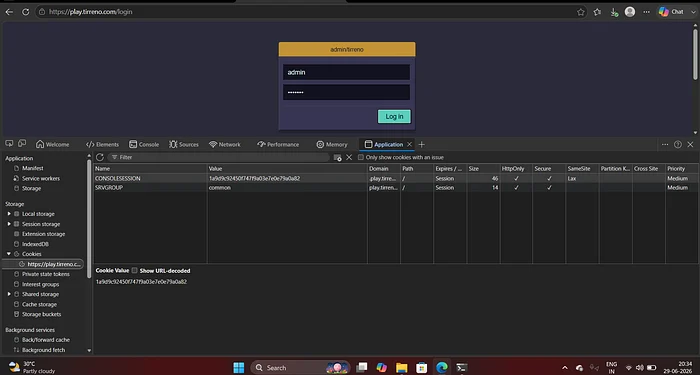
Figure 1 shows the CONSOLESESSION cookie before authentication.
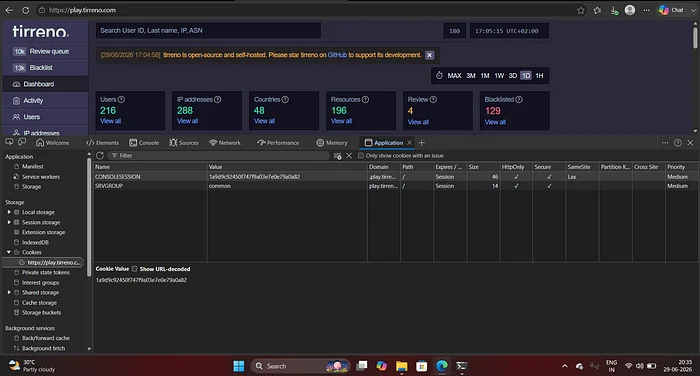
Figure 2 shows the same CONSOLESESSION value still present after a successful authentication.
Step 2: Reproduce with a Bash/cURL PoC
After the browser-level verification, the author reproduced the behaviour using a small Bash/cURL PoC. The script captures a session identifier before authentication and compares it with the one after.
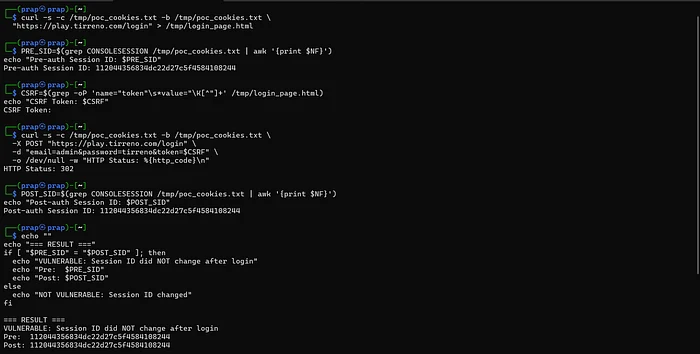
Figure 3 shows the PoC obtaining the pre-authentication session.
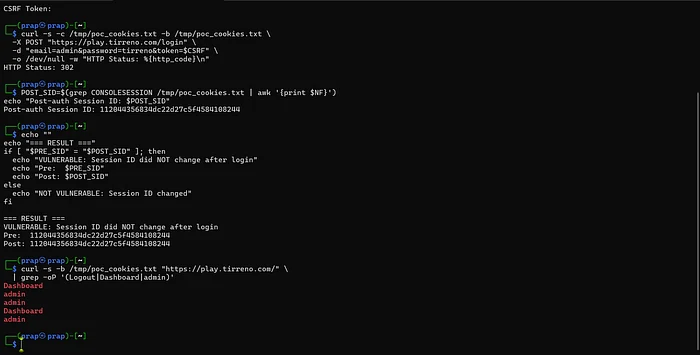
Figure 4 shows the same session identifier remaining after authentication.
The uploaded PoC specifically compares PRE_SID and POST_SID and reports the session as vulnerable when they match. The report does not include the script's source, only its output.
Root cause
The mistake is in the login controller: after credentials are validated, the authenticated state is written into the session that already existed, and the session identifier is never rotated. The application therefore treats a successful login as an upgrade of an existing unauthenticated session rather than as the creation of a new authenticated session.
Session fixation depends on the attacker being able to make a victim authenticate with a session identifier the attacker already knows. The report does not describe a specific delivery mechanism for planting the identifier; it presents the missing rotation as the defect and the known-identifier precondition as the condition under which it becomes dangerous. Nothing in the login path invalidated the old identifier or issued a new one.
Impact
If an attacker can cause a victim to authenticate using a session identifier the attacker already knows, that same identifier represents the victim's authenticated session afterwards. The security boundary that matters is the transition from an unauthenticated session to an authenticated session, and that transition should always involve session ID rotation. The author keeps the impact conditional on the attacker's ability to fix the victim's session identifier in advance.
Fix
The fix is to regenerate the session identifier after successful authentication. The report gives the example:
session_regenerate_id(true);
Passing true invalidates the previous session and creates a new identifier for the authenticated session. The recommended remediation in the original technical report was to regenerate the session ID during the login flow, and the issue was fixed in 0.10.0.
The vulnerability was responsibly disclosed to Tirreno Technologies and published through GitHub Security Advisories as GHSA-gwcm-4p9m-9mvr, and has been assigned CVE-2026-64857.
Variants to test
- Login without rotation. Authenticate with a session cookie you obtained beforehand and compare the identifier before and after. A positive result is an identical session ID on both sides of the login, as in this report.
- Privilege change without rotation. Log in as a low-privileged user, then trigger any flow that elevates the session (role change, step-up authentication, impersonation). A positive result is the same identifier carrying the higher privilege.
- Logout and reuse. Log out and then replay the old identifier. A positive result is the old session still being accepted, which points at the same lifecycle gap.
- Cookie name and framework defaults. Check whether the framework's session handler is configured to regenerate on authentication; a positive result is a session cookie whose value is unchanged across the login response.
- Pre-authentication identifier acceptance. Obtain a session identifier without logging in, then complete a login in a separate client using that identifier. A positive result is the second client ending up authenticated with the identifier the first client knows.
What happened, in plain words
Tirreno is an open-source analytics platform: software you can download and run yourself to collect and look at statistics about a website or application. Like most such tools, it has a login page, and behind that login page it keeps track of who is signed in.
That tracking is done with a session. A session is a short conversation between your browser and the server. When you first arrive, the server hands your browser a small piece of text with a random-looking value, called a session identifier (or session ID), and your browser stores it in a cookie. A cookie is a tiny labelled note that a website asks your browser to keep and to send back on every later request to that site. From then on, every time your browser talks to the server, it shows that note, and the server uses the value to look up "which conversation is this?" and what state belongs to it.
A useful everyday comparison: think of a cloakroom. You hand in your coat and get a numbered ticket. Every time you come back, you show the ticket and the attendant fetches the coat that belongs to that number. The ticket number is the session identifier, and the coat rack is the server's memory of sessions.
The problem found in Tirreno is called session fixation. Normally, when you log in successfully, the server should take away your old ticket and give you a brand new one, so that the number you were holding before you proved who you are can no longer be used. Tirreno did not do that. It kept the same session identifier before and after login. The same ticket that was handed out to an anonymous visitor was still valid once that visitor had signed in.
Why does that matter? Because if an attacker can arrange for a victim to log in while holding a ticket number the attacker already knows, then after the login the attacker still knows the number of the victim's now-authenticated session. The attacker can then use that number to act as the victim. The report presents the missing ticket swap as the defect, and the attacker's ability to plant a known ticket as the condition that makes it dangerous.
The issue is classified as CWE-384, which is the standard catalogue entry for session fixation, and the author rates it Moderate. Affected versions are those below 0.10.0, and it was fixed in 0.10.0.
The product and the piece of code involved
The finding concerns Tirreno's authentication flow, that is, the sequence of steps the application goes through when someone signs in. Specifically it is in the login controller at app/Controllers/Pages/Login.php.
A controller is the part of a web application that handles a particular kind of request. When your browser submits a login form, the request arrives at the login controller, which checks the username and password and then decides what to do next. The file path tells you it is written in PHP, a programming language commonly used for websites; files ending in .php are PHP source files.
In a normal login flow, the application checks the credentials and then issues a fresh session identifier for the authenticated state. Tirreno instead authenticated the user and stored the authenticated state in the session that already existed, without regenerating the session ID. The same identifier therefore represented both the unauthenticated session and the authenticated one.
How the testing was set up
The testing was done against Tirreno's public demonstration environment. A demonstration environment is a copy of the software that the project runs openly so that people can try it out; it is not a customer's private installation. The author states that the proof of concept used that environment and did not access or modify any unrelated user data.
A proof of concept (PoC) is a small, focused demonstration that a suspected problem is real, rather than a full attack tool.
Two tools were used:
- A browser, to inspect the session cookie before and after login. Every modern browser has a developer tools panel where you can see the cookies a site has set.
- A small Bash/cURL script to reproduce the behaviour at the protocol level. Bash is a command-line shell, a program where you type commands as text. cURL is a command-line tool for making web requests, the same kind of requests a browser makes, but from a terminal and with full control over what is sent. Working at the protocol level means talking to the server directly rather than through a browser's interface.
The report does not describe any accounts, roles or special configuration beyond the demonstration instance.
Finding it
The observation was simple to state: the application kept the same session identifier before and after a successful login. The login flow authenticated the user and wrote the authenticated state into the existing session, but the session ID itself was not regenerated.
The relevant code was essentially:
// User authentication succeeds$_SESSION['active_user_id'] = $user['id'];$_SESSION['role'] = $user['role'];// Session ID was not regenerated here
Line by line, in plain words:
// User authentication succeedsis a comment. Comments are notes for humans; the computer ignores them. This one marks the point where the username and password have been checked and accepted.$_SESSION['active_user_id'] = $user['id'];stores a value in the session.$_SESSIONis PHP's built-in way of keeping data for one visitor across requests; it is the coat rack from the cloakroom comparison. The line puts the logged-in user's ID into a slot namedactive_user_id, taking the ID from the$userrecord that was just looked up.$_SESSION['role'] = $user['role'];does the same for the user's role, for example whether they are an ordinary user or an administrator, storing it in a slot namedrole.// Session ID was not regenerated hereis the comment that names the defect. Regenerating means replacing the session identifier with a new random value. Nothing in this snippet does that.
So the two assignments record who the user is and what they are allowed to do. What is missing is any call that would replace the session identifier at that point. Because the pre-authentication session stays active, an attacker who can get a victim to authenticate using a session identifier the attacker already knows could potentially reuse that session after login.
Exploitation
Step 1: Compare the session identifier in the browser
The author first compared the session identifier before and after authentication on the demonstration environment. The idea is to write down the value, log in, and write it down again. If the two values are identical, the application never swapped the ticket.
The result showed that the identifier remained unchanged:
Pre-auth Session ID : [same value]Post-auth Session ID: [same value]Result: Session ID unchanged after login
Line by line:
Pre-auth Session ID : [same value]is the identifier observed before logging in. The report shows the value as[same value]rather than printing it.Post-auth Session ID: [same value]is the identifier observed after logging in, and it is the same one.Result: Session ID unchanged after loginis the conclusion drawn from the two lines above.
This confirmed the underlying session fixation condition. The cookie involved is named CONSOLESESSION. The cookie name is just the label the application gives its session cookie; it is what you would look for in the browser's developer tools when checking this behaviour.
Figure 1 shows the CONSOLESESSION cookie before authentication: the value the browser is holding while nobody is signed in.
Figure 2 shows the same CONSOLESESSION value still present after a successful authentication. Seeing the identical value on both sides of the login is the whole finding in one screenshot.
Step 2: Reproduce with a Bash/cURL PoC
A screenshot in a browser is good evidence, but it depends on a person clicking around. To make the result repeatable, the author reproduced the behaviour using a small Bash/cURL PoC. The script captures a session identifier before authentication and compares it with the one after. In cloakroom terms: take a ticket, then hand in a coat while holding that same ticket, and see whether the ticket number changes.
Figure 3 shows the PoC obtaining the pre-authentication session.
Figure 4 shows the same session identifier remaining after authentication.
The uploaded PoC specifically compares PRE_SID and POST_SID and reports the session as vulnerable when they match. PRE_SID is the identifier captured before login and POST_SID the one captured after; the names are just labels the script uses for the two values. The report does not include the script's source, only its output.
Root cause
The mistake is in the login controller: after credentials are validated, the authenticated state is written into the session that already existed, and the session identifier is never rotated. Rotating means replacing the identifier with a new one. The application therefore treats a successful login as an upgrade of an existing unauthenticated session rather than as the creation of a new authenticated session.
Session fixation depends on the attacker being able to make a victim authenticate with a session identifier the attacker already knows. The report does not describe a specific delivery mechanism for planting the identifier; it presents the missing rotation as the defect and the known-identifier precondition as the condition under which it becomes dangerous. Nothing in the login path invalidated the old identifier or issued a new one.
Impact
If an attacker can cause a victim to authenticate using a session identifier the attacker already knows, that same identifier represents the victim's authenticated session afterwards. The security boundary that matters is the transition from an unauthenticated session to an authenticated session, and that transition should always involve session ID rotation. The author keeps the impact conditional on the attacker's ability to fix the victim's session identifier in advance.
Fix
The fix is to regenerate the session identifier after successful authentication. The report gives the example:
session_regenerate_id(true);
Line by line:
session_regenerate_idis a PHP function whose job is exactly the missing step: it gives the current session a new identifier.(true)is the argument passed to it. Passingtruetells PHP to delete the old session data rather than keep it around under the old identifier.;ends the statement, as PHP requires.
Passing true invalidates the previous session and creates a new identifier for the authenticated session. The recommended remediation in the original technical report was to regenerate the session ID during the login flow, and the issue was fixed in 0.10.0.
The vulnerability was responsibly disclosed to Tirreno Technologies and published through GitHub Security Advisories as GHSA-gwcm-4p9m-9mvr, and has been assigned CVE-2026-64857. A GitHub Security Advisory is a public notice published on GitHub about a vulnerability in a project hosted there. A CVE is a globally recognised identifier for a publicly known vulnerability, so that people can refer to the same issue unambiguously. Responsible disclosure means telling the maintainers privately first and giving them time to fix it before publishing details.
Variants to test
These are the same checks the technical write-up lists, explained for someone starting out. Each one is a way of asking the same question: does the application hand out a new ticket at the moment the trust level changes?
- Login without rotation. Authenticate with a session cookie you obtained beforehand and compare the identifier before and after. A positive result is an identical session ID on both sides of the login, as in this report. This is the exact test described above.
- Privilege change without rotation. Log in as a low-privileged user, then trigger any flow that elevates the session (role change, step-up authentication, impersonation). A positive result is the same identifier carrying the higher privilege. In other words, the ticket stays the same even when the coat becomes a much more valuable one.
- Logout and reuse. Log out and then replay the old identifier. A positive result is the old session still being accepted, which points at the same lifecycle gap. Replaying means sending a previously captured value again as if it were current.
- Cookie name and framework defaults. Check whether the framework's session handler is configured to regenerate on authentication; a positive result is a session cookie whose value is unchanged across the login response. A framework is a reusable base that developers build an application on, and it often has a setting for this behaviour.
- Pre-authentication identifier acceptance. Obtain a session identifier without logging in, then complete a login in a separate client using that identifier. A positive result is the second client ending up authenticated with the identifier the first client knows. This is the attacker-and-victim situation from the report, reproduced with two programs instead of two people.
Glossary
- Authentication: the process of proving who you are, usually with a username and password.
- Bash: a command-line shell where you type commands as text.
- Browser developer tools: a panel built into browsers for inspecting cookies, requests and responses.
- Controller: the part of a web application that handles a particular kind of request, such as a login submission.
- Cookie: a small labelled value a website asks your browser to store and send back on later requests to that site.
- cURL: a command-line tool for making web requests.
- CVE: a globally recognised identifier for a publicly known vulnerability.
- CWE-384: the standard catalogue entry for session fixation.
- Demonstration environment: a publicly accessible copy of software that people can try out.
- Framework: a reusable base that developers build an application on, often with built-in session handling.
- GitHub Security Advisory: a public notice published on GitHub about a vulnerability in a project hosted there.
- PHP: a programming language commonly used for websites.
- Proof of concept (PoC): a small, focused demonstration that a suspected problem is real.
- Protocol level: talking to a server directly with requests, rather than through a browser's interface.
- Regenerate (session ID): replace the current session identifier with a new random value.
- Replay: send a previously captured value again as if it were current.
- Responsible disclosure: telling maintainers privately first and giving them time to fix the issue before publishing details.
- Rotate (session ID): see regenerate; the identifier changes at a defined point, such as login.
- Session: a short conversation between a browser and a server, identified by a session identifier.
- Session fixation: a flaw where the session identifier is not changed at login, so an identifier known before login still works afterwards.
- Session identifier (session ID): the random-looking value that names a session.
- Tirreno: an open-source analytics platform.
- Unauthenticated session: a session belonging to a visitor who has not signed in.



