CVE-2026–82019: How a Random Ad Led to DOM XSS While Testing ch
A third-party advertising script loaded on chess.com registered a postMessage handler that did not check the sender's origin and wrote the message data straight into a script element, so the data ran as JavaScript. An attacker-controlled page could send a crafted message and, once the affected ad had won the auction and its frame was active, run script in the publisher page context.
 Published on hussein-mahmoud7.medium.com
Bug Bounty
The full write-up lives on its author's site
It belongs to its author, so we link to it rather than copy it. The other two tabs are our own rewrites, checked against it.
Context
Chess.com is a site the researcher already used regularly, playing at a rating around 2000. The feature involved in this bug is not part of Chess.com's own code: it is an advertising script, video-bundle.js, served by the vendor TripleLift, which appeared on the page when an advertisement loaded. The script registers a postMessage handler and, when it receives certain message data, writes that data into a script element and appends it to the document.
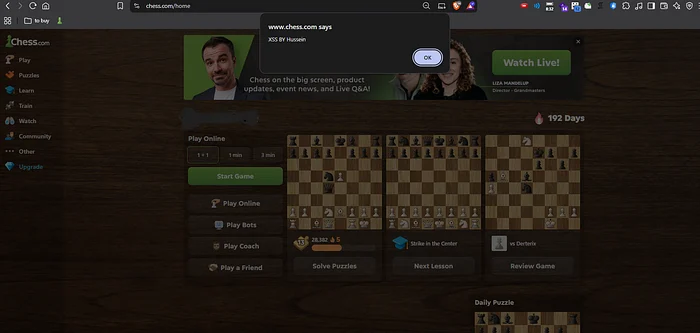
The write-up is about a DOM-based XSS in that third-party advertising script, tracked as CVE-2026-82019. The researcher had just finished studying postMessage vulnerabilities on PortSwigger Web Security Academy and wanted to practise on a real target.
Setup
No accounts, roles or special tooling are described beyond a browser, the target site, and a regex used to search JavaScript files for message handlers. The key precondition is environmental rather than technical: the vulnerable script only appears after the affected advertisement wins the ad auction. On another page load the script might never have appeared at all. The researcher also notes that using a US IP made the required advertisement appear more often during testing.
Finding it
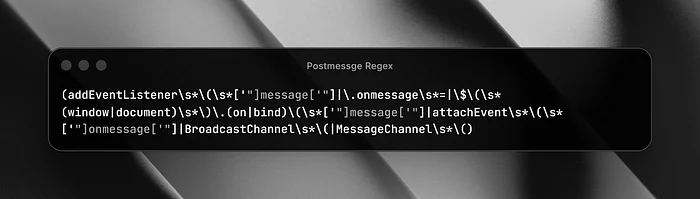
While testing Chess.com, an advertisement loaded and one script appeared: video-bundle.js, belonging to TripleLift. The researcher was not hunting the vendor; the ad simply appeared while testing postMessage. The script was searched for message handlers, and the regex used to find handlers inside JavaScript files is shown here:
One handler looked interesting, and the data flow was followed from there.
Exploitation
Step 1: locate the handler and check origin validation
Inside the vendor script, the handler looked like this:
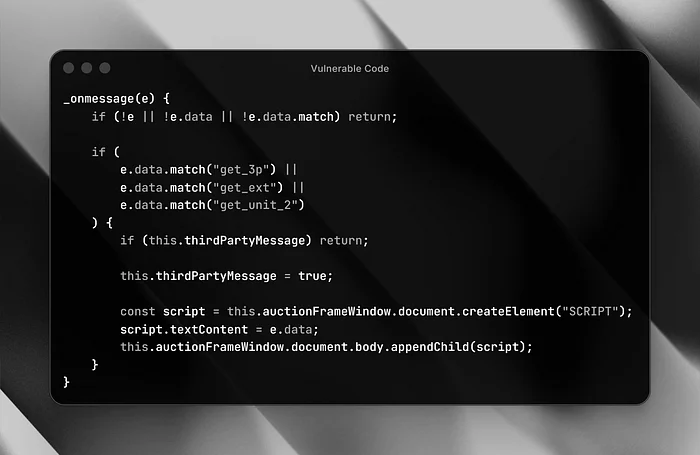
The first thing checked was event.origin. There was no validation. The handler checked what the message contained, but not where the message came from, so an attacker-controlled page could send a message to it.
Step 2: follow the data to the sink
Following e.data led to the important sink:
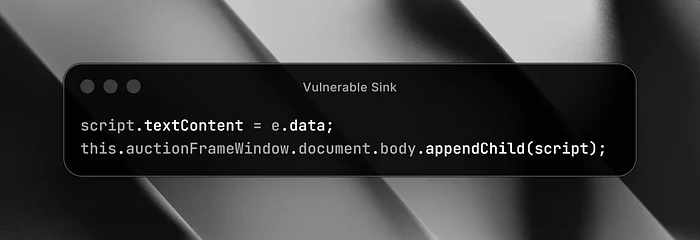
The message data was placed directly inside a script element and appended to the document. The flow was therefore:
Attacker page -> postMessage() -> No origin validation -> event.data -> script.textContent -> JavaScript execution.
The handler required one of a few expected strings, so a harmless proof of concept was enough, using the string get_ext. Finding the XSS was simple; making it reliable was harder.
Step 3: deal with the ad lifecycle
At first the PoC sometimes worked and sometimes nothing happened. The problem was not the payload but the ad lifecycle. The vulnerable environment was only available after the affected ad won the auction:
Chess.com loads -> Ad auction starts -> Affected ad wins -> Frame is created -> Message listener becomes active.
There was another important condition: only the first matching message would be processed.
Because the researcher could not know exactly when the vulnerable frame and listener were ready, instead of guessing the timing the same harmless message was sent repeatedly:
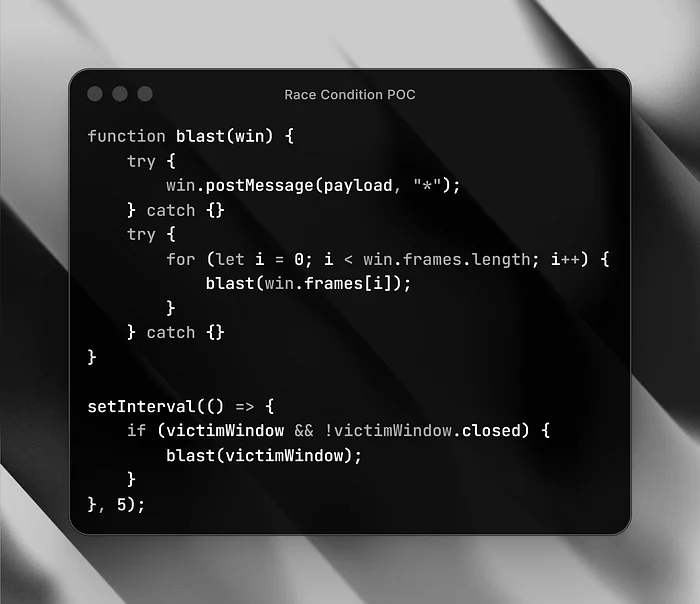
This was not a bypass for thirdPartyMessage. It simply kept the payload ready until the correct frame existed and the listener became active; once that happened, one of the messages reached the handler.
Step 4: compare publisher integrations
After confirming the issue, the same script was checked on other publisher integrations. One of the affected places observed was the Yahoo homepage. The same vulnerable script did not always have the same impact: some publishers isolated advertisements using SafeFrame or sandboxed iframes, and in those cases the JavaScript execution stays isolated. The environment observed while testing Chess.com behaved differently: the JavaScript execution could reach the publisher page context instead of staying only inside an isolated advertisement environment.
Root cause
There were two problems. The first was trusting postMessage without validating the sender; a message handler should validate the expected origin. The second, and more dangerous design, was turning trusted message data directly into executable JavaScript. The fix needed both: validate the sender and never directly execute message-controlled data.
The bug was inside a third-party advertising script, not Chess.com's own code, but the way each publisher integrated the script affected the final impact, which the researcher frames as an example of defence in depth.
Impact
An attacker-controlled page could send a message to the handler, and because the message data was written into a script element and appended to the document, that data became executable JavaScript. On the Chess.com integration the researcher observed, execution could reach the publisher page context rather than staying inside an isolated advertisement environment. On publishers that isolated ads with SafeFrame or sandboxed iframes, the execution stayed isolated. The vulnerable environment only existed once the affected ad had won the auction, and only the first matching message was processed.
The issue was classified as DOM-based Cross-Site Scripting, CWE-79, with CVSS 3.1 score 4.2 (Medium).
Fix
The report does not describe the code change that was deployed. It states the two requirements for a fix: validate the sender (the expected origin) and never directly execute message-controlled data. The fix was deployed to production on 28 April 2026.
Reporting and timeline
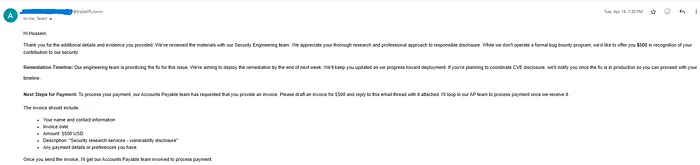
The company had no public bug bounty program, and the researcher could not find a security contact or a clear security email. He searched for the company on LinkedIn, contacted three employees, and one replied with the correct security email. The vulnerability details were sent to the security team. Although the company did not operate a bug bounty program, it appreciated the research and decided to reward the report.
| Date | Event |
|---|---|
| 14 April 2026 | $500 bounty received, the researcher's first paid bug bounty |
| 28 April 2026 | Fix deployed to production |
| 28 August 2026 | CVE-2026-82019 assigned |
Variants to test
- Search vendor bundles for message handlers. Run the handler regex over every third-party script loaded by a page, including ad, analytics and widget bundles. A positive result is a handler that reads
event.datawithout validatingevent.origin. - Follow
event.datato a sink. Trace the data toscript.textContent,innerHTML,evalor similar. A positive result is message data reaching an executable sink, with the handler accepting a fixed expected string so a harmless value such asget_extis enough to trigger it. - Repeat the message instead of guessing timing. When the vulnerable frame is created asynchronously, send the same harmless message on an interval until the listener is active. A positive result is execution appearing after a delay without any change to the payload.
- Check the integration on several publishers. Test the same script where it is embedded by different sites and note whether ads are isolated with SafeFrame or sandboxed iframes. A positive result is execution reaching the publisher page context rather than staying inside the isolated ad frame.
- Watch for auction-dependent scripts. Reload the page several times and log which vendor scripts appear; some only load when a particular ad wins the auction. A positive result is a vulnerable script that appears intermittently, which explains a PoC that works only sometimes.
Conclusion
The lesson the researcher draws is to apply a vulnerability immediately after studying it: spend a week or two on one class, learn different techniques, hunt for it on real targets, read JavaScript, build PoCs and keep testing until the idea becomes natural. In this case a random advertisement was enough to turn that practice into a first bounty and a CVE.
What happened, in plain words
A security researcher who plays chess online was practising a common web attack technique on a real website. While he was testing, an advertisement loaded on the page, and with it came a script written by an advertising company. That script had a flaw: it accepted instructions from any web page that sent them, without checking who had sent them, and then turned those instructions into running code. Because the advertisement only appeared when it won an advertising auction, the flaw was only reachable some of the time, which made the proof of concept unreliable at first. The researcher reported it to the advertising company, which had no public bug bounty programme, received a $500 reward, and the issue later got an official identifier, CVE-2026-82019.
The screenshot above is the proof of concept from the write-up.
Before going further, a few words that will come up constantly:
- JavaScript is the programming language that runs inside your browser. It is what makes pages interactive: buttons react, menus open, content loads without a full page refresh.
- A script is a file of JavaScript that a page loads. Pages often load scripts from other companies, for example advertising, analytics or chat widgets.
- A vulnerability is a weakness in software that someone else can use to make it do something its authors did not intend.
- XSS (Cross-Site Scripting) is a vulnerability where an attacker manages to get their own JavaScript to run inside someone else's page, in the browser of a visitor. Think of it like someone slipping a fake page into a printed newspaper: readers think they are reading the paper, but part of what they see was written by a stranger.
- DOM-based XSS is a specific kind. The DOM (Document Object Model) is the browser's in-memory model of the page: every element, every attribute, every piece of text. In DOM-based XSS the malicious data never needs to travel to the server at all; the page's own JavaScript takes it and writes it into the DOM in a dangerous way.
- postMessage is a browser feature that lets one page (or one frame inside a page) send a message to another page or frame. It is the browser's built-in way for separate pieces of a page to talk to each other. The catch is that the receiving side has to check who sent the message, because otherwise any page can send one.
- An origin is the combination of protocol, host and port that identifies where a page came from, for example
https://example.com. Browsers use origins as a security boundary: pages from different origins are not supposed to be able to interfere with each other. - A frame (iframe) is a page embedded inside another page, like a small window within a window. Advertisements are very often shown inside frames.
- A sink is the place in code where data finally gets used in a way that matters. If the sink executes code, then data reaching it is dangerous.
The setting
Chess.com is a site the researcher already used regularly, playing at a rating around 2000. The feature involved in this bug is not part of Chess.com's own code: it is an advertising script, video-bundle.js, served by the vendor TripleLift, which appeared on the page when an advertisement loaded. The script registers a postMessage handler and, when it receives certain message data, writes that data into a script element and appends it to the document.
A vendor here means a third-party company whose code a site embeds. The site does not write that code and often does not control it; it just includes it, the way a shop might put a supplier's display stand in its window.
The write-up is about a DOM-based XSS in that third-party advertising script, tracked as CVE-2026-82019. A CVE is a public catalogue number for a known security flaw, so that people across the industry can refer to the same issue unambiguously. The researcher had just finished studying postMessage vulnerabilities on PortSwigger Web Security Academy, a well-known free learning site with labs, and wanted to practise on a real target.
Setup
No accounts, roles or special tooling are described beyond a browser, the target site, and a regex used to search JavaScript files for message handlers. A regex (regular expression) is a short pattern for finding text that matches a rule, like a search that says "find anything shaped like this" rather than "find this exact word".
The key precondition is environmental rather than technical: the vulnerable script only appears after the affected advertisement wins the ad auction. An ad auction is the automated, split-second bidding process that decides which advertisement a visitor sees; several advertisers compete, and the winner's creative and code get loaded. On another page load the script might never have appeared at all. The researcher also notes that using a US IP made the required advertisement appear more often during testing. An IP address is the numeric label that identifies a connection on the internet; sites and ad systems often use the rough geographic location attached to it to decide what to show.
Finding it
While testing Chess.com, an advertisement loaded and one script appeared: video-bundle.js, belonging to TripleLift. The researcher was not hunting the vendor; the ad simply appeared while testing postMessage. The script was searched for message handlers, and the regex used to find handlers inside JavaScript files is shown here:
A message handler is the piece of code that runs when a message arrives. It is like a receptionist: postMessage is the person walking in, and the handler is whoever is sitting at the desk deciding what to do with what they are told. Searching for handlers is a way of narrowing thousands of lines of unfamiliar vendor code down to the few places where outside input is received, because those are the places where trust decisions get made, and trust decisions are where bugs live.
One handler looked interesting, and the data flow was followed from there. Following the data means tracing a value from where it enters the program to where it is finally used, step by step, the way you would follow a parcel from the front door to the room it ends up in.
Exploitation
Step 1: locate the handler and check origin validation
Inside the vendor script, the handler looked like this:
The first thing checked was event.origin. There was no validation. The handler checked what the message contained, but not where the message came from, so an attacker-controlled page could send a message to it.
This is the heart of the bug, so it is worth slowing down. When a message arrives, the browser hands the receiving code an event object, a bundle describing what happened. event.origin is the field that says which site sent the message. Checking it is the equivalent of a receptionist asking for ID before acting on a request. Here, nobody asked. The code looked only at the content of the message, which is like accepting a delivery because the box is the right shape, without caring who is holding it.
An attacker-controlled page is simply any website the attacker can put content on, which in practice means any website at all. If the handler accepts messages from anywhere, then a visitor who has the vulnerable page open in one tab and the attacker's page open in another can have a message sent from the attacker's page into the vulnerable one.
Step 2: follow the data to the sink
Following e.data led to the important sink:
e.data is the actual content of the message, the payload inside the envelope. The message data was placed directly inside a script element and appended to the document. The flow was therefore:
Attacker page -> postMessage() -> No origin validation -> event.data -> script.textContent -> JavaScript execution.
Read that chain left to right as a story:
- The attacker's page calls
postMessage(), the browser function for sending a message. - The vulnerable handler receives it and does not check the origin, so it accepts it.
- The handler takes
event.data, the message content. - It assigns that content to
script.textContent, meaning it creates a script element and puts the text inside it. - It appends that element to the document, at which point the browser runs the text as JavaScript.
textContent is the property that holds the text inside an element. Putting text into a script element and adding it to the page is one of the most direct ways to turn a string into running code, because the browser's job is to execute whatever is inside a script element. This is why the sink matters: the same string would be harmless if it were displayed as text on the page, and dangerous here.
The handler required one of a few expected strings, so a harmless proof of concept was enough, using the string get_ext. A proof of concept (PoC) is a minimal demonstration that a vulnerability is real, kept as harmless as possible so that nobody is harmed while proving the point. Because the handler only reacted to certain known strings, the researcher did not need to send anything destructive; sending the expected word was enough to reach the vulnerable code path. Finding the XSS was simple; making it reliable was harder.
Step 3: deal with the ad lifecycle
At first the PoC sometimes worked and sometimes nothing happened. The problem was not the payload but the ad lifecycle. The vulnerable environment was only available after the affected ad won the auction:
Chess.com loads -> Ad auction starts -> Affected ad wins -> Frame is created -> Message listener becomes active.
A listener is the code that is waiting for messages; it only exists once the frame has been created and the script inside it has run. Until then, messages sent into the void are simply lost, like shouting at a room before anyone has walked into it.
There was another important condition: only the first matching message would be processed. That means only the first matching message is processed. This detail matters because it changes the strategy: you cannot simply send a message early and hope it is still relevant later.
Because the researcher could not know exactly when the vulnerable frame and listener were ready, instead of guessing the timing the same harmless message was sent repeatedly:
This is a race condition in the practical sense: two things happen on independent schedules, and the outcome depends on which happens first. The everyday comparison is trying to unlock a door while someone is still walking towards it; you do not know the exact moment, so you try the handle repeatedly until it turns. Sending the same message on a loop means that whenever the listener does become active, a message is already arriving.
This was not a bypass for thirdPartyMessage. A bypass would mean defeating a protection that was actually working. Here nothing was being defeated; the protection simply was not there. The repetition simply kept the payload ready until the correct frame existed and the listener became active; once that happened, one of the messages reached the handler.
Step 4: compare publisher integrations
After confirming the issue, the same script was checked on other publisher integrations. A publisher is a website that displays advertisements supplied through an ad platform; the same vendor script can be embedded by many different publishers, each in its own way. One of the affected places observed was the Yahoo homepage.
The same vulnerable script did not always have the same impact. Impact means how much damage a bug can actually do in a given setup. Some publishers isolated advertisements using SafeFrame or sandboxed iframes, and in those cases the JavaScript execution stays isolated. A sandboxed iframe is a frame the browser deliberately restricts, so code inside it cannot reach the surrounding page; SafeFrame is an advertising industry mechanism with a similar goal of keeping ad code contained. Think of it as the difference between a shop assistant who can walk anywhere in the building and one who is kept behind a counter.
The environment observed while testing Chess.com behaved differently: the JavaScript execution could reach the publisher page context instead of staying only inside an isolated advertisement environment. Page context means the code runs as if it belonged to the main site, with access to what the main site can see. That is the difference between a stranger getting into the lobby and a stranger getting keys to the offices.
Root cause
There were two problems. The first was trusting postMessage without validating the sender; a message handler should validate the expected origin. The second, and more dangerous design, was turning trusted message data directly into executable JavaScript. The fix needed both: validate the sender and never directly execute message-controlled data.
It is worth being clear about why both matter. Checking the origin is like checking ID at the door: good, but if the person at the desk then hands whatever arrives straight to the machine that runs code, one mistake at the door is enough. Not executing message data is the second lock: even if something gets through, it is treated as data, not as instructions. Defence in depth is the general principle of having more than one layer of protection, so that a single failure does not become a full compromise.
The bug was inside a third-party advertising script, not Chess.com's own code, but the way each publisher integrated the script affected the final impact, which the researcher frames as an example of defence in depth.
Impact
An attacker-controlled page could send a message to the handler, and because the message data was written into a script element and appended to the document, that data became executable JavaScript. On the Chess.com integration the researcher observed, execution could reach the publisher page context rather than staying inside an isolated advertisement environment. On publishers that isolated ads with SafeFrame or sandboxed iframes, the execution stayed isolated. The vulnerable environment only existed once the affected ad had won the auction, and only the first matching message was processed.
The issue was classified as DOM-based Cross-Site Scripting, CWE-79, with CVSS 3.1 score 4.2 (Medium). CWE-79 is the entry in a public catalogue of weakness types that corresponds to Cross-Site Scripting. CVSS is a standard scoring system for severity, from 0 to 10, where a higher number means more serious; 4.2 is in the Medium band. The report gives the score without explaining how it was derived.
Fix
The report does not describe the code change that was deployed. It states the two requirements for a fix: validate the sender (the expected origin) and never directly execute message-controlled data. The fix was deployed to production on 28 April 2026. Production means the live systems that real visitors use, as opposed to a test environment.
Reporting and timeline
The company had no public bug bounty program, and the researcher could not find a security contact or a clear security email. A bug bounty programme is a scheme where a company invites outsiders to report security problems and pays for valid ones. Without one, there is no obvious front door, so the researcher had to find a person. He searched for the company on LinkedIn, contacted three employees, and one replied with the correct security email. The vulnerability details were sent to the security team. Although the company did not operate a bug bounty program, it appreciated the research and decided to reward the report.
| Date | Event |
|---|---|
| 14 April 2026 | $500 bounty received, the researcher's first paid bug bounty |
| 28 April 2026 | Fix deployed to production |
| 28 August 2026 | CVE-2026-82019 assigned |
The screenshot above is captioned 'Bounty' in the write-up.
Variants to test
If you want to practise the same thinking, these are the checks the researcher describes, written as steps you can repeat. Each one names what a positive result looks like, so you know when you have found something rather than just looked at something.
- Search vendor bundles for message handlers. Run the handler regex over every third-party script loaded by a page, including ad, analytics and widget bundles. A positive result is a handler that reads
event.datawithout any check onevent.origin. - Follow
event.datato a sink. Trace the data toscript.textContent,innerHTML,evalor similar. A positive result is message data reaching an executable sink, with the handler accepting a fixed expected string so a harmless value such asget_extis enough to trigger it. - Repeat the message instead of guessing timing. When the vulnerable frame is created asynchronously, send the same harmless message on an interval until the listener is active. Asynchronously means not at a fixed, predictable moment: the frame appears when the ad system gets round to creating it. A positive result is execution appearing after a delay without any change to the payload.
- Check the integration on several publishers. Test the same script where it is embedded by different sites and note whether ads are isolated with SafeFrame or sandboxed iframes. A positive result is execution reaching the publisher page context rather than staying inside the isolated ad frame.
- Watch for auction-dependent scripts. Reload the page several times and log which vendor scripts appear; some only load when a particular ad wins the auction. A positive result is a vulnerable script that appears intermittently, which explains a PoC that works only sometimes.
Conclusion
The lesson the researcher draws is to apply a vulnerability immediately after studying it: spend a week or two on one class, learn different techniques, hunt for it on real targets, read JavaScript, build PoCs and keep testing until the idea becomes natural. In this case a random advertisement was enough to turn that practice into a first bounty and a CVE.
Glossary
- Ad auction: the automated, split-second bidding process that decides which advertisement a visitor sees and therefore which ad code loads.
- Asynchronous: happening at an unpredictable moment rather than immediately, so code has to wait or retry.
- Attacker-controlled page: any web page the attacker can put content on, used to send messages or host payloads.
- Bug bounty programme: a scheme where a company invites outsiders to report security flaws and pays for valid reports.
- Bypass: defeating a protection that is actually in place.
- CVE: a public catalogue identifier for a known security vulnerability.
- CVSS: a standard 0 to 10 severity score for vulnerabilities, with bands such as Medium.
- CWE-79: the catalogue entry for Cross-Site Scripting.
- Defence in depth: using several independent layers of protection so one failure does not mean full compromise.
- DOM (Document Object Model): the browser's in-memory model of a page, made of elements, attributes and text.
- DOM-based XSS: XSS where the page's own JavaScript writes attacker data into the DOM in a dangerous way, without the data going to the server.
- Event object: the bundle of information the browser passes to code when something happens, such as a message arriving.
- Frame (iframe): a page embedded inside another page.
- Handler (message handler): the code that runs when a message arrives and decides what to do with it.
- Impact: how much harm a vulnerability can actually cause in a given setup.
- IP address: the numeric label identifying a connection on the internet, often used to infer rough location.
- JavaScript: the programming language that runs in the browser and makes pages interactive.
- Listener: code that waits for incoming messages or events; it only exists once it has been set up.
- Origin: the protocol, host and port that identify where a page came from, used by browsers as a security boundary.
- Page context: running as part of the main site, with access to what the main site can access.
- postMessage: the browser feature that lets pages and frames send messages to each other.
- Production: the live systems that real users use.
- Proof of concept (PoC): a minimal, ideally harmless demonstration that a vulnerability is real.
- Publisher: a website that displays advertisements supplied through an ad platform.
- Regex (regular expression): a pattern for finding text that matches a rule.
- SafeFrame: an advertising industry mechanism for containing ad code so it cannot reach the surrounding page.
- Sandboxed iframe: a frame the browser restricts so code inside it cannot reach the surrounding page.
- Script: a file of JavaScript that a page loads, sometimes from another company.
- Sink: the place in code where data is finally used, especially where it can become executable.
- textContent: the property holding the text inside an element; putting text into a script element and adding it to the page makes the browser run it.
- Vendor: a third-party company whose code a site embeds.
- Vulnerability: a weakness that someone else can use to make software behave in unintended ways.
- XSS (Cross-Site Scripting): getting attacker JavaScript to run inside someone else's page in a visitor's browser.



