Detecting and exploiting mass-assignments in order to manipulate user columns and read private messages
The application automatically bound request parameters to database columns, allowing an attacker to set arbitrary columns such as user IDs and conversation IDs. This enabled reading private messages from other users and could cause a denial of service by manipulating auto-increment IDs.

Mass assignments are often overlooked yet extremely critical vulnerabilities, depending on the context. I've been asked about details on how I found certain vulnerabilities a couple of times now and I've never really seen this on the HackerOne Hacktivity or security blogs.
The full write-up lives on its author's site
It belongs to its author, so we link to it rather than copy it. The other two tabs are our own rewrites, checked against it.
Context
Mass assignment is a class of vulnerability in which an application automatically binds HTTP request parameters into program code variables or objects, as OWASP puts it. It is convenient for developers working with a framework and an ORM, and it is easy to overlook. This write-up walks through the concept, how to detect it, and two concrete impacts: a denial of service through an auto-increment identifier column, and a case study from a bug bounty program where a manipulated user column and a hidden conversation identifier allowed reading private messages.
The case study began with a signup page in a bug bounty program. The report does not name the program or the application. The researcher is Paul (@padannewitz), the weakness is mass assignment, and the disclosed bounty was 5000.00 USD.
Setup
The tooling used is Burp Suite (the Community Edition, which limits the Intruder after a short time) and, as an alternative, the fuzzer wfuzz. The report notes that automated tools must be allowed by the program and that automated column setting can cause damage.
For the case study the researcher used two test accounts of their own, so that a message could be sent from one to the other and the result inspected in the Sent folder. No versions of the application stack are given.
Finding it
The starting point is the bracket syntax in form input names. In the Eloquent ORM used by the Laravel PHP Framework, models have a static create method that takes an array of data as its first parameter. The keys of the array are the database columns and the values are the data to be saved in them.
A registration form with these fields:
<form method="POST" action="https://evilcorp.com/register">
    <input type="hidden" name="csrf" value="[redacted]==">
    <input type="text" name="user[name]" value="Paul">
    <input type="email" name="user[email]" value="[redacted]">
</form>
produces a user key in the request data (in PHP, $_POST['user']):
[
    'name' => 'Paul',
    'email' => '[redacted]',
]
Passing that array to User::create($_POST['user']) persists it. With a table of id, name, email, is_admin, where id is AUTO INCREMENT and is_admin defaults to false / 0, the row becomes:
id, name, email, is_admin
1, Paul, [redacted], 0
Without validation or filtering of the input data (columns and values), an attacker can set any column to any value. Adding one input is enough:
<input type="text" name="user[is_admin]" value="1">
and the fresh database now holds:
id, name, email, is_admin
1, Paul, [redacted], 1
Detection itself can be simple, but may require interpreting the application response to different requests with various values. Interesting aspects of a response are its status code (500, for example), its headers (such as a redirect to an error page) and its content (such as error messages).
The simplest indicator is the bracket syntax for input parameter names. Sending an additional input with a column name that does not exist, such as <input name="user[thisdoesnotexist]" type="text">, with any value, will very likely make an application with mass assignment and no column whitelist respond with an error, most commonly status code 500. The database causes it because the passed column does not exist and the INSERT query fails. Indicators are not definitive confirmation: an internal server error could also come from a MassAssignmentException thrown by Laravel, for example.
A second approach, also important for exploitation, is gathering information about the database structure of the model. Look at the source of generated pages for a partly or fully dumped current user. There may be API requests returning the current user, either on user creation or as a GET request retrieving the logged-in user. In applications with frontend frameworks like VueJS, the whole user with all attributes could be passed as an object to the Vue component, which can be found in the source code as well. With knowledge of columns that might be manipulable, try passing them in the request and verify the change where the column was found.
Exploitation
Step 1: Brute-forcing column names with Burp Intruder
To gather response data and behaviour quickly, intercept the request, right click it and choose Send to Intruder. Add an additional input like user[column], which you could set to 1. Highlight column and click Add § at the right side of the Burp interface to add an intrusion point, where the program will add the entries in the wordlist one by one afterwards.
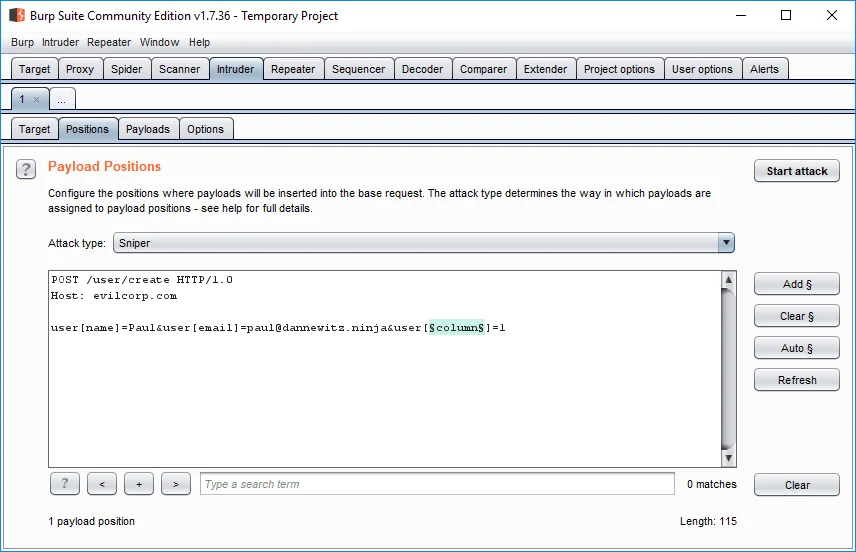
sqlmap ships a common-columns.txt wordlist. Go to the Payloads tab in the Intruder module and load the wordlist under Payload Options. With these basic settings you can start the attack and order the responses by status code, length and more.
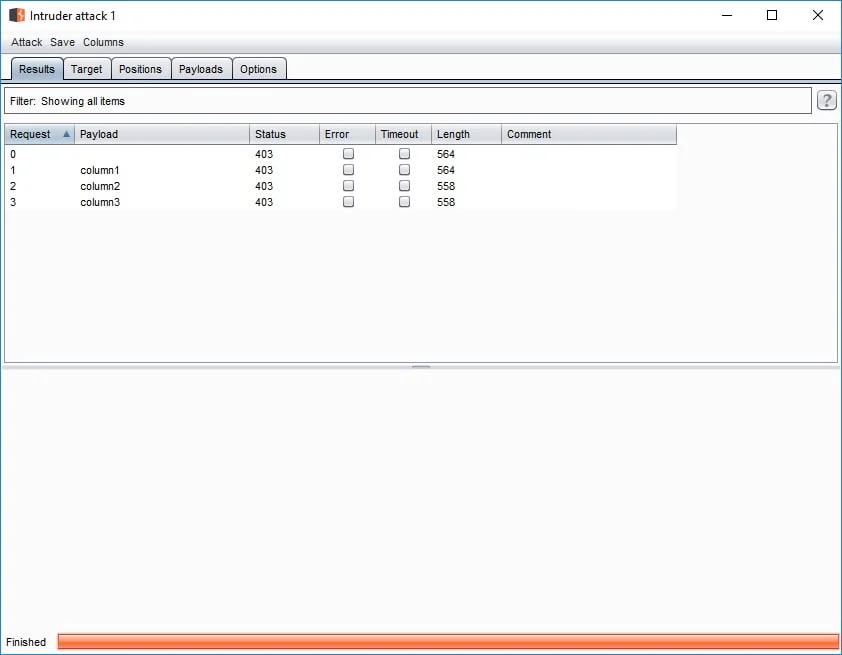
Burp will try to set all the columns in the wordlist to 1; other values can be chosen. Besides causing damage, this might not just escalate privileges to an admin account through columns like is_admin, but also get you banned if setting columns to 1/0.
As an alternative, fuzzers like wfuzz can be used. wfuzz does not log the actual response content, so filters that blacklist or whitelist specific response codes and amounts of lines, words or characters help distinguish the typical responses from anomalies.
Step 2: Denial of service through the auto-increment column
With an auto incremental identifier column, a DoS can be triggered. Take a user table with a column id of type auto incremental UNSIGNED INT(10). The highest possible id is 4294967295. When inserting a user, the application normally does not choose the id, so the database looks at the current auto increment index. Passing the id to the database makes the auto increment functionality use the inserted id as its new starting point. Sending an additional input user[id] with the value 4294967295 causes all future inserts into the user table to fail.
When a row is inserted with the highest possible number, the auto increment index is stuck at that number because it reached the column limit. The database then tries to insert the next row with the same id, and since primary keys uniquely identify a row, the query fails with Duplicate entry '4294967295' for key 'PRIMARY'. The report links a database fiddle to test this.
Step 3: Probing the signup form of the case study
Going through the source code of a signup page in a bug bounty program, the researcher noticed form input names that indicated mass assignments. Requests including these columns, each with a value of 1, were sent:
is_admin
is_administrator
isAdmin
isAdministrator
admin
administrator
The application responded with status code 500 directly. The researcher then tried the most popular column name, id, with different values.
Sending the column id with a value of 1, a user that probably already exists if not deleted, produced a redirect to an error page. Because the earlier error was a direct 500 and not a redirect, the researcher was sure the column does exist. The redirect was most likely caused by the value, which caused duplicate entries for the primary key column id. Altering the id value to something similar to 133333337 returned status code 200 and the user was created.
The user id was not reflected in the source code, so without a reflection of the manipulated column the success was very certain but not absolutely sure. However, the id of the profile belonging to the user was found. Upon registration there is an array for the user and one for the profile, so an additional column id was sent for the profile array as well. At the places in the source code where the profile id is reflected, the id passed in the creation request appeared. The mass assignment was confirmed at this point. If there is no blacklist for columns, and id was missing from it, this was certainly a critical flaw; at minimum a denial of service can be triggered.
The security team was contacted before reporting. The scenario and the current theory were explained and information on the database structure was requested. The team was very responsive and gave an insight into the column names.
Step 4: Reading private messages through a hidden conversation identifier
While waiting, the rest of the application was browsed for another occurrence, to demonstrate a more critical and straightforward scenario: the program is managed, and getting past triaging with something that is not a single one-liner command or request is very hard.
The form for sending a message was investigated. This time there was a hidden input already, which was not set by default; the vulnerability sits somewhere between an insecure direct object reference and a mass assignment. The input name was similar to mail[conversation_id]. Setting the value to a random number and sending the message to the other test account worked fine. Opening the message in the Sent folder of the inbox showed a third-party message below the test message that was sent. It did not belong to the two test accounts in the conversation. The researcher suspected that conversation_id is meant to be set to the message being answered in a reply.
Testing stopped right away at this point, everything was documented and the report was filed. Even with the id column manipulation combined with the analysis of the application responses and the demonstration of reading other people's messages, the report was flagged with Needs more info by the platform team. The researcher was still in contact with the company's team, which confirmed the vulnerability on its own and took over the report.
Step 5: What happened afterwards
After the report was resolved, the researcher received additional insight into what happened after the tests. The id was purposely chosen not too high so the database would not reach the column integer value limit any time soon, since that results in a DoS. The database was in fact fine. What triggered a DoS nonetheless was a maximum number limitation in their runtime engine at 2^32. This underlines that tests should be run carefully and that possible problems the system might run into when processing the sent data should be considered.
Root cause
The mistake is binding request data directly into model attributes without validating or filtering the columns and values. In the Eloquent example, User::create($_POST['user']) takes every key of the array as a database column, so an attacker controls which columns are written. The report notes that if there is no blacklist for columns, and id was missing from it, this was certainly a critical flaw. The message form is a related case: a hidden mail[conversation_id] input that is not set by default is trusted when the message is created, so a client-supplied conversation identifier is bound to the stored message.
Impact
Depending on the application's context, the specific form and the object being modified, the impact can range from a simple denial of service to reading sensitive private messages, privilege escalation and account takeovers. In the case study, the confirmed effect was the ability to set the id of the created profile, and a message placed into a conversation showed a third-party message in the Sent folder. The DoS variant requires an auto-increment identifier column and a value at the column's limit; in the case study the actual DoS came from a 2^32 limitation in the runtime engine rather than from the database.
Fix
The report does not describe the fix that was applied. What it points to is validation or filtering of the input data, that is, columns and values, before it is bound to the model: a whitelist of assignable columns, and a blacklist that includes id where appropriate. For the message form, the conversation identifier should not be taken from a client-controlled hidden input without authorisation checks.
Variants to test
- Send an additional bracket-syntax input with a non-existent column name, for example
user[thisdoesnotexist], and look for a 500 or a database error. A positive result is an error that mentions the missing column or a failed INSERT. - Send known sensitive column names with a value of
1, such asis_admin,is_administrator,isAdmin,isAdministrator,adminandadministrator, and check for a change of privileges. A positive result is a successful privilege change, or a response that differs from the 500 seen for non-existent columns. - Send
idwith an existing value and with a fresh value. A redirect to an error page for the existing value and a 200 for the fresh one suggests the column is writable. A positive result is the chosen id appearing where the object is reflected. - Send an
idat the column's maximum, for example4294967295for anUNSIGNED INT(10), and watch forDuplicate entryerrors on later inserts. A positive result is failing inserts after the request. - Look for hidden inputs that are not set by default, such as
mail[conversation_id], set them to a random number and check whether content from another conversation appears. A positive result is a message from a third party showing up in the sent folder. - Use Burp Intruder with the sqlmap
common-columns.txtwordlist against a bracket-syntax parameter, ordering responses by status code and length. A positive result is an anomaly in status code or length for a specific column name. - Use wfuzz with filters on response codes and line, word or character counts to separate typical responses from anomalies. A positive result is a response that passes the filters and differs from the baseline.
What happened, in plain words
A security researcher was looking at a website that runs a bug bounty programme. A bug bounty programme is an arrangement where a company pays people for finding and reporting security problems in its systems, instead of punishing them. The researcher found a bug of a class called mass assignment, which lets someone sneak extra fields into a form and have the website save them as if they were legitimate data. Using that, they could change values in the database that they were never supposed to control, and in one case they could read a private message that belonged to someone else.
The researcher is Paul (@padannewitz). The weakness is mass assignment. The disclosed bounty was 5000.00 USD. The report does not name the programme or the application.
This article explains the idea from scratch, then walks through how the researcher detected the bug, how they proved it, and the two concrete consequences: a denial of service (making a system stop working for everyone) and reading private messages.
The idea behind mass assignment
Most websites have forms: a signup page, a profile page, a message box. When you press a button, your browser sends the contents of the form to the server. The server is the computer that runs the website; your browser is the client. The data travels as a list of name and value pairs, called HTTP request parameters. A parameter is simply one labelled piece of data, for example the name user[name] with the value Paul.
Many web applications are built with a framework, which is a ready-made set of code that handles common jobs, and an ORM, which stands for object-relational mapper. An ORM is a layer that lets a programmer treat a database row as if it were an ordinary object in their code, so they do not have to write database queries by hand. A database is an organised collection of tables; each table has columns (the kinds of information stored, such as name or email) and rows (the individual records).
Mass assignment is a vulnerability in which an application automatically binds HTTP request parameters into program code variables or objects, as OWASP puts it. OWASP is a well-known non-profit that publishes guidance on web security. In plain words: the application takes whatever fields arrive in the request and copies them straight into the object it is about to save, without checking which fields are allowed. It is like a hotel receptionist who accepts any key you hand over and adds it to your keyring, including the master key, because nobody told them to check the label.
This automatic copying is very convenient for developers, which is exactly why the bug is easy to overlook.
How the bug looks in code
The report uses Eloquent, the ORM that comes with the Laravel PHP Framework. Laravel is a popular toolkit for building websites in the PHP programming language. In Eloquent, each kind of object has a model, which is the code representation of a database table. Models have a static create method. A method is a named action in code; static means you call it on the model itself rather than on one particular record. create takes an array of data as its first parameter. An array is an ordered list of key and value pairs. The keys are the database columns and the values are the data to be saved in each column.
Imagine a users table with four columns: id, name, email and is_admin. The id column is AUTO INCREMENT, meaning the database picks the next number automatically each time a row is added. The is_admin column defaults to false / 0, meaning a new user is not an administrator unless something changes it.
A registration form might look like this:
<form method="POST" action="https://evilcorp.com/register">
    <input type="hidden" name="csrf" value="[redacted]==">
    <input type="text" name="user[name]" value="Paul">
    <input type="email" name="user[email]" value="[redacted]">
</form>
Line by line:
<form method="POST" action="https://evilcorp.com/register">opens the form.method="POST"means the browser sends the data in the body of the request rather than in the address bar.actionis the address the data is sent to.- The first
<input>istype="hidden", so the visitor does not see it. Its name iscsrfand its value is a long string. CSRF stands for cross-site request forgery, an attack where another site tricks your browser into submitting a form you did not intend to submit; the hidden value is a token, a one-time secret the server checks to make sure the request really came from its own page. Treat that value as a secret and never reuse it. - The second
<input>is a text box nameduser[name], pre-filled withPaul. - The third is an email box named
user[email], pre-filled with an address. </form>closes the form.
The square brackets in user[name] are the important part. They tell the server to group these fields under one key called user, with name and email inside it. After the form is submitted, the backend can access a key user in the request data. In PHP, the language Laravel is written in, that looks like $_POST['user']:
[
    'name' => 'Paul',
    'email' => '[redacted]',
]
This is an array with two entries. 'name' => 'Paul' means the key name holds the value Paul; 'email' => '[redacted]' means the key email holds that address. The arrow => is how PHP writes a key and its value.
With an ORM, we can pass this array to a method like create on the model and the library does the rest: User::create($_POST['user']). The :: means we are calling the method on the model class itself. The database now holds:
id, name, email, is_admin
1, Paul, [redacted], 0
The first line lists the columns. The second line is the single row that was created: the database chose id 1, stored the name and email, and set is_admin to 0 because that is the default.
Arranging and saving data this way is called a mass assignment. Without validation or filtering of the input data, meaning without checking which columns and values are allowed, an attacker can set any column to any value. Adding one input is enough:
<input type="text" name="user[is_admin]" value="1">
This is a single text box named user[is_admin] with the value 1. Because the name uses the same user[...] bracket pattern, the server adds is_admin to the same array it is about to save. The array now has a third entry, and the fresh database looks like this after the creation process:
id, name, email, is_admin
1, Paul, [redacted], 1
The only difference from before is the last value: is_admin is now 1, so the ordinary user has become an administrator. The attacker never had permission to set that column; they simply asked for it and the application obliged.
How to detect it
Detection can be simple, but it may require reading the application's response to different requests with various values and interpreting what comes back. The response is what the server sends to your browser: a status code (a three-digit number saying roughly what happened), headers (extra information such as redirects) and content (the page body, which may include error messages).
A status code of 500 means internal server error: the server hit a problem it did not handle. A redirect is a response that tells the browser to go to a different address instead.
The simplest indicator is the bracket syntax for input parameter names, the user[...] pattern described above. If you send an additional input with a column name that does not exist, such as <input name="user[thisdoesnotexist]" type="text">, with any value, an application with mass assignment and no column whitelist will very likely respond with an error, most commonly status code 500. A whitelist is a list of things that are allowed; here it would be a list of columns the application agrees to accept. The database causes the error because the passed column does not exist, so the INSERT query, the instruction that adds a row, fails.
Indicators are not definitive confirmation. An internal server error could also come from a MassAssignmentException thrown by Laravel, for example. That is an error Laravel raises when it is configured to reject fields it does not recognise, which would mean the protection is actually working.
A second approach, also important for exploitation, is gathering information about the database structure of the model. Look at the source of generated pages, meaning the HTML your browser receives, for a partly or fully dumped current user. There may be API requests returning the current user. An API is an interface through which one piece of software talks to another; here it means the website's own pages quietly asking the server for data. This could happen on user creation, or as a GET request retrieving the logged-in user. GET is the request type used when your browser simply asks for a page or a piece of data, as opposed to POST, which sends data to be saved. In applications with frontend frameworks like VueJS, which run part of the page logic inside your browser, the whole user with all attributes could be passed as an object to the Vue component, and that can be found in the source code as well. With knowledge of columns that might be manipulable, try passing them in the request and verify the change where the column was found.
Exploitation
Step 1: Brute-forcing column names with Burp Intruder
Brute-forcing means trying many possibilities automatically until one works. Burp Suite is a tool that sits between your browser and the website so you can inspect and change requests. Its Intruder module repeats a request many times, substituting different values each time.
To gather response data and behaviour quickly, intercept the request, right click it and choose Send to Intruder. Intercepting means catching the request before it reaches the server so you can edit it. Add an additional input like user[column], which you could set to 1. Highlight column and click Add § at the right side of the Burp interface to add an intrusion point, where the program will add the entries in the wordlist one by one afterwards. A wordlist is a plain text file with one candidate value per line.
The screenshot shows the Burp Intruder screen with the highlighted position in the request where the wordlist entries will be inserted.
sqlmap is a separate tool for testing databases, and it ships a common-columns.txt wordlist, a list of column names that are common in real applications. Go to the Payloads tab in the Intruder module and load the wordlist under Payload Options. With these basic settings you can start the attack and order the responses by status code, length and more.
The second screenshot shows the Intruder results table, where responses can be sorted by status code and length so that unusual ones stand out.
Burp will try to set all the columns in the wordlist to 1; other values can be chosen. Besides causing damage, this might not just escalate privileges to an admin account through columns like is_admin, but also get you banned if setting columns to 1/0. Escalating privileges means gaining more rights than you should have. Getting banned means the programme may block you for careless testing.
As an alternative, fuzzers like wfuzz can be used. A fuzzer is a program that sends many variations of a request automatically. wfuzz does not log the actual response content, so filters that blacklist or whitelist specific response codes and amounts of lines, words or characters help distinguish the typical responses from anomalies. A filter here is a rule that hides responses you do not care about, so the odd ones remain visible.
Step 2: Denial of service through the auto-increment column
A denial of service, or DoS, is an attack that makes a system unusable for legitimate users. With an auto incremental identifier column, a DoS can be triggered. Take a user table with a column id of type auto incremental UNSIGNED INT(10). UNSIGNED means the number cannot be negative, and INT(10) is a whole number of a fixed size. The highest possible id is 4294967295.
When inserting a user, the application normally does not choose the id, so the database looks at the current auto increment index, its running counter for the next number. Passing the id to the database makes the auto increment functionality use the inserted id as its new starting point. Sending an additional input user[id] with the value 4294967295 causes all future inserts into the user table to fail.
Why? When a row is inserted with the highest possible number, the auto increment index is stuck at that number because it reached the column limit. The database then tries to insert the next row with the same id, and since primary keys uniquely identify a row, the query fails with Duplicate entry '4294967295' for key 'PRIMARY'. A primary key is the column that must be unique for every row. The report links a database fiddle, an online sandbox for trying SQL, to test this.
Step 3: Probing the signup form of the case study
Going through the source code of a signup page in a bug bounty programme, the researcher noticed form input names that indicated mass assignments. Requests including these columns, each with a value of 1, were sent:
is_admin
is_administrator
isAdmin
isAdministrator
admin
administrator
Each line is a candidate column name for an administrator flag. The variants cover different naming styles, because developers write the same idea in different ways. The application responded with status code 500 directly.
The researcher then tried the most popular column name, id, with different values. Sending the column id with a value of 1, a user that probably already exists if not deleted, produced a redirect to an error page. Because the earlier error was a direct 500 and not a redirect, the researcher was sure the column does exist. The redirect was most likely caused by the value, which caused duplicate entries for the primary key column id. In other words, the database complained that row number 1 was already taken.
Altering the id value to something similar to 133333337 returned status code 200 and the user was created. Status 200 means success. The user id was not reflected in the source code, so without a reflection of the manipulated column the success was very certain but not absolutely sure. Reflected here means shown back on a page you can see.
However, the id of the profile belonging to the user was found. Upon registration there is an array for the user and one for the profile, so an additional column id was sent for the profile array as well. At the places in the source code where the profile id is reflected, the id passed in the creation request appeared. The mass assignment was confirmed at this point. If there is no blacklist for columns, and id was missing from it, this was certainly a critical flaw; at minimum a denial of service can be triggered. A blacklist is the opposite of a whitelist: a list of things that are forbidden.
The security team was contacted before reporting. The scenario and the current theory were explained and information on the database structure was requested. The team was very responsive and gave an insight into the column names.
Step 4: Reading private messages through a hidden conversation identifier
While waiting, the rest of the application was browsed for another occurrence, to demonstrate a more critical and straightforward scenario: the programme is managed, and getting past triaging with something that is not a single one-liner command or request is very hard. Triaging is the first stage where a programme decides whether a report is worth investigating.
The form for sending a message was investigated. This time there was a hidden input already, which was not set by default; the vulnerability sits somewhere between an insecure direct object reference and a mass assignment. An insecure direct object reference, or IDOR, is when an application lets you reach an object, such as a message, simply by changing its identifier in a request, without checking that the object belongs to you.
The input name was similar to mail[conversation_id]. Setting the value to a random number and sending the message to the other test account worked fine. Opening the message in the Sent folder of the inbox showed a third-party message below the test message that was sent. It did not belong to the two test accounts in the conversation. The researcher suspected that conversation_id is meant to be set to the message being answered in a reply.
Testing stopped right away at this point, everything was documented and the report was filed. Even with the id column manipulation combined with the analysis of the application responses and the demonstration of reading other people's messages, the report was flagged with Needs more info by the platform team. The researcher was still in contact with the company's team, which confirmed the vulnerability on its own and took over the report.
Step 5: What happened afterwards
After the report was resolved, the researcher received additional insight into what happened after the tests. The id was purposely chosen not too high so the database would not reach the column integer value limit any time soon, since that results in a DoS. The database was in fact fine. What triggered a DoS nonetheless was a maximum number limitation in their runtime engine at 2^32. A runtime engine is the software that executes the application's code while it runs. This underlines that tests should be run carefully and that possible problems the system might run into when processing the sent data should be considered.
Why it works
The mistake is binding request data directly into model attributes without validating or filtering the columns and values. In the Eloquent example, User::create($_POST['user']) takes every key of the array as a database column, so an attacker controls which columns are written. The report notes that if there is no blacklist for columns, and id was missing from it, this was certainly a critical flaw. The message form is a related case: a hidden mail[conversation_id] input that is not set by default is trusted when the message is created, so a client-supplied conversation identifier is bound to the stored message.
What the impact can be
Depending on the application's context, the specific form and the object being modified, the impact can range from a simple denial of service to reading sensitive private messages, privilege escalation and account takeovers. In the case study, the confirmed effect was the ability to set the id of the created profile, and a message placed into a conversation showed a third-party message in the Sent folder. The DoS variant requires an auto-increment identifier column and a value at the column's limit; in the case study the actual DoS came from a 2^32 limitation in the runtime engine rather than from the database.
How to fix it
The report does not describe the fix that was applied. What it points to is validation or filtering of the input data, that is, columns and values, before it is bound to the model: a whitelist of assignable columns, and a blacklist that includes id where appropriate. For the message form, the conversation identifier should not be taken from a client-controlled hidden input without authorisation checks.
Things to try yourself
- Send an additional bracket-syntax input with a non-existent column name, for example
user[thisdoesnotexist], and look for a 500 or a database error. A positive result is an error that mentions the missing column or a failed INSERT. - Send known sensitive column names with a value of
1, such asis_admin,is_administrator,isAdmin,isAdministrator,adminandadministrator, and check for a change of privileges. A positive result is a successful privilege change, or a response that differs from the 500 seen for non-existent columns. - Send
idwith an existing value and with a fresh value. A redirect to an error page for the existing value and a 200 for the fresh one suggests the column is writable. A positive result is the chosen id appearing where the object is reflected. - Send an
idat the column's maximum, for example4294967295for anUNSIGNED INT(10), and watch forDuplicate entryerrors on later inserts. A positive result is failing inserts after the request. - Look for hidden inputs that are not set by default, such as
mail[conversation_id], set them to a random number and check whether content from another conversation appears. A positive result is a message from a third party showing up in the sent folder. - Use Burp Intruder with the sqlmap
common-columns.txtwordlist against a bracket-syntax parameter, ordering responses by status code and length. A positive result is an anomaly in status code or length for a specific column name. - Use wfuzz with filters on response codes and line, word or character counts to separate typical responses from anomalies. A positive result is a response that passes the filters and differs from the baseline.
Glossary
- API: an interface through which one piece of software asks another for data or actions.
- Array: an ordered list of key and value pairs in code.
- AUTO INCREMENT: a database setting that picks the next number automatically for a column.
- Blacklist: a list of things that are forbidden.
- Brute-forcing: trying many possibilities automatically until one works.
- Bug bounty programme: an arrangement where a company pays people for reporting security problems.
- Burp Suite: a tool that sits between browser and website so requests can be inspected and changed.
- Client: the program on your side, usually your browser.
- Column: one kind of information stored in a database table, such as name or email.
- CSRF: cross-site request forgery, an attack that tricks your browser into submitting a form you did not intend.
- Denial of service (DoS): an attack that makes a system unusable for legitimate users.
- Eloquent: the ORM that comes with the Laravel PHP Framework.
- Filter: a rule that hides responses you do not care about so odd ones stand out.
- Framework: a ready-made set of code that handles common jobs.
- Fuzzer: a program that sends many variations of a request automatically.
- GET: the request type used to ask for a page or piece of data.
- Header: extra information sent with a response, such as a redirect.
- Hidden input: a form field the visitor cannot see but the browser still sends.
- HTTP request parameters: the labelled pieces of data a browser sends to a server.
- IDOR: insecure direct object reference, reaching an object by changing its identifier without an ownership check.
- INSERT query: the database instruction that adds a row.
- Intruder: the Burp Suite module that repeats a request with different values.
- Laravel: a popular toolkit for building websites in PHP.
- Mass assignment: a vulnerability where an application copies request fields straight into an object without checking which are allowed.
- Method: a named action in code.
- Model: the code representation of a database table.
- ORM: object-relational mapper, a layer that lets code treat database rows as ordinary objects.
- OWASP: a non-profit that publishes web security guidance.
- PHP: a programming language commonly used for websites.
- POST: the request type used to send data to be saved.
- Primary key: the column whose value must be unique for every row.
- Privilege escalation: gaining more rights than you should have.
- Redirect: a response telling the browser to go to a different address.
- Reflected: shown back on a page you can see.
- Response: what the server sends back: status code, headers and content.
- Row: one individual record in a database table.
- Runtime engine: the software that executes an application's code while it runs.
- Server: the computer that runs the website.
- Static method: a method called on the model itself rather than on one record.
- Status code: a three-digit number saying roughly what happened to a request; 200 means success, 500 means internal server error.
- Token: a secret value used to prove a request is genuine.
- Triaging: the first stage where a programme decides whether a report is worth investigating.
- UNSIGNED INT(10): a whole-number column type that cannot be negative and has a fixed size.
- VueJS: a frontend framework that runs part of the page logic inside your browser.
- Whitelist: a list of things that are allowed.
- Wordlist: a plain text file with one candidate value per line.