Stories Of IDOR-Part 2
Several requests on an education platform trusted numeric identifiers supplied by the client, so changing a student role identifier moved another student into a different class, and changing a student identifier let the author rename other users. Adding an email field to the profile update request also let the author change any user's email address, which he says allowed account takeover.
 Published on medium.com
Before you Begin i recommend you to Read about IDOR in my Previous blog
The full write-up lives on its author's site
It belongs to its author, so we link to it rather than copy it. The other two tabs are our own rewrites, checked against it.
Context
The target is an education platform, referred to throughout as xyz.com, aimed mainly at political, media and history students. It gives classes a shared space for discussions, assignments and projects, and the author notes that well-known universities use it for their students.
Each class has a Teacher (admin) who creates the class and invites students, who are low-privilege users. Within a class there are discussions and debates, and a student can be given a role in that discussion. The platform also lets students submit assignments to the teacher, and each submission carries a reference to the uploaded file.
This write-up covers several IDOR issues found in the same application: role changes in a class, profile edits that lead to account takeover, and reading other students' assignment files, including a bypass of the fix for the last one.
Setup
The report does not describe any special tooling, accounts or versions. The report does not describe the accounts used; the requests shown are ones a student can make.
Finding it
The first thing that looked wrong was the request used to change a student's role in a class discussion or debate. It carried two identifiers: a class admin ID and a student role ID. The student role ID is tied to the student ID, so the researcher reasoned that keeping the student ID fixed and guessing the role ID would let him move that student out of their previous class and into his own class, or into any other class, depending on which class admin ID was sent.
A second, similar request follows the role change. Here the name of another student can be changed simply by changing the ID in the request, which lets an attacker rename other users.
Exploitation
Step 1: Changing a student's class role
The role change request contains the class admin ID and the student role ID. Because the role ID is associated with the student ID, keeping the student ID the same and brute-forcing the role ID moves that student from their previous class into the attacker's class, or into any other class selected through the class admin ID.
Step 2: Renaming other students
A similar request that follows the role change lets the attacker change another student's name by changing the ID of that student.
Step 3: Adding an undocumented parameter for account takeover
The researcher then took the original profile update request and deliberately added an extra parameter to see what the response would be. The JSON body originally contained only the first and last name:
{"first_name":"again","last_name":"namechanged"}
He added an email parameter to that JSON. The server answered 200 OK, and the researcher states he could change any user's email by guessing their ID. With control of the email address, the account can be taken over.
Step 4: Reading other students' assignment files
The assignment submission request contains a file_url parameter with a numeric value. Changing that number uploads another student's file into the attacker's assessment, giving access to other users' files. The researcher reported it and the fix removed the parameter.
Step 5: Bypassing the fix
Four months after the patch, the researcher went back to his old report and tried to bypass it. The same request now looked different: the file_url parameter was no longer present in the request.
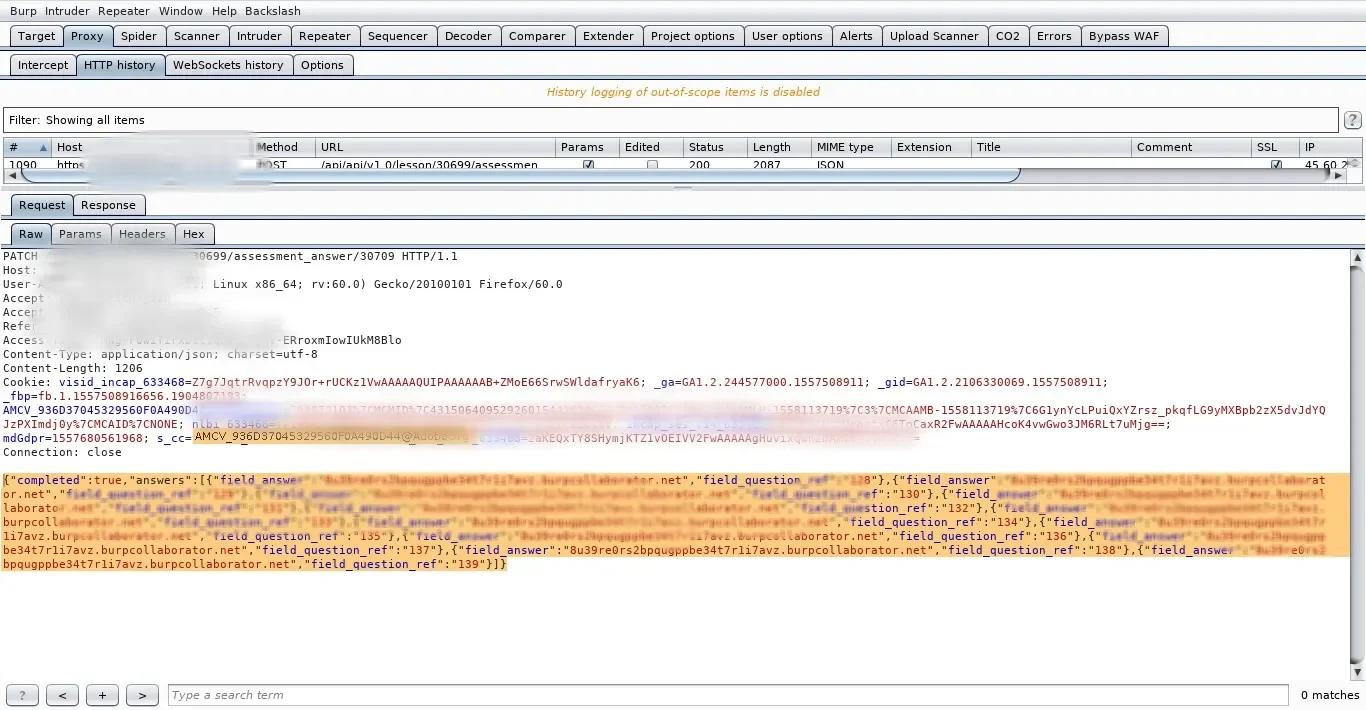
The response to that request looked like this:
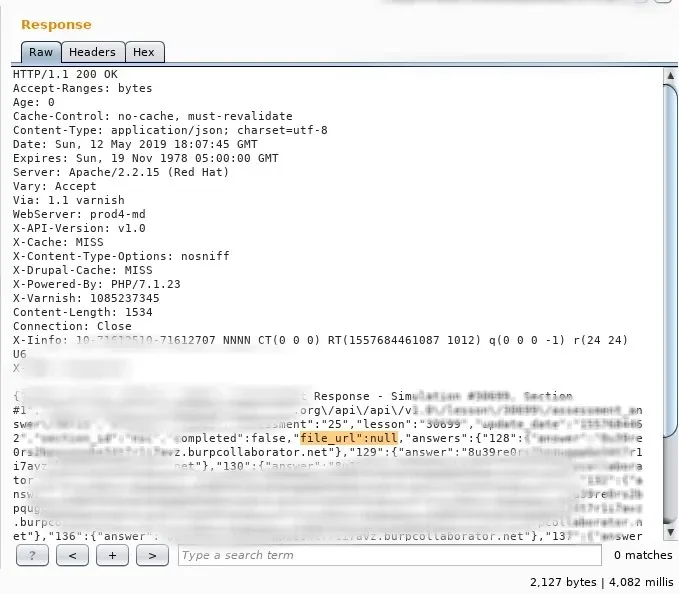
In the response there is a "file_url":null field. The parameter was gone from the request but still present in the response, so he appended it to the request again, and the rest is history.
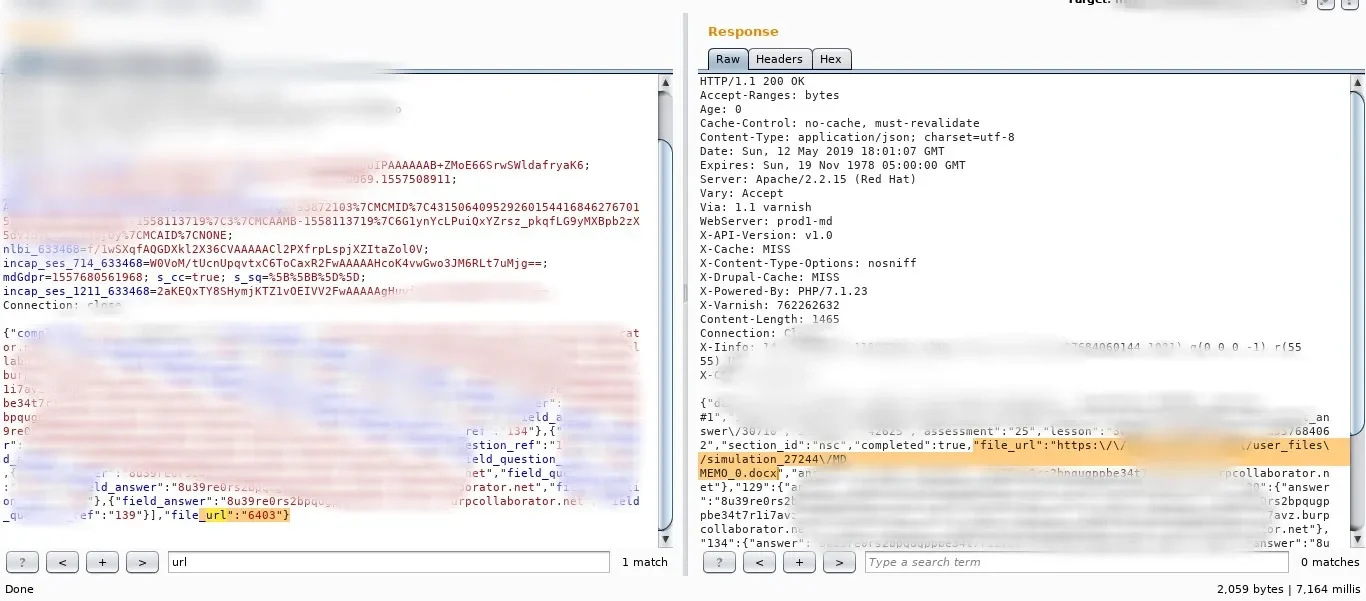
With the parameter added back, he was able to bypass the fix.
Root cause
All of these issues share the same shape: the server accepts an object identifier from the client and acts on it without checking that the object belongs to the caller. The role change trusts the student role ID and class admin ID supplied in the request, the profile update trusts the user ID, and the assignment submission trusts the numeric file_url. Adding the email field worked because the update handler accepted fields beyond the ones the UI sends, so the client-side form was the only thing limiting which attributes could be changed.
The patch removed file_url from the request, but the response still contained the field, and re-adding it worked. The server still returned the field in its response and, as the successful bypass shows, still accepted it when it was supplied. Removing a parameter from the client is not an authorisation check; the server has to verify ownership of the referenced file.
Impact
According to the report, the issues allowed an attacker to:
- Get the details of any student and change them, which leads to account takeover.
- Remove any student from their original class and move them to any other class.
- Permanently remove a user from the application by adding them to the attacker's account and then removing them from it.
- Read other students' assignment files by changing the numeric
file_url, and continue to do so after the first fix by re-adding the parameter.
All of this requires only a normal student account. The two reports described were rewarded with $1500 for the first and $2150 for the account takeover.
Fix
For the assignment file issue, the platform patched the problem by removing the file_url parameter. As the bypass shows, that was not sufficient: the server still accepted the parameter when it was sent and still exposed it in the response.
Variants to test
- Role or membership identifiers tied to a user ID. Keep the user ID fixed and vary the role ID, and vary the class or group ID. A positive result is that another user's membership changes class or role.
- Object IDs in update requests. Change the ID in a profile update to another user's ID. A positive result is that the other user's data changes.
- Undocumented fields in JSON bodies. Add fields the UI does not send, such as
email, to an update request. A positive result is a200 OKand the field actually changing. - Numeric file references. Change a numeric file or attachment ID in a submission request. A positive result is that another user's file appears in your own view.
- Parameters removed by a patch. After a fix, compare the request and the response. If a field still appears in the response, try adding it back to the request. A positive result is that the old behaviour returns.
What happened, in plain words
A security researcher found several ways to abuse a school-style website. The site is used by universities for classes, discussions and assignments. The requests shown are ones a normal student can make. By changing numbers and adding a field in the requests his browser sent to the site, he could:
- move other students into a different class,
- rename other students,
- change any user's email address and take over their account,
- read other students' assignment files,
- and, after the site tried to fix the file problem, get around that fix.
He was paid $1500 for the first report and $2150 for the account takeover. This article walks through each step in the same order as his write-up, explains every term from scratch, and shows the exact requests he used.
The platform and the people on it
The site is an education platform, called xyz.com in the write-up. It is aimed mainly at students of politics, media and history. It gives a class a shared space for discussions, assignments and projects. The researcher says that well-known universities use it for their students.
Every class has a Teacher, who is the admin of that class. The teacher creates the class and invites students. Students are low-privilege users: they can take part in discussions and submit assignments, but they cannot do admin things. Inside a class there are discussions and debates, and a student can be given a role in a discussion. There is also an assignment section where students submit their work to the teacher. Each submission carries a reference to the uploaded file.
To understand the attacks, you need a few basic ideas:
- Request: when you click something in a browser, the browser sends a message to the website's server. That message is a request. It says what you want (for example, "change this student's role") and includes the details the server needs.
- Response: the server's reply. It contains a status code (like
200 OK, meaning "done") and often some data. - API: the part of the website that accepts these requests and returns data. Think of it as a waiter: you tell the waiter what you want, the waiter goes to the kitchen (the server) and brings back your order. The website's pages are just a friendly front; the API is what actually does the work.
- Parameter: a named value inside a request. In a web address, parameters come after a
?asname=value. In a JSON body (explained below), they are the keys of the object. Parameters are how you tell the server which student, which class, which file you mean. - ID: a number or string that uniquely identifies something, like a student number or a class number. If IDs are guessable (for example, simple increasing numbers), an attacker can try other numbers to refer to other people's things.
- IDOR (Insecure Direct Object Reference): a bug where the server takes an ID from the request and acts on it without checking that the thing it refers to belongs to you. Imagine a hotel where you ask for "key to room 101" and the receptionist hands it over without checking that you are the guest in room 101. That is IDOR.
- JSON: a text format for structured data, used in many API requests and responses. It looks like
{"first_name":"again","last_name":"namechanged"}. The curly braces hold an object; inside, names (keys) are paired with values. JSON is just a way to write down labelled values so a computer can read them. - Cookie / session: after you log in, the site gives your browser a small piece of data (a cookie) that proves who you are on each later request. Without it, the server would not know you are logged in.
- Brute-force: trying many values one after another, often automatically, until one works. If an ID is a number, you can try 1, 2, 3, and so on.
- Account takeover: gaining control of someone else's account, usually by changing their email address or password so that you can log in as them or receive their password-reset messages.
Setup
The write-up does not describe any special tools, accounts or software versions. The researcher worked with a normal student account on the platform, using the requests the application itself sends. The only precondition is that you are logged in as a low-privilege student, because every request below is one a student can make.
Finding it
The first thing that looked wrong was the request used to change a student's role in a class discussion or debate. It carried two identifiers: a class admin ID and a student role ID. The student role ID is tied to the student ID. The researcher reasoned that if he kept the student ID fixed and guessed the role ID, he could move that student out of their previous class and into his own class, or into any other class, depending on which class admin ID he sent.
A second, similar request follows the role change. Here the name of another student can be changed simply by changing the ID in the request, which lets an attacker rename other users.
Exploitation
Step 1: Changing a student's class role
The role change request contains the class admin ID and the student role ID. Because the role ID is associated with the student ID, keeping the student ID the same and brute-forcing the role ID moves that student from their previous class into the attacker's class, or into any other class selected through the class admin ID.
In plain terms: the server trusts the two numbers in the request. It does not check that the student role ID really belongs to the student ID you sent, nor that you are allowed to change that student's role. So by trying different role IDs while leaving the student ID alone, you can make the server move someone else's membership. The class admin ID then decides which class they land in.
Step 2: Renaming other students
A similar request that follows the role change lets the attacker change another student's name by changing the ID of that student. Again, the server takes the ID from the request and acts on it without checking ownership. If you can guess or observe another student's ID, you can rename them.
Step 3: Adding an undocumented parameter for account takeover
The researcher then took the original profile update request and deliberately added an extra parameter to see what the response would be. The JSON body originally contained only the first and last name:
{"first_name":"again","last_name":"namechanged"}
This is a JSON object with two keys: first_name and last_name. The values are the new first and last name. The request would normally update the logged-in user's own profile. The researcher wanted to know whether the server would accept other fields that the website's form does not send.
He added an email parameter to that JSON. The server answered 200 OK, and the researcher states he could change any user's email by guessing their ID. With control of the email address, the account can be taken over.
Why does changing the email lead to takeover? Many sites let you reset a forgotten password by sending a reset link to the email address on file. If an attacker can change the email to one they control, they can trigger a password reset and receive the link themselves, then set a new password and log in as the victim. The write-up does not describe how the takeover was achieved beyond changing the email.
The key lesson: the website's form only showed first and last name, but the server accepted an extra field. The client-side form was the only thing limiting which attributes could be changed. The server should have checked which fields the user is allowed to modify.
Step 4: Reading other students' assignment files
The assignment submission request contains a file_url parameter with a numeric value. Changing that number uploads another student's file into the attacker's assessment, giving access to other users' files. The researcher reported it and the fix removed the parameter.
In other words, the submission request said something like "attach file number 123". By changing 123 to another number, the attacker could make the system attach someone else's file to his own submission, and then view it. The server did not check that the file belonged to the student making the submission.
Step 5: Bypassing the fix
Four months after the patch, the researcher went back to his old report and tried to bypass it. The same request now looked different: the file_url parameter was no longer present in the request.
The image shows the request after the patch: the file_url parameter is gone from what the browser sends.
The response to that request looked like this:
The image shows the response. In it there is a "file_url":null field. The parameter was gone from the request but still present in the response, so he appended it to the request again, and the rest is history.
The image relates to the request with file_url added back.
With the parameter added back, he was able to bypass the fix.
The patch removed file_url from the request, but the response still contained the field, and re-adding it worked. The server still returned the field in its response and, as the successful bypass shows, still accepted it when it was supplied. Removing a parameter from the client is not an authorisation check. The server has to verify ownership of the referenced file.
Root cause
All of these issues share the same shape: the server accepts an object identifier from the client and acts on it without checking that the object belongs to the caller. The role change trusts the student role ID and class admin ID supplied in the request, the profile update trusts the user ID, and the assignment submission trusts the numeric file_url. Adding the email field worked because the update handler accepted fields beyond the ones the UI sends, so the client-side form was the only thing limiting which attributes could be changed.
The bypass worked because the patch only removed file_url from the request the client sends. Removing a parameter from the client is not an authorisation check; the server has to verify ownership of the referenced file.
Impact
According to the write-up, the issues allowed an attacker to:
- Get the details of any student and change them, which leads to account takeover.
- Remove any student from their original class and move them to any other class.
- Permanently remove a user from the application by adding them to the attacker's account and then removing them from it.
- Read other students' assignment files by changing the numeric
file_url, and continue to do so after the first fix by re-adding the parameter.
All of this requires only a normal student account. The two reports described were rewarded with $1500 for the first and $2150 for the account takeover.
Fix
For the assignment file issue, the platform patched the problem by removing the file_url parameter. As the bypass shows, that was not sufficient: the server still accepted the parameter when it was sent and still exposed it in the response.
Variants to test
- Role or membership identifiers tied to a user ID. Keep the user ID fixed and vary the role ID, and vary the class or group ID. A positive result is that another user's membership changes class or role.
- Object IDs in update requests. Change the ID in a profile update to another user's ID. A positive result is that the other user's data changes.
- Undocumented fields in JSON bodies. Add fields the UI does not send, such as
email, to an update request. A positive result is a200 OKand the field actually changing. - Numeric file references. Change a numeric file or attachment ID in a submission request. A positive result is that another user's file appears in your own view.
- Parameters removed by a patch. After a fix, compare the request and the response. If a field still appears in the response, try adding it back to the request. A positive result is that the old behaviour returns.
Glossary
- API: the part of a website that accepts requests and returns data, like a waiter taking your order to the kitchen.
- Request: a message your browser sends to a server asking it to do something.
- Response: the server's reply to a request, including a status code and often data.
- Parameter: a named value in a request, such as
file_url=123or"email":"..."in JSON. - ID: a number or string that uniquely identifies something, like a student or a class.
- IDOR (Insecure Direct Object Reference): a bug where the server uses an ID from the request without checking that the object belongs to the requester.
- JSON: a text format for structured data, using curly braces and key-value pairs.
- Cookie / session: a small piece of data your browser stores after login and sends with each request so the server knows who you are.
- Brute-force: trying many values automatically until one works.
- Account takeover: gaining control of someone else's account, often by changing their email or password.
- 200 OK: the HTTP status code meaning the request succeeded.
- Admin: a user with high privileges, here the teacher who manages a class.
- Low-privilege user: a normal user with limited permissions, here a student.
- Authorisation: checking whether a user is allowed to perform an action on a particular object.
- Patch: a fix applied to software.
- Bypass: getting around a fix or protection.
- Client: the browser or app you use; the opposite of the server.
- Server: the computer that runs the website and processes requests.



