Stories Of IDOR
The application exposed user account details and newsletter unsubscribe functionality through direct object references without proper authorisation checks. An attacker could enumerate user IDs to retrieve personal information, including admin details, and unsubscribe any user from the newsletter by manipulating a base64-encoded email parameter.
 Published on medium.com
Security
The full write-up lives on its author's site
It belongs to its author, so we link to it rather than copy it. The other two tabs are our own rewrites, checked against it.
Context
This is a write-up about insecure direct object references (IDOR) found across several features of a single site, referred to throughout as whocare.com (a placeholder name). The author presents it as the first part of a series of findings. The features involved are ordinary ones: user sign-up backed by an internal API, a newsletter subscription with an unsubscribe link, and a feedback form. The write-up was published on 28 September 2019.
The author starts with a definition: insecure direct object references occur when an application provides direct access to objects based on user-supplied input, letting an attacker bypass authorisation and reach resources in the system directly.
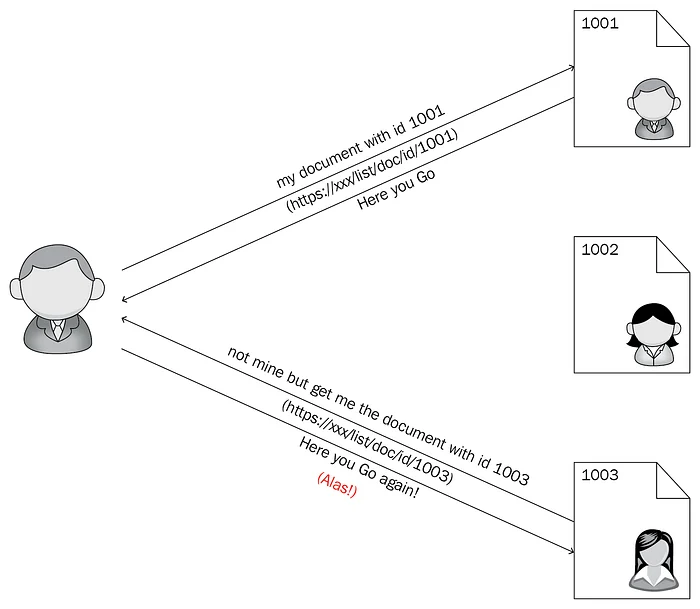
The illustration is the familiar two-user scenario. Two accounts, U1 and U2, each hold files, and each user should only reach their own. U1 views a file whose URL in the browser looks like:
https://whocare.com/file/23
U1 changes the trailing number to 50:
and can now view U2's file. The reason, as the author puts it, is that the application gives direct access to the object based on user input without validating the authenticity of the object.
On finding them, the author's view is that IDOR is as common as XSS and easy to spot, but becomes much easier once you understand the purpose and workflow of the application you are testing. The three findings below are offered as examples of where these issues appear.
Setup
The only tool named is Burp Suite, used as an intercepting proxy and, for the enumeration steps, as Burp Intruder. The precondition for the first finding is simply the ability to register an account: the researcher was signing up when the relevant request was intercepted. No versions, roles or other preconditions are given.
Finding it
Part 1: reading other users' account details
While signing up, the sign-up request was intercepted in Burp Proxy. The domain makes an internal API call for sign-up. The request contains a user_id parameter. For testing, the value was changed to random values, and the response came back as an error saying the user already existed, together with the user's information such as name, email and address.
The report shows the request and response only as placeholders: the request and response bodies themselves are not reproduced in the text, so the exact parameter layout and response format are not available here. What matters is the behaviour: an error path for a duplicate user_id returns the existing user's details.
This did not come up in one shot. The author then brute-forced the user_id parameter with Burp Suite Intruder, collected many users' details, and among them found the admin account's details. Some of the personal information in the response was redacted because it belonged to the admin account.
Part 2: unsubscribing any user from the newsletter
The same site offers a newsletter subscription for email notifications about updates. In the user account settings there is an option to unsubscribe from the newsletter. When the request is submitted, an email is sent to the registered user, and the URL looks like this:
http://whocare.com/deleteNewsletter/dmljdGltZW1haWxAZ21haWwuY29t
The trailing segment is Base64. The report gives the encoding of an address as an example:
dGVzdGVybWFpbEBnbWFpbC5jb20= : [redacted]
So the unsubscribe action is keyed on the user's email address, encoded rather than encrypted, and the server does not validate the request. Anyone who knows a user's email address can therefore unsubscribe that user. The author connects this to the first finding: the account-details IDOR supplies email addresses, so the two issues chain. To attack at scale, intercept the unsubscribe URL request, send it to Intruder, load the collected email addresses, Base64-encode each one before submission, and start the attack. That would unsubscribe every user whose address you hold.
The author's stated aim in this part was to chain the two small IDORs into an impactful report.
Part 3: open mail relay in the feedback form
A third issue sits in the feedback section of the same domain, where users submit feedback to the team. The request contains three parameters used in the attack:
ContactUs_Department_Txt: the account the email is sent toContactUs_Email_Txt: the account the email is sent fromContactUs_MessageBody_Txt: the message body
The request itself is again shown only as a placeholder in the report, so the full request is not reproduced. The researcher crafted a new request with the parameters set like this:
ContactUs_Department_Txt=[redacted]
ContactUs_Email_Txt=[Use All the Users List For Attacking purpose]
With the sender taken from the harvested user list and the recipient set to the admin address, the author states that all the users would receive email appearing to come from the admin account. The author notes that all the users would receive email appearing to come from the admin account, looking legitimate: a suitable setup for phishing.
Root cause
In each case the object reference is supplied by the client and acted on without an access-control check. In Part 1 the user_id in the sign-up API call is trusted, and the duplicate-user error path discloses the record instead of refusing. In Part 2 the unsubscribe action is keyed by a Base64-encoded email address, which is encoding, not a secret, and the server does not validate the request. In Part 3 the feedback form lets the client choose both the sender and the recipient of the mail, which the author calls an open mail relay. The author's summary is that a proper access control needs to be implemented: these requests should be validated before they proceed.
Impact
Part 1 exposes other users' account details, including name, email and address, and with enumeration reaches the admin account. Part 2 lets an attacker unsubscribe any user whose email address is known, and combined with Part 1 the author says you could unsubscribe all the users whose addresses you hold. Part 3 lets an attacker send mail from the site's authentic mail server with a spoofed sender, which the author frames as a phishing primitive. The report does not quantify the user base or give any response from the programme beyond the timeline.
Fix
The author's remediation advice is twofold: implement proper access control so that requests are validated before they proceed, and use strong random identifiers instead of sequential numbers, for example a random value in place of id=3. The report points to the OWASP Insecure Direct Object Reference Prevention Cheat Sheet for further reading. The timeline given is: report sent, patched, bounty awarded. No details of the patch itself are provided.
Variants to test
- Numeric or sequential object identifiers in API calls made during sign-up, profile edits and similar flows. A positive result is a response that returns another user's record, or an error that leaks fields of an existing record when you submit an identifier that is already taken.
- Enumeration of such identifiers with Intruder. A positive result is a run of responses containing other users' details, especially privileged accounts.
- Action links that carry an encoded identifier, such as a Base64 email address in an unsubscribe or confirmation URL. A positive result is the action succeeding for an address you do not own.
- Forms that let the client set both sender and recipient, such as feedback or contact forms. A positive result is mail arriving from the site's own mail server with a sender you chose.
- Chaining a disclosure bug into a state-changing action, as here: harvest identifiers from one endpoint and feed them to another. A positive result is a bulk action against accounts you do not control.
What happened, in plain words
A security researcher spent some time on a website, which he calls whocare.com in his write-up (a made-up name, used so the real site is not named). While testing the site, he found three separate mistakes in how the site handled requests. Each mistake let him do something to other people's accounts that he should not have been able to do.
The three mistakes were:
- When he signed up for an account, the sign-up request contained a parameter called user_id that said which account was meant. By changing that number he could read other people's details, including the administrator's.
- The link that unsubscribes you from the site's newsletter contained your email address, lightly disguised. Anyone who knew your email address could unsubscribe you, and the first mistake gave him everybody's email address.
- The site's feedback form let the person filling it in choose both who the email went to and who it appeared to come from. He could therefore send email that looked like it came from the site's own administrator.
He published the write-up on 28 September 2019 as the first part of a series. The timeline at the end is short: the report was sent, the site was patched, and a bounty was awarded.
The idea behind all three: IDOR
The researcher opens with a definition. Insecure direct object references occur when an application provides direct access to objects based on user-supplied input. As a result of this vulnerability attackers can bypass authorization and access resources in the system directly.
The picture above is the illustration that goes with that definition.
In everyday terms: imagine a hotel where every room's key is just the room number written on a card. If you are in room 23 and you write 50 on your card, the door to room 50 opens for you. Nothing is broken, no lock is picked; the hotel simply trusts whatever number you show it. A website has the same problem when it decides which record to show you purely from a number or name you sent, without checking that the record belongs to you.
The researcher's example uses two accounts, U1 and U2. Both have files in their accounts, and only the owner should be able to open their own files, so U1 should never reach U2's files. One day U1 opens his own file, blahBlah.pdf, and the address in the browser looks like this:
https://whocare.com/file/23
Line by line: https:// is the secure version of the protocol browsers use to fetch pages; whocare.com is the site; /file/23 is the path, and the last part, 23, is the identifier of the file. The site reads that number and sends back the matching file. Nothing in the address says who is asking.
Curious, U1 changes the last number to see what happens:
Line by line: everything is the same except the identifier, which is now 50. If the site sends back U2's file, the site has trusted the number without checking that the file belongs to the person asking.
That is exactly what happened, and the researcher explains why: the application provides direct access to the object based on user input, without validating the authenticity of the object. "Validating the authenticity" here means checking that this particular user is allowed to see this particular record.
How to find these issues
His advice on finding them: IDOR is present in applications much like XSS (cross-site scripting, another common class of web bug), so it is easy to find, and it becomes even easier once you understand the purpose and workflow of the application you are testing. In other words, learn what each feature is supposed to do and who is supposed to be allowed to do it, then watch what the site actually accepts. The three findings below are his examples of where these issues turn up.
The tool used
The only tool named in the write-up is Burp Suite. Burp Suite is a program that sits between your browser and the website, like a post office that opens every letter, lets you read and rewrite it, and then sends it on. Two parts of it are used here:
- Burp Proxy: it pauses each request your browser makes so you can look at it and change it before it reaches the site.
- Burp Intruder: it takes one request and sends it again and again, each time with a different value in a chosen spot, automatically. That is how you try many identifiers quickly instead of editing by hand.
The only precondition mentioned for the first finding is being able to register an account: the researcher was signing up when the interesting request was intercepted.
Part 1: reading other users' account details
He was signing up for a user account when the sign-up request was intercepted by Burp Proxy. The domain makes an internal API call for sign-up. An API is a way for one piece of software to talk to another: here, the web page you see asks a separate service behind the scenes to create the account, rather than doing it itself. The request contains a parameter called user_id. A parameter is a named value sent along with a request, like a field on a form; user_id is the name, and whatever number follows it is the value.
For testing, he changed the user_id value to random values. The response came back as an error saying the user already existed, and along with that error it disclosed the user's information, such as name, email and address.
Why this matters: the site was asked to create an account with an identifier that was already taken. The correct answer is a plain refusal. Instead the site answered "that user already exists" and then handed over that user's record. The error message became a way to read accounts.
The request and response are shown in the write-up only as placeholders, so the exact layout of the request and the exact format of the response are not reproduced here.
This did not come up in one shot. He then brute-forced the user_id parameter using Burp Suite Intruder. Brute-forcing means trying many values in turn, here simply counting through identifiers, and keeping the answers. He collected many users' details, and among them he found the admin account's details. He redacted some of the personal information in what he published, because it belonged to the admin account.
Why use Intruder rather than editing by hand: one request tells you the door is open; a run of requests tells you how many rooms are behind it. The admin record is the one that turns a curiosity into a serious finding.
Part 2: unsubscribing any user from the newsletter
On the same site there is an option to subscribe to a newsletter, for email notifications about the latest updates. In the user account settings there is an option to unsubscribe from the newsletter. When you submit the request, the site sends an email to the registered user, and the URL looks like this:
http://whocare.com/deleteNewsletter/dmljdGltZW1haWxAZ21haWwuY29t
Line by line: http:// is the ordinary, unencrypted web protocol; whocare.com is the site; /deleteNewsletter/ is the action, meaning "remove this address from the newsletter"; and the long string at the end is the identifier of the person being removed. That string is not random: it is Base64.
Base64 is a way of writing data using only letters, digits and a couple of symbols, so it can travel safely inside a web address. The write-up gives an example of the encoding of an address:
dGVzdGVybWFpbEBnbWFpbC5jb20= : [redacted]
Line by line: on the left is the Base64 text, ending in =, which is padding Base64 adds to keep the length tidy; the colon separates it from the plain address on the right. So the unsubscribe action is keyed on the user's email address, encoded rather than encrypted, and the server does not validate the request. "Does not validate" means it never checks that the person making the request is the owner of that address.
Anyone who knows a user's email address can therefore unsubscribe that user. He connects this to the first finding: the account-details problem supplies email addresses, so the two issues chain. Chaining means using the output of one bug as the input to another, so that two small problems add up to a bigger one.
To attack at scale, intercept the unsubscribe URL request, send it to Intruder, load all the collected email addresses, Base64-encode each one before submission, and start the attack. That would unsubscribe every user whose address you hold. His stated aim in this part was to chain the two small IDORs into an impactful report.
Part 3: open mail relay in the feedback form
A third issue sits in the feedback section of the same domain, where users submit feedback to the team. The request contains three parameters used in the attack:
ContactUs_Department_Txt: the account the email is sent toContactUs_Email_Txt: the account the email is sent fromContactUs_MessageBody_Txt: the message body
In plain terms, the form asks the site to send an email on your behalf. The site's mail server is the machine that actually posts the letter. Normally such a form should fix the sender itself, so that the message can only ever come from the site. Here the sender is a field the visitor fills in.
The request itself is again shown only as a placeholder in the write-up, so the full request is not reproduced. He crafted a new request with the parameters set like this:
ContactUs_Department_Txt=[redacted]
ContactUs_Email_Txt=[Use All the Users List For Attacking purpose]
Line by line: the first line sets the recipient to the administrator's address; the second sets the sender to an address taken from the harvested user list. With the sender taken from that list and the recipient set to the admin address, the author states that all the users would receive email appearing to come from the admin account. He notes that all the users would receive email appearing to come from the admin account, looking legitimate: a suitable setup for phishing. Phishing is sending a message that pretends to come from someone trusted, so the reader clicks or replies without suspicion; a message genuinely sent by the site's own mail server is far more convincing than one from a stranger's address.
Root cause
In each case the object reference is supplied by the client and acted on without an access-control check. Access control is the part of a site that decides who is allowed to do what. In Part 1 the user_id in the sign-up API call is trusted, and the duplicate-user error path discloses the record instead of refusing. In Part 2 the unsubscribe action is keyed by a Base64-encoded email address, which is encoding, not a secret, and the server does not validate the request. In Part 3 the feedback form lets the client choose both the sender and the recipient of the mail, so the application's own mail server relays messages on the attacker's behalf. His summary is that proper access control needs to be implemented: these requests should be validated before they proceed.
Impact
Part 1 exposes other users' account details, including name, email and address, and with enumeration reaches the admin account. Part 2 lets an attacker unsubscribe any user whose email address is known, and combined with Part 1 the author says you could unsubscribe all the users whose addresses you hold. Part 3 lets an attacker send mail from the site's authentic mail server with a spoofed sender, which he frames as a phishing primitive. The write-up does not quantify the user base or give any response from the programme beyond the timeline.
Fix
His remediation advice is twofold: implement proper access control so that requests are validated before they proceed, and use strong random identifiers instead of sequential numbers, for example a random value in place of id=3. The reasoning is the hotel key again: if room numbers were long random strings that nobody could guess, writing a different one on your card would get you nowhere. The write-up points to the OWASP Insecure Direct Object Reference Prevention Cheat Sheet for further reading. The timeline given is: report sent, patched, bounty awarded. No details of the patch itself are provided.
Variants to test
- Numeric or sequential object identifiers in API calls made during sign-up, profile edits and similar flows. A positive result is a response that returns another user's record, or an error that leaks fields of an existing record when you submit an identifier that is already taken.
- Enumeration of such identifiers with Intruder. Enumeration means walking through the possible values one by one. A positive result is a run of responses containing other users' details, especially privileged accounts.
- Action links that carry an encoded identifier, such as a Base64 email address in an unsubscribe or confirmation URL. A positive result is the action succeeding for an address you do not own.
- Forms that let the client set both sender and recipient, such as feedback or contact forms. A positive result is mail arriving from the site's own mail server with a sender you chose.
- Chaining a disclosure bug into a state-changing action, as here: harvest identifiers from one endpoint and feed them to another. A positive result is a bulk action against accounts you do not control.
Glossary
- API: a way for one piece of software to ask another to do something, such as creating an account, without the visitor seeing the exchange.
- Access control: the part of a site that decides who is allowed to see or change what.
- Base64: a way of writing data using letters, digits and a few symbols so it can travel inside a web address; it is reversible by anyone and is not a secret.
- Brute-forcing: trying many possible values in turn, usually automatically, until something interesting comes back.
- Burp Intruder: the part of Burp Suite that repeats one request many times with a different value in a chosen spot.
- Burp Proxy: the part of Burp Suite that pauses requests between your browser and the site so you can read and change them.
- Burp Suite: a program used by testers to intercept, inspect and modify web traffic.
- Chaining: using the result of one bug as the input to another, so two small issues combine into a bigger one.
- Client: the program on your side, usually your browser, that sends requests to the site.
- Enumeration: going through a list of possible identifiers one by one to see which ones return something.
- IDOR (insecure direct object reference): a bug where a site picks a record using an identifier you supplied without checking that the record belongs to you.
- Impact: the real-world harm a bug can cause, such as reading private data or acting on other people's accounts.
- Intercepting proxy: a tool that sits between browser and site, letting you read and rewrite traffic; Burp Suite is one.
- Open mail relay: a mail server that will send messages on behalf of anyone who asks, including with a sender the asker chose.
- Parameter: a named value sent with a request, like a field on a form.
- Phishing: sending a message that pretends to come from someone trusted so the reader acts on it.
- Remediation: the fix for a bug.
- Request: the message your browser sends to a site asking for a page or an action.
- Response: the message the site sends back.
- Root cause: the underlying mistake that makes a bug possible.
- Server: the computer, or program, that answers requests and holds the data.
- Spoofed sender: an email whose "from" address was chosen by the sender rather than being genuine.
- XSS (cross-site scripting): a common web bug where a site runs code supplied by an attacker inside another visitor's browser.
user_id: the parameter in the sign-up request that names which account is meant.ContactUs_Department_Txt,ContactUs_Email_Txt,ContactUs_MessageBody_Txt: the feedback form parameters for recipient, sender and message body.



