Dokumentasi Pengujian Cross-Site Scripting (XSS) Pada Sistem Informasi Akademik
Two reflected cross-site scripting issues were found in an academic information system: a redirect URL parameter on an LMS subdomain accepted a javascript: scheme, and a URL path segment on a web endpoint echoed input without sanitisation. An attacker could run script in a victim's browser to steal session cookies, phish, or alter page content.
 Published on medium.com
Xss Vulnerability
The full write-up lives on its author's site
It belongs to its author, so we link to it rather than copy it. The other two tabs are our own rewrites, checked against it.
Context
The target is an academic information system, and the specific finding described here is on a Learning Management System (LMS) subdomain. The report also covers a second reflected XSS on a web application endpoint reached through a URL path. The author frames the article as documentation of a self-directed security test of a web application, with risk analysis and mitigation recommendations, rather than as a bounty submission.
The LMS is the kind of application that handles authentication, sessions and course content for students and staff. The report identifies the vulnerable parameter as a redirect URL but does not describe the login flow or how the parameter is normally handled.
Setup
The testing was carried out independently ("secara mandiri") against the academic system. The report does not name the tools used, the accounts or roles involved, or any software versions. The second finding requires access to an endpoint whose path segment is reflected.
Finding it
The author starts from the general mechanism: XSS occurs when an application processes untrusted input and places it in a context where the browser interprets it as JavaScript. The browser cannot tell whether a script came from the developer or from an injected input; it processes content according to how HTML and JavaScript interpret it. If untrusted input lands in a context that permits script execution, the code can run in the origin of the vulnerable application.
The report splits XSS into the three usual categories:
- Reflected XSS: input from a request, such as a URL parameter, is returned in the response without safe handling. Exploitation usually needs user interaction, such as opening a manipulated link.
- Stored XSS: malicious content is stored by the application, for example in a database, and later shown to other users without adequate protection.
- DOM-based XSS: client-side JavaScript processes an untrusted data source and inserts it into the DOM through an unsafe operation, so execution can happen without the server returning the payload in the HTML response.
The two findings below are both reflected XSS.
Exploitation
Step 1: Reflected XSS through the LMS redirect URL
The vulnerable location is the LMS subdomain. The report gives the address as https://lms.dinxxx.ac.id. in the body text and as https://lms.dinxx.ac.id in the location line; both are redacted forms of the same host. The vulnerable parameter is the redirect URL.
The payload tested was:
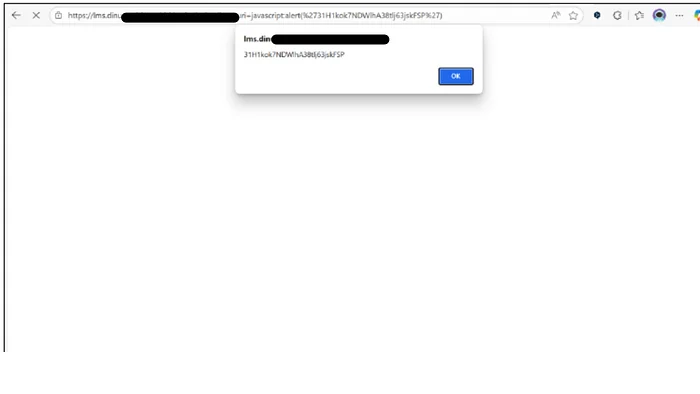
javascript:alert(‘XSS Test’)
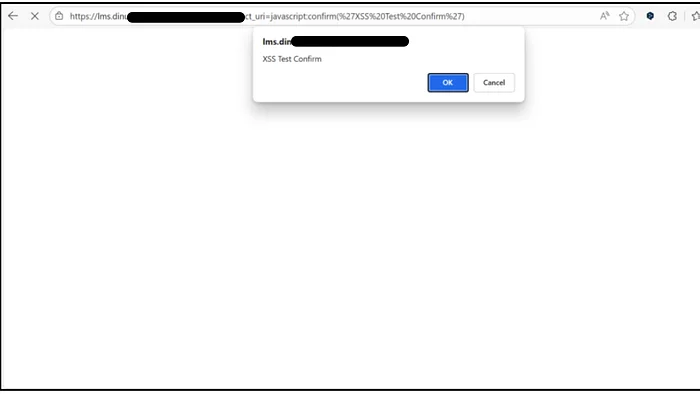
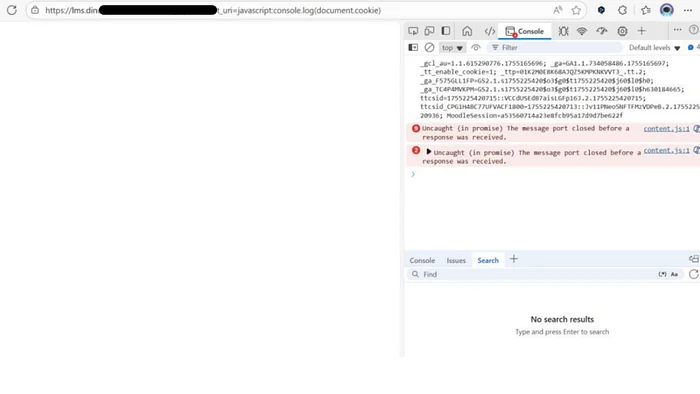
This is a javascript: URI rather than an HTML fragment. If the redirect URL parameter is used as a navigation target without validating the scheme, the browser treats the value as script to execute in the origin of the page that performs the navigation. The report says the vulnerability allows an attacker to insert and execute a malicious script client-side, with the potential to steal sensitive information such as session cookies, conduct phishing, or alter the displayed content of the page.
Step 2: Reflected XSS through a URL path segment
The second finding is a reflected XSS on a web application endpoint. The payload tested was:
<img src=x onerror=”alert(‘XSS’)”>
The vulnerable parameter is the URL path on the endpoint /cpanelwebcall/<input>, which the report says accepts and executes input without adequate sanitisation or filtering.
The evidence lists two hosts where the behaviour was observed:
laborxx.uxxx.ac.id
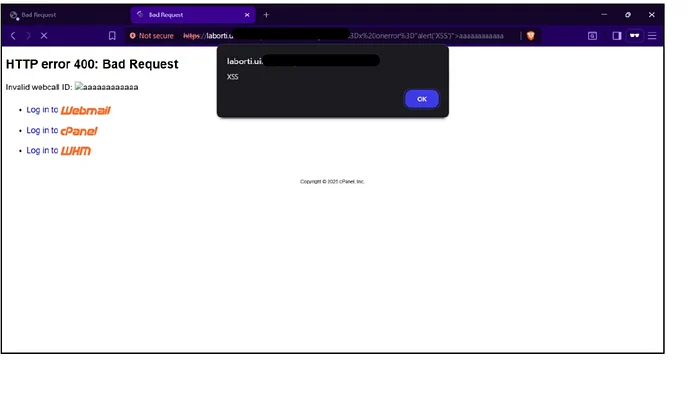
icodaxx.uxxx.ac.id
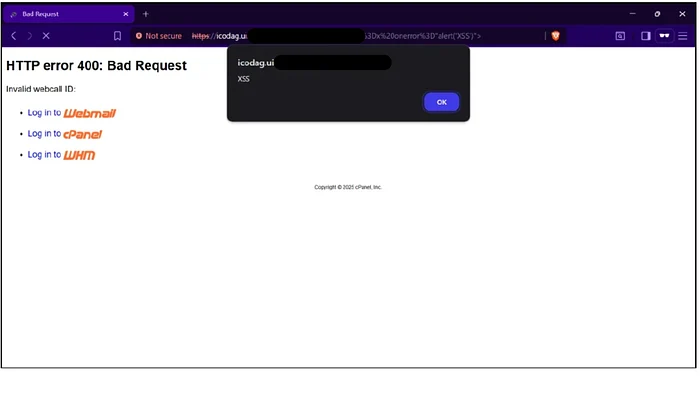
The report does not include the full request or response for either host, so the exact reflected context (attribute, text node or script) is not shown. What it does state is that the endpoint accepts and executes input without adequate sanitisation or filtering.
Root cause
In both cases the application takes untrusted input and places it in a context where the browser can execute it, without validation or output encoding appropriate to that context. For the LMS, the vulnerable parameter is the redirect URL, and the tested payload was a javascript: URI. For the /cpanelwebcall/<input> endpoint, the report says input is accepted and executed without adequate sanitisation or filtering.
The report does not describe any server-side or client-side defence that was present and bypassed.
Impact
For the LMS finding, the report says an attacker could insert and execute a malicious script on the client side, with the potential to steal sensitive information such as session cookies, conduct phishing, or change how page content is displayed. As with reflected XSS generally, exploitation requires the victim to open a manipulated link, so the attacker needs a way to deliver the URL to the victim.
Fix
The report gives four mitigation measures rather than describing a patch that was applied:
- Input validation. Define the permitted format, length, data type and character set for input. For URL parameters, parse the value and validate the scheme and the permitted destinations.
- Use safe DOM APIs. Avoid putting untrusted strings into APIs that interpret HTML. When only displaying text, use
textContentinstead ofinnerHTML. - Implement Content Security Policy. CSP limits the sources of scripts that can execute and can reduce the impact of some implementation mistakes. The policy should be designed incrementally, tested, and tightened, without relying on an overly permissive policy.
- Run security testing regularly. Testing should cover query parameters, URL paths, forms, authentication integrations, and JavaScript components that process data from untrusted sources. After fixes are applied, retest to confirm the vulnerability is closed and that the changes did not introduce new problems.
- Other redirect parameters. Look for
redirect,next,return,continueand similar parameters on login and logout flows. A positive result is that ajavascript:URI supplied in the parameter executes in the application origin when the redirect is followed. - Other path segments reflected into HTML. Try endpoints that take a name or identifier in the path, such as
/cpanelwebcall/<input>, and supply the same<img src=x onerror=...>payload. A positive result is that the handler fires when the response is rendered. - Different reflection contexts. Where the value lands inside an attribute, a script block or a text node, adjust the payload to that context. A positive result is execution of the injected script rather than display of the literal text.
- Scheme handling on URL parameters. Test
javascript:,data:and protocol-relative values against any parameter that is used for navigation. A positive result is that a non-HTTP scheme is accepted and acted on. - DOM sinks. Check client-side code that reads from
location,document.URLor similar sources and writes toinnerHTMLor other HTML-interpreting sinks. A positive result is execution without the payload appearing in the server response.
What happened, in plain words
A security researcher tested a university's academic information system independently and wrote up what he found. The system has a part called a Learning Management System, or LMS: the website where students and staff log in to see courses, materials and grades. On that LMS subdomain he found a way to make the site run a small piece of JavaScript that he supplied. He found a second, similar problem on a web application endpoint at /cpanelwebcall/<input>.
Both problems belong to one family of bugs called Cross-Site Scripting, usually shortened to XSS. The short version: a website takes something a visitor typed or put in a link, and later hands it back to the browser in a way that makes the browser treat it as a program rather than as words. The browser has no way of knowing the difference. It runs whatever looks like code.
He documented the tests, explained the risk, and listed four things a developer should do to fix it. The article is written as a learning document, not as a paid bug bounty report.
The background you need first
Before the findings make sense, a few everyday ideas need to be clear.
A web page is a set of instructions to your browser. When you open a site, the server sends back text. Some of that text is content (headings, paragraphs, images) and some of it is instructions written in a language called HTML. Your browser reads the HTML and builds the page you see. HTML can also carry small programs written in JavaScript, and the browser runs those programs.
The browser trusts the page it is on. If a script arrives as part of a page from example.com, the browser runs it with the permissions of example.com. It can read the page, change what is displayed, and read the site's cookies for that domain. This trusted zone is called the origin: the combination of scheme (http or https), host name and port. Scripts from one origin are not supposed to touch another origin's data.
A cookie is a small note the site stores in your browser. After you log in, the site gives your browser a cookie containing a session identifier. On every later request your browser sends that cookie back, and the server uses it to know who you are. If someone else gets your session cookie, they can often act as you without knowing your password. That is why stealing cookies is a classic goal of an XSS attack.
A URL parameter is the part of a link after a question mark. In https://example.com/login?next=/home, the parameter is named next and its value is /home. Sites use parameters to remember where you came from, what you searched for, which page you want. A redirect URL parameter is one that tells the site where to send you next, usually after login.
A URL path is the part after the domain name. In https://example.com/cpanelwebcall/abc, the path is /cpanelwebcall/abc. Some sites put a name or identifier directly in the path instead of in a parameter.
An API is a way for programs to talk to each other. Think of a restaurant: the menu is the list of things you can ask for, and the waiter carries your order to the kitchen and brings back the result. An API is that menu plus waiter for software. A web endpoint is one specific address a program can call to get or send something.
Sanitising input means cleaning it before use. If a site is going to display what you typed, it should either reject characters that could be mistaken for code, or encode them so the browser shows them as text. Encoding is like putting a letter in a sealed envelope: the content is still there, but nobody mistakes it for an instruction.
XSS is what happens when that cleaning is skipped. The site takes your input and drops it into the page as if it were part of the site's own code. Your browser then runs it.
Why XSS happens at all
The researcher starts from the mechanism rather than the bug. A web application receives input from users all the time: search boxes, login forms, URL parameters, path segments. It then often shows that input back, for example "You searched for: cats". If the application pastes the input into the page without encoding it, and the input contains HTML or JavaScript, the browser will treat it as code.
The browser cannot tell whether a script came from the developer or from an attacker. It only sees text that looks like a script, and it runs it. If that text lands in a place where scripts are allowed, the code runs with the permissions of the vulnerable site.
This is why the fix is not "detect bad scripts" but "never let user input become code".
The three kinds of XSS
The report splits XSS into the three standard categories. You need all three to understand which one each finding is.
- Reflected XSS. The input comes in with a request, such as a URL parameter, and is echoed straight back in the response. Nothing is stored. To trigger it, the attacker has to get the victim to open a crafted link. The payload lives only in that one request and response.
- Stored XSS. The malicious content is saved by the application, for example in a database, and later shown to other users. A forum comment is the classic example: one user posts a comment containing a script, and every visitor who opens the thread runs it. No crafted link is needed; the payload is waiting on the page.
- DOM-based XSS. The server never sees the payload. JavaScript already running in the page reads something untrusted (for example the current URL) and writes it into the page through an unsafe operation. The browser executes it purely on the client side.
Both findings in this report are reflected XSS. The payload travels in the request and comes back in the response.
Finding 1: the LMS login redirect
The first finding is on the LMS subdomain of the university. The report gives the address in two slightly different redacted forms in the body text and in the location line; both refer to the same host. The vulnerable parameter is the redirect URL.
It is a convenience feature, and it is exactly the kind of value that gets used as a navigation target.
The payload
The researcher supplied this value in the redirect URL parameter:
javascript:alert(‘XSS Test’)
Line by line:
javascript:is a URL scheme, likehttp:orhttps:. It tells the browser that what follows is JavaScript to run, not an address to fetch. It is a legitimate part of the web platform, used for things like bookmarklets.alert(is a built-in browser function that opens a small pop-up box with a message.‘XSS Test’is the message shown in the box. The report uses curly single quotes around it, exactly as shown.)closes the function call.
So the whole value means: "run a script that pops up a box saying XSS Test".
Why this works
If the site takes the redirect parameter and uses it as a navigation target without checking the scheme, the browser obeys. It does not fetch a page; it runs the script. And because the navigation is performed by the site's own page, the script runs in the site's origin, with the site's cookies and permissions.
That is the whole trick. The site meant to send the user somewhere; instead it told the browser to run code.
The report says the vulnerability allows an attacker to insert and execute a malicious script on the client side, and that this could be used to steal sensitive information such as session cookies, to conduct phishing, or to change how the page content is displayed.
What the screenshots show
What an attacker would need
Reflected XSS needs the victim to open a crafted link. The attacker has to deliver the URL somehow: an email, a chat message, a post on a forum. The victim clicks, the site runs the script, and the script can then read the page's cookies or rewrite the page to look like a login form that sends the password somewhere else. That is the phishing angle the report mentions.
Finding 2: the /cpanelwebcall/ path
The second finding is on a different part of the university's web infrastructure. The vulnerable parameter is the URL path on the endpoint /cpanelwebcall/<input>. The report says this endpoint accepts and executes input without adequate sanitisation or filtering.
The payload
The researcher supplied this value in the path:
<img src=x onerror=”alert(‘XSS’)”>
Line by line:
<imgstarts an HTML image tag. The browser expects an image to be loaded.src=xsets the image source tox. That is not a real address, so the image will fail to load.onerror=”alert(‘XSS’)”attaches an event handler.onerrormeans "when loading fails, do this". The thing to do isalert(‘XSS’), which opens a pop-up saying XSS. The report uses curly double quotes around the handler value, exactly as shown.>closes the tag.
So the whole value means: "try to load an image from x; when that fails, pop up a box saying XSS".
The clever part is that the payload does not need a working image. It needs the image to fail, which it always will, because x is not a real address. The failure is what triggers the script.
Why this works
If the endpoint takes the path segment and pastes it into the page without encoding it, the browser sees a real <img> tag with a real onerror handler. It tries to load the image, fails, and runs the handler. The handler is JavaScript, and it runs in the site's origin.
The report lists two hosts as evidence:
laborxx.uxxx.ac.id
icodaxx.uxxx.ac.id
What the report does not show
The report does not include the full request or response for either host, so the exact place where the value lands (inside an attribute, inside a text node, inside a script block) is not shown. What it does state is that the endpoint accepts and executes input without adequate sanitisation or filtering.
The root cause, in both cases
Both findings share the same underlying mistake. The application takes untrusted input and places it in a context where the browser can execute it, without validation or output encoding appropriate to that context.
For the LMS, the vulnerable parameter is the redirect URL, and the tested payload was a javascript: URI. For the /cpanelwebcall/<input> endpoint, the report says input is accepted and executed without adequate sanitisation or filtering.
The report does not describe any defence that was present and bypassed.
What the impact is
For the LMS finding, the report says an attacker could insert and execute a malicious script on the client side, with the potential to steal sensitive information such as session cookies, conduct phishing, or change how page content is displayed.
As with reflected XSS generally, exploitation requires the victim to open a manipulated link, so the attacker needs a way to deliver the URL to the victim.
The report does not assign a severity or CVSS score to either finding, and it does not describe any specific data that was actually accessed.
How to fix it
The report gives four mitigation measures rather than describing a patch that was applied.
- Input validation. Define the permitted format, length, data type and character set for input. For URL parameters, parse the value and validate the scheme and the permitted destinations. In plain terms: decide in advance what a valid redirect looks like, and reject anything else. A redirect should point to a page on your site, not to a
javascript:scheme. - Use safe DOM APIs. Avoid putting untrusted strings into APIs that interpret HTML. When only displaying text, use
textContentinstead ofinnerHTML. In plain terms: if you only want to show words, use the tool that only shows words.innerHTMLtreats its input as HTML and will happily run a script;textContenttreats its input as text and will show the angle brackets as characters. - Implement Content Security Policy. CSP limits the sources of scripts that can execute and can reduce the impact of some implementation mistakes. The policy should be designed incrementally, tested, and tightened, without relying on an overly permissive policy. In plain terms: tell the browser in advance which places scripts are allowed to come from, so a script injected from somewhere else is refused even if it gets into the page.
- Run security testing regularly. Testing should cover query parameters, URL paths, forms, authentication integrations, and JavaScript components that process data from untrusted sources. After fixes are applied, retest to confirm the vulnerability is closed and that the changes did not introduce new problems.
If you are testing a site yourself, the same patterns show up in predictable places. The report lists these variants to test.
- Other redirect parameters. Look for
redirect,next,return,continueand similar parameters on login and logout flows. A positive result is that ajavascript:URI supplied in the parameter executes in the application origin when the redirect is followed. - Other path segments reflected into HTML. Try endpoints that take a name or identifier in the path, such as
/cpanelwebcall/<input>, and supply the same<img src=x onerror=...>payload. A positive result is that the handler fires when the response is rendered. - Different reflection contexts. Where the value lands inside an attribute, a script block or a text node, adjust the payload to that context. A positive result is execution of the injected script rather than display of the literal text.
- Scheme handling on URL parameters. Test
javascript:,data:and protocol-relative values against any parameter that is used for navigation. A positive result is that a non-HTTP scheme is accepted and acted on. - DOM sinks. Check client-side code that reads from
location,document.URLor similar sources and writes toinnerHTMLor other HTML-interpreting sinks. A positive result is execution without the payload appearing in the server response.
Glossary
- API: a defined way for one program to ask another for something, like a menu and waiter in a restaurant.
- Browser: the program you use to open web pages, such as Chrome, Firefox or Safari.
- Client side: work done by your browser on your computer, as opposed to the server.
- Content Security Policy (CSP): a set of rules a site sends to the browser saying which sources of scripts are allowed.
- Cookie: a small piece of data a site stores in your browser, often used to remember that you are logged in.
- Cross-Site Scripting (XSS): a bug where a site lets input from a user become code that the browser runs.
- CVSS: a standard scoring system for rating how serious a security bug is.
- DOM: the browser's in-memory model of the page, which scripts can read and change.
- DOM-based XSS: XSS where the payload never reaches the server; client-side JavaScript inserts it into the page unsafely.
- Endpoint: one specific address a program can call to get or send something.
- Event handler: an attribute on an HTML element that says what to do when something happens, such as
onerrorwhen an image fails to load. - HTML: the language used to describe the structure and content of a web page.
- innerHTML: a JavaScript property that sets the contents of an element and interprets the value as HTML, including scripts.
- Input validation: checking that input matches an expected format before using it.
- JavaScript: the programming language browsers run to make pages interactive.
javascript:URI: a URL scheme that tells the browser to run the text after it as JavaScript.- Learning Management System (LMS): a website where students and staff access courses, materials and grades.
- Origin: the combination of scheme, host and port that defines a security boundary in the browser.
- Output encoding: converting characters so the browser shows them as text rather than treating them as code.
- Parameter: a named value in a URL, usually after a question mark.
- Path: the part of a URL after the domain name, such as
/cpanelwebcall/abc. - Payload: the specific input an attacker supplies to trigger a bug.
- Phishing: tricking someone into entering their credentials or other data on a fake page.
- Redirect URL: a parameter that tells a site where to send the user next, often after login.
- Reflected XSS: XSS where the input is echoed straight back in the response and needs the victim to open a crafted link.
- Sanitisation: cleaning input so it cannot be interpreted as code.
- Scheme: the first part of a URL, such as
http:,https:orjavascript:. - Server: the computer that stores a website and sends pages to browsers.
- Session cookie: a cookie that identifies your logged-in session, so the server knows who you are.
- Stored XSS: XSS where the malicious content is saved by the site and later shown to other users.
textContent: a JavaScript property that sets the text of an element without interpreting it as HTML.- Untrusted input: anything a user or another system supplies, which the site should not assume is safe.
- URL: the address of a resource on the web.




