Drupal Critical RCE Vulnerability: How Attackers Can Take Over a Website
Drupal Core had an installation-security failure where the application incorrectly determined whether installation was already complete, which under specific conditions could let an unauthenticated attacker take over an existing site or run arbitrary code. The text claims the issue was exploited in the wild and added to CISA's known exploited vulnerabilities catalog.
 Published on medium.com
It involves an installation-security failure that, under specific conditions, could allow an unauthenticated attacker to take over an existing website or execute arbitrary code.
The full write-up lives on its author's site
It belongs to its author, so we link to it rather than copy it. The other two tabs are our own rewrites, checked against it.
Context
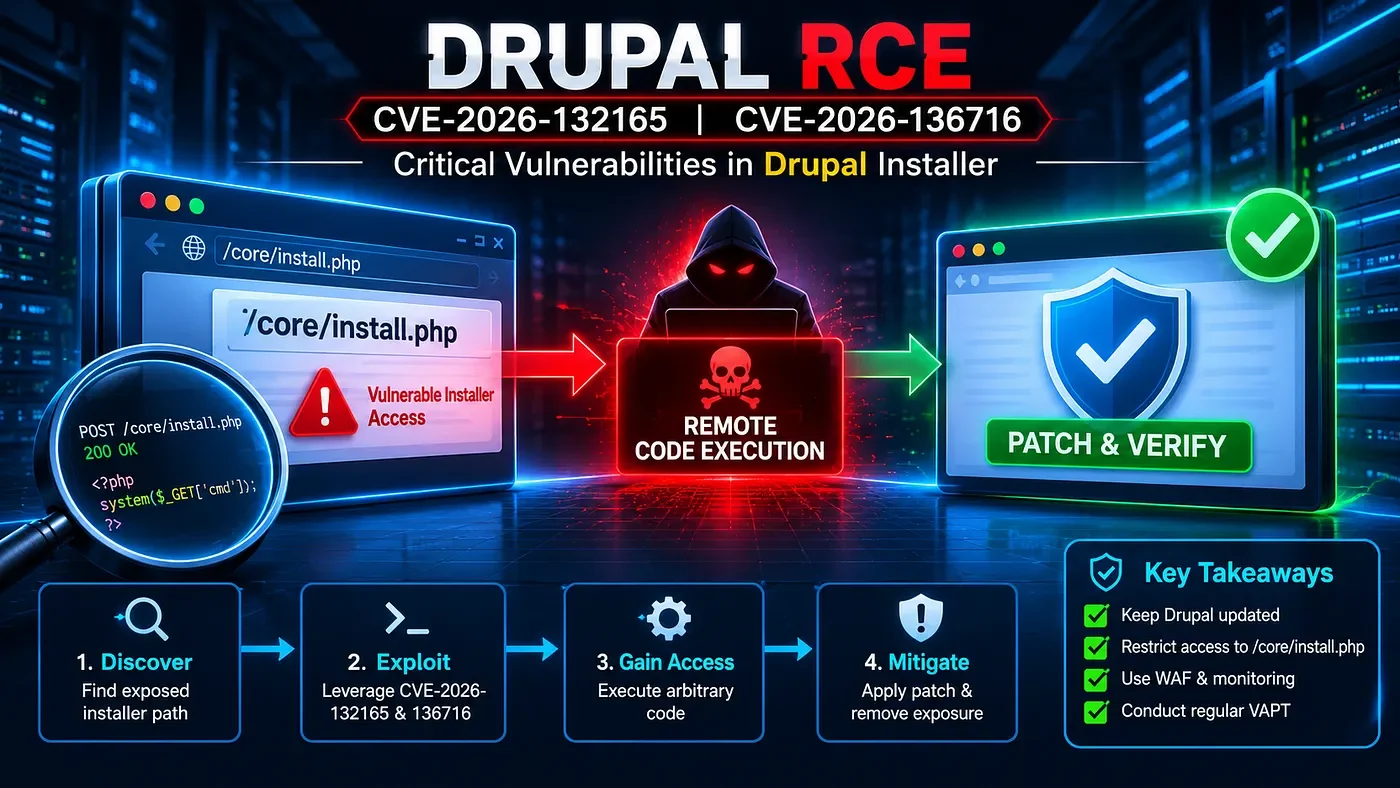
Drupal Core was affected by CVE-2026-132165, also called Fail2Install. The issue is an installation-security failure: under specific conditions it could allow an unauthenticated attacker to take over an existing website or execute arbitrary code. The vulnerability was assigned a CVSS score of 9.8 and was added to CISA's Known Exploited Vulnerabilities catalogue.
A normal CMS installation should prevent an attacker from reinstalling an already configured website. The feature at the centre of this bug is the installer itself, the component that runs when Drupal is first set up and that should refuse to run again once the site is configured.
Setup
The write-up does not describe a specific target, account, role or lab environment. It is written as a penetration tester's methodology, and the author is explicit about the precondition: do not attempt exploitation on a live website without explicit written authorization, and use a patched test environment or a controlled vulnerable lab instead. The tools named for the assessment are WhatWeb, Wappalyzer, BuiltWith, browser developer tools, HTTP response headers and page source, plus Drush and Composer for version checks on the project directory.
Finding it
The reasoning starts from how the installer is supposed to behave. A configured Drupal site should treat installation as complete and block any further installation actions. The vulnerability involves the application incorrectly determining whether the installation has already been completed, which creates an opportunity for unauthorised installation actions.
The author frames the tester's job as verifying that determination rather than assuming it: compare the installed version and configuration against the official Drupal advisory, and do not assume every Drupal installation is vulnerable. An HTTP 200 from the installer endpoint is not proof of anything on its own, because a normal installed Drupal site may also return HTTP 200.
Exploitation
The report does not publish an exploit. What it provides is a defensive, step-by-step assessment process for systems you own or are authorised to test, and it repeats that you should not attempt to execute arbitrary commands on a production website.
Step 1: Identify Drupal CMS
Check whether the target website is running Drupal, using Wappalyzer, WhatWeb, BuiltWith, and HTTP response headers and page source.
Step 2: Identify the Drupal version
For an authorised assessment, use the project directory:
drush statuscomposer show drupal/core-recommended
Compare the installed version against the affected versions in the official advisory.
Step 3: Check installer exposure
Check whether the installer endpoint is reachable:
curl -i https://TARGET/core/install.php
The important caveat: an HTTP 200 response alone does not prove vulnerability. Examine the response and the installation state, because a normal installed Drupal site may also return HTTP 200.
Step 4: Review server logs
For Nginx:
grep -E 'install\.php' \/var/log/nginx/access.log
For Apache:
grep -E 'install\.php' \/var/log/apache2/access.log
Investigate unexpected POST requests, suspicious redirects (302/303), repeated installer requests, unexpected administrator account changes, and unusual PHP files in upload directories.
Step 5: Verify security configuration
Check whether /core/install.php is blocked externally, whether settings.php has appropriate write restrictions, whether administrative accounts are legitimate, and whether installation-state records match deployment history.
Step 6: Report and remediate
Document the affected version, exposed endpoint, evidence, impact, severity and remediation. Do not attempt to execute arbitrary commands on a production website.
Root cause
The report describes the flaw as the application incorrectly determining whether the installation has already been completed. That misjudgement is what turns the installer into an attack surface on an already configured site. The author also lists server resource exhaustion as something that must not bypass installation-state checks. The report does not show the code path behind the incorrect determination, so the precise mechanism is not stated.
Impact
Potential consequences listed in the report are:
- Unauthorised administrator account creation.
- Website takeover.
- Remote code execution.
- Data exposure.
- Website modification.
The impact is hedged: the failure could allow an unauthenticated attacker to take over an existing website or execute arbitrary code under specific conditions. The report does not enumerate those conditions.
Fix
Drupal's reported fixed releases include 10.6.22, 11.3.22 and 11.4.13, and the author advises verifying the current vendor advisory before deployment. A later section of the report gives a different set of fixed versions as of November 27, 2026:
| Drupal branch | Fixed version |
|---|---|
| 11.4.x | 11.4.14 |
| 11.3.x | 11.3.23 |
| 10.6.x | 10.6.23 |
After upgrading, run database updates using drush updatedb or the authorised update procedure. Patching alone does not remove an existing compromise, so investigate possible compromise separately.
A second Drupal issue is also covered: CVE-2026-136716, an installer access bypass, published on November 25 and also being exploited in the wild. The report's remediation section does not distinguish between the two CVEs when listing versions.
Variants to test
- Installer endpoint reachable on a configured site: request
/core/install.phpand look past the status code at the response and installation state, since a 200 is expected on normal installed sites too. - Installation-state records that do not match deployment history: check whether the recorded installation state agrees with how the site was deployed.
- Resource exhaustion against the installer: confirm that server resource exhaustion does not bypass installation-state checks.
- Write access to
settings.php: check whether it has appropriate write restrictions. - Log evidence of installer abuse: unexpected POST requests to
install.php, 302/303 redirects, repeated installer requests, unexpected administrator account changes, or unusual PHP files in upload directories.
Hunting notes
What it does give is a recon pattern. Fingerprint Drupal with WhatWeb, Wappalyzer, BuiltWith, headers and page source, then pin the exact core version with drush status and composer show drupal/core-recommended before comparing against the advisory. Treat the installer as the signal: check whether /core/install.php is reachable from outside, then corroborate with server logs and with the installation-state records rather than relying on the status code. The author's repeated warning is the practical rule for hunters as well: verify on systems you own or are authorised to test, and never run arbitrary commands against production.
What happened, in plain words
A piece of software called Drupal had a serious security problem. Drupal is a content management system, or CMS: a program that lets people build and run websites without writing every page by hand. Many organisations use it, so a flaw in it matters to a lot of sites at once.
The flaw was tracked under the identifier CVE-2026-132165 and given the nickname Fail2Install. A CVE is a public catalogue number for a known security bug, so that everyone in the world can refer to the same issue by the same name. The nickname is a play on words: the bug lives in the installer, the part of Drupal that runs when the site is first set up.
In plain terms, the bug is this: Drupal is supposed to notice that it has already been installed and refuse to run the installer again. Under specific conditions it got that decision wrong. Under specific conditions, an unauthenticated attacker might be able to take over the website or run their own code on the server; potential consequences include unauthorised administrator account creation.
The bug was rated 9.8 on the CVSS scale, which is a standard way of scoring how severe a vulnerability is; 9.8 is near the top of the range. It was also added to CISA's Known Exploited Vulnerabilities catalogue, a list maintained by a US government agency of bugs that are known to be used by attackers in the real world, not just in theory.
This article walks through the same assessment process a penetration tester would follow, but explains every idea from scratch. A penetration tester is someone hired to attack a system on purpose, with permission, to find its weaknesses before a real criminal does. The whole process here is defensive: it is about checking whether your own site, or a site you have written permission to test, is exposed.
1. What is the vulnerability?
Drupal Core, the main body of the Drupal software, was affected by CVE-2026-132165, also called Fail2Install.
The vulnerability was assigned a CVSS score of 9.8. CVSS stands for Common Vulnerability Scoring System: a shared scale from 0 to 10 that tries to express how bad a bug is if it is used. A high number means the vulnerability is considered severe.
It involves an installation-security failure that, under specific conditions, could allow an unauthenticated attacker to take over an existing website or execute arbitrary code. Two phrases there are worth unpacking:
- Unauthenticated means the attacker does not need an account or a password. They are a stranger on the internet.
- Execute arbitrary code means running commands of the attacker's choosing on the server, not just using the website's own features. This is often called remote code execution, or RCE, and it is usually the most serious outcome a web bug can have, because the attacker is no longer limited by what the website was designed to do.
The vulnerability was added to CISA's Known Exploited Vulnerabilities catalogue.
2. Understand the attack concept
A normal CMS installation should prevent an attacker from reinstalling an already configured website. Think of it like the setup wizard on a new phone: it runs once, when the phone is new, and afterwards it is gone. If the setup wizard could be brought back on a phone in daily use, a stranger could walk up and register themselves as the owner.
The vulnerability involves the application incorrectly determining whether the installation has already been completed. In other words, the check that asks "has this site been set up already?" gave the wrong answer. That is the whole idea behind the name Fail2Install: the installer fails to stay shut.
This could create an opportunity for unauthorised installation actions. Potential consequences include:
- Unauthorised administrator account creation. An administrator is the highest level of user on a CMS; they can change anything.
- Website takeover. Once an attacker holds an administrator account, the site is effectively theirs.
- Remote code execution. Running their own code on the server, as described above.
- Data exposure. Reading information that should have stayed private.
- Website modification. Changing content, adding pages, or planting malicious links for visitors.
3. Step-by-step VAPT testing methodology
VAPT stands for Vulnerability Assessment and Penetration Testing: the combined practice of scanning a system for known weaknesses and then carefully trying to exploit them, with permission, to prove whether they are real. The steps below are the tester's checklist.
Important: Do not attempt exploitation on a live website without explicit written authorization. Use a patched test environment or a controlled vulnerable lab. This is the single most important rule in the whole article. A patched test environment is a copy of the site with the fix applied; a controlled vulnerable lab is a deliberately unsafe copy that exists only for practice. Written authorisation means a document, signed by someone who is allowed to give it, saying you may test this specific system.
Step 1: Identify Drupal
Check whether the application uses Drupal. You cannot assess a bug in Drupal on a site that is not running Drupal, so the first job is simply to recognise the software. Tools:
- WhatWeb. A command-line tool that looks at a website and reports what software it appears to be running.
- Wappalyzer. A browser extension that does the same kind of detection while you browse.
- Browser developer tools. The built-in panel in every modern browser (usually opened with F12) that shows the page's source, its requests and its responses.
- CMS identification features. General clues such as telltale file paths, page markup or response headers that reveal the CMS.
Step 2: Identify the version
Review:
- CMS version. Which release of Drupal is installed.
- Installed modules. Modules are add-on packages that extend a CMS; they matter because they change what the site can do.
- Core components. The parts that ship with Drupal itself.
- Vendor security advisories. An advisory is the official notice from the maker of the software describing a bug and which versions are affected.
Why this step matters: a vulnerability almost never affects every version of a product. Knowing the exact version is what lets you decide whether the bug applies at all.
Step 3: Verify vulnerability applicability
Compare the installed version and configuration against the official Drupal advisory. Do not assume every Drupal installation is vulnerable. This is a discipline point. Finding the word "Drupal" on a site is not a finding; matching the version and configuration to the advisory is.
Step 4: Review installer exposure
In your test environment, inspect whether installation-related routes are exposed and whether the application correctly blocks unauthorized installation. A route is simply a web address the application responds to. "Exposed" means that address answers requests coming from the internet, rather than being blocked or removed once setup is finished.
Step 5: Validate security controls
A security control is any safeguard the application is supposed to have. Confirm:
- Existing installations cannot be reinstalled by unauthorized users.
- Installation routes are appropriately restricted.
- Application permissions are correctly configured.
- Server resource exhaustion does not bypass installation-state checks. Resource exhaustion means deliberately overloading the server, for example with a flood of requests, to see whether the site behaves differently under stress. The point here is that a stressed server must not suddenly forget that it has already been installed.
Step 6: Document the finding
A finding is a confirmed weakness written up for the person who has to fix it. Include:
- CVE ID. The catalogue number, so the reader can look it up.
- Affected version. Exactly which release is vulnerable.
- Evidence. Screenshots, responses or logs that show the problem is real.
- Business impact. What could actually go wrong for the organisation, in plain terms.
- Recommended fixed version. Which release to upgrade to.
4. How to identify this vulnerability
The following is a defensive, step-by-step assessment process for systems you own or are authorized to test.
Step 1, Identify Drupal CMS
Check whether the target website is running Drupal. Tools:
- Wappalyzer
- WhatWeb
- BuiltWith. Another service that fingerprints the technology behind a website.
- HTTP response headers and page source. Every time your browser loads a page, the server sends back hidden information (headers) alongside the visible page (the source). Both can carry clues about the software.
Step 2, Identify the Drupal version
For an authorized assessment, use the project directory. The project directory is the folder on the server, or on your own machine, that holds the site's files. These commands are run there, not in a browser.
drush statuscomposer show drupal/core-recommended
Line by line, in plain words:
drush statusis a command from Drush, a helper tool for managing Drupal from a terminal. It prints a summary of the site, including which version of Drupal is running.composer show drupal/core-recommendedis a command from Composer, a tool that downloads and tracks the software packages a project depends on. It asks Composer to list details of the package nameddrupal/core-recommended, which is the bundle that pins Drupal's core version.- In the report the two commands appear run together on one line, with no separator between them. Read them as two separate checks: one asks Drush for the site status, the other asks Composer which core version is installed.
Compare the installed version against the affected versions in the official advisory.
Step 3, Check installer exposure
Check whether the installer endpoint is reachable. An endpoint is a specific address on a server that accepts requests; here it is the installer's web address.
curl -i https://TARGET/core/install.php
curlis a command-line tool for fetching a web address, like a browser without a window. It prints what the server sends back.-itells curl to include the response headers, the hidden information the server sends before the page itself. Without it you would see only the page body.https://TARGET/core/install.phpis the address being requested.TARGETis a placeholder for the site you are authorised to test; you replace it with the real hostname./core/install.phpis the installer's address on a Drupal site.
Why this step: if the installer address answers at all on a site that is already set up, that is worth understanding. But the report is careful here.
Important: An HTTP 200 response alone does not prove vulnerability. Examine the response and installation state. A normal installed Drupal site may also return HTTP 200. HTTP 200 is the status code a web server sends to mean "here is the page you asked for". It is not a verdict. A normal installed Drupal site may also return HTTP 200, so the status code alone is not a verdict. The status code tells you the address exists; it does not tell you the installer will run.
Step 4, Review server logs
A server log is a running diary the web server keeps of every request it receives. Reading it is how you find out what has actually happened to the site, as opposed to what should happen.
For Nginx:
grep -E 'install\.php' \/var/log/nginx/access.log
For Apache:
grep -E 'install\.php' \/var/log/apache2/access.log
Line by line:
grepis a command that searches text for a pattern and prints only the matching lines.-Etells grep to treat the pattern as a regular expression, a compact way of describing text to match.'install\.php'is the pattern: the textinstall.php, with the dot escaped so it is matched literally rather than as a wildcard.\/var/log/nginx/access.logand\/var/log/apache2/access.logare the log files being searched. Nginx and Apache are two very common web server programs, and each keeps its access log in its own place. The leading backslash before the path is how the path appears in the report.
Why this step: the log shows every request to the installer, including ones you did not make. That is how you tell whether someone has already been poking at it.
Investigate:
- Unexpected POST requests. A POST is a request that sends data to the server, as opposed to a GET, which just asks for a page. Unexpected POST requests are worth investigating.
- Suspicious redirects (302/303). A redirect is the server telling the browser "the page is somewhere else". Status codes 302 and 303 are two common forms of redirect. Suspicious redirects (302/303) are worth investigating.
- Repeated installer requests. One visit is normal; a stream of them is not.
- Unexpected administrator account changes. New administrators appearing without explanation are the outcome this whole bug is about.
- Unusual PHP files in upload directories. PHP is a programming language commonly used for web applications. Upload directories are folders meant to hold images and documents, not programs. A PHP file sitting there is a classic sign that someone has planted code on the server.
Step 5, Verify security configuration
Check:
- Whether
/core/install.phpis blocked externally. "Externally" means from the internet, as opposed to from the server itself. - Whether
settings.phphas appropriate write restrictions. Check whethersettings.phphas appropriate write restrictions. - Whether administrative accounts are legitimate. Every administrator account should be one somebody can account for.
- Whether installation-state records match deployment history. Check whether installation-state records match deployment history.
Step 6, Report and remediate
Document the affected version, exposed endpoint, evidence, impact, severity and remediation. Remediation means the fix: what has to change to close the hole. Do not attempt to execute arbitrary commands on a production website. Production means the real, live site that real people use. Testing there risks breaking it or destroying evidence.
Important: Latest vulnerability developments
A second Drupal issue has also been published:
CVE, , Vulnerability
**CVE-2026-132165, ** Installer-related RCE
**CVE-2026-136716, ** Installer access bypass
The second issue was published on November 25 and is also being exploited in the wild. "Exploited in the wild" means real attackers are using it against real sites, not just researchers in a lab. An access bypass is a bug where someone gets past a check they should have failed, without needing to break any password.
Latest fixed releases as of November 27, 2026
Drupal branch, Fixed version
**11.4.x, ** 11.4.14
**11.3.x, ** 11.3.23
**10.6.x, ** 10.6.23
A branch here is a line of development: 11.4.x means any release starting 11.4, where the x is the final number. The table says: if you are on the 11.4 line, upgrade to 11.4.14; if you are on 11.3, upgrade to 11.3.23; if you are on 10.6, upgrade to 10.6.23.
After upgrading, run database updates using drush updatedb or the authorized update procedure. Investigate possible compromise separately; patching alone does not remove an existing compromise. This is a crucial point for beginners: patching closes the door, but it does not remove a burglar who is already inside. If an attacker got in before the fix, they may have left accounts or files behind, and those have to be found and removed separately.
Original references
- Drupal Official Advisory, CVE-2026-132165
- Drupal Official Advisory, CVE-2026-136716
- Drupal, Checking Whether Your Site Was Compromised
- CERT-In Vulnerability Note, CIVN-2026-0567
These are the primary sources. An advisory is the maker's own description of the bug;
4. Remediation
Drupal's reported fixed releases include:
- 10.6.22
- 11.3.22
- 11.4.13
Verify the current vendor advisory before deployment. Note that this list differs from the later table above, which gives 10.6.23, 11.3.23 and 11.4.14 as of November 27, 2026.
Conclusion
An RCE vulnerability can transform a simple website into a serious security incident.
For penetration testers, version identification, configuration validation and safe verification are essential skills. For everyone else, the same three habits apply: know what software and version you are running, check that its safeguards are actually switched on, and test only where you have permission.
Glossary
- Access bypass: a flaw that lets someone get past a check they should have failed, without breaking a password.
- Administrator: the highest level of user on a CMS, able to change anything on the site.
- Advisory: the official notice from a software maker describing a vulnerability and which versions are affected.
- Apache: a widely used web server program.
- Arbitrary code execution: running commands of the attacker's choosing on a server, rather than only using the site's intended features.
- Branch: a line of development for a product, such as 11.4.x, where the final number changes with each release.
- BuiltWith: a service that identifies the technology behind a website.
- CERT-In: India's national computer emergency response team, which publishes vulnerability notes.
- CISA: a US government agency that maintains a catalogue of vulnerabilities known to be exploited.
- CMS: content management system, software for building and running a website without hand-writing every page.
- Composer: a tool that downloads and tracks the software packages a project depends on.
- Configuration: the settings that determine how a piece of software behaves.
- Control (security control): any safeguard an application is supposed to have.
- CVE: a public catalogue number for a known security vulnerability, so everyone can refer to the same issue.
- CVSS: a shared 0 to 10 scale for how severe a vulnerability is.
- curl: a command-line tool for fetching a web address and printing the response.
- Deployment: the act of putting a version of a site live.
- Drush: a command-line helper tool for managing Drupal.
- Endpoint: a specific address on a server that accepts requests.
- Evidence: screenshots, responses or logs that show a finding is real.
- Exploited in the wild: used by real attackers against real systems, not only in a lab.
- Finding: a confirmed weakness written up for whoever has to fix it.
- GET: a request that asks the server for a page or resource.
- grep: a command that searches text for a pattern and prints matching lines.
- Header (HTTP response header): hidden information the server sends alongside a page, such as its type or the software serving it.
- HTTP 200: the status code meaning the server returned the requested page successfully.
- Installer: the part of a CMS that runs during first-time setup.
- Log (access log): a running diary the web server keeps of every request it receives.
- Module: an add-on package that extends what a CMS can do.
- Nginx: a widely used web server program.
- Patch: a fix applied to software to close a vulnerability.
- Penetration tester: someone who attacks a system on purpose, with permission, to find weaknesses before criminals do.
- PHP: the programming language Drupal is written in.
- POST: a request that sends data to the server, as opposed to simply asking for a page.
- Production: the real, live site that real people use.
- RCE (remote code execution): running an attacker's own code on a server over the network.
- Redirect (302/303): the server telling the browser the page is somewhere else.
- Regular expression: a compact way of describing text to match.
- Remediation: the fix; what has to change to close a vulnerability.
- Resource exhaustion: deliberately overloading a server, for example with a flood of requests, to see how it behaves under stress.
- Route: a web address the application responds to.
- settings.php: Drupal's main configuration file, holding sensitive settings such as database details.
- Unauthenticated: acting without any account or password, as a stranger on the internet.
- VAPT: vulnerability assessment and penetration testing; scanning for weaknesses and then carefully proving them, with permission.
- Vendor: the maker of the software.
- Vulnerability: a weakness in software that an attacker could use to cause harm.
- Wappalyzer: a browser extension that identifies the technology behind a website.
- WhatWeb: a command-line tool that identifies the technology behind a website.


