Elasticsearch A Easy Win For Bug Bounty Hunters || How To Find and Report
An Elasticsearch instance was exposed without authentication on a non-standard port, allowing anyone to list indices and search data. The author found it via port scanning and could access internal information, potentially dumping the database.
 Published on tamimhasan404.medium.com
Hello hackers. I hope you are well.
The full write-up lives on its author's site
It belongs to its author, so we link to it rather than copy it. The other two tabs are our own rewrites, checked against it.
Context
Elasticsearch is a search and analytics engine built in Java. The author describes it as a database-like system used to hold and query information, storing data as documents with fields rather than as rows in tables with columns, and exposing extensive REST APIs for storing and searching data. In the author's comparison, the field names in a JSON document play the role that column names play in MySQL.
The relevant property for this write-up is that, according to the author, Elasticsearch does not have authentication enabled by default. When an instance is reachable from the internet on its default port, 9200, and no authentication has been put in front of it, anyone who can reach that port can query it.
The target is anonymised as target.com. The exposed instance the author found was reachable at vault.target.com:9200.

Setup
The author, Tamim Hasan, describes himself as a security researcher and bug bounty hunter from Bangladesh. The work described is a reconnaissance exercise against a target's subdomains, using port scanning followed by manual HTTP requests and directory brute forcing. No accounts, roles or credentials are involved: the whole point is that the instance answered without any.
The tools used are:
- naabu for port scanning, with a custom list of common ports.
- httpx for cross-checking a specific port across hosts.
- dirsearch for content brute forcing, with a wordlist the author maintains.
- A browser or HTTP client for the manual requests to the Elasticsearch API.

Finding it
The author's recon methodology includes port scanning, but deliberately not a full scan. Scanning all 65535 ports across every subdomain of a target creates a lot of noise and takes a long time, so he scans a fixed list of common and useful ports instead. He credits this approach to Godfather Orwa. The port list is:
81,300,591,593,832,981,1010,1311,1099,2082,2095,2096,2480,3000,3128,3333,4243,4567,4711,4712,4993,5000,5104,5108,5280,5281,5601,5800,6543,7000,7001,7396,7474,8000,8001,8008,8014,8042,8060,8069,8080,8081,8083,8088,8090,8091,8095,8118,8123,8172,8181,8222,8243,8280,8281,8333,8337,8443,8500,8834,8880,8888,8983,9000,9001,9043,9060,9080,9090,9091,9200,9443,9502,9800,9981,10000,10250,11371,12443,15672,16080,17778,18091,18092,20720,32000,55440,55672
The scan command, run against the list of live hosts previously collected with httpx, is:
naabu -l live-httpx-target.txt -pf common-ports.txt -ep 80,443 -c 200 -timeout 1500
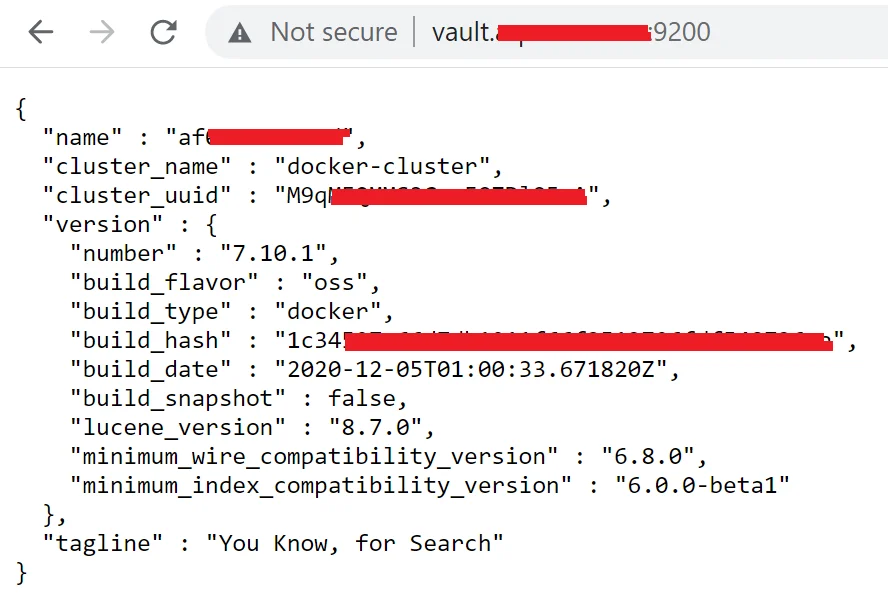
-l supplies the input host list, -pf the file of ports to scan, -ep excludes ports 80 and 443 from the scan, -c 200 sets the concurrency and -timeout 1500 the per-probe timeout. Among the results, one host stood out: vault.target.com:9200. Port 9200 is the default port for Elasticsearch, so it was worth a look. Visiting the host in a browser showed a response the author recognised as Elasticsearch.
Exploitation
Step 1: list the indexes
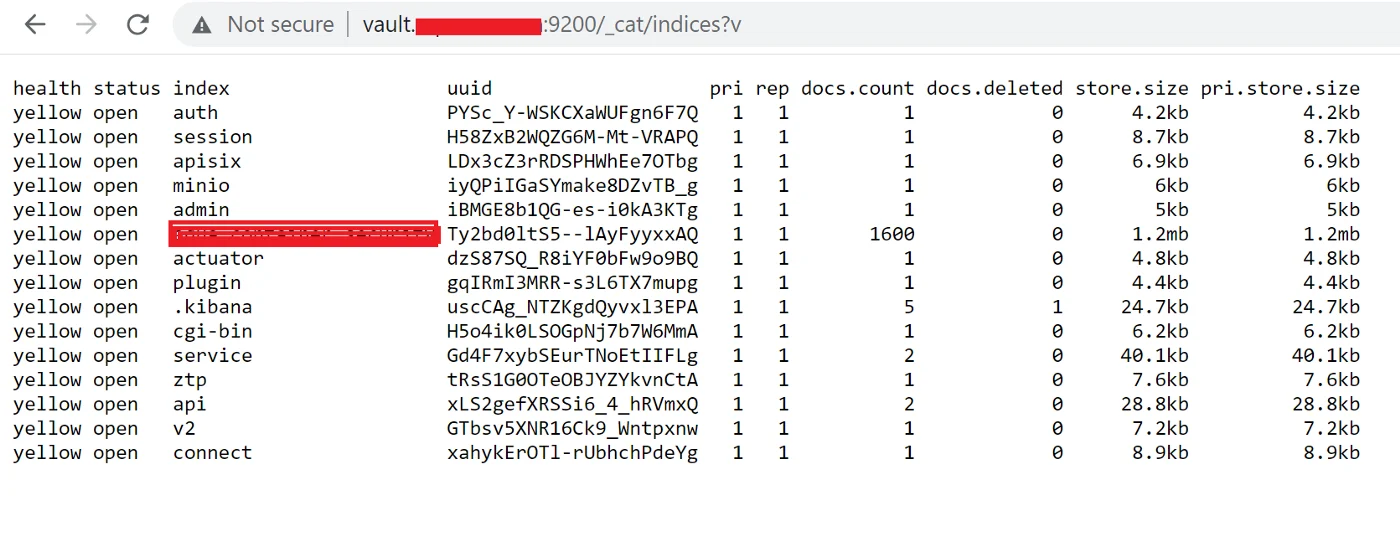
With the instance answering on 9200, the next step is to enumerate the indexes, which the author equates with databases. The request is:
http://vault.target.com:9200/_cat/indices?v
_cat is the Elasticsearch compact and aligned text API, and indices lists the indexes; the ?v parameter adds a header row to the output. The author captured the output of this request.
Step 2: enumerate the _cat API surface
Requesting the _cat root shows the many paths available under /_cat/:
http://vault.target.com:9200/_cat
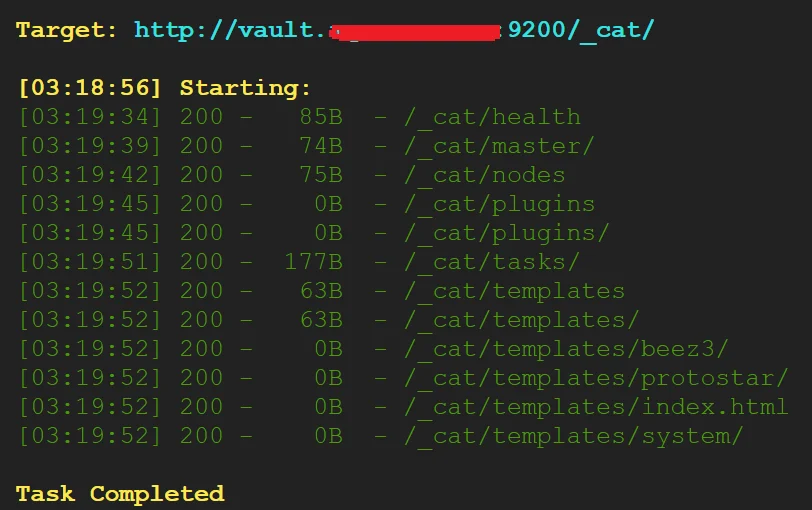
The author notes that these are commonly used Elasticsearch API endpoints, linking to a public gist that lists them, and that they can be checked one by one manually. If nothing appears after visiting /_cat/, the same paths can be brute forced by substituting a word after the slash:
Step 3: full-text search across all indexes
To run a full-text search over the data, the author uses the _all index pattern with the _search endpoint and a query string:
_all targets every index and q=users is the query string. The same endpoint can be brute forced with a list of common important words, which the author gives as:
token
secret
username
uuid
client
admin
password
error
file
data
His tip is to use a wordlist related to the specific target.

Step 4: brute force paths with dirsearch
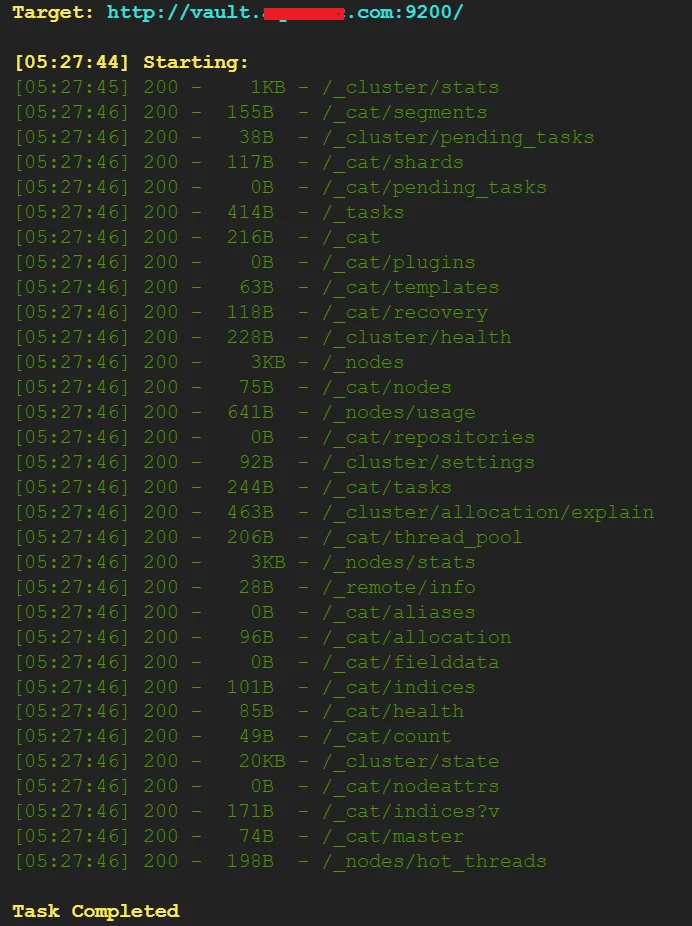
After the manual analysis the author already had enough for a report, but before writing it he ran one more brute force with his own Elasticsearch wordlist:
-u is the base URL, -w the wordlist, -U randomises the user agent, -L follows redirects, -C parses the response for comments, -e json,bak adds those extensions and -i 200 shows only responses with status 200. The author captured the dirsearch result.
Root cause
The instance was reachable on its default port with no authentication in front of it. The author's framing is that Elasticsearch does not enable authentication by default, so an operator who exposes the service without adding authentication leaves every API that the service offers open to anyone who can connect. Nothing in the report suggests an application flaw in Elasticsearch itself; the exposure is a deployment and configuration problem.
Impact
Without any kind of authentication, an attacker can read a large amount of information from the instance. The author also notes that an attacker can run custom queries against it, and that where a searched word exists, the attacker can obtain internal information from the data. He adds that it may also be possible for an attacker to dump the database. The impact applies to any instance left in this state and reachable from the internet.
Fix
The author's recommendation is twofold: change the Elasticsearch default port 9200, and implement authentication so that nobody who is not authenticated can see any information. The report does not say what the target actually changed.
Variants to test
Manual port checks
Scan only port 9200 across live hosts, because the author has seen full port scans miss open ports that were in fact open, given the scale of 65535 ports multiplied by every subdomain. A positive result is a host answering on 9200.
naabu -l live-urls.txt -p 9200
Cross-check the same port with httpx by requesting the _cat path and matching on status 200:
httpx -l live-urls.txt -p 9200 -path /_cat/ -mc 200
Search engines
ZoomEye queries:
site:target.com +port:"9200" +"elastic"
port:9200 +elasticsearch
Shodan query:
port:9200 all:"indices" all:"production"
To find exposed Kibana, Google dorks:
inurl:/app/kibana
inurl::5601/app/kibana
Automation
The author points to elasticpwn, which collects data from thousands of exposed Elasticsearch or Kibana instances and generates a report to analyse, and to two other tools, elasticpot and elastichoney.
On any candidate instance
- Request
/_cat/indices?vand check whether index names come back. - Request
/_catand walk the listed paths, or brute force words after/_cat/. - Query
/_all/_search?q=<word>with target-specific words to see whether documents are returned. - Run dirsearch with an Elasticsearch-specific wordlist and filter on status 200 to find further paths.
What happened, in plain words
A security researcher was looking around the internet-facing parts of a company's systems, the way you might walk around the outside of a building checking which doors are unlocked. He found a service called Elasticsearch answering on one of the company's subdomains, on a particular numbered door (a port). That service had no lock on it: no username, no password, nothing. Anyone who knew the address could ask it questions and read the answers, including the names of its databases.
This kind of problem is called information disclosure: information that should be private is handed out to anyone who asks. It is not a clever trick or a broken piece of software. It is a service that was installed and left reachable with its default settings, and the default settings include no authentication.
The author is Tamim Hasan, who describes himself as a security researcher and bug bounty hunter from Bangladesh. A bug bounty is a programme where a company invites outside researchers to look for problems in its systems and report them, sometimes for a reward. The target's real name is hidden and written as target.com throughout.
The one fact that makes this possible
Elasticsearch is a search engine for data. The author compares it to a database such as MySQL: a place where information is stored and then queried. The difference in his description is in how the information is shaped. MySQL stores data in tables with columns; Elasticsearch stores it as documents made of fields. If a document holds a person's details, the field names might be id, name and password. Those field names do the job that column names do in MySQL.
Elasticsearch is written in Java. It is built to store, search and analyse very large amounts of data quickly, close to real time. It offers REST APIs for storing and searching that data.
Two terms worth unpacking here:
- An API (application programming interface) is a way for one program to talk to another. Think of a restaurant: the menu is the API. You do not walk into the kitchen; you pick something from the menu, the kitchen makes it, and it comes back to you. An API is the menu of requests a service accepts and the answers it gives back.
- REST is a common style for such APIs, built on ordinary web requests: you use a web address (a URL) and the same kind of request your browser makes when it loads a page. That is why everything in this article can be done from a browser's address bar.
The crucial property, as the author states it, is that Elasticsearch does not have authentication enabled by default. Authentication is the check that asks who you are before letting you in, like a bouncer asking for ID. When a service ships with that check switched off, and someone puts it on the internet without switching it on, every menu item it offers is open to anyone who can reach it.
Finding it
The author's routine when approaching a target includes port scanning. A port is a numbered channel on a computer. One machine can run many services at once, and each listens on its own number, the way a large office building has one room number per department. A port scan is walking down the corridor trying every door number to see which ones answer.
He deliberately does not scan all 65535 ports. A full scan across every subdomain of a target means 65535 ports multiplied by all of those subdomains, which creates a huge amount of noise on the target and takes a long time. Instead he scans a fixed list of common and useful ports. He credits this method to Godfather Orwa. The list is:
81,300,591,593,832,981,1010,1311,1099,2082,2095,2096,2480,3000,3128,3333,4243,4567,4711,4712,4993,5000,5104,5108,5280,5281,5601,5800,6543,7000,7001,7396,7474,8000,8001,8008,8014,8042,8060,8069,8080,8081,8083,8088,8090,8091,8095,8118,8123,8172,8181,8222,8243,8280,8281,8333,8337,8443,8500,8834,8880,8888,8983,9000,9001,9043,9060,9080,9090,9091,9200,9443,9502,9800,9981,10000,10250,11371,12443,15672,16080,17778,18091,18092,20720,32000,55440,55672
That is simply a comma-separated list of port numbers. Some of them are well-known service doors: 8080 and 8443 are common for web servers, 5601 is the default for Kibana (a dashboard that sits in front of Elasticsearch), and 9200, the one that matters here, is the default for Elasticsearch itself.
The scan command, run against a list of live hosts he had collected earlier, is:
naabu -l live-httpx-target.txt -pf common-ports.txt -ep 80,443 -c 200 -timeout 1500
Line by line:
naabuis the name of the port-scanning tool being run.-l live-httpx-target.txtgives it the input: a text file holding the hosts that were found alive earlier.-lstands for list.-pf common-ports.txtpoints it at a file containing the port list above.-pfstands for ports file.-ep 80,443excludes ports 80 and 443 from the scan. Those are the normal web ports, already known to be open because the hosts were found with a web tool, so there is no point scanning them again.-c 200sets the concurrency: how many checks run at the same time. Higher is faster and noisier.-timeout 1500sets how long, in the tool's units, to wait for an answer before giving up on a port.
Among the results, one entry stood out: vault.target.com:9200. The part before the colon is a subdomain of the target, and 9200 is the default port of Elasticsearch. A door with the service's default number is worth knocking on. When he visited that address in a browser, it showed a response he recognised as Elasticsearch.
Asking it questions
Step 1: list the databases
With the service answering, the next step is to list its indexes. An index is Elasticsearch's container for a set of documents, and the author equates it with a database. The request is:
http://vault.target.com:9200/_cat/indices?v
Line by line:
http://is the ordinary web protocol, the same one your browser uses for most sites.vault.target.com:9200is the host and the port: the machine and the door number./_catis a built-in part of the Elasticsearch API whose name means compact and aligned text. It is a set of endpoints that return plain, readable listings rather than structured data, designed for humans to look at./indicesasks specifically for the list of indexes.?vis a parameter that adds a header row to the output, so each column is labelled. Without it you get bare values with no headings.
The author captured the output of this request.
Step 2: see what else the _cat menu offers
Requesting the _cat root shows the many paths available underneath it:
http://vault.target.com:9200/_cat
This is the same address as before with everything after /_cat removed. It is like asking a restaurant for the full menu instead of one dish. The author notes that the paths it revealed are commonly used Elasticsearch API endpoints, and links to a public list of them. They can be checked one by one by hand.
If nothing appears after visiting /_cat/, the same paths can be found by brute forcing: trying a long list of likely words in place of the unknown part and seeing which ones come back with an answer. The pattern is:
Here bruteforec-here is a placeholder: in practice you would substitute each candidate word from your list in that position and watch for responses that are not errors. It is the same idea as guessing a filename by trying every word in a dictionary.
Step 3: search the data itself
Listing indexes tells you what exists. Searching tells you what is inside. To run a full-text search across the data, the author uses:
Line by line:
/_allmeans every index at once, rather than one named index./_searchis the endpoint that performs a search.?q=usersis the query string: the word being searched for.qis the parameter name andusersis the value. Change the value and you search for something else.
The same endpoint can be tried with a list of common, important words. The author gives this list:
token
secret
username
uuid
client
admin
password
error
file
data
Each word is substituted for users in the address above, one at a time. These are words likely to appear as field names or values in stored data. His tip is to add words related to the specific target, because an organisation's own vocabulary is more likely to match its own data.
Step 4: brute force the paths
After the manual analysis he already had enough to write a report, but before writing it he ran one more brute force with a wordlist he maintains for Elasticsearch:
Line by line:
dirsearchis the tool being run. It takes a base address and tries many paths under it.-u http://vault.target.com:9200is the base URL to attack.-w elasticsearch.txtis the wordlist: a file of candidate path names to try.-Urandomises the user agent. The user agent is a line of text your browser sends to identify itself; randomising it makes the requests look less like they all come from one automated tool.-Lfollows redirects. If a path answers by pointing elsewhere, the tool follows the pointer instead of stopping.-Cparses responses for comments, looking inside the returned content for extra hints.-e json,bakadds those extensions to each word, so it also tries names ending in.jsonand.bak. Backup files with such endings are a classic source of leaked data.-i 200shows only responses with HTTP status 200. HTTP status codes are the short numbers a server returns with every answer: 200 means success, 404 means not found, 403 means forbidden. Filtering on 200 hides all the misses and leaves only the paths that actually exist.
The author captured the dirsearch result.
Why it works
The instance was reachable on its default port with no authentication in front of it. Elasticsearch does not enable authentication by default, so an operator who exposes the service without adding it leaves every API the service offers open to anyone who can connect. Nothing in the account suggests a flaw in Elasticsearch itself. The problem is in how it was deployed and configured: the door was fitted correctly, but nobody locked it.
What an attacker could do
Without any kind of authentication, an attacker can read a large amount of information from the instance. The author also notes that an attacker can run custom queries against it, and that where a searched word exists, the attacker can obtain internal information from the data. He adds that it may also be possible for an attacker to dump the database, meaning to copy the whole thing out. The impact applies to any instance left in this state and reachable from the internet.
How to fix it
The author's recommendation has two parts: change the Elasticsearch default port 9200, and implement authentication so that nobody who is not authenticated can see any information. The report does not say what the target actually changed.
Other ways to look for the same thing
Check only the Elasticsearch port
Scan only port 9200 across live hosts. The author has seen full port scans miss open ports that were in fact open, given the scale of 65535 ports multiplied by every subdomain, so a narrow, targeted scan is worth running as a cross-check. A positive result is a host answering on 9200.
naabu -l live-urls.txt -p 9200
Line by line: naabu is the scanner, -l live-urls.txt is the input list of hosts, and -p 9200 restricts the scan to that single port instead of a whole file of them.
Cross-check the same port with httpx, a tool that sends a web request to each host and reports what came back:
httpx -l live-urls.txt -p 9200 -path /_cat/ -mc 200
Line by line: -l live-urls.txt is again the host list, -p 9200 the port, -path /_cat/ the path to request on each host, and -mc 200 means match code 200, so only hosts that answered that path successfully are printed. In other words, it asks every host on port 9200 for the _cat menu and keeps the ones that say yes.
Search engines
There are search engines that index internet-connected devices rather than web pages. ZoomEye queries:
site:target.com +port:"9200" +"elastic"
port:9200 +elasticsearch
The first line asks for results on the target's domain, on port 9200, mentioning elastic. The second drops the domain and asks for anything on port 9200 mentioning elasticsearch. The + signs mean all of these conditions must hold.
Shodan query:
port:9200 all:"indices" all:"production"
This asks for hosts on port 9200 whose content includes both the word indices and the word production, which is a hint of a live Elasticsearch holding real data.
To find exposed Kibana, the dashboard that sits in front of Elasticsearch, Google dorks:
inurl:/app/kibana
inurl::5601/app/kibana
A Google dork is a search query using special operators. inurl: restricts results to pages whose address contains the given text. The first line finds addresses containing /app/kibana; the second finds addresses containing :5601/app/kibana, port 5601 being Kibana's default.
Automation
The author points to elasticpwn, which collects data from thousands of exposed Elasticsearch or Kibana instances and generates a report to analyse, and to two other tools, elasticpot and elastichoney.
On any candidate instance
- Request
/_cat/indices?vand check whether index names come back. - Request
/_catand walk the listed paths, or brute force words after/_cat/. - Query
/_all/_search?q=<word>with target-specific words to see whether documents are returned. - Run dirsearch with an Elasticsearch-specific wordlist and filter on status 200 to find further paths.
Glossary
- API: the set of requests a service accepts and the answers it gives back, like a restaurant menu you order from instead of entering the kitchen.
- Authentication: the check that establishes who you are before granting access, like a bouncer asking for ID.
- Brute forcing: trying a long list of likely names or words one after another to discover which ones exist or work.
- Bug bounty: a programme in which a company invites outside researchers to find and report problems in its systems, sometimes for a reward.
- Concurrency: how many checks a tool performs at the same time.
- Database: an organised store of information that can be queried.
- dirsearch: a tool that tries many path names under a web address and reports which ones exist.
- Document: in Elasticsearch, one stored record made up of fields, roughly what a row is in a table-based database.
- Elasticsearch: a search and analytics engine written in Java that stores data as documents and exposes REST APIs for storing and searching it.
- Field: a named piece of a document, playing the role a column name plays in a table.
- Full-text search: searching the contents of stored text for a word or phrase rather than looking up an exact record.
- Google dork: a search query that uses special operators such as
inurl:to find specific pages. - HTTP status code: the short number a server returns with each answer, such as 200 for success, 404 for not found, 403 for forbidden.
- httpx: a tool that sends a web request to each host in a list and reports the responses.
- Index: Elasticsearch's container for a set of documents, comparable to a database.
- Information disclosure: a weakness where information that should be private is handed to someone who should not have it.
- Java: a programming language; Elasticsearch is written in it.
- Kibana: a dashboard that sits in front of Elasticsearch, by default on port 5601.
- naabu: a port-scanning tool.
- Port: a numbered channel on a computer on which a service listens, like a room number in a building.
- Port scanning: trying many port numbers on a host to see which ones answer.
- Query string: the part of a web address after a
?, carrying parameters such asq=users. - REST: a common style for APIs built on ordinary web requests and addresses.
- Subdomain: a named subdivision of a domain, such as
vaultinvault.target.com. - User agent: the line of text a browser or tool sends to identify itself.
- Wordlist: a file of candidate words or names that a tool tries in turn.
- ZoomEye / Shodan: search engines that index internet-connected devices and services rather than web pages.