Email and Phone Number Verification Bypass [worth $200] | by Hacking articles
The OTP verification for email and phone number was tied to a requestId, and an attacker could reuse a valid OTP response from their own account to verify a victim's email or phone number. This allowed creating an account using the victim's email address and phone number.

infosecwriteups.com
Published on infosecwriteups.com
Cybersecurity
The full write-up lives on its author's site
It belongs to its author, so we link to it rather than copy it. The other two tabs are our own rewrites, checked against it.
Context
The target was an email marketing website, referred to in the write-up as redacted.com. The feature in scope is account creation: when a user signs up, the site verifies both the email address and the phone number with a one-time password (OTP). The OTP is submitted back to the server together with a requestId, and the server checks that the submitted response matches the OTP associated with that requestId before letting the user continue to the next verification step.
Setup
The researcher created an account on the site and used Burp to capture the OTP submission request. No specific tool versions, accounts or roles beyond an attacker-controlled email address and phone number are described. The precondition for the attack is simply that the attacker can start a signup with their own email address and phone number, receive a valid OTP, and intercept the submission request.
Finding it
While creating an account, the researcher noticed that both the email and the phone number are verified using an OTP. That prompted an attempt at OTP bypass. The OTP was submitted and the request captured with Burp. In both cases, email and phone number, the request looked like this:
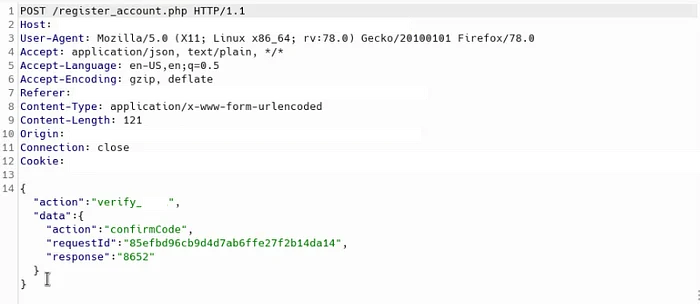
The screenshot shows the captured OTP submission request as it appeared in Burp.
Exploitation
The researcher's assumption was that the OTP is associated with the requestId. When the request is forwarded, the server verifies whether the value of response is the same for the corresponding requestId, and if it matches it redirects to phone number verification. The idea was therefore: copy the request body, drop the request, and then reuse that body while generating an account with the victim's email address.
Step i
Try to create an account using the attacker's email address.
Step ii
Submit the OTP received in the attacker's account, copy the request body and drop the request.
Step iii
Now try to create an account using the victim's email address.
Step iv
Enter any random OTP and capture the request using Burp.
Step v
Replace the body of the request with the one copied in step ii.
Step vi
Forward the request.
Following these steps, the email verification was bypassed successfully and the researcher was able to create an account using the victim's email address. Because the same mechanism is implemented while verifying the phone number, the phone number verification was bypassed in the same way.
Root cause
The report describes the mechanism as the server checking whether the response value matches the OTP for the corresponding requestId. The researcher's assumption was that the copied body, containing a valid requestId and response pair from the attacker's own signup, would be accepted when replayed in the request for a different account (the victim's email address), and the bypass succeeded. The report does not state why the server accepted the replayed pair. The report does not go into the server-side code, so the exact binding that is missing is not stated.
Impact
By exploiting this vulnerability, an attacker can create an account using a victim's email address and phone number. The report does not describe any further consequences beyond account creation with those identifiers.
Fix
Variants to test
- Replay a valid
requestId/responsepair from your own signup against a signup for a different email address, as in the report. A positive result is the second signup passing email verification without the OTP sent to that address. - Repeat the same replay against the phone number verification step. A positive result is the phone number being marked verified without the OTP sent to that number.
- Try reusing the copied body after the original request has been dropped, to see whether the pair is single-use. A positive result is acceptance in either case.
- A positive result is more than one account being verified with the same pair.
Timeline
- 04/05/21: vulnerability reported
- 05/05/21: replied with the bounty email
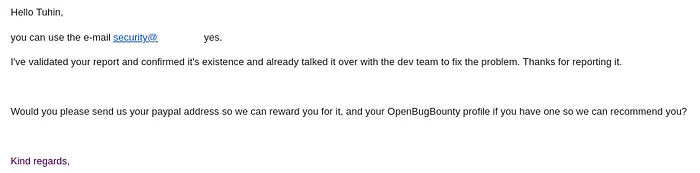
The screenshot shows the vendor's reply, received within 24 hours of the report.
What happened, in plain words
A security researcher was looking at a website that sells email marketing services. When you sign up for such a site, it usually wants to make sure you really own the email address and phone number you typed in. It does this by sending you a short numeric code, called a one-time password (OTP), and asking you to type it back into the website. If the code matches, the site marks that email address or phone number as verified.
The researcher found a way to skip that check. He could take a valid code from his own signup, keep a copy of the message his browser sent to the server, and then reuse that copied message while signing up with somebody else's email address. The server accepted it, so the account was created with the victim's email address. The same trick worked for phone numbers.
The researcher reported the issue and was waiting for a bounty. The researcher's name is Tuhin Bose, and he was working as Chief Technology Officer at Virtual Cyber Labs when he wrote this up. He published it on 17 May 2021.

The image above is the banner at the top of the article, before the technical part begins.
The target and the feature
The target was an email marketing website. The write-up calls it redacted.com, which means the real domain name has been hidden so that the site is not named publicly. Email marketing sites let businesses send newsletters and promotional emails to lists of customers, so they have a strong reason to make sure every account is tied to a real, verified email address and phone number. Otherwise people could sign up with addresses they do not own and send spam through the service.
The feature involved is account creation, also called signup. During signup the site asked for an email address and a phone number, and it verified both with an OTP. An OTP is a short code, usually a handful of digits, that the site sends to you (by email or by text message) and that you type back into the page. It proves you can receive messages at that address or number, because only the person who controls it will see the code.
What the researcher used
To see and change what his browser sent to the site, the researcher used Burp, short for Burp Suite. Burp is a tool that sits between your browser and the website, like a post office clerk who opens every letter, reads it, and can rewrite it before passing it on. This position is called a proxy. With a proxy you can pause a request, look at exactly what the browser is sending, change parts of it, and then either send it on or throw it away.
A request, in this context, is the message your browser sends to a website's server. The server is the computer that runs the site and holds the data. When you fill in a form and press a button, your browser packages up what you typed into a request and sends it off. The server reads it, does something (checks a password, saves a record), and sends back a response, which is the reply your browser uses to draw the next page.
Many modern sites also work through an API, which is a set of addresses on the server that accept requests and return data rather than whole web pages. Think of a restaurant: the menu is the API, the kitchen is the server, and your order is the request. You do not walk into the kitchen yourself; you ask through the menu. When a signup form submits an OTP, it is usually talking to an API behind the scenes.
The only precondition for the attack was that the researcher could sign up with his own email address and phone number, receive a real OTP, and intercept the message his browser sent when he submitted that OTP. No special account, role or tool version is described.
Noticing the OTP check
While creating an account, the researcher noticed that the site verified both the email address and the phone number using an OTP. That observation is what started the investigation: if a code is checked somewhere, it is worth asking how the server knows which code belongs to which signup.
He decided to try an OTP bypass. A bypass means getting past a check without satisfying it properly, the way you might get through a door not by having the key but by finding that the lock was never actually engaged. He submitted the OTP and captured the request with Burp. In both cases, email and phone number, the request looked like this:
The screenshot shows the captured OTP submission request as it appeared in Burp. It is the raw message the browser sent when the code was entered.
The researcher's assumption
The researcher formed a theory about how the server was checking the code. His assumption was that the OTP is associated with a value called requestId. A requestId is an identifier the server hands out when it starts a verification, so that when the code comes back the server can look up which pending verification it belongs to. Think of a cloakroom: you hand in your coat and get a numbered ticket; when you come back with the ticket, the attendant fetches the matching coat. The requestId is the ticket number.
When the request is forwarded, the server verifies whether the value of response is the same for the corresponding requestId. The response field is where the code the user typed is placed. If the two match, the server redirects to phone number verification, meaning it moves the user on to the next step of signup.
From that theory came the idea: copy the request body, drop the request, and then try using that body while generating an account with the victim's email address. The request body is the part of the message that carries the actual data, as opposed to the headers, which are the labels and routing information around it. Dropping the request means telling Burp not to send it to the server at all, so the server never sees that first attempt. The researcher hoped the copied body, containing a valid ticket and a matching code from his own signup, would still be accepted when replayed for a different account.
Steps to reproduce
He performed the following steps and the email verification was bypassed successfully. He was able to create an account using the victim's email address.
- Try to create an account using the attacker's email address.
- Submit the OTP (which is received in the attacker's account), copy the request body and drop it.
- Now try to create an account using the victim's email address.
- Enter any random OTP and capture the request using Burp.
- Replace the body of the request with that one which you copied in step 2.
- Forward the request.
Here is why each step matters.
Step 1 starts a normal signup with an address the researcher controls. This is the setup: he needs a genuine OTP sent to a mailbox he can read, so that he has a real code and a real requestId to work with.
Step 2 is the heart of the trick. He types the real code into the form, but when Burp catches the outgoing message he copies its body and then drops it. The server never processes that first submission, so from the site's point of view the attacker's own signup is still waiting for a code. Meanwhile the researcher holds a copy of a message that contains a valid requestId and the matching response.
Step 3 begins a second signup, this time with the victim's email address. The site sends an OTP to the victim, who of course does not pass it on. The researcher does not need it.
Step 4 is where he pretends to verify. He types any random OTP, because the value will not survive the next step anyway. Burp catches this second request so that it can be edited before it reaches the server.
Step 5 swaps the body. The second request now carries the requestId and response pair from the attacker's own signup, not the random code typed for the victim's address.
Step 6 sends it. If the server accepts the copied requestId and response pair for the second signup, the check passes. The email address is marked verified and the account is created.
Because the same mechanism is implemented while verifying the phone number, the researcher was also able to bypass the phone number verification successfully, using the same approach.
Why it worked
The report describes the mechanism as the server checking whether the response value matches the OTP for the corresponding requestId. The researcher's assumption was that the copied body, containing a valid requestId and response pair from his own signup, would be accepted when replayed for a different account, the victim's email address, and the bypass succeeded.
In plain terms, the ticket and the coat matched, but nobody checked whose coat it was. The report does not state why the server accepted the replayed pair. A session is the site's way of remembering that a series of requests come from the same person; a cookie is a small piece of data the browser stores and sends back with each request so the server can recognise you. The report does not go into the server-side code, so the exact binding that is missing is not stated.
Impact
By exploiting this vulnerability, an attacker can create an account using a victim's email address and phone number. The report does not describe any further consequences beyond account creation with those identifiers.
The vendor's response
The researcher quickly made a proof of concept, usually shortened to POC: a small, repeatable demonstration that the problem is real, rather than just a claim. He sent it to the vendor, the company that runs the site. Within 24 hours they replied.
The screenshot shows the vendor's reply, received within 24 hours of the report.
Timeline
- 04/05/21: vulnerability reported
- 05/05/21: replied with the bounty email
The researcher ends by saying he is waiting for the bounty, the payment some companies make for valid security reports.
Glossary
- API: a set of addresses on a server that accept requests and return data, rather than whole web pages; the menu you order from when talking to a site's backend.
- Attacker: the person trying to abuse a feature, in this case the researcher testing his own accounts.
- Body (request body): the part of a request that carries the actual data being sent, such as form fields, as opposed to the headers around it.
- Bounty: a payment a company makes to someone who reports a valid security problem in its product.
- Burp (Burp Suite): a tool that sits between browser and website so you can pause, read, change, drop or forward requests.
- Bypass: getting past a security check without satisfying it properly.
- Cookie: a small piece of data a browser stores for a site and sends back with later requests, so the server can recognise the same visitor.
- Drop (a request): telling the proxy not to send the request to the server at all.
- Email marketing website: a service that helps businesses send newsletters and promotional emails to lists of customers.
- Forward (a request): sending a captured request on to the server, possibly after editing it.
- Headers: the labels and routing information attached to a request, separate from the data in the body.
- OTP (one-time password): a short code sent to your email address or phone number that you type back to prove you control it.
- POC (proof of concept): a small, repeatable demonstration that a security problem is real.
- Proxy: a tool or service that sits between your browser and a website and passes messages between them, with the option to inspect and alter them.
requestId: an identifier the server issues when a verification starts, used to look up which pending verification a returned code belongs to; the cloakroom ticket number.response: the field in the request where the code the user typed is placed.- Redirect: the server telling the browser to move on to another page or step, here the next stage of signup.
- Request: the message a browser sends to a server when you do something on a site.
- Response: the server's reply to a request.
- Server: the computer that runs a website and holds its data.
- Session: the site's way of remembering that a series of requests come from the same person.
- Signup (account creation): the process of registering a new account on a site.
- Vendor: the company that runs the website and receives the report.
- Verification: the step where a site confirms you really control an email address or phone number, usually by sending a code to it.


