Email Verification Bypass Leads to Account Lockout
The email verification link accepted a changed email parameter, so the application marked an address the user did not own as verified. An attacker could therefore reserve other people's email addresses, blocking those owners from registering.

Cybersecurity
The full write-up lives on its author's site
It belongs to its author, so we link to it rather than copy it. The other two tabs are our own rewrites, checked against it.
Context
The target here is an application's email verification flow: the step where a newly registered account is confirmed by opening a link sent to the address supplied at sign-up. Normally that link proves the person who registered controls the mailbox, and the application marks that specific address as verified.
The report does not name the product, the program or the platform hosting the application. What it describes is the verification link itself and the email parameter it carries.
Setup
No tooling, versions or special preconditions are described. The researcher needed two email addresses, referred to throughout as [redacted] and [redacted], and the ability to receive mail at the first one so the verification link could be opened. The second address is the one the researcher does not control, which is the point of the test.
Finding it
The observation is that the verification link contains the address being verified as a parameter named email. If the server trusts that parameter when deciding which address to mark as verified, rather than binding the link to the account that requested it, then anyone holding a valid link can swap the address inside it.
Exploitation
Step 1: Register with the first address
Register a new account using [redacted]. This triggers the verification email and gives the researcher a legitimate link.
Step 2: Open the verification link
Open the link from the email. At this stage it is the genuine link for [redacted].
Step 3: Change the email parameter
In the link, change the email parameter from [redacted] to [redacted].
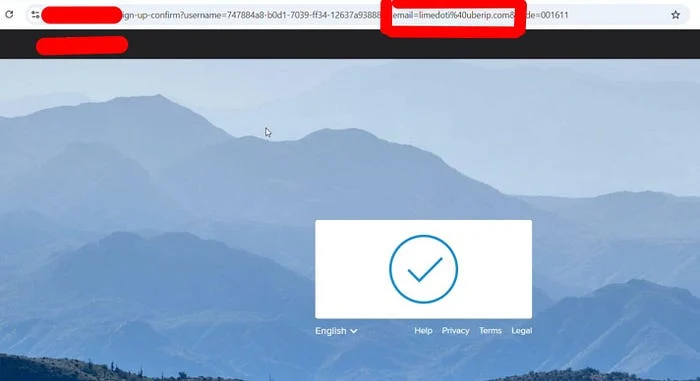
The image accompanies the step where the email parameter is changed from [redacted] to [redacted].
Step 4: Open the modified link
Open the modified link and observe that the application reports the email as verified. The application accepts the substituted address and marks [redacted] as verified, even though nobody has proved control of that mailbox.
Step 5: Try to log in as the second address
Try to log in using [redacted] and observe that login fails. The address is now flagged as verified, but there is no usable account behind it for the researcher.
Step 6: Try to register the second address
Try to register a new account using [redacted] and observe that the application reports that the email is unavailable.
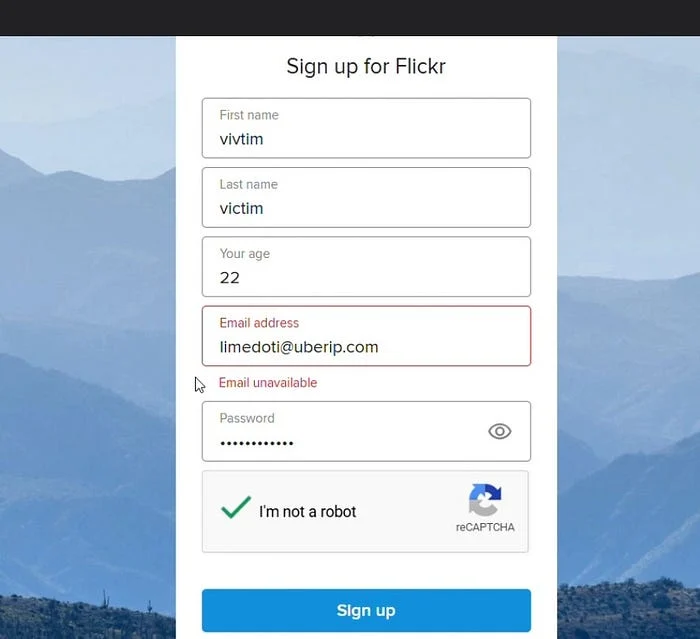
The image accompanies the step where registering with [redacted] shows the email as unavailable.
Root cause
The verification endpoint takes the address to be verified from the request, in the email parameter, instead of deriving it from the account or token that the link was issued for. The server appears to take the address to be verified from the email parameter rather than from the account the link was issued for.
Impact
This is an account registration denial of service. An attacker can reserve email addresses without verifying ownership, which prevents the legitimate owners of those addresses from registering. The report does not describe any further consequence, such as takeover of an existing account, and the login attempt with the substituted address fails, so the effect is limited to blocking registration of addresses the attacker does not control.
Fix
The fix implied by the finding is to stop trusting the email parameter: bind the verification token to the account it was issued for on the server side and mark that account's address as verified, ignoring any address supplied in the request.
Variants to test
- Substitute the address in other links that carry an identifier, such as password reset or email change confirmation. A positive result is the application acting on the substituted address rather than the one the token was issued for.
- Reuse a verification token after the address has already been verified, or after the account has been deleted. A positive result is the token still being accepted.
- Send the same token with several different
emailvalues in sequence. A positive result is each address being marked verified from one issued link. - Check whether the token itself is checked at all, for example by altering or removing it while keeping a valid
emailvalue. A positive result is verification succeeding without a valid token.
What happened, in plain words
When you create an account on a website, the site usually wants to check that the email address you typed really belongs to you. It does this by sending a message to that address with a special link inside. You click the link, the site sees that you could open the message, and it marks your address as confirmed. This is called email verification, and the link is called a verification link.
The researcher in this report found that the verification link contained the email address itself, as a piece of data called a parameter named email. A parameter is a small labelled value attached to a link or a request, a bit like the "To:" line on an envelope: it tells the receiving side who the message is for. The problem was that the site trusted whatever address was written in that parameter. So the researcher took a genuine link issued for one address, swapped the address inside it for a different one, and the site marked the second address as verified, even though nobody had proved they could read mail sent to it.
The result is a kind of denial of service: the second address becomes "taken" on the site, so its real owner can no longer register with it, while the attacker cannot actually log in with it either. The address is effectively blocked for everyone.
This report does not name the product, the company or the bug bounty programme. It only describes the verification link and the email parameter inside it.
The feature being tested
The target is the email verification flow of an application. In plain terms, the flow works like this:
- You sign up and give an email address.
- The site sends a message to that address containing a link.
- You open the link.
- The site marks that address as verified, meaning "we know this person can read mail at this address".
The report does not describe any other value in the link besides the email parameter. Think of it as a cloakroom ticket: the number on the ticket matches the coat the attendant is holding, and nobody else can claim your coat with a made-up number.
The report's finding is that the link carries the address being verified in a parameter called email, and the server appears to trust that parameter.
Setting up
The report describes no special tools, software versions or preconditions. To reproduce the issue you need:
- Two email addresses. The report calls them
[redacted]and[redacted]. - Access to the mailbox for the first one,
[redacted], so you can receive and open the verification link. - The second address,
[redacted], is the one the researcher does not control. That is the whole point: the test checks whether the site will mark an address as verified without the person running the test being able to read mail sent to it.
No code, command or request is shown in the report for this part, so there is nothing to copy here.
Finding it
The observation is simple. The verification link contains the address being verified as a parameter named email. If the server decides which address to mark as verified by reading that parameter, rather than by looking up the account that requested the link, then anyone holding a valid link can swap the address inside it for another one.
This is a classic case of a server trusting input that comes from the user. In security terms, any value that arrives from the browser should be treated as untrusted until the server has checked it against something it controls itself, such as a record in its database.
Exploitation
Step 1: Register with the first address
Register a new account using [redacted]. This triggers the verification email and gives the researcher a legitimate link, issued by the site for that account.
Why this step: you need a real, valid link to work with. A made-up link would not tell you anything, because the server would reject it for the wrong reason.
Step 2: Open the verification link
Open the link from the email. At this stage it is the genuine link for [redacted].
Why this step: opening the real link first shows the exact shape of the link, including the email parameter.
Step 3: Change the email parameter
In the link, change the email parameter from [redacted] to [redacted].
The image accompanies the step where the email parameter is changed from [redacted] to [redacted].
Why this step: this is the actual test. If the server ignores the parameter and uses the token to decide which account to verify, nothing bad happens. If the server reads the parameter, the second address will be marked as verified.
Step 4: Open the modified link
Open the modified link and observe that the application reports the email as verified. The application accepts the substituted address and marks [redacted] as verified, even though nobody has proved control of that mailbox.
Why this step: this confirms the behaviour. The site accepted the substituted address.
Step 5: Try to log in as the second address
Try to log in using [redacted] and observe that login fails. The address is now flagged as verified, but there is no usable account behind it for the researcher.
Why this step: this checks how far the problem goes. A verified flag on an address is not the same as an account you can use. Here the login fails, so the researcher gains no access.
Step 6: Try to register the second address
Try to register a new account using [redacted] and observe that the application reports that the email is unavailable.
The image accompanies the step where registering with [redacted] shows the email as unavailable.
Why this step: this is where the harm becomes visible. The site now treats [redacted] as belonging to an existing account, so the real owner is locked out of registering.
Root cause
The verification endpoint takes the address to be verified from the request, in the email parameter, instead of deriving it from the account or token that the link was issued for. The server appears to take the address to be verified from the email parameter rather than from the account the link was issued for.
In everyday terms: the cloakroom attendant checks that your ticket is real, but then hands over whichever coat you name, instead of the one matching the ticket.
Impact
This is an account registration denial of service. An attacker can reserve email addresses without verifying ownership, which prevents the legitimate owners of those addresses from registering. The report does not describe any further consequence, such as takeover of an existing account, and the login attempt with the substituted address fails, so the effect is limited to blocking registration of addresses the attacker does not control.
Fix
The fix implied by the finding is to stop trusting the email parameter: bind the verification token to the account it was issued for on the server side and mark that account's address as verified, ignoring any address supplied in the request.
Variants to test
These are further checks in the same spirit, suggested by the finding:
- Substitute the address in other links that carry an identifier, such as password reset or email change confirmation. A positive result is the application acting on the substituted address rather than the one the token was issued for.
- Reuse a verification token after the address has already been verified, or after the account has been deleted. A positive result is the token still being accepted.
- Send the same token with several different
emailvalues in sequence. A positive result is each address being marked verified from one issued link. - Check whether the token itself is checked at all, for example by altering or removing it while keeping a valid
emailvalue. A positive result is verification succeeding without a valid token.
Glossary
- Parameter: a labelled value attached to a link or request, such as
email=[redacted], which tells the receiving side what data is being sent. - Email verification: the step where a site confirms that a person can read mail at the address they signed up with, usually by sending a link.
- Verification link: the link sent by email that, when opened, tells the site the address is confirmed.
- Token: a long random value generated by the server and included in a link or request, used to prove the request is genuine and was issued for a particular purpose.
- Endpoint: the specific address on a server that handles a particular action, such as verifying an email.
- Server: the computer that runs the website and stores its data, as opposed to the browser on your own machine.
- Request: the message a browser sends to a server asking it to do something, such as load a page or submit a form.
- Denial of service: a situation where something is made unavailable to the people who should be able to use it.
- Account registration denial of service: a denial of service aimed at sign-up, where an attacker blocks other people from registering with their own addresses.
- Root cause: the underlying reason a bug exists, as opposed to its visible symptoms.
- Replay: sending a valid value, such as a token, again in a different context, hoping the server accepts it a second time.
- Bug bounty programme: a scheme where organisations pay researchers for reporting security problems to them.
- Researcher: the person who tests a system for security problems and reports what they find.




