Error based SQL Injection with WAF bypass manual Exploit 100%
The login form was vulnerable to error-based SQL injection, but a web application firewall (WAF) blocked common keywords like 'select' and 'order by'. The authors bypassed the WAF by using the '+' character (encoded as %2b) to concatenate a string with the result of a function call, causing a data type conversion error that revealed database information.
 Published on c0nqr0r.medium.com
Hey folks, Back again with SQL injection WAF bypass write-up, I’m gonna share what methodology I used to bypass the WAF block.
The full write-up lives on its author's site
It belongs to its author, so we link to it rather than copy it. The other two tabs are our own rewrites, checked against it.
Context
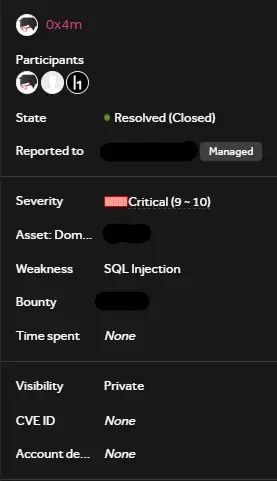
This is a write-up of an error-based SQL injection found in the login function of an old bug bounty program on HackerOne, on the program's main domain. The login form takes the submitted credentials and sends them in a POST request. The finding was a collaboration between Ahmed Qaramany (@c0nqr0r) and Mahmoud Samaha (@0x__4m), and it was reported from @0x__4m's HackerOne account.
The authors stress that the program had previously been a pentest project, so scanners such as Acunetix and SQLmap, and generic "spray and pray" payloads, had almost certainly been run against it before. That is why they avoided scanners and worked manually.
Setup
The work was black-box testing. They intercepted the login request and sent it to Repeater, and later opened their cheat sheets of WAF bypass techniques. The target database turned out to be MS-SQL.
One practical constraint shaped the whole write-up: the program applied a fix about two hours after the report, before the triage team saw it, so the authors could not capture detailed screenshots of every step.
Finding it
After recon, the authors looked at the functions that send queries to the database. Login is the obvious one, so they intercepted the login request and sent it to Repeater.

The first test was the standard way to break out of a SQL string, a single or double quote. Because this was black-box testing, they injected this value into the email parameter:
email=qaramany'
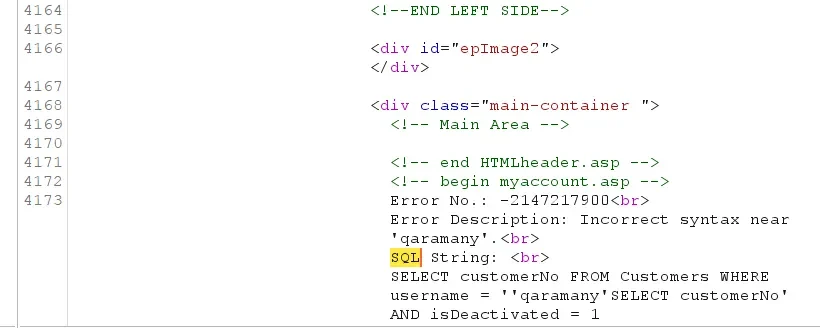
The quote was the last line of the request. Looking at the response length, the application returned an error at line 4173. Searching for that error gave more information about the database being interacted with; a quick search led to the OWASP article on testing for SQL injection.
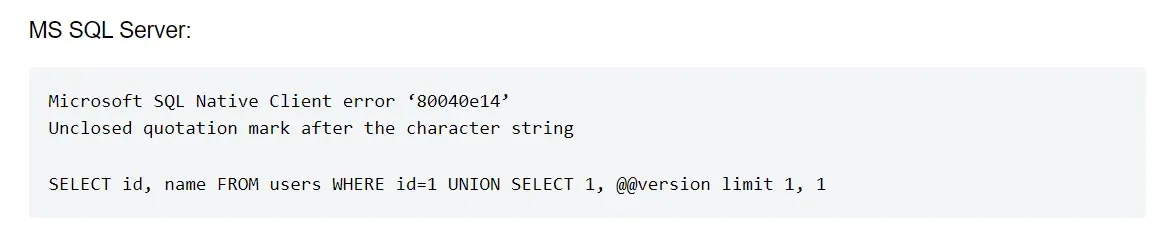
At this point they had an error-based SQL injection against an MS-SQL database. The scanners were no help: Burp scanner, Acunetix and SQLmap, run at high level and high risk for long hours, found nothing. The reason is an aggressive filter on keywords such as select and order by, so even +select may be filtered and return a 500 WAF error.
After more than 50 Repeater tabs they worked out how the WAF logic behaved and when it blocked them. Staring at the response, they noticed their own name reflected, as in the previous screenshot: typing qaramany came back in the response. Since the tools could not exploit it, they opened their cheat sheets and WAF bypass techniques.
With select, order by, group by and alternative error-based vectors blocked, the key insight was that queries containing those expressions are usually blocked by WAFs. The bypass is to concatenate a string using the %2b character, which is the URL encoding of +, together with the result of function calls that trigger a data type conversion error on the sought-after data.
Functions that can be used this way:
SUSER_NAME()USER_NAME()PERMISSIONS()DB_NAME()FILE_NAME()TYPE_NAME()COL_NAME()
Exploitation
Step 1: confirm the injection with a quote
The email parameter was set to qaramany'. The single quote breaks out of the string in the SQL query and produces an error at line 4173. The name was reflected in the response.
Step 2: read the database version
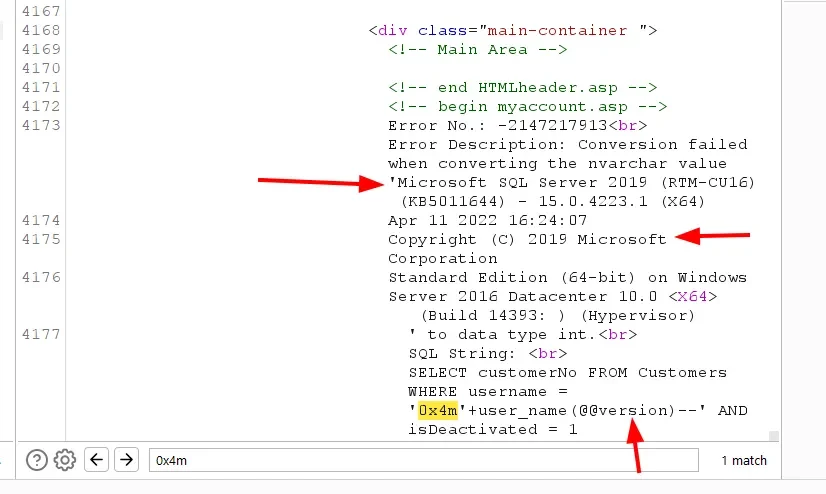
qaramany'%2buser_name(@@version)--
Breaking the payload down as the authors do:
qaramanyis the author's name.'is the single quote that triggers the error.%2bis the code for+.user_name()is a function call that triggers a data type conversion error on the sought-after data.
This payload returned the version of the database.
Step 3: handle intermittent 500 errors
Sometimes the request returned 500 errors, so, based on the same approach, they created this payload:
qaramany'%2buser_name(convert(int,(SYSTEM_USER)))--
This bypassed the WAF and returned SYSTEM_USER.
Step 4: other proofs of concept
These are the other PoCs sent in the report:
qaramany’%2buser_name(convert(int,(SESSION_USER))) — qaramany’%2buser_name(UPPER(‘sql+tutorial+is+fun!’)) — qaramany’%2buser_name(IIF(5=4,+’YES’,+’HackedBy_c0nqr0r&0x4m’)) — qaramany’%2buser_name(convert(int,(db_name()))) —
They follow the same pattern: a quote to break out, %2b to concatenate, and a function whose result is forced through a conversion error so the value appears in the error message. The variants read SESSION_USER, evaluate an expression with UPPER, use IIF to return a chosen string, and read the database name with db_name().
Root cause
A single quote in the email field breaks the query and produces an error at line 4173. The error pointed to line 4173, and searching for it gave more information about the database.
The WAF blocked keywords such as select and order by. It did not block the + concatenation operator or the conversion-error functions, so the injection could still be exploited without any of the filtered keywords.
Impact
Under the conditions described, an attacker could read database information through error messages: the database version, SYSTEM_USER, SESSION_USER and the database name. The report does not go further than that; it does not describe extracting table contents or escalating beyond the database user's context.
Fix
The program applied a fix about two hours after the report, before triage. The report does not describe what the fix was.
Variants to test
- Quote in any parameter that reaches a query. Send a single quote in fields such as email, username or search, and look for a database error or a change in response length. A positive result is a database error or a change in response length.
- Concatenation with
%2bplus a conversion function. Whereselectandorder byare blocked, try'%2buser_name(@@version)--and the other functions listed above. A positive result is the function's value appearing in the error response. convert(int, ...)wrappers. If plain function calls return 500 errors, wrap the target expression as inuser_name(convert(int,(SYSTEM_USER))). A positive result is the value of the wrapped expression in the error.IIFto confirm control. UseIIF(5=4,+'YES',+'...')style expressions to show that you control the returned string. A positive result is your chosen string in the response.- Scanner comparison. Run SQLmap and Burp scanner at high level and risk against the same parameter to see whether the WAF blocks them while manual payloads get through. A positive result is a manual payload succeeding where the scanners report nothing.
What happened, in plain words
A website had a login form. When you type your email and password and press the button, the site sends that text to a database, which is the program that stores and looks up all the site's data. The site builds a question (a "query") out of whatever you typed and asks the database to answer it.
The problem was that the site did not treat your text as plain text. It pasted it straight into the question. So if you typed a special character that has meaning in the database's language, you could change the question itself. That is what a SQL injection is: making the database answer a different question than the one the site intended, by putting database code into an ordinary input field.
A common everyday comparison: imagine a form that says "write your name here" and a clerk who reads it out as "Please let in [your name]". If you write "Alice and also everyone else", the clerk reads "Please let in Alice and also everyone else". You did not hack the clerk; you just wrote something the clerk took literally. SQL injection is the same idea, with a database instead of a clerk.
There was a second layer in the way: a WAF (Web Application Firewall), a filter that sits in front of the site and blocks requests that look like attacks. It blocked certain words. The two researchers found a way to ask the database questions without using those words, and the database's own error messages handed back the answers.
The finding was a collaboration between Ahmed Qaramany (@c0nqr0r) and Mahmoud Samaha (@0x__4m), and it was reported from @0x__4m's HackerOne account. HackerOne is a platform where companies invite researchers to test their systems and report problems.
Background you need first
A few ideas come up again and again, so here they are from zero.
HTTP request. When you use a website, your browser sends a short text message to the server: "give me this page", or "here is my login form, please check it". That message is an HTTP request. A POST request is the kind that carries data in its body, which is what a login form does: it posts your email and password.
Parameter. The named pieces of data inside a request. In a login form the fields might be called email and password. When the researchers write email=qaramany', they mean the parameter named email was given the value qaramany'.
Response. The server's reply. It has a status code (200 usually means fine, 500 means the server hit an internal error) and a body, which is the page or data you see. The response length is simply how big that body is; a change in length is a clue that something different happened.
Database and SQL. A database stores data in tables, like a very large spreadsheet. SQL is the language used to ask it questions, for example "find the row whose email matches this". A query is one such question.
String. A piece of text in a program, usually written between quotes, like 'qaramany'. The quotes tell the database where the text starts and stops.
Error-based SQL injection. If you break the query, the database complains. If the site shows that complaint to you, the complaint can contain data from the database. That is the whole trick: you deliberately cause an error whose message includes the answer you want.
WAF. A filter in front of the site that inspects requests and blocks ones containing suspicious patterns, such as the SQL word select. It is like a bouncer with a list of banned words.
Black-box testing. Testing a system from the outside with no access to its source code, no documentation of its internals, and no special accounts. You only see what a normal browser sees.
Scanner. A program that automatically fires many known attack patterns at a site and reports what looks vulnerable. Acunetix and SQLmap are two such tools; Burp Suite is a toolkit that lets a person capture a request, edit it by hand and resend it. Its Repeater tab is exactly that: a place to change one request and send it again and again.
Payload. The specific piece of text you put into a parameter to try to trigger the behaviour you want.
URL encoding. Some characters cannot travel safely inside a URL or form body, so they are written as a percent sign plus a code. %2b is the encoded form of the plus sign +.
Comment. In SQL, -- starts a comment: everything after it on that line is ignored by the database. Attackers use it to cut off the rest of the original query so it does not interfere.
The target and the approach
This was an old bug bounty program on HackerOne, on the program's main domain. The login form takes the submitted credentials and sends them in a POST request.
The authors make an important point about method. The program had previously been a pentest project, meaning a company had once paid professionals to attack it. So scanners such as Acunetix and SQLmap, and generic "spray and pray" payloads (fire lots of known attacks and hope one lands), had almost certainly been run against it before. Anything a scanner would find had probably already been found and fixed. That is why the two researchers avoided scanners and worked by hand.
The work was black-box testing. They intercepted the login request and sent it to Repeater, and later opened their cheat sheets of WAF bypass techniques. The target database turned out to be MS-SQL, Microsoft's database product.
One practical constraint shaped the whole write-up: the program applied a fix about two hours after the report, before the triage team saw it. Triage is the first review a report gets, where the company confirms the problem is real. Because the fix landed first, the authors could not capture detailed screenshots of every step.
Finding it
After recon (reconnaissance: looking around the site to map what it does and which features talk to the database), the authors looked at the functions that send queries to the database. Login is the obvious one, because it has to look your account up. So they intercepted the login request and sent it to Repeater.
The first test was the standard way to break out of a SQL string: a single or double quote. The reasoning is simple. If the site builds a query like ... WHERE email = 'your input', then typing a quote of your own closes the text early and leaves the rest of your input sitting in the query as code. If the site handles input safely, the quote is just a character and nothing happens. If it does not, you get an error or a different response. Because this was black-box testing, they injected this value into the email parameter:
email=qaramany'
Line by line:
email=is the name of the form field being sent.qaramanyis an ordinary-looking value, the author's name, so the request still looks normal to a casual observer.'is the single quote. This is the actual test: it is the character that can end the text early inside the database query.
The quote was the last line of the request. Looking at the response length, the application returned an error at line 4173. Searching for that error gave more information about the database being interacted with; a quick search led to the OWASP article on testing for SQL injection. OWASP is a well-known non-profit that publishes free guidance on web security.
At this point they had an error-based SQL injection against an MS-SQL database. The scanners were no help: Burp scanner, Acunetix and SQLmap, run at high level and high risk for long hours, found nothing. "High level and high risk" are scanner settings that make the tool try more, and more aggressive, attacks. The reason for the failure is an aggressive filter on keywords such as select and order by, so even +select may be filtered and return a 500 WAF error. In other words, the bouncer's banned-word list was doing its job.
After more than 50 Repeater tabs they worked out how the WAF logic behaved and when it blocked them. Staring at the response, they noticed their own name reflected, as in the previous screenshot: typing qaramany came back in the response. That reflection is a useful signal. It shows your input travels into the page, so if you can make the database put something interesting next to your input, it will come back to you too. Since the tools could not exploit it, they opened their cheat sheets and WAF bypass techniques.
With select, order by, group by and alternative error-based vectors blocked, the key insight was that queries containing those expressions are usually blocked by WAFs. The bypass is to concatenate a string using the %2b character, which is the URL encoding of +, together with the result of function calls that trigger a data type conversion error on the sought-after data.
Two ideas are packed into that sentence, so let us unpack them.
Concatenation. In SQL, + joins two pieces of text together, like glue. 'abc' + 'def' becomes 'abcdef'. The WAF did not block +, so the researchers could still build expressions even without select.
Data type conversion error. A database column has a type: numbers, text, dates. If you ask it to treat text as a number, it fails and produces an error. If the text it failed to convert is the value you wanted to read, that value ends up inside the error message. So you deliberately force a failed conversion and read the answer in the complaint. It is like asking a clerk to file a word in a box labelled "numbers only": the clerk shouts back "I cannot file this word here", and now you know the word.
Functions that can be used this way:
SUSER_NAME()USER_NAME()PERMISSIONS()DB_NAME()FILE_NAME()TYPE_NAME()COL_NAME()
Each of these is a built-in MS-SQL function that returns some piece of information about the database or the account running the query. The researchers' trick is to feed such a function's result into a place where a conversion error will expose it.
Exploitation
Step 1: confirm the injection with a quote
The email parameter was set to qaramany'. The single quote breaks out of the string in the SQL query and produces an error at line 4173. The name was reflected in the response. This step is about proof, not data: before building anything clever, you want to know that your text actually reaches the database and that the site tells you when it breaks.
Step 2: read the database version
qaramany'%2buser_name(@@version)--
Breaking the payload down as the authors do:
qaramanyis the author's name.'is the single quote that triggers the error.%2bis the code for+.user_name()is a function call that triggers a data type conversion error on the sought-after data.
A little more detail on the pieces. @@version is an MS-SQL variable holding the database version string. user_name(...) expects a user name; handing it a version string forces the conversion failure, and the failure message carries the version. The trailing -- comments out whatever the site appended after your input, so the rest of the original query does not cause a second, confusing error. This payload returned the version of the database.
Step 3: handle intermittent 500 errors
Sometimes the request returned 500 errors, so, based on the same approach, they created this payload:
qaramany'%2buser_name(convert(int,(SYSTEM_USER)))--
Line by line:
qaramany'is the same name plus quote as before, to break out of the text.%2bis the plus sign, gluing the next expression onto the broken query.convert(int, ...)explicitly asks the database to turn the value inside into a whole number (int). SinceSYSTEM_USERis text, this conversion is guaranteed to fail, and the error message will contain the text.SYSTEM_USERis the MS-SQL value naming the account the database is running as.user_name(...)wraps the whole thing, and--comments out the remainder.
This bypassed the WAF and returned SYSTEM_USER. The reason for the extra convert wrapper is that the plain form sometimes produced 500 errors; making the conversion explicit gives the database a clearer reason to complain in a way that carries the value.
Step 4: other proofs of concept
These are the other PoCs sent in the report:
qaramany’%2buser_name(convert(int,(SESSION_USER))) — qaramany’%2buser_name(UPPER(‘sql+tutorial+is+fun!’)) — qaramany’%2buser_name(IIF(5=4,+’YES’,+’HackedBy_c0nqr0r&0x4m’)) — qaramany’%2buser_name(convert(int,(db_name()))) —
They follow the same pattern: a quote to break out, %2b to concatenate, and a function whose result is forced through a conversion error so the value appears in the error message. The variants read SESSION_USER, evaluate an expression with UPPER, use IIF to return a chosen string, and read the database name with db_name().
In plain words, each variant is a different question asked through the same broken channel:
SESSION_USERnames the current session's user, a close relative ofSYSTEM_USER.UPPER('sql+tutorial+is+fun!')turns a piece of text into capitals. It is a harmless expression, used to show that the database will evaluate whatever you put there.IIF(5=4, 'YES', 'HackedBy_c0nqr0r&0x4m')is an if-then-else: if 5 equals 4, returnYES, otherwise return the chosen string. Since 5 does not equal 4, the chosen string comes back. This is a strong proof: it shows you control what the database returns, not just that it errors.db_name()returns the name of the current database.
Why it worked
A single quote in the email field breaks the query and produces an error at line 4173. Parameterisation means passing user input to the database as data, separately from the query text, so the database never treats it as code. Without it, the input and the query are mixed together, and a quote is enough to change the question.
The error pointed to line 4173, and searching for it gave more information about the database. A site that shows a generic "something went wrong" page would have hidden the same bug from this technique.
The WAF blocked keywords such as select and order by. It did not block the + concatenation operator or the conversion-error functions, so the injection could still be exploited without any of the filtered keywords. The lesson is that a WAF is a filter, not a fix: it raises the cost of an attack but does not remove the underlying flaw.
What an attacker could get
Under the conditions described, an attacker could read database information through error messages: the database version, SYSTEM_USER, SESSION_USER and the database name. The report does not go further than that; it does not describe extracting table contents or escalating beyond the database user's context. In everyday terms, they could read the label on the database and the name of the account it runs under, not the contents of the filing cabinets.
The fix
The program applied a fix about two hours after the report, before triage. The report does not describe what the fix was.
Things to try on your own targets
These are the same ideas, written so a beginner can follow them in order.
- Quote in any parameter that reaches a query. Send a single quote in fields such as email, username or search, and look for a database error or a change in response length. A positive result is a database error or a change in response length. Start here because it costs nothing and tells you whether the site is even worth more work.
- Concatenation with
%2bplus a conversion function. Whereselectandorder byare blocked, try'%2buser_name(@@version)--and the other functions listed above. A positive result is the function's value appearing in the error response. This is the core bypass: avoid the banned words, use the glue and the complaint instead. convert(int, ...)wrappers. If plain function calls return 500 errors, wrap the target expression as inuser_name(convert(int,(SYSTEM_USER))). A positive result is the value of the wrapped expression in the error. The explicit conversion gives the database a reliable reason to fail.IIFto confirm control. UseIIF(5=4,+'YES',+'...')style expressions to show that you control the returned string. A positive result is your chosen string in the response. This distinguishes "the database is echoing something" from "the database is running my expression".- Scanner comparison. Run SQLmap and Burp scanner at high level and risk against the same parameter to see whether the WAF blocks them while manual payloads get through. A positive result is a manual payload succeeding where the scanners report nothing. It is also a reminder of why manual work still matters on a target that has been scanned before.
Glossary
- API: a defined way for one program to talk to another, like a service counter with set questions and answers.
- Black-box testing: testing from the outside with no source code, documentation or special access.
- Burp Suite: a toolkit for capturing, editing and resending web requests by hand; its Repeater tab resends one request repeatedly.
- Concatenation: joining two pieces of text together, in SQL with the
+operator. - Conversion error: a database failure caused by asking it to treat one type of data as another, such as text as a number.
- Database: the program that stores and looks up a site's data, organised in tables.
- Error-based SQL injection: an injection where the attacker reads data out of the database's error messages.
- HackerOne: a platform where companies invite researchers to test their systems and report vulnerabilities.
- HTTP request: the message a browser sends to a server asking for a page or submitting data.
- MS-SQL: Microsoft's database product, the database involved here.
- OWASP: a non-profit that publishes free, well-known guidance on web security.
- Parameter: a named piece of data in a request, such as
email. - Parameterisation: passing user input to a database as data, separately from the query text, so it is never treated as code.
- Payload: the specific text placed in a parameter to try to trigger a behaviour.
- POST request: an HTTP request that carries data in its body, as a login form does.
- Query: one question asked of a database in SQL.
- Recon (reconnaissance): looking around a target to map its features and behaviour before attacking.
- Response: the server's reply to a request, with a status code and a body.
- Response length: the size of the response body; a change can signal different behaviour.
- Scanner: a tool that automatically fires known attack patterns and reports possible vulnerabilities, such as Acunetix or SQLmap.
- Spray and pray: firing many generic payloads and hoping one works.
- SQL: the language used to ask questions of a database.
- SQL injection: putting database code into an ordinary input field so the database runs a different question than intended.
- String: a piece of text in a program, usually written between quotes.
- Triage: the first review of a bug report, where the company confirms the problem is real.
- URL encoding: writing characters as a percent sign plus a code so they travel safely, for example
%2bfor+. - WAF (Web Application Firewall): a filter in front of a site that blocks requests matching suspicious patterns.
- 500 error: an HTTP status code meaning the server hit an internal error.




