Exfiltration via CSS Injection
A CSS injection vulnerability allowed an attacker to exfiltrate CSRF tokens from hidden input fields by using sibling selectors to trigger background-image requests. The attacker could learn the token character by character through repeated requests to an attacker-controlled server.

CSS
The full write-up lives on its author's site
It belongs to its author, so we link to it rather than copy it. The other two tabs are our own rewrites, checked against it.
Context
The target was a real site that the author was testing as part of bug bounty work, and the vulnerability was a CSS injection. The report does not name the program or describe the feature in detail; what matters is that the page contained forms with CSRF token input elements, and that the author and two collaborators (Behrouz Sadeghipour, also known as nahamsec, and Brett Buerhaus) had found the injection but were struggling to turn it into something exploitable.
The normal purpose of a CSS injection attack is data exfiltration from input elements. The elements that matter most are CSRF token inputs, because they are commonly placed on the page as type=hidden input elements inside forms. The general technique is to use CSS attribute selectors to test guesses about a value, and to make the browser fetch a URL only when a guess matches, so the attacker learns the value one character at a time.
Setup
The author had recently taken up bug bounties in his spare time and was working with Sadeghipour and Buerhaus on various targets. Sadeghipour messaged him to say they had found a CSS injection but had trouble exploiting it.
Finding it
The team already had a CSS injection on the target. The obstacle was that the value they wanted to steal sat in a hidden input. In both Chrome and Firefox, input[type=hidden] elements do not fetch background-image URLs, so the usual exfiltration primitive does not fire on the element that holds the token.
The team looked at other ways to make the page call out but found nothing simple. They assumed there had to be another route and kept investigating until they learned about the ~ and + selectors in CSS, the general and adjacent sibling selectors.
Exploitation
Step 1: the standard CSS exfiltration loop
The general method is to inject CSS that makes the browser request a URL on the attacker's host when a guess about the token matches. The attacker loads an iframe pointing at the target, with the injection in place, and waits for a request to https://attacker.com/exfil/<data>.
Assume the token is csrF. The first round of CSS triggers a page load on https://attacker.com/exfil/c. The attacker then reloads the iframe with CSS that tests a longer prefix, which causes a page load at https://attacker.com/exfil/cs. Repeating the pattern a few times eventually produces a request to https://attacker.com/exfil/csrF, which tells the attacker the visitor's CSRF token.
On this specific site there was no X-Frame-Options header, so iframes could be used to exploit the injection in a simple way. The author notes that opening more tabs would technically work without iframes, but calls that ugly and very noisy.
Step 2: the hidden input problem
The straightforward version of the attack fails here because almost all CSRF tokens in forms are type=hidden, and hidden inputs do not request the background images. Directly using the input field to exfiltrate data is therefore much harder.
Step 3: sibling selectors
The sibling selectors let you take an element that shares a common parent with another element and style it based on a CSS query. The author illustrates this with a page containing paragraphs and the following CSS:
Read right to left, this says: any p that is a sibling of a p[color=red] should have color: red. The selector can be used to say that if any element sits next to an input element containing the CSRF token, that element should get a background-image.
Step 4: applying it to the target
Since there existed a form on the target with elements that were not type=hidden, the team was able to cause those elements to make the request on behalf of the CSRF token element. The PoC built for the report is shown below.
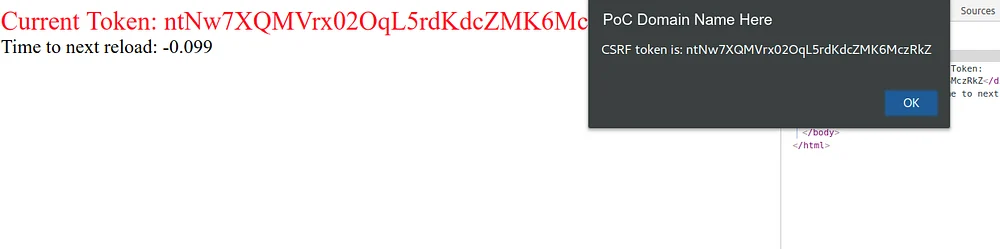
Step 5: the proof of concept
An anonymised version of the PoC used for the report is published at https://gist.github.com/d0nutptr/[redacted]. It does not include the server side code, which the author considers obvious: the background-image requests set a value on a cookie. That choice has the side benefit that the PoC will not work in Safari.
Root cause
The flaw is a CSS injection on the target page. The obstacle to the obvious exfiltration path is a browser behaviour rather than a server-side control: hidden inputs do not fetch background-image URLs. That behaviour is not a fix for the injection itself, and it is bypassed whenever a form contains a non-hidden element that shares a parent with the token input, because the sibling selector can attach the background image to that element instead.
Impact
An attacker who can inject CSS and can frame the target can recover a visitor's CSRF token character by character, provided the form holding the token has at least one sibling element that is not type=hidden. The simple version of the attack relies on the absence of X-Frame-Options, since the iframe reload loop drives the guessing; the author notes tabs would technically work instead. The report does not state which users or accounts were affected beyond the visitor whose token is exfiltrated.
Fix
The general remedy implied by the analysis is to remove the CSS injection itself, since the sibling selector technique only works once attacker-controlled CSS is on the page.
Variants to test
- Forms whose token input has a non-hidden sibling. A positive result is a
background-imagerequest to your host when the guessed prefix matches, which confirms the sibling selector route works. - Forms that contain only hidden inputs. The sibling technique will not work there; the author points to the
:has()selector proposed in theselectors-4draft as the future answer, for example a rule saying that any form with a descendant input namedcsrfand valuetokenshould get a background image. A positive result is the same kind of request, but only once:has()is supported, which the author notes it currently is not. - Targets without
X-Frame-Options. A positive result is that the iframe reload loop drives the exfiltration without opening extra tabs.
What happened, in plain words
A security researcher found a way to make a website leak a secret value that it was supposed to keep private. The secret was a CSRF token: a short random string that a website puts inside a form so it can tell a real submission from a forged one. The researcher could not read the token directly, but he could add his own styling rules (CSS) to the page. Those rules can make a browser download an image from a server the researcher controls, and the address of that image can carry a piece of the secret. By guessing the secret one character at a time and watching which guesses cause a download, he could recover the whole token.
The interesting part is that the obvious version of this trick did not work on this site. The token sat in a hidden form field, and browsers do not download background images for hidden fields. The researcher and his two collaborators worked around that by using a CSS feature called a sibling selector, which lets a rule aimed at one element take effect on a different element next to it. Because the form had at least one visible element next to the hidden token field, that visible element could be made to fetch the image instead.
This article walks through the whole story from zero: what CSS is, what a CSRF token is, why a browser downloading an image can leak data, and how the sibling selector saved the day. No prior security knowledge is assumed.
Background: the pieces involved
Before the attack makes sense, a few everyday ideas need to be clear.
CSS
CSS stands for Cascading Style Sheets. It is the language that tells a browser how a web page should look: which text is red, which box has a border, which element has a background picture. A page usually loads its CSS from the site itself, but if a site lets a visitor's input end up inside a stylesheet, the visitor can add rules of their own. That situation is called a CSS injection. It is the vulnerability class in this report.
CSRF and CSRF tokens
CSRF stands for Cross-Site Request Forgery. It is an attack where a malicious site tricks your browser into submitting a form on another site where you are already logged in, for example transferring money or changing your password, without you meaning to. The standard defence is a CSRF token: the site puts a long random value inside each form, and when the form is submitted the server checks that the value matches the one it issued to you. A malicious site cannot guess that value, so it cannot forge a valid submission.
The token is usually stored in a form field of type hidden, which means the browser keeps it in the page but does not display it to you. That detail matters a lot later.
Data exfiltration
Exfiltration means getting data out of a place where it is supposed to stay. In a browser, one classic route is to make the page request something from a server the attacker controls. The request itself is the message: the attacker reads the leaked data from the address that was requested. No file is actually needed; the browser just has to try to fetch it.
Iframes
An iframe is a rectangular window inside a web page that loads another web page. Attackers use iframes because a page on attacker.com can embed target.com in one, and the attacker's page can then reload that iframe over and over with different content. A site can refuse to be embedded by sending an HTTP response header called X-Frame-Options. If that header is missing, embedding works.
Cookies
A cookie is a small piece of data a website asks your browser to store and send back on later requests. In this story the attacker's own server sets a cookie to remember which characters have already been guessed, so the proof of concept can keep track across many requests.
The setup
The author had recently started doing bug bounties in his spare time. A bug bounty is a programme where a company invites outside researchers to look for security problems in its systems and pays them for valid reports. He was working with two other researchers, Behrouz Sadeghipour (known online as nahamsec) and Brett Buerhaus, against various targets.
Sadeghipour messaged him to say the team had found a CSS injection on a target but could not work out how to exploit it. Exploiting means turning a weakness into a concrete demonstration of harm, which is what a bounty report needs. The report does not name the programme or describe the site's features in detail. What matters is that the page contained forms with CSRF token inputs, and that the target did not send X-Frame-Options, so it could be embedded in an iframe.
The standard attack, and why it usually works
The usual goal of a CSS injection is to steal the contents of input elements, and the most valuable input is the CSRF token. The technique relies on attribute selectors. CSS can style an element based on the value of one of its attributes, for example input[value^="c"] means "any input whose value starts with the letter c". If the rule also sets a background-image, the browser will download that image only when the condition is true. So each guess about the token either causes a download or does not, and the attacker learns one character at a time.
The general shape of the attack is:
- The attacker's page loads an iframe pointing at the target, with the injected CSS in place.
- The CSS tests a guess about the token. If the guess is right, the browser requests
https://attacker.com/exfil/<data>, where<data>is the guessed prefix. - The attacker's server sees the request and records the prefix.
- The attacker reloads the iframe with a longer guess and repeats.
Suppose the token is csrF. The first round of CSS causes a request to https://attacker.com/exfil/c. The attacker then reloads the iframe with CSS that tests a longer prefix, producing a request to https://attacker.com/exfil/cs. After a few repetitions the browser requests https://attacker.com/exfil/csrF, and the attacker now knows the visitor's CSRF token.
On this particular site there was no X-Frame-Options header, so the iframe approach worked without any extra tricks. The author notes that opening more tabs would technically also work, but calls that ugly and very noisy.
The problem: hidden fields do not load images
Here is where the plan falls apart. In both Chrome and Firefox, an input element with type=hidden does not fetch background-image URLs. Since almost all CSRF tokens in forms are hidden fields, the direct version of the attack simply produces no requests at all.
The team looked for other ways to make the page call out to their server but found nothing simple. They were convinced another route existed and kept investigating.
The solution: sibling selectors
The breakthrough was the ~ and + selectors in CSS, known as the general sibling selector and the adjacent sibling selector. A sibling is an element that shares the same parent element with another. In a form, for example, several inputs and buttons all sit inside the same <form> tag, so they are siblings of each other.
Sibling selectors let you write a rule that targets one element based on what sits next to it. The author illustrates this with a page containing paragraphs and this CSS:
Read right to left, the rule says: any p that is a sibling of a p[color=red] should have color: red. In other words, the selector on the right of the ~ is the element being styled, and the selector on the left is the condition it must sit next to. The + version is stricter: it only matches the element immediately after the condition element.
Why does this help? Because the rule can be aimed at a visible element while the condition is about the hidden token field. The author describes the idea as: if any element is next to an input element that contains the CSRF token, set a background-image on it. The visible sibling does the fetching, and the hidden token field only supplies the condition.
Applying it to the target
On the target there was a form whose elements were not all type=hidden. That gave the team a visible sibling to work with, so they could cause those elements to make the request on behalf of the CSRF token element. The proof of concept built for the report is shown below.
The screenshot shows the PoC written for the CSS injection CSRF token exfiltration report.
The proof of concept
An anonymised version of the PoC used in the report is published at https://gist.github.com/d0nutptr/[redacted]. It does not include the server-side code, which the author considers obvious: the background-image requests set a value on a cookie. That choice has the side benefit that the PoC will not work in Safari.
Why it works at all
The underlying flaw is the CSS injection itself: the site let attacker-controlled styles run in the context of its own page. The thing that blocked the obvious exfiltration path was not a server-side defence but a browser behaviour: hidden inputs do not fetch background images. That behaviour is not a fix for the injection. It is bypassed as soon as a form contains a non-hidden element that shares a parent with the token input, because the sibling selector can attach the background image to that element instead.
What an attacker gets
An attacker who can inject CSS and can frame the target can recover a visitor's CSRF token one character at a time, as long as the form holding the token has at least one sibling element that is not type=hidden. The simple version of the attack relies on the absence of X-Frame-Options, because the iframe reload loop drives the guessing; the author notes tabs would technically work instead. The report does not say which users or accounts were affected beyond the visitor whose token is exfiltrated.
What the fix would be
The remedy implied by the analysis is to remove the CSS injection itself, since the sibling selector technique only works once attacker-controlled CSS is on the page.
Variants worth testing
- Forms whose token input has a non-hidden sibling. A positive result is a
background-imagerequest to your host when the guessed prefix matches, which confirms the sibling selector route works. - Forms that contain only hidden inputs. The sibling technique will not work there. The author points to the
:has()selector proposed in theselectors-4draft as the future answer, for example a rule saying that any form with a descendant input namedcsrfand valuetokenshould get a background image. A positive result is the same kind of request, but only once:has()is supported, which the author notes it currently is not. - Targets without
X-Frame-Options. A positive result is that the iframe reload loop drives the exfiltration without opening extra tabs.
Glossary
- Attribute selector: a CSS rule that matches an element based on one of its attributes, such as its
valueorname. - Background image: a picture a browser downloads and paints behind an element, set in CSS with
background-image. - Bug bounty: a programme where a company pays outside researchers for reporting security problems.
- Cookie: a small piece of data a site asks the browser to store and send back on later requests.
- CSS: Cascading Style Sheets, the language that controls how a web page looks.
- CSS injection: a flaw where attacker-supplied CSS ends up being applied to a page.
- CSRF: Cross-Site Request Forgery, an attack that makes your browser submit a form on another site without your intent.
- CSRF token: a random value placed in a form so the server can tell a genuine submission from a forged one.
- Data exfiltration: getting data out of a place where it is meant to stay, often by making the browser send it to an attacker's server.
:has(): a proposed CSS selector that matches a parent element based on what it contains.- Hidden input: a form field with
type=hidden, kept in the page but not displayed to the user. - Iframe: a window inside a page that loads another page.
- Proof of concept (PoC): a small working demonstration that a vulnerability can actually be exploited.
- Sibling selector: a CSS selector (
~or+) that targets an element based on another element sharing the same parent. type=hidden: the attribute value that makes an input invisible and, in Chrome and Firefox, stops it fetching background images.X-Frame-Options: an HTTP response header a site can send to refuse being embedded in an iframe.