Exploiting Application Logic to Phish Internal Mailing Lists
The application allowed an attacker to set a user-defined SAML IdP URL, which acted as an open redirect to a phishing page. Combined with an organisation invite feature that sent emails from the company's own domain, the attacker could post phishing links to internal mailing lists and steal Okta sessions, then add a new MFA factor within a short window to access protected apps.
 Published on medium.com
A while back I was tasked with performing a Red Team engagement on a tech company with a mature security program. Aside from all the normal technical testing, I wanted to run a phishing campaign to see if I could find a way to gain access to some of their highest value assets.
The full write-up lives on its author's site
It belongs to its author, so we link to it rather than copy it. The other two tabs are our own rewrites, checked against it.
Context
This engagement was a Red Team assessment against a tech company with a mature security programme. Beyond the usual technical testing, the goal was a phishing campaign aimed at the organisation's highest value assets. The company runs a public bug bounty programme with one of the highest payout tables around, and its security team is described as talented, engaged and proactive. The researcher also observed a company-wide security Slack channel where teams across the business post security articles, technical blogs and discussions, which made it clear that security awareness extended well past the security team. Phishing that audience would need to be more creative than a run-of-the-mill campaign.
The organisation relies on Okta as its identity provider. The researcher frames this as a double-edged sword: good for access control, logging and removing passwords, but if an employee's Okta account is compromised it is effectively game over. That made Okta the top target for the campaign. Throughout the write-up, example.com stands in for the real organisation.
Setup
The phishing page was a replica Okta login page capable of stealing full sessions, built with Kuba Gretzky's EvilGinx. The campaign needed a domain that would host the page, plus a way to deliver the link. The delivery mechanism came from the target application itself: it had a SAML authentication section and an organisation invite flow that sends email from the company's own infrastructure.
Finding it
Two observations shaped the approach.
First, domain reputation is a real obstacle. Google automatically looks for and blocks suspicious domains that mimic popular services. A domain the researcher had chosen that included the word "okta" was completely blocked on all browsers within 40 minutes. Brand monitoring services such as MarkMonitor will also raise alerts if a company subscribes to them. The conclusion was to leave both the company name and the word "okta" out of the registered domain entirely.
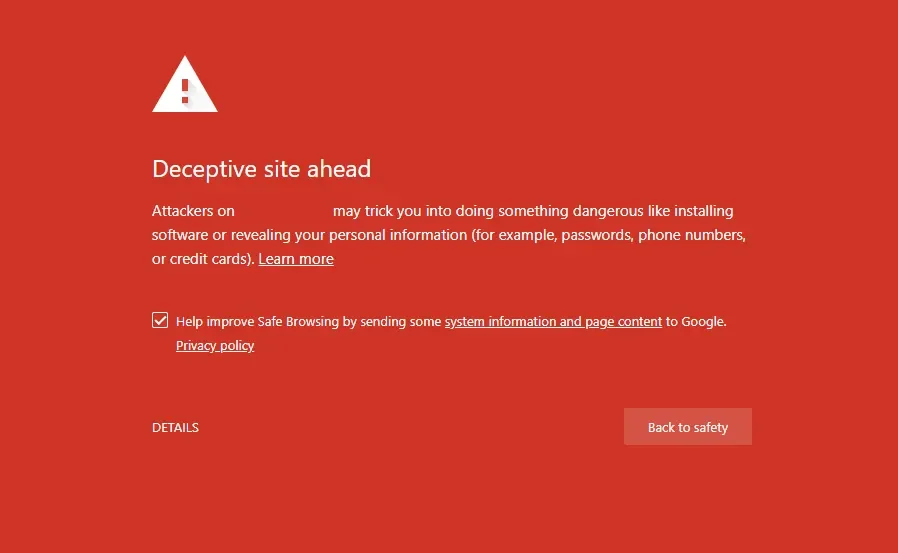
Reconnaissance showed that the organisation's internal domains were often variations of shortened domains built from the brand initials. That made it possible to register a domain nobody had seen before but which users would assume was legitimate, given the existing variety of internal domains. The word "secure" and "okta" were added as subdomains, on the reasoning that this makes a domain look legitimate, producing a full domain of the form secure.okta.exmpl.com. The researcher also advises visiting any newly registered campaign domain in multiple browsers and waiting at least a day before using it, so that a Google block does not land shortly after the campaign goes out.
Second, getting the link into an inbox is the hard part. The report lists the obstacles:
- Google will likely identify an unsolicited email containing a link as phish or spam, and its warnings are good enough that the researcher would consider that a failure. A few victims might be caught, but the aim was to compromise as many high value accounts as possible.
- Companies often add
[EXTERNAL]tags or labels to email from non-whitelisted domains, putting users on heightened alert. - A call to action convincing enough to make savvy users enter credentials is tricky.
The way past all three is to have the email sent by the company itself. Most applications send email on various actions such as sign-up and password reset, so the question was whether any of those flows could be hijacked.
Exploitation
Step 1: Turn the SAML configuration into an open redirect
The application under test had a section for SAML authentication. At a high level, the Service Provider (SP) redirects to the Identity Provider (IdP), such as Okta, for authentication, which is SP-initiated auth. When an organisation sets up SAML on its account it chooses the URL of the IdP. A user visiting example.com to log in enters their email, is redirected to the IdP, authenticates there, and the IdP POSTs the SAML response back to example.com, which authenticates the user without a password.
The key point is that the IdP URL is user defined. By setting the IdP URL to the Okta phishing page, users who expect to be sent to a legitimate IdP land on the malicious page instead. That gives an open redirect from the company site to the phishing page. What remained was getting that redirect into an inbox.
Step 2: Use the organisation invite email as the delivery vehicle
A common flow lets organisations invite other users, which sends the invitee an email with a call to action such as "[Company] has invited you to their organization, click here to join". The malicious organisation can be named something convincing, such as "[Target Company] testing" or "[Target Company] experiments".
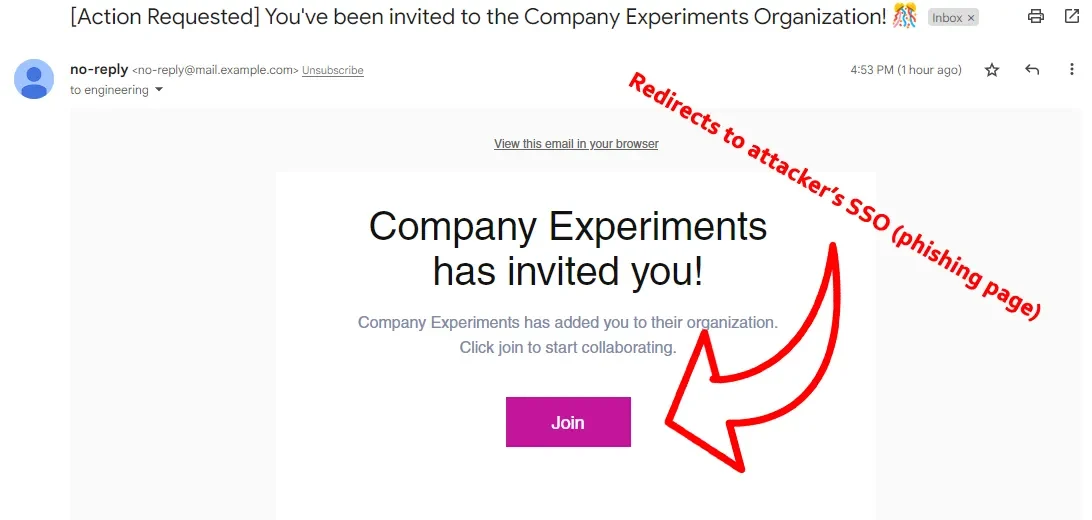
Because the invite email comes from the company itself, the primary call to action is a link to the phishing Okta page, and the message arrives as a legitimate email from the company rather than an external sender. This allows targeted phishing links to be sent to individual employees.
Step 3: Post to internal mailing lists through Google Groups behaviour
The researcher describes an unexpected and somewhat dangerous behaviour in how Google handles mailing lists (Google Groups): outsiders can post to them using application logic. Google allows managed domains to post to internal Groups from any email address on the domain, regardless of whether that address belongs to a defined user in the organisation. For example, if a Google Group allows the "Entire Organization" to post, which is the default when a group is created, an address such as [redacted], or a managed [redacted], can post internally to any group under example.com. The researcher reported this to Google, which closed the report as intended behaviour.
Step 4: Invite the mailing lists
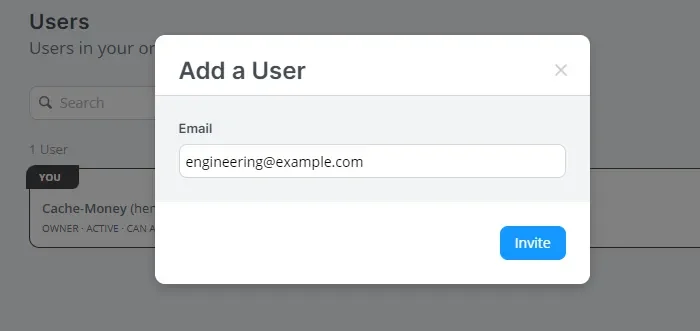
The organisation invite emails were being sent from [redacted]. That meant common mailing lists such as [redacted] could simply be invited as users into the malicious organisation. Doing so posted to the internal group and sent the malicious organisation invite to hundreds of employees. An email to a user from their own company, posted to an internal mailing list, is about as legitimate as it gets. Within a short time frame the researcher captured a number of full Okta sessions, with the first victim arriving minutes after the invite went out.
Step 5: Bypass MFA on protected apps
The Okta instance was configured so that sensitive apps prompt for MFA when launched. That is normally effective, since the attacker does not have the victim's MFA device and cannot add another factor without confirming an existing one. The caveat in this implementation is a window of a couple of minutes after authenticating during which MFA is not prompted again to add a new factor. After stealing an Okta session, the attacker can therefore quickly visit the user settings page and add their own factor without being prompted for the existing one. To avoid the victim seeing an email notification that a new factor was added, the attacker can use Okta to log in to the victim's email and delete the notification. With their own factor registered, the attacker can launch protected apps and authenticate freely into the account using the captured password.
Root cause
The chain depends on two design decisions. The first is that the SAML IdP URL is user defined, so an organisation administrator can point the login redirect at any URL, including an attacker-controlled page. The second is that the organisation invite flow sends email from the company's own domain with an attacker-defined link as the primary call to action, so the message inherits the trust of the sender and bypasses external-sender labelling and much of the spam filtering that an unsolicited message would attract.
The amplification comes from Google Groups behaviour: a managed domain can post to internal Groups from any address on the domain, including addresses that do not correspond to real users, when the group permits the "Entire Organization" to post. The researcher reported this to Google and it was closed as intended behaviour, so it is a platform design choice rather than a bug to be fixed.
The MFA bypass is a timing weakness in the Okta configuration: a short post-authentication window in which a new factor can be enrolled without re-confirming an existing one.
Impact
Under these conditions an attacker can send a phishing link that arrives from the target company's own mail infrastructure, addressed to individual employees or posted to internal mailing lists, and can capture full Okta sessions from users who authenticate on the replica page. With a captured session and password, the attacker can add their own MFA factor during the post-authentication window, suppress the notification email, and then launch MFA-protected applications. The researcher captured a number of full Okta sessions, with the first victim minutes after the invite was sent.
Not everyone fell for it. The users who were not captured were:
- Users whose second factor was a FIDO device, which cannot be phished.
- Users who noticed the login page was not on their Okta domain.
- Some users on password managers who noticed auto-fill was not offered, and then noticed the domain was fake.
Those users alerted the IT team, which was able to purge the messages from inboxes. The researcher guesses that most companies with SSO and a similar organisation invite structure are likely to be vulnerable, and notes that phishing is almost always out of scope for bug bounties and public security testing.
Fix
The report gives three technical measures to prevent this and similar attacks:
- Require FIDO as a secondary factor and disable other factors.
- Do not allow user-defined links or redirects inside emails sent from the application.
- Send emails from a different domain so internal mailing lists cannot be posted to, or only allow posting from "Group Members".
Variants to test
- User-defined SAML IdP URLs. Configure the IdP URL to point at a controlled page and trigger a login. A positive result is the application redirecting the user to the attacker's URL as part of a normal login flow.
- Organisation or workspace invite emails. Invite an address you control and inspect the message. A positive result is an email from the company's own domain whose primary call to action is a link you defined.
- Inviting mailing list addresses. Invite a group address such as
[redacted]into an organisation you control. A positive result is the invite being posted to the internal group and delivered to its members. - Google Groups posting permissions. On a managed domain, check whether a group set to allow the "Entire Organization" to post accepts mail from a non-existent address on the domain. A positive result is the message being accepted and distributed.
- MFA enrolment windows. After authenticating, try to add a new factor immediately. A positive result is being allowed to enrol without confirming an existing factor, and being able to delete the notification email from the linked mailbox.
What happened, in plain words
A security researcher was hired to test how well a technology company could resist a fake login attack. The company was not careless: it had a well-funded security team, a public programme that pays people for finding flaws, and a company-wide chat channel where staff regularly share security articles. The researcher realised that tricking these people with an ordinary fake email would not work. So instead of pretending to be a stranger, the researcher made the company's own website send the fake login link for them.
Here is the trick in one sentence: the company's website let an administrator type in any web address as the place users should be sent to log in, and it also let anyone create an organisation and invite people by email. By pointing that login address at a fake Okta page and then inviting the company's own internal mailing lists, the researcher got convincing emails from the company's own mail system delivered to hundreds of employees. Some of them typed their passwords into the fake page, and the researcher captured their live login sessions.
This article walks through the whole story from the beginning, explaining every term as it appears. If you can use a browser, you can follow it.
The target and why Okta mattered
The company used Okta as its identity provider. An identity provider is a service that holds everyone's username and password and confirms who they are when they log in to other apps. Think of it as the single front door to a building: instead of every office having its own lock and key, everyone shows their badge once at the main entrance and then walks freely between rooms.
The researcher calls this a double-edged sword. On one hand it is good for controlling who gets in, for keeping records of who logged in when, and for not having passwords scattered across dozens of systems. On the other hand, if someone steals an employee's Okta login, they effectively have the keys to everything. That is why Okta became the top target.
Throughout the write-up, example.com is used as a stand-in for the real company's web address. Whenever you see it, read it as "the company's real domain".
Building the fake login page
The first job was to build a fake Okta login page that does more than just collect a password. It had to steal the session, which is what keeps you logged in after you sign in. When you log in to a website, the site gives your browser a small piece of data called a cookie or session token. Your browser sends it back with every request so the site knows it is still you. If an attacker can copy that token, they can pretend to be you without ever knowing your password.
The researcher used a tool called EvilGinx, created by Kuba Gretzky, to build this page. EvilGinx is a phishing framework: it sits between the victim and the real website, shows a copy of the real login page, and quietly records the session token as the victim logs in. Phishing means tricking someone into handing over credentials by pretending to be a service they trust.
Choosing a domain that would not be blocked
A domain is the part of a web address after the https://, such as example.com. To host the fake page, the researcher needed a domain that looked believable. That turned out to be harder than expected.
Google runs a service that automatically scans the web for suspicious domains that imitate popular brands, and it blocks them in browsers. The researcher had picked a domain containing the word "okta", and within 40 minutes it was completely blocked on all browsers. The researcher's reaction in the write-up is simply: Aargh!
The image shows the blocked domain after just 40 minutes, as the caption says.
There is a second problem: some companies pay for brand monitoring services such as MarkMonitor. These services watch for domains that look like the company's brand and raise alerts when one appears. So the researcher concluded that the safest approach was to leave both the company name and the word "okta" out of the registered domain entirely.
During reconnaissance (the information-gathering phase before an attack), the researcher noticed that the company's internal domains were often shortened versions built from the brand's initials. That gave an idea: register a domain nobody had seen before, but one that employees would assume was legitimate because the company already used a confusing variety of internal domains. The researcher then added "secure" and "okta" as subdomains. A subdomain is the part before the main domain, as in mail.example.com where mail is the subdomain. The reasoning was that a name like secure.okta. in front makes a domain look official. The full domain took the form secure.okta.exmpl.com.
The researcher also advises visiting any newly registered campaign domain in several browsers and waiting at least a day before using it, so that a Google block does not land shortly after the campaign goes out.
Getting the link into an inbox
This was the hardest part of the whole operation. The researcher points out that this was not a corporate phishing exercise where the only goal is for someone to click a link. The goal was for a large number of employees to visit the fake page and hand over their full Okta credentials without hesitating.
The obstacles were:
- Google will likely identify an unsolicited email containing a link as phishing or spam. Its warnings are good enough that the researcher would consider that a failure. A few victims might be caught, but the aim was to compromise as many high-value accounts as possible.
- Companies often add
[EXTERNAL]tags or labels to email coming from domains that are not on an approved list, which puts users on heightened alert. - A call to action (the part of a message that tells the reader what to do, such as "click here to join") convincing enough to make savvy users enter credentials is tricky.
The way past all three obstacles was to have the email sent by the company itself. Most applications send email when users do things such as signing up or resetting a password. The question was whether any of those flows could be hijacked.
Step 1: Turning the SAML configuration into an open redirect
The application under test had a section for SAML authentication. SAML is a standard way for one service to ask another service to confirm who a user is. In SAML terms, the application is the Service Provider (SP) and the login service such as Okta is the Identity Provider (IdP). When a user visits the application, the application sends them to the IdP to log in, and the IdP sends a signed confirmation back. This is called SP-initiated authentication.
When an organisation sets up SAML on its account, it chooses the URL of the IdP. A user visiting example.com to log in enters their email, is redirected to the IdP, authenticates there, and the IdP sends the SAML response back to example.com, which logs the user in without a password.
The key point is that the IdP URL is user defined: an administrator can type in any address. By setting the IdP URL to the fake Okta page, users who expect to be sent to a legitimate IdP land on the malicious page instead. That gives an open redirect from the company site to the phishing page. An open redirect is a feature that sends users to another address, where the destination is controlled by whoever sets it up. What remained was getting that redirect into an inbox.
Step 2: Using the organisation invite email as the delivery vehicle
A common feature lets organisations invite other users. The invitee receives an email with a call to action such as "[Company] has invited you to their organization, click here to join". The malicious organisation can be named something convincing, such as "[Target Company] testing" or "[Target Company] experiments".
The image shows the invite email, with the caption noting that inviting a user into your organisation sends them this email with an attacker-defined link.
Because the invite email comes from the company itself, the primary call to action is a link to the fake Okta page, and the message arrives as a legitimate email from the company rather than an external sender. This allows targeted phishing links to be sent to individual employees.
Step 3: Posting to internal mailing lists through Google Groups behaviour
The researcher describes an unexpected and somewhat dangerous behaviour in how Google handles mailing lists, known as Google Groups. Google Groups is a service that lets an organisation run email lists, such as [redacted], so that one message reaches everyone on the list. The behaviour is that outsiders can post to these lists using the application's own logic.
Specifically, Google allows managed domains to post to internal Groups from any email address on the domain, regardless of whether that address belongs to a real user in the organisation. For example, if a Google Group allows the "Entire Organization" to post, which is the default when a group is created, an address such as [redacted], or a managed [redacted], can post internally to any group under example.com. The researcher reported this to Google, which closed the report as intended behaviour.
In plain terms: the mailing list only checks that the sender's address ends in the company's domain, not that the sender is a real person. So a made-up address on the company's domain is enough to post to the list.
Step 4: Inviting the mailing lists
The organisation invite emails were being sent from [redacted]. That meant common mailing lists such as [redacted] could simply be invited as users into the malicious organisation. Doing so posted to the internal group and sent the malicious organisation invite to hundreds of employees. An email to a user from their own company, posted to an internal mailing list, is about as legitimate as it gets. Within a short time frame the researcher captured a number of full Okta sessions, with the first victim arriving minutes after the invite went out.
The image shows the entire mailing list being invited as a user in the organisation, as the caption says.
Step 5: Bypassing MFA on protected apps
The Okta instance was configured so that sensitive apps prompt for MFA when launched. MFA stands for multi-factor authentication: a second proof of identity beyond the password, such as a code from a phone app or a physical security key. That is normally effective, since the attacker does not have the victim's MFA device and cannot add another factor without confirming an existing one.
The caveat in this implementation is a window of a couple of minutes after authenticating during which MFA is not prompted again to add a new factor. After stealing an Okta session, the attacker can therefore quickly visit the user settings page and add their own factor without being prompted for the existing one. To avoid the victim seeing an email notification that a new factor was added, the attacker can use Okta to log in to the victim's email and delete the notification. With their own factor registered, the attacker can launch protected apps and authenticate freely into the account using the captured password.
Why it worked
The chain depends on two design decisions. The first is that the SAML IdP URL is user defined, so an organisation administrator can point the login redirect at any URL, including an attacker-controlled page. The second is that the organisation invite flow sends email from the company's own domain with an attacker-defined link as the primary call to action, so the message inherits the trust of the sender and bypasses external-sender labelling and much of the spam filtering that an unsolicited message would attract.
The amplification comes from Google Groups behaviour: a managed domain can post to internal Groups from any address on the domain, including addresses that do not correspond to real users, when the group permits the "Entire Organization" to post. The researcher reported this to Google and it was closed as intended behaviour, so it is a platform design choice rather than a bug to be fixed.
The MFA bypass is a timing weakness in the Okta configuration: a short post-authentication window in which a new factor can be enrolled without re-confirming an existing one.
What the attacker could do
Under these conditions an attacker can send a phishing link that arrives from the target company's own mail infrastructure, addressed to individual employees or posted to internal mailing lists, and can capture full Okta sessions from users who authenticate on the replica page. With a captured session and password, the attacker can add their own MFA factor during the post-authentication window, suppress the notification email, and then launch MFA-protected applications. The researcher captured a number of full Okta sessions, with the first victim minutes after the invite was sent.
Not everyone fell for it. The users who were not captured were:
- Users whose second factor was a FIDO device, which cannot be phished. FIDO is a standard for physical security keys that check the actual web address before confirming a login, so a fake page cannot use them.
- Users who noticed the login page was not on their Okta domain.
- Some users on password managers who noticed auto-fill was not offered, and then noticed the domain was fake. A password manager is software that stores passwords and fills them in automatically, but only on the correct website.
Those users alerted the IT team, which was able to purge the messages from inboxes. The researcher guesses that most companies with SSO and a similar organisation invite structure are likely to be vulnerable, and notes that phishing is almost always out of scope for bug bounties and public security testing. SSO stands for single sign-on: logging in once and being recognised by many apps.
How to fix it
The report gives three technical measures to prevent this and similar attacks:
- Require FIDO as a secondary factor and disable other factors.
- Do not allow user-defined links or redirects inside emails sent from the application.
- Send emails from a different domain so internal mailing lists cannot be posted to, or only allow posting from "Group Members".
Things to test for
- User-defined SAML IdP URLs. Configure the IdP URL to point at a controlled page and trigger a login. A positive result is the application redirecting the user to the attacker's URL as part of a normal login flow. OIDC is a related login standard.
- Organisation or workspace invite emails. Invite an address you control and inspect the message. A positive result is an email from the company's own domain whose primary call to action is a link you defined.
- Inviting mailing list addresses. Invite a group address such as
[redacted]into an organisation you control. A positive result is the invite being posted to the internal group and delivered to its members. - Google Groups posting permissions. On a managed domain, check whether a group set to allow the "Entire Organization" to post accepts mail from a non-existent address on the domain. A positive result is the message being accepted and distributed.
- MFA enrolment windows. After authenticating, try to add a new factor immediately. A positive result is being allowed to enrol without confirming an existing factor, and being able to delete the notification email from the linked mailbox.
Glossary
- API: a way for one piece of software to talk to another, like a waiter taking your order to the kitchen.
- Brand monitoring: a paid service that watches for domains imitating a company's brand and raises alerts.
- Call to action (CTA): the part of a message that tells the reader what to do, such as "click here to join".
- Cookie / session token: a small piece of data a website gives your browser after login so it recognises you on later requests.
- Domain: the part of a web address after
https://, such asexample.com. - EvilGinx: a phishing framework that shows a copy of a real login page and records the session token.
- FIDO: a standard for physical security keys that check the real web address, so they cannot be phished.
- Google Groups: Google's service for running email mailing lists.
- Identity provider (IdP): a service that holds logins and confirms who a user is, such as Okta.
- MFA (multi-factor authentication): a second proof of identity beyond the password, such as a code or a security key.
- OIDC: a login standard related to SAML.
- Okta: a popular identity provider service.
- Open redirect: a feature that sends users to another address, where the destination is controlled by whoever sets it up.
- Password manager: software that stores passwords and fills them in automatically, but only on the correct website.
- Phishing: tricking someone into handing over credentials by pretending to be a service they trust.
- Reconnaissance: the information-gathering phase before an attack.
- SAML: a standard for one service to ask another to confirm a user's identity.
- Service Provider (SP): in SAML, the application the user is trying to log in to.
- Session: the period during which a website remembers you are logged in, kept alive by a token.
- Single sign-on (SSO): logging in once and being recognised by many apps.
- SP-initiated authentication: a login flow where the application sends the user to the IdP first.
- Subdomain: the part before the main domain, as in
mail.example.com. - User-defined: a setting where an administrator can type in any value, such as a URL.


