Using a GitHub app to escalate to an organization owner for a $10,000 bounty
A GitHub organization member could install a GitHub App into an organization by manipulating the target_id parameter, bypassing the restriction that only owners can install integrations. This allowed the member to grant the app sensitive permissions and then use the API to invite another user as an organization owner.
 Published on medium.com
I had never participated in GitHub’s long running bounty program in the past, but the HackTheWorld promo of free private repositories for life piqued my interest. I’m going to walk through a simple yet high-impact privilege escalation I landed on while poking around.
The full write-up lives on its author's site
It belongs to its author, so we link to it rather than copy it. The other two tabs are our own rewrites, checked against it.
I had never taken part in GitHub's long running bounty programme before, but the HackTheWorld promo of free private repositories for life got me interested. What follows is a simple but high-impact privilege escalation I found while poking around: I used a GitHub app to go from organisation member to account owner.
Context
GitHub organisations have three relevant roles:
- Outside collaborator (for completeness): not part of the organisation, but given access to specific repositories inside it.
- Member: the lowest role inside an organisation. Depending on organisation settings, a member may be limited to viewing or having write access on a subset of repositories. The highest access a member can be given is repository admin, which allows changing most configuration settings for that specific repository.
- Owner: the highest role, effectively a super admin. An owner can view and edit all organisation data and repositories and, more critically, irreversibly delete the entire organisation and its code.
Organisations commonly assume their members are not a threat when access controls are in place, for example by not giving admin access to every repository. A common model puts members into teams and uses those teams to control access across repositories, which lets owners be a very small subset of users.
Two kinds of app matter here. OAuth apps act on behalf of the user. Integrations (GitHub Apps) are similar, except they act on behalf of the organisation instead of the user. The organisation setting I started from was the Third-party access policy switch, which is meant to stop members giving repository access to untrusted third parties via OAuth. Once enabled, a member must specifically request access from the OAuth permissions prompt, and an organisation owner must approve it before the app can access any organisation data.
Setup
I had an account that was a member of an organisation, and I also had access to an organisation owner account for checking results. My member account was a repository admin on one repository. I used the GitHub Marketplace to go through the installation flow for a few apps, and later created my own GitHub integration to test which permissions could be requested.
Finding it
I first played with the Third-party access policy settings. That did not lead anywhere, and I could not find a way to bypass the approval requirement.
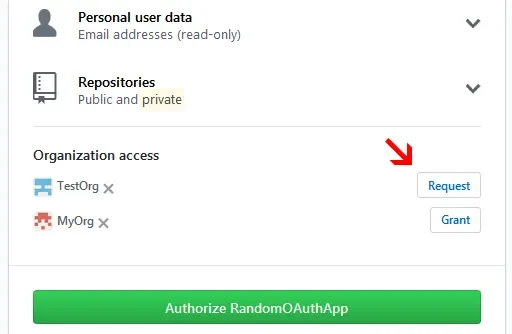
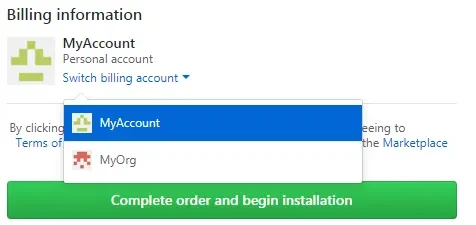
So I turned to integrations and asked whether the Third-party access policy applied to them too, or whether they slipped through. Going through the installation flow on the marketplace made it clear that as an organisation member you are not given the option to install an integration. You can only install integrations into your own account, or into organisations where you are an owner. The documentation confirms this:
Organization members can't request a GitHub App installation.
Exploitation
Step 1: change the target_id
During the installation flow, after choosing a billing account, you land on a screen whose URL looks like this:
https://github.com/apps/:app_name/installations/new/permissions?target_id=:id
target_id is the organization_id, or the account_id, where the app is to be installed. As a member of another organisation, I changed target_id to that organisation's id. Because my member account was a repository admin, I was prompted with the installation page, and I was able to install the app, but only to the one repository for which I had admin rights.
I double checked the installation by visiting the "Installed GitHub Apps" page from the organisation owner account. It was there.
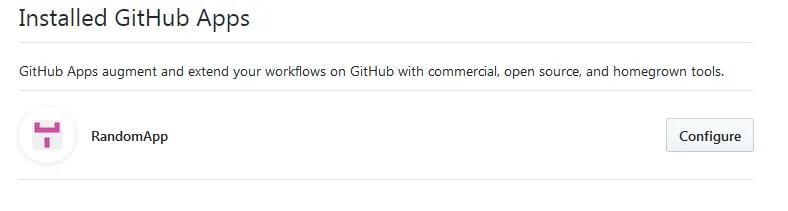
By this point it was past 3am. I knew I had a valid issue because I had circumvented the Third-party access restriction that was set. I reported it to the GitHub programme with the intention of adding comments to the report for any later findings.
Step 2: request sensitive scopes
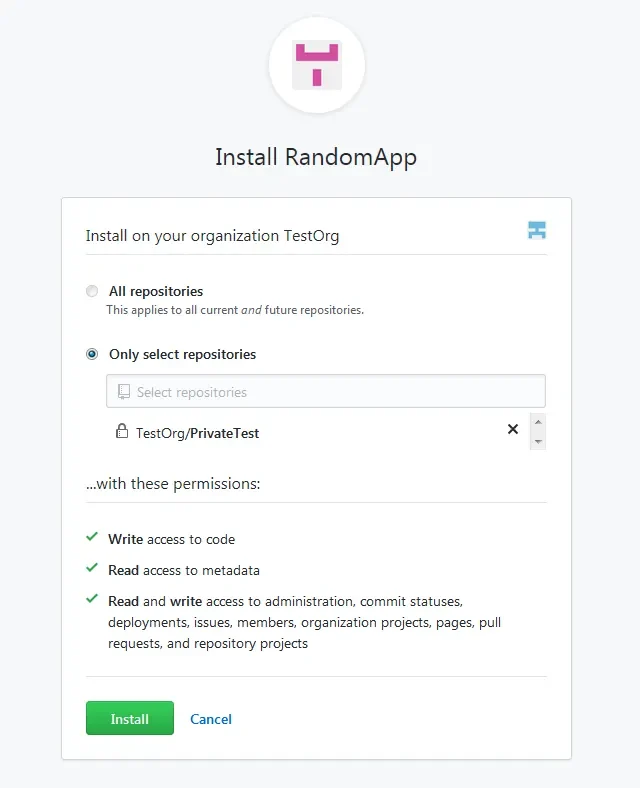
The next day I wanted to see how far this could go. I created my own GitHub integration and noticed that the permissions it could request were extremely sensitive, in particular write access to all organisation members and teams. Surely being able to install an integration into one repository would not let me grant write access to all of the organisation's members. It did. The intended design is that only owners can install integrations, so having the permission is binary: the scopes you can grant are not enforced, because you are already considered to have the highest level of access.
Step 3: use the API to invite an owner
Next I checked whether the API worked as expected and whether I could actually use it without hitting a permissions error later. I tried a number of endpoints and eventually reached the one that mattered: Add or update an organization membership, with a role parameter. Using that endpoint, I was able to invite another user into the organisation as an account owner.
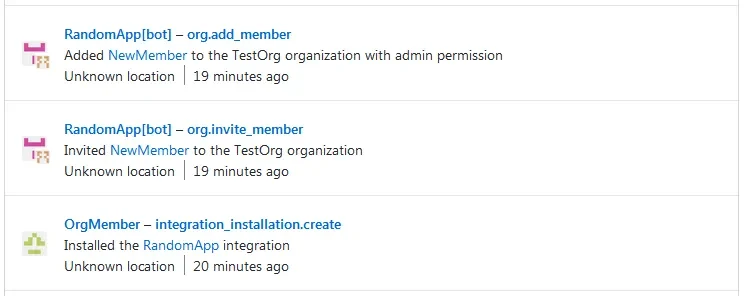
The audit log shows the underprivileged "OrgMember" account installing the integration and then using the API to invite "NewMember" as an owner.
Root cause
The report does not describe the underlying cause of the installation flow's behaviour. The only check that stood in the way was repository admin rights, which let a member install the app into a repository they administered.
Because the design assumes only owners install integrations, the permission model treats installation as binary: once installed, the app is considered to have the highest level of access, and the scopes it requests are not enforced against the installer's real role. That is what turned a single-repository installation into write access over all organisation members and teams, and then into the membership endpoint with a role parameter.
The installation circumvented the Third-party access restriction that was set.
Impact
A member could escalate to organisation owner, and an owner can view and edit all organisation data and repositories and irreversibly delete the organisation and its code.
The immediate precondition I found was repository admin rights, which limits the set of members who can do this. After more investigation I found that all organisations that allow members to create repositories are vulnerable, because a member is automatically given admin rights to any repository they create, so they can create a dummy repository and install the app into it. That feature is enabled by default, and organisations commonly leave it enabled since GitHub's payment model is no longer repository bound but based on the number of users.
Exploitation does not necessarily require a malicious insider. It can come from an attacker who compromises a member account. In an organisation with 300 members, the surface an attacker can go after is no longer limited to the 3 or 4 owners but to any member.
Fix
GitHub deployed a fix to production on 15 November 2017, and the issue was marked as resolved on 1 December 2017. The report does not describe the code change itself.
Variants to test
Timeline
- Initial report: 11/11/17 @ 3:30 AM
- Reporting the ability to escalate to organisation owner: 11/11/17 @ 8:30 PM
- GitHub team officially looking into the issue: 11/13/17 @ 5:30 AM
- Bounty of $10,000 awarded and triaged: 11/14/17 @ 1:40 PM
- Fix deployed to production: 11/15/17
- Issue marked as resolved: 12/1/17
What happened, in plain words
GitHub is a website where people and companies keep their computer code. A company on GitHub is called an organisation: it is a shared space with repositories (folders of code) inside it, and people join it with different levels of permission.
This report is about a way for a low-level person inside an organisation, a plain member, to give themselves the highest level of permission, owner, without asking anyone. An owner can read and change everything the organisation has, and can permanently delete the whole organisation and all its code. The researcher found this by using a GitHub App, a kind of add-on program that a company can attach to its GitHub space.
The researcher reported it to GitHub's bug bounty programme, which pays people for finding security problems, and received $10,000. GitHub deployed a fix to production on 15 November 2017 and marked the issue resolved on 1 December 2017.
A quick word on the vulnerability class named for this report: broken authorization means the website does not properly check whether you are allowed to do something, and IDOR (Insecure Direct Object Reference) means the website takes an identifier from you, such as a number in a web address, and acts on it without checking that the thing it points to belongs to you. Both ideas appear below.
Background: the three roles
Before the trick makes sense, you need to know who can do what inside a GitHub organisation. The researcher lists three roles.
- Outside collaborator. This person is not really part of the organisation. They are simply given access to a few specific repositories inside it. Think of a contractor who gets a key to one room in an office building.
- Member. The lowest role you can have inside the organisation. Depending on how the organisation is set up, a member might only be able to look at some repositories, or might be able to change ("write") some of them. The most a member can be given is repository admin: the ability to change most settings of one particular repository. Think of an employee who is allowed to rearrange the furniture in their own office, but not in the rest of the building.
- Owner. The top role, effectively a super administrator. An owner can see and edit all organisation data and all repositories, and, most seriously, can irreversibly delete the entire organisation and its code. Think of the building manager who holds the master key and can also order the building demolished.
Organisations generally assume that their members are not a danger as long as the access controls are set sensibly, for example by not making every member an admin of every repository. A common pattern is to put members into teams and use the teams to decide who can touch which repositories. That way the number of owners can stay very small, because team-based controls are enough to hand out wider access where it is needed.
Two kinds of app, and one setting
GitHub lets outside programs connect to your account or your organisation. Two kinds matter here.
- OAuth apps act on behalf of a user. When you approve one, it can do things as you. The everyday comparison is a shop loyalty card: it is tied to you personally and works wherever you shop.
- Integrations, also called GitHub Apps, are similar but act on behalf of the organisation instead of the user. The comparison is a company account with a supplier: the supplier deals with the company, not with one employee.
The setting the researcher started from is the Third-party access policy switch, found in the organisation settings. Its purpose is to stop members from handing repository access to untrusted outside programs through OAuth. Once the switch is on, a member has to specifically request access from the OAuth permissions prompt, and an organisation owner has to approve that request before the app can touch any organisation data. Think of a rule that says any contractor entering the building must be signed in by a manager first.
Digging into GitHub apps
While going through the organisation settings as an owner, the researcher noticed the Third-party access policy switch. He played with those settings, but it did not lead anywhere: he could not find a way to get around the approval requirement.
The screenshot shows the settings he was experimenting with. The point of this step was to test the obvious defence first: if the approval requirement could be bypassed, that alone would be a bug. It could not.
So he turned to the other kind of app, the integration. His question was simple: does the Third-party access policy also cover integrations, or do integrations slip past it? To find out, he went to the GitHub Marketplace, the catalogue of apps, and went through the installation flow for a few of them.
What he saw was clear. As an organisation member, you are not offered the option to install an integration into the organisation at all. You can only install integrations into your own personal account, or into organisations where you are an owner. The documentation says the same thing:
Organization members can't request a GitHub App installation.
The screenshot shows the installation screen offering only his own account and the organisations where he had owner rights. This is the intended design: installing an app is an owner-only action.
Exploitation
Step 1: change the target_id
While going through the installation flow, the researcher noticed something about the web address. After you choose a "Billing account", you arrive at a page whose URL looks like this:
https://github.com/apps/:app_name/installations/new/permissions?target_id=:id
Line by line, in plain words:
https://github.comis the GitHub website./apps/:app_namepoints at one particular app in the catalogue. The:app_namepart is a placeholder for the app's name./installations/new/permissionsis the page in the installation flow where the app asks for permissions.?target_id=:idis the interesting part. Everything after the?is extra information sent along with the request, andtarget_idis the name of a value the page expects.:idis a placeholder for a number.
That target_id is the organization_id, or the account_id, of the place where the app is to be installed. In other words, the page reads a number out of the address bar to decide which organisation the installation is for. This is exactly the situation the term IDOR describes: a number supplied by the visitor is trusted to point at the right thing.
As a member of another organisation, the researcher changed target_id to that organisation's id. Because his member account was a repository admin, he was shown the installation page, and he was able to install the app, but only into the one repository he had admin rights over.
The report does not explain why the installation flow behaved this way.
He double checked the result by visiting the "Installed GitHub Apps" page from the organisation owner account. The app was listed there.
The screenshot shows the app successfully installed in the organisation where he was only a member. This mattered because the organisation had the Third-party access restriction switched on, and he had just got around it.
By this point it was past 3am. He knew he had a valid issue, so he reported it to the GitHub programme, planning to add comments to the report if he found anything more later.
Step 2: request sensitive scopes
The next day he wanted to see how far this could go. He created his own GitHub integration and looked at the permissions it could ask for. They were extremely sensitive, in particular the permission to have write access to all organisation members and teams. His reasoning: surely being able to install an integration into one repository would not let him grant write access over every member of the organisation. It did.
The reason is the design assumption. Only owners are supposed to install integrations, so the system treats installation as a yes-or-no matter: if you can install, you are treated as having the highest level of access. The permissions the app asks for are not checked against the installer's real role, because the installer is already assumed to be an owner. Think of a building where only the manager can sign for a delivery, so the delivery desk never asks what is in the boxes.
The screenshot shows the app being installed while requesting a large set of permissions. The point of this step was to test whether the permission list is enforced against the person doing the installing. It was not.
Step 3: use the API to invite an owner
Next he checked whether the API worked as expected, and whether he could actually use it without hitting a permissions error later. An API is the way one program talks to another over the web, instead of a person clicking buttons. The everyday comparison is a restaurant: the menu is the list of things you can ask for, and the waiter is the API that carries your order to the kitchen and brings back the result. Here, the API is GitHub's set of addresses that programs can call to do things.
He tried a number of endpoints (the individual addresses in that API) and eventually reached the one that mattered: Add or update an organization membership, with a role parameter. A parameter is a named value you attach to a request, like the target_id above. Using that endpoint, he was able to invite another user into the organisation as an account owner.
The screenshot shows the organisation's audit log, the record of who did what. It shows the underprivileged "OrgMember" account installing the integration, and then using the API to invite "NewMember" as an owner. That is the full chain: a member installs an app, the app is treated as an owner, and the app's access is used to make someone else an owner.
Root cause
The report does not describe the underlying cause. The only check in the way was repository admin rights, which let a member install the app into a repository they administered.
Because the design assumes only owners install integrations, the permission model treats installation as binary: once installed, the app is considered to have the highest level of access, and the permissions it requests are not checked against the installer's real role. That is what turned a single-repository installation into write access over all organisation members and teams, and then into the membership endpoint with a role parameter.
The installation circumvented the Third-party access restriction that was set.
Impact
A member could escalate to organisation owner, and an owner can view and edit all organisation data and repositories and irreversibly delete the organisation and its code.
The immediate precondition the researcher found was repository admin rights, which limits which members can do this. After more investigation he found that all organisations that allow members to create repositories are vulnerable, because a member is automatically given admin rights to any repository they create. So a member can simply create a dummy repository and install the app into it. That feature is enabled by default, and organisations commonly leave it enabled, since GitHub's payment model is no longer tied to the number of repositories but to the number of users.
Exploitation does not necessarily require a malicious insider. It can come from an attacker who takes over a member account. In an organisation with 300 members, the surface an attacker can go after is no longer limited to the 3 or 4 owners but to any member.
Fix
GitHub deployed a fix to production on 15 November 2017, and the issue was marked as resolved on 1 December 2017.
Variants to test
Timeline
- Initial report: 11/11/17 @ 3:30 AM
- Reporting the ability to escalate to organisation owner: 11/11/17 @ 8:30 PM
- GitHub team officially looking into the issue: 11/13/17 @ 5:30 AM
- Bounty of $10,000 awarded and triaged: 11/14/17 @ 1:40 PM
- Fix deployed to production: 11/15/17
- Issue marked as resolved: 12/1/17
Glossary
- API: the set of web addresses a program can call to make a website do something, instead of a person clicking buttons.
- Audit log: a record kept by a service of who did what and when.
- Broken authorization: a flaw where the website does not properly check whether you are allowed to perform an action.
- Bug bounty programme: a scheme where a company pays people for reporting security problems to it.
- Endpoint: one specific address in an API that performs one specific action.
- GitHub App (integration): an add-on program that acts on behalf of an organisation rather than a single user.
- IDOR (Insecure Direct Object Reference): a flaw where the website takes an identifier from you, such as a number in a URL, and acts on it without checking that the thing it points to belongs to you.
- Integration: see GitHub App.
- Marketplace: GitHub's catalogue of apps that can be installed.
- Member: the lowest role inside a GitHub organisation, with limited access to repositories.
- OAuth app: an add-on program that acts on behalf of a single user.
- Organisation: a shared company or group space on GitHub containing repositories and people.
- Outside collaborator: someone who is not part of the organisation but is given access to specific repositories inside it.
- Owner: the highest role in an organisation, able to view and edit everything and to delete the organisation.
- Parameter: a named value attached to a request, such as
target_idorrole. - Permission / scope: the specific things an app is allowed to do, such as reading members or writing to teams.
- Privilege escalation: gaining a higher level of access than you are supposed to have.
- Repository: a folder of code stored on GitHub, with its history.
- Repository admin: the highest access level for a single repository, allowing most of its settings to be changed.
- Role: the level of permission a person has, such as member or owner.
- Team: a group of members used to control access to repositories.
- Third-party access policy: an organisation setting that requires an owner to approve OAuth apps before they can access organisation data.
- URL: the address of a page or resource on the web, shown in the browser's address bar.

