Exploiting SSRF like a boss
A Jira instance exposed an SSRF endpoint that could fetch arbitrary URLs. The attacker used it to reach an internal GlassFish server and exploit a path traversal flaw to read local files such as /etc/passwd.
 Published on medium.com
Greetings everyone! Today I am doing another write-up about one of my best findings.
The full write-up lives on its author's site
It belongs to its author, so we link to it rather than copy it. The other two tabs are our own rewrites, checked against it.
Context
The target was a private bug bounty program. Its scope page listed a handful of IP addresses, and only server-side bugs were accepted on them. One of those IPs hosted a subdomain, https://help.redacted.com, which ran a Jira instance. The vulnerable endpoint is Jira's /plugins/servlet/oauth/users/icon-uri, which takes a consumerUri parameter and fetches the URL it is given server-side. That server-side fetch is the SSRF primitive.
Setup
No account or role was needed. The work started from the in-scope IP list and used HackerTarget's Reverse IP lookup to find hostnames on an in-scope address:
http://api.hackertarget.com/reverseiplookup/?q={IP}
That returned https://help.redacted.com. The Jira version was checked and appeared vulnerable to the SSRF described in Alyssa Herrera's article on SSRF in Jira instances. The host was an Azure instance, which matters later when the metadata service is tried.
Finding it
The endpoint was confirmed with a request that asks Jira to fetch Google:
https://help.redacted.com/plugins/servlet/oauth/users/icon-uri?consumerUri=http://google.com
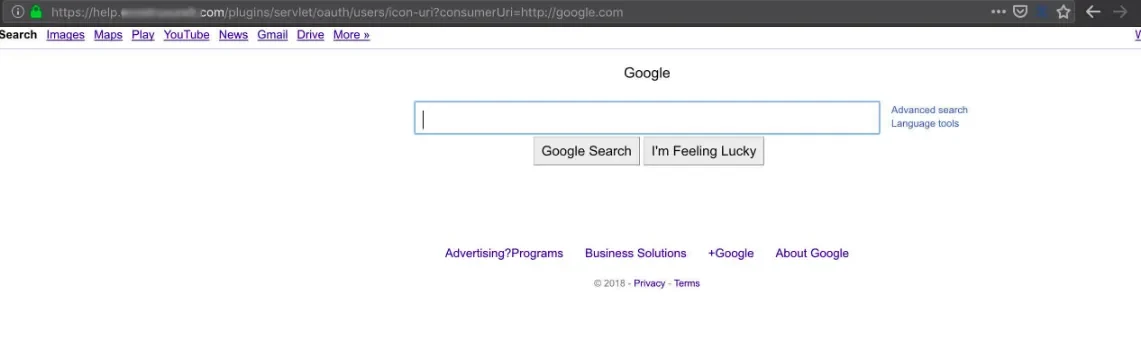
The page rendered google.com, which verified the SSRF. At that point the endpoint could render any web page, and the author notes it could also have been turned into XSS by loading an external page. Because the program only accepted server-side and network issues, the work continued inward instead.
Exploitation
Step 1: probe the protocol handlers
gopher://, file://, ldap:// and ftp:// were all tried and none worked. Only http:// was accepted by the fetcher, so the attack had to stay within HTTP.
Step 2: try the cloud metadata service
Since the host was an Azure instance, the next attempt was the instance metadata file:
The response was a blank JSON body, so this route gave nothing.
Step 3: reach localhost and scan internal ports
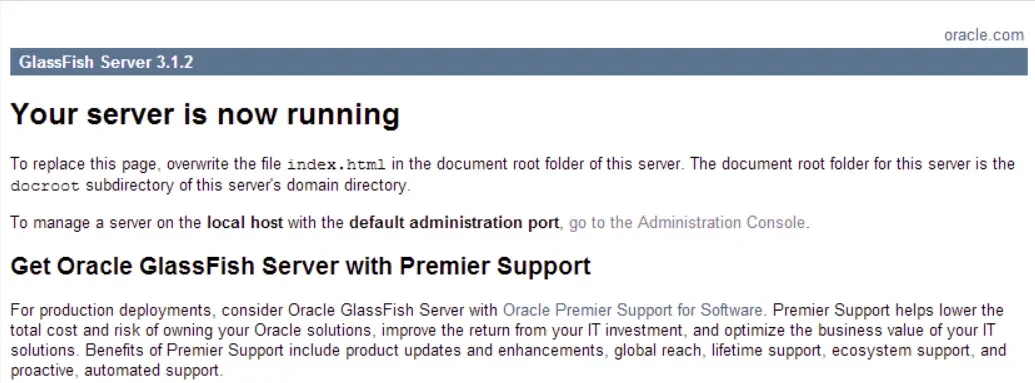
Loading [redacted] through consumerUri returned the main page, which showed the fetcher would talk to loopback. The next idea was that services might still be listening on internal ports. Port 8080 was tried first and returned the GlassFish server's default page.
Step 4: find the administration console
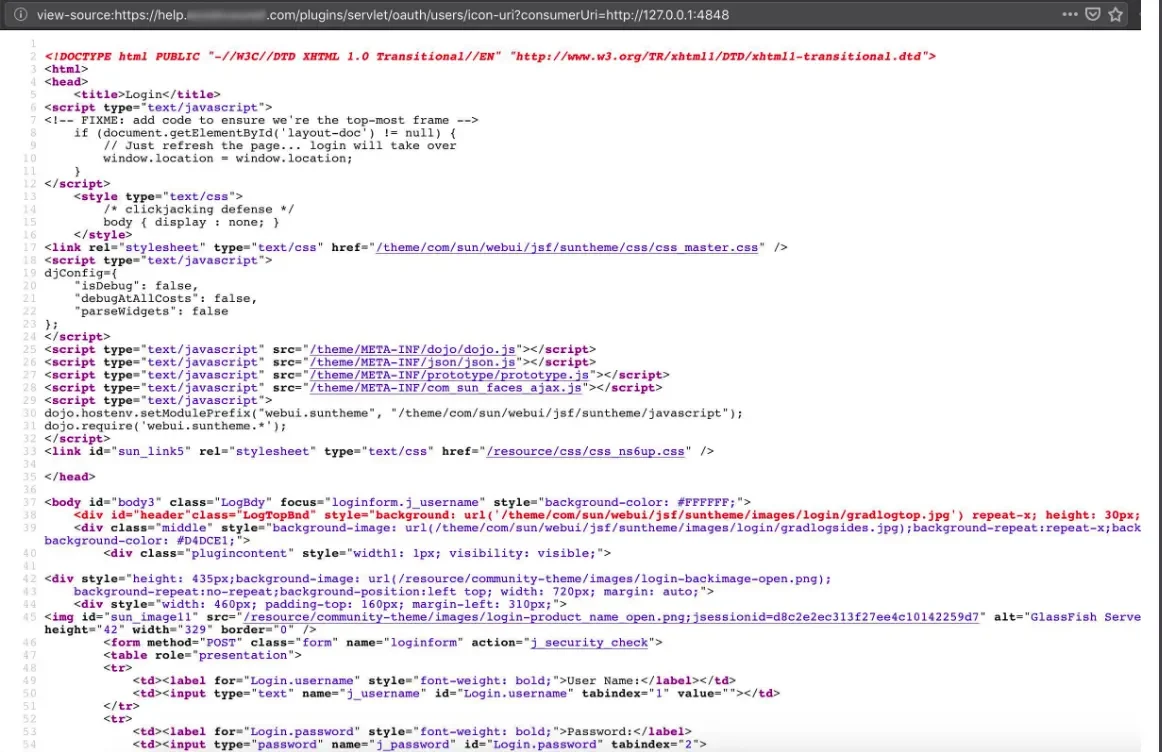
Port 4848 was then tried and returned the GlassFish login page, the default administration console.
Step 5: pick an exploit
A search for GlassFish exploits turned up a GET-based one, Exploit-DB 39241:
https://www.exploit-db.com/exploits/39241/

The exploit reads server files, and the payload uses the /theme/META-INF/ path with %c0%ae sequences.
Step 6: first payload attempt
The payload was crafted against the internal console through the SSRF:
It did not work. The reason, noticed after nearly giving up, is that the exploit contains URL encoding, and the browser decodes it before the request leaves. The encoded traversal therefore never reached GlassFish in the form the exploit expects.
Step 7: double-encode and read the file
The fix was to double-encode the traversal so that one round of decoding still leaves the encoded form for the GlassFish server. The final payload:
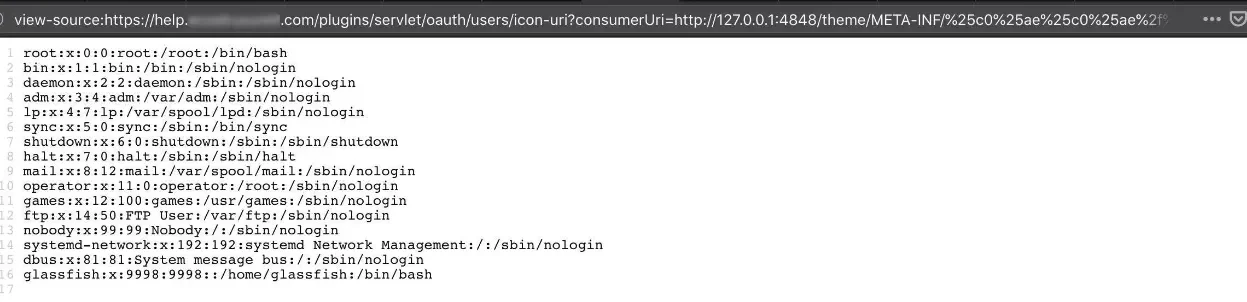
This returned the contents of /etc/passwd, so the HTTP-only SSRF had been escalated to a local file read by way of the internal GlassFish service.
Root cause
The Jira OAuth icon endpoint fetches a user-supplied URL server-side without restricting where it may go, so it will follow the URL to loopback and to internal ports. The fetcher only supports http://, which limits the protocols but not the destinations. The internal GlassFish administration console on port 4848 was reachable from the Jira host, and the path traversal in Exploit-DB 39241 let the request read files. The double-encoding was needed because the browser decodes the URL encoding before the request is sent.
Impact
Within the conditions of this program, an unauthenticated attacker who could reach the Jira endpoint could make the server issue HTTP requests to arbitrary hosts, including loopback and internal ports, and could read local files on the Jira host through the internal GlassFish service. The author notes the same endpoint could have been used to render an external page and turn the SSRF into XSS, but the program scoped out client-side issues. The metadata service on the Azure instance returned only a blank JSON response, so no instance credentials were obtained this way.
Fix
The report does not describe the fix that was applied. The timeline records that the issue was reported on 12 November 2018, triaged the same day, and fixed and rewarded on 13 November 2018. In general terms, the endpoint should not fetch arbitrary user-supplied URLs, or should restrict destinations to an allowlist and block loopback, link-local and internal ranges, and the internal GlassFish console should not be reachable from the Jira host.
Variants to test
- On other Jira instances, request
/plugins/servlet/oauth/users/icon-uri?consumerUri=http://<your host>/and look for a callback from the server. A positive result is an inbound request from the target's IP. - Try
consumerUri=http://[redacted]:<port>/across common admin ports (8080, 4848, 8443, 9090) and compare responses. A positive result is a distinct default page or login page for an internal service. - When an internal service is found, replay its known GET-based exploits through
consumerUri, watching for decoding differences. A positive result is file contents such as/etc/passwdin the response. - Try the cloud metadata endpoints for the host's provider (for example
http://[redacted]/paths) through the same parameter. A positive result is instance metadata rather than a blank body. - Test whether other protocols are accepted by the fetcher (
gopher://,file://,ldap://,ftp://). A positive result is a successful fetch or error that shows the scheme was parsed rather than rejected.
What happened, in plain words
A security researcher found a bug in a website that let him make the website's own server fetch other web pages on his behalf. That kind of bug is called SSRF, short for Server-Side Request Forgery. Think of it like a hotel concierge who will fetch anything you ask for: if you can trick the concierge into walking into the staff-only back rooms, you can learn things you were never meant to see.
In this case the researcher used that trick to reach services running inside the company's own network, which are normally invisible from the internet. One of those internal services was an old administration tool called GlassFish. That tool had a separate, known bug that let anyone read files from the server without logging in. By chaining the two together, the researcher went from "make the server fetch a web page" to "read a sensitive file from the server's disk".
The whole thing was reported on 12 November 2018, triaged the same day, and fixed and rewarded on 13 November 2018.
The setting: a private bug bounty program
A bug bounty program is an arrangement where a company invites outside researchers to look for security problems in its systems and pays them for reporting what they find. A private program is one you can only join by invitation, rather than one open to the whole world.
Each program publishes a scope page. The scope is the list of things you are allowed to test. Anything not on the list is off limits, and testing it can get you into trouble. This program's scope page listed a few IP addresses. An IP address is the numeric label that identifies a computer on a network, a bit like a street address for a building. The program said that on those addresses, only server-side bugs were acceptable. A server-side bug is one that lives in the code running on the company's own machines, as opposed to a client-side bug, which lives in what runs inside a visitor's browser. The distinction matters later: the researcher found something that could also have been used as a browser-side attack, but the program was not interested in that, so he kept digging in the server direction.
Step 1: find a website on one of the in-scope addresses
The researcher picked one IP address from the list and started reconnaissance. Reconnaissance (recon) is the information-gathering phase: finding out what is running where before you try anything.
An IP address can host many different websites, each known by a name (a domain name) rather than by the number. To discover which names point at a given address, you can do a reverse IP lookup. The researcher used HackerTarget's free tool for this:
http://api.hackertarget.com/reverseiplookup/?q={IP}
Line by line: http://api.hackertarget.com/reverseiplookup/ is the address of the tool itself. The ?q= part starts the question you are asking, and {IP} is where you put the address you are curious about. The tool replies with a list of domain names that resolve to that address.
This turned up https://help.redacted.com, a help-desk style site hosted on the in-scope IP. Because it sat on an address the program had authorised, it was fair game.
Step 2: recognise the software and the known weakness
The site was running Jira. Jira is a widely used issue-tracking and project-management product made by Atlassian; teams use it to record tasks, bugs and support tickets. The researcher checked which version of Jira was running and it looked vulnerable to a known SSRF problem.
He remembered an article by Alyssa Herrera about SSRF in Jira instances, which described a specific feature that could be abused. The feature is an OAuth icon endpoint. OAuth is a way for one website to ask another website for permission to act on a user's behalf, and it often involves showing a small icon (a logo) for the other site. Jira's server fetches the URL supplied in the request through that endpoint. The endpoint is /plugins/servlet/oauth/users/icon-uri and the parameter carrying the URL is called consumerUri.
That is the whole problem in miniature: the server takes a URL from whoever sends the request and goes and fetches it. If the server will fetch any address it is given, including addresses it can reach but outsiders cannot, then the person sending the request is effectively borrowing the server's network position.
Step 3: confirm the bug
To prove the server really would fetch an address of his choosing, the researcher asked it to fetch Google:
https://help.redacted.com/plugins/servlet/oauth/users/icon-uri?consumerUri=http://google.com
Line by line: https://help.redacted.com is the Jira site. /plugins/servlet/oauth/users/icon-uri is the icon-fetching feature. The ? begins the parameters, consumerUri= names the parameter, and http://google.com is the value: the address the researcher wants the server to visit. Nothing here is an attack yet; it is a test of whether the server obeys.
The screenshot shows google.com rendered back through the Jira page, which confirmed the SSRF. The server had gone out to Google and brought the result back.
At this point the researcher could have made the server render any web page, and he notes he could also have turned this into XSS by loading an external page. XSS, cross-site scripting, is a client-side bug where an attacker gets their own code to run inside a victim's browser. But the program only accepted server-side and network issues, so that route was out of scope. Instead he went further inward, towards the company's internal network.
Step 4: test which kinds of address the fetcher accepts
URLs come in flavours called schemes, the part before the ://. http:// and https:// are the web. file:// points at a file on the local disk. ftp:// is an old file-transfer scheme. gopher:// and ldap:// are other protocols, and they are interesting to attackers because they can sometimes be bent into sending arbitrary data to other services.
The researcher tried gopher://, file://, ldap:// and ftp://. None of them worked. Only http:// was accepted. That is a limitation, but not a fatal one: it means the attack has to stay within ordinary web requests, which is still plenty.
Step 5: try the cloud metadata service
The host was an Azure instance. Azure is Microsoft's cloud platform, and a machine running there is a virtual server rented from Microsoft. Cloud providers give each virtual machine a special internal address, [redacted], which serves information about the machine itself: its identity, its configuration, and sometimes credentials. This is called the instance metadata service. It is only reachable from inside the machine, which is exactly why an SSRF is dangerous: the server can reach it even though the researcher cannot.
So he asked Jira to fetch the metadata file:
Line by line: the same Jira endpoint and parameter, but now the value is http://[redacted]/metadata/v1/maintenance, the internal metadata address and a path on it. If it had worked, the response would have contained information about the machine.
It returned a blank JSON response. JSON is a common text format for structured data, and a blank one means the request went somewhere but came back with nothing useful. This route gave the researcher nothing.
Step 6: reach the machine itself and look for open doors
Next he tried loading [redacted] through consumerUri. The address [redacted] is special: it always means "this same machine". Every computer uses it to talk to itself. When the Jira server fetched [redacted], it was talking to itself, and it returned the main page.
That gave him an idea. A single machine can run many services at once, each listening on a different numbered port. A port is like a numbered door on the same building: the address gets you to the building, the port number tells you which door to knock on. Web traffic normally uses port 80 or 443, but internal tools often sit on other ports that are never exposed to the internet. If any of those doors were left open, the SSRF could knock on them.
He started with port 8080, one of the most common alternatives for web services. The response was the default welcome page of a GlassFish server. GlassFish is a Java application server: software that runs Java web applications. Seeing its default page meant an internal service was running and reachable.
The screenshot shows that default GlassFish page, the first sign that the internal network had more to offer than the public site.
Step 7: find the administration console
GlassFish ships with an administration console, a web interface for managing the server, and the researcher found it on port 4848. The researcher tried that port and got the console's login page.
The screenshot shows the source of that login page, confirming the administration console was there.
A login page is not a way in by itself, but it told him which software he was dealing with, so he went looking for known problems.
Step 8: find a known exploit for GlassFish
He searched for GlassFish exploits and found a GET-based one, published on Exploit-DB as number 39241:
https://www.exploit-db.com/exploits/39241/
Exploit-DB is a public archive of documented vulnerabilities and proof-of-concept code. "GET-based" means the exploit works through an ordinary web request of the GET type, the same kind your browser sends when you open a page. That matters here because the SSRF can only make simple web requests, so an exploit that needs a GET request fits perfectly.
The screenshot shows the exploit's description: it reads server files.
How the exploit works: it abuses a path traversal. Web servers keep files in folders, and .. means "go up one folder". If a server fails to clean up .. properly in a URL, an attacker can climb out of the folder they are supposed to be in and reach files elsewhere on the disk. The exploit uses the /theme/META-INF/ path with %c0%ae sequences to read server files.
Step 9: first attempt, and why it failed
The researcher built the attack by putting the exploit's path into the consumerUri value, so that Jira would fetch it from the internal GlassFish console:
Line by line: https://help.redacted.com/plugins/servlet/oauth/users/icon-uri?consumerUri= is the same Jira endpoint as before. The value is http://[redacted]:4848, meaning the machine itself on port 4848, the GlassFish console. Then /theme/META-INF/ is the starting folder the exploit uses. The repeated %c0%ae sequences are the disguised dots, each pair climbing up one folder. Finally /etc/passwd is the target file. On Linux systems, /etc/passwd is a classic file to read as proof: it lists the user accounts on the machine. It does not contain passwords despite the name, but it is a standard demonstration that file reading works.
It did not work. The researcher nearly gave up. Then he noticed the reason: the exploit contains URL encoding, and the browser decodes it before the request even leaves. URL encoding is the convention where special characters are written as % followed by two characters, so that they can travel safely inside a URL. When you type an encoded URL into a browser, the browser helpfully turns it back into ordinary characters. That meant the carefully encoded traversal never reached GlassFish in the form the exploit expected.
Step 10: encode it twice and read the file
The fix was to double-encode the traversal. If the browser strips one layer of encoding, one layer still remains for GlassFish to see. The final payload:
Line by line: the start is the same Jira endpoint with consumerUri=http://[redacted]:4848, still pointing at the internal GlassFish console. Now /theme/META-INF is followed by %2f, which is an encoded slash, and each disguised dot is written as %25c0%25ae. The %25 is itself the encoding of the % character, so after the browser decodes one layer, GlassFish receives %c0%ae as intended. The same trick applies to the slashes and to the final etc%2fpasswd, which becomes etc/passwd for the server. The result is the same path traversal as before, but this time it survives the trip.
The screenshot shows the contents of /etc/passwd returned in the response, proving the file had been read.
So a simple HTTP-only SSRF had been escalated into a local file read, by way of an internal service that was never meant to be reachable from outside.
Why it worked
Two weaknesses lined up.
First, the Jira OAuth icon endpoint fetches a URL supplied by the requester without checking where that URL points. It will happily follow the URL to [redacted] and to internal ports. The fetcher only supports http://, which limits the kinds of protocol but not the destinations: any web address the server can reach is fair game.
Second, the GlassFish administration console on port 4848 was reachable from the Jira host, and the path traversal in Exploit-DB 39241 let the request read files. "Unauthenticated" means no login is needed at all.
The double-encoding was needed because the browser decodes the URL encoding before the request is sent.
What an attacker could have done
Within the rules of this program, an attacker who could reach the Jira endpoint, with no account and no login, could make the server send web requests to any host it could reach, including the machine itself and its internal ports. Through the internal GlassFish service, that attacker could read local files on the Jira host.
The researcher notes that the same endpoint could have been used to render an external page and turn the SSRF into XSS, but the program scoped out client-side issues. The Azure metadata service returned only a blank JSON response, so no instance credentials were obtained that way.
How it was fixed
The report does not describe the fix that was applied. The timeline records that the issue was reported on 12 November 2018, triaged the same day, and fixed and rewarded on 13 November 2018. In general terms, the endpoint should not fetch arbitrary user-supplied URLs, or should restrict destinations to an allowlist and block loopback, link-local and internal ranges, and the internal GlassFish console should not be reachable from the Jira host.
Things to try on other targets
- On other Jira instances, request
/plugins/servlet/oauth/users/icon-uri?consumerUri=http://<your host>/and look for a callback from the server. A positive result is an inbound request from the target's IP. - Try
consumerUri=http://[redacted]:<port>/across common admin ports (8080, 4848, 8443, 9090) and compare responses. A positive result is a distinct default page or login page for an internal service. - When an internal service is found, replay its known GET-based exploits through
consumerUri, watching for decoding differences. A positive result is file contents such as/etc/passwdin the response. - Try the cloud metadata endpoints for the host's provider (for example
http://[redacted]/paths) through the same parameter. A positive result is instance metadata rather than a blank body. - Test whether other protocols are accepted by the fetcher (
gopher://,file://,ldap://,ftp://). A positive result is a successful fetch or error that shows the scheme was parsed rather than rejected.
Glossary
- Bug bounty program: an arrangement where a company pays outside researchers for reporting security problems in its systems.
- Private program: a bug bounty program open only to invited researchers.
- Scope: the list of systems a researcher is allowed to test.
- IP address: the numeric label identifying a computer on a network.
- Server-side bug: a flaw in code running on the company's own machines, rather than in a visitor's browser.
- Client-side bug: a flaw in code that runs inside a visitor's browser.
- Reconnaissance (recon): the information-gathering phase before testing.
- Reverse IP lookup: a tool that lists domain names pointing at a given IP address.
- Domain name: the human-readable name of a website, such as example.com.
- Jira: Atlassian's issue-tracking and project-management product.
- OAuth: a way for one website to ask another for permission to act on a user's behalf, often displaying the other site's icon.
- Endpoint: a specific address on a server that performs a particular function.
- Parameter: a named value passed in a URL, after the
?, such asconsumerUri=. - SSRF (Server-Side Request Forgery): a bug where an attacker makes a server send requests to addresses of the attacker's choosing.
- XSS (cross-site scripting): a bug where an attacker gets their own code to run inside a victim's browser.
- Scheme: the part of a URL before
://, such ashttp,https,fileorftp. - Azure: Microsoft's cloud platform.
- Instance: a virtual server running in a cloud platform.
- Instance metadata service: an internal cloud address,
[redacted], serving information about the machine itself. - JSON: a common text format for structured data.
- Loopback: the address
[redacted], which always means the same machine. - Port: a numbered door on a machine, letting several services run on one address.
- GlassFish: a Java application server, software that runs Java web applications.
- Administration console: a web interface for managing a server.
- Exploit-DB: a public archive of documented vulnerabilities and proof-of-concept code.
- GET request: the ordinary web request a browser sends when opening a page.
- Path traversal: a bug where
..in a path lets an attacker climb out of the intended folder and reach other files. - Overlong encoding: an unusual way of writing a character, such as
%c0%aefor a dot, that some software mistakenly accepts. - URL encoding: writing special characters as
%followed by two characters so they can travel safely in a URL. - Double encoding: encoding an already-encoded value so that one round of decoding still leaves it encoded.
- Unauthenticated: needing no login or account.
- Allowlist: a list of things explicitly permitted, with everything else refused.
- Link-local range: addresses such as
169.254.x.xthat are only meaningful on the local network segment.