Hacking Apple - SQL Injection to Remote Code Execution
A SQL injection vulnerability in the Mura/Masa CMS JSON API allowed an attacker to execute arbitrary SQL queries. On Apple's Book Travel portal, the attacker could exploit this to reset an admin password and potentially achieve remote code execution.
 Published on blog.projectdiscovery.io
Research Nuclei Templates
The full write-up lives on its author's site
It belongs to its author, so we link to it rather than copy it. The other two tabs are our own rewrites, checked against it.
Context
Masa/Mura CMS is a ColdFusion content management system, and Masa is an open-source fork of Mura. The target of this research was Apple's Book Travel portal, which runs the CMS. The feature at the centre of the write-up is the CMS JSON API, reachable under /_api/json/v1/default/, which exposes methods such as processAsyncObject. That method takes an object parameter (for example displayregion) and dispatches to internal handlers that render content regions. The authors had already spent time in the Lucee runtime and the Masa/Mura source in an earlier post, and the size of the attack surface convinced them that further code review would pay off.
Setup
The work was source code review of Masa/Mura CMS, with the JSON API as the assumed entry point because it exposes methods that are reachable in Apple's environment. The tooling was a CFML parser, cfmlparser, used to walk CFM/CFC files and print candidate queries. No accounts, roles or specific CMS versions are described for the Apple target. The exploitation was first developed locally, where the authors achieved RCE, and then attempted against Apple's environment.
Finding it
The starting assumption was that any sink worth finding must have its source in the JSON API, since that is the part of the CMS exposed on the target. To make the review tractable, the authors wanted a way to list only the cfquery blocks that interpolate unsanitised input, ignoring the ones that use cfqueryparam.
A safe, parameterised query in tag-based CFM looks like this:
<cfquery>
select * from table where column=<cfqueryparam cfsqltype="cf_sql_varchar" value="#arguments.user_input#">
</cfquery>
An unsafe one interpolates the argument directly:
<cfquery>
select * from table where column=#arguments.user_input#
</cfquery>
The detection logic was:
- Parse each CFM/CFC file.
- Go through each statement and select it if it is a tag named
cfquery. - Strip all tags (such as
cfqueryparam) inside thecfqueryblock; ifargumentsstill appears in the block, the input is not parameterised and the query is a candidate for SQL injection, assuming no other validation is in place. - Print the query.
The script that implements this:
<cfscript>
    targetDirectory = "../mura-cms/";
    files = DirectoryList(targetDirectory, true, "query");

    for (file in files) {
        if (FindNoCase(".cfc", file.name) or FindNoCase(".cfm", file.name)) {
            fname = file.directory & "/" & file.name;
            if (file.name != "dbUtility.cfc" && file.name != "configBean.cfc" && !FindNoCase("admin", file.directory) && !FindNoCase("dbUpdates", file.directory)) {
                filez = new cfmlparser.File(fname);
                statements = filez.getStatements();
                info = [];
                for (s in statements) {
                    if (s.isTag() && s.getName() == "cfquery" && FindNoCase("arguments", s.getStrippedInnerContent(true, true))) {
                        WriteOutput("Filename: <b>#fname#</b>");
                        WriteOutput("<br><br>" & s.getStrippedInnerContent(true, true));
                        WriteOutput("<br><br><br><br>");
                    }
                }
            }
        }
    }
</cfscript>
While triaging the output, the authors ignored inputs such as siteid, because the JSON API validates it in advance. One of the queries that had two other inputs was flagged by the script.

Tracing the sink to its source
The function containing that query has only one exploitable argument, ContentHistID. The columnid argument is numeric and siteid is validated by default.
<cffunction name="getObjects" output="false">
	<cfargument name="columnID" required="yes" type="numeric" >
	<cfargument name="ContentHistID" required="yes" type="string" >
	<cfargument name="siteID" required="yes" type="string" >

	<cfset var rsObjects=""/>

	<cfquery attributeCollection="#variables.configBean.getReadOnlyQRYAttrs(name='rsObjects')#">
		select tcontentobjects.object,tcontentobjects.name,tcontentobjects.objectid, tcontentobjects.orderno, tcontentobjects.params, tplugindisplayobjects.configuratorInit from tcontentobjects
		inner join tcontent On(
		tcontentobjects.contenthistid=tcontent.contenthistid
		and tcontentobjects.siteid=tcontent.siteid)
		left join tplugindisplayobjects on (tcontentobjects.object='plugin'
											and tcontentobjects.objectID=tplugindisplayobjects.objectID)
		where tcontent.siteid='#arguments.siteid#'
		and tcontent.contenthistid ='#arguments.contentHistID#'
		and tcontentobjects.columnid=#arguments.columnID#
		order by tcontentobjects.orderno
	</cfquery>

	<cfreturn rsObjects>

</cffunction>
ContentHistID is typed as a string and is interpolated inside single quotes in the where clause, so a quote in the value breaks out of the literal. The function getObjects is called from the dspObjects function in the core/mura/content/contentRendererUtility.cfc component.

The call stack is:
JSON API -> processAsyncObject -> object case: displayregion -> dspobjects() -> getobjects()

Exploitation
Step 1: the first injection attempt
Lucee escapes single quotes by default, adding a backslash before them. That can be worked around by using a backslash to escape one of the single quotes. The payload the authors expected to trigger the injection:
/_api/json/v1/default/?method=processAsyncObject&object=displayregion&contenthistid=x%5c'
Here contenthistid carries x\', which should neutralise Lucee's escaping and leave a live quote in the SQL. It did not trigger. Revisiting the source showed a condition in dspObjects: before getObjects is called, an if must be satisfied, namely that the isOnDisplay property is true on the Mura servlet event handler.
Step 2: setting isOnDisplay
The authors first assumed that any property on the event handler could be set by passing the property name as a parameter with a value, based on their debugging of the codebase. Setting isOnDisplay that way did not work; somewhere in the code the property is overwritten. Grep searches led to the standardSetIsOnDisplayHandler function call inside processAsyncObjects of the JSON API.
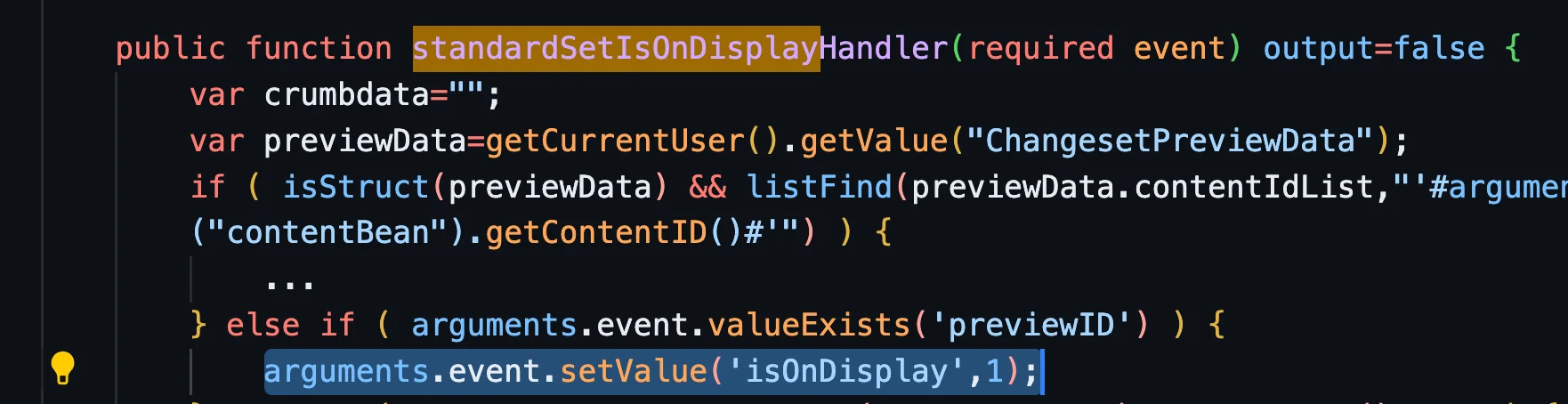
Passing the previewID parameter with any value sets the previewID property, which in turn sets isOnDisplay to true. The working request:
/_api/json/v1/default/?method=processAsyncObject&object=displayregion&contenthistid=x%5c'&previewID=x
And it worked:

Step 3: from error-based injection to RCE
Because this was an error-based SQL injection, exploitation was straightforward. Locally, the authors achieved RCE with these steps:
- Reset an Admin user's password.
- Obtain the reset token and user ID via SQL injection.
- Use the password reset endpoint with the exfiltrated information.
- Use plugin installation to upload CFM files.
On Apple's environment the response was only an Unhandled Exception error with no query-related information, which turned the bug into a blind SQL injection. The reset token and user ID are UUIDs, which made exfiltration relatively straightforward, and with some scripting the authors completed the task.
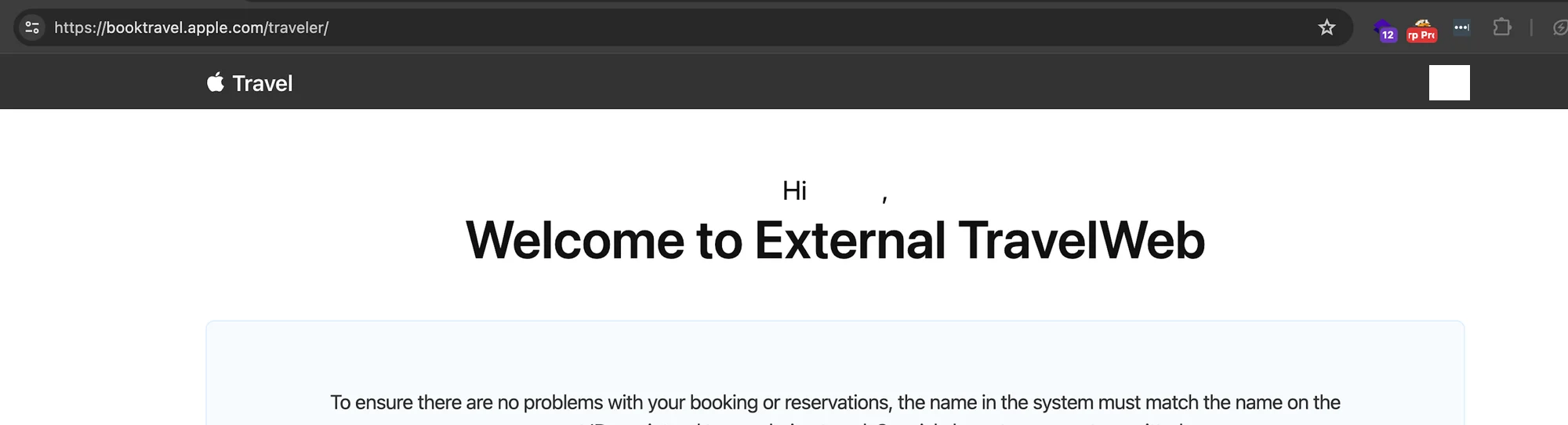
The report to Apple included a PoC demonstrating logging into an account, while theoretically providing the RCE details.
Root cause
The flaw is string interpolation of user input into SQL. In getObjects, ContentHistID is declared as a string argument and placed directly inside single quotes in the where clause of the cfquery, with no cfqueryparam and no other validation. The other two arguments are protected: columnID is numeric and siteID is validated by the JSON API. Lucee's automatic escaping of single quotes is the only barrier, and it can be bypassed with a backslash, as the payload above shows. The second condition is the isOnDisplay check in dspObjects; it is satisfied by supplying previewID, which routes through standardSetIsOnDisplayHandler and sets the property to true.; it is satisfied by supplying previewID, which routes through standardSetIsOnDisplayHandler and sets the property to true.
Impact
On the local installation, the SQL injection led to full RCE: resetting an admin password, exfiltrating the reset token and user ID, completing the reset, and uploading CFM files through plugin installation. Against Apple's Book Travel portal the injection was blind, returning only an Unhandled Exception, but the UUID token and user ID could still be exfiltrated with scripting, and the submitted PoC demonstrated logging into an account. The authors describe the RCE as theoretical in the Apple context.
Fix
Apple implemented a fix within 2 hours of the initial report. Masa CMS released new versions with fixes: 7.4.6, 7.3.13 and 7.2.8 carry the latest security patches, including another critical pre-auth SQL injection assigned CVE-2024-32640. Mura CMS did not respond across multiple communication channels, and the 90-day deadline elapsed before publication.
Detection
The SQL injection can be identified with the following Nuclei template:
id: CVE-2024-32640

info:
  name: Mura/Masa CMS - SQL Injection
  author: iamnoooob,rootxharsh,pdresearch
  severity: critical
  description: |
    The Mura/Masa CMS is vulnerable to SQL Injection.
  reference:
    - https://blog.projectdiscovery.io/mura-masa-cms-pre-auth-sql-injection/
    - https://cve.mitre.org/cgi-bin/cvename.cgi?name=CVE-2024-32640
  impact: |
    Successful exploitation could lead to unauthorized access to sensitive data.
  remediation: |
    Apply the vendor-supplied patch or update to a secure version.
  metadata:
    verified: true
    max-request: 3
    vendor: masacms
    product: masacms
    shodan-query: 'Generator: Masa CMS'
  tags: cve,cve2022,sqli,cms,masa,masacms

http:
  - raw:
      - |
        POST /index.cfm/_api/json/v1/default/?method=processAsyncObject HTTP/1.1
        Host: {{Hostname}}
        Content-Type: application/x-www-form-urlencoded

        object=displayregion&contenthistid=x\'&previewid=1

    matchers:
      - type: dsl
        dsl:
          - 'status_code == 500'
          - 'contains(header, "application/json")'
          - 'contains_all(body, "Unhandled Exception")'
          - 'contains_all(header,"cfid","cftoken")'
        condition: and
The template sends the injection in the POST body with previewid=1 to satisfy the isOnDisplay gate, and matches on a 500 status, a JSON content type, an Unhandled Exception in the body, and the cfid/cftoken cookies in the response headers. It was also added to the nuclei-templates GitHub project.
Variants to test
- Other
cfqueryblocks flagged by the parser script: run the same CFML parser over a Masa/Mura installation and inspect every query that still containsargumentsafter tag stripping. A positive result is a query where a string argument is interpolated inside quotes and reachable from the JSON API. - Other JSON API object types: the call stack goes through
processAsyncObjectand thedisplayregioncase. Try otherobjectvalues that dispatch to handlers calling into content rendering functions, and look for the samegetObjects-style interpolation. A positive result is an error-based or blind SQL error from a crafted string argument. - The
previewIDgate bypass on other handlers: passpreviewIDwith any value to methods that checkisOnDisplaybefore reaching a sink. A positive result is a handler that proceeds past the check and reaches the vulnerable query. - Backslash escaping of quotes on other Lucee-backed targets: send a value ending in
%5c'where a string is interpolated into SQL. A positive result is a database error or a changed response indicating the quote was not escaped. - Blind exfiltration of UUID values: where errors are suppressed, use boolean or time-based inference to recover tokens and user IDs, then use the password reset endpoint with the recovered values. A positive result is a successful reset or login with the exfiltrated account.
- Plugin installation for CFM upload: after obtaining admin access, attempt plugin installation to upload a CFM file. A positive result is execution of the uploaded file on the server.
Conclusion
The approach was to search the codebase for vulnerable SQL patterns with a CFM/CFC parser, similar to Semgrep, then trace each candidate sink back to its source, here the JSON API of Masa/Mura CMS. The findings were disclosed to Apple and to the Masa and Mura teams. Apple fixed the issue within 2 hours; Masa released patched versions; Mura did not respond before the 90-day deadline.
What happened, in plain words
Two security researchers, Harsh Jaiswal and Rahul Maini, spent a week reading the source code of a content management system called Masa/Mura CMS. A content management system (CMS) is the software a website uses to store and serve pages, images and other content; think of it as the filing cabinet behind a website, plus the staff who fetch things out of it. Masa is a free, open-source copy of Mura, which is a commercial CMS. Both are written in a programming language called ColdFusion, and they run on a server engine called Lucee.
The researchers exploited the SQL injection within Apple's Book Travel portal. The researchers found a way to slip extra instructions into a database query the CMS builds, which is called SQL injection. On their own test machine they turned that into full control of the server, known as remote code execution (RCE). Against Apple they could only get a much weaker signal, but they still managed to pull out account recovery data. They reported it to Apple, Apple fixed it within 2 hours, and the Masa project released patched versions. The Mura team never replied, and after the standard 90-day waiting period the researchers published this write-up.


The rest of this article walks through the same journey they did, in the same order, explaining each idea from scratch as it comes up.
Introduction
In an earlier blog post the two researchers had already looked at how Lucee works and read through the source code of Masa/Mura CMS. What struck them was how much surface there was to attack. Attack surface is simply everything an outsider can reach: every page, every form, every address the server answers on. The bigger it is, the more places there are to look for mistakes. They decided a week of reading code was worth the investment, and during that week they found several entry points, including the critical SQL injection they later used against Apple's Book Travel portal.
This article is about how they found the weak spot, how they traced it back to the part of the site a visitor can actually reach, and how they turned the injection into remote code execution.
Finding the sink
From earlier work with Masa/Mura CMS they already knew roughly where to look. Their main focus was the JSON API. An API (application programming interface) is a set of addresses a program exposes so that other programs, or a browser, can ask it to do things and get answers back, usually in a structured format. JSON is one such format: a way of writing data as labelled values, a bit like a very strict shopping list. The CMS's JSON API is reachable under a path beginning /_api/json/v1/default/ and it exposes methods that are reachable in Apple's environment. A method here means a named action the API will perform for you, such as processAsyncObject.
Their reasoning was simple: any weak spot worth finding must be reachable from the JSON API, because that is the part of the CMS exposed on the target. In security language, the place where untrusted input finally gets used dangerously is called the sink, and the place where that input enters the program is called the source. Their plan was to find sinks first, then trace each one back to a source.
Reading thousands of files by hand is slow, so they wanted a tool. They looked for static analysers or CFM parsers: programs that read source code without running it and report patterns. CFM and CFC are the two file types ColdFusion code lives in. A parser is a program that breaks code into its grammatical pieces so another program can inspect them, much like a grammar checker breaks a sentence into subject, verb and object.
To see why this matters, compare two ways of writing the same database query. A database query is an instruction to the database, for example "give me every row in this table where the column matches this value". The first example is the safe way, written in tag-based CFM (ColdFusion's HTML-like syntax):
<cfquery>
select * from table where column=<cfqueryparam cfsqltype="cf_sql_varchar" value="#arguments.user_input#">
</cfquery>
Line by line:
<cfquery>opens a database query block. Everything until the closing tag is the query itself.select * from table where column=is the query text: pick all columns from a table calledtablewhere a column matches something.<cfqueryparam ...>is a special tag that hands the value to the database separately from the query text.cfsqltype="cf_sql_varchar"tells the database the value is text.value="#arguments.user_input#"is the value the user supplied. Because the value travels separately, the database treats it purely as data and never as part of the instruction. This is called a parameterised query, and it is the standard defence against SQL injection.</cfquery>closes the block.
The second example is the unsafe way:
<cfquery>
select * from table where column=#arguments.user_input#
</cfquery>
Line by line:
<cfquery>opens the query block again.select * from table where column=#arguments.user_input#pastes the user's value straight into the query text. If the user's value contains a quote or extra SQL, the database cannot tell where the intended query ends and the user's addition begins. That is exactly the opening SQL injection needs.</cfquery>closes the block.
The researchers wanted a script that would parse and walk the code and print only the cfquery tags that contain unsanitised input, whether or not a cfqueryparam tag happens to be inside. They found a parser that could do this: cfmlparser.
Their detection logic was:
- Parse each CFM/CFC file.
- Go through each statement and select it if it is a tag named
cfquery. - Strip all tags (such as
cfqueryparam) inside thecfqueryblock; ifargumentsstill appears in the block, the input is not parameterised and the query is a candidate for SQL injection, assuming no other validation is in place. - Print the query.
Step 3 is the clever part. If a query is properly parameterised, the user's value sits inside a cfqueryparam tag, so removing all tags removes the value too. If the value is still there after stripping, it was pasted directly into the query text, which is the dangerous pattern.
The script that implements this:
<cfscript>
    targetDirectory = "../mura-cms/";
    files = DirectoryList(targetDirectory, true, "query");

    for (file in files) {
        if (FindNoCase(".cfc", file.name) or FindNoCase(".cfm", file.name)) {
            fname = file.directory & "/" & file.name;
            if (file.name != "dbUtility.cfc" && file.name != "configBean.cfc" && !FindNoCase("admin", file.directory) && !FindNoCase("dbUpdates", file.directory)) {
                filez = new cfmlparser.File(fname);
                statements = filez.getStatements();
                info = [];
                for (s in statements) {
                    if (s.isTag() && s.getName() == "cfquery" && FindNoCase("arguments", s.getStrippedInnerContent(true, true))) {
                        WriteOutput("Filename: <b>#fname#</b>");
                        WriteOutput("<br><br>" & s.getStrippedInnerContent(true, true));
                        WriteOutput("<br><br><br><br>");
                    }
                }
            }
        }
    }
</cfscript>
Line by line:
<cfscript>opens a block of ColdFusion written in script style rather than tag style.targetDirectory = "../mura-cms/";sets the folder to scan: the local copy of the CMS source.files = DirectoryList(targetDirectory, true, "query");lists every file under that folder, including subfolders (thetrue), and returns the list in a query-like structure.for (file in files) {starts a loop over each file.if (FindNoCase(".cfc", file.name) or FindNoCase(".cfm", file.name)) {keeps only files whose names contain.cfcor.cfm, ignoring case.FindNoCasereturns a position if it finds the text, and zero if it does not, so a non-zero result counts as true.fname = file.directory & "/" & file.name;builds the full path of the file.- The next
ifskips a few files and folders:dbUtility.cfc,configBean.cfc, anything under anadminfolder and anything under adbUpdatesfolder. These are excluded to cut noise from the results. filez = new cfmlparser.File(fname);loads the file into the parser.statements = filez.getStatements();asks the parser for the file's statements, the individual grammatical pieces.info = [];creates an empty list, which is not used further in the script.for (s in statements) {loops over each statement.if (s.isTag() && s.getName() == "cfquery" && FindNoCase("arguments", s.getStrippedInnerContent(true, true))) {is the core test: the statement must be a tag, its name must becfquery, and after stripping inner tags the text must still containarguments.getStrippedInnerContent(true, true)returns the inside of the tag with tags removed.WriteOutput("Filename: <b>#fname#</b>");prints the file name in bold.WriteOutput("<br><br>" & s.getStrippedInnerContent(true, true));prints the query text below it.WriteOutput("<br><br><br><br>");adds blank lines between results.- The closing braces end the inner loop, the inner
if, the outer loop and the outerif, and</cfscript>ends the script.
They then went through the output with a few things in mind. One was to ignore inputs such as siteid, because the JSON API validates it in advance, so it cannot carry an attack. One of the queries that had two other inputs was flagged by the script.
Tracing the sink to its source
Having a suspicious query is not enough. You also need to know whether a visitor can actually influence the dangerous value. Looking at the function that contained the query, they concluded there was only one exploitable argument: ContentHistID. An argument here means a named value the function accepts. The other two were safe: columnid is numeric, and a number cannot carry SQL syntax in the same way text can, and siteid is validated by default.
<cffunction name="getObjects" output="false">
	<cfargument name="columnID" required="yes" type="numeric" >
	<cfargument name="ContentHistID" required="yes" type="string" >
	<cfargument name="siteID" required="yes" type="string" >

	<cfset var rsObjects=""/>

	<cfquery attributeCollection="#variables.configBean.getReadOnlyQRYAttrs(name='rsObjects')#">
		select tcontentobjects.object,tcontentobjects.name,tcontentobjects.objectid, tcontentobjects.orderno, tcontentobjects.params, tplugindisplayobjects.configuratorInit from tcontentobjects
		inner join tcontent On(
		tcontentobjects.contenthistid=tcontent.contenthistid
		and tcontentobjects.siteid=tcontent.siteid)
		left join tplugindisplayobjects on (tcontentobjects.object='plugin'
											and tcontentobjects.objectID=tplugindisplayobjects.objectID)
		where tcontent.siteid='#arguments.siteid#'
		and tcontent.contenthistid ='#arguments.contentHistID#'
		and tcontentobjects.columnid=#arguments.columnID#
		order by tcontentobjects.orderno
	</cfquery>

	<cfreturn rsObjects>

</cffunction>
Line by line:
<cffunction name="getObjects" output="false">defines a function calledgetObjects.output="false"means it does not print anything itself; it just returns a value.<cfargument name="columnID" required="yes" type="numeric" >declares the first input,columnID, which must be supplied and must be a number.<cfargument name="ContentHistID" required="yes" type="string" >declares the second input,ContentHistID, which must be supplied and is text. This is the one that matters.<cfargument name="siteID" required="yes" type="string" >declares the third input,siteID, also text.<cfset var rsObjects=""/>creates an empty variable to hold the result.<cfquery attributeCollection="#variables.configBean.getReadOnlyQRYAttrs(name='rsObjects')#">opens the query and passes a set of connection settings from the CMS configuration;name='rsObjects'says where to store the result.- The
select ... from tcontentobjectsline lists the columns to fetch and the first table to read from. inner join tcontent On(...)andleft join tplugindisplayobjects on (...)combine rows from other tables. A join is how a database stitches related tables together, like matching names in one list to addresses in another.inner joinkeeps only matching rows;left joinkeeps all rows from the first table even when there is no match.where tcontent.siteid='#arguments.siteid#'filters by site. The value is placed inside single quotes, which is how SQL marks text.and tcontent.contenthistid ='#arguments.contentHistID#'filters by content history ID. This is the dangerous line: the user's text is pasted inside single quotes with nocfqueryparam.and tcontentobjects.columnid=#arguments.columnID#filters by column ID. It is not inside quotes because it is a number.order by tcontentobjects.ordernosorts the results.</cfquery>closes the query.<cfreturn rsObjects>returns the result to the caller.</cffunction>closes the function.
Because ContentHistID is text and is placed inside single quotes, a single quote in the value ends the text early. Everything after it is then read by the database as part of the query, which is the injection.
The function getObjects was called from the dspObjects function in the core/mura/content/contentRendererUtility.cfc component. A component in ColdFusion is a reusable code file, roughly what other languages call a class or a module.
The call stack was:
JSON API -> processAsyncObject -> object case: displayregion -> dspobjects() -> getobjects()
A call stack is the chain of functions that led to the current one, like a list of who handed the work to whom. Reading it from left to right: a request arrives at the JSON API, the API runs processAsyncObject, that method takes the object value displayregion and follows that case, which calls dspobjects(), which calls getobjects(). This chain is what connects the public API to the dangerous query.
Triggering and exploiting the SQL injection
By default, Lucee escapes single quotes by adding a backslash before them when they arrive as input. A backslash is the character \, and in many programming languages it is used to say "the next character is literal, not special". So if you send a single quote, Lucee turns it into \', and the database sees a harmless quote inside text rather than the end of the text. This can be worked around by using a backslash to escape one of the single quotes: send a backslash followed by a quote, and the escaping logic ends up protecting the wrong character.
The request they expected to trigger the injection:
/_api/json/v1/default/?method=processAsyncObject&object=displayregion&contenthistid=x%5c'
Line by line:
/_api/json/v1/default/is the path of the JSON API.?starts the query string, the part of a URL that carries parameters.method=processAsyncObjectasks the API to run the method namedprocessAsyncObject.&object=displayregiontells that method which kind of object to process;displayregionis the case that leads to the content rendering code.&contenthistid=x%5c'supplies the value forcontenthistid.%5cis how a backslash is written in a URL, because URLs cannot contain raw special characters safely. So the value isx\': anx, a backslash and a single quote. The idea is that Lucee's escaping will neutralise the quote, but the backslash before it changes which character gets escaped, leaving a live quote in the SQL.
It did not trigger. Going back to the source, they found a condition in dspObjects: before getObjects is called, an if must be satisfied, namely that the isOnDisplay property is true on the Mura servlet event handler. A servlet is the part of a Java web server that handles a request; an event handler is the code that reacts to it. A property is simply a named setting attached to an object. In plain terms, the CMS only builds the query if it believes the content is currently being displayed, so the request has to convince it of that first.
They first assumed that any property on the event handler could be set by passing the property name as a parameter with a value, based on their debugging of the codebase. Debugging means running the code and watching what happens step by step. Setting isOnDisplay that way did not work; somewhere in the code the property is overwritten. Grep searches, which are text searches across many files, led them to the standardSetIsOnDisplayHandler function call inside processAsyncObjects of the JSON API.
Passing the previewID parameter with any value sets the previewID property, which in turn sets isOnDisplay to true. In other words, the CMS has a preview feature, and telling it "this is a preview" makes it treat the content as visible. The working request:
/_api/json/v1/default/?method=processAsyncObject&object=displayregion&contenthistid=x%5c'&previewID=x
Line by line:
- Everything up to
contenthistid=x%5c'is the same as before: the API path, the method, the object type and the injection attempt. &previewID=xadds the preview parameter with an arbitrary value. That is enough to setpreviewID, which setsisOnDisplayto true, which lets the code pass theifand reach the vulnerable query.
And it worked:
Because this was an error-based SQL injection, exploitation was straightforward. Error-based means the database's error message itself carries information back to the attacker, so you can read data out of the error text instead of guessing. Locally, the authors achieved RCE with these steps:
- Reset an Admin user's password.
- Obtain the reset token and user ID via SQL injection.
- Use the password reset endpoint with the exfiltrated information.
- Use plugin installation to upload CFM files.
A few terms in that list. A token is a long random string a site gives you to prove you are allowed to do something, like a cloakroom ticket: whoever holds it gets the coat. A user ID is the internal number or string that identifies an account. Exfiltration means getting data out of a system you should not be able to read. A plugin is an add-on that extends the CMS, and installing one can involve uploading files. A CFM file is ColdFusion code, so uploading one and getting the server to run it is effectively running your own code on the server, which is RCE.
On Apple's environment the response was only an Unhandled Exception error with no query-related information, which turned the bug into a blind SQL injection. Blind means the application gives no useful output, so you have to infer the data from indirect signals, such as whether a page loads or how long it takes. The reset token and user ID are UUIDs, which made exfiltration relatively straightforward. A UUID is a long, randomly generated identifier, usually written in groups of letters and numbers separated by hyphens. Random values are hard to guess but easy to recognise, so a script can pick them out of noisy responses. With some scripting the authors completed the task.
The report to Apple included a PoC demonstrating logging into an account, while theoretically providing the RCE details. A PoC, or proof of concept, is a minimal demonstration that a vulnerability is real, enough to convince the owner without causing harm.
Root cause
The flaw is string interpolation of user input into SQL. Interpolation means building a string by pasting values into it, the way a mail merge pastes names into a letter. In getObjects, ContentHistID is declared as a string argument and placed directly inside single quotes in the where clause of the cfquery, with no cfqueryparam and no other validation. The other two arguments are protected: columnID is numeric and siteID is validated by the JSON API. Lucee's automatic escaping of single quotes is the only barrier, and it can be bypassed with a backslash, as the payload above shows. The second condition is the isOnDisplay check in dspObjects; it is satisfied by supplying previewID, which routes through standardSetIsOnDisplayHandler and sets the property to true.; it is satisfied by supplying previewID, which routes through standardSetIsOnDisplayHandler and sets the property to true.
Impact
On the local installation, the SQL injection led to full RCE: resetting an admin password, exfiltrating the reset token and user ID, completing the reset, and uploading CFM files through plugin installation. Against Apple's Book Travel portal the injection was blind, returning only an Unhandled Exception, but the UUID token and user ID could still be exfiltrated with scripting, and the submitted PoC demonstrated logging into an account. The authors describe the RCE as theoretical in the Apple context.
Fix
Apple implemented a fix within 2 hours of the initial report. Masa CMS released new versions with fixes: 7.4.6, 7.3.13 and 7.2.8 carry the latest security patches, including another critical pre-auth SQL injection assigned CVE-2024-32640. A CVE is a public catalogue number for a known vulnerability, so people can refer to the same issue unambiguously. Mura CMS did not respond across multiple communication channels, and the 90-day deadline elapsed before publication. The 90-day deadline is a common industry convention: give the vendor three months to fix the issue before telling the world.
Detection
The SQL injection can be identified with the following Nuclei template. Nuclei is a scanner that sends predefined requests and checks the responses against rules; a template is one such recipe.
id: CVE-2024-32640

info:
  name: Mura/Masa CMS - SQL Injection
  author: iamnoooob,rootxharsh,pdresearch
  severity: critical
  description: |
    The Mura/Masa CMS is vulnerable to SQL Injection.
  reference:
    - https://blog.projectdiscovery.io/mura-masa-cms-pre-auth-sql-injection/
    - https://cve.mitre.org/cgi-bin/cvename.cgi?name=CVE-2024-32640
  impact: |
    Successful exploitation could lead to unauthorized access to sensitive data.
  remediation: |
    Apply the vendor-supplied patch or update to a secure version.
  metadata:
    verified: true
    max-request: 3
    vendor: masacms
    product: masacms
    shodan-query: 'Generator: Masa CMS'
  tags: cve,cve2022,sqli,cms,masa,masacms

http:
  - raw:
      - |
        POST /index.cfm/_api/json/v1/default/?method=processAsyncObject HTTP/1.1
        Host: {{Hostname}}
        Content-Type: application/x-www-form-urlencoded

        object=displayregion&contenthistid=x\'&previewid=1

    matchers:
      - type: dsl
        dsl:
          - 'status_code == 500'
          - 'contains(header, "application/json")'
          - 'contains_all(body, "Unhandled Exception")'
          - 'contains_all(header,"cfid","cftoken")'
        condition: and
Line by line:
id: CVE-2024-32640names the template after the CVE.- The
info:block is metadata: a human-readable name, the authors, a severity ofcritical, a description, references, impact and remediation text, plus metadata such asverified: true,max-request: 3, the vendor and product, a Shodan search string for finding exposed instances, and tags for filtering. http:starts the request section.raw:means the request is written out exactly as it will be sent.POST /index.cfm/_api/json/v1/default/?method=processAsyncObject HTTP/1.1is the request line: the method is POST, the path includes the API and the method parameter, and the protocol is HTTP/1.1.Host: {{Hostname}}is the target host, filled in by the scanner.Content-Type: application/x-www-form-urlencodedsays the body is form data, the same format a browser uses when you submit a form.- The blank line separates headers from the body.
object=displayregion&contenthistid=x\'&previewid=1is the body: the object type, the injection valuex\', andpreviewid=1to satisfy theisOnDisplaygate.matchers:lists the checks that decide whether the target is vulnerable.type: dslmeans the checks are written in a small expression language.'status_code == 500'expects a server error, which is what a broken query produces.'contains(header, "application/json")'expects the response to be JSON.'contains_all(body, "Unhandled Exception")'expects the error text in the body.'contains_all(header,"cfid","cftoken")'expects the CMS session cookies in the response headers. A cookie is a small piece of data a site stores in your browser to remember who you are between requests.condition: andmeans all of these must be true at once.
The template sends the injection in the POST body with previewid=1 to satisfy the isOnDisplay gate, and matches on a 500 status, a JSON content type, an Unhandled Exception in the body, and the cfid/cftoken cookies in the response headers. It was also added to the nuclei-templates GitHub project.
Variants to test
- Other
cfqueryblocks flagged by the parser script: run the same CFML parser over a Masa/Mura installation and inspect every query that still containsargumentsafter tag stripping. A positive result is a query where a string argument is interpolated inside quotes and reachable from the JSON API. - Other JSON API object types: the call stack goes through
processAsyncObjectand thedisplayregioncase. Try otherobjectvalues that dispatch to handlers calling into content rendering functions, and look for the samegetObjects-style interpolation. A positive result is an error-based or blind SQL error from a crafted string argument. - The
previewIDgate bypass on other handlers: passpreviewIDwith any value to methods that checkisOnDisplaybefore reaching a sink. A positive result is a handler that proceeds past the check and reaches the vulnerable query. - Backslash escaping of quotes on other Lucee-backed targets: send a value ending in
%5c'where a string is interpolated into SQL. A positive result is a database error or a changed response indicating the quote was not escaped. - Blind exfiltration of UUID values: where errors are suppressed, use boolean or time-based inference to recover tokens and user IDs, then use the password reset endpoint with the recovered values. Boolean inference means asking yes/no questions through the application's behaviour; time-based means measuring how long a response takes. A positive result is a successful reset or login with the exfiltrated account.
- Plugin installation for CFM upload: after obtaining admin access, attempt plugin installation to upload a CFM file. A positive result is execution of the uploaded file on the server.
Conclusion
The approach was to search the codebase for vulnerable SQL patterns with a CFM/CFC parser, similar to Semgrep, then trace each candidate sink back to its source, here the JSON API of Masa/Mura CMS. Semgrep is a tool that finds patterns in source code. The findings were disclosed to Apple and to the Masa and Mura teams. Apple fixed the issue within 2 hours; Masa released patched versions; Mura did not respond before the 90-day deadline.


Glossary
- API: a set of addresses a program exposes so other programs or browsers can ask it to do things and get answers back.
- Argument: a named value a function accepts as input.
- Attack surface: everything an outsider can reach on a system, such as pages, forms and addresses.
- Blind SQL injection: an injection where the application gives no useful output, so data must be inferred from indirect signals.
- Call stack: the chain of functions that led to the one currently running.
- CFC / CFM: the two file types ColdFusion code lives in; CFC files are reusable components, CFM files are pages.
- CFML: the language ColdFusion code is written in, in either tag or script style.
- CMS (content management system): software a website uses to store and serve pages and other content.
- ColdFusion: a programming language and platform for building web applications.
- Component: a reusable code file, roughly what other languages call a class or module.
- Cookie: a small piece of data a site stores in your browser to remember who you are between requests.
- CVE: a public catalogue number for a known vulnerability.
- Error-based SQL injection: an injection where the database's error message itself carries information back to the attacker.
- Exfiltration: getting data out of a system you should not be able to read.
- Inner join / left join: ways of combining rows from related database tables; an inner join keeps only matches, a left join keeps all rows from the first table.
- Interpolation: building a string by pasting values into it.
- JSON: a text format for writing data as labelled values.
- JSON API: an API that accepts and returns data in JSON format.
- Lucee: the server engine that runs ColdFusion code.
- Method: a named action an API or object will perform for you.
- Nuclei: a scanner that sends predefined requests and checks responses against rules.
- Parameterised query: a database query where user values are handed to the database separately from the query text, so they can never change the instruction.
- Parser: a program that breaks code into its grammatical pieces so another program can inspect them.
- Plugin: an add-on that extends a CMS, often installed by uploading files.
- PoC (proof of concept): a minimal demonstration that a vulnerability is real.
- Pre-authentication: reachable without logging in.
- Property: a named setting attached to an object.
- RCE (remote code execution): running your own code on someone else's server.
- Semgrep: a tool that finds patterns in source code.
- Servlet: the part of a Java web server that handles a request.
- Sink: the place where untrusted input finally gets used dangerously.
- Source: the place where untrusted input enters a program.
- SQL injection: slipping extra instructions into a database query by putting special characters in a value the program pastes into the query text.
- Static analyser: a program that reads source code without running it and reports patterns.
- Token: a long random string a site gives you to prove you are allowed to do something.
- Unauthenticated: not logged in.
- User ID: the internal identifier that identifies an account.
- UUID: a long, randomly generated identifier, usually written in groups of letters and numbers separated by hyphens.