Finding Sensitive Backend Information Through GraphQL Errors
A GraphQL endpoint returned a detailed Node.js stack trace alongside its validation error when an invalid field was queried. This exposed backend file paths, module names and details of the GraphQL validation process to any unauthenticated caller.
 Published on medium.com
Bug Bounty
The full write-up lives on its author's site
It belongs to its author, so we link to it rather than copy it. The other two tabs are our own rewrites, checked against it.
Context
While testing a web application, I spent some time on its GraphQL endpoint, looking at how it handled invalid queries. GraphQL is expected to reject a query that asks for a field which does not exist in the schema, so the rejection itself was not interesting. What the application sent back alongside that rejection was.
This write-up is about verbose error handling on a GraphQL API: a validation error that came back wrapped in a detailed Node.js stack trace, exposing internal file paths, module names and details of how the GraphQL validation was being processed.
Setup
The testing was done against a web application with a GraphQL endpoint at /graphql. No account, role, token or special tooling is described: the behaviour could be triggered with an ordinary request carrying an invalid query. No authentication bypass or complicated payload was required.
Finding it
I started by checking how the endpoint handled invalid queries. A simple query with a field that is not part of the schema was enough:
query {
  users {
    id
    email
    Role
  }
}
The request was rejected, as expected. GraphQL is supposed to return an error when a query contains a field that does not exist.
What caught my attention was the response. Instead of returning only the GraphQL validation error, the application also returned a detailed Node.js stack trace. The response exposed internal information such as backend file paths, module names, and details about the GraphQL validation process.
Exploitation
Step 1: send a query with a field outside the schema
I sent the invalid query above to the /graphql endpoint, intentionally requesting a field that was not part of the schema. The field Role is the trigger: it does not exist on the User type, so the query fails validation.
Step 2: read the response
The server returned a 400 response containing the GraphQL validation error, but also included the internal stack trace.
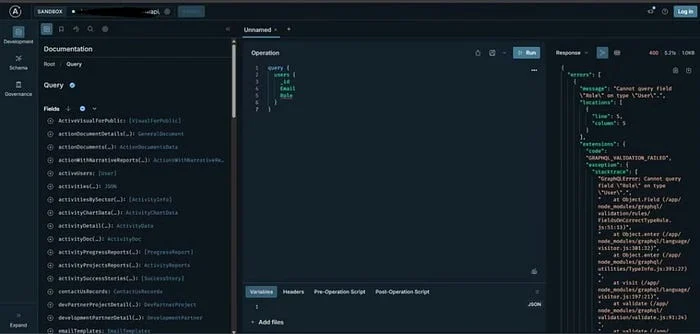
The response contained information similar to:
/app/node_modules/graphql/…
/app/node_modules/…
along with the stack trace showing how the request was being processed internally. From a user's perspective, an error such as:
Cannot query field "Role" on type "User"
is enough. The additional stack trace does not help the user fix their request, but it does give someone testing the application more information about what is happening behind the API.
Root cause
The issue is verbose error handling: the GraphQL layer, or the error middleware in front of it, serialises the full exception, including its stack, into the HTTP response instead of returning only the validation message. The stack trace reveals the backend technology, the GraphQL implementation, internal application structure, module and dependency paths, and how GraphQL validation is being handled. The report does not describe the specific configuration responsible.
Impact
This falls under information disclosure / verbose error handling. On its own, exposing a stack trace does not necessarily give an attacker direct access to the application, but it makes reconnaissance easier. From the response, an attacker can start learning about:
- the backend technology being used;
- the GraphQL implementation;
- internal application structure;
- module and dependency paths;
- how GraphQL validation is being handled.
That information can then be combined with other findings. For example, knowing the technologies and dependencies an application uses can make it easier to look for known vulnerabilities or identify areas worth testing further. The error itself is not an exploit, but it is information the application should not be giving away.
Fix
The recommended fix is fairly simple:
- Disable verbose error responses in production.
- Return generic or appropriate GraphQL errors to clients.
- Keep detailed stack traces in server-side logs.
- Review the application's GraphQL error-handling configuration.
- Make sure development/debug settings are not enabled in production.
In production, detailed debugging information should stay on the server. The client should receive a clean error response, for example:
{
  "errors": [
    {
      "message": "Cannot query field \"Role\" on type \"User\"."
    }
  ]
}
The full stack trace can still be captured in server-side logs for developers and security teams. It just should not be sent back to the person making the request.
Variants to test
- Other invalid fields and types. Request a field that does not exist on any type in the schema. A positive result is a 400 whose body contains file paths, module names or a stack trace rather than only the validation message.
- Malformed queries. Send syntactically invalid GraphQL rather than a schema mismatch. A positive result is a parse error response that leaks the same internal detail.
- Resolver-level errors. Trigger an error inside a resolver, for example by requesting an object with arguments that cause a failure. A positive result is a 200 or 500 response carrying a stack trace.
- Other error surfaces. Check REST endpoints, authentication failures and 404s on the same host for the same verbose behaviour. A positive result is any error body that names internal paths or dependencies.
- Production versus development configuration. Compare responses from different environments if both are reachable. A positive result is a clean error in one environment and a stack trace in the other, which confirms debug settings are enabled where they should not be.
What happened, in plain words
A security researcher was testing a website that has a GraphQL API. GraphQL is a way for a website's front end to ask its back end for exactly the data it needs. When the researcher sent the API a request that contained a mistake, the API did the right thing and refused it. But along with the refusal, it also sent back a long technical message describing how the server is built: file paths, folder names and the names of software components. That kind of message is meant for developers, not for visitors. The researcher wrote it up as an information disclosure issue, which simply means the application is giving away information it should keep to itself.
This article walks through the same story from the beginning, assuming you have never done security testing before. You only need a browser and a computer to follow along.
The background: what an API is
When you use a website, your browser shows you pages. Behind those pages there is usually another computer, the server, that holds the data and does the work. The browser talks to the server through an API (Application Programming Interface). Think of a restaurant: the menu is the API, the kitchen is the server, and the waiter carries your order back and forth. You do not walk into the kitchen yourself; you ask through the menu, and the kitchen sends back a plate.
Most APIs speak in a format called JSON, which is just structured text with labels and values, a bit like a very tidy shopping list.
What GraphQL is
GraphQL is a particular style of API. Instead of the server deciding what each answer looks like, the client writes a query describing exactly which pieces of data it wants. If you want a user's name and email but not their address, you ask for just those two things.
A GraphQL server has a schema: a formal description of every kind of data it knows about and every field each kind has. You can think of the schema as the menu again, but a very strict one. If a dish is not on the menu, the kitchen will not make it.
When a query asks for something that is not in the schema, GraphQL is designed to refuse it and return an error message. That is normal and correct behaviour. The interesting question is not whether the request is refused, but what the refusal looks like.
The setup
The researcher tested a web application whose GraphQL API lives at the address /graphql. That is a path on the website, the part after the domain name, the same way /about or /contact would be a page.
No account, password, login token or special software is described in the report. The behaviour could be triggered with an ordinary request carrying an invalid query. In other words, anyone who can reach the website could have done this.
Finding it
Step 1: send a query with a field outside the schema
The researcher started by checking how the endpoint handled invalid queries. A simple query with a field that is not part of the schema was enough:
query {
  users {
    id
    email
    Role
  }
}
Line by line:
query {opens a request for data. The wordquerysays what kind of operation this is, and the opening brace starts the list of things being asked for.users {asks for the collection of users. The opening brace after it means "and here are the details I want about each user".idasks for each user's identifier.emailasks for each user's email address.Roleasks for a field calledRole. This is the deliberate mistake: the report says this field does not exist on theUsertype in the schema.- The two closing braces close the
usersblock and then the whole query.
The capital R in Role matters. GraphQL field names are case sensitive, so Role and role would be treated as two different things.
Why do this? Because error messages are one of the cheapest ways to learn about a system. A well-behaved server says "I do not know that field" and nothing more. A careless server may say much more than it means to.
Step 2: read the response
The request was rejected, as expected. GraphQL is supposed to return an error when a query contains a field that does not exist.
What caught the researcher's attention was the response. Instead of returning only the GraphQL validation error, the application also returned a detailed Node.js stack trace. The response exposed internal information such as backend file paths, module names, and details about the GraphQL validation process.
Two terms need unpacking here.
Node.js is a popular piece of software for running programs written in the JavaScript language on a server. Many websites use it.
A stack trace is a list a program prints when something goes wrong, showing the chain of internal steps that led to the failure, like the receipt trail from a kitchen showing every station your order passed through before it was sent back. It is enormously useful to a developer fixing a bug, and it is meant for their eyes only.
A 400 is an HTTP status code. Status codes are short numbers a server sends with every answer to say how it went: 200 means fine, 404 means not found, and 400 means the request itself was malformed or unacceptable. So a 400 here is the correct outcome. The problem is what came with it.
The response contained information similar to:
/app/node_modules/graphql/…
/app/node_modules/…
Line by line:
/app/node_modules/graphql/…is a file path on the server. The leading slash means it starts from the top of the file system.appis a folder,node_modulesis the folder where Node.js keeps installed software packages, andgraphqlis the package for the GraphQL library itself. The ellipsis stands for more of the path that the report does not reproduce./app/node_modules/…is the same idea without naming the specific package, showing that more than one internal path appeared.
These paths tell a reader which software is installed and where it lives on disk. That is housekeeping information about the server, not something a visitor needs.
Along with the paths, the stack trace showed how the request was being processed internally. From a user's perspective, an error such as:
Cannot query field "Role" on type "User"
is enough. Read plainly, that sentence says: you asked for a field called Role, on a type called User, and no such field exists. It tells you exactly what to fix and nothing about the server. The additional stack trace does not help the user fix their request, but it does give someone testing the application more information about what is happening behind the API.
Why this happens
The issue is called verbose error handling. "Verbose" just means wordy: the application says too much. The GraphQL layer, or the error-handling code sitting in front of it, takes the full internal exception, including its stack, and copies it into the HTTP response instead of returning only the validation message.
The report does not describe the specific configuration responsible. "Production" means the live site real users visit, as opposed to a development copy used while building it. Debug modes are designed to be helpful and talkative, which is fine on a developer's laptop and wrong on a public server.
Why it matters
This falls under information disclosure, also described as verbose error handling. Information disclosure is a broad category for any case where a system reveals something it should keep private. It is not the same as someone breaking in; it is more like a building that leaves its floor plans taped to the front door.
On its own, exposing a stack trace does not necessarily give an attacker direct access to the application, but it makes reconnaissance easier. Reconnaissance is the looking-around phase, the same word used for scouting in a military or hiking context: before doing anything, you learn the terrain.
From the response, an attacker can start learning about:
- the backend technology being used;
- the GraphQL implementation;
- internal application structure;
- module and dependency paths;
- how GraphQL validation is being handled.
That information can then be combined with other findings. For example, knowing the technologies and dependencies an application uses can make it easier to look for known vulnerabilities or identify areas worth testing further. A dependency is a piece of software your application relies on rather than writes itself, like a cook using a bought sauce. If a known flaw exists in a particular version of a dependency, knowing it is present narrows the search enormously.
The error itself is not an exploit, but it is information the application should not be giving away.
The fix
The recommended fix is fairly simple:
- Disable verbose error responses in production.
- Return generic or appropriate GraphQL errors to clients.
- Keep detailed stack traces in server-side logs.
- Review the application's GraphQL error-handling configuration.
- Make sure development/debug settings are not enabled in production.
In production, detailed debugging information should stay on the server. The client, meaning the browser or app making the request, should receive a clean error response, for example:
{
  "errors": [
    {
      "message": "Cannot query field \"Role\" on type \"User\"."
    }
  ]
}
Line by line:
- The outer braces
{and}hold one JSON object, a bundle of labelled values. "errors"is the label. Its value is a list, shown by the square brackets[and], because a response can contain more than one error.- Inside the list is another object, again in braces.
"message"is the label for the human-readable text, and its value is the sentenceCannot query field "Role" on type "User".The backslashes before the inner quotation marks are how JSON includes a quote character inside a piece of text without ending it early.
That is all the client needs: one clear sentence. The full stack trace can still be captured in server-side logs for developers and security teams. Logs are the records a server keeps of what happened, like a diary. It just should not be sent back to the person making the request.
Other places to look
Once you know this pattern exists, it is worth checking for it elsewhere:
- Other invalid fields and types. Request a field that does not exist on any type in the schema. A positive result is a 400 whose body contains file paths, module names or a stack trace rather than only the validation message.
- Malformed queries. Send syntactically invalid GraphQL rather than a schema mismatch. "Syntactically invalid" means the text is not even properly formed, like a sentence with the words in the wrong order, as opposed to a well-formed request for something that does not exist. A positive result is a parse error response that leaks the same internal detail.
- Resolver-level errors. A resolver is the piece of server code that actually fetches the data for a field, the cook preparing a specific dish. Trigger an error inside a resolver, for example by requesting an object with arguments that cause a failure. A positive result is a 200 or 500 response carrying a stack trace. A 500 means the server hit an unexpected problem of its own.
- Other error surfaces. Check REST endpoints, authentication failures and 404s on the same host for the same verbose behaviour. REST is the older, more common style of API built around fixed addresses for each thing, rather than one address you send queries to. A positive result is any error body that names internal paths or dependencies.
- Production versus development configuration. Compare responses from different environments if both are reachable. An environment here means a separate copy of the application, such as a test copy and the live one. A positive result is a clean error in one environment and a stack trace in the other, which confirms debug settings are enabled where they should not be.
Closing
This was a good example of why testing error handling is worthwhile. Sometimes you do not need a complicated payload to find something interesting. A malformed request and a close look at the response can reveal quite a lot about what is running behind an application.
A 400 Bad Request is expected. A 400 Bad Request that also tells you how the backend is built is a different story. If you run a GraphQL API in production, it is worth checking what your errors actually return, because your users may not be the only ones reading them.
Glossary
- API: the agreed way for one piece of software to ask another for data or actions, like a menu you order from.
- JSON: a plain-text format for structured data, made of labels and values in braces and brackets.
- GraphQL: an API style where the client writes a query naming exactly the fields it wants, and the server answers according to a fixed schema.
- Query: the request text a client sends to a GraphQL server describing the data it wants.
- Schema: the formal description of every type and field a GraphQL server offers.
- Field: one named piece of data inside a type, such as
emailon a user. - Type: a named kind of data in a schema, such as
User. - Endpoint: a specific address on a server that accepts requests, here
/graphql. - Validation error: the refusal a GraphQL server sends when a query asks for something the schema does not contain.
- Node.js: software for running JavaScript programs on a server.
- Stack trace: a list of internal program steps printed when something fails, showing the path the code took.
- HTTP status code: a number sent with every web response describing the outcome, such as 200 for success, 400 for a bad request, 404 for not found and 500 for a server error.
- 400: the status code meaning the request was malformed or unacceptable.
- 500: the status code meaning the server hit an unexpected problem.
- File path: the location of a file on a server's disk, written as folders separated by slashes.
- Module: a packaged piece of software a program loads and uses.
- Dependency: software an application relies on instead of writing itself.
- Verbose error handling: returning far more technical detail in an error message than the person receiving it needs.
- Information disclosure: any case where a system reveals information it should keep private.
- Reconnaissance: the information-gathering phase before any attack, learning about the target's technology and structure.
- Production: the live version of an application that real users use.
- Debug mode: a talkative setting meant for developers that reveals internal detail, which should be off in production.
- Client: the browser or app making a request to a server.
- Server-side logs: records a server keeps of what happened, for developers and security teams to review.
- Resolver: the server code that fetches the data for a particular GraphQL field.
- REST: an older, common API style with a fixed address for each resource.
- Environment: a separate copy of an application, such as a test copy or the live one.
- Payload: the content of a request, here the query text sent to the server.



