Information Disclosure Through Verbose Error Messages
An OAuth token endpoint returned a full Symfony exception page instead of a generic error when it received an empty POST request. The page exposed internal file paths, framework details, stack traces, middleware and routing information, and parts of the source code to unauthenticated users.
 Published on medium.com
Bug Bounty
The full write-up lives on its author's site
It belongs to its author, so we link to it rather than copy it. The other two tabs are our own rewrites, checked against it.
Context
The target was an application that exposed an OAuth token endpoint. While testing its OAuth functionality, the researcher looked at how the endpoint handled invalid or incomplete requests, which should get a controlled error response explaining which required parameters are missing.
Instead of that, the endpoint returned a full Symfony exception page. The response exposed internal application details, including file paths, framework information, stack traces, middleware details, and even parts of the application's source code.
Setup
The write-up describes no accounts, roles, tools or versions. No authentication was required and no specially crafted payload was needed.
Finding it
While testing the application's OAuth functionality, the researcher looked at how the token endpoint handled invalid requests. A normal token endpoint should answer an invalid or incomplete request with a standard OAuth error saying that required parameters are missing. This one returned a Symfony exception page instead, which is what made the behaviour stand out.
Exploitation
Step 1: Send an empty POST to the token endpoint
To see how the endpoint handled invalid requests, the researcher sent a simple POST request with no request body:
POST /oauth/token HTTP/1.1

Host: [REDACTED]

Content-Length: 0
The request has no body (Content-Length: 0) and no authentication. Its only purpose was to observe how the application handled an incomplete request.
Step 2: Read the response
Instead of a generic OAuth error, the server responded with a detailed exception page: a Symfony exception showing an internal application error. The error page exposed information that should generally not be available to external users in a production environment.
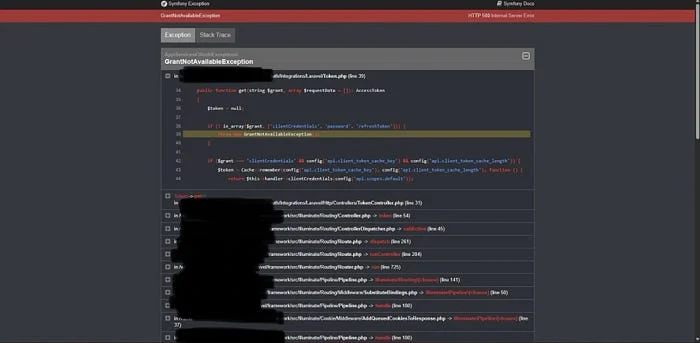
The screenshot shows the Symfony exception page and the specific location where the exception was triggered within the application. According to the write-up, the response revealed:
- Internal application file paths
- Symfony/Laravel framework information
- Backend stack traces
- Middleware and routing details
- Source code references
- Parts of the application's internal request flow
Root cause
The application appears to have verbose error handling exposed to external users. This behaviour is consistent with debug functionality or detailed exception handling being available in a production-facing environment. The write-up notes that a detailed Symfony exception page alone does not necessarily prove a specific configuration value, but the result clearly shows that internal debugging information was being returned to unauthenticated users.
Detailed error pages are useful during development, where developers need stack traces, file names, line numbers and debugging information. The problem starts when the same information reaches a production environment. A production application should return a controlled error response to the user while logging the technical details internally.
Impact
On its own, this may be classified as an information disclosure issue. A detailed error page may not immediately lead to account compromise or remote code execution, but it gives an attacker useful information about the application. The exposed stack trace can help identify:
- The frameworks being used
- How requests move through the application
- Internal directory structures
- Middleware involved in processing requests
- Specific application components and files
This information can be useful during reconnaissance. Attackers often do not start with a complete picture of an application's backend, and small pieces of information collected from different places can help build that picture over time. An exposed stack trace might be one of those pieces. The information could become more valuable when combined with other vulnerabilities or weaknesses within the application.
Fix
The application should ensure that detailed exception information is never exposed to external users in production. The recommended steps are:
- Disable debug mode in production environments.
- Configure generic error pages for production.
- Prevent stack traces from being returned in HTTP responses.
- Store detailed exception information only in server-side logs.
- Review framework error-handling configurations.
- Verify that development settings are not deployed to production systems.
For Laravel/Symfony-based applications, production environment settings should be reviewed carefully to ensure debugging information is not publicly accessible. Where a full exception page with source code and stack traces is currently returned, the application should instead return a generic response such as:
500 Internal Server Error
or an appropriate OAuth error response. The detailed exception should remain available only through server-side logs and monitoring tools.
Variants to test
- Send an empty POST to other OAuth token endpoints. A positive result is a framework exception page rather than a standard OAuth error about missing parameters.
- Send incomplete or malformed requests to other API endpoints that expect a body. A positive result is a stack trace, file paths or source code references in the response.
- Try requests that trigger validation or routing errors. A positive result is middleware, routing or framework details leaking in the error output.
- Repeat the same requests without authentication. A positive result is that the verbose error is returned to unauthenticated users, as it was here.
What happened, in plain words
A security researcher was testing a website's OAuth functionality, specifically its token endpoint. They sent it an empty request to see how the endpoint handled an incomplete request. Instead of a polite "you forgot something" message, the website replied with a long, technical error page. That page showed the website's internal file names, the software it runs on, the order in which it processes requests, and even snippets of its own programming code.
Nothing was hacked. No password was guessed. The researcher just asked a badly formed question and the website answered with far too much detail. This kind of leak is called information disclosure: the site gives away information about itself that outsiders should not see.
Think of it like asking a shop assistant "do you have this in blue?" and getting back not "no, sorry" but the shop's full stock list, the manager's phone number and a map of the back room. The answer is technically correct, but it tells you far more than you asked for.
The feature being tested: OAuth and token endpoints
Before the steps, a few words about what was being tested.
OAuth is a standard way for apps to let you log in or grant access without sharing your password. When you click "Sign in with Google" or let a photo app post to your social account, OAuth is usually doing the work behind the scenes.
An API (Application Programming Interface) is the part of a website that other software talks to, rather than the part a human clicks on. You can picture the website's visible pages as the shop counter, and the API as the back door where delivery drivers come and go. Both belong to the same shop, but they speak a different language.
An endpoint is one specific address on that API, like one particular door. The endpoint in this report is the token endpoint, the door a client knocks on to exchange credentials for a token.
A token is a short string of characters that acts like a temporary key or wristband. Once you have it, you can prove who you are for a while without sending your password again. It is similar to the paper wristband you get at a festival: the staff at the gate check it, and you do not need to show your ticket every time.
A client, in OAuth terms, is the application asking for the token on your behalf, for example a mobile app or a third-party website.
When a client sends a request to a token endpoint, it is supposed to include certain required pieces of information, called parameters. If something is missing or wrong, the endpoint should reply with a short, standard error saying which parameter is missing. That is the expected, well-behaved response.
Setting up
The write-up describes no accounts, no special tools and no particular software versions. The only thing needed was network access to the OAuth token endpoint. No login was required, and no cleverly crafted payload was needed. In other words, no login and no cleverly crafted payload were needed.
Finding it
While testing the application's OAuth functionality, the researcher looked at how the token endpoint handled invalid requests. A normal token endpoint should answer an invalid or incomplete request with a standard OAuth error saying that required parameters are missing. This one returned a full error page from Symfony instead, which is what made the behaviour stand out.
Symfony is a framework: a collection of ready-made building blocks that developers use to build web applications faster, instead of writing everything from scratch. Think of it as a flat-pack kitchen: the cupboards, hinges and worktops come pre-made, and the developer assembles them into a kitchen. Laravel is another popular framework of the same kind, and the response revealed Symfony/Laravel framework information.
A framework's error page is designed for developers. It is meant to be helpful, showing exactly where something broke. That helpfulness is precisely the problem when the page is shown to strangers on the internet.
Exploitation
Step 1: Send an empty POST to the token endpoint
To see how the endpoint handled invalid requests, the researcher sent a simple POST request with no request body:
POST /oauth/token HTTP/1.1

Host: [REDACTED]

Content-Length: 0
Line by line, in plain words:
POST /oauth/token HTTP/1.1is the request line. POST is the type of request used when you are sending something to the server, as opposed to simply asking to view a page./oauth/tokenis the address of the token endpoint, the specific door being knocked on.HTTP/1.1is the version of the language the browser and server use to talk to each other.Host: [REDACTED]tells the server which website the request is for. One server can host many websites, so this line says which one is meant. The actual name has been hidden here.Content-Length: 0says how much data is being sent along with the request. Zero means nothing at all: the request is empty on purpose.
The request has no body and no authentication. Its only purpose was to observe how the application handled an incomplete request. The researcher was not trying to break in; they were checking what the site says when it is asked something it cannot make sense of. This is a common first move in security testing, because error messages are where applications often speak too freely.
Step 2: Read the response
Instead of a generic OAuth error, the server responded with a detailed exception page: a Symfony exception showing an internal application error. An exception is simply the technical name for an error that a program hits while running. The error page exposed information that should generally not be available to external users in a production environment.
A production environment is the live version of a website that real users see, as opposed to a development environment, which is the private copy developers use while building and testing. The two are supposed to behave differently: the development copy is chatty and helpful, the live copy should be quiet and careful.
The screenshot shows the Symfony exception page and the specific location where the exception was triggered within the application. According to the write-up, the response revealed:
- Internal application file paths
- Symfony/Laravel framework information
- Backend stack traces
- Middleware and routing details
- Source code references
- Parts of the application's internal request flow
A few of those terms deserve a plain explanation.
A file path is the address of a file on the server's own disk, something like a folder name followed by a file name. It is the server's internal filing system, and outsiders normally have no business seeing it.
A stack trace is the list a program prints when it crashes, showing the chain of steps that led to the error, like the receipt roll from a till showing every item scanned before the problem. It is invaluable to a developer fixing a bug, and revealing to anyone else.
Middleware is software that sits between the incoming request and the application's main code, doing jobs such as checking who you are or logging the request. Picture a series of security guards between the front door and the manager's office; middleware details tell an outsider how many guards there are and what each one checks.
Routing is the part that decides which piece of code handles which address, like a receptionist directing visitors to the right department. Knowing the routes tells an outsider which departments exist.
Source code is the actual programming instructions the developers wrote. Seeing parts of it is like being handed pages of the shop's internal manual.
Root cause
The application appears to have verbose error handling exposed to external users. Verbose here simply means talkative: the error page says much more than it needs to. This behaviour is consistent with debug functionality, or detailed exception handling, being available in a production-facing environment.
Debug mode is a switch developers turn on while building a site so that errors show every detail. It is meant to be turned off before the site goes live. Leaving it on is like leaving the shop's staff-only door propped open to the street.
The write-up notes that a detailed Symfony exception page alone does not necessarily prove a specific configuration value, but the result clearly shows that internal debugging information was being returned to unauthenticated users. Unauthenticated means the person making the request had not logged in at all; they were a stranger.
Detailed error pages are useful during development, where developers need stack traces, file names, line numbers and debugging information. The problem starts when the same information reaches a production environment. A production application should return a controlled error response to the user while logging the technical details internally. Logging means writing the details into a private record on the server, like a diary kept in the back office rather than pinned to the front window.
Impact
On its own, this may be classified as an information disclosure issue. A detailed error page may not immediately lead to account compromise or remote code execution, but it gives an attacker useful information about the application.
Account compromise means someone else getting into your account. Remote code execution is a far more serious problem where an attacker manages to make the server run their own commands. Neither happened here. What happened is quieter: a leak of clues.
The exposed stack trace can help identify:
- The frameworks being used
- How requests move through the application
- Internal directory structures
- Middleware involved in processing requests
- Specific application components and files
This information can be useful during reconnaissance, which is the information-gathering phase of an attack, the equivalent of walking around a building and noting the doors, windows and cameras before trying anything. Attackers often do not start with a complete picture of an application's backend, and small pieces of information collected from different places can help build that picture over time. An exposed stack trace might be one of those pieces. The information could become more valuable when combined with other vulnerabilities or weaknesses within the application.
In short: this finding is not a break-in by itself, but it is a map that makes a later break-in easier.
Fix
The application should ensure that detailed exception information is never exposed to external users in production. The recommended steps are:
- Disable debug mode in production environments.
- Configure generic error pages for production.
- Prevent stack traces from being returned in HTTP responses.
- Store detailed exception information only in server-side logs.
- Review framework error-handling configurations.
- Verify that development settings are not deployed to production systems.
For Laravel/Symfony-based applications, production environment settings should be reviewed carefully to ensure that debugging information is not publicly accessible. Where a full exception page with source code and stack traces is currently returned, the application should instead return a generic response such as:
500 Internal Server Error
That line is a standard, deliberately vague reply. The 500 is a status code, a number the server sends to say how the request went; 500 means "something went wrong on our side". It tells the visitor that there is a problem without telling them anything about the inside of the building. The alternative is an appropriate OAuth error response, the standard short message saying which parameter was missing. The detailed exception should remain available only through server-side logs and monitoring tools.
Variants to test
- Send an empty POST to other OAuth token endpoints. A positive result is a framework exception page rather than a standard OAuth error about missing parameters.
- Send incomplete or malformed requests to other API endpoints that expect a body. A positive result is a stack trace, file paths or source code references in the response.
- Try requests that trigger validation or routing errors. A positive result is middleware, routing or framework details leaking in the error output.
- Repeat the same requests without authentication. A positive result is that the verbose error is returned to unauthenticated users, as it was here.
Final thoughts
This finding was a good reminder that sometimes the simplest requests are worth testing. There was no complex payload involved. The researcher sent an incomplete POST request to an OAuth endpoint and looked at how the server responded. That response ended up revealing much more about the application's backend than it should have.
Error handling is often overlooked during security testing, but it is still part of the application's attack surface. The attack surface is everything an outsider can reach and interact with: every page, every endpoint, every error message. A user needs to know that something went wrong. They do not need to see the application's internal files, stack traces, middleware and source code to understand it.
Keep detailed errors in the logs. Keep them out of production responses.
Glossary
- API: the part of a website that other software talks to, as opposed to the pages a person clicks on.
- Account compromise: someone other than the owner gaining access to an account.
- Attack surface: everything an outsider can reach and interact with on a system, including pages, endpoints and error messages.
- Authentication: proving who you are, usually by logging in.
- Client: in OAuth, the application asking for a token on a user's behalf.
- Content-Length: a line in a request saying how much data is being sent; zero means an empty request.
- Debug mode: a setting developers turn on while building a site so errors show full detail; it should be off in production.
- Development environment: the private copy of a website used by developers while building and testing it.
- Endpoint: one specific address on an API where a particular job is done.
- Exception: the technical name for an error a program hits while running.
- File path: the address of a file on the server's own disk, showing folder and file names.
- Framework: a collection of ready-made building blocks developers use to build applications faster, such as Symfony or Laravel.
- HTTP: the language browsers and servers use to exchange requests and responses.
- Information disclosure: a weakness where a system gives away information about itself that outsiders should not see.
- Laravel: a popular framework for building web applications.
- Logging: writing technical details into a private record on the server rather than showing them to visitors.
- Middleware: software that sits between an incoming request and the application's main code, doing jobs such as checking identity or logging.
- OAuth: a standard way for apps to grant access or log you in without sharing your password.
- Parameter: a required piece of information that must be included in a request.
- Payload: the data sent along with a request; here, the request was deliberately empty.
- POST: the type of HTTP request used when sending data to a server, rather than just asking to view a page.
- Production environment: the live version of a website that real users see.
- Reconnaissance: the information-gathering phase of an attack, noting doors, windows and weak points before trying anything.
- Remote code execution: a serious weakness where an attacker can make a server run their own commands.
- Routing: the part of an application that decides which code handles which address.
- Source code: the programming instructions developers wrote to build the application.
- Stack trace: the list a program prints on an error, showing the chain of steps that led to it.
- Status code: a number a server sends to say how a request went, such as 500 for a server-side error.
- Symfony: a popular framework for building web applications.
- Token: a short string that acts like a temporary key, proving who you are without resending a password.
- Token endpoint: the specific API address where a client exchanges credentials for a token.
- Unauthenticated: not logged in; a stranger to the system.
- Verbose error handling: error messages that reveal far more technical detail than a visitor needs.



