From a Contact Form to RCE: How I Found Blind PHP Code Injection
A contact form field was passed into a PHP processing context, so submitting PHP code caused the server to execute it. The author confirmed blind execution with a time delay and then made command output visible by terminating the script, eventually uploading a web shell to show full remote code execution.
 Published on medium.com
Cybersecurity
The full write-up lives on its author's site
It belongs to its author, so we link to it rather than copy it. The other two tabs are our own rewrites, checked against it.
Context
The target was a website the author was testing for XSS vulnerabilities. After working through several parts of the application, the testing reached the Contact Us section, a form whose normal job is to take visitor input and hand it to the application's backend for processing.
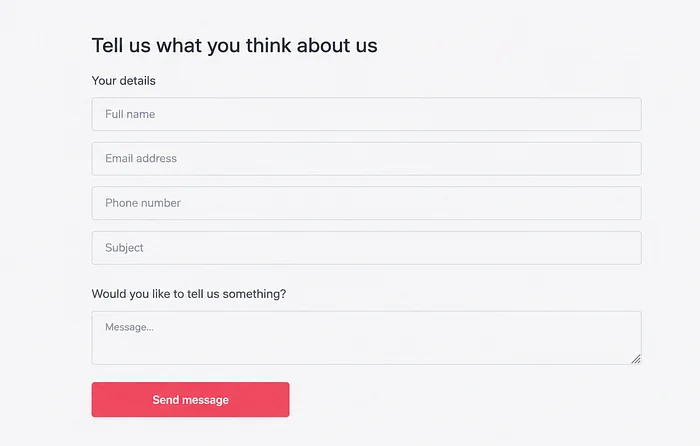
The backend was written in PHP. That single observation shaped everything that followed: it told the author which interpreter might be sitting behind the form, and therefore which syntax was worth trying in the input fields.
Setup
The report describes no accounts, roles or special preconditions. The only tool named is Burp Suite, used to capture the request to the contact form so that the input fields could be manipulated directly. Testing was done against the live site, and the author notes that the application's backend was PHP.
Finding it
The first pass was a quick probe of the input fields with a set of special characters and patterns:
Every one of these returned a 200 OK and nothing unusual appeared in the response. On its own that is unremarkable: most forms either sanitise such characters or simply store them as data.
Because the backend was PHP, the next test injected the opening of a PHP tag:
This time the server answered with a 500 Internal Server Error.
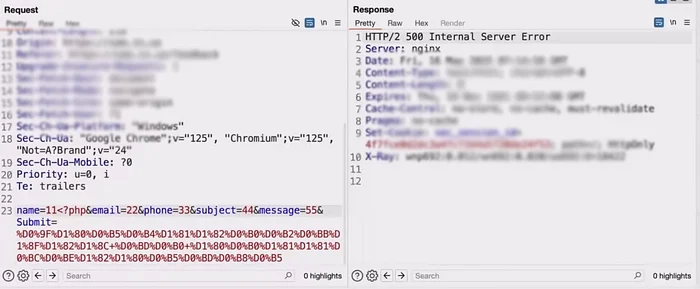
That change in behaviour is the whole finding in miniature. A bare <?php is not valid, complete PHP, so a component that merely treats input as data has no reason to fail on it. A component that hands the input to the PHP interpreter, however, will try to parse it, and an unterminated tag is a parse error. The author read the 500 as a sign that the input was reaching a PHP processing context and being interpreted rather than stored.
Exploitation
Step 1: confirm that code actually runs
The next question was whether PHP code could be executed and made to appear in the application's output.
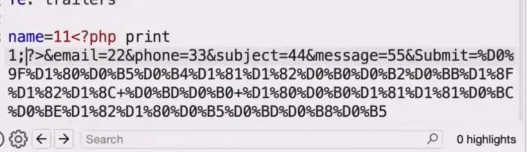
Nothing appeared in the page response. The input was evidently being processed by PHP, but whatever the code produced was not reflected back in the HTTP response. The author's conclusion was that this was Blind PHP Code Injection: the injected code was being executed, but its output was not returned directly.
Step 2: prove execution with a time-based test
To test the blind hypothesis, the author used a time-based technique. The reasoning is straightforward: if the injected code really executes, it can be made to trigger a measurable effect, such as a delay in the server's response, and that delay serves as an indicator of success even when no command output is visible.
The results showed the expected behaviour.


According to the author, the screenshots provide strong evidence of a blind execution scenario. The report does not reproduce the exact payload used for the delay test.
Step 3: turn blind execution into visible output
With execution established, one question remained: how to retrieve the result of the executed code when its output is not returned in the response?
Out-of-band techniques are one answer to blind vulnerabilities, but the author points out they are not the only option. Here a PHP behaviour helped. In PHP, die() is an alias of exit(), which terminates execution of the current script. Under certain conditions, terminating the script immediately after the operation of interest prevents the rest of the application's logic from running, and that remaining logic is what was swallowing the output.
The payload used to test this was:
<?php system('ls');die;?>
The payload runs the desired operation first, system('ls'), and then terminates the PHP script with die. The result was that the output of the executed command became visible in the HTTP response.
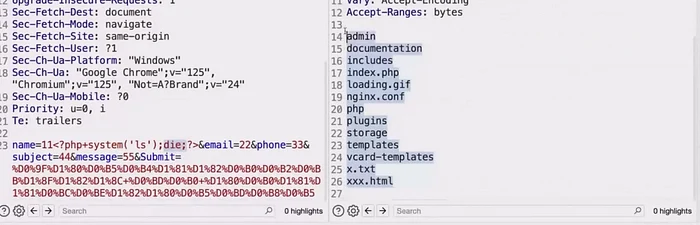
At that point the author was no longer looking at a suspicious behaviour or a blind indicator: both PHP code execution and the ability to run a system command on the target were confirmed.
In classification terms, the primary vulnerability is PHP Code Injection, with operating-system command execution as one of its resulting impacts. The author cites OWASP's description of Code Injection as the injection of code that is subsequently interpreted and executed by the application, and notes that OWASP specifically mentions that PHP code injection can let an attacker leverage PHP's capabilities to perform various operations.
The vulnerability was now fully confirmed and could have been reported at that point.
Step 4: assess the impact with a web shell
The author then moved to impact assessment, stating explicitly that this stage was solely to understand the severity of the vulnerability and not to abuse the target, and that the testing from this point on is described strictly for educational purposes and to demonstrate potential impact.
If a web application lacks appropriate security controls and restrictions, code injection can, under certain conditions, allow an attacker to create or execute PHP files on the server. To assess that possibility, the author used a well-known PHP web shell with a graphical interface, alfa-shell.
The script had previously been hosted on a server under the author's control as a text file. During the test, the file was transferred to the target environment, and then the mv command was used to change its extension to .php.
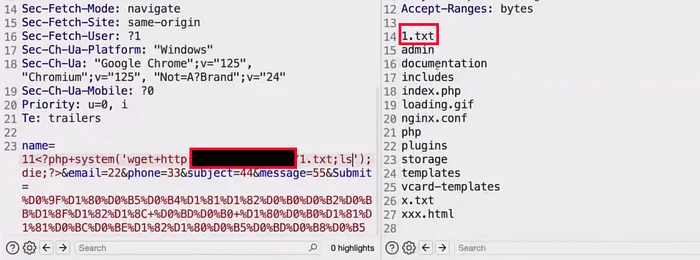
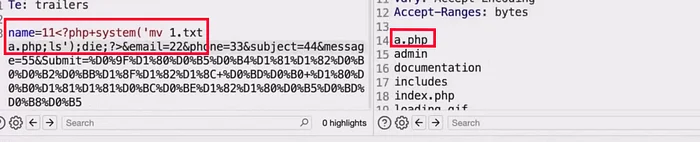
txt file to php
The path to the newly created file was then opened in the browser:
target.com/a.php
The graphical web shell interface loaded successfully.
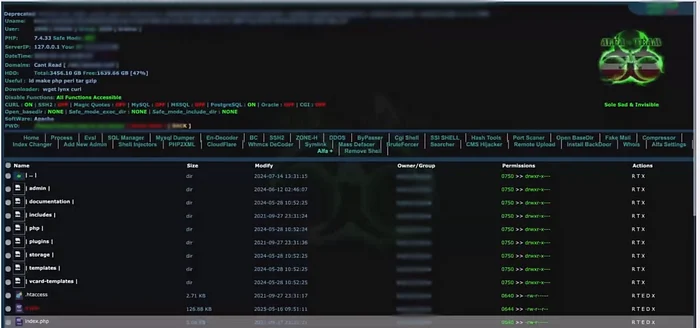
alfa shell __ Backdoor PHP shell script
This showed that the impact was not limited to running a single command. Under the right conditions the vulnerability could provide significantly broader access to the application's execution environment. The web shell used offered capabilities such as:
- Database backups
- Website file backups
- File creation
- File deletion
- File management
- Other functionality
The author therefore characterises the issue as going well beyond a simple blind PHP code injection and, under the appropriate conditions, leading to Remote Code Execution (RCE) with significant impact.
After testing, the web shell was removed from the website, and the support team was given full documentation of the vulnerability and its potential impact.
Root cause
The report does not include the vulnerable source code, so the exact mistake is not shown. What the behaviour implies is that the contact form input was passed into a context where PHP interprets it, rather than being treated purely as data: a lone <?php produced a parse error (500), and a complete <?php ... ?> block executed. The report does not explain why the output was not returned. It notes that in PHP, die() is an alias of exit() and that, under certain conditions, terminating the script immediately after the operation of interest can prevent the application's remaining logic from executing; calling die right after the operation made the command output visible in the response.
As for defences, the report does not describe any that were present.
Impact
An attacker able to reach this form could execute PHP code on the server and, through it, operating-system commands. The author demonstrated command output (ls) and then the deployment of a PHP web shell, which loaded successfully and exposed database backups, website file backups, file creation, deletion and management, and other functionality.
The author is careful about conditions: code injection can lead to creating or executing PHP files on the server only if the application lacks appropriate security controls and restrictions, and the step up to RCE is described as happening "under the appropriate conditions". Within those limits, the impact is broad access to the application's execution environment rather than a single command.
On process: the company was not running an official bug bounty programme and had no formal bounty programme in place, so the report was handled as a Vulnerability Disclosure / VDP submission. The company provided a limited monetary reward, which the author describes as relatively modest compared with official bug bounty programmes, especially given the severity and potential impact. The author's stated primary goal was responsible disclosure, proper documentation, and helping the company understand and remediate the issue.
Fix
What the finding calls for is that contact form input never reach a PHP evaluation context: user-supplied data should be treated as data throughout, and any feature that genuinely needs to interpret input should not accept arbitrary PHP from a public form. After testing, the author removed the uploaded web shell from the site.
Variants to test
- PHP tag probe on any PHP-backed form. Submit
<?phpalone into each field. A500where ordinary special characters return200is a signal worth following up. - Blind confirmation with a delay. If a complete payload executes but nothing is reflected, inject code that sleeps and compare response times against a baseline request. A consistent, repeatable delay indicates execution.
- Output recovery with
die. Try<?php system('ls');die;?>(or the equivalent for the operation you want) to terminate the script before the application's remaining logic can discard the output. Visible command output in the response confirms both code execution and command execution. - File write and rename. If command execution works, check whether you can transfer a file into the web root and rename it to a
.phpextension withmv, then request the resulting path. A page that renders your script instead of serving it as text shows that executable files can be planted. - Other interpreters. The same logic applies wherever input reaches an interpreter: template engines, expression languages, and
eval-style features. A syntax error from a lone opening delimiter, followed by a delay test, is the same pattern in a different language.
What happened, in plain words
A security researcher was testing a website for one kind of bug (cross-site scripting, explained in the glossary) and ended up finding a much more serious one. The website had a Contact Us form, the kind of page where a visitor types a name, an email address and a message and presses Send. Normally a form like that just collects text and stores it or emails it to somebody. Here, the text typed into the form was being handed to the programming language that runs the site, PHP, and treated as instructions. That meant the researcher could type programming code into a public form and have the server run it. From there they could run commands on the server itself, and eventually upload a small program that gave them a control panel for the site.
The researcher reported it responsibly and the company paid a small reward, and the write-up explains each step so that others can learn the pattern.
The starting point: a contact form on a PHP site
The target was a website the author was testing for XSS vulnerabilities. XSS, or cross-site scripting, is a bug where a site lets a visitor's text be treated as a piece of the page itself, so that a malicious visitor can make other people's browsers run code. Testing for it usually means typing odd characters into every input you can find and watching what comes back. After going through several parts of the application, the testing reached the Contact Us section.
The screenshot appears at the point where the testing reached the Contact Us section. Nothing about it looks dangerous. That is the point of the story: the interesting part is not the page, it is what happens to the text after you press Send.
A form like this has two halves. The half you see is the page in your browser. The other half is software on the server that receives what you typed. That server-side half is often called the backend. The backend here was written in PHP, a programming language that is very common on the web. PHP runs on the server, not in your browser, and it is used to build pages, talk to databases and handle form submissions.
Knowing the backend was PHP mattered a lot. It told the author which language the server speaks, and therefore which syntax was worth trying in the input fields. If you suspect a door is opened by a particular key, you try that key first.
Setting up the test
The report describes no accounts, roles or special preconditions. There was nothing to log into and no special access needed. The only tool named is Burp Suite, used to capture the request to the contact form so that the input fields could be manipulated directly.
Burp Suite is a tool that sits between your browser and the website, like a postbox you can open and rewrite. When you submit a form, your browser sends a request to the server: a short message saying which page you want and carrying the values you typed. Burp lets you pause that message, change the values by hand, and send it on. That is useful because a browser normally hides this message from you, and because you can send exactly the characters you want, as many times as you want, without retyping the form each time.
Testing was done against the live site, and the author notes that the application's backend was PHP.
Finding it
The first pass was a quick probe of the input fields with a set of special characters and patterns:
Line by line, this is not a program. It is a bag of characters that tend to mean something to software:
"and'are quote marks. Many systems use them to mark where a piece of text starts and ends, so a stray quote can break a query or a page.\is a backslash, an escape character in many languages: it tells the software that the next character is literal rather than special./is a slash, used in paths and in closing tags.`is a backtick, which some systems use to run a command.{,},$and combinations like${}and{{}}are used by template engines and by PHP itself for variables and placeholders.
The idea is to throw a handful of these at the form and see whether anything changes: an error, a broken page, a different status code. It is the cheapest possible first test.
Every one of these returned a 200 OK and nothing unusual appeared in the response. A status code is the short number a server sends back with every reply. 200 OK means "here is your page, all normal". 500 Internal Server Error means "something broke on my side". On its own, a 200 OK for odd characters is unremarkable: most forms either clean such characters up or simply store them as data.
Because the backend was PHP, the next test injected the opening of a PHP tag:
This is the two-character-plus sequence that starts a block of PHP code. In a .php file, everything after <?php is treated as instructions until the closing ?>.
This time the server answered with a 500 Internal Server Error.
The screenshot appears at the point where the server responded with a 500 Internal Server Error. That change in behaviour is the whole finding in miniature. A bare <?php is not valid, complete PHP, so a component that merely treats input as data has no reason to fail on it. A component that hands the input to the PHP interpreter, however, will try to parse it, and an unterminated tag is a parse error. The author read the 500 as a sign that the input was reaching a PHP processing context and being interpreted rather than stored.
An everyday comparison: if you hand a librarian a shopping list, nothing goes wrong, they just file it. If you hand the same list to a translator who is told "this is a sentence in a language I need translated", the translator will try to read it as language and complain that it is not valid. The 500 was the translator complaining.
Testing for code execution
The next question was whether PHP code could be executed and made to appear in the application's output.
The screenshot appears at the point where the author tested whether PHP code could be executed and appear in the output. Nothing appeared in the page response. The input was evidently being processed by PHP, but whatever the code produced was not reflected back in the HTTP response.
HTTP is the language browsers and servers use to talk to each other. A response is the server's reply: a status code, some headers (small labels such as content type) and usually a body, which is the page itself. "Not reflected in the response" means the result of the code did not show up anywhere in that body.
The author's conclusion was that this was Blind PHP Code Injection: the injected code was being executed, but its output was not returned directly. "Blind" is a useful word here. It does not mean the attacker is blindfolded; it means the attacker cannot see the result of what they did. Imagine shouting into a cave and getting no echo. Something may be happening in there, but you cannot tell from the outside.
Proving execution with a time-based test
To test the blind hypothesis, the author used a time-based technique. The reasoning is straightforward: if the injected code really executes, it can be made to trigger a measurable effect, such as a delay in the server's response, and that delay serves as an indicator of success even when no command output is visible.
In plain terms: instead of asking the server to show you something, ask it to be slow. The delay is the echo.
The results showed the expected behaviour.
The two screenshots appear at the point where the results showed the expected behaviour. According to the author, they provide strong evidence of a blind execution scenario. The report does not reproduce the exact payload used for the delay test.
Why does this matter so much? Because up to this point the 500 error was only a hint. A hint can be a coincidence: a broken form, a temporary server problem, a validation rule that rejects certain characters. A repeatable delay that only appears when you send your code is much harder to explain away. It is the difference between "the door rattled" and "the door opened when I used this key".
Turning blind execution into visible output
With execution established, one question remained: how to retrieve the result of the executed code when its output is not returned in the response?
Out-of-band techniques are one answer to blind vulnerabilities, but the author points out they are not the only option. Out-of-band means the result does not come back in the reply to your request at all; instead, the server is made to contact a different machine that you control, for example by loading a small image from your own server. When your server sees that request, you know the code ran. It works, but it needs extra infrastructure and can be blocked by network rules.
Here a PHP behaviour helped. In PHP, die() is an alias of exit(), which terminates execution of the current script. Think of a recipe where step five is "throw the rest of the recipe in the bin". Whatever the kitchen was going to do afterwards, it does not happen. Under certain conditions, terminating the script immediately after the operation of interest prevents the rest of the application's logic from running, and that remaining logic is what was swallowing the output.
The payload used to test this was:
<?php system('ls');die;?>
Line by line:
<?phpopens a block of PHP code. Everything until?>is instructions.system('ls')asks PHP to run an operating-system command.systemis a PHP function that hands a command to the server's own command line and prints whatever the command prints.lsis the classic Unix command that lists the files in the current directory, like opening a folder and reading out its contents.;ends that statement.diestops the script immediately. Nothing after it runs.?>closes the PHP block.
The payload runs the desired operation first, system('ls'), and then terminates the PHP script with die. The result was that the output of the executed command became visible in the HTTP response.
The screenshot appears at the point where the output of the executed command was visible in the HTTP response. At that point the author was no longer looking at a suspicious behaviour or a blind indicator: both PHP code execution and the ability to run a system command on the target were confirmed.
Why did die change anything? Because the application's own code was still running after the injected snippet. That later code was building the normal page, and in doing so it discarded or overwrote whatever the injected code had printed. By stopping the script at the moment the command finished, the author prevented the page-building code from running at all, so the command's output was the last thing left in the response.
In classification terms, the primary vulnerability is PHP Code Injection, with operating-system command execution as one of its resulting impacts. The author cites OWASP's description of Code Injection as the injection of code that is subsequently interpreted and executed by the application, and notes that OWASP specifically mentions that PHP code injection can let an attacker leverage PHP's capabilities to perform various operations. OWASP is a well-known non-profit that publishes guidance on web security; its descriptions are widely used as a shared vocabulary for naming bugs.
The vulnerability was now fully confirmed and could have been reported at that point.
Going further: assessing the impact
The author then moved to impact assessment, stating explicitly that this stage was solely to understand the severity of the vulnerability and not to abuse the target, and that the testing from this point on is described strictly for educational purposes and to demonstrate potential impact.
This is worth pausing on. Once you can run commands on somebody else's server, you have the ability to do real damage, and the line between "proving a bug" and "causing harm" is thin. The author's approach was to stop at the smallest demonstration that shows how bad things could get, and then to clean up.
If a web application lacks appropriate security controls and restrictions, code injection can, under certain conditions, allow an attacker to create or execute PHP files on the server. To assess that possibility, the author used a well-known PHP web shell with a graphical interface, alfa-shell.
A web shell is a small program written in a server language that, once placed on a website, gives whoever knows its address a control panel in the browser for that server. It is not a hacking tool in the sense of breaking in; it is what you leave behind after you are in, to make further work easier. A graphical one looks like a file manager.
The script had previously been hosted on a server under the author's control as a text file. During the test, the file was transferred to the target environment, and then the mv command was used to change its extension to .php.
txt file to php
The two screenshots appear at the point where the file was transferred and renamed to .php. The mv command is the Unix command for moving or renaming a file. The extension is the part of a filename after the last dot, such as .txt or .php, and servers often decide how to treat a file based on it. A .txt file is served as plain text: the server reads it out and your browser displays it as words. A .php file is handed to PHP first, which runs it and sends whatever it prints. Renaming the file therefore changes it from a document into a program, as far as the server is concerned.
The path to the newly created file was then opened in the browser:
target.com/a.php
This is simply the address of the file that was just created, typed into the browser's address bar. target.com stands for the site's domain, and a.php is the name the file was given.
The graphical web shell interface loaded successfully.
alfa shell __ Backdoor PHP shell script
The screenshot appears at the point where the graphical web shell interface loaded successfully. This showed that the impact was not limited to running a single command. Under the right conditions the vulnerability could provide significantly broader access to the application's execution environment. The web shell used offered capabilities such as:
- Database backups
- Website file backups
- File creation
- File deletion
- File management
- Other functionality
Each of those is a normal feature of a file manager, and each is alarming on somebody else's server. A database backup means a copy of the site's data can be taken. A website file backup means a copy of the site's code can be taken. File creation and deletion mean files can be added or removed. File management means browsing and editing what is there.
The author therefore characterises the issue as going well beyond a simple blind PHP code injection and, under the appropriate conditions, leading to Remote Code Execution (RCE) with significant impact. RCE is the general name for the situation where someone who is not supposed to can make a machine run their code. It is usually treated as the most serious class of web bug, because from there almost anything else on that machine becomes possible.
After testing, the web shell was removed from the website, and the support team was given full documentation of the vulnerability and its potential impact.
Why it worked
The report does not include the vulnerable source code, so the exact mistake is not shown. What the behaviour implies is that the contact form input was passed into a context where PHP interprets it, rather than being treated purely as data: a lone <?php produced a parse error (500), and a complete <?php ... ?> block executed. The report does not explain why the output was not returned. It notes that in PHP, die() is an alias of exit() and that, under certain conditions, terminating the script immediately after the operation of interest can prevent the application's remaining logic from executing; calling die right after the operation made the command output visible in the response.
A comparison that helps: a comment box on a blog should treat what you type as a comment. If instead the site pasted your comment into the middle of its own source code and then ran that source code, your words would become instructions. That is the mistake in general terms. The safe design is that user input is always data, never code, no matter what characters it contains.
As for defences, the report does not describe any that were present. Escaping means marking special characters so that they are treated as literal text rather than as instructions, the way you might put quotation marks around a word to show you are mentioning it rather than using it.
What the impact was
An attacker able to reach this form could execute PHP code on the server and, through it, operating-system commands. The author demonstrated command output (ls) and then the deployment of a PHP web shell, which loaded successfully and exposed database backups, website file backups, file creation, deletion and management, and other functionality.
The author is careful about conditions: code injection can lead to creating or executing PHP files on the server only if the application lacks appropriate security controls and restrictions, and the step up to RCE is described as happening "under the appropriate conditions". Within those limits, the impact is broad access to the application's execution environment rather than a single command.
On process: the company was not running an official bug bounty programme and had no formal bounty programme in place, so the report was handled as a Vulnerability Disclosure / VDP submission. A bug bounty programme is a company's public offer to pay people for reporting bugs, with rules and reward ranges. A VDP, vulnerability disclosure programme, is the lighter version: a company says "tell us about bugs, we will take them seriously", without promising a fixed reward. The company provided a limited monetary reward, which the author describes as relatively modest compared with official bug bounty programmes, especially given the severity and potential impact. The author's stated primary goal was responsible disclosure, proper documentation, and helping the company understand and remediate the issue.
What the fix should look like
What the finding calls for is that contact form input never reach a PHP evaluation context: user-supplied data should be treated as data throughout, and any feature that genuinely needs to interpret input should not accept arbitrary PHP from a public form. After testing, the author removed the uploaded web shell from the site.
The same pattern elsewhere
- PHP tag probe on any PHP-backed form. Submit
<?phpalone into each field. A500where ordinary special characters return200is a signal worth following up. - Blind confirmation with a delay. If a complete payload executes but nothing is reflected, inject code that sleeps and compare response times against a baseline request. A consistent, repeatable delay indicates execution.
- Output recovery with
die. Try<?php system('ls');die;?>(or the equivalent for the operation you want) to terminate the script before the application's remaining logic can discard the output. Visible command output in the response confirms both code execution and command execution. - File write and rename. If command execution works, check whether you can transfer a file into the web root and rename it to a
.phpextension withmv, then request the resulting path. A page that renders your script instead of serving it as text shows that executable files can be planted. - Other interpreters. The same logic applies wherever input reaches an interpreter: template engines, expression languages, and
eval-style features. A syntax error from a lone opening delimiter, followed by a delay test, is the same pattern in a different language.
Glossary
- XSS (cross-site scripting): a bug where a site treats a visitor's text as part of the page, so a malicious visitor can make other people's browsers run code.
- Backend: the part of a website that runs on the server, as opposed to the part you see in your browser.
- PHP: a programming language commonly used on web servers to build pages and handle form submissions.
- Burp Suite: a tool that sits between your browser and a website so you can capture, inspect and change the requests you send.
- Request: the message your browser sends to a server asking for a page or submitting data.
- Response: the server's reply, made of a status code, headers and usually a body containing the page.
- Status code: the short number in a response, such as
200 OK(all normal) or500 Internal Server Error(something broke on the server). 200 OK: the status code meaning the request succeeded and the normal page is being returned.500 Internal Server Error: the status code meaning the server hit an error while handling the request.- HTTP: the language browsers and servers use to exchange requests and responses.
- PHP tag (
<?php): the sequence that marks the start of a block of PHP code; everything after it until?>is treated as instructions. - Parse error: an error caused by text that does not follow the rules of the language being read, like a sentence with no ending.
- Code injection: a bug where input supplied by a user is interpreted and executed as code by the application.
- Blind (vulnerability): a bug where your code runs but you cannot see its output in the response.
- Time-based technique: proving code ran by making it cause a measurable delay in the server's response.
- Out-of-band (OOB): getting evidence of execution through a separate channel, such as the server contacting a machine you control, rather than through the reply to your request.
die()/exit(): PHP functions that stop the script immediately;dieis an alias ofexit.system(): a PHP function that runs an operating-system command and prints its output.ls: a Unix command that lists the files in the current directory.- Operating-system command: an instruction given to the server's own operating system, outside the web application.
- OWASP: a non-profit organisation that publishes widely used guidance and naming for web security issues.
- Web shell: a small program placed on a server that gives an attacker a control panel for that server through the browser.
- Extension: the part of a filename after the last dot, such as
.txtor.php, which often decides how a server treats the file. mv: the Unix command for moving or renaming a file.- RCE (Remote Code Execution): the situation where someone who should not be able to makes a machine run their code.
- Escaping: marking special characters so they are treated as literal text rather than as instructions.
- Bug bounty programme: a company's public offer to pay people for reporting security bugs, with rules and reward ranges.
- VDP (Vulnerability Disclosure Programme): a lighter arrangement where a company invites reports of security bugs without a formal bounty structure.
- Responsible disclosure: reporting a bug privately to the owner, giving them time to fix it, rather than publishing or exploiting it.
- Remediation: the fix that removes the vulnerability.



