From Django Debug Mode to PII Data Leak of more than 500+ Employees due Broken Access Control and IDOR
An internal subdomain exposed Django debug mode and Swagger/Redoc API documentation, and the same API was reachable from a public login page. After signing up, the author reused their JWT on the Swagger UI and changed an id parameter to read other employees' personal data.
 Published on medium.com
While performing a pentest for a client, I found an interesting subdomain running on port 8443 with a Django Debug mode enabled , exposing the endpoints for Swagger UI Dashboard and Redoc API Documentation Dashboard. The same subdomain running on port 443 as well, hosting a Login/Sign-Up panel leads to accessing the…
The full write-up lives on its author's site
It belongs to its author, so we link to it rather than copy it. The other two tabs are our own rewrites, checked against it.
Context
This is a pentest write-up about a client's internal subdomain, referred to throughout as 3ntern1l.redacted.com under the target domain redacted.com. The subdomain was reachable on two ports, 8443 and 443. On 8443 it ran a Django application with debug mode left on, which exposed the endpoints for a Swagger UI Dashboard and a Redoc API Documentation Dashboard. On 443 the same subdomain hosted a login and sign-up panel that gave access to the same API, whose endpoints were protected by a JWT. The API itself returns employee records: first name, last name, professional email address, phone number and similar fields.
Setup
The researcher started with no credentials. The tooling was standard recon:
- Subfinder, Amass, Assetfinder and Alterx for subdomain enumeration.
- httpx to filter live hosts by status code.
- naabu for port scanning.
- nuclei running in the background on the live subdomains while the researcher browsed them manually.
- Burp to intercept requests from the dashboard.
No account existed before the test; the researcher created one through the sign-up page on port 443.
Finding it
Enumeration started from the root domain and produced a list of subdomains, which was then resolved and port scanned. While nuclei ran in the background, the researcher looked at each live subdomain by hand and settled on 3ntern1l.redacted.com, which had both 8443 and 443 open.
On 8443, appending a random string to the URL, for example 3ntern1l.redacted.com/hacker, returned a Django debug page. That page listed five endpoints, including the Swagger and Redoc documentation routes.
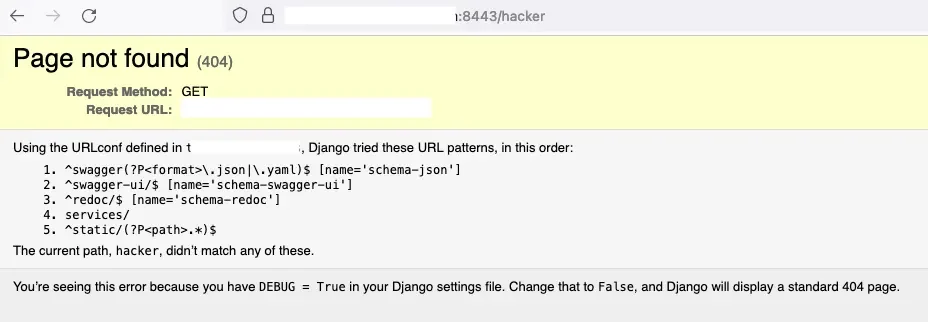
The Django debug page on port 8443, reached by appending a random path segment to the host.
Using the Swagger endpoint, the Swagger UI Dashboard loaded normally.
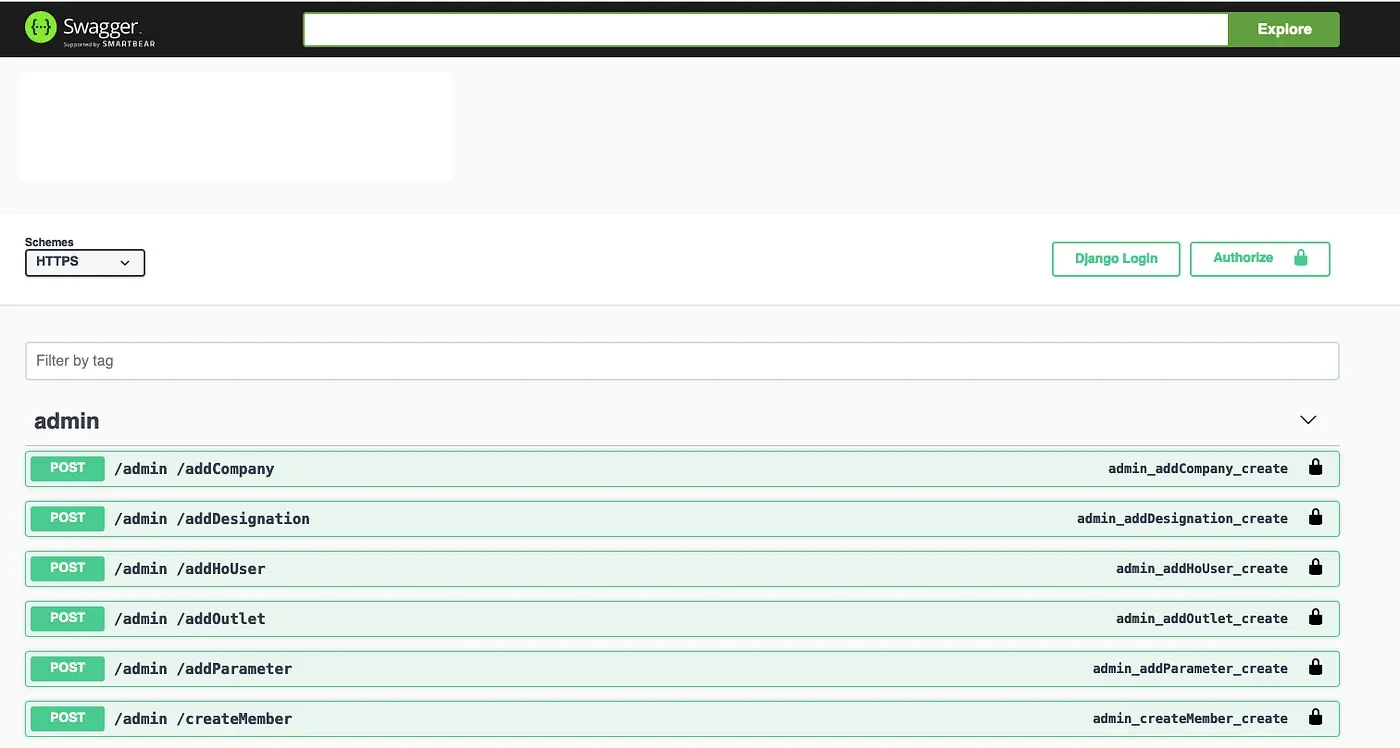
The Swagger UI Dashboard exposed through the debug page's endpoint listing.
The API calls behind the dashboard required an authorization token, and the researcher had none at that point, so the documented endpoints could be seen but not called.
Exploitation
Step 1: Sign up on port 443
The same subdomain was also listening on 443. Navigating there showed a login page and a sign-up page. The researcher signed up and was let straight into the dashboard.
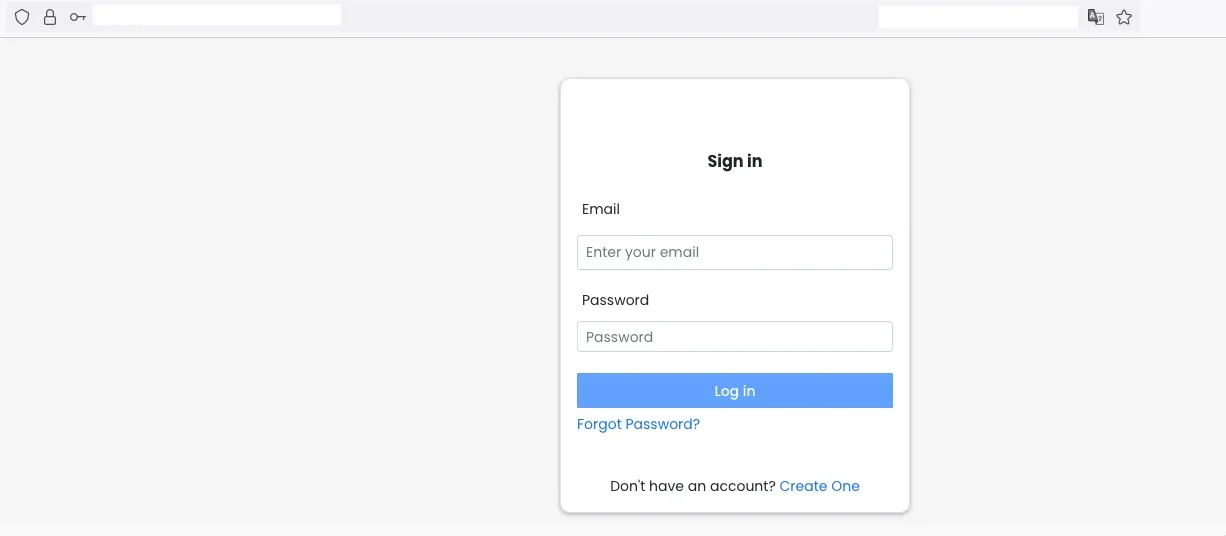
The login and sign-up page served on port 443 of the same subdomain.
This is the pivot: the internal subdomain accepted self-registration, so an outsider could obtain a valid session without any invitation or approval.
Step 2: Capture the JWT from the dashboard
Browsing the dashboard showed that it called the same API endpoints that the Swagger UI Dashboard documented. Intercepting the traffic in Burp revealed the JWT being sent to authorize those calls.
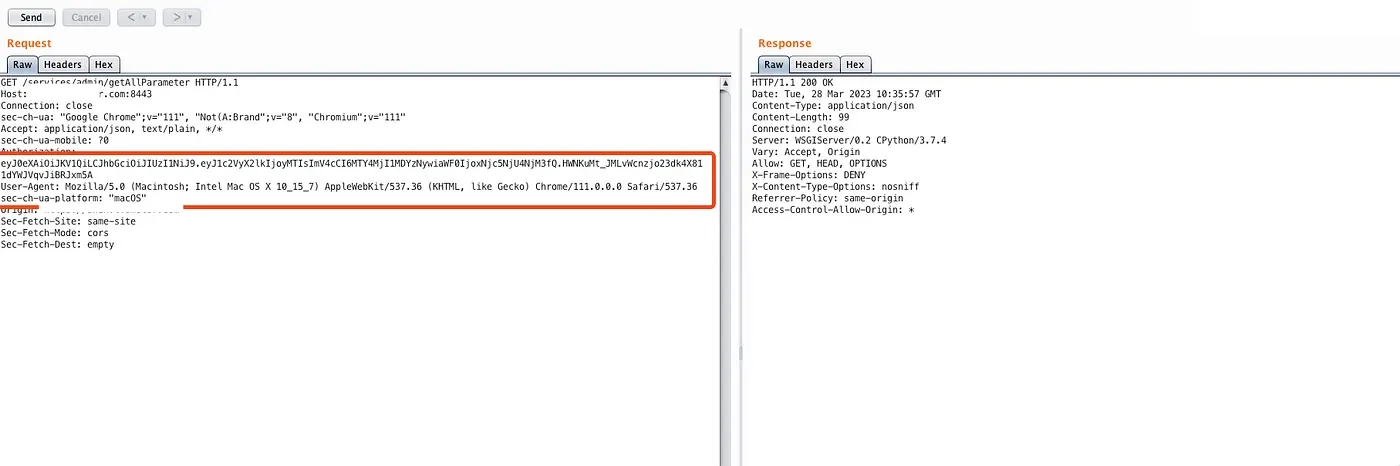
A Burp-intercepted request to an API endpoint, showing the JWT used for authorization.
Step 3: Replay the JWT in Swagger UI
The token was copied out of the intercepted request and pasted into the Swagger UI Dashboard. With that, the documented endpoints became callable from Swagger UI, using the account created in step 1.
Step 4: Change the id parameter
Among the endpoints, two or three took only an id value as input. The researcher changed that id and the API returned records belonging to other users.
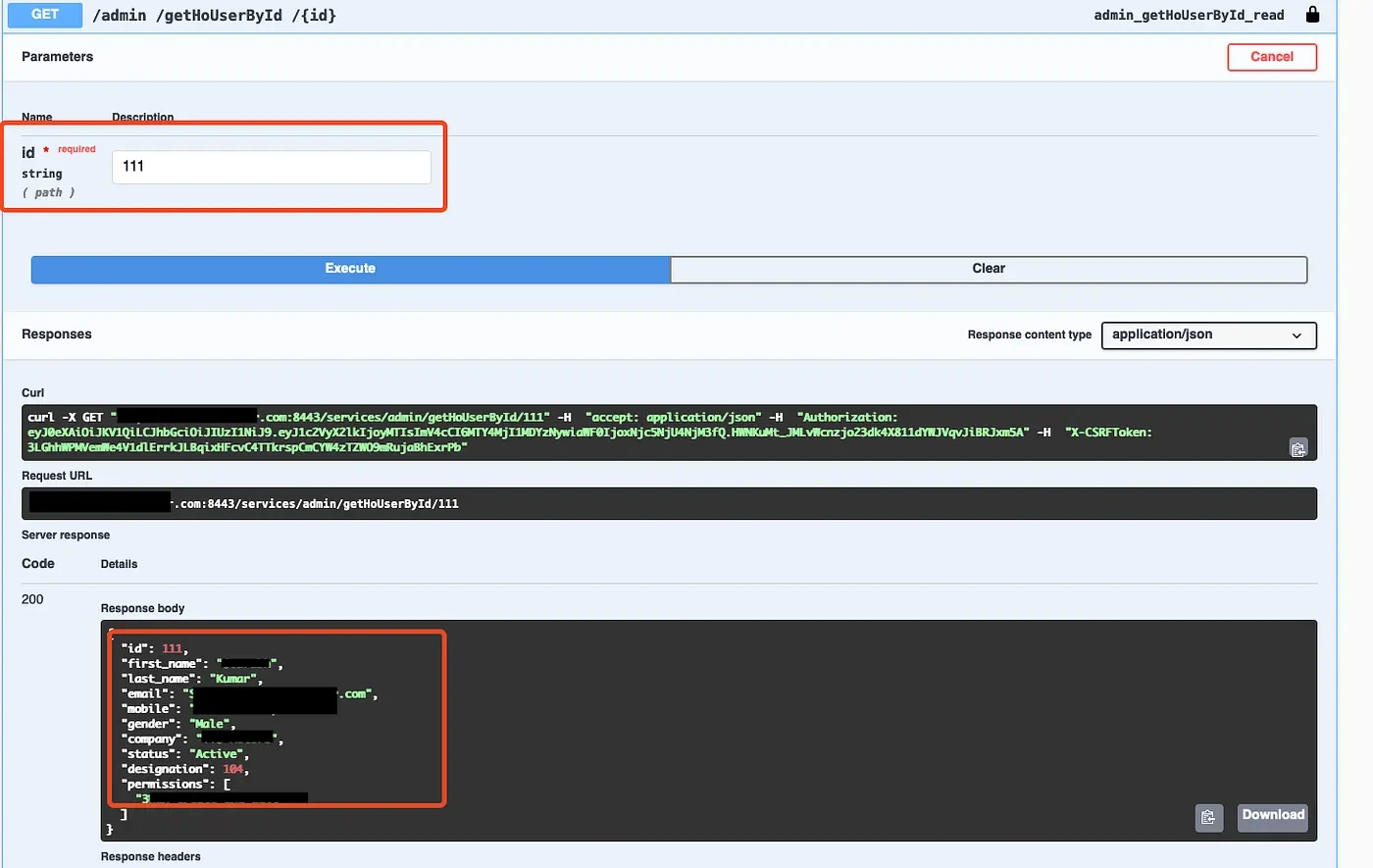
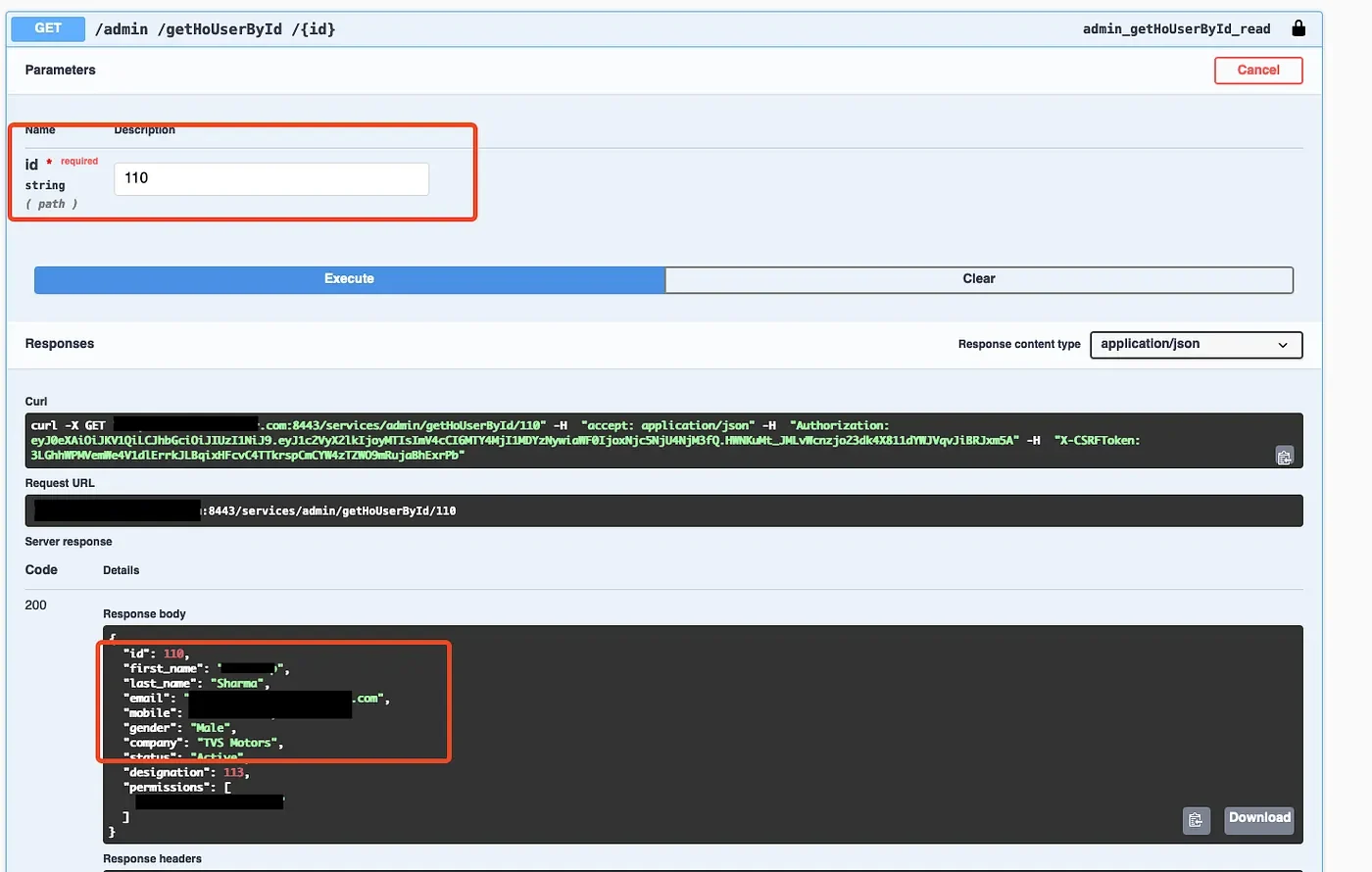
The IDOR results: changing the id input returns other employees' records.
The exposed data covered first name, last name, professional email address, phone number and similar fields for more than 500 employees registered on the subdomain.
Root cause
Four separate weaknesses combined:
- Web server misconfiguration. Django debug mode was left enabled on port
8443, so an arbitrary path produced a traceback page that disclosed internal endpoints, including the Swagger and Redoc documentation routes. The same internal subdomain also allowed public sign-up. - Broken access control on the token. The report describes this as no verification/validation of the JWT token. The report describes this as no verification/validation of the JWT token.
- IDOR. Endpoints that take only an
idreturned the object for thatidwithout checking that the caller owned it. - PII data leak. The combination of the three above exposed employee personal data.
The report lists debug mode, open sign-up, token validation and IDOR as the weaknesses. The report does not describe any compensating control.
Impact
An outsider could enumerate the API through the debug page, create an account through the open sign-up, obtain a JWT, and then read other users' records by changing the id. The data exposed includes first name, last name, professional email address and phone number for more than 500 employees registered on the subdomain. The report does not state whether write operations were possible, only that records could be read by changing the identifier.
Fix
Based on the findings, the fixes are:
- Disable Django debug mode on all internet-facing deployments, and return a generic error page for unknown paths.
- Remove or restrict the Swagger and Redoc documentation dashboards on internal hosts.
- Close public sign-up on the internal subdomain, or gate it behind an invitation or approval flow.
- Validate the JWT properly on every request, including issuer, audience, signature and expiry, and bind the token's subject to the resources it may access.
- Enforce object-level authorization on every endpoint that takes an
id, so a caller can only read records they own or are entitled to.
Variants to test
- Debug mode on other paths. Append a random segment to each live host and look for a Django traceback page. A positive result is a stack trace listing URL patterns or settings.
- Documentation endpoints. Request
/swagger,/redoc,/api/docsand similar on hosts found during recon. A positive result is a rendered Swagger or Redoc dashboard. - Open registration on internal hosts. Visit the login page of each internal subdomain and check for a sign-up link. A positive result is a working account created without approval.
- Token reuse across hosts. Take a JWT issued by one host and replay it against the API on another port or host of the same organisation. A positive result is a
200with data. - IDOR on single-parameter endpoints. For every endpoint that takes only an
id, increment and decrement the value. A positive result is a record belonging to a different user. - JWT tampering. Modify claims in the token and resend. A positive result is the API accepting a token whose claims no longer match the caller.
What happened, in plain words
A security researcher was hired to test a company's systems. During that test he found an internal web address belonging to the company that was reachable from the open internet on two different doors, called ports. On one door the website was accidentally showing its own error pages in a very talkative way, and those error pages listed other pages the site offered, including two pages that document how the site's API works. On the other door the same site offered a normal login page, but also a sign-up page that anyone could use. The researcher created an account, took the pass that the site handed him, and used it on the documentation page to call the API. The API returned employee records, and by changing one number in the request he could read the records of other employees. In total the personal data of more than 500 employees was exposed.
This article walks through that story from the beginning, explaining every term as it appears. You only need to know how to use a browser.
Context
This is a write-up of a penetration test, often shortened to pentest. A pentest is a paid, authorised attempt to break into a company's systems, done so the company can fix the problems before a real attacker finds them. Think of it as hiring a locksmith to try every door in your house and tell you which ones open too easily.
The target was a company's domain, written here as redacted.com. A domain is the part of a web address you type, like example.com. Companies own one main domain and then create many smaller addresses under it, called subdomains. The one in this story is written as 3ntern1l.redacted.com.
A port is a numbered door on a single computer. One machine can run many services at once, and each service listens on its own port number. The usual web port is 443, which is the one your browser uses when you visit an address starting with https://. Port 8443 is a common alternative for web services, often used for administration or internal tools.
This subdomain was reachable on two ports, 8443 and 443:
- On
8443it ran a Django application with debug mode left on. Django is a popular framework, a set of building blocks programmers use to build websites in the Python language. Debug mode is a setting meant for development: when something goes wrong, the site shows a detailed technical page instead of a polite error, so the programmer can see what broke. Left on in production, that page can reveal internals to anyone. - On
443the same subdomain hosted a login and sign-up panel that gave access to the same API, whose endpoints were protected by a JWT.
An API is the part of a website that programs talk to, rather than people. When you use a normal website, your browser asks for a page and gets back a page with buttons and text. When a program uses an API, it asks a question and gets back raw data, usually in a format called JSON, which looks like a structured list. Think of a restaurant: the dining room with menus is the website, and the kitchen hatch where waiters pass orders is the API. An endpoint is one specific address inside that API, one dish on the menu. For example, one endpoint might return a list of employees and another might return a single employee.
A JWT, short for JSON Web Token, is a small string of text that a website gives you after you log in, and that you show on every later request to prove who you are. It works like a cloakroom ticket: you hand over your coat, you get a ticket, and later you show the ticket to get the coat back. The ticket itself contains some information, and it is signed so the server can check it was really issued by the site and not forged.
The API itself returns employee records: first name, last name, professional email address, phone number and similar fields. Data like this is called PII, short for Personally Identifiable Information, meaning information that can identify a real person.
Setup
The researcher started with no credentials. In plain terms, he sat at a normal computer somewhere on the internet, with no account and no password, exactly like any outsider would.
The tooling was standard recon. Recon, short for reconnaissance, is the information-gathering phase: finding out what exists before trying to break anything. It is the equivalent of walking around a building and noting which windows are open before trying any of them.
- Subfinder, Amass, Assetfinder and Alterx for subdomain enumeration. Enumeration means making a list. These tools try to discover as many subdomains of a company as possible, by querying public sources and by guessing common names.
- httpx to filter live hosts by status code. A status code is the three-digit number a web server sends back with every answer.
200means "here is the page you asked for".404means "not found".403means "forbidden". Filtering by200keeps only the addresses that actually respond with content. - naabu for port scanning. A port scan means asking a computer, door by door, which doors are open. It is how you discover that a machine offers a service on
8443as well as443. - nuclei running in the background on the live subdomains while the researcher browsed them manually. Nuclei is an automated scanner that checks hosts against a large library of known problems. Running it in the background is like leaving a smoke detector on while you walk around the house yourself.
- Burp to intercept requests from the dashboard. Burp, short for Burp Suite, is a tool that sits between your browser and the website and lets you pause, read and edit every message that passes. It is a transparent proxy: your browser thinks it is talking to the site, and the site thinks it is talking to your browser, but everything goes through Burp first.
No account existed before the test; the researcher created one through the sign-up page on port 443.
Finding it
Enumeration started from the root domain and produced a list of subdomains, which was then resolved and port scanned. Resolving means turning a name like 3ntern1l.redacted.com into the numeric address of the machine that answers for it, the way a phone book turns a name into a number.
While nuclei ran in the background, the researcher looked at each live subdomain by hand and settled on 3ntern1l.redacted.com, which had both 8443 and 443 open. Looking by hand matters because automated scanners only find what they have a rule for; a human notices things that look odd.
On 8443, appending a random string to the URL, for example 3ntern1l.redacted.com/hacker, returned a Django debug page. A URL is the full address you type in the browser's address bar. Appending a random string means adding a made-up path to the end, like /hacker. On a healthy site, a path that does not exist returns a plain "not found" page. Here, because debug mode was on, the site instead produced a detailed technical page. That page listed five endpoints, including the Swagger and Redoc documentation routes.
Swagger and Redoc are two tools that generate a documentation website for an API. They read a description file that the programmers wrote and turn it into a browsable page listing every endpoint, what input each one takes and what it returns. Swagger UI is interactive: it has buttons that let you actually send a request from the page. Redoc is mostly for reading. Having either of these pages publicly reachable is like leaving the restaurant's full menu, including prices and kitchen instructions, taped to the front window.
The Django debug page on port 8443, reached by appending a random path segment to the host.
Using the Swagger endpoint, the Swagger UI Dashboard loaded normally.
The Swagger UI Dashboard exposed through the debug page's endpoint listing.
The API calls behind the dashboard required an authorization token, and the researcher had none at that point, so the documented endpoints could be seen but not called. This is an important distinction: seeing the menu is not the same as ordering from it. The documentation told him exactly what the API could do, but every request he tried came back refused because he had no ticket to show.
Exploitation
Exploitation means actually using a weakness to get something you should not have. Up to this point the researcher had only looked; now he starts acting.
Step 1: Sign up on port 443
The same subdomain was also listening on 443. Navigating there showed a login page and a sign-up page. The researcher signed up and was let straight into the dashboard.
The login and sign-up page served on port 443 of the same subdomain.
This is the pivot: the internal subdomain accepted self-registration, so an outsider could obtain a valid session without any invitation or approval. A session is the state of being logged in. Normally an internal tool is meant only for staff, and accounts are created by an administrator. Here the front door was open to anyone who filled in the form. The word "internal" in the subdomain name is a hint that this was not supposed to be public at all.
Step 2: Capture the JWT from the dashboard
Browsing the dashboard showed that it called the same API endpoints that the Swagger UI Dashboard documented. In other words, the dashboard is just a friendly face on top of the same API. Every button you press in the dashboard causes the browser to send an API request behind the scenes.
Intercepting the traffic in Burp revealed the JWT being sent to authorize those calls. To authorize a call means to prove you are allowed to make it. The browser attaches the token to each request, usually in a header. A header is a small labelled line of extra information sent along with a request, like the address block on an envelope.
A Burp-intercepted request to an API endpoint, showing the JWT used for authorization.
Step 3: Replay the JWT in Swagger UI
The token was copied out of the intercepted request and pasted into the Swagger UI Dashboard's authorization field. With that, the documented endpoints became callable from Swagger UI, using the account created in step 1.
Replaying a token means taking a token that was issued for one place and using it somewhere else. The token was issued by the login on port 443 and was accepted by the API documented in Swagger UI. That is the broken access control: the API did not check carefully enough who the token belonged to or what it should be allowed to do. Broken access control is a broad label for any situation where the system fails to check whether you are allowed to do what you are asking. It is like a hotel key card that opens every room because the lock only checks that the card is a real card, not which room it was issued for.
Step 4: Change the id parameter
Among the endpoints, two or three took only an id value as input. A parameter is a piece of input you supply with a request, the way a search box takes a word. An id is a number that identifies one record in a database, for example employee number 42.
The researcher changed that id and the API returned records belonging to other users. This is called IDOR, short for Insecure Direct Object Reference. The name sounds complicated but the idea is simple: the system lets you refer to an object, here an employee record, directly by its number, and never checks that the object is yours. It is like a bank that lets you ask for "account 42" and hands over the details without asking whether account 42 is yours.
The IDOR results: changing the id input returns other employees' records.
The exposed data covered first name, last name, professional email address, phone number and similar fields for more than 500 employees registered on the subdomain.
Root cause
A root cause is the underlying reason a problem exists, as opposed to the symptom you see. Four separate weaknesses combined:
- Web server misconfiguration. Django debug mode was left enabled on port
8443, so an arbitrary path produced a traceback page that disclosed internal endpoints, including the Swagger and Redoc documentation routes. A traceback is the technical report a program produces when it crashes, showing the chain of steps that led to the error. It is useful to a programmer and dangerous to everyone else, because it names internal parts of the system. The same internal subdomain also allowed public sign-up. - Broken access control on the token. The report describes this as no verification/validation of the JWT token. The report describes this as no verification/validation of the JWT token. Validating a token means checking all its parts: that the signature is genuine, that it was issued by the right place, that it is meant for this audience, and that it has not expired. Skipping that is like a bouncer who glances at a piece of paper and waves you in without reading it.
- IDOR. Endpoints that take only an
idreturned the object for thatidwithout checking that the caller owned it. - PII data leak. The combination of the three above exposed employee personal data.
The report lists debug mode, open sign-up, token validation and IDOR as the weaknesses. Object-level authorization means checking, for each individual record, whether this particular caller may see this particular record. The report does not describe any compensating control, meaning no other safeguard was in place to catch what these missing checks would have caught.
Impact
Impact means what harm the problem could cause. An outsider could enumerate the API through the debug page, create an account through the open sign-up, obtain a JWT, and then read other users' records by changing the id. The data exposed includes first name, last name, professional email address and phone number for more than 500 employees registered on the subdomain. The report does not state whether write operations were possible, only that records could be read by changing the identifier. A write operation would mean changing or deleting data rather than just reading it.
Fix
Based on the findings, the fixes are:
- Disable Django debug mode on all internet-facing deployments, and return a generic error page for unknown paths. A generic error page says only that something went wrong, without naming any internal parts.
- Remove or restrict the Swagger and Redoc documentation dashboards on internal hosts. Documentation is useful to developers, but it does not need to be visible to the whole internet.
- Close public sign-up on the internal subdomain, or gate it behind an invitation or approval flow. Gating means requiring a step before access is granted, such as an administrator approving the account.
- Validate the JWT properly on every request, including issuer, audience, signature and expiry, and bind the token's subject to the resources it may access. The issuer is who created the token, the audience is who it is meant for, the signature is the cryptographic proof it is genuine, and the expiry is the time after which it stops being valid. Binding the subject means tying the identity inside the token to the records that identity is allowed to see.
- Enforce object-level authorization on every endpoint that takes an
id, so a caller can only read records they own or are entitled to.
Variants to test
A variant is the same idea applied in a slightly different place. If you want to practise, these are the checks to try, each with the sign that it worked:
- Debug mode on other paths. Append a random segment to each live host and look for a Django traceback page. A positive result is a stack trace listing URL patterns or settings. A stack trace is the list of steps the program was executing when it failed.
- Documentation endpoints. Request
/swagger,/redoc,/api/docsand similar on hosts found during recon. A positive result is a rendered Swagger or Redoc dashboard. - Open registration on internal hosts. Visit the login page of each internal subdomain and check for a sign-up link. A positive result is a working account created without approval.
- Token reuse across hosts. Take a JWT issued by one host and replay it against the API on another port or host of the same organisation. A positive result is a
200with data. - IDOR on single-parameter endpoints. For every endpoint that takes only an
id, increment and decrement the value. A positive result is a record belonging to a different user. - JWT tampering. Modify claims in the token and resend. A positive result is the API accepting a token whose claims no longer match the caller. Claims are the pieces of information inside the token, such as who it belongs to and when it expires.
Glossary
- API: the part of a website that programs talk to, returning raw data rather than web pages.
- Authorization: proving that you are allowed to do what you are asking to do.
- Broken access control: any failure by a system to check whether a user is permitted to perform an action.
- Burp (Burp Suite): a tool that sits between your browser and a website so you can read and edit every message.
- Claim: a piece of information stored inside a token, such as an identity or an expiry time.
- Credentials: the username and password, or similar proof, used to log in.
- Debug mode: a development setting that makes a website show detailed technical error pages instead of plain ones.
- Django: a framework for building websites in the Python programming language.
- Domain: the main part of a web address, such as
example.com. - Endpoint: one specific address inside an API that performs one specific job.
- Enumeration: the process of making a complete list of things that exist, such as subdomains.
- Exploitation: actually using a weakness to obtain something you should not have.
- Header: a labelled line of extra information sent along with a web request or response.
- httpx: a tool that checks which hosts respond and with what status code.
- IDOR (Insecure Direct Object Reference): a flaw where a record can be fetched by its identifier without checking that the requester owns it.
- Impact: the harm a vulnerability could cause.
- Issuer: the party that created and signed a token.
- JSON: a structured text format for data, made of names and values.
- JWT (JSON Web Token): a signed string of text issued at login and shown on later requests to prove identity.
- naabu: a tool for scanning which ports on a host are open.
- nuclei: an automated scanner that checks hosts against a library of known problems.
- Object-level authorization: checking, for each individual record, whether this particular caller may access it.
- Parameter: a piece of input supplied with a request, such as a search word or an identifier.
- Pentest: an authorised attempt to break into a system in order to find and fix its weaknesses.
- PII (Personally Identifiable Information): data that can identify a real person, such as a name, email address or phone number.
- Port: a numbered door on a computer through which one service is reachable.
- Recon (reconnaissance): the information-gathering phase of a test, before any attempt to break in.
- Redoc: a tool that turns an API description into a readable documentation page.
- Replay: sending a token or request again in a different context from the one it was issued for.
- Resolving: turning a domain name into the numeric address of the machine that answers for it.
- Root cause: the underlying reason a problem exists, as opposed to the visible symptom.
- Session: the state of being logged in to a website.
- Status code: the three-digit number a server returns with each response, such as
200for success or404for not found. - Subdomain: a smaller address created under a main domain, such as
internal.example.com. - Swagger UI: an interactive documentation page for an API that lets you send requests from the page itself.
- Token: a string of text issued after login and shown on later requests as proof of identity.
- Traceback / stack trace: the technical report a program produces when it fails, listing the steps that led to the error.
- URL: the full address typed into a browser's address bar.
- Validation (of a token): checking a token's signature, issuer, audience and expiry before trusting it.
- Vulnerability: a weakness in a system that an attacker could use.
- Write operation: an action that changes or deletes data, as opposed to only reading it.



