How a misconfigured Lotus Domino Server can lead to Disclosure of PII Data of Employees, Configuration Details about the Active Directory, etc
A publicly reachable Lotus Domino server exposed default administrative and configuration endpoints without authentication. An attacker could read employee PII, Active Directory details, access control lists, and meeting notes, and could modify login forms and approve or reject admin requests.
 Published on medium.com
The original lives on medium.com
We do not hold its text, so we link to it rather than copy it. The other two tabs are our own rewrites, checked against it.
Context
This write-up describes a security misconfiguration found on a subdomain of a target referred to as redacted.com. The subdomain, https://notes.redacted.com, was running an HCL Lotus Domino server. Lotus Domino can act as a web server and/or an application server for the Lotus Notes application, the client side of a client-server collaborative application. Domino provides email, calendars, instant messaging, discussions and forums, blogs, and an inbuilt personnel/user directory.
The issue is that several default Lotus Domino endpoints were reachable without authentication, exposing the web server configuration page, employee data held in the Active Directory, administrative requests, and meeting notes. The researcher frames this as a misconfiguration rather than a software vulnerability: the server was deployed without changing default settings.
Setup
The work was done against a single target, redacted.com, using a personal reconnaissance automation script plus manual analysis. No accounts, roles or credentials were used; the whole point is that the endpoints were reachable anonymously.
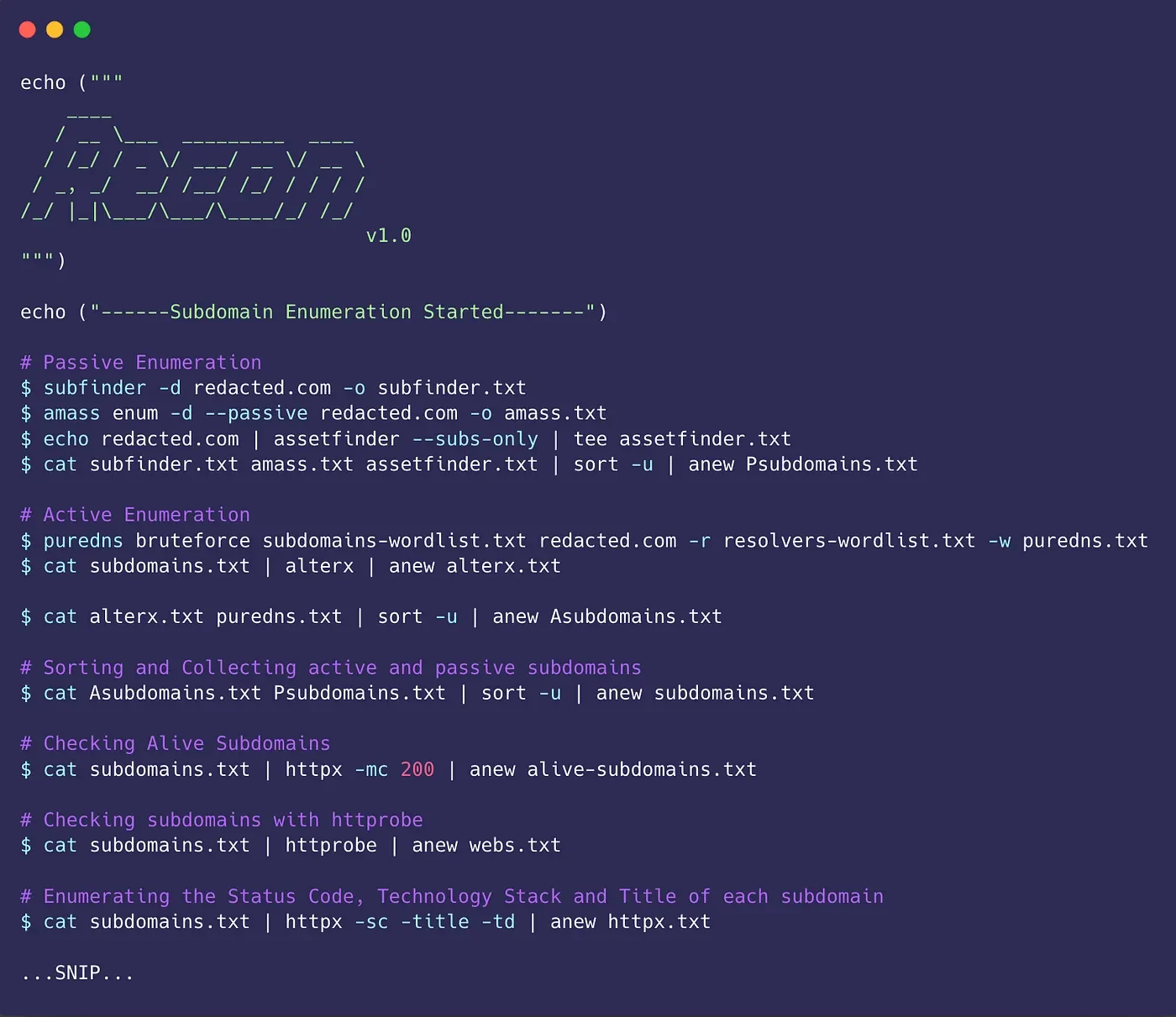
The script runs several phases. The first phase performs passive and active subdomain enumeration with subfinder, amass, findomain, assetfinder, puredns and alterx:
The second phase sorts the collected subdomains into alive and dead hosts using httpx or httprobe:
# Checking Alive Subdomains$ cat subdomains.txt | httpx -mc 200 | anew alive-subdomains.txt# Checking subdomains with httprobe$ cat subdomains.txt | httprobe | anew webs.txt
The third phase records the status code, title and technology stack of each subdomain:
# Enumerating the Status Code, Technology Stack and Title of each subdomain$ cat subdomains.txt | httpx -sc -title -td | anew httpx.txt
Later phases of the script cover port scanning, nuclei scans, directory fuzzing and content discovery. The researcher notes that the third phase deliberately includes subdomains with status codes other than 200, because 302 and 403 responses are also interesting.
Finding it
The starting point came from the third phase. One subdomain, https://notes.redacted.com, returned status code 302 and the technology stack HCL Domino, HSTS and Java.
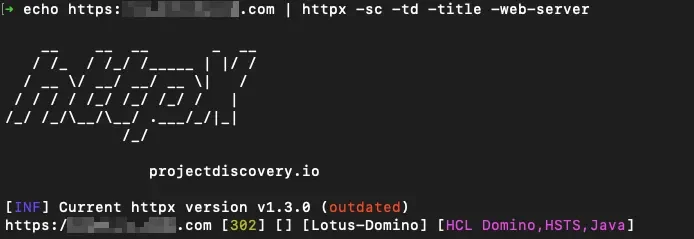
The httpx output shows the subdomain with its status code and detected technologies. The researcher had been reading about Lotus Domino Server and its misconfigurations two to three weeks earlier, so the technology stack was enough to make the subdomain worth a manual look.
Visiting the subdomain showed only the default HCL Domino Server page, with links to documentation and a support page. On its own this looked like a dead end.

Exploitation
Step 1: Fuzz with a technology-specific wordlist
Because the server was identified as Lotus Domino, the researcher used a wordlist containing sensitive endpoints related to Lotus Domino Server rather than a generic one. The reasoning given is that choosing wordlists based on the technology stack or CMS in use avoids hitting random endpoints and produces results quickly.
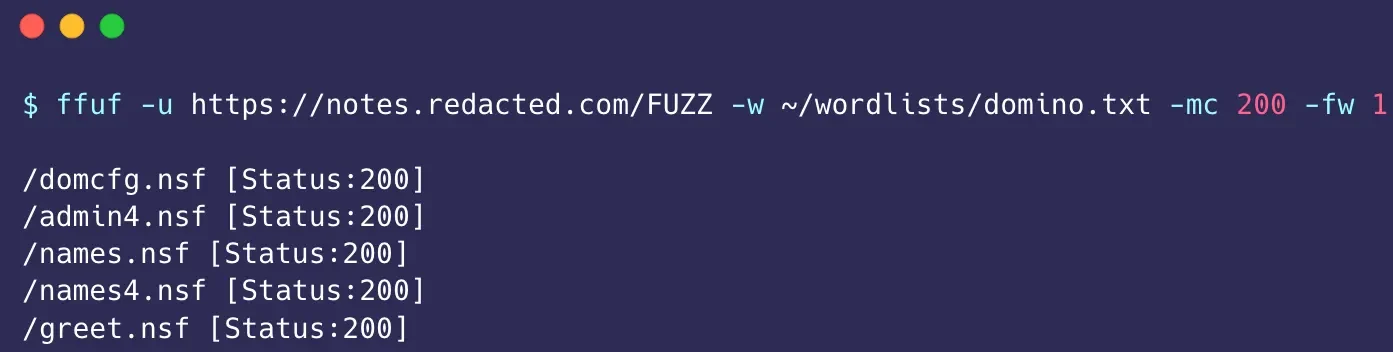
The FFUF output shows the endpoints that responded. Several exposed large amounts of PII about employees, server configuration and AD configuration.
Step 2: Read the web server configuration at /domcfg.nsf
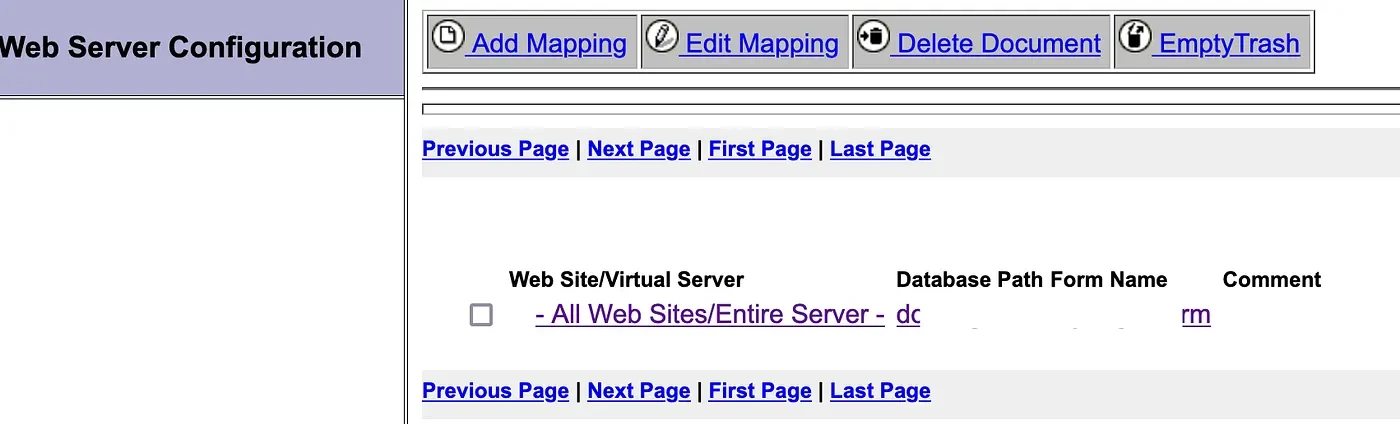
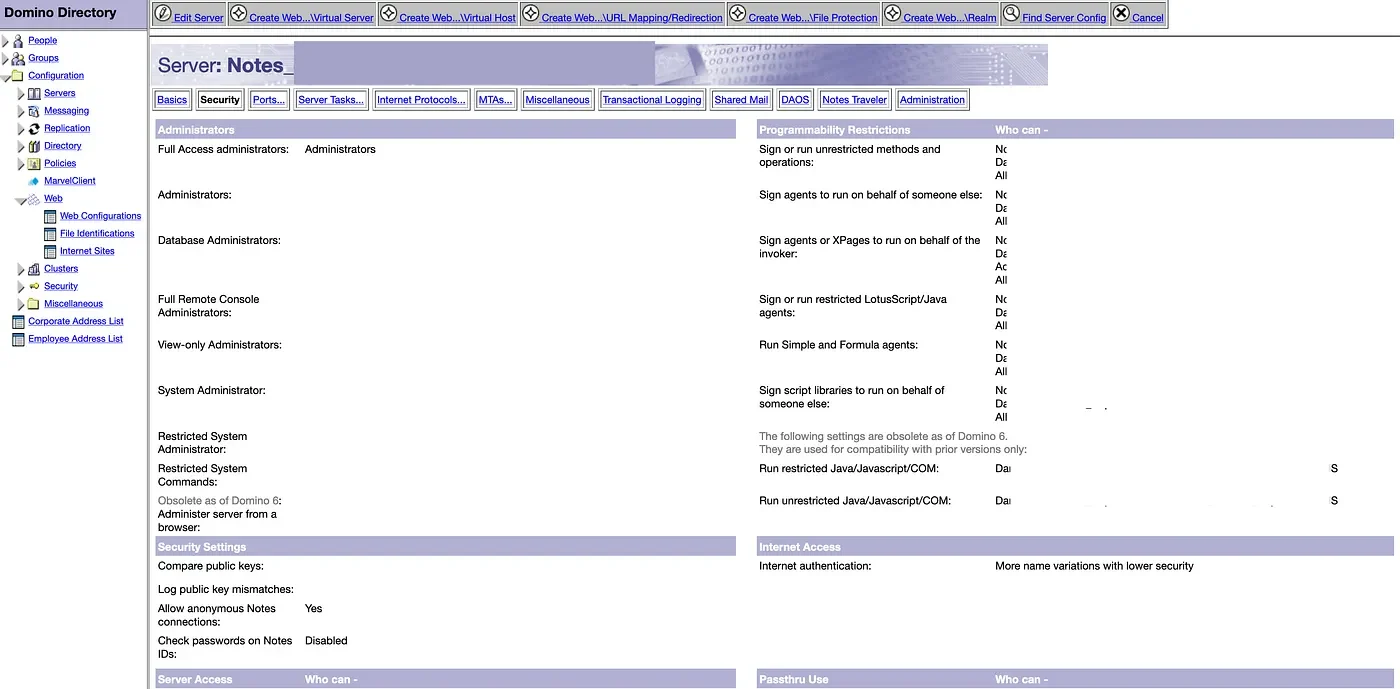
The first endpoint is /domcfg.nsf. When it is publicly accessible it exposes the Web Server Configuration page. In this case the researcher found that the Login Forms data could be modified and the Database could be changed.
Step 3: Dump employee and directory data at /names.nsf
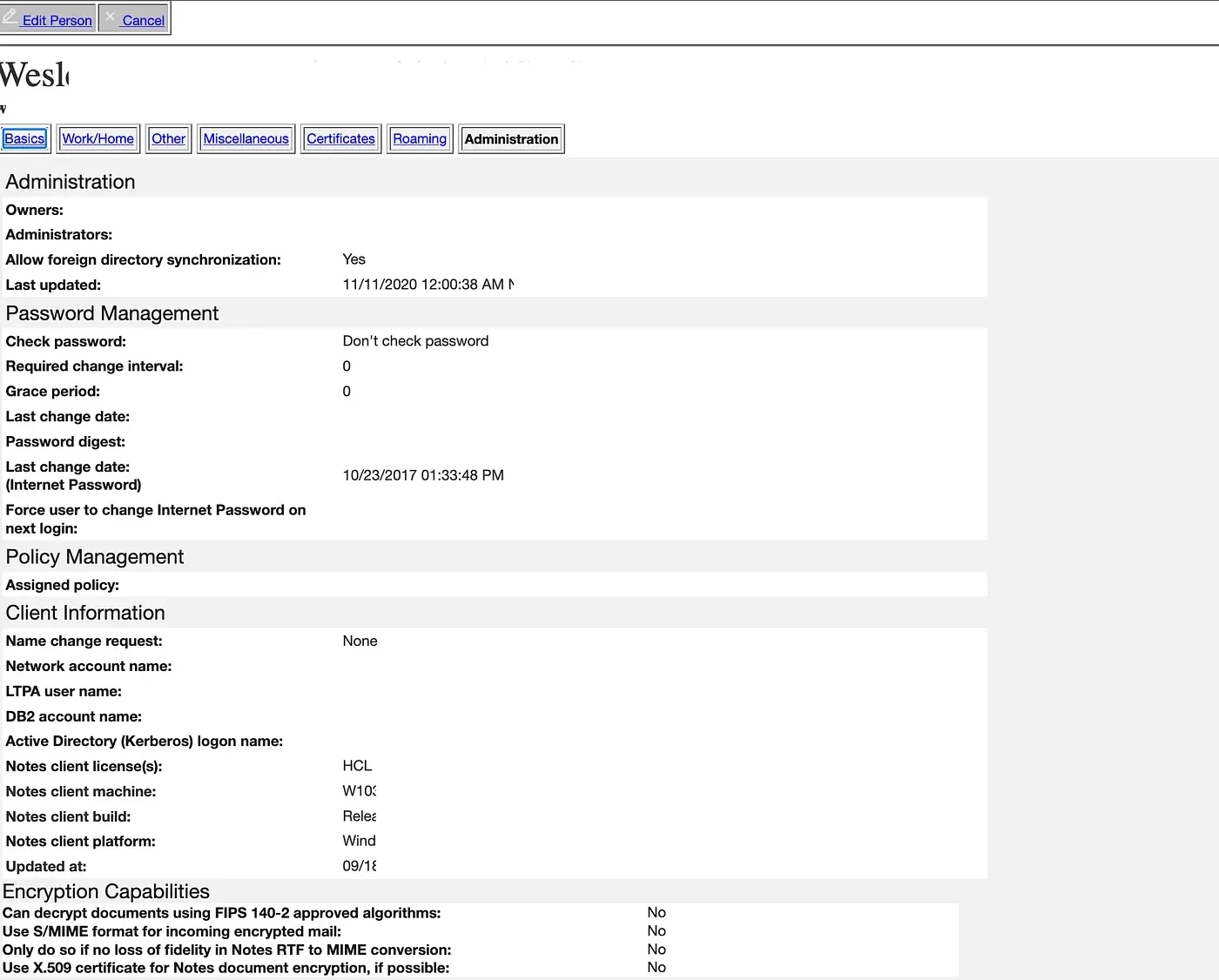
The second endpoint is /names.nsf. When publicly accessible it exposes all the employee names available in the Active Directory. The Lotus Domino instance in this case was also used for LDAP services, and through it the researcher found employee information including email address, the password used to access AD, host-name, ACLs (Access Control lists), permissions, computer name in AD and machine details. The endpoint also contains all the Domain and Server Configuration files, which can be used to modify the configuration of any user or employee.
Step 4: Reach the admin request queue at /admin4.nsf
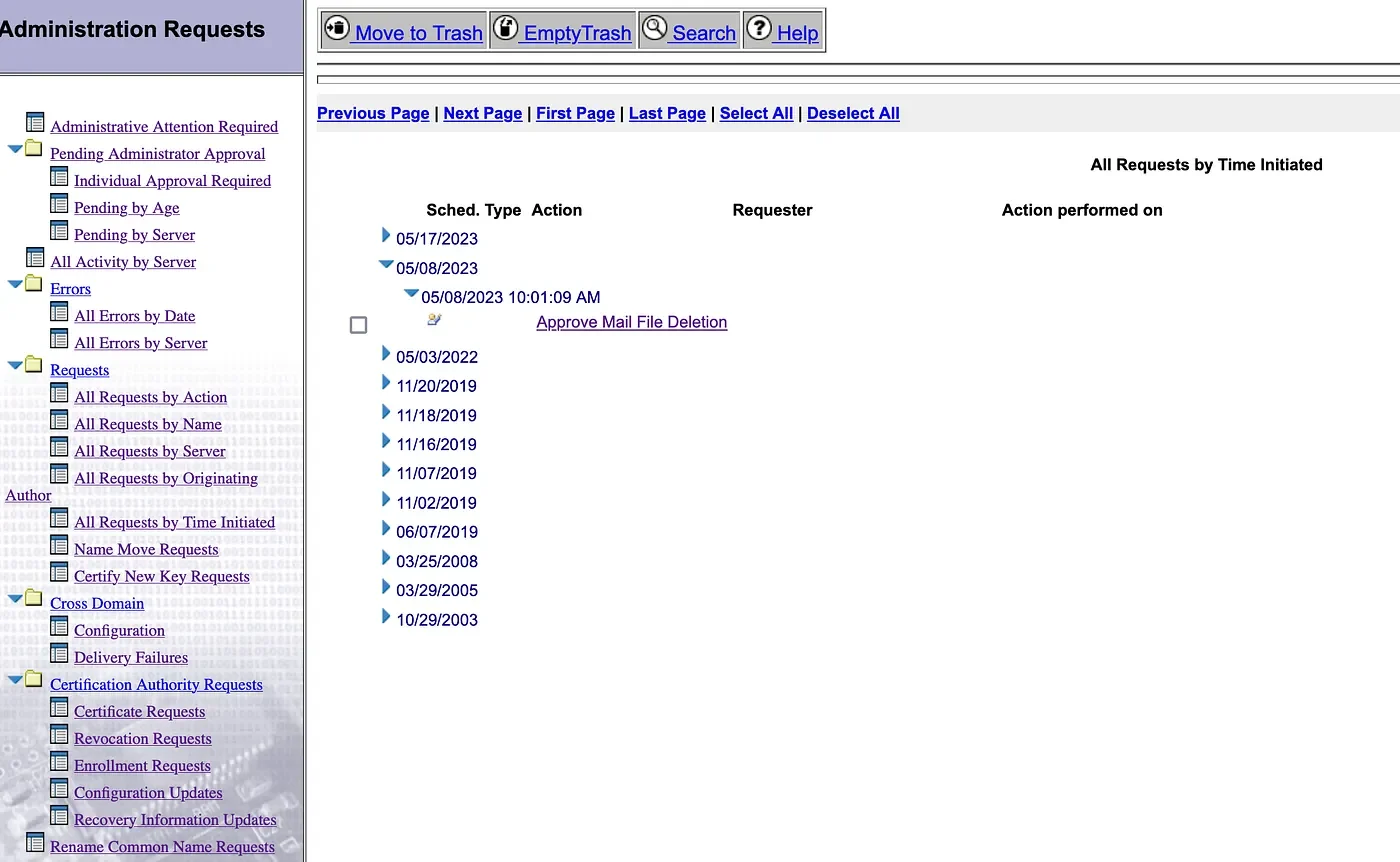
The third endpoint is /admin4.nsf. When publicly accessible it exposes all the requests employees have made to the administrator, whether to grant some access, change a file, and so on. From this endpoint the researcher could see all requests available for the Admin user and also had permissions to either accept or reject a request and to modify the details mentioned. In other words, without authentication or authorisation the researcher held administrative privileges.
Step 5: Read meeting notes at /greet.nsf
The fourth endpoint is /greet.nsf. It matters when the application uses Lotus Domino Server for note-taking, that is, as a place to keep meeting notes, employee notes and similar. Through this endpoint the researcher found meeting notes with customers containing information about customer issues and feedback.
Root cause
The report attributes the exposure to the server being deployed without changing default settings, or development mode not being switched off. Exposing them publicly means either the web server was deployed without changing the default settings, or the development mode of the application was not switched off before deployment. The report does not describe any specific server-side control that failed.
Impact
The misconfiguration exposes sensitive information about AD configuration, domain configuration, server configuration and employees' PII. That information can be used to understand the structure of the AD and other configuration, which aids an attacker in exploiting it later through AD vulnerabilities or other loopholes. The customer notes and other information about an organisation's customers can be used by competitors to sharpen their strategies, which affects the organisation's business revenue. Because the admin request queue was writable, the researcher could also accept, reject or modify administrative requests without authentication.
Fix
The report does not describe a remediation applied to the target. Its recommendation is that before deploying any application to the internet, every setting should be properly reviewed to prevent this kind of misconfiguration, in particular changing default settings and switching off development mode.
Variants to test
- Fuzz with wordlists matched to the detected technology stack or CMS, as was done here with Lotus Domino endpoints.
- Check
/domcfg.nsfon any Lotus Domino host. - Check
/names.nsfon the same host. - Check
/admin4.nsf. - Check
/greet.nsfwhere Domino is used for note-taking. - When a path such as
/adminreturns 403, fuzz beneath it, for examplehttps://example.com/admin/FUZZ, to look for endpoints reachable without an admin login.
The researcher's reconnaissance script is shown in the report as a snippet for reference.
What happened, in plain words
A security researcher was looking at the public face of a company's website, the part anyone on the internet can reach. While doing that, he found a subdomain running HCL Lotus Domino that was reachable by anyone. That server was running a program called HCL Lotus Domino, which companies use for email, calendars, shared notes and an internal staff directory.
The problem was not a clever hack. The server was either deployed without changing the default settings, or development mode was not switched off. Because of that, the researcher could open pages that showed the server's own configuration, a list of employees with their details, a queue of requests sent to the administrator, and notes from meetings with customers. He could even modify the Login Forms data and the Database, and accept or reject employees' requests to the administrator, all without logging in.
The researcher calls this a misconfiguration: the software itself was not broken, but it was left in a state that should never be exposed to the internet. Think of it like a new house where the builder leaves the master key under the doormat. The lock works fine; the problem is where the key was left.
This article walks through the same steps the researcher took, in the same order, and explains every term along the way. You only need to know how to use a browser and a computer to follow it.
Background: what Lotus Domino is
Before the steps, a short introduction to the product involved, because the whole story depends on knowing what it does.
Lotus Domino can act as a web server and/or as an application server for the Lotus Notes application, the client side of a client-server collaborative application. Domino provides email, calendars, instant messaging (with additional HCL software voice- and video-conferencing and web-collaboration), discussions/forums, blogs, and an inbuilt personnel/user directory.
In everyday terms: a web server is the program that hands web pages to your browser when you type an address. An application server is the program that does the actual work behind those pages, such as storing your email or looking up a colleague's phone number. Lotus Domino does both jobs at once. A company installs it so staff can share mail, calendars, notes and a staff directory. The personnel/user directory is the company's internal phone book: names, email addresses, job details, and often much more.
Because so much company information lives inside Domino, its pages are valuable. Some of those pages are meant only for administrators. The researcher found that several of them were open to the whole internet.
The setup: how the researcher found the server
The work was done against a single target, redacted.com, using a personal reconnaissance automation script plus manual analysis. No accounts, roles or credentials were used; the whole point is that the endpoints were reachable anonymously.
A few words first. Reconnaissance (often shortened to recon) means gathering information about a target before trying anything: what addresses exist, what software runs on them, what pages they serve. It is the online equivalent of walking around a building and noting which doors exist before trying any of them. An automation script is a small program that runs a list of commands for you, so you do not have to type them one by one. Anonymous means without logging in, the way a stranger sees your website.
The script runs several phases. The first phase performs passive and active subdomain enumeration with subfinder, amass, findomain, assetfinder, puredns and alterx:
Line by line, in plain words:
echo ("------Subdomain Enumeration Started-------")prints a banner so the person watching the script knows this phase has begun. It is just a message on screen.subfinder -d redacted.com -o subfinder.txtruns a tool called subfinder against the domainredacted.comand saves what it finds in a file calledsubfinder.txt.amass enum -d --passive redacted.com -o amass.txtruns another tool, amass, in passive mode. Passive means it only asks public sources (search engines, public records) and never touches the target's own servers directly.echo redacted.com | assetfinder --subs-only | tee assetfinder.txtruns a third tool, assetfinder, and saves its output while also showing it on screen. The|symbol means "take the output of the left command and feed it to the right one", like a pipe carrying water from one place to another.cat subfinder.txt amass.txt assetfinder.txt | sort -u | anew Psubdomains.txtcombines the three result files, removes duplicates (sort -u), and saves the unique list with a tool called anew, which only adds lines that are not already in the file. ThePinPsubdomains.txtstands for passive.puredns bruteforce subdomains-wordlist.txt redacted.com -r resolvers-wordlist.txt -w puredns.txtis the active part. It takes a long list of common subdomain names (a wordlist) and tries each one against the target, asking the internet's address book (the DNS) whether that name exists. Bruteforce here means trying every name on the list, not guessing passwords.cat subdomains.txt | alterx | anew alterx.txtruns a tool called alterx, which takes known subdomain names and generates variations of them (for example, adding common prefixes or suffixes), then saves the new ones.cat alterx.txt puredns.txt | sort -u | anew Asubdomains.txtmerges the active results, removes duplicates, and saves them. TheAstands for active.cat Asubdomains.txt Psubdomains.txt | sort -u | anew subdomains.txtmerges the active and passive lists into one final file,subdomains.txt.
What is a subdomain? If redacted.com is the company's main address, a subdomain is a named section of it, like mail.redacted.com or shop.redacted.com. Companies often have dozens or hundreds of them, and each one can run different software. Finding them is the first step because you cannot examine a door you do not know exists.
The second phase sorts the collected subdomains into alive and dead hosts using httpx or httprobe:
# Checking Alive Subdomains$ cat subdomains.txt | httpx -mc 200 | anew alive-subdomains.txt# Checking subdomains with httprobe$ cat subdomains.txt | httprobe | anew webs.txt
Line by line:
cat subdomains.txt | httpx -mc 200 | anew alive-subdomains.txtfeeds every subdomain to a tool called httpx, which tries to load each one like a browser would.-mc 200means "match code 200", so only subdomains that answered with the standard success code are kept. The result goes intoalive-subdomains.txt.cat subdomains.txt | httprobe | anew webs.txtdoes the same job with a simpler tool called httprobe, saving the live ones inwebs.txt.
What is a status code? Every time your browser asks a web server for a page, the server replies with a three-digit number. 200 means "here is the page, all good". 302 means "the page has moved, go here instead" (a redirect). 403 means "I understood you, but you are not allowed". 404 means "no such page". These numbers are the server's way of telling the browser what happened, and they are useful for reconnaissance because they reveal which addresses exist and how they behave.
The third phase records the status code, title and technology stack of each subdomain:
# Enumerating the Status Code, Technology Stack and Title of each subdomain$ cat subdomains.txt | httpx -sc -title -td | anew httpx.txt
Line by line:
cat subdomains.txt | httpx -sc -title -td | anew httpx.txtasks httpx to visit every subdomain and record three things: the status code (-sc), the page title (-title, the text shown in the browser tab), and the technologies in use (-td, short for tech detect). Everything is saved inhttpx.txt.
What is a technology stack? It is the set of software a website is built from: the web server, the programming language, the database, and any ready-made products on top. Tools like httpx can often guess the stack from small clues in the server's replies, such as a header or a file name. Knowing the stack matters because each product has its own known pages and its own common mistakes. It is like recognising a car brand from the shape of the headlights: once you know the brand, you know which parts to look for.
Later phases of the script cover port scanning, nuclei scans, directory fuzzing and content discovery. The researcher notes that the third phase deliberately includes subdomains with status codes other than 200, because 302 and 403 responses are also interesting.
A quick word on those later phases, since they are named but not shown. Port scanning means checking which numbered doors (ports) on a computer are open; every internet service listens on a port, like a flat number in a building. Nuclei is a tool that runs a large library of known checks against a target. Directory fuzzing and content discovery mean trying many possible page names to see which ones exist. The reason 302 and 403 are interesting is simple: a 403 says "this page exists but you cannot see it", which tells you there is something worth looking at behind it. A 404 says nothing is there at all.
Finding it
The starting point came from the third phase. One subdomain, https://notes.redacted.com, returned status code 302 and the technology stack HCL Domino, HSTS and Java.
The httpx output shows the subdomain with its status code and detected technologies. The researcher had been reading about Lotus Domino Server and its misconfigurations two to three weeks earlier, so the technology stack was enough to make the subdomain worth a manual look.
Two more terms from that line. HSTS stands for HTTP Strict Transport Security. It is a setting that tells browsers "always use the encrypted version of this site (https), never the plain one". It is a good thing in itself; it just happens to be one of the clues httpx uses to fingerprint a server. Java is a programming language and runtime that many server products are built on. Neither of these is a weakness; they are simply facts about the server that help identify it.
Why did the researcher care? Because he had recently read about Lotus Domino and its common misconfigurations. This is a normal part of security work: you learn about a product, and then when you see that product in the wild, you know which questions to ask. It is like a locksmith who has just studied a particular lock brand and then spots that brand on a door.
Visiting the subdomain showed only the default HCL Domino Server page, with links to documentation and a support page. On its own this looked like a dead end.
A default page is the page a product shows when it has just been installed and nobody has customised it. Seeing one is a signal in itself: it suggests the server may not have been configured carefully. But a default page alone gives nothing away, so at this point the researcher had found a server but not yet a problem.
Exploitation
Step 1: Fuzz with a technology-specific wordlist
Because the server was identified as Lotus Domino, the researcher used a wordlist containing sensitive endpoints related to Lotus Domino Server rather than a generic one. The reasoning given is that choosing wordlists based on the technology stack or CMS in use avoids hitting random endpoints and produces results quickly.
Let us unpack the words in that paragraph, because they carry the whole method.
An endpoint is a specific address on a server that does a specific job, such as /login or /admin. If a website is a building, endpoints are the individual rooms: the reception, the filing room, the manager's office. Some rooms are meant for the public, some only for staff.
Fuzzing means trying many possible names automatically to see which ones exist. You give a tool a list of names (the wordlist) and it asks the server about each one in turn, then reports which ones answered. It is like trying every key on a big keyring in a lock, very fast, and noting which ones turn.
A CMS is a Content Management System, ready-made software for building websites (think of the tools people use to publish blog posts without writing code). The researcher's point is that the wordlist should match the software you found. A list of generic page names will mostly miss; a list of Lotus Domino page names will hit the real ones quickly. It is the difference between searching a library by author and pulling books off shelves at random.
The FFUF output shows the endpoints that responded. Several exposed large amounts of PII about employees, server configuration and AD configuration.
FFUF is a fuzzing tool: it takes a wordlist, substitutes each word into a URL, and shows you the responses. PII stands for Personally Identifiable Information: any data that can identify a real person, such as a name, an email address, a phone number or a home address. AD stands for Active Directory, Microsoft's system for managing staff accounts and permissions inside a company. Think of AD as the company's master list of who works there and what each person is allowed to do. If an outsider can read that list, they learn a great deal about the organisation.
Step 2: Read the web server configuration at /domcfg.nsf
The first endpoint is /domcfg.nsf. When it is publicly accessible it exposes the Web Server Configuration page. In this case the researcher found that the Login Forms data could be modified and the Database could be changed.
A few explanations. The .nsf ending is the file type Lotus Domino uses for its databases; each .nsf address is a small application inside Domino. The Web Server Configuration page is the settings screen for the server itself: how it presents login forms, which database it uses, and similar. Normally only an administrator can open it. Login Forms data means the fields and layout of the login box that visitors see. Being able to modify it means an outsider could change the login form data. The researcher also found that the Database could be changed.
Step 3: Dump employee and directory data at /names.nsf
The second endpoint is /names.nsf. When publicly accessible it exposes all the employee names available in the Active Directory. The Lotus Domino instance in this case was also used for LDAP services, and through it the researcher found employee information including email address, the password used to access AD, host-name, ACLs (Access Control lists), permissions, computer name in AD and machine details. The endpoint also contains all the Domain and Server Configuration files, which can be used to modify the configuration of any user or employee.
LDAP stands for Lightweight Directory Access Protocol. It is the standard way software looks up people and resources in a directory, such as a company's staff list. When a product says it "uses LDAP", it means it reads from or writes to that kind of directory. Here, the Domino server was connected to the company's directory, so the directory's contents were reachable through it.
ACLs, or Access Control Lists, are the rules that say who may do what. If the staff directory is a set of filing cabinets, the ACLs are the labels on each drawer saying which departments may open it. Permissions is the same idea in plain words: what each account is allowed to do. Host-name is the name of a computer on the network, and machine details means information about that computer, such as its operating system or hardware.
The mention of "the password used to access AD" is worth pausing on. Passwords are the keys to accounts. If a directory page shows them, anyone who reads the page can see them. The report does not say how those passwords were stored or displayed; it only states that they were among the exposed details.
Step 4: Reach the admin request queue at /admin4.nsf
The third endpoint is /admin4.nsf. When publicly accessible it exposes all the requests employees have made to the administrator, whether to grant some access, change a file, and so on. From this endpoint the researcher could see all requests available for the Admin user and also had permissions to either accept or reject a request and to modify the details mentioned. In other words, without authentication or authorisation the researcher held administrative privileges.
Two words to separate here, because they are often confused. Authentication is proving who you are, like showing your ID at the door. Authorisation is what you are allowed to do once inside, like which floors your badge opens. The researcher is saying that neither check happened: he did not have to prove who he was, and he was not stopped from doing administrator-level actions. Administrative privileges means the powers of an administrator: the person who runs the system. Being able to accept, reject or edit other people's requests is exactly that kind of power.
Step 5: Read meeting notes at /greet.nsf
The fourth endpoint is /greet.nsf. It matters when the application uses Lotus Domino Server for note-taking, that is, as a place to keep meeting notes, employee notes and similar. Through this endpoint the researcher found meeting notes with customers containing information about customer issues and feedback.
This one is less about technical access and more about business risk. Meeting notes often contain candid remarks: what a customer complained about, what they liked, what the company promised. That is valuable to a competitor and embarrassing if leaked.
Root cause
The report attributes the exposure to the server being deployed without changing default settings, or development mode not being switched off. Exposing them publicly means either the web server was deployed without changing the default settings, or the development mode of the application was not switched off before deployment. The report does not describe any specific server-side control that failed.
Deployment means putting software into its live, public state, as opposed to testing it on a private machine. Development mode is a setting some software uses while it is being built, which often turns off safety checks and shows extra detail to help the developers. Leaving it on in production is like leaving the scaffolding up on a finished building: it was only meant for the construction phase.
Impact
The misconfiguration exposes sensitive information about AD configuration, domain configuration, server configuration and employees' PII. That information can be used to understand the structure of the AD and other configuration, which aids an attacker in exploiting it later through AD vulnerabilities or other loopholes. The customer notes and other information about an organisation's customers can be used by competitors to sharpen their strategies, which affects the organisation's business revenue. Because the admin request queue was writable, the researcher could also accept, reject or modify administrative requests without authentication.
In plain terms, the damage has two shapes. The first is direct: private data about staff and customers is out in the open. The second is indirect: knowing how a company's internal systems are arranged makes any future attack easier, because the attacker no longer has to guess. A map of the building is useful even to someone who has not yet decided which door to try.
Fix
Its recommendation is that before deploying any application to the internet, every setting should be properly reviewed to prevent this kind of misconfiguration, in particular changing default settings and switching off development mode.
Remediation means the fix: what you change to close the problem. The advice here is procedural rather than technical: check the settings before going live. It is the software equivalent of a final walk-through before opening a shop, checking that no storeroom door has been left unlocked.
Variants to test
If you ever find yourself in a similar situation, these are the checks the researcher describes, in the same order.
- Fuzz with wordlists matched to the detected technology stack or CMS, as was done here with Lotus Domino endpoints.
- Check
/domcfg.nsfon any Lotus Domino host. - Check
/names.nsfon the same host. - Check
/admin4.nsf. - Check
/greet.nsfwhere Domino is used for note-taking. - When a path such as
/adminreturns 403, fuzz beneath it, for examplehttps://example.com/admin/FUZZ, to look for endpoints reachable without an admin login.
The last point deserves a sentence of explanation. A 403 on /admin means the front door is locked. But a locked front door does not tell you whether the side rooms behind it are also locked. By replacing FUZZ with many names, you ask the server about /admin/settings, /admin/users and so on, and see whether any of them answer without a login. It is checking whether the building has a back entrance.
The researcher's reconnaissance script is shown in the report as a snippet for reference.
Glossary
- Active Directory (AD): Microsoft's system for managing staff accounts, computers and permissions inside a company.
- ACL (Access Control List): a set of rules saying who may access or change something.
- Administrative privileges: the powers held by the person who runs a system, such as approving requests or changing settings.
- Anonymous: without logging in, as a stranger would see a site.
- Application server: the program that does the real work behind web pages, such as storing data or looking up records.
- Authentication: proving who you are, like showing an ID.
- Authorisation: what you are allowed to do once identified, like which doors your badge opens.
- Automation script: a small program that runs a list of commands for you.
- Bruteforce (in subdomain tools): trying every name on a list, one after another.
- CMS (Content Management System): ready-made software for building and publishing websites.
- Default page: the page a product shows right after installation, before anyone customises it.
- Deployment: putting software into its live, public state.
- Development mode: a setting used while software is being built, which often disables safety checks and shows extra detail.
- Endpoint: a specific address on a server that performs a specific job, such as
/login. - FFUF: a tool that tries many page names from a wordlist and shows which ones respond.
- Fuzzing: automatically trying many possible names or inputs to see which ones exist or behave differently.
- Host-name: the name of a computer on a network.
- HSTS (HTTP Strict Transport Security): a setting telling browsers to always use the encrypted version of a site.
- httpx / httprobe: tools that visit a list of addresses and report which ones are alive and what they run.
- Java: a programming language and runtime many server products are built on.
- LDAP (Lightweight Directory Access Protocol): the standard way software looks up people and resources in a directory.
- Lotus Domino: HCL software that can act as a web server and application server, providing email, calendars, notes and a staff directory.
- Misconfiguration: software left in a state that should not be exposed, even though the software itself works as designed.
- Nuclei: a tool that runs a large library of known checks against a target.
- Passive (reconnaissance): gathering information only from public sources, without contacting the target's own servers.
- Permissions: what a given account is allowed to do.
- PII (Personally Identifiable Information): data that can identify a real person, such as a name, email address or phone number.
- Port scanning: checking which numbered network doors on a computer are open.
- Reconnaissance (recon): gathering information about a target before trying anything.
- Remediation: the fix applied to close a problem.
- Status code: the three-digit number a server returns with every reply, such as 200 (success), 302 (redirect), 403 (forbidden) or 404 (not found).
- Subdomain: a named section of a domain, such as
mail.redacted.comunderredacted.com. - Technology stack: the set of software a website is built from, such as its web server, language and database.
- Web server: the program that hands web pages to your browser.
- Wordlist: a file containing many candidate names or words for a tool to try.



