Utilizing Historical URLs of an Organization to successfully execute SQL queries — Blind SQLi
A URL parameter was vulnerable to time-based blind SQL injection, allowing an attacker to delay database responses. The author confirmed the flaw by observing an 11-second delay when injecting a payload.
 Published on medium.com
I was working on a target and asked to find something but not taking much time, so this time I decided not to do deep reconnaissance and only start with the target domain which is their main web application. While analyzing I found one URL with a parameter id= which I exploited and found it vulnerable to Time based…
The full write-up lives on its author's site
It belongs to its author, so we link to it rather than copy it. The other two tabs are our own rewrites, checked against it.
Context
The target was the main web application of an organisation, referred to throughout as redacted.com. The application had few features: some products that could be viewed and searched, and not much else to test. The researcher deliberately skipped deep reconnaissance because of a time constraint and started from the main domain instead.
The feature that turned out to matter was a URL carrying an attachment_id parameter, discovered through historical URLs rather than through the live application's navigation. The report does not describe what the parameter normally does beyond appearing in a URL of the form https://www.redacted.com/?attachment_id=123.
Setup
No accounts, roles or credentials are mentioned. The tooling used was:
- waybackurls, run from the command line, to pull historical URLs for the domain from the Wayback Machine.
- anew, to append new lines to a file without duplicates.
- grep, to filter the collected URLs for interesting parameters.
- Wappalyzer, to fingerprint the technology stack.
- Burp Suite, to send requests and measure response times for the time-based test.
- curl, to reproduce the final request.
The researcher also mentions the PortSwigger param-miner parameter wordlist as something used sometimes to fuzz for parameter names on interesting subdomains.
Finding it
The methodology was intentionally shallow: browse the application like a normal user, then mine historical URLs for parameters worth testing.
- Visit the target domain as a regular user. The application offers product viewing and searching, and little else.
- Collect all URLs associated with the domain from the Wayback Machine:
$ echo redacted.com | waybackurls | anew urls.txt
- Filter the collected URLs for interesting parameter names such as
id, redirect parameters andurlparameters. The researcher notes that the param-miner wordlist is sometimes used for fuzzing parameter names on interesting subdomains.
$ cat urls.txt | grep "id=" | anew temp-sqli.txt
- Reviewing
temp-sqli.txtsurfaced a URL of the formhttps://www.redacted.com/?attachment_id=123.

The screenshot shows the contents of temp-sqli.txt, the filtered list of URLs containing id=.
Exploitation
Step 1: Probe for error-based feedback
The first test appended a single quote and a double quote to the end of the URL:
https://www.redacted.com/?attachment_id=123'
https://www.redacted.com/?attachment_id=123"
Neither produced an SQL error or a database error. The parameter still looked interesting, so the researcher decided to try every type of SQL injection rather than stopping at the absence of error output.
Step 2: Fingerprint the database
Wappalyzer showed the application was using MySQL. The researcher then gathered SQL injection payloads and tried them against the URL.
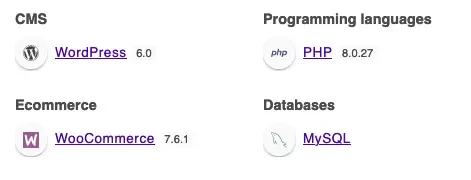
The Wappalyzer result identifying the database technology behind the application.
Step 3: Establish a baseline response time
Burp Suite was used to send the request and compare timings while running time-based payloads. A browser could have been used, but Burp was chosen for the proof of concept. The request without any SQL payload returned quickly.
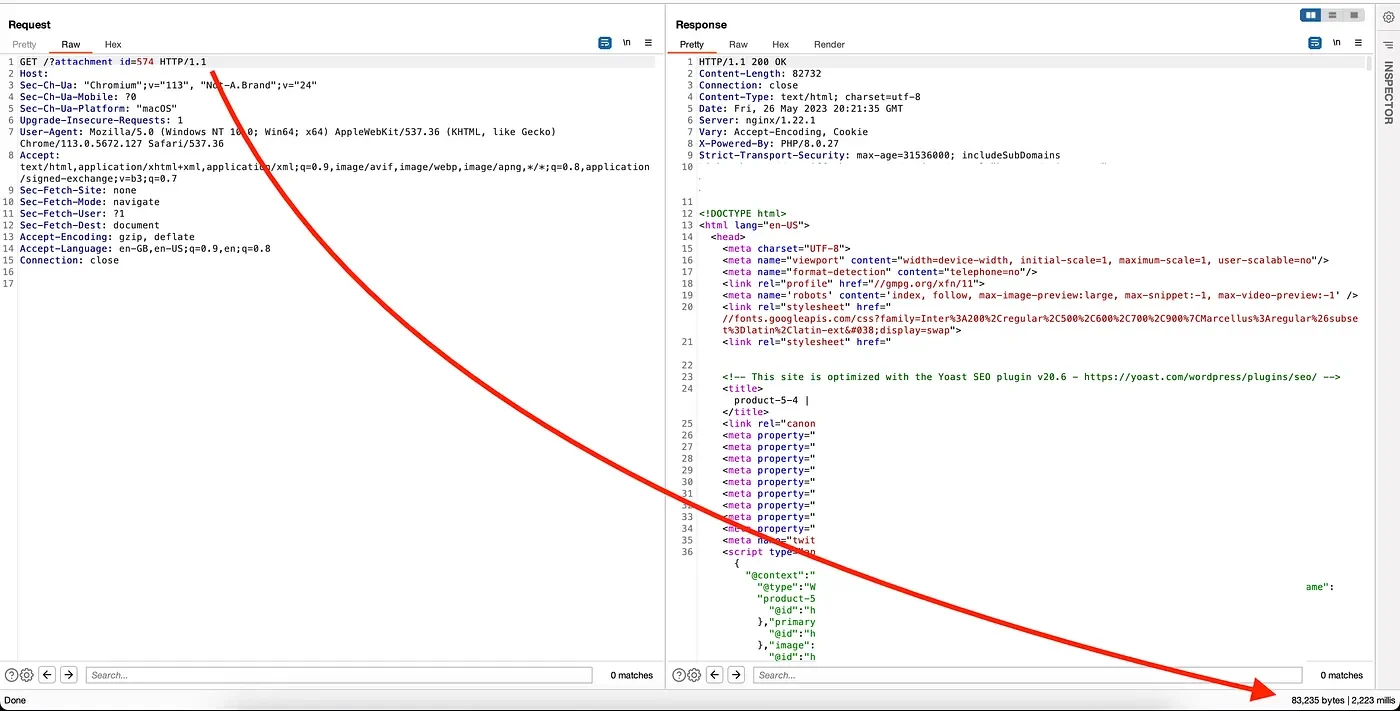
The baseline request with no SQL payload, showing the response time without injection.
Step 4: Send the time-based payload
A payload was found that worked:
" AND 4564=(SELECT 4564 FROM PG_SLEEP(11)) OR "04586"="4586--
It produced a sleep of 11 seconds on the web application, which the researcher took as confirmation of a successful time-based blind SQL injection. The complete URL with the payload:
$ curl https://www.redacted.com/?attachment_id=123" AND 4564=(SELECT 4564 FROM PG_SLEEP(11)) OR "04586"="4586--
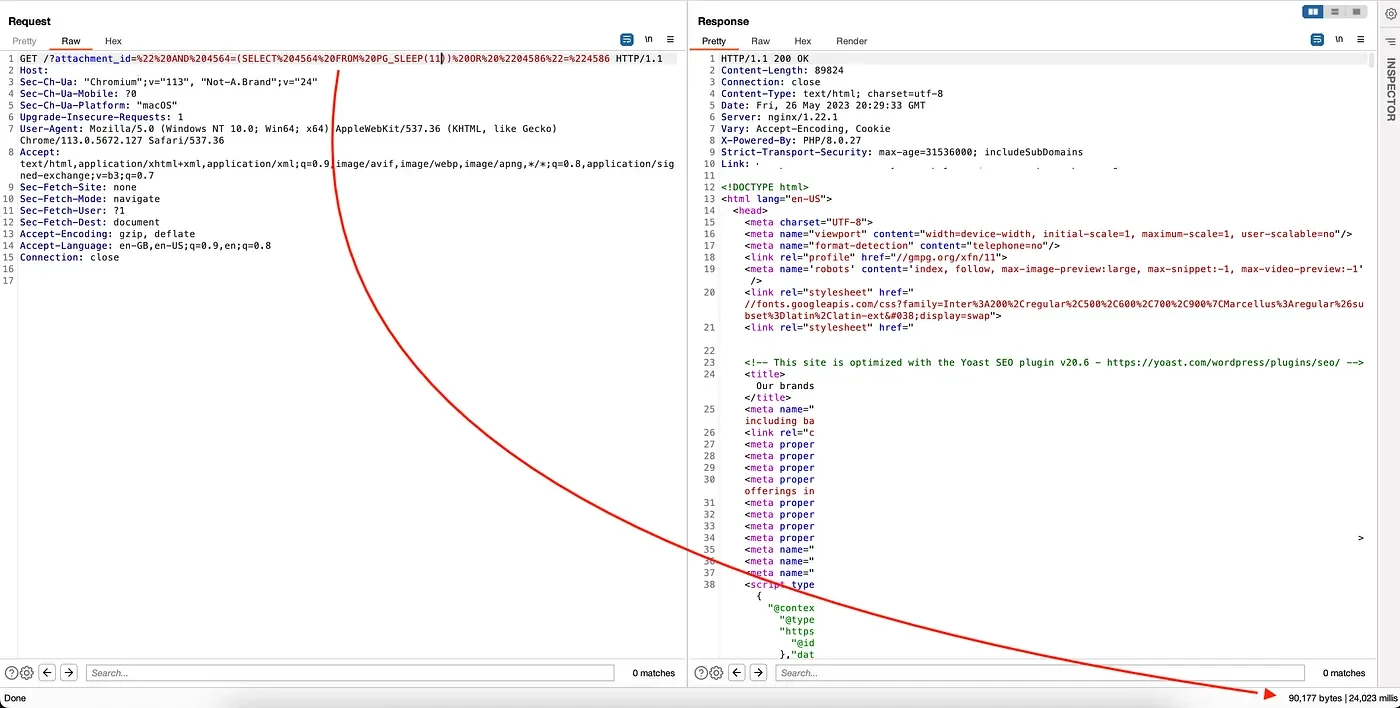
The same request with the SQL payload, showing the increased time taken to complete the response.
The screenshot shows the increase in time taken to complete the request with the payload, which confirms the vulnerability. The application was also slow to load in the web browser.
Step 5: Stop at confirmation
The researcher did not exploit the finding further because of the time constraint during testing, but expects it could be exploited to retrieve sensitive information.
Root cause
The report does not include any source code or server-side detail, so the exact mistake is not shown. What the behaviour implies is that the value of attachment_id is placed into an SQL query without being treated as data, so the injected boolean and time-based expressions are evaluated by the database. The absence of error output on the quote probes suggests errors are suppressed or not returned to the client. Why the existing defences did not stop it is not stated in the report.
Impact
The report frames the impact as dependent on the application. Where the vulnerable application is the product application that generates the organisation's revenue, the researcher argues the effect would reach the business itself, leading to financial loss and a bad user experience. The researcher states that further exploitation to extract sensitive information was not attempted, so the extent of what is reachable is not demonstrated in the report.
Fix
The report does not describe any fix or remediation applied by the organisation. It gives no recommendation on parameterised queries, input validation or error handling.
Variants to test
- Historical URL mining on other targets. Run
waybackurlsagainst a domain and filter forid=, redirect andurlparameters. A positive result is a URL with a parameter that behaves differently when a quote is appended, or that shows a measurable delay with a time-based payload. - Parameter-name fuzzing with the param-miner wordlist. Apply the list to interesting subdomains. A positive result is a hidden parameter that changes the response when supplied.
- Time-based confirmation when errors are suppressed. Send a payload that causes a deliberate delay and compare against a baseline request without the payload. A positive result is a clear difference in response time, as with the 11-second sleep here.
- Database-specific sleep functions. The payload used here relies on
PG_SLEEP, which is a PostgreSQL function, even though Wappalyzer reported MySQL. Trying the equivalent sleep function for the fingerprinted database is worth doing when one variant does not delay the response.
What happened, in plain words
A security researcher was asked to look at a company's main website and find a problem, but without spending a lot of time on it. So instead of doing a long, deep investigation (the kind where you map out every server, subdomain and hidden service), he took a shortcut. He started from the main website itself, the one ordinary customers use.
While poking around, he found a web address (a URL) that contained a small piece of information called a parameter, named id=. He tested that parameter and found the database would execute an instruction he slipped in. That let him slip in a small instruction of his own, and the database obeyed it by waiting 11 seconds before answering. That kind of flaw is called a blind SQL injection, and the "blind" part means the website never shows you the database's answers directly, so you have to infer what is happening from side effects such as how long a page takes to load.
This article walks through exactly what he did, step by step, in the same order, explaining every term along the way as if you have never done security testing before. You only need to be comfortable using a browser and a computer.
Some words you will meet first
Before we start, a handful of ideas come up again and again. Here they are in everyday language.
- A URL (Uniform Resource Locator) is just a web address, the thing you type into your browser's address bar, like
https://www.example.com/page. - A parameter is a small labelled value attached to the end of a URL, usually after a question mark. In
https://www.example.com/?colour=blue, the parameter name iscolourand its value isblue. Think of it like a form field on a paper order: the label says what it is, and the value is what you filled in. Websites use parameters to tell their own pages what to show, for example which product to display. - A database is the organised store where a website keeps its information: product names, prices, user accounts, and so on. Imagine a very large, very fast spreadsheet that the website reads from and writes to.
- SQL (Structured Query Language) is the language used to ask that database questions, such as "give me the product with this number". The website builds these questions and sends them to the database.
- SQL injection (often shortened to SQLi) is a flaw where a website takes something a visitor typed or put in a URL and glues it directly into one of those database questions, without checking it. A clever visitor can then add extra SQL of their own, and the database treats it as a legitimate instruction. It is like a form that says "write your name here" and someone writes "Bob, and also hand over the keys to the safe", and the clerk reads the whole line as an order.
- Blind SQL injection is SQL injection where the website does not show you the database's reply or any error message. You cannot see the stolen data directly, so you have to ask yes/no questions and watch for indirect clues, such as whether the page loads slowly or quickly.
- Time-based blind SQL injection is a specific trick: you inject an instruction that tells the database to pause (sleep) for a set number of seconds. If the page then takes noticeably longer to load, you know your injected instruction ran, which proves the flaw exists.
- Reconnaissance (recon) is the information-gathering phase of security testing: finding out what exists, what software is running, and where the interesting parts are. Deep recon is thorough and slow; shallow recon is quick and broad.
- Fingerprinting means working out what software a website is built on (which database, which web server, which framework), because that tells you which techniques are likely to work.
With those in hand, let's follow the researcher's steps.
The starting point: the target website
Throughout the report the target is written as redacted.com, a placeholder standing in for the real company's domain. The website did not have many features. It had some products that visitors could view and search, and not much else to test. That matters because it means there were few obvious places to look, so the researcher had to be a bit creative about where to find something worth testing.
Because of the time limit, he deliberately skipped deep reconnaissance and started from the main domain, the website ordinary customers use. The idea is simple: the main website is the most-used part of a company's online presence, so a flaw there can matter a lot, and you do not always need to dig through obscure servers to find one.
The method: browsing like a normal user, then mining old URLs
His approach was basic but worth trying. Here is the sequence.
- Visit the website like a normal visitor. He opened the target domain and clicked around as any customer would. The site let you view and search products, and that was about it. This step is about getting a feel for what the site does and what inputs it accepts.
- Collect every URL ever seen for that domain, using the Wayback Machine. The Wayback Machine is a public archive, run by the Internet Archive, that has been saving copies of web pages for years. If a page existed at some point, the archive may have a record of its address. This is useful because websites often have old pages, forgotten links and parameters that are no longer linked from the menu but still work on the live server. It is like finding an old set of keys to a building: the door may still open even though nobody hands out that key any more.
- Filter that big list down to the interesting URLs. Out of thousands of archived addresses, he wanted the ones with parameters that might be passed to a database, such as
id, redirect parameters andurlparameters.
He did steps 2 and 3 with command-line tools. A command line (or terminal) is a text window where you type instructions to your computer instead of clicking icons. The tools he used were:
- waybackurls, a small program that asks the Wayback Machine for all known URLs of a domain and prints them out.
- anew, a helper that adds new lines to a file but skips any line that is already there, so you do not get duplicates.
- grep, a standard tool for searching text and printing only the lines that match a pattern.
Here is the first command, which gathers the URLs:
$ echo redacted.com | waybackurls | anew urls.txt
Line by line, in plain words:
echo redacted.comprints the domain name to the screen. It is a way of handing the name to the next tool.- The
|symbol is called a pipe. It takes the output of the thing on its left and feeds it as input to the thing on its right, like passing a note along a chain of people. waybackurlsreceivesredacted.comand asks the Wayback Machine for every URL it knows for that domain, printing them one per line.anew urls.txttakes those lines and appends them to a file calledurls.txt, but only the ones not already in the file. The result is a clean list of unique URLs saved on disk.
After this, all the URLs were sitting in a file called urls.txt. The next step was to narrow that list to the ones most likely to be interesting: URLs with an id parameter, a redirect parameter, a url parameter and similar. The researcher also mentions that he sometimes uses a public wordlist of common parameter names (the PortSwigger param-miner list, at https://github.com/PortSwigger/param-miner/blob/master/resources/params) to guess parameter names on interesting subdomains. A wordlist is simply a long text file of candidate words that a tool tries one after another, like a dictionary used to guess a password. In this case, though, the parameter came from the archived URL list rather than from guessing.
The filtering command was:
$ cat urls.txt | grep "id=" | anew temp-sqli.txt
Line by line:
cat urls.txtprints the whole contents of the fileurls.txtto the screen.- The pipe
|passes that output to the next tool. grep "id="searches each line for the exact textid=and prints only the lines that contain it. So it keeps URLs that have anidparameter and throws away the rest.anew temp-sqli.txtsaves those matching lines into a new file calledtemp-sqli.txt, again without duplicates.
Why this step? Because a parameter named id is very often used to look something up in a database (for example, "show me product number 123"). If a website takes that number and drops it straight into a database question, it may be injectable. So filtering for id= is a quick way to find candidate URLs to test.
While reviewing temp-sqli.txt, he spotted an interesting URL of the form:
https://www.redacted.com/?attachment_id=123
The screenshot shows the contents of temp-sqli.txt, the filtered list of URLs that contain id=. This is the file where the interesting URL turned up.
Notice the parameter here is called attachment_id, not just id. The grep search for id= still matched it because the text id= appears inside attachment_id=. The report does not say what this parameter normally does beyond appearing in a URL of this shape; it is enough to know that it carries a number and that the website uses it somehow.
Testing the parameter: the hacking begins
Now the researcher had a URL with a parameter worth testing. The first thing to try with any suspected SQL injection is to send a character that has special meaning in SQL and see whether the website complains. The two classic characters are the single quote (') and the double quote ("). In SQL, quotes mark the beginning and end of text values, so an unexpected quote can break the database's question and cause an error.
He appended each quote to the end of the URL:
https://www.redacted.com/?attachment_id=123'
https://www.redacted.com/?attachment_id=123"
What this does: the first line sends the value 123' instead of 123, and the second sends 123". If the website were naively building a database question, the stray quote might make that question malformed, and the database would return an error.
Neither attempt produced an SQL error or a database error. In other words, the website did not visibly break. Many people would stop here. But the parameter still looked interesting to the researcher, so he decided to try every type of SQL injection rather than giving up just because there was no error message. This is an important habit: the absence of an error does not mean the absence of a flaw. Errors are often hidden from visitors on purpose, precisely so attackers cannot learn from them.
Working out which database is in use
Before choosing payloads, it helps to know what database the website uses, because different databases understand slightly different commands. A payload here means the specific piece of injected text you send, crafted to make the database do something.
The researcher used Wappalyzer, a browser extension that looks at clues a website gives off (such as response headers and page contents) and guesses what software it is built on. It reported that the application was using MySQL.
The Wappalyzer result identifying the database technology behind the application.
Knowing the database was MySQL, he gathered a set of SQL injection payloads and tried them against the URL. The goal at this stage was to find any payload that produced a visible or measurable effect.
Measuring time: setting a baseline
Because the earlier quote tests produced no error, the researcher turned to a time-based technique. The idea: inject an instruction that makes the database pause for a known number of seconds. If it loads at normal speed, it did not. It is like timing how long a shop assistant takes to fetch something: if you ask for an item and the assistant disappears for ten seconds, you know the request reached them.
To measure this reliably, he used Burp Suite, a well-known tool for security testers that sits between your browser and the website. It lets you capture a request, change it, send it again, and see exactly how long the response took. A browser could have been used, but Burp was chosen because it gives a clean, repeatable measurement for the proof of concept. A proof of concept (PoC) is a small demonstration that proves a flaw is real, without needing to fully exploit it.
The first request he sent contained no SQL payload at all. This is the baseline: a normal request whose response time you record so you have something to compare against later. Without a baseline, a slow response could just be a slow internet connection or a busy server.
The baseline request with no SQL payload, showing the response time without injection. This is the "normal speed" reference point.
Sending the time-based payload
With a baseline recorded, he tried time-based payloads. One of them worked:
" AND 4564=(SELECT 4564 FROM PG_SLEEP(11)) OR "04586"="4586--
This is the payload that produced a sleep of 11 seconds on the web application, which the researcher took as confirmation of a successful time-based blind SQL injection. Let's unpack what the pieces are doing, in plain terms, without needing to be a database expert:
- The leading
"is a double quote, used to try to close off whatever text value the website had started building around the parameter. AND 4564=(SELECT 4564 ...)is a condition that is always true: it compares the number 4564 with the result of a sub-query that also returns 4564. Because it is always true, it does not change the overall logic, but it gives the database something to evaluate.PG_SLEEP(11)is a function that tells the database to pause for 11 seconds. The namePG_SLEEPis associated with PostgreSQL, a different database from MySQL, which is a detail worth noticing: the payload that worked uses a PostgreSQL sleep function even though Wappalyzer had reported MySQL. The report does not explain this discrepancy.OR "04586"="4586--is a trailing condition plus--, which in SQL starts a comment, telling the database to ignore the rest of the original question. This helps the injected text fit cleanly into the website's own query.
The complete URL with the payload looked like this:
$ curl https://www.redacted.com/?attachment_id=123" AND 4564=(SELECT 4564 FROM PG_SLEEP(11)) OR "04586"="4586--
Line by line:
curlis a command-line tool for fetching a URL, like a browser without a window. It sends the request and prints the response.- The URL is the same
attachment_idURL as before, but with the payload appended after123. The double quote, theAND ... PG_SLEEP(11) ...condition and the trailing--are all part of the value being sent. - Because the payload contains spaces and special characters, in a real terminal you would normally wrap the whole URL in quotes so the shell does not split it; the report shows it as written.
The same request with the SQL payload, showing the increased time taken to complete the response. Comparing this with the baseline is what confirms the flaw.
The screenshot shows the increase in time taken to complete the request when the payload was included, which confirms the vulnerability. The application was also taking time while loading in the web browser.
Why this proves the flaw
Put simply: a normal request came back quickly, and the same request with the injected sleep instruction came back about 11 seconds later. The only thing that changed was the injected text, so the delay must have come from the database executing that text. That is the essence of time-based blind SQL injection: you cannot see the database's reply, but you can see the clock.
Where the researcher stopped
He did not exploit the finding any further because of the time constraint during testing. He notes that he expects it could be exploited to retrieve sensitive information, but the report does not demonstrate that. So what is proven is that the injection point exists and that the database will execute injected instructions; what data could ultimately be reached is not shown.
Why it happens (the root cause)
The report does not include any source code or server-side detail, so the exact mistake in the code is not shown. What the behaviour implies is that the value of attachment_id is placed into an SQL query without being treated purely as data. In other words, the website takes the number from the URL and glues it into the database question, so anything extra that a visitor adds is also read as part of the question. The absence of error output on the quote tests suggests that errors are suppressed or simply not returned to the visitor, which is exactly why a time-based technique was needed rather than an error-based one. Why the website's existing defences did not stop it is not stated in the report.
What the impact could be
The report frames the impact as depending on the application. Where the vulnerable application is the product application that generates the organisation's revenue, the researcher argues the effect would reach the business itself, leading to financial loss and a bad user experience. In everyday terms: if the shop's website can be made to misbehave or leak its data, customers may have a poor experience, and the company may lose money. Because further exploitation to extract sensitive information was not attempted, the full extent of what is reachable is not demonstrated in the report.
What the fix would be
It gives no recommendation on parameterised queries, input validation or error handling. (For context, a parameterised query is the standard defence: it keeps the visitor's value separate from the database question so it can never be read as an instruction. But that is general knowledge, not something the report states.)
Other things worth trying
These are variations on the same idea, useful if you want to practise the method on your own targets.
- Mine historical URLs on other targets. Run
waybackurlsagainst a domain and filter forid=, redirect andurlparameters. A positive result is a URL with a parameter that behaves differently when a quote is appended, or that shows a measurable delay with a time-based payload. - Guess parameter names with a wordlist. Apply the param-miner list to interesting subdomains. A positive result is a hidden parameter that changes the response when supplied.
- Confirm with timing when errors are hidden. Send a payload that causes a deliberate delay and compare it against a baseline request without the payload. A positive result is a clear difference in response time, as with the 11-second sleep here.
- Try the sleep function for the right database. The payload used here relies on
PG_SLEEP, which is a PostgreSQL function, even though Wappalyzer reported MySQL. Trying the equivalent sleep function for the fingerprinted database is worth doing when one variant does not delay the response.
Glossary
- URL: a web address, the text you type into a browser to reach a page.
- Parameter: a labelled value attached to a URL (after a
?), used to tell the page what to show. - Database: the organised store where a website keeps its data, like a very large, fast spreadsheet.
- SQL: the language used to ask a database questions.
- Blind SQL injection: SQL injection where the website shows no database output or errors, so you infer results from indirect clues.
- Time-based blind SQL injection: a blind technique where you inject a pause instruction and measure how long the page takes to respond.
- Payload: the specific piece of injected text you send to make the database do something.
- Reconnaissance (recon): the information-gathering phase of security testing.
- Fingerprinting: working out what software a website runs on, such as its database.
- Wayback Machine: a public archive that saves copies of web pages over time.
- waybackurls: a command-line tool that fetches all known URLs for a domain from the Wayback Machine.
- anew: a command-line helper that appends new lines to a file while skipping duplicates.
- grep: a command-line tool that prints only the lines of text matching a pattern.
- Pipe (
|): a symbol that feeds the output of one command into the next. - Command line (terminal): a text window where you type instructions to your computer.
- Wordlist: a long text file of candidate words that a tool tries one after another.
- Wappalyzer: a browser extension that guesses what software a website is built on.
- Burp Suite: a tool for security testers that captures, modifies and times web requests.
- curl: a command-line tool for fetching a URL, like a browser without a window.
- Baseline: a normal request whose response time you record so you can compare later.
- Proof of concept (PoC): a small demonstration that proves a flaw is real.
- MySQL: a popular open-source database.
- PostgreSQL: another popular open-source database;
PG_SLEEPis one of its functions. - PG_SLEEP: a database function that pauses for a given number of seconds.
- Parameterised query: the standard defence that keeps visitor values separate from the database question so they cannot be read as instructions.



