From nothing to AWS credentials
An API endpoint accepted a user-supplied URL and fetched it server-side, allowing an attacker to reach the cloud metadata service. The attacker could then read the EC2 instance's identity credentials.
 Published on webs3c.com
Bug Bounty Write-ups
The full write-up lives on its author's site
It belongs to its author, so we link to it rather than copy it. The other two tabs are our own rewrites, checked against it.
Context
The target was a single asset from a bug bounty program, referred to in the write-up as REDACTED[.]COM. The feature of interest is an endpoint, /api/crawler.do, which accepts a url parameter. Based on the name and the parameter, the researcher's reading was that the endpoint loads content from a web site supplied by the caller, in other words a server-side fetch of a user-controlled URL.
That is exactly the kind of feature that turns into SSRF when the server does not restrict where it is allowed to connect.
Setup
The write-up does not describe accounts, roles or specific tool versions. The tools named are:
- A browser, used to inspect requests and responses.
- A fuzzer for files and directories.
- gauplus, used to collect known endpoints for the asset.
- An interactsh server, used to receive out-of-band DNS and HTTP interactions.
The only precondition is access to the asset and the ability to send requests to it.
Finding it
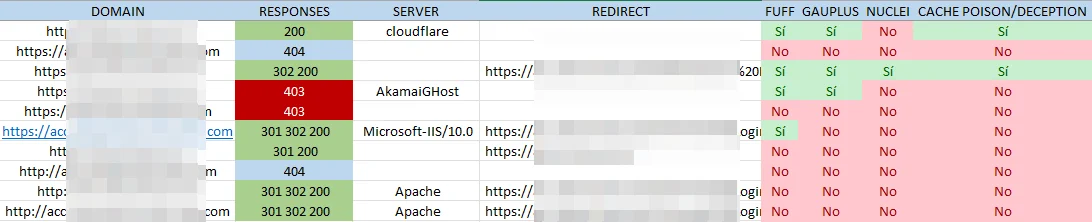
The researcher starts every program with an asset survey and then works through each asset against a checklist so that nothing is left unchecked.
For this asset, opening the domain in a browser and watching requests and responses produced nothing: the page did not load.
Fuzzing files and directories found no new resources either. Rather than discard the host, the researcher turned to gauplus, which returned some endpoints. One of them stood out: /api/crawler.do, which took a ?url parameter, apparently to load content from web sites.
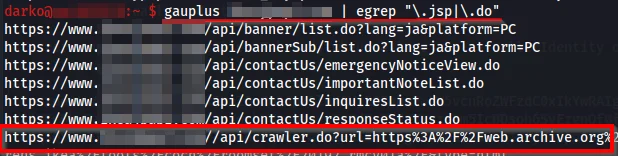
A parameter that names a URL and is consumed by the server is the classic SSRF shape, so it was worth a direct test.
Exploitation
Step 1: confirm the parameter is actually used
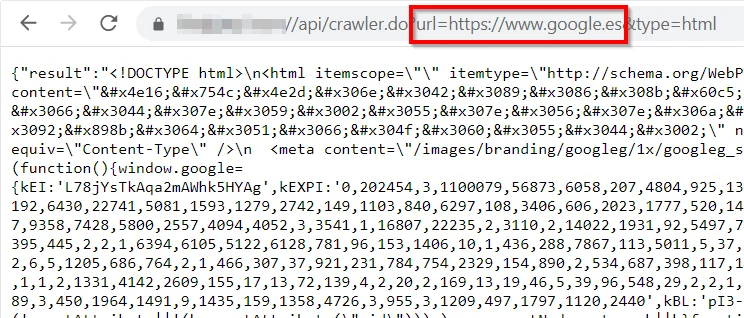
The first request set a well-known external site as the url value, to see whether the server would fetch it and return the content:
http[s]://www.google.com
It was accepted as the value and the content was loaded.
Step 2: prove out-of-band that the server makes the request
To be sure the fetch came from the server, the researcher started an interactsh server and used its address as the url value. After the request was launched, DNS and HTTP interactions arrived some seconds later from 52.xxx.xxx.xx.

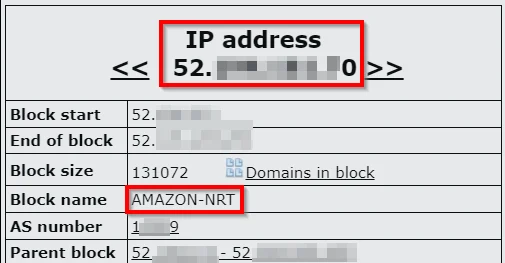
The source address, 52.xxx.xxx.xx, belongs to AMAZON, which placed the target domain on AWS.
Step 3: reach the instance metadata service
With the server confirmed as the requester and hosted on AWS, the next step was to see whether files or directories could be read from the server itself. The value used was the link-local metadata address:
htt[p]://[redacted]/latest/
Set as the url parameter, it returned content from the server.

Step 4: walk the metadata tree to credentials
Following directories under /latest/meta-data eventually reached AWS credentials at the path:
/latest/meta-data/identity-credentials/ec2/security-credentials/ec2-instance
The full request that returned them was:
The final URL also carried a second parameter, type=html. The credentials were retrieved and the finding was rewarded with a bounty.

Root cause
The endpoint takes a caller-supplied URL and fetches it server-side without restricting the destination. Because the server runs on AWS and can reach the link-local address [redacted], the same feature that loads public web pages also loads the instance metadata service, including the path that exposes the instance's role credentials. The write-up does not describe any allow-list, address filtering or metadata blocking, so the absence of egress restrictions is the likely reason nothing stopped the request.
Impact
A caller who can reach the endpoint can make the server issue requests to destinations of their choosing, including internal addresses. On this target that yielded AWS credentials for the instance. What those credentials allow is not described in the write-up; the impact depends on the permissions attached to the instance role.
Fix
The measure that addresses this class of bug is to constrain the fetch: allow only expected schemes and hosts, resolve the hostname and reject private, loopback and link-local ranges such as [redacted], and re-check after redirects. Where the platform supports it, requiring IMDSv2 also raises the bar for metadata access.
Variants to test
- Other parameters that take URLs. Look for names like url, uri, target, dest, callback, webhook, feed, image, proxy and fetch. A positive result is the server returning content you supplied or an out-of-band interaction from the server's address.
- Redirect-based bypasses. Point the parameter at a URL you control that redirects to [redacted] or an internal host. A positive result is the server following the redirect and returning internal content.
- Alternate encodings and address forms. Try decimal, octal or IPv6 representations of the metadata address, and DNS names that resolve to it. A positive result is the same metadata content coming back.
- Other cloud metadata paths. On AWS, walk /latest/meta-data/ as done here; on other providers, try their equivalent metadata endpoints. A positive result is credentials or instance information in the response.
- Non-HTTP schemes. Try file://, gopher:// and dict:// where the client library might support them. A positive result is local file content or protocol-level interaction.
- Hosts that look empty. As the write-up notes, a domain with no visible content can still hide endpoints; enumerate with tools like gauplus before discarding it.
What happened, in plain words
A security researcher was taking part in a bug bounty programme. A bug bounty programme is an arrangement where an organisation invites people outside the company to look for security weaknesses in its systems and pays a reward, called a bounty, for findings it accepts. The researcher was working on a bug bounty programme and testing its assets.
One of those domains, referred to here as REDACTED[.]COM, looked completely empty when opened in a browser. Most people would move on. The researcher did not. Using gauplus, they found some endpoints, including /api/crawler.do, which accepts a web address as input and, apparently, fetches that address on the server's behalf.
That kind of feature is dangerous. If a server will fetch any address a visitor gives it, the visitor can ask it to fetch addresses that are not on the public internet at all, including special internal addresses that only the server itself can reach. One of those internal addresses, on Amazon's cloud platform AWS, hands out the server's own access credentials. The researcher used the feature to reach that address, read the credentials, and was rewarded with a bounty.
This article walks through the same steps for someone who has never done security testing before. Every tool and term is explained as it appears.
Background: what the pieces are
Before the steps, a few ideas that come up throughout.
A domain and an asset. A domain is a name like example.com that points to a computer somewhere on the internet. In bug bounty work, each domain or subdomain you are allowed to test is called an asset. A programme may hand you dozens of assets, and part of the job is simply going through them methodically.
A server and a browser. Your browser is the program on your own computer that shows web pages. A server is the computer far away that stores the page and sends it to you. Normally the browser asks and the server answers. Some features flip this around: you give the server an address, and the server goes off and fetches it. That is what happened here.
An endpoint. An endpoint is a specific address on a server that does one particular job, as opposed to a normal page meant for people to read. Think of a restaurant: the dining room is the website you see, and the kitchen door where orders are handed in is the endpoint. Endpoints are often used by programs talking to programs rather than by people clicking links.
An API. API stands for application programming interface. It is a set of endpoints designed for software to call, rather than for a human to browse. When one program wants another to do something, it sends a request to an API endpoint and gets data back. The endpoint in this story, /api/crawler.do, sits under /api/, which is a strong hint that it is meant for software, not people.
A parameter. A parameter is a named value you attach to an address to tell the endpoint what you want. In a web address, parameters come after a question mark, written as name=value. If an endpoint is a form, parameters are the boxes you fill in. Here the endpoint takes a parameter called url, and the value you put in it is a web address.
SSRF. SSRF stands for server-side request forgery. It means tricking a server into making a request on your behalf, to a destination you choose. The everyday comparison: imagine a building where visitors are not allowed into the back offices, but there is a receptionist who will walk anywhere in the building and bring back whatever you ask for. If you can convince the receptionist to fetch things from the back offices, you have effectively got past the front door without ever going through it. The server is the receptionist, and the url parameter is how you give it instructions.
AWS and instance metadata. AWS (Amazon Web Services) is a cloud platform: instead of owning physical computers, companies rent virtual ones, called instances, that run inside Amazon's data centres. Every instance needs a way to know who it is and to get temporary access credentials so it can use other Amazon services. AWS provides this through a special internal address, [redacted], which only the instance itself can reach. It is called the instance metadata service. The comparison: it is like a staff locker room that only employees can enter, where each employee's badge and keys are kept. If you can persuade someone inside to walk to the locker room and read out what is in your locker, you get the keys without ever entering the building.
Credentials. Credentials are the username-and-password equivalent for software: strings that prove identity and grant access. In cloud environments they are often long random-looking tokens rather than passwords. Anyone holding them can act as the instance, within whatever permissions it has.
Out-of-band interaction. When you are testing whether a server made a request, you cannot always see the result directly. Out-of-band means you watch a separate channel instead: you give the server an address that you control, and you watch whether anything arrives at your side. If it does, the server really did make the request. The comparison: instead of asking someone whether they posted your letter, you put your own address on the envelope and wait to see if it comes back to you.
DNS and HTTP. DNS is the internet's address book: it turns a name like example.com into a numeric address. HTTP is the language browsers and servers use to exchange pages and data. When a server fetches a URL, it usually does both: first a DNS lookup to find the address, then an HTTP request to fetch the content. Watching for both tells you the fetch really happened.
Fuzzing. Fuzzing means trying many inputs automatically to see what the system does. When applied to files and directories, it means requesting lots of common names in the hope that one exists and is not linked from anywhere. It is like trying every key on a keyring on a door, quickly.
gauplus. gauplus is a command-line tool that collects known addresses for a domain from public sources, such as archived records of pages that once existed. It does not break in; it gathers what is already publicly recorded. It is useful precisely for domains that look empty, because old records may mention endpoints that are no longer linked.
interactsh. interactsh is a service that gives you a unique address you control and records any DNS lookups or HTTP requests that arrive at it. You put that address into the target, and if the target's server fetches it, interactsh shows you the incoming interaction, including the address the request came from.
Step 1: survey the assets and work through a checklist
The researcher begins every programme the same way: spend time mapping out which assets exist, then go through each one against a checklist so nothing is skipped.
The image shows the checklist the researcher uses when going through an asset, so that no check is forgotten.
Why this matters: bug bounty work rewards patience and routine more than cleverness. A checklist turns a vague task ("look at this website") into a series of concrete questions, and it stops you from declaring an asset finished just because the first few checks found nothing.
Step 2: open the asset in a browser
The researcher picked one asset, REDACTED[.]COM, and opened it in a browser to watch the requests and responses. Nothing loaded.
Why this matters: the browser is the simplest way to see what a site actually does. Opening the developer tools and watching the network traffic shows which addresses the page asks for. Here the page produced nothing at all, which is the first sign that the visible website is not where the interesting parts are.
Step 3: fuzz for files and directories, then switch to gauplus
Next the researcher tried fuzzing files and directories to discover resources that are not linked from the visible site. Nothing was found that way either.
Rather than discard the host, the researcher turned to gauplus, which returned some endpoints. One of them stood out: /api/crawler.do, which took a ?url parameter, apparently to load content from web sites.
Why this matters: a domain that shows nothing in a browser is not necessarily empty. It may still have endpoints that only software calls. gauplus looks through public records for addresses that have been seen on the domain before, which is exactly how a hidden endpoint surfaces when directory guessing fails. The name crawler suggests something that goes out and collects content, and the url parameter suggests you tell it where to go. A parameter that names a web address and is used by the server is the classic shape of SSRF, so it deserved a direct test.
Step 4: check that the parameter is really used
The first test set a well-known external site as the url value, to see whether the server would fetch it and return the content:
http[s]://www.google.com
Line by line:
http[s]://is the scheme, meaning the protocol used to fetch the page. The square brackets around thesare the write-up's shorthand for "eitherhttporhttps".www.google.comis the address being requested, a site everyone knows, chosen because its content is easy to recognise.
It was accepted as the value and the content was loaded.
Why this matters: before going further, you want to know the parameter does anything at all. Many parameters are ignored. If the server returns the content of a page you named, the server itself went and got it, and that is the precondition for SSRF.
Step 5: prove the request comes from the server
To be sure the fetch came from the server rather than from somewhere else, the researcher started an interactsh server and used its address as the url value. After the request was launched, DNS and HTTP interactions arrived some seconds later from 52.xxx.xxx.xx.
The image shows the DNS and HTTP interactions recorded by interactsh, arriving from the address 52.xxx.xxx.xx.
Why this matters: seeing a page come back is good evidence, but it does not by itself prove who fetched it. An interactsh address is one you control and that nobody else knows about. If a lookup and a request for it arrive, and they come from an address that is not yours, the target's server made them. The delay of a few seconds is normal: the server had to resolve the name and connect.
The source address, 52.xxx.xxx.xx, belongs to AMAZON, which placed the target domain on AWS.
Why this matters: knowing the server runs on AWS changes what you test next. AWS instances have that special internal metadata address, so if the server can be made to fetch arbitrary addresses, the metadata service becomes the obvious target.
Step 6: reach the instance metadata service
With the server confirmed as the requester and hosted on AWS, the next step was to see whether files or directories could be read from the server itself. The value used was the link-local metadata address:
htt[p]://[redacted]/latest/
Line by line:
htt[p]://is again shorthand, this time for eitherhttporhttps.[redacted]is the special internal address that AWS instances use for their metadata service. It is not reachable from the ordinary internet; only the instance itself can talk to it./latest/is the top of the metadata tree, the starting folder you list before going deeper.
Set as the url parameter, it returned content from the server.
Why this matters: this is the moment the bug becomes serious. The same feature that fetched a public page now fetches an address that is supposed to be private to the server. The comparison from earlier: the receptionist has walked into the staff locker room and is reading out what is there.
Step 7: walk the metadata tree to credentials
Following directories under /latest/meta-data eventually reached AWS credentials at the path:
/latest/meta-data/identity-credentials/ec2/security-credentials/ec2-instance
Line by line:
/latest/meta-datais the part of the metadata service that describes the instance./identity-credentials/ec2/security-credentials/ec2-instanceis the path that returns the credentials the instance uses to identify itself to other AWS services.
The full request that returned them was:
Line by line:
http[s]://REDACTED.COMis the target domain./api/crawler.dois the endpoint that does the fetching.?url=starts the parameters, and everything up to the next&is the value of url: the internal metadata address ending in the credentials path.&type=htmlis a second parameter present in the final URL.
The credentials were retrieved and the finding was rewarded with a bounty.
Why this matters: the metadata tree is just folders and files, so you explore it one level at a time, the same way you would browse a directory listing. The credentials are the payoff: they are the instance's keys, and the researcher was paid for finding that they could be read this way.
Why it worked
The endpoint takes a web address supplied by the caller and fetches it on the server side without restricting where it is allowed to go. Because the server runs on AWS and can reach [redacted], the same feature that loads public web pages also loads the instance metadata service, including the path that exposes the instance's role credentials. Nothing in the write-up describes an allow-list, address filtering or metadata blocking, so the absence of restrictions on where the server may connect is the likely reason nothing stopped the request.
What the impact is
Anyone who can reach the endpoint can make the server issue requests to destinations of their choosing, including internal addresses. On this target that produced AWS credentials for the instance. What those credentials allow is not described in the write-up; the real impact depends on the permissions attached to the instance's role.
How to fix it
The write-up does not say what was changed. The measure that addresses this class of bug is to constrain the fetch: allow only expected schemes and hosts, resolve the hostname and reject private, loopback and link-local ranges such as [redacted], and re-check after redirects. Where the platform supports it, requiring IMDSv2, a newer version of the metadata service that needs a session token, also raises the bar for metadata access.
Other things to try
- Other parameters that take URLs. Look for names like url, uri, target, dest, callback, webhook, feed, image, proxy and fetch. A positive result is the server returning content you supplied or an out-of-band interaction from the server's address.
- Redirect-based bypasses. Point the parameter at a URL you control that redirects to [redacted] or an internal host. A positive result is the server following the redirect and returning internal content.
- Alternate encodings and address forms. Try decimal, octal or IPv6 representations of the metadata address, and DNS names that resolve to it. A positive result is the same metadata content coming back.
- Other cloud metadata paths. On AWS, walk /latest/meta-data/ as done here; on other providers, try their equivalent metadata endpoints. A positive result is credentials or instance information in the response.
- Non-HTTP schemes. Try file://, gopher:// and dict:// where the client library might support them. A positive result is local file content or protocol-level interaction.
- Hosts that look empty. As the write-up notes, a domain with no visible content can still hide endpoints; enumerate with tools like gauplus before discarding it.
Glossary
- API: a set of endpoints designed for software to call, rather than for people to browse.
- Asset: a domain or subdomain that a bug bounty programme allows you to test.
- AWS: Amazon Web Services, a cloud platform where companies rent virtual computers.
- Bounty: a reward paid by an organisation for a security finding it accepts.
- Bug bounty programme: an arrangement where an organisation invites outside people to look for security weaknesses and pays for accepted findings.
- Credentials: strings that prove identity and grant access, the software equivalent of a username and password.
- DNS: the internet's address book, turning names into numeric addresses.
- Domain: a name like
example.comthat points to a computer on the internet. - Endpoint: a specific address on a server that performs one particular job.
- Fuzzing: trying many inputs automatically to see what a system does.
- gauplus: a command-line tool that collects known addresses for a domain from public sources such as archived records.
- HTTP: the language browsers and servers use to exchange pages and data.
- IMDSv2: a newer version of the AWS instance metadata service that requires a session token.
- Instance: a virtual computer rented on a cloud platform.
- Instance metadata service: a special internal service on a cloud instance, reached at [redacted] on AWS, that provides information and credentials to the instance itself.
- interactsh: a service that gives you an address you control and records any DNS lookups or HTTP requests that arrive at it.
- Link-local address: an address only reachable on the local network segment, not from the ordinary internet; [redacted] is one.
- Out-of-band interaction: evidence of a request seen on a separate channel you control, rather than in the direct response.
- Parameter: a named value attached to a web address after a question mark, written as
name=value. - Server: the remote computer that stores a site or service and answers requests.
- SSRF: server-side request forgery, tricking a server into making a request to a destination of your choosing.
- Token: a string used in place of a password to prove identity, often temporary.



