SSRF to local file disclosure

This blog is written about a bug (I believe), that was found on my last weekend. It located on a website from a private program X on Hackerone.
The full write-up lives on its author's site
It belongs to its author, so we link to it rather than copy it. The other two tabs are our own rewrites, checked against it.
Context
The target was a website belonging to a private program on HackerOne, which the author refers to as program X. The site exposes an API that lets a user submit a URL together with an email address. On the backend, a simulated browser opens the submitted URL and sends a screenshot of the result to that email address. The author notes that they had no insight into how this simulated browser was implemented, and was not sure whether it was a real browser or not.
The feature is therefore a server-side URL fetcher with a mail delivery channel. That makes it an obvious candidate for server-side request forgery, and the author says they are personally interested in SSRF.
Setup
No accounts, roles or tooling beyond the public API are described. The only external service used is requestb.in, a request bin, to observe what the backend sends. The precondition for the whole exercise is that the API accepts a URL and an email address and that the response (the screenshot) is delivered to an inbox the tester controls, which gives a feedback channel for every request.
Finding it
The first step was to confirm that the backend actually makes the request. The author submitted a requestb.in URL and inspected the incoming request. The received User-Agent was:
Mozilla/5.0 (X11; Linux x86_64) AppleWebKit/537.36 (KHTML, like Gecko) Chrome/60.0.3112.101 Safari/537.36
The incoming request carried a User-Agent claiming to be Chrome 60 on 64-bit Linux. Because the response comes back to the tester, the author decided there was room to explore further.
Exploitation
Step 1: internal addresses
The next attempt was a set of URLs aimed at the loopback interface and private address space:
http://localhosthttp://0http://127.0.0.1https://localhosthttp://localhost:8080http://[redacted]
The server accepted these URLs, opened them and sent the result to the inbox. However, the received responses were Err: timeout almost every time. So the fetcher would happily attempt internal destinations, but the author could not get useful content back from them.
A practical limit made itself felt here: the number of URLs that can be submitted is limited, so brute-forcing Boolean-based questions was not possible.
Step 2: local file schemes
The author then moved to local file access and tried these payloads as URLs:
file:///file:///etc/passwdfile:///c/chrome://aboutabout:addons
This time the server rejected them, stating that they were invalid URLs. At this point the author paused, out of ideas.
Step 3: a different scheme
After a rethink, the author went through the schemes already tried, http, file and chrome, and asked what other services might be accepted. The answer was ftp. The URL inserted was:
ftp://example.com
It worked. That raised the question of which keyword had been filtered on the server. The author replaced ftp with file, and that worked too.
The explanation is the number of slashes. The problem was ///: only a couple of / are needed, and if there are more than that, the server treats the value as an invalid URL. The author concluded the problem was ///: only a couple of / are needed. The author then tried with file://.
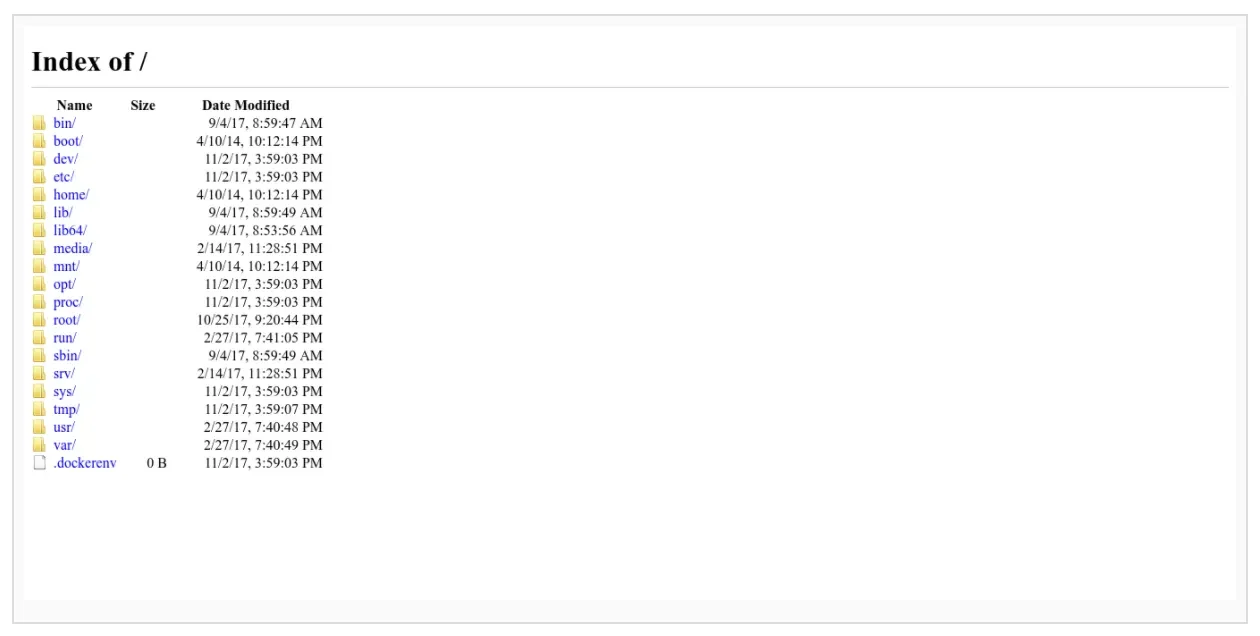
The response contained an Index of page, a directory listing. The author describes this as awesome.
Step 4: reading a known file
The next question was how to reach /etc/passwd. The URL used was:
file://s/etc/passwd
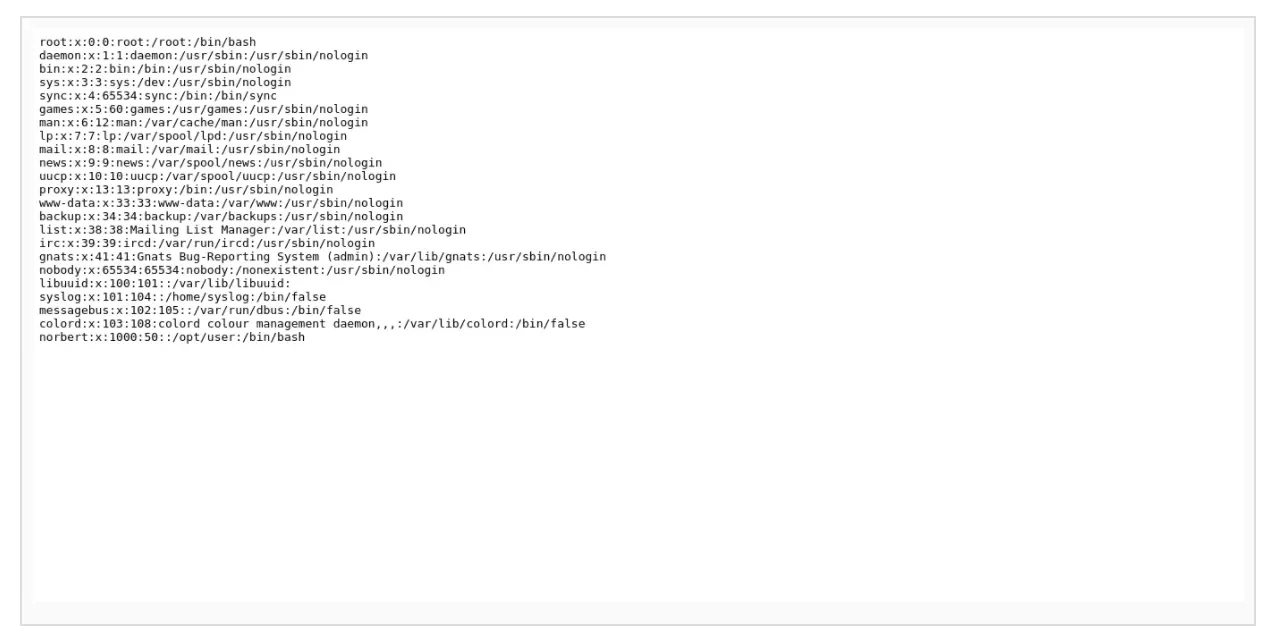
The file was returned in the response. That is the proof of concept.
Root cause
The backend passed file:// URLs to the fetcher and their contents were rendered and mailed back. The only obstacle was input validation on the URL string: values containing /// were rejected as invalid, which is why the initial file:/// attempts failed. The author then tried with file:// and it worked. The report does not describe the validation logic itself, so the exact rule that rejected /// is not stated.
Impact
A user of the API could make the backend read local files and receive their contents by email, as demonstrated with a directory listing and with /etc/passwd. The same feature could also be pointed at internal HTTP services, although in the author's tests those attempts returned Err: timeout almost every time. The practical reach of the file read depends on the privileges of the process running the simulated browser, which the report does not describe.
The report was submitted to the program. The author says they still do not really understand that decision but did not want to argue with the triagers.
Fix
Based on the behaviour observed, the fetcher should restrict accepted schemes to those the feature needs, typically HTTP and HTTPS, and should refuse file:// and other local schemes before the URL reaches the browser. Destination filtering for loopback and private ranges would address the internal-address attempts as well.
Variants to test
- Scheme allow-list bypass: submit
file://,ftp://,gopher://and similar values where the feature expects a web URL. A positive result is any response that contains content the fetcher could only have obtained through that scheme. - Slash-count validation: compare
file:///etc/passwdwithfile://s/etc/passwdand other slash variants. A positive result is one form being rejected as invalid while another returns file content, which shows the validation is string-based rather than scheme-based. - Internal HTTP targets: submit
http://[redacted],http://localhost:8080and private addresses. A positive result is a rendered page or banner from an internal service rather than a timeout. - Redirect to a local scheme: host a URL that redirects to
file://and submit the HTTP URL. A positive result is file content arriving through a URL that passed the initial check. - Response channel: if the screenshot is delivered by email, check whether error text, headers or partial page content leak into the message, since that turns blind SSRF into a readable one.
What happened, in plain words
A security researcher found a bug on a website that belongs to a private program on HackerOne, which they call program X. The website had a feature: you give it a web address (a URL) and your email address, and it takes a picture (a screenshot) of whatever is at that address and emails the picture to you. The researcher found that, after tweaking the address, the website would accept addresses pointing to files on its own server. By tweaking the address slightly, they could make the server read its own files and email the contents back. Those files can contain sensitive information. The researcher reported it, but the program said they already knew about it and closed the report as "Informative".
This article explains, step by step, how the researcher found the bug, in language that assumes no prior security knowledge. You only need to know how to use a browser and a computer.
Background: what the website did
The website had an API. An API (Application Programming Interface) is a way for one piece of software to talk to another. Think of it as a waiter in a restaurant: you tell the waiter what you want, the waiter goes to the kitchen, and brings back your order. Here, the API is the waiter: you send it a URL and an email address, and it goes to the kitchen (the server) to fetch a screenshot and email it to you.
The feature worked like this: you provide a URL and an email address. On the server, a "simulated browser" opens that URL and takes a screenshot. Then it sends the screenshot to your email. The researcher did not know exactly how this simulated browser was built, or whether it was a real browser or something else.
Because the server itself is making the request to whatever URL you give it, this is a classic setup for a vulnerability called Server-Side Request Forgery (SSRF). SSRF means an attacker can trick a server into making requests on their behalf. Imagine you ask a friend who works in a building to go to a specific room and bring you back what's inside. If your friend has access to rooms you don't, you can use them to get things you shouldn't have. That's SSRF.
The researcher is particularly interested in SSRF, so they decided to explore.
Step 1: Confirming the server makes the request
First, the researcher needed to check that the server actually goes out and fetches the URL. To do this, they used a service called requestb.in. A request bin is a simple web service that gives you a unique URL and records any request made to it. It's like a temporary mailbox that logs every letter it receives. You can then look at the log to see what was sent.
The researcher submitted a requestb.in URL to the website's API. Then they checked the request bin to see what request arrived. The request included a User-Agent header. A User-Agent is a piece of text that a browser (or any software making a web request) sends to identify itself, like a name badge. The User-Agent received was:
Mozilla/5.0 (X11; Linux x86_64) AppleWebKit/537.36 (KHTML, like Gecko) Chrome/60.0.3112.101 Safari/537.36
This tells us the request came from a client that claims to be Chrome 60 on a 64-bit Linux system. That confirms the server is making the request, not the user's browser. Because the screenshot is emailed back to the researcher, they have a way to see the result of each request. That feedback channel is important: it lets them try things and see what happens.
Step 2: Trying internal addresses
Now that the researcher knew the server would fetch URLs, they tried to make it access internal addresses. These are addresses that only make sense from inside the server's own network, like "localhost" (which means "this computer") or private IP addresses (like [redacted]) that are used in home and office networks. The idea is to see if the server can be tricked into talking to services that are not meant to be public.
The researcher submitted these URLs:
http://localhosthttp://0http://127.0.0.1https://localhosthttp://localhost:8080http://[redacted]
Let's break this down. The text is a jumble because the researcher probably entered each URL one after another without spaces. The URLs are:
http://localhosthttp://0http://[redacted]https://localhosthttp://localhost:8080http://[redacted]
Each of these points to a local or internal address. localhost and [redacted] both mean the same computer (the server itself). 0 is sometimes used as a shorthand for localhost. [redacted] is a common private address for home routers. Port 8080 is a common alternative web port.
The server accepted these URLs and opened them, but the received responses were Err: timeout almost every time. But almost every time, the response was Err: timeout. A timeout means the server tried to connect but gave up after waiting too long. So the server would attempt to reach internal addresses, but the researcher couldn't get useful content back from them.
There was also a practical limit: the API only allowed a limited number of URLs to be submitted. That meant the researcher couldn't do brute-force testing. Brute-force means trying many possibilities systematically, like trying every combination of a lock. With a limited number of tries, that's not possible.
Step 3: Trying to read local files
Next, the researcher tried to make the server read files on its own filesystem. They used URLs with the file:// scheme. A scheme is the first part of a URL that tells the software how to handle it. You're probably familiar with http:// and https:// for web pages. file:// is used to access files on a local computer. For example, file:///etc/passwd would refer to the file /etc/passwd on a Unix-like system.
The researcher submitted these payloads as URLs:
file:///file:///etc/passwdfile:///c/chrome://aboutabout:addons
Again, this is a concatenation of several attempts:
file:///file:///etc/passwdfile:///c/chrome://aboutabout:addons
/etc/passwd is a file on Linux systems that lists user accounts. chrome://about and about:addons are internal browser pages. The researcher was trying different schemes to see what the server would accept.
This time, the server rejected them, saying they were invalid URLs. The researcher was stuck. They paused, out of ideas.
Step 4: A fresh idea
That night, after a cup of Asahi beer, the researcher brainstormed again. They asked themselves: "Is there anything else that I forgot?" They had tried http, file, and chrome. What about other services? How about ftp? FTP (File Transfer Protocol) is an older way to transfer files over the internet.
They inserted this URL:
ftp://example.com
It worked. It worked. The researcher then wondered which keyword had been filtered on the server. They replaced ftp with file, and that worked too. How?
The author concluded the problem was ///: only a couple of / are needed. If there are more than that, the server thinks the URL is invalid. So the earlier file:/// payloads were rejected not because of the file scheme but because of the extra slash. The researcher then tried with file:// (two slashes).
The response contained an Index of page. That's a directory listing, like when you open a folder on your computer and see the files inside. The researcher describes this as awesome.
Step 5: Reading a specific file
The next question was how to reach /etc/passwd. The URL used was:
file://s/etc/passwd
The file was returned in the response. That is the proof of concept. A proof of concept (PoC) is a demonstration that the vulnerability is real and can be exploited.
Why did this happen?
The backend passed file:// URLs to the fetcher and their contents were rendered and emailed back. So file:// URLs are passed to the fetcher, and their contents are rendered and emailed back. The only obstacle was input validation on the URL string: values containing /// were rejected as invalid. That's why the initial file:/// attempts failed. The author then tried with file:// and it worked. The report does not describe the validation logic itself, so the exact rule that rejected /// is not stated.
What was the impact?
A user of the API could make the backend read local files and receive their contents by email, as demonstrated with a directory listing and with /etc/passwd. The same feature could also be pointed at internal HTTP services, although in the researcher's tests those attempts returned Err: timeout almost every time. The practical reach of the file read depends on the privileges of the process running the simulated browser, which the report does not describe.
The report was submitted to the program. The researcher says they still do not really understand that decision but did not want to argue with the triagers.
How to fix it
Based on the behaviour observed, the fetcher should restrict accepted schemes to those the feature needs, typically HTTP and HTTPS, and should refuse file:// and other local schemes before the URL reaches the browser. Destination filtering for loopback and private ranges would address the internal-address attempts as well.
Variants to test
If you want to look for similar bugs, here are some variations to try:
- Scheme allow-list bypass: submit
file://,ftp://,gopher://and similar values where the feature expects a web URL. A positive result is any response that contains content the fetcher could only have obtained through that scheme. - Slash-count validation: compare
file:///etc/passwdwithfile://s/etc/passwdand other slash variants. A positive result is one form being rejected as invalid while another returns file content, which shows the validation is string-based rather than scheme-based. - Internal HTTP targets: submit
http://[redacted],http://localhost:8080and private addresses. A positive result is a rendered page or banner from an internal service rather than a timeout. - Redirect to a local scheme: host a URL that redirects to
file://and submit the HTTP URL. A positive result is file content arriving through a URL that passed the initial check. - Response channel: if the screenshot is delivered by email, check whether error text, headers or partial page content leak into the message, since that turns blind SSRF into a readable one.
Glossary
- API: Application Programming Interface; a way for software to interact with other software, like a waiter taking your order.
- SSRF: Server-Side Request Forgery; a vulnerability where an attacker can make a server perform requests on their behalf.
- URL: Uniform Resource Locator; the address of a resource on the internet, like
http://example.com. - Scheme: The first part of a URL that specifies the protocol, like
http://orfile://. - User-Agent: A header sent by a client to identify itself, like a name badge.
- Request bin: A service that logs incoming requests, useful for observing what a server sends.
- Localhost: The name for the computer itself, usually
[redacted]. - Private IP address: An IP address used within a private network, not routable on the public internet.
- Timeout: An error when a connection attempt takes too long and is abandoned.
- Brute-force: Trying many possibilities systematically.
- Payload: The part of an attack that carries the malicious data.
- FTP: File Transfer Protocol; a standard for transferring files over a network.
- Directory listing: A web page that shows the files in a directory, like a folder view.
- Proof of concept (PoC): A demonstration that a vulnerability exists and can be exploited.
- Informative: A status given to a bug report that the program considers not actionable or already known.
- Triager: A person who reviews and categorises bug reports.
- Allow-list: A list of allowed items; only those are permitted.
- Loopback: The internal interface of a computer that points back to itself.
- Redirect: A response that tells the client to go to a different URL.
- Blind SSRF: SSRF where the attacker cannot see the response, only infer it.



