From Unrestricted File Upload to Remote Code Execution: A Responsible Disclosure Case Study
An unauthenticated file upload endpoint accepted ASP.NET executable file types and stored them in a publicly accessible web directory where the server executed them. An attacker could upload malicious ASP.NET code and achieve remote code execution on the production server.
 Published on medium.com
Cyber Security Awareness
The full write-up lives on its author's site
It belongs to its author, so we link to it rather than copy it. The other two tabs are our own rewrites, checked against it.
Context
File-upload functionality is a deceptively important security boundary. At first glance an upload endpoint looks like a simple operation: receive a file, store it, return a reference to the uploaded object. Whether that workflow stays safe depends on several controls: who is permitted to upload, which file types are accepted, whether validation covers both the filename and the actual content, where uploaded files are stored, whether those objects are directly reachable from the Internet, and whether the web server can interpret any of them as executable content.
During security research in June 2026 the author, Godwin Akinyomi (publicly known as Paul Haykeens), found an unauthenticated file-upload endpoint on a production ASP.NET application that failed across several of these boundaries. The endpoint accepted ASP.NET executable file types and stored uploaded files inside a publicly accessible web directory, and the server processed the uploaded ASP.NET content. The resulting primitive was straightforward: an unauthenticated remote user could upload attacker-controlled ASP.NET code and cause the production web server to execute it.
The application and organisation are not named in the write-up, and the request path and host are redacted.
Setup
No accounts, roles or tooling are described. The key precondition is the opposite of an account: the upload endpoint was reachable without authentication. The endpoint accepted multipart/form-data requests containing user-supplied files. The application is described as an ASP.NET deployment on IIS, where certain extensions may be mapped to server-side handlers.
Finding it
Unauthenticated file upload is not inherently vulnerable. Applications may intentionally let unauthenticated users submit documents, images or attachments as part of a legitimate business workflow. The security question is therefore not simply whether an unauthenticated user can upload a file, but what security boundaries exist between attacker-controlled content and the server environment.
The researcher began by testing those boundaries. Using benign test files, the upload functionality was found to accept multiple file types, including:
.txt.html.svg.doc.aspx.ashx.asmx.svc.cshtml
The ASP.NET-related extensions were the significant part. On an IIS/ASP.NET deployment, certain extensions may be mapped to server-side handlers, so if attacker-controlled content reaches a directory where those handlers remain active, the server may interpret the uploaded content as application code rather than static data.
Accepting an .aspx filename alone does not establish remote code execution, because several other controls could still prevent exploitation. The application could store uploads outside the web root, rewrite dangerous extensions, serve files through a controlled download handler, disable ASP.NET execution inside the upload directory, store content in isolated object storage, or otherwise keep the uploaded object out of an executable context. The next step was therefore to determine what happened to the file after upload.
Exploitation
Step 1: Identify the unauthenticated upload endpoint
The endpoint was accessible without authentication and accepted multipart/form-data requests. Conceptually the functionality looked like this:
The request targets an upload path (redacted) on a redacted host over HTTP/2 and declares a multipart body with a boundary.
Step 2: Map the accepted extensions
Benign test files were submitted to see which extensions the backend would accept. The accepted set included .txt, .html, .svg, .doc, .aspx, .ashx, .asmx, .svc, .cshtml. The ASP.NET handler extensions are the ones that matter for code execution; .html and .svg matter for a separate class of risk discussed below.
Step 3: Check where the file lands
After accepting an uploaded file, the application generated a filename and stored the resulting object beneath a publicly accessible uploads directory. That established the following chain:
Unauthenticated User │ ▼Attacker-Controlled File │ ▼Dangerous Extension Accepted │ ▼File Stored Beneath Web Root │ ▼Uploaded Object Publicly Accessible
At this point the issue was a serious unrestricted file-upload condition. One critical question remained: would the web server serve the uploaded ASP.NET file as static content, or execute it? That distinction decided whether the vulnerability stopped at arbitrary file hosting or crossed into remote code execution.
Step 4: Validate execution with a minimal proof
When testing a potential RCE against production, establishing a clear stopping condition matters. The objective was not to find everything possible after compromising the application, but to answer one question: can attacker-controlled ASP.NET code execute server-side?
A minimal ASP.NET proof was used. It performed only two observable actions: it returned a unique marker, and it displayed the current ASP.NET process identity. It provided no command execution functionality and no interactive access. No web shell was deployed, no reverse connection was initiated, no files were enumerated, no application configuration was accessed, no credentials or secrets were retrieved, no persistence was established, and no customer or business information was accessed.
The proof was uploaded through the affected functionality and then requested from its resulting public location. The response contained the expected marker and process identity, which meant the uploaded ASP.NET content had executed server-side. That result was sufficient to confirm the vulnerability, and testing stopped there.
Evidence of server-side execution
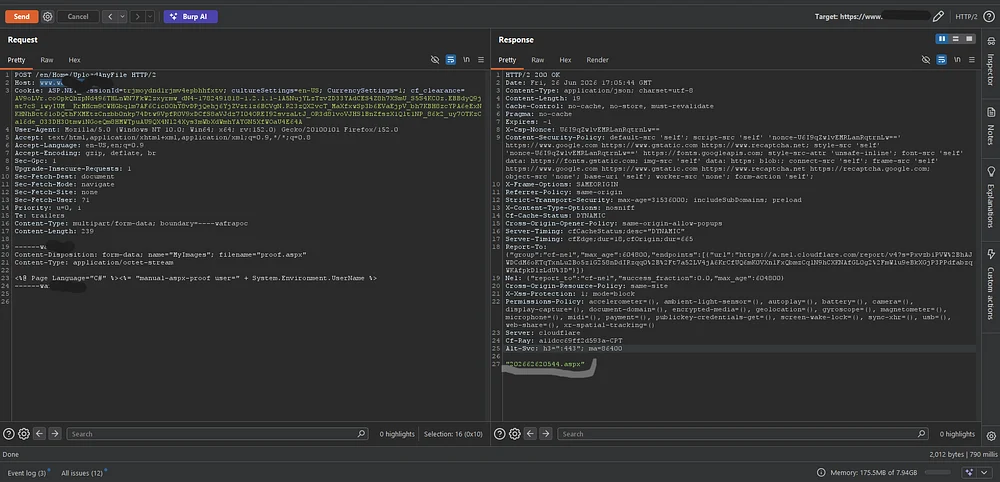
The first screenshot shows the unauthenticated upload functionality accepting an ASP.NET file and returning a server-generated reference to the uploaded object. Sensitive and unnecessary information is redacted.
The uploaded proof was then requested from its public location.
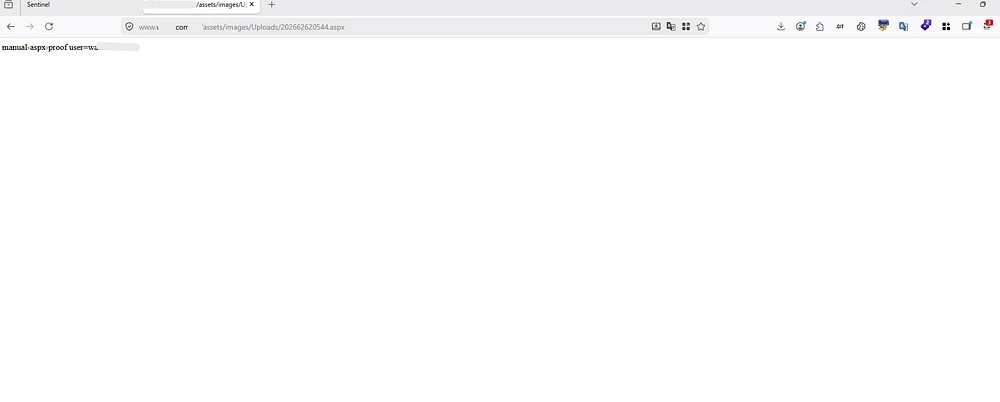
The second screenshot shows the safe validation of server-side ASP.NET execution: the proof returned only the controlled marker and the application process identity.
Together these observations established the complete execution chain:
Internet │ ▼Unauthenticated Upload │ ▼ASP.NET Content Accepted │ ▼Public Web Directory │ ▼Uploaded Resource Requested │ ▼ASP.NET Handler Invoked │ ▼Attacker-Supplied Code Executes
This transformed the finding from an unrestricted file upload into unauthenticated remote code execution.
Step 5: Note other active content types
During limited validation the endpoint also accepted other potentially active content types, including HTML and SVG. HTML content could be hosted beneath the application's trusted domain, which could introduce a separate class of risk involving trusted-origin content hosting, phishing or other content-injection scenarios, depending on browser behaviour and application configuration. Those possibilities were not pursued further, because once unauthenticated server-side execution was confirmed, additional exploitation was unnecessary.
Root cause
It is tempting to describe the root cause as simply "the application allowed .aspx uploads", but that explanation is incomplete. The vulnerability became RCE because several security controls failed at the same time:
Unauthenticated Upload +Insufficient File-Type Restrictions +Dangerous Extensions Accepted +Web-Accessible Storage +ASP.NET Execution Enabled =Unauthenticated RCE
The backend did not adequately restrict dangerous server-side file types, the uploaded object was placed in a location reachable through the production web application, and, most importantly, the server continued to process ASP.NET content within the upload location. That last condition is what converted arbitrary file upload into server-side execution. The trust boundary collapsed to:
UNTRUSTED INTERNET │ ▼ File Upload │ ▼ Web Root │ ▼ ASP.NET Runtime │ ▼Application Process
Secure file-upload architecture should use defence in depth, so that a failure in one control does not immediately result in server compromise. Even if extension validation were bypassed, storing uploads outside the executable web root could prevent execution; even if files had to remain web-accessible, disabling script execution inside the upload directory could break the chain. In this case those boundaries aligned in the attacker's favour. The write-up does not describe the application code or configuration, so the precise implementation mistake is not stated.
Impact
The vulnerable functionality was reachable without an authenticated account, which substantially lowered the barrier to exploitation. An unauthenticated remote user could upload attacker-controlled ASP.NET code and have the production web server execute it, running in the context of the application process.
A malicious actor who discovered the same primitive would not necessarily limit themselves to a harmless process-identity proof. Depending on the privileges and environment available to the application process, successful exploitation could potentially provide a starting point for accessing application configuration, secrets or data available to that identity, modifying application content, establishing persistence, or attempting further compromise of reachable infrastructure. These are potential post-exploitation consequences and were not tested; there was no need to pursue them because arbitrary server-side execution had already been established.
The separately accepted HTML and SVG content could, depending on browser behaviour and configuration, allow content to be hosted under the application's trusted origin, with risks around trusted-origin hosting, phishing or content injection. That avenue was not explored.
Fix
The original attack path was no longer reproducible after disclosure. The researcher returned to the original attack path to check whether the vulnerable behaviour remained reproducible, and it did not: within approximately 24 hours of the report, the original execution path had been remediated.
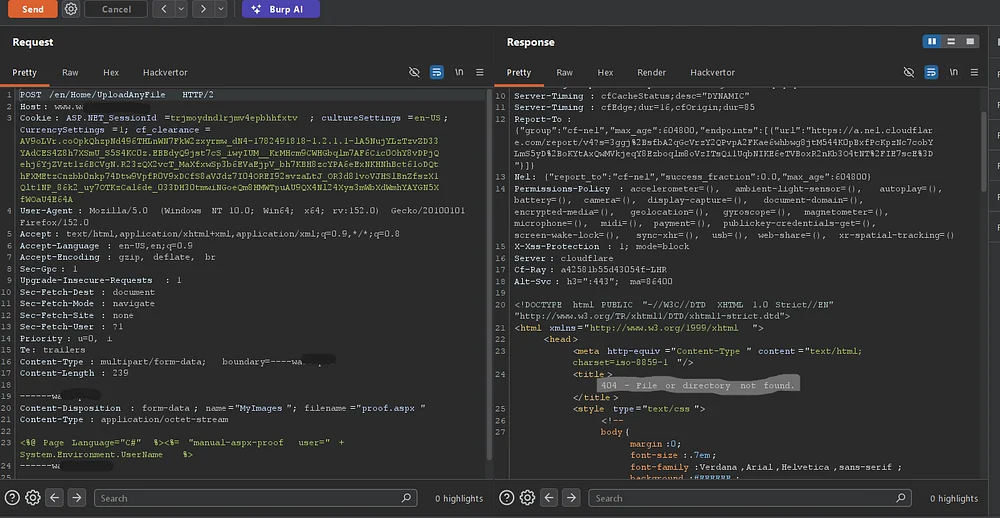
Subsequent validation showed the originally demonstrated attack path was no longer reproducible; the author guessed from a 404 that the path had been removed. No technical details of the remediation were shared with the researcher, so which defensive control changed is not known; the 404 on the path is the only observable evidence.
A failed original PoC shows that the reported path has changed, but it does not by itself establish how comprehensively the underlying vulnerability class has been addressed. For a vulnerability capable of unauthenticated server-side execution, shrinking the exposure window quickly matters more than leaving the issue open while administrative processes run.
The write-up also sets out how this class of vulnerability should be remediated. The guiding principle is that user-controlled uploads should never become executable application content, and remediation should address multiple layers rather than relying on extension filtering alone:
- Use a strict allowlist: accept only the formats the business workflow requires, so executable ASP.NET extensions never reach storage.
- Validate actual file content server-side, not filenames, extensions or client-provided MIME types.
- Store uploads outside the web root, in non-executable storage rather than alongside application resources.
- Disable script execution: if files must sit beneath a web-accessible path, explicitly prevent ASP.NET and other executable handlers from processing content there.
- Generate safe server-side filenames and object identifiers rather than trusting attacker-controlled names, and do not preserve dangerous executable extensions.
- Isolate user content, for example in dedicated object storage or a separate origin without access to the primary application's authentication context.
- Apply authentication and authorisation where uploads belong to authenticated business workflows, verifying that the requester is permitted to perform the operation.
- Add abuse controls: file-size limits, rate limiting, malware scanning, logging, monitoring and alerting.
No single control should be responsible for preventing RCE.
Variants to test
- Other handler extensions on IIS/ASP.NET. Submit
.ashx,.asmx,.svc,.cshtml,.configand similar files where the endpoint accepts them, then request the stored object. A positive result is a response containing your marker or process identity rather than the file served as static text. - Double extensions and trailing characters. Try names such as
x.aspx.jpg,x.aspx;.jpg,x.aspx%00.jpgand trailing dots or spaces. A positive result is the stored object being handled by the ASP.NET handler despite the apparent safe extension. - Content-type and magic-byte mismatches. Send an ASP.NET payload with an image MIME type and image magic bytes prepended. A positive result is acceptance plus execution when the object is requested.
- Storage location probing. After a benign upload, request the returned reference and vary the path to see whether the object sits under the web root and whether the directory executes handlers. A positive result is a publicly reachable object in an executable directory.
- HTML and SVG hosting. Upload HTML and SVG and load them from the application origin. A positive result is active content rendered under the trusted domain, which is worth reporting separately as a content-hosting or injection risk.
- Filename handling. Upload files with path traversal sequences or unusual names to see whether the server-generated name is truly independent of attacker input. A positive result is a stored path you influence outside the intended upload directory.
- Authorisation on related endpoints. Look for authenticated upload endpoints that skip the permission check, or unauthenticated variants of the same handler under different paths. A positive result is an upload succeeding without the expected session or role.
What happened, in plain words
A security researcher found a page on a company's website where anyone, without logging in, could upload a file. That alone is not always a bug: many sites let visitors send in a document or a photo on purpose. The problem was what happened to the file afterwards. The site accepted file types that a web server can run as a program, put the uploaded file in a folder that anyone on the internet could reach, and then actually ran the file when it was requested. So a stranger could send in a small program and make the company's own server execute it. That is called remote code execution, or RCE.
The researcher proved this with the smallest possible test: a tiny file that only printed a marker and the identity of the account the server runs under. He did not open a shell, did not read data, did not install anything. He reported the issue on 26 June 2026, and about 24 hours later the same path returned a 404, meaning it was gone.
This article walks through the same story for someone who has never done security work. Every technical word is explained the first time it appears, and every request and diagram from the case is shown exactly as it was published, with a plain-language explanation underneath.
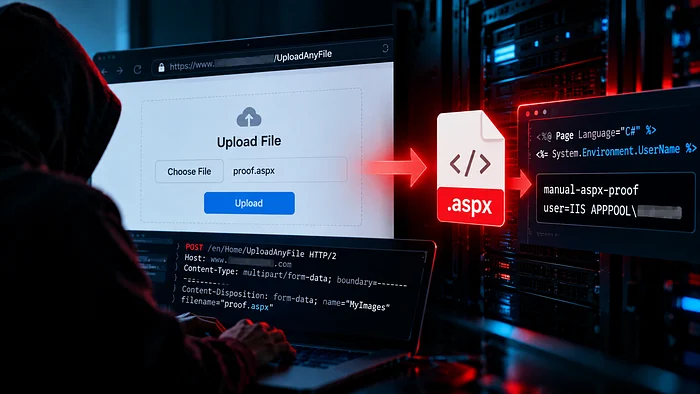
The idea you need first: an upload endpoint
When you pick a file in a web form and press "Send", your browser does not email the file. It builds a special kind of HTTP request and posts it to a URL on the server. That URL is often called an endpoint: a specific address on a server that accepts a particular kind of request and does something with it. Think of a restaurant: the building is the website, and each endpoint is a different counter, one for orders, one for complaints, one for deliveries. An upload endpoint is the deliveries counter.
The request format used for file uploads is called multipart/form-data. A normal web request carries one small bundle of text (the form fields). A multipart request can carry several parts in one envelope, each with its own label, and one of those parts is the file itself. The parts are separated by a short random string called a boundary, so the server knows where one part ends and the next begins. It is like a shipping box with dividers: the boundary is the cardboard between compartments.
A web server is the program that answers these requests. This one was described as an ASP.NET application running on IIS. ASP.NET is Microsoft's framework for building web applications; IIS is Microsoft's web server, the program that listens for requests on Windows. The important detail is that IIS can be configured to treat certain file extensions not as text to hand back, but as programs to run.
Why file uploads are a security boundary
A security boundary is a line that untrusted input should not cross. A comment box is a boundary: text goes in, text comes out, and the server never treats it as instructions. An upload form is a much wider boundary, because a file can be almost anything, and the server has to decide what to do with it.
At first glance an upload endpoint looks trivial: receive a file, store it, return a reference to the stored object. A reference here means a URL or identifier the site gives back so the file can be found later. But whether that simple workflow stays safe depends on several separate controls. A control is a safeguard, one check that is supposed to stop bad things:
- Who is permitted to upload files? (Is a login required?)
- Which file types are accepted?
- Is validation performed on both the filename and the actual file content? Validation means checking input against rules before trusting it.
- Where are uploaded files stored?
- Are uploaded objects directly accessible from the internet?
- Can the web server interpret any of those objects as executable content?
Each of those is a lock on a different door. The case below is the story of several locks being open at once.
During research in June 2026, the author, Godwin Akinyomi, publicly known as Paul Haykeens, found an upload endpoint on a production ASP.NET application that failed across several of these boundaries. Production means the real, live system that real users use, not a test copy. The endpoint accepted ASP.NET executable file types and stored uploaded files inside a publicly accessible web directory, and the server processed the uploaded ASP.NET content. The result was simple to state: an unauthenticated remote user could upload attacker-controlled ASP.NET code and make the production web server run it. Unauthenticated means without logging in; remote means from anywhere on the internet.
The application and organisation are not named in the write-up, and the request path and host are redacted. Redacted means deliberately blanked out before publication, usually to avoid pointing strangers at a live system.
Setup: what was needed to start
No accounts, roles or tools are described. The key precondition is the opposite of an account: the upload endpoint was reachable without authentication. That is the whole starting position. You do not need special software to send a request; a browser does it every time you submit a form, and the researcher's requests are shown below in plain text so you can see exactly what was sent.
The endpoint accepted multipart/form-data requests containing user-supplied files. The application is described as an ASP.NET deployment on IIS, where certain extensions may be mapped to server-side handlers. A handler is the piece of the web server that knows how to process a particular kind of file. For a .jpg, the handler just sends the bytes back. For an .aspx file, the handler is the ASP.NET engine, which reads the file as a program and runs it. That mapping is the hinge on which this whole case turns.
Finding it
Unauthenticated file upload is not inherently vulnerable. Inherently means by its nature, always. Applications may intentionally let unauthenticated users submit documents, images or attachments as part of a legitimate business workflow, for example a contact form with a CV attached, or a public bug-report form with a screenshot. The security question is therefore not simply whether an unauthenticated user can upload a file, but what security boundaries exist between attacker-controlled content and the server environment. Attacker-controlled means the attacker decides the bytes; server environment means the machine, its files and its permissions.
The researcher began by testing those boundaries. Using benign test files, the upload functionality was found to accept multiple file types, including:
.txt.html.svg.doc.aspx.ashx.asmx.svc.cshtml
This is a list of file extensions, the part of a filename after the last dot. Line by line, in plain words:
.txtis a plain text file. Harmless..htmlis a web page. A browser renders it, and it can contain scripts..svgis a vector image format. It is written in a markup language and can also contain scripts, which surprises many people..docis a word-processor document..aspxis an ASP.NET page: a file the ASP.NET engine treats as a program..ashxis an ASP.NET generic handler, another kind of server-side program file..asmxis an ASP.NET web service file..svcis a Windows Communication Foundation service file, another server-side program type..cshtmlis an ASP.NET Razor view, a template the server processes.
The ASP.NET-related extensions were the significant part. On an IIS/ASP.NET deployment, certain extensions may be mapped to server-side handlers, so if attacker-controlled content reaches a directory where those handlers remain active, the server may interpret the uploaded content as application code rather than static data. Static data means bytes sent back unchanged, like a photo; application code means instructions the server obeys.
Accepting an .aspx filename alone does not establish remote code execution, because several other controls could still prevent exploitation. The application could store uploads outside the web root, rewrite dangerous extensions, serve files through a controlled download handler, disable ASP.NET execution inside the upload directory, store content in isolated object storage, or otherwise keep the uploaded object out of an executable context. The web root is the folder the web server is allowed to serve from; anything outside it is not directly reachable by a browser. Object storage is a separate file service, like a bucket, that does not run code. The next step was therefore to determine what happened to the file after upload. That is the difference between a locked door and an open one: the extension list tells you the door exists, not whether it opens.
Exploitation
Step 1: Identify the unauthenticated upload endpoint
The endpoint was accessible without authentication and accepted multipart/form-data requests. Conceptually the functionality looked like this:
This is an HTTP request, the same kind of message your browser sends when you submit a form. Line by line:
POSTis the method, the verb of the request.GETasks for something;POSTsends something. Here it sends a file./[REDACTED]/UploadAnyFileis the path, the address on the server. The first part is redacted; the last part is the endpoint's name,UploadAnyFile, which reflects the behaviour observed: no meaningful restriction on the file being submitted.HTTP/2is the version of the protocol used to talk to the server. HTTP is the language browsers and servers use to exchange requests and responses; version 2 is a newer, more efficient version of it.Host: [REDACTED]names the website the request is for. One server can host many sites, so the request says which one it wants. The host is redacted here.Content-Type: multipart/form-data; boundary=...hhhhhhttells the server the body is a multipart envelope and gives the boundary string that separates the parts. The boundary is a short random-looking marker; the server uses it to split the body into pieces.
The request targets an upload path (redacted) on a redacted host over HTTP/2 and declares a multipart body with a boundary. The last part is the endpoint's name, UploadAnyFile. The researcher did not need an account to send it. A cookie is a small piece of data a site stores in your browser to remember who you are; a token is a similar credential, often sent in a header. Neither was required here, which is exactly the point.
Step 2: Map the accepted extensions
Benign test files were submitted to see which extensions the backend would accept. Benign means harmless: files that do nothing if run. The accepted set included .txt, .html, .svg, .doc, .aspx, .ashx, .asmx, .svc, .cshtml. The ASP.NET handler extensions are the ones that matter for code execution; .html and .svg matter for a separate class of risk discussed below.
Why start with harmless files? Because the first question is not "can I run code" but "what does this endpoint allow at all". Sending a text file and seeing it accepted tells you the door is open without yet telling you what walks through it. It is the difference between checking which keys fit a lock and actually turning one.
Step 3: Check where the file lands
After accepting an uploaded file, the application generated a filename and stored the resulting object beneath a publicly accessible uploads directory. Publicly accessible means anyone on the internet can fetch it with a browser, no login needed. That established the following chain:
Unauthenticated User │ ▼Attacker-Controlled File │ ▼Dangerous Extension Accepted │ ▼File Stored Beneath Web Root │ ▼Uploaded Object Publicly Accessible
Read the diagram from top to bottom, each arrow meaning "leads to":
- An unauthenticated user, someone with no account, starts the chain.
- They send a file whose contents they control.
- The server accepts a dangerous extension, one that maps to a program handler.
- The file is stored beneath the web root, the folder the web server serves from.
- The stored object is publicly accessible, so anyone can request it by URL.
At this point the issue was a serious unrestricted file-upload condition. Unrestricted means the server does not meaningfully limit what can be uploaded. One critical question remained: would the web server serve the uploaded ASP.NET file as static content, or execute it? That distinction decided whether the vulnerability stopped at arbitrary file hosting or crossed into remote code execution. Arbitrary file hosting means the attacker can put any file on the site, which is bad but limited; remote code execution means the attacker's instructions run on the server, which is far worse. The next step answers that question.
Step 4: Validate execution with a minimal proof
When testing a potential RCE against production, establishing a clear stopping condition matters. A stopping condition is a rule you set in advance for when you will stop, so that curiosity does not turn into damage. The objective was not to find everything possible after compromising the application, but to answer one question: can attacker-controlled ASP.NET code execute server-side? Server-side means on the server, as opposed to in the browser.
A minimal ASP.NET proof was used. A proof of concept, or PoC, is a small demonstration that shows a flaw is real without doing harm. This one performed only two observable actions: it returned a unique marker, and it displayed the current ASP.NET process identity. A marker is a random string the researcher chooses, so that when it appears in a response there is no doubt the uploaded file produced it. Process identity is the account the server program runs as, for example a low-privilege service account; it tells you what permissions the code inherits.
It provided no command execution functionality and no interactive access. No web shell was deployed, no reverse connection was initiated, no files were enumerated, no application configuration was accessed, no credentials or secrets were retrieved, no persistence was established, and no customer or business information was accessed. A few of those terms, because they come up constantly in security writing:
- A web shell is a small program uploaded to a server that lets an attacker type commands into it through a browser. It is the classic next step after an upload bug.
- A reverse connection is the server calling back out to the attacker's machine, giving the attacker a live session.
- Enumerating files means listing what is on disk.
- Credentials or secrets are passwords, API keys and similar strings that unlock other systems.
- Persistence means arranging to still have access after a reboot or a cleanup.
None of that was done. The proof was uploaded through the affected functionality and then requested from its resulting public location. The response contained the expected marker and process identity, which meant the uploaded ASP.NET content had executed server-side. That result was sufficient to confirm the vulnerability, and testing stopped there. The reasoning is worth spelling out: once you know the server runs your code, every further action only adds risk to the company and to its users, and adds nothing to the proof.
Evidence of server-side execution
The first screenshot shows the unauthenticated upload functionality accepting an ASP.NET file and returning a server-generated reference to the uploaded object. Sensitive and unnecessary information is redacted.
The uploaded proof was then requested from its public location.
The second screenshot shows the safe validation of server-side ASP.NET execution: the proof returned only the controlled marker and the application process identity.
Together these observations established the complete execution chain:
Internet │ ▼Unauthenticated Upload │ ▼ASP.NET Content Accepted │ ▼Public Web Directory │ ▼Uploaded Resource Requested │ ▼ASP.NET Handler Invoked │ ▼Attacker-Supplied Code Executes
Again, top to bottom, each arrow meaning "leads to":
- The internet, meaning anyone, anywhere.
- An upload with no login.
- ASP.NET content accepted, meaning the server takes a file it will later treat as a program.
- A public web directory, a folder reachable by URL.
- The uploaded resource requested, meaning someone fetches that URL, which is the trigger.
- The ASP.NET handler invoked, meaning the server's program-running component picks up the file.
- Attacker-supplied code executes, meaning the instructions in the file run on the server.
This transformed the finding from an unrestricted file upload into unauthenticated remote code execution. The key insight is that the last two steps are what turn a storage problem into an execution problem. A file sitting in a folder is inert; a file being run is not.
Step 5: Note other active content types
During limited validation the endpoint also accepted other potentially active content types, including HTML and SVG. Active content means content that can do something when viewed, such as run a script, rather than just display. HTML content could be hosted beneath the application's trusted domain, which could introduce a separate class of risk involving trusted-origin content hosting, phishing or other content-injection scenarios, depending on browser behaviour and application configuration. Origin is the combination of scheme, host and port that browsers use to decide what a page is allowed to touch; content on the application's own origin is trusted by the browser in ways content on another site is not. Phishing is tricking a person into trusting a page that looks legitimate. Those possibilities were not pursued further, because once unauthenticated server-side execution was confirmed, additional exploitation was unnecessary. The researcher noted them and moved on, which is the same stopping rule applied again.
Root cause
Root cause means the underlying reason the bug exists, as opposed to the symptom you see. It is tempting to describe the root cause as simply "the application allowed .aspx uploads", but that explanation is incomplete. The vulnerability became RCE because several security controls failed at the same time:
Unauthenticated Upload +Insufficient File-Type Restrictions +Dangerous Extensions Accepted +Web-Accessible Storage +ASP.NET Execution Enabled =Unauthenticated RCE
This is an addition, each line a condition that had to be true:
- Unauthenticated upload: no login was required.
- Insufficient file-type restrictions: the checks on what could be sent were too weak.
- Dangerous extensions accepted: names that map to program handlers got through.
- Web-accessible storage: the file landed somewhere a browser could fetch.
- ASP.NET execution enabled: the server ran the file instead of returning it.
Add them together and you get unauthenticated RCE. Remove any one and the chain breaks. That is why the write-up stresses that no single check is the villain.
The backend did not adequately restrict dangerous server-side file types, the uploaded object was placed in a location reachable through the production web application, and, most importantly, the server continued to process ASP.NET content within the upload location. That last condition is what converted arbitrary file upload into server-side execution. The trust boundary collapsed to:
UNTRUSTED INTERNET │ ▼ File Upload │ ▼ Web Root │ ▼ ASP.NET Runtime │ ▼Application Process
Trust boundary is the line between data you do not trust and code you do. Here it collapsed to a single straight line from the open internet into the application process, the running program that holds the site's permissions. Runtime means the environment in which code runs, here the ASP.NET engine.
Secure file-upload architecture should use defence in depth, so that a failure in one control does not immediately result in server compromise. Defence in depth means layering independent safeguards, like a building with a gate, a locked door and a safe, so that one mistake is not enough. Even if extension validation were bypassed, storing uploads outside the executable web root could prevent execution; even if files had to remain web-accessible, disabling script execution inside the upload directory could break the chain. In this case those boundaries aligned in the attacker's favour. The write-up does not describe the application code or configuration, so the precise implementation mistake is not stated.
Impact
Impact is what an attacker could actually do with the flaw. The vulnerable functionality was reachable without an authenticated account, which substantially lowered the barrier to exploitation. An unauthenticated remote user could upload attacker-controlled ASP.NET code and have the production web server execute it, running in the context of the application process. In the context of means with the same permissions as that process, no more and no less.
A malicious actor who discovered the same primitive would not necessarily limit themselves to a harmless process-identity proof. A primitive is the basic capability you have gained, the building block; here it is "run my code on the server". Depending on the privileges and environment available to the application process, successful exploitation could potentially provide a starting point for accessing application configuration, secrets or data available to that identity, modifying application content, establishing persistence, or attempting further compromise of reachable infrastructure. These are potential post-exploitation consequences and were not tested; there was no need to pursue them because arbitrary server-side execution had already been established. Post-exploitation means everything that happens after the first break-in.
The separately accepted HTML and SVG content could, depending on browser behaviour and configuration, allow content to be hosted under the application's trusted origin, with risks around trusted-origin hosting, phishing or content injection. That avenue was not explored.
Fix
The original attack path was no longer reproducible after disclosure. The researcher returned to the original attack path to check whether the vulnerable behaviour remained reproducible, and it did not: within approximately 24 hours of the report, the original execution path had been remediated. Remediated means fixed. Reproducible means you can make it happen again on demand; a bug you cannot reproduce is a bug you cannot be sure still exists.
Subsequent validation showed the originally demonstrated attack path was no longer reproducible; the author guessed from a 404 that the path had been removed. 404 is the HTTP status code for "not found": the server says there is nothing at that address. No technical details of the remediation were shared with the researcher, so which defensive control changed is not known; the 404 on the path is the only observable evidence.
A failed original PoC shows that the reported path has changed, but it does not by itself establish how comprehensively the underlying vulnerability class has been addressed. Vulnerability class means the general category of bug, here unrestricted file upload, as opposed to the one specific URL. For a vulnerability capable of unauthenticated server-side execution, shrinking the exposure window quickly matters more than leaving the issue open while administrative processes run. Exposure window is the time between discovery and fix during which the flaw can be used.
The write-up also sets out how this class of vulnerability should be remediated. The guiding principle is that user-controlled uploads should never become executable application content, and remediation should address multiple layers rather than relying on extension filtering alone:
- Use a strict allowlist: accept only the formats the business workflow requires, so executable ASP.NET extensions never reach storage. An allowlist is a list of what is permitted, the opposite of a blocklist of what is banned; allowlists are safer because you cannot forget a dangerous name you never thought of.
- Validate actual file content server-side, not filenames, extensions or client-provided MIME types. A MIME type is the label a browser or client attaches to a file saying what it is, such as
image/png; it is a claim, not a fact, and can be forged. - Store uploads outside the web root, in non-executable storage rather than alongside application resources.
- Disable script execution: if files must sit beneath a web-accessible path, explicitly prevent ASP.NET and other executable handlers from processing content there.
- Generate safe server-side filenames and object identifiers rather than trusting attacker-controlled names, and do not preserve dangerous executable extensions.
- Isolate user content, for example in dedicated object storage or a separate origin without access to the primary application's authentication context. Authentication context means the logged-in state and cookies of the main site.
- Apply authentication and authorisation where uploads belong to authenticated business workflows, verifying that the requester is permitted to perform the operation. Authorisation is the check that a logged-in user is allowed to do this particular thing, which is separate from authentication, the check that they are who they say they are.
- Add abuse controls: file-size limits, rate limiting, malware scanning, logging, monitoring and alerting. Rate limiting caps how many requests one client can make in a period.
No single control should be responsible for preventing RCE.
Variants to test
A variant is a neighbouring version of the same bug, a different way to try the same idea. These are the follow-up checks the write-up lists for anyone testing a similar endpoint. Each one names what to try and what a positive result looks like, so you know when to stop.
- Other handler extensions on IIS/ASP.NET. Submit
.ashx,.asmx,.svc,.cshtml,.configand similar files where the endpoint accepts them, then request the stored object. A positive result is a response containing your marker or process identity rather than the file served as static text. - Double extensions and trailing characters. Try names such as
x.aspx.jpg,x.aspx;.jpg,x.aspx%00.jpgand trailing dots or spaces. A positive result is the stored object being handled by the ASP.NET handler despite the apparent safe extension. The idea is that a check looking at the end of the name and the server looking at the middle can disagree. - Content-type and magic-byte mismatches. Send an ASP.NET payload with an image MIME type and image magic bytes prepended. Magic bytes are the first few bytes of a file that identify its real format, regardless of the name. A positive result is acceptance plus execution when the object is requested.
- Storage location probing. After a benign upload, request the returned reference and vary the path to see whether the object sits under the web root and whether the directory executes handlers. A positive result is a publicly reachable object in an executable directory.
- HTML and SVG hosting. Upload HTML and SVG and load them from the application origin. A positive result is active content rendered under the trusted domain, which is worth reporting separately as a content-hosting or injection risk.
- Filename handling. Upload files with path traversal sequences or unusual names to see whether the server-generated name is truly independent of attacker input. Path traversal means using
../style sequences to try to escape the intended folder. A positive result is a stored path you influence outside the intended upload directory. - Authorisation on related endpoints. Look for authenticated upload endpoints that skip the permission check, or unauthenticated variants of the same handler under different paths. A positive result is an upload succeeding without the expected session or role. A session is the logged-in state a site keeps for you between requests.
Glossary
- 404: the HTTP status code meaning the requested address has nothing there.
- Active content: content that can do something when viewed, such as run a script, rather than only display.
- Allowlist: a list of what is permitted; anything not on it is refused.
- ASP.NET: Microsoft's framework for building web applications, whose files the server can execute.
- Attacker-controlled: content whose bytes the attacker decides.
- Authentication: proving who you are, usually by logging in.
- Authentication context: the logged-in state and cookies belonging to the main application.
- Authorisation: the check that an identified user is allowed to perform a specific action.
- Benign: harmless; a test file that does nothing if run.
- Boundary (multipart): a short marker string that separates the parts of a multipart request body.
- Control: a single safeguard meant to stop something bad from happening.
- Cookie: a small piece of data a site stores in your browser to remember you between requests.
- Credentials: passwords, keys and similar strings that unlock systems.
- Defence in depth: layering independent safeguards so one failure is not enough to compromise the system.
- Endpoint: a specific address on a server that accepts a particular kind of request.
- Enumerating files: listing what files exist on a system.
- Exposure window: the time between discovery and fix during which a flaw can be used.
- Extension: the part of a filename after the last dot, such as
.aspx. - Handler: the part of a web server that knows how to process a given kind of file; some handlers run files as programs.
- Host: the website name a request is addressed to.
- HTTP: the protocol browsers and servers use to exchange requests and responses.
- HTTP/2: a newer, more efficient version of HTTP.
- IIS: Microsoft's web server software for Windows.
- Impact: what an attacker could actually do with a flaw.
- Inherently: by its nature, always.
- Magic bytes: the first bytes of a file that reveal its real format regardless of its name.
- Marker: a unique string a researcher chooses so a response proves their code ran.
- MIME type: a label saying what kind of file something is, such as
image/png; it is a claim that can be forged. - Multipart/form-data: the request format used to send files and form fields together in one body.
- Object storage: a separate file service, like a bucket, that stores files without running them.
- Origin: the combination of scheme, host and port that browsers use to decide what a page may access.
- Path traversal: using
../style sequences in a path to try to escape the intended folder. - Persistence: arranging to keep access after a reboot or cleanup.
- Phishing: tricking a person into trusting a page or message that looks legitimate.
- POST: the HTTP method used to send data to a server.
- Post-exploitation: everything an attacker does after the first break-in.
- Primitive: the basic capability gained, the building block for further actions.
- Process identity: the account a running program operates as, which sets its permissions.
- Production: the real, live system used by real users.
- Proof of concept (PoC): a small demonstration that a flaw is real without causing harm.
- Rate limiting: capping how many requests a client may make in a period.
- Redacted: deliberately blanked out before publication.
- Reference: a URL or identifier returned so a stored file can be found later.
- Remediated: fixed.
- Remote code execution (RCE): making a remote server run code the attacker supplied.
- Reproducible: able to be made to happen again on demand.
- Reverse connection: the server calling out to the attacker's machine to give a live session.
- Root cause: the underlying reason a bug exists, as opposed to its visible symptom.
- Runtime: the environment in which code runs, such as the ASP.NET engine.
- Security boundary: a line that untrusted input should not cross into trusted code or data.
- Server-side: happening on the server, as opposed to in the browser.
- Session: the logged-in state a site keeps for you between requests.
- Static data: bytes sent back unchanged, like a photo, never executed.
- Stopping condition: a rule set in advance for when testing will stop.
- Token: a credential-like string, often sent in a header, that proves identity or permission.
- Trust boundary: the line between data you do not trust and code you do.
- Unauthenticated: without logging in.
- Unrestricted file upload: an upload feature that does not meaningfully limit what can be sent.
- Validation: checking input against rules before trusting it.
- Variant: a neighbouring version of the same bug, a different way to try the same idea.
- Vulnerability class: the general category a bug belongs to, such as unrestricted file upload.
- Web root: the folder a web server is allowed to serve from.
- Web shell: a small uploaded program that lets an attacker type commands through a browser.


