From “Won’t Fix” to $$$$: How I Bypassed Google’s SSRF Filters Using an IPv6-Mapped Address
The platform's URL-fetching endpoint blocked the standard cloud metadata IP but failed to account for its IPv6-mapped form, so the attacker could reach the internal metadata service. This proved a network boundary bypass, though the metadata token itself could not be read because a required header was missing.
 Published on medium.com
Bug Bounty
The full write-up lives on its author's site
It belongs to its author, so we link to it rather than copy it. The other two tabs are our own rewrites, checked against it.
Context
Nitin Attri describes an SSRF he found in one of Google's platforms. The feature at the centre of the report is an endpoint that fetches external kernel content from user-supplied URLs. Because the server performs that fetch on the user's behalf, the URL parameter is a natural SSRF sink: whatever address the backend can reach, the requester can ask it to reach.
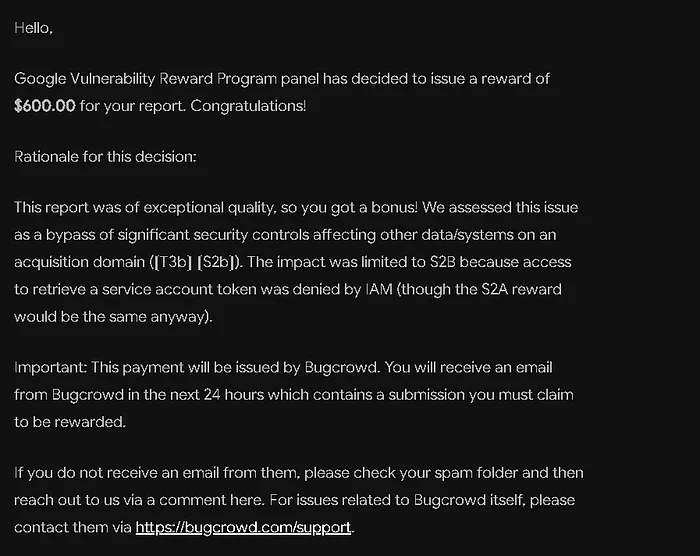
The interesting part of the story is not the SSRF itself but what happened after it was reported. The issue was first triaged as "Won't Fix (Intended Behaviour)", then reopened after an appeal that reframed the finding as a network boundary bypass rather than a token theft, and it ended with a fix and a $600 reward.
Setup
The report does not describe any accounts, roles, tooling or versions. The only precondition that matters is that the endpoint accepts a user-supplied URL and fetches it server-side, and that the platform's blacklist blocks the usual metadata address.
Finding it
The obvious target for an SSRF on Google Cloud is the metadata service:
http://[redacted]/computeMetadata/v1/...
Standard payloads aimed at that address were blocked. The researcher then noticed that the backend validation did not account for IPv6-mapped IPv4 addresses. An IPv4 address can be written in IPv6 form by prefixing it with ::ffff:, so [redacted] becomes ::ffff:a9fe:a9fe. If the filter only matches the dotted-quad string, the mapped form slips past it while the network stack still routes it to the same IPv4 destination.
Exploitation
Step 1: Send the IPv6-mapped metadata URL
The request went to:
http://[::ffff:a9fe:a9fe]/computeMetadata/v1/instance/service-accounts/default/token
The bracketed form is the correct way to put an IPv6 literal in a URL authority. The path is the standard token endpoint of the default service account on the GCP metadata service.
Step 2: Read the response
The server returned a structured 403 from the internal metadata service:
{"error":{"code":403,"message":"Encountered Forbidden..."}}
That error is the proof of the bypass. It shows the backend resolved the IPv6 address, routed the request into the internal network and reached the protected metadata endpoint. The request was refused by the metadata service itself, not by the platform's filter, which is exactly the distinction the researcher needed.
Step 3: Handle the initial rejection
Google closed the issue as "Won't Fix (Intended Behaviour)", arguing that because the Metadata-Flavor: Google header was missing, the token could not be exfiltrated. That is accurate as far as the token goes: the metadata service requires that header, and the SSRF primitive did not let the attacker set it.
Step 4: Appeal on impact, not on the token
The appeal argued that the vulnerability was never about the token. It was about network boundary bypass, and the researcher laid out two consequences:
- Internal reconnaissance. Reaching internal IP ranges such as
[redacted]/9lets an attacker port-scan internal services and map the infrastructure. - Service pivoting. The metadata service needs a specific header, but many internal microservices, databases and APIs assume network-level trust. An attacker could interact with those unauthenticated services.
Step 5: Outcome
The Google VRP panel accepted the appeal. It recognised the bypass of significant security controls affecting other systems on the domain, issued a reward of $600, and implemented the fix on the platform.
Root cause
The backend validation did not account for IPv6-mapped IPv4 addresses, so the mapped form of the metadata address passed the check. An IPv6-mapped address such as ::ffff:a9fe:a9fe is a different string but the same destination, so the check passed and the fetch proceeded. The existing defence failed because it did not account for the IPv6-mapped form of the address. The report does not describe the validation code, so the exact matching logic is not stated.
Impact
Under the conditions described, an attacker who controls the URL parameter can make the backend issue requests to internal addresses, including the GCP metadata service and internal ranges such as [redacted]/9. Token theft was not possible because the Metadata-Flavor: Google header could not be supplied. The impact the panel accepted is the breach of network isolation: internal reconnaissance through port scanning and interaction with internal services that rely on network-level trust. The report does not enumerate which internal services were reachable or what data they held.
Fix
The report states only that the fix was implemented on the platform.
Variants to test
- Other IPv6-mapped forms. Try alternative encodings of the same address, such as different case or zero-padding in the hex groups. A positive result is the same internal error or response coming back from the metadata service.
- Decimal and octal IPv4 forms. Submit the metadata address as a single integer or in octal notation. A positive result is a response from the internal service rather than a filter rejection.
- Redirect chains. Point the URL at an attacker-controlled host that redirects to the internal address. A positive result is the backend following the redirect and returning internal content.
- DNS rebinding. Use a hostname that resolves to a public address at validation time and to an internal address at fetch time. A positive result is a request reaching an internal service.
- Internal range probing. Once a bypass works, vary the address across internal ranges such as
[redacted]/9and observe differences in response time or error text. A positive result is a distinguishable response that indicates a live internal service.
What happened, in plain words
A security researcher named Nitin Attri found a way to make one of Google's websites fetch a web address that it was not supposed to be able to reach. The website had a feature that takes a link from a user and downloads whatever is at that link on the server's side. The team blocked the standard payloads aimed at the metadata service. Nitin found a way around the blocklist by writing the same internal address in a different format, and the server happily fetched it.
At first Google said the issue was not worth fixing, because the most obvious thing an attacker might steal (a secret token) could not actually be stolen. Nitin appealed, explaining that the real problem was not the token but the fact that the server could be made to talk to machines on Google's private network. Google agreed, paid a $600 reward, and fixed the bug.
This article walks through the whole story from scratch. You do not need any security background. If you can use a browser, you can follow along.
The basics you need first
Before the story makes sense, here are a few ideas that come up again and again.
What a server is
When you visit a website, your browser asks another computer somewhere in the world to send it a page. That other computer is called a server. Servers are just computers that stay switched on and answer requests. Most of the interesting things on the internet happen on servers you never see.
What an IP address is
Every computer on a network has an address, called an IP address, so that other computers can find it. It looks like a series of numbers, for example [redacted]. Think of it like a postal address: without it, nobody knows where to deliver a message.
There are two versions of IP addresses in use today:
- IPv4, the older one, written as four numbers separated by dots, like
[redacted]. - IPv6, the newer one, written with letters and numbers and colons, like
::ffff:a9fe:a9fe. IPv6 exists because the world ran out of IPv4 addresses.
What a URL is
A URL is the address you type into a browser, like https://example.com/page. It has a few parts: the scheme (https), the host (the computer to talk to), and the path (which page on that computer). When the host is an IP address, the URL can point straight at a machine rather than at a name like example.com.
What an API is
An API is a way for one piece of software to ask another piece of software to do something, without a human clicking anything. Think of a restaurant: you (the software) do not walk into the kitchen; you tell the waiter (the API) what you want, and the waiter brings it back. Websites use APIs constantly, often without you noticing.
What a token is
A token is a short piece of text that proves who you are, a bit like a wristband at a festival. If you have the right wristband, staff let you into areas that other people cannot enter. On cloud platforms, tokens are often used by one program to prove to another program that it is allowed to do something. Stealing a token is a classic goal for attackers, because it can give them access without needing a password.
What a header is
When your browser (or a program) talks to a server, it sends the request along with some extra information called headers. Headers are small labelled lines, like Metadata-Flavor: Google. They are not visible on the page; they are part of the conversation between computers. Some servers refuse to answer unless a particular header is present, a bit like a bouncer checking for a specific stamp on your hand.
What the metadata service is
Cloud providers such as Google Cloud run a special internal service on every virtual machine, called the metadata service. Programs running on the machine can ask it questions about the machine itself, such as "what is my name?" or "give me a token so I can talk to other Google services." The metadata service lives at a fixed internal address, [redacted], and it is deliberately only reachable from inside the cloud, not from the public internet. That is why it is such a valuable target: if an attacker can reach it, they may be able to get secrets that were meant to stay inside.
What SSRF is
SSRF stands for Server-Side Request Forgery. It is a vulnerability where a website lets a user supply a URL, and the server then fetches that URL on the user's behalf. Normally that is a useful feature: for example, a site might let you paste a link and it shows a preview. The problem is that the server can reach places your browser cannot, such as internal machines on the company's private network. If the server does not carefully check the URL, an attacker can use the server as a proxy to poke at those internal machines.
A simple comparison: imagine a hotel concierge who will fetch anything you ask for from anywhere in the building. Normally that is helpful. But if you ask the concierge to go into the staff-only room and read out what is on the whiteboard, the concierge has just become your way past the locked door. The concierge is the server; you are the attacker; the staff-only room is the internal network.
What a blocklist is
A blocklist (sometimes called a blacklist) is a list of things that are forbidden. A website might keep a list of addresses it refuses to fetch, such as [redacted]. The idea is simple: if the requested address is on the list, refuse. The weakness is that a blocklist only catches exactly what is written on it. If the same destination can be written in a different way, the list may not recognise it.
The vulnerability
The platform had a feature that fetched external kernel content from URLs supplied by users. In plain terms: you give it a link, and the server goes and downloads what is at that link. That is exactly the kind of feature where SSRF can appear, because the server is doing the fetching for you.
The obvious target for an attacker on Google Cloud is the metadata service. The standard address for it is:
http://[redacted]/computeMetadata/v1/...
Line by line:
http://is the scheme, meaning "talk to this address using the ordinary web protocol."[redacted]is the internal address of the metadata service./computeMetadata/v1/...is the path on that service. The...stands for whatever specific piece of information you want to ask for.
When Nitin tried to make the platform fetch that address, the platform blocked it. The blocklist was doing its job, at least for the obvious form of the address.
Then he noticed something. The check on the server did not account for IPv6-mapped IPv4 addresses. That sounds complicated, but the idea is simple. Because IPv6 is the newer addressing system, there is a standard way to write an old IPv4 address inside an IPv6 address: you put ::ffff: in front of it, and you write the four numbers in hexadecimal (base 16) instead of decimal. So [redacted] becomes ::ffff:a9fe:a9fe.
Why does that matter? Because to a computer's network stack, ::ffff:a9fe:a9fe and [redacted] are the same destination. But to a simple text-matching filter, they are completely different strings. The IPv6-mapped form was not blocked, and the request went through. The network then delivered the request to the same internal machine as before.
The exploit
Step 1: Send the IPv6-mapped metadata URL
Nitin sent a request to this address:
http://[::ffff:a9fe:a9fe]/computeMetadata/v1/instance/service-accounts/default/token
Line by line:
http://is the scheme, as before.[::ffff:a9fe:a9fe]is the IPv6-mapped form of[redacted]. The square brackets are required when you put an IPv6 address in a URL, because the address itself contains colons and the browser or server needs to know where the address ends. Without the brackets, the colons would be confused with the colons that separate the host from the port./computeMetadata/v1/instance/service-accounts/default/tokenis the path that asks the metadata service for a token belonging to the machine's default service account. In other words, it is the request that would hand over a credential if it succeeded.
Why this step? Because the goal was to prove that the server could be tricked into reaching the metadata service. If the server fetched this URL, the response would come from the metadata service itself, not from the platform's filter.
Step 2: Read the response
The server did not return the token. Instead, it returned a structured error:
{"error":{"code":403,"message":"Encountered Forbidden..."}}
Line by line:
"error"is the outer label, saying that this is an error response."code":403is the HTTP status code. 403 means "forbidden", the server understood the request but refused to fulfil it."message":"Encountered Forbidden..."is a human-readable explanation. The...indicates the message was longer in the original.
Why is this important? Because this error came from the metadata service, not from the platform's blocklist. That is the proof. It shows that the server resolved the IPv6 address, routed the request into Google's internal network, and actually reached the protected metadata endpoint. The request was refused at the final door, but the attacker had already walked through the building to get there. The distinction matters: a blocklist rejection would have happened at the front gate; this rejection happened inside the vault.
Step 3: Handle the initial rejection
Google's team closed the report as "Won't Fix (Intended Behaviour)." Their reasoning was that the token could not actually be stolen, because the request was missing a header called Metadata-Flavor: Google. The metadata service requires that header before it will hand over a token, and the SSRF feature did not let the attacker add custom headers to the request. So from Google's point of view, the attacker could knock on the door but could not get the prize.
That reasoning is correct as far as the token goes. But it misses the bigger picture, which is what Nitin argued next.
Step 4: Appeal on impact, not on the token
The appeal said: this was never about the token. It was about network boundary bypass. In other words, the attacker had found a way to make a public-facing server send requests into Google's private network, and that alone is a serious problem, regardless of whether a token came back.
Nitin laid out two consequences:
- Internal reconnaissance. The attacker could reach internal IP ranges such as
[redacted]/9. That is a range of private addresses used inside Google's network. Being able to reach them means an attacker can probe them, for example by trying different ports (the numbered doors on a computer) to see which services are running, and gradually build a map of the internal infrastructure. Think of it as being able to walk the corridors of an office building and note which doors are open. - Service pivoting. The metadata service needs a special header, but many internal microservices, databases and APIs assume that anything coming from inside the network is trustworthy. That assumption is dangerous: if an attacker can send requests from inside, those services may answer without asking for any credentials. "Pivoting" means using one foothold to reach the next target, like stepping from one stone to another to cross a river.
Why frame it this way? Because bug bounty programmes prioritise issues by impact. A bug that only produces an error message looks minor. A bug that breaks the separation between the public internet and the private network looks serious. The same technical finding can be valued very differently depending on how its consequences are explained.
Step 5: Outcome
The Google VRP panel (VRP stands for Vulnerability Reward Program, Google's bug bounty scheme) accepted the appeal. They recognised that the bypass affected significant security controls protecting other systems on the domain. They issued a reward of $600, and the fix was implemented on the platform.
Root cause
The blocklist failed because it did not account for IPv6-mapped IPv4 addresses.
An IPv6-mapped address such as ::ffff:a9fe:a9fe is a different string but the same destination. The check did not account for the mapped form, so it passed. The fetch then went ahead and reached the same internal machine the blocklist was meant to protect.
The report does not describe the validation code, so the exact matching logic is not stated. But the principle is clear: a filter that compares strings can be defeated by writing the same thing differently.
Impact
Under the conditions described, an attacker who controls the URL parameter can make the backend issue requests to internal addresses. That includes the GCP metadata service and internal ranges such as [redacted]/9.
Token theft was not possible, because the Metadata-Flavor: Google header could not be supplied through this feature. The impact that the panel accepted is the breach of network isolation: internal reconnaissance through port scanning, and interaction with internal services that rely on network-level trust.
The report does not enumerate which internal services were reachable or what data they held.
Fix
The report states only that the fix was implemented on the platform. It does not describe the change, so the specific remediation is not stated.
In everyday terms: instead of checking whether the envelope has a banned name written on it, open the envelope and check where it is really going.
Variants to test
If you ever find yourself in a similar situation, here are other ways the same kind of bypass can be attempted. Each one is a variation on the same theme: write the same destination in a different way, or make the destination change after the check.
- Other IPv6-mapped forms. Try alternative encodings of the same address, such as different case or zero-padding in the hex groups. A positive result is the same internal error or response coming back from the metadata service.
- Decimal and octal IPv4 forms. Submit the metadata address as a single integer or in octal notation. A positive result is a response from the internal service rather than a filter rejection.
- Redirect chains. Point the URL at an attacker-controlled host that redirects to the internal address. A positive result is the backend following the redirect and returning internal content.
- DNS rebinding. Use a hostname that resolves to a public address at validation time and to an internal address at fetch time. A positive result is a request reaching an internal service.
- Internal range probing. Once a bypass works, vary the address across internal ranges such as
[redacted]/9and observe differences in response time or error text. A positive result is a distinguishable response that indicates a live internal service.
Key takeaways
- Think beyond data exfiltration. SSRF is not only about stealing tokens. It is about breaching network isolation, which can be valuable even when no secret comes back.
- Be persistent. If you believe an issue has a higher impact than the first triager saw, explain the chain of exploitation clearly.
- IPv6 is often overlooked. Security controls frequently fail to consider IPv6 variants of blocked IPs.
Glossary
- API: a way for one piece of software to ask another piece of software to do something, without a human clicking anything.
- Blocklist (blacklist): a list of things that are forbidden, such as addresses a server refuses to fetch.
- DNS rebinding: a technique where a hostname resolves to one address when it is checked and a different address when it is used, so the check and the actual request disagree.
- Header: extra labelled information sent along with a web request, such as
Metadata-Flavor: Google. - Hexadecimal: a way of writing numbers using sixteen symbols (0 to 9 and a to f) instead of ten.
- HTTP status code: a number in a web response that says what happened, such as 403 for "forbidden".
- Internal network: the private part of a company's network, not reachable from the public internet.
- IP address: the numeric address of a computer on a network.
- IPv4: the older form of IP address, written as four numbers separated by dots.
- IPv6: the newer form of IP address, written with letters, numbers and colons.
- IPv6-mapped IPv4 address: an IPv4 address written inside an IPv6 address by prefixing it with
::ffff:. - Metadata service: a special internal service on a cloud machine that answers questions about the machine and can hand out credentials.
- Microservice: a small, separate piece of software that does one job and talks to other pieces over a network.
- Network boundary bypass: getting past the separation between a public network and a private one.
- Port: a numbered channel on a computer that a particular service listens on.
- Port scanning: trying many ports on a machine to discover which services are running.
- Pivoting: using one foothold to reach the next target.
- Reconnaissance: gathering information about a target before or during an attack.
- Server: a computer that stays switched on and answers requests from other computers.
- SSRF (Server-Side Request Forgery): a vulnerability where a server fetches a URL supplied by a user, allowing the user to make the server reach places they should not be able to reach.
- Token: a short piece of text that proves identity or permission, like a wristband at a festival.
- URL: the address of something on the web, such as
https://example.com/page. - VRP (Vulnerability Reward Program): Google's bug bounty programme, which pays researchers for reporting security issues.



