Fun With CORS Misconfiguration — II
The application's CORS policy trusted any subdomain, and a reflected XSS on one subdomain let an attacker run JavaScript there that read the victim's sensitive data from the main domain with credentials. The author demonstrated this by injecting a script that fetched the user endpoint and alerted the response.
 Published on medium.com
Hello all again, I hope everything in going well on your ends. Today I will explain further about CORS misconfiguration leading to sensitive information leaks!!!!
The full write-up lives on its author's site
It belongs to its author, so we link to it rather than copy it. The other two tabs are our own rewrites, checked against it.
Context
This is a follow-up to an earlier write-up on CORS misconfiguration leading to sensitive information disclosure. The target here is a web application, referred to throughout as vulnerable.com, whose CORS policy trusts all of its subdomains. That is a common and superficially reasonable design: the main application wants to let its own subdomains read authenticated data, so it reflects any origin that belongs to the parent domain.
The report shows a request to /sensitiveData on the main host, and later uses /auth/user in the exploit script.
Setup
No accounts, roles, tools or versions are described. The only preconditions the report establishes are:
- The application reflects the request
OrigininAccess-Control-Allow-Originwhen that origin is a subdomain ofvulnerable.com. - The response also sets
Access-Control-Allow-Credentials: true, so a cross-origin request from a subdomain can carry the victim's cookies and the response body can be read by the calling script. - The attacker can run JavaScript on some subdomain, either through an XSS or through a subdomain takeover.
Finding it
The researcher observed that the application trusts all of its subdomains. In principle this is defensible, since the subdomains belong to the same organisation, but it becomes a problem the moment any one subdomain can be made to serve attacker-controlled JavaScript.
The confirmation came from sending a request with an Origin header pointing at a subdomain and observing that the server echoed it back while allowing credentials:
GET /sensitiveData HTTP/1.1
Host: vulnerable.com
Origin: https://example.vulnerable.com
The response was:
HTTP/1.1 200 OK
Access-Control-Allow-Origin: https://example.vulnerable.com
Access-Control-Allow-Credentials: true
...
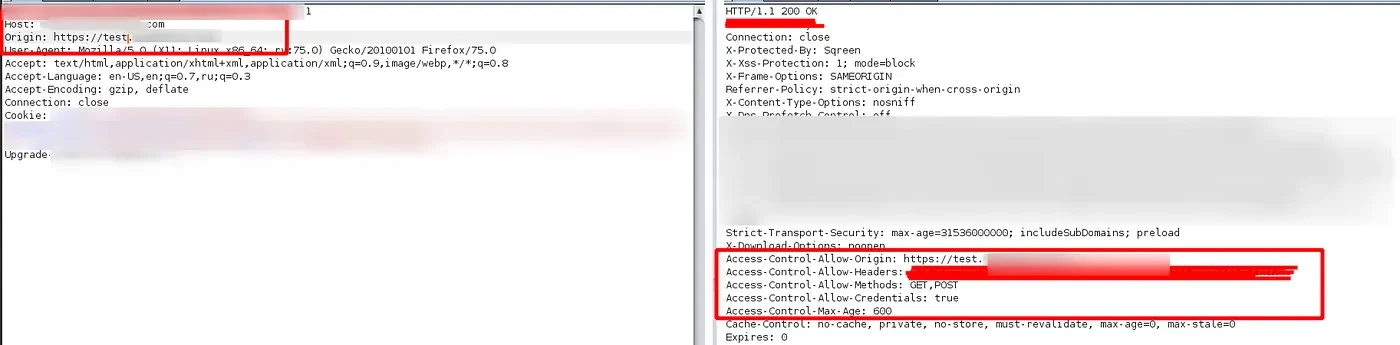
The screenshot sits next to the response above.
This pair of headers is the whole finding. Reflecting the origin means the browser will treat the response as readable by the requesting origin, and Access-Control-Allow-Credentials: true means the victim's session cookies are sent along with the request and the response is not blocked from the script. The report describes the server-side setting as being equivalent to:
Access-Control-Allow-Origin: *.vulnerable.com
That is a simplification of the behaviour, since the header value is a single origin and not a wildcard pattern, but it captures the intent: any host under vulnerable.com is accepted.
Exploitation
With the CORS behaviour confirmed, the remaining problem for an attacker is getting JavaScript to execute on an origin the server trusts. The report lists two ways to achieve that:
- Cross-Site Scripting on any of the subdomains.
- Subdomain takeover, so that the attacker can host their own JavaScript on that subdomain and fool the victim.
Step 1: find execution on a trusted subdomain
The researcher looked for vulnerabilities on the subdomains and found reflected XSS on one of them, referred to as https://test.vulnerable.com.
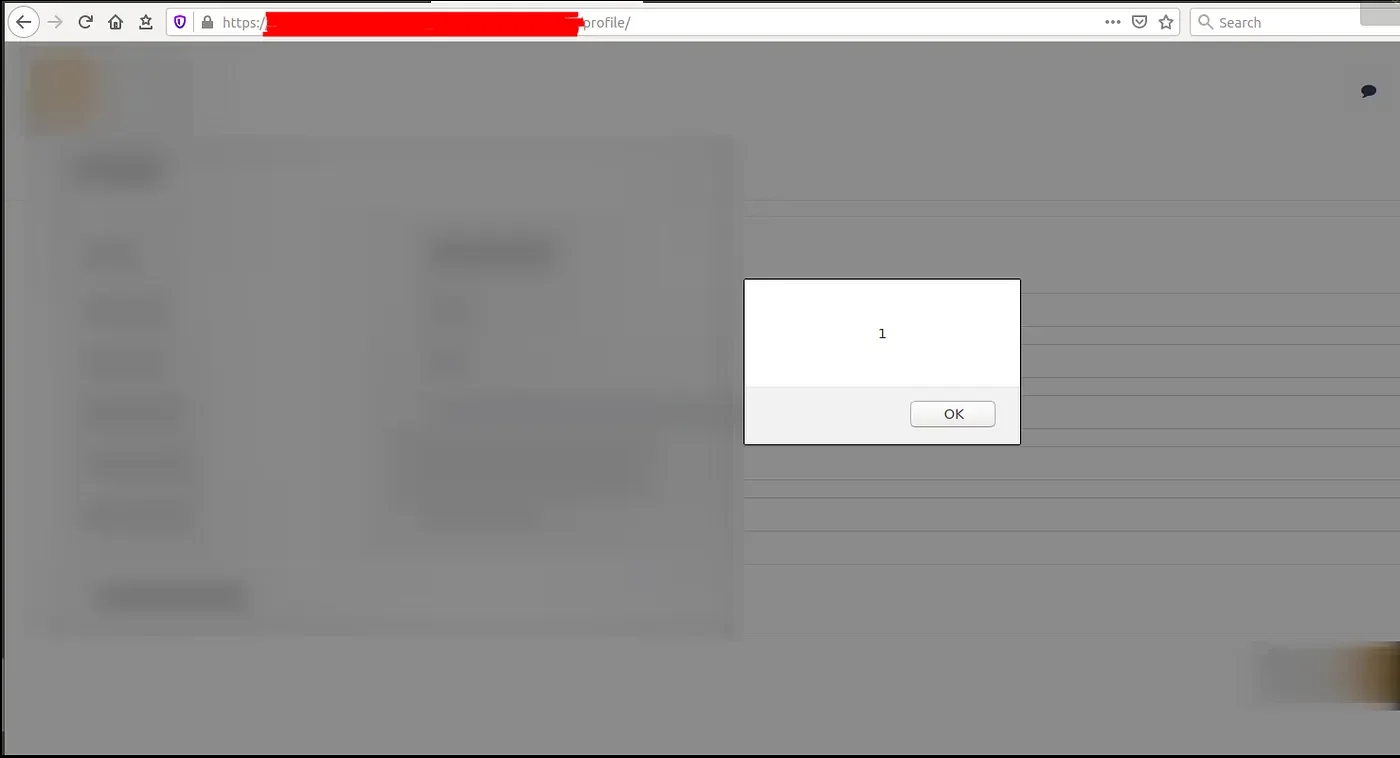
The screenshot sits next to the mention of the reflected XSS on the subdomain.
Step 2: inject JavaScript that reads the sensitive endpoint
The following payload, injected into the subdomain where the XSS exists, performs the cross-origin read against the main application:
function cors(){var xhttp=new XMLHttpRequest();xhttp.onreadystatechange=function(){if (this.readyState ==4&& this.status==200){alert(this.responseText)}};xhttp.open(“GET”, “https://vulnerable.com/auth/user”, true);xhttp.withCredentials=true;xhttp.send();}
The important parts are xhttp.open with the target URL https://vulnerable.com/auth/user, which is the authenticated endpoint on the main host, and xhttp.withCredentials=true, which makes the browser attach the victim's cookies to the cross-origin request. Because the page executing this script is served from test.vulnerable.com, the browser sends Origin: https://test.vulnerable.com, the server reflects it, and the onreadystatechange handler reads this.responseText and displays it. The report does not show the response body that came back.
Step 3: deliver the payload
The XSS was in a parameter named name on the subdomain. The payload used was:
“ onclick=”[payload]
The report gives this payload for the vulnerable name parameter and states that with it the CORS misconfiguration was exploited successfully. The report states that with this injection the CORS misconfiguration was exploited successfully. The victim has to be engaged to visit the page and trigger the handler; the report does not describe how the link was delivered.
Root cause
The mistake is in the CORS policy: the application reflects any origin that is a subdomain of vulnerable.com and pairs that reflection with Access-Control-Allow-Credentials: true. Trusting the whole subdomain space means the security of the main application's authenticated data is only as strong as the least secure subdomain. A single reflected XSS, or a dangling DNS record that permits a takeover, converts a trusted origin into an attacker-controlled one, and the browser then happily lets that origin read credentialed responses from the main host.
The report does not discuss any defence.
Impact
An attacker who can run JavaScript on any subdomain of vulnerable.com can read authenticated responses from the main application on behalf of a logged-in victim who visits the malicious page. In the demonstrated case the data came from /auth/user, and the earlier request in the report targeted /sensitiveData; the report characterises the outcome as sensitive information disclosure. The attack requires the victim to be logged in and to visit the page hosting the injected script, and it requires the attacker to first obtain script execution on a trusted subdomain through XSS or subdomain takeover.
Fix
No fix is described in the report. The report itself only states the problem and the exploitation path.
Variants to test
- Send a request with
Originset to an arbitrary subdomain of the target and check whether it is reflected inAccess-Control-Allow-OriginalongsideAccess-Control-Allow-Credentials: true. A positive result is the exact origin echoed back with credentials allowed. - Try origins that merely contain the trusted domain, such as
https://vulnerable.com.attacker.example, to see whether the matching is done with a naive substring or suffix check rather than a proper parse. A positive result is the attacker domain reflected back. - Try
Origin: null, which browsers send from sandboxed iframes and some redirects, to see whether it is accepted. A positive result isAccess-Control-Allow-Origin: nullwith credentials allowed. - Enumerate subdomains for reflected XSS or dangling records pointing at third-party services, since either gives the script execution the CORS policy depends on. A positive result is script execution on a host the main application trusts.
- Test whether the preflight response for non-simple requests also reflects the origin and permits credentials, which would widen the set of reachable endpoints.
What happened, in plain words
A website called vulnerable.com had a rule that said: "any page on any of my subdomains is allowed to read my private data." A subdomain is a smaller site that belongs to the same organisation, for example mail.vulnerable.com or shop.vulnerable.com. On paper this sounds sensible, because those subdomains are owned by the same company. The problem is that the safety of the main site then depends on the safety of every single subdomain, including the weakest one.
The researcher found that one subdomain had a bug that let an attacker run their own JavaScript inside it. JavaScript is the programming language that runs in your browser and makes pages interactive. Once an attacker can run their own JavaScript on a subdomain that the main site trusts, they can use that script to ask the main site for the logged-in user's private data, and the browser will hand it over. That is what this report demonstrates.
This is a follow-up to an earlier write-up by the same researcher about CORS misconfiguration leading to sensitive information disclosure. CORS is explained below, but in short it is the set of rules a browser uses to decide whether one website is allowed to read a response from another website.
The pieces you need to know first
Before walking through the attack, here are the basic ideas, explained from zero.
- A browser and a website. When you type an address into your browser, the browser sends a request to a server. The server sends back a response, usually a web page. Every request carries a small amount of extra information called headers, which are like labels on an envelope: they say where the request came from, what kind of content is wanted, and so on.
- Cookies and sessions. When you log in to a website, the server usually gives your browser a small piece of data called a cookie. Your browser stores it and sends it back with every later request to that same site. The cookie is how the site remembers that you are logged in. Think of it as a wristband you get at an event: you show it at the door and you are let in without showing your ticket again.
- An API endpoint. Many websites have addresses that return raw data rather than a full web page. These are often called endpoints or APIs. For example,
/sensitiveDatamight return your account details as data. An API is simply a way for one piece of software to ask another for information or to perform an action. - Origin. An origin is the combination of protocol, host and port, for example
https://vulnerable.com. Browsers treat each origin as a separate security zone. A page on one origin is not normally allowed to read data from another origin. - CORS. CORS stands for Cross-Origin Resource Sharing. It is a set of response headers that a server can send to tell the browser: "it is fine for this other origin to read my response." Without CORS, a browser blocks a page on one origin from reading a response from a different origin. With CORS, the server can grant permission.
- The two CORS headers in this report.
Access-Control-Allow-Originnames the origin that is allowed to read the response.Access-Control-Allow-Credentials: truesays that the request may include the user's cookies and that the response may be read by the calling script. Both together are what make the misconfiguration dangerous. - XSS. Cross-Site Scripting, or XSS, is a bug where a website takes input from a user and puts it into a page without proper cleaning, so an attacker can slip their own JavaScript into the page. When another visitor loads that page, the attacker's script runs in their browser as if it were part of the site.
- Subdomain takeover. Sometimes a subdomain points to a service that is no longer in use, and an attacker can claim that service and put their own content on the subdomain. The result is similar to XSS: the attacker controls what runs on a subdomain the main site trusts.
The setup
The report does not describe any accounts, roles, tools or software versions. The only preconditions it establishes are these:
- The application reflects the request
Originheader inAccess-Control-Allow-Originwhen that origin is a subdomain ofvulnerable.com. - The response also sets
Access-Control-Allow-Credentials: true, so a cross-origin request from a subdomain can carry the victim's cookies and the response body can be read by the calling script. - The attacker can run JavaScript on some subdomain, either through an XSS or through a subdomain takeover.
In plain words: the main site says "any of my subdomains may read my data, and they may do it while carrying the user's login cookie." The attacker only needs to find one subdomain where they can run their own script.
Finding it
The researcher observed that the application trusts all of its subdomains. In principle this is defensible, since the subdomains belong to the same organisation, but it becomes a problem the moment any one subdomain can be made to serve attacker-controlled JavaScript.
The confirmation came from sending a request with an Origin header pointing at a subdomain and observing that the server echoed it back while allowing credentials:
GET /sensitiveData HTTP/1.1
Host: vulnerable.com
Origin: https://example.vulnerable.com
Line by line:
GET /sensitiveData HTTP/1.1asks the server for the resource at/sensitiveDatausing version 1.1 of the HTTP protocol.GETmeans "give me this data".Host: vulnerable.comtells the server which website the request is for. One server can host many sites, so this header picks the right one.Origin: https://example.vulnerable.comtells the server where the request is coming from. Here it is a made-up subdomain ofvulnerable.com.
The response was:
HTTP/1.1 200 OK
Access-Control-Allow-Origin: https://example.vulnerable.com
Access-Control-Allow-Credentials: true
...
Line by line:
HTTP/1.1 200 OKmeans the request succeeded.200is the standard code for "here is your data".Access-Control-Allow-Origin: https://example.vulnerable.comis the server saying "the origin that asked is allowed to read this response." Notice that it copied back exactly the origin that was sent. This is called reflecting the origin.Access-Control-Allow-Credentials: trueis the server saying "the request may include the user's cookies, and the calling script may read the response."...stands for the rest of the response, which the report does not show.
The screenshot sits next to the response above.
This pair of headers is the whole finding. Reflecting the origin means the browser will treat the response as readable by the requesting origin, and Access-Control-Allow-Credentials: true means the victim's session cookies are sent along with the request and the response is not blocked from the script. The report describes the server-side setting as being equivalent to:
Access-Control-Allow-Origin: *.vulnerable.com
That is a simplification of the behaviour, since the header value is a single origin and not a wildcard pattern, but it captures the intent: any host under vulnerable.com is accepted. The * here is a shorthand for "anything", so the line means "any subdomain of vulnerable.com is allowed".
Exploitation
With the CORS behaviour confirmed, the remaining problem for an attacker is getting JavaScript to execute on an origin the server trusts. The report lists two ways to achieve that:
- Cross-Site Scripting on any of the subdomains.
- Subdomain takeover, so that the attacker can host their own JavaScript on that subdomain and fool the victim.
Both routes end in the same place: the attacker's script runs on a subdomain that the main site trusts. The browser sees the script as coming from a trusted origin, so the CORS rules allow it to read the main site's data.
Step 1: find execution on a trusted subdomain
The researcher looked for vulnerabilities on the subdomains and found reflected XSS on one of them, referred to as https://test.vulnerable.com.
The screenshot sits next to the mention of the reflected XSS on the subdomain.
Reflected XSS means the malicious input is sent in a request and immediately echoed back into the page. The attacker does not need to store anything on the server; they just need the victim to open a crafted link.
Step 2: inject JavaScript that reads the sensitive endpoint
The following payload, injected into the subdomain where the XSS exists, performs the cross-origin read against the main application:
function cors(){var xhttp=new XMLHttpRequest();xhttp.onreadystatechange=function(){if (this.readyState ==4&& this.status==200){alert(this.responseText)}};xhttp.open(“GET”, “https://vulnerable.com/auth/user”, true);xhttp.withCredentials=true;xhttp.send();}
Line by line, in plain words:
function cors(){ ... }defines a function namedcors. A function is a named block of instructions that can be run later.var xhttp=new XMLHttpRequest();creates an object that can send requests to a server from inside a web page. This is the browser's built-in way for JavaScript to fetch data without reloading the page.xhttp.onreadystatechange=function(){ ... }sets up a piece of code that will run whenever the request's state changes. Think of it as a callback: "when something happens, do this."if (this.readyState ==4&& this.status==200){alert(this.responseText)}checks whether the request is finished (readyState == 4) and whether the server answered successfully (status == 200). If both are true, it shows the response text in a pop-up box usingalert.xhttp.open(“GET”, “https://vulnerable.com/auth/user”, true);prepares aGETrequest tohttps://vulnerable.com/auth/user. Thetruemeans the request is asynchronous, so the page does not freeze while waiting.xhttp.withCredentials=true;tells the browser to include the user's cookies with this request. This is the crucial line: without it, the request would go out without the login cookie and the server would not know who the user is.xhttp.send();actually sends the request.
The important parts are xhttp.open with the target URL https://vulnerable.com/auth/user, which is the authenticated endpoint on the main host, and xhttp.withCredentials=true, which makes the browser attach the victim's cookies to the cross-origin request. Because the page executing this script is served from test.vulnerable.com, the browser sends Origin: https://test.vulnerable.com, the server reflects it, and the onreadystatechange handler reads this.responseText and displays it.
In everyday terms: the attacker's script is sitting on a subdomain the main site trusts. It knocks on the main site's door, shows the victim's wristband (the cookie), and the main site lets it in and hands over the private data. The script then shows that data to whoever is running it.
Step 3: deliver the payload
The XSS was in a parameter named name on the subdomain. A parameter is a piece of data you send to a website, often visible in the address bar after a question mark, for example ?name=something. The payload used was:
“ onclick=”[payload]
Line by line:
“is a double quote character. It is used to close whatever attribute the website had already opened in its HTML. HTML attributes are the extra settings inside a tag, such ashref="..."orclass="...".onclick=starts a new attribute calledonclick. This attribute tells the browser what to do when the element is clicked.”[payload]is the value of that attribute. The[payload]is a placeholder for the actual script, and the closing quote ends the attribute value.
The report gives this payload for the vulnerable name parameter and states that with it the CORS misconfiguration was exploited successfully. The report states that with this injection the CORS misconfiguration was exploited successfully.
Root cause
The mistake is in the CORS policy: the application reflects any origin that is a subdomain of vulnerable.com and pairs that reflection with Access-Control-Allow-Credentials: true. Trusting the whole subdomain space means the security of the main application's authenticated data is only as strong as the least secure subdomain. A single reflected XSS, or a dangling DNS record that permits a takeover, converts a trusted origin into an attacker-controlled one, and the browser then happily lets that origin read credentialed responses from the main host.
A dangling DNS record is a domain name entry that points to a service which no longer exists or is no longer controlled by the organisation. If an attacker can register that service, they effectively control the subdomain.
The report does not discuss any defence. An allowlist would mean naming exactly which origins are allowed, rather than accepting anything that ends in vulnerable.com.
Impact
An attacker who can run JavaScript on any subdomain of vulnerable.com can read authenticated responses from the main application on behalf of a logged-in victim who visits the malicious page. In the demonstrated case the data came from /auth/user, and the earlier request in the report targeted /sensitiveData; the report characterises the outcome as sensitive information disclosure. The attack requires the victim to be logged in and to visit the page hosting the injected script, and it requires the attacker to first obtain script execution on a trusted subdomain through XSS or subdomain takeover.
In plain words: if you are logged in to vulnerable.com and you click a link that takes you to the compromised subdomain, the attacker's script can quietly fetch your account data from the main site and show it to the attacker. You would not necessarily notice anything unusual.
Fix
No fix is described in the report. The report itself only states the problem and the exploitation path.
Variants to test
These are checks for finding similar problems elsewhere. Each one is a small experiment you could run with a browser's developer tools or a tool that lets you set request headers.
- Send a request with
Originset to an arbitrary subdomain of the target and check whether it is reflected inAccess-Control-Allow-OriginalongsideAccess-Control-Allow-Credentials: true. A positive result is the exact origin echoed back with credentials allowed. - Try origins that merely contain the trusted domain, such as
https://vulnerable.com.attacker.example, to see whether the matching is done with a naive substring or suffix check rather than a proper parse. A positive result is the attacker domain reflected back. - Try
Origin: null, which browsers send from sandboxed iframes and some redirects, to see whether it is accepted. A positive result isAccess-Control-Allow-Origin: nullwith credentials allowed. - Enumerate subdomains for reflected XSS or dangling records pointing at third-party services, since either gives the script execution the CORS policy depends on. A positive result is script execution on a host the main application trusts.
- Test whether the preflight response for non-simple requests also reflects the origin and permits credentials, which would widen the set of reachable endpoints. A preflight is an automatic check the browser sends before certain cross-origin requests, asking the server whether the real request is allowed.
Glossary
- API: a way for one piece of software to ask another for information or to perform an action, often over the web using addresses called endpoints.
- Attribute: an extra setting inside an HTML tag, such as
hreforonclick. - Browser: the program you use to view websites, such as Chrome, Firefox or Safari.
- Callback: a piece of code that is set up to run later, when something happens.
- Cookie: a small piece of data a website stores in your browser so it can remember you, for example that you are logged in.
- CORS: Cross-Origin Resource Sharing, a set of response headers that tell the browser whether a page from one origin may read a response from another origin.
- Cross-origin request: a request made from a page on one origin to a different origin.
- Dangling DNS record: a domain name entry that points to a service which is no longer in use or no longer controlled by the organisation.
- Endpoint: a specific address on a server that returns data or performs an action, for example
/sensitiveData. - Function: a named block of instructions in a program that can be run later.
- GET: an HTTP method that means "give me this data".
- Header: extra information sent with a request or response, like a label on an envelope.
- HTML: the language used to structure web pages.
- HTTP: the protocol browsers and servers use to exchange requests and responses.
- JavaScript: the programming language that runs in the browser and makes pages interactive.
- Origin: the combination of protocol, host and port, for example
https://vulnerable.com. - Parameter: a piece of data sent to a website, often visible in the address bar after a question mark.
- Payload: the piece of code or data an attacker injects to carry out an attack.
- Preflight: an automatic check the browser sends before certain cross-origin requests, asking the server whether the real request is allowed.
- Reflected XSS: a type of Cross-Site Scripting where the malicious input is sent in a request and immediately echoed back into the page.
- Reflecting the origin: copying the origin from the request back into the response header.
- Session: the period during which a website remembers that you are logged in, usually tracked with a cookie.
- Subdomain: a smaller site under a main domain, for example
mail.vulnerable.comundervulnerable.com. - Subdomain takeover: claiming a subdomain that points to an unused service, so that the attacker controls what runs on it.
- XSS: Cross-Site Scripting, a bug where a website puts user input into a page without proper cleaning, letting an attacker run their own JavaScript.



