Hacker Holidays Day 5: From a Leftover Login to Full Root, in Three Mistakes
A leftover developer note in the login page source revealed default credentials, allowing login. The playlist import feature used unsafe YAML deserialisation, enabling remote code execution as a low-privilege user; then a root-run process exposed a password in its command-line arguments, which was reused as the root password, granting full root access.
 Published on medium.com
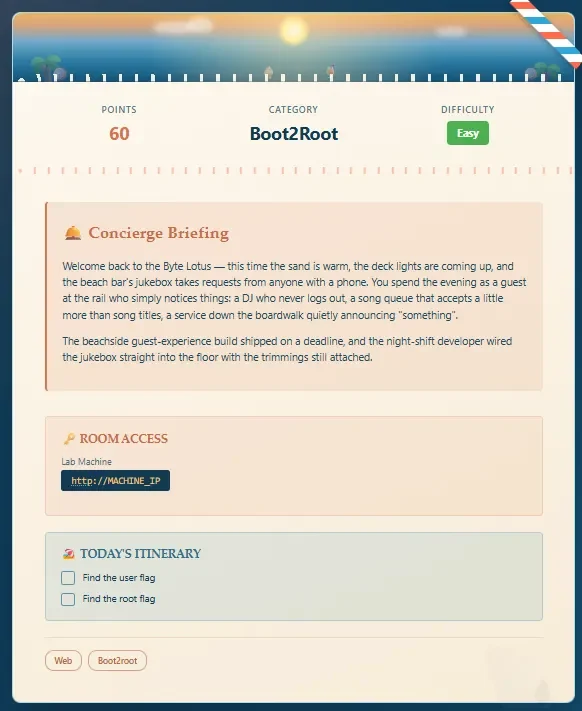
Day 5 is a full “boot2root” machine — meaning two flags this time, not one: a user flag and a root flag, each requiring a different level of access. The theming: a beachside jukebox app, “wired straight into the floor with the trimmings still attached” by a developer who shipped on a deadline.
The full write-up lives on its author's site
It belongs to its author, so we link to it rather than copy it. The other two tabs are our own rewrites, checked against it.
Day 5 of this series is a full boot2root machine rather than a single-bug lab: two flags, a user flag and a root flag, each requiring a different level of access. The theme is a beachside jukebox app, described as "wired straight into the floor with the trimmings still attached" by a developer who shipped on a deadline. The goal is to find a way onto the machine at all, then to become the most privileged user on it, root.
Context
The target is a Linux host running two exposed services: SSH, and a web application served by Gunicorn, the Python/Flask WSGI server. The web app presents itself as "Beach Bar // Sign in." Once authenticated, the dashboard offers a playlist feature with two operations: Export the current playlist as a YAML file, and Import a YAML file back. That export and re-import cycle is the feature under test, and it is where the initial access comes from.
The privilege escalation path is separate from the web bug. It runs through a background service on the same host that is started as root and carries a password in plain text as one of its startup flags.
A few terms as used here:
- Boot2root: a lab where the objective is full control of a machine, usually split into getting any foothold (user flag) and becoming root (root flag), often by chaining two unrelated vulnerabilities.
- Reverse shell: the target is induced to connect out to the attacker, handing over an interactive terminal on its own machine.
- Insecure deserialisation: data saved in a file format and loaded back later. If the loading step is not careful, code can be disguised as data and executed when the file is read.
- SUID binary: a Linux permission that lets a program run with its owner's privileges regardless of who executes it. A flawed SUID program owned by root can yield root access.
su: the Linux command for switching to another account, given that account's password.
Setup
The researcher starts with a scan, which returns two ports: SSH and the Gunicorn-served web app.
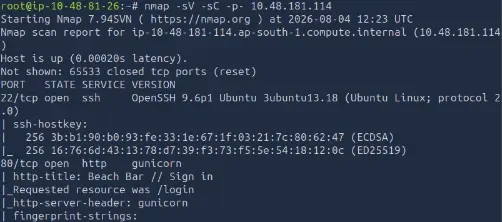
No credentials are supplied up front. The login page is the entry point, and the foothold comes from information left in its source.
Finding it
The first move is the same one that worked on Day 2 of the series: instead of reading the rendered login page, view the raw page source. Sitting in an HTML comment is a leftover developer note that was never removed.
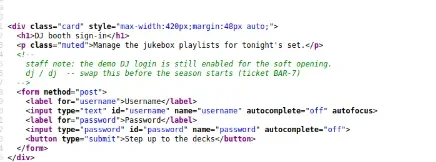
Logging in with dj / dj worked immediately. That is the whole of the initial access: a leftover developer note in an HTML comment, never removed.
Exploitation
Step 1: reach the playlist import
Once logged in, the dashboard exposes the export and import feature. The reasoning at this point is straightforward: an application that exports data and reads it back later has to parse an attacker-supplied file, and the question is how carefully it does so.
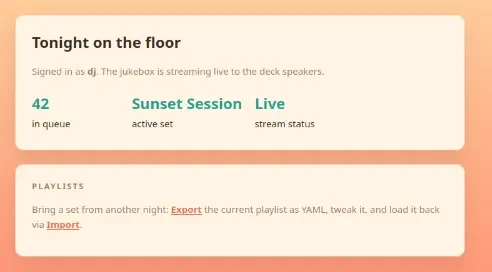
Exporting produces a normal-looking YAML file, which establishes the expected structure that the import side will accept.
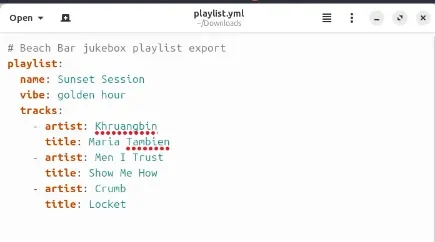
If the application uses an unsafe YAML loading method, the file is not treated as plain data: the loader can be made to construct and run real code. The sequence below is the exact one used.
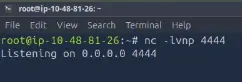
Step 2: start a listener first
nc -lvnp 4444
This has to be running before anything else, because it is what catches the connection the target makes back to the attacker.
Step 3: create the payload file
In a separate terminal:
nano payload.yaml
The file contains a YAML tag that disguises a real system command as if it were playlist data.
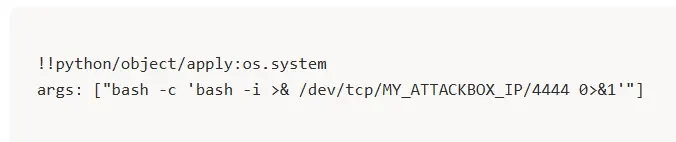
It is saved with Ctrl+O, then Enter, then Ctrl+X.
Step 4: confirm the file saved correctly
cat payload.yaml

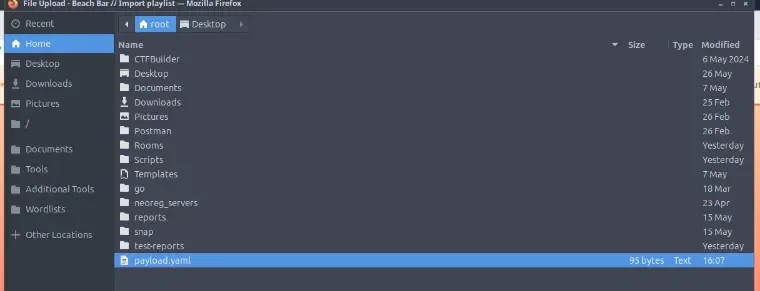
Step 5: upload through the Import page
The file goes in through the file picker rather than by pasting into the text box:
- Click "Browse..."
- Select
payload.yaml - Click "Load playlist"
Step 6: catch the shell and read the user flag
The moment the page loaded the "playlist", the server ran the disguised command instead, and a connection arrived at the listener. That dropped the researcher into a shell as a low-privileged user called bartender.
The user flag was in that account's home folder:
cat user.txt
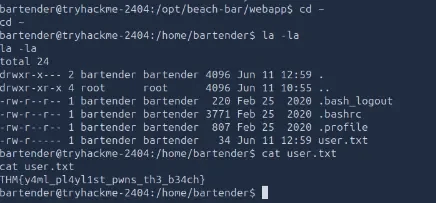
Step 7: local enumeration, and three dead ends
Getting from bartender to root took several wrong turns before the real lead appeared.
- Sudo rights.
sudo -lasks for a password that is not available. Dead end. - Unusual SUID binaries.
find / -perm -4000 -type f 2>/dev/null
Only standard system binaries appeared, nothing custom to exploit. Dead end.
- Hidden network services that the external
nmapscan might have missed, that is, services listening only on localhost:
ss -tulnp
Only SSH and the web app, nothing extra. Dead end.
With the obvious checks exhausted, the next place to look is running processes:
ps aux
One line stands out.

A background service is running as root, and one of its startup flags is a password in plain text.

Step 8: switch to root
The first attempt to use that password on the actual root account was correct, but the terminal froze at that exact moment, so the result was not visible. Assuming failure, the researcher went on to test other theories (a different user account, SSH keys, systemd permissions) before coming back and repeating the exact same step, this time watching it work cleanly:
su root
Password: SunsetSpritz2024!
The leaked service password turned out to be reused as the literal root account password.
root@tryhackme-2404:~# cat root.txt
The root flag is in /root.
Root cause
There are two independent mistakes, and the chain only works because both are present.
On the web side, the import feature parses user-supplied YAML with a loader that constructs objects from tags rather than restricting itself to plain data. The export and import design means the parser consumes files that a logged-in user supplies. The credentials left in an HTML comment made logging in trivial. The report does not name the specific loader or library involved; the behaviour described is consistent with a YAML loader that honours arbitrary tags.
On the host side, a root-owned background service is started with a password passed as a command-line argument. Command-line arguments are visible to any local user through the process list, so the secret is readable by bartender without any privilege at all. The password is then reused as the root account password, which converts a low-stakes disclosure into full system compromise. Notably, the jukebox service did not use that password for anything functional in its own code; the reuse is what gives it value.
Impact
Reaching the login page was enough to read the commented credentials, authenticate, and upload a crafted YAML playlist. That yields code execution as bartender and the user flag. From that shell, reading the process list exposes the service password, and because it is also the root password, su root gives full control of the host and the root flag.
The conditions are narrow but realistic: the leftover comment must still be present, the import must use an unsafe loader, and the leaked password must be reused on a privileged account. Each of the three is a separate, individually mundane mistake; together they turn a forgotten comment into total compromise.
Fix
- Remove the credentials from the HTML comment. Comments ship to every visitor, so they are public.
- Load imported YAML with a safe loader that only produces plain data and refuses arbitrary tags. If the format needs richer types, validate against an explicit schema rather than trusting the parser.
- Never pass secrets as command-line arguments. Use environment variables or a properly permissioned configuration file, as the report's own lesson states.
- Do not reuse service passwords as account passwords, and in particular never as the root password. A password that a service does not even use functionally should not exist in a form that can be read from the process list.
Variants to test
- Comment and source disclosure on login pages. Fetch the raw HTML of authentication pages and search for comments, hidden fields and developer notes. A positive result is a credential pair left in a comment.
- YAML import with tag injection. On any feature that exports and re-imports structured data, submit a file containing a language-specific tag that maps to a system command, with a listener running first. A positive result is an inbound connection to the listener when the file is loaded.
- Other deserialisation formats. The same export and import pattern with pickle, JSON with type hints, XML with external entities, or PHP serialised objects.
- Process list review after foothold. Run
ps auxand inspect every command line for flags that look like credentials. A positive result is a plain-text password or token belonging to a service running as a more privileged user. - Password reuse checks. Take any credential found in a low-privilege context and try it against
su rootand other privileged accounts. A positive result is a successful switch, which is exactly the step that ended this machine. - Localhost-only services. Run
ss -tulnpafter a foothold to find services the external scan missed, then probe them directly. A positive result is any service the external scan missed.
What happened, in plain words
This is a story about a practice machine, a computer set up deliberately so that people learning security can try to break into it legally. The machine is called a "boot2root" box, and the goal is simple to state: first get any kind of access to it at all, then keep climbing until you are the most powerful user on the system, the one called root.
There are two prizes along the way, called flags. A flag is just a short piece of text, often stored in a file, that proves you reached a certain point. The user flag proves you got onto the machine as an ordinary user. The root flag proves you became the administrator. In this case the two steps have nothing to do with each other: the way in is a mistake in a website, and the way to the top is a completely separate mistake in how a background program was started.
The theme of the machine is a beachside jukebox, a music player app. The story describes it as "wired straight into the floor with the trimmings still attached", which is a colourful way of saying it was built quickly by a developer who was in a hurry and left loose ends behind.
Three separate small mistakes combine to give total control:
- A username and password were left in a comment inside the login page's source code, where anyone can read them.
- The playlist import feature reads uploaded files in a way that lets a file contain a real command, which the server then runs.
- A background program was started with a password typed directly on its command line, where any user on the machine can see it, and that same password was also used for the root account.
Each one on its own is the kind of thing that happens on a busy Friday. Together they turn a forgotten comment into full ownership of the machine.
A few ideas you need first
Before walking through the steps, here are the concepts the rest of the article leans on. None of them require any prior knowledge.
Boot2root. Imagine a locked building with a cheap front door and, somewhere inside, a safe. "Boot2root" is a practice exercise shaped like that: get in through any means (that is the user flag), then find a way to open the safe (that is the root flag). The two stages usually need different skills, and often the second stage only becomes possible once you are inside.
SSH. SSH is a way to open a text-only session on another computer over the network, like a remote control for a machine's command line. You type commands on your own keyboard and they run on the far machine. It normally requires a username and password, or a key file.
A web application and its server. A web application is a program that answers requests from browsers. When you visit a page, your browser sends a request and the server sends back a page. The program that does the answering here is built with a toolkit called Flask, running on a piece of software called Gunicorn. You do not need to know these names to follow the story; they just tell you what kind of program is listening.
Ports. A computer on a network can run many services at once, and each one listens on a numbered "port", like different doors into the same building. A scan is simply knocking on every door to see which ones answer. Here, two doors answer: one for SSH and one for the web app.
A reverse shell. Normally when you connect to a machine, you are the one dialling out. A reverse shell flips that around: you trick the target machine into dialling out to you, and when it connects, it hands you a command line on itself. The target connects out to you, handing you a command line on itself. Think of it as asking someone to phone you back rather than trying to get past their receptionist.
Insecure deserialisation. Programs often save data to a file and load it back later. "Serialising" means turning data into a file format; "deserialising" means turning that file back into data. The danger is that some file formats are richer than plain text: they can describe not just values but also types of objects, and some of those types mean "run this". If the loading step trusts whatever the file says, an attacker can disguise a command as if it were ordinary data, and the program runs it the moment the file is read. A useful comparison: a form that says "fill in your name" is safe, but a form that says "fill in your name, and also tell us which department to transfer the money to" is dangerous if nobody checks that second box.
YAML. YAML is a plain-text file format for structured data, often used for settings and lists. It is designed to be easy for humans to read. It also supports special markers called tags, which tell the loader what kind of object a value should become. That feature is what makes an unsafe YAML loader dangerous.
SUID binary. On Linux, every program file has an owner. Normally a program runs with the permissions of whoever launched it. A SUID program is special: it runs with the permissions of its owner, no matter who started it. If a SUID program is owned by root and has a flaw, running it can give you root's power. It is like a staff-only key that, if the lock is faulty, opens for anyone who tries it.
su. This is a Linux command that means "switch user". You give it a username and, if you know that account's password, you become that user. su root tries to become the administrator.
sudo. A different command that lets an ordinary user run a single command with root's power, if the system's configuration allows it. sudo -l lists what you are allowed to do that way.
Command-line arguments. When a program starts, it can be given extra instructions called arguments or flags, for example a setting that says which port to listen on. These arguments are visible to every user on the machine through the process list. That is the third mistake in this story.
Getting in: a leftover login
The first move is always the same on these machines: find out what is running. The researcher scanned the target and found two open ports.
One port is SSH, the remote command-line service. The other is a web application, served by Gunicorn, which is the Python/Flask server mentioned above. The page it serves is titled "Beach Bar // Sign in." So there is a login screen, and no credentials have been given out.
The next move is the one that had already worked earlier in this series: instead of looking at the login page as a visitor sees it, look at the raw source code the browser received. A web page is just text, and that text can contain comments. Comments are notes for humans that the browser does not display, but they are still sent to every visitor and anyone can read them by choosing "view source" in the browser.
Sitting in an HTML comment was a leftover developer note that had never been removed. It contained a username and password: dj and dj. Logging in with those worked immediately.
That is the whole of the first stage. No clever trick, no exploit: a pair of credentials written into the page markup and forgotten. The lesson is that anything in a page's source is public, even if it is invisible on screen.
The real bug: a playlist that runs code
Once logged in, the dashboard offers a playlist feature with two buttons: Export, which saves the current playlist as a YAML file, and Import, which reads a YAML file back in. The idea is that you can download your playlist, edit it, and upload it again.
The researcher's first thought on seeing "export data, then re-import it later" was: how carefully does this app read that file back in? That is the right question, because the import step has to parse a file that the user controls. If the parser is careless, the file can contain more than data.
Exporting first produced a normal-looking file, which shows the structure the import side expects.
If the application uses an unsafe way of loading YAML, then the file is not treated as plain data. The loader can be made to build real objects and run real code. The steps below are the exact sequence used.
Step 1: start a listener first
nc -lvnp 4444
This command starts a program called nc (short for netcat), which is a simple tool for making network connections. The flags mean: -l listen for an incoming connection, -v be verbose and show what is happening, -n do not look up hostnames, and -p 4444 wait on port 4444. In plain words: "sit on port 4444 and wait for someone to call me."
This has to be running before anything else, because it is what catches the connection the target will make back to the attacker. If you upload the file first and only then start listening, the target's call arrives when nobody is there to answer, and you see nothing.
Step 2: create the payload file
In a separate terminal, so the listener keeps running in the first one:
nano payload.yaml
nano is a simple text editor that runs in a terminal. This command opens a new file called payload.yaml for editing. The name ends in .yaml because that is the format the import page expects.
The file contains a YAML tag that disguises a real system command as if it were playlist data.
In other words, the file looks like a playlist entry, but one of its values is marked with a tag that tells an unsafe loader to construct something that runs a command. When the server loads the file, it does not just read a song name; it executes the command, which is the instruction to connect back to the listener on port 4444. That is the reverse shell from the definitions above.
The file is saved with Ctrl+O, then Enter to confirm the filename, then Ctrl+X to exit the editor.
Step 3: confirm the file saved correctly
cat payload.yaml
cat prints the contents of a file to the screen. This step is a sanity check: before uploading anything, make sure the file on disk really contains what you think it does. It is much easier to fix a typo now than to wonder later why nothing happened.
Step 4: upload it through the Import page
The file goes in through the file picker rather than by pasting into the text box:
- Click "Browse..."
- Select
payload.yaml - Click "Load playlist"
Step 5: catch the shell and read the user flag
The moment the page loaded the "playlist", the server ran the disguised command instead. A connection arrived at the listener, and that dropped the researcher into a shell as a low-privileged user called bartender.
A shell here means an interactive command line on the target machine: you type a command, it runs there, and you see the output. The account is called bartender and is low-privileged, which is why the next stage is needed.
The user flag was in that account's home folder:
cat user.txt
cat user.txt prints the contents of a file called user.txt, which sits in the current folder, the home folder of the bartender account. That file holds the first flag.
Climbing to root: several dead ends first
Getting from bartender to root took a few wrong turns before the real answer appeared. This part is worth reading slowly, because the dead ends are as instructive as the success.
First check: what can this user do with sudo?
sudo -l lists the commands the current user is allowed to run as root. It asked for a password that the researcher did not have. Dead end.
Second check: unusual SUID programs.
find / -perm -4000 -type f 2>/dev/null
This command searches the whole filesystem for files with a particular permission. find is the search tool, / means start at the top of the filesystem, -perm -4000 means "has the SUID bit set", and -type f means "only regular files, not folders". The last part, 2>/dev/null, throws away error messages: the search will try to look inside folders the user is not allowed to read, and those complaints would otherwise flood the screen. In plain words: "find every SUID program on this machine and show me only the results, not the errors."
Only standard system programs appeared, nothing custom to exploit. Dead end.
Third check: hidden network services.
ss -tulnp
ss shows network connections and listening ports. The flags mean: -t TCP connections, -u UDP connections, -l only listening sockets, -n show numbers rather than names, and -p show which program owns each one. The point is to find services that the outside scan could not see because they only listen on the machine itself, not on the network. Only SSH and the web app were there, nothing extra. Dead end.
At this point the obvious checks were exhausted. The real lead was hiding somewhere the researcher had not looked yet: running processes.
ps aux
ps lists running programs. The flags aux mean: show processes for all users (a), including ones without a terminal attached (x), in a detailed format that includes the full command line (u). In plain words: "show me every program running on this machine, and exactly how each one was started."
One line stood out.
A background service was running as root, and one of its startup flags was a password in plain text.
This is the third mistake. When a program is started with a password as a command-line argument, that password is visible to every user on the machine through the process list. The command line itself is visible to every user on the machine. The comparison is leaving your house key taped to the front door with your address written on it.
Getting root
Here is the honest part: the very first attempt to use that password on the actual root account was correct, but the terminal froze at that exact moment, so the result could not be seen. Assuming it had failed, the researcher went off testing other theories, a different user account, SSH keys, systemd permissions, before eventually coming back and trying the exact same thing again, this time watching it work cleanly:
su root
Password: SunsetSpritz2024!
su root asks the system to switch to the root account. It prompts for root's password, and the leaked service password turned out to be reused as the literal root account password. That is the second half of the third mistake: the password was not only exposed, it was also the key to the most powerful account on the machine.
root@tryhackme-2404:~# cat root.txt
This line shows the prompt after the switch succeeded. The prompt now reads root@tryhackme-2404, meaning the current user is root on a machine called tryhackme-2404, and the current folder is root's home folder. cat root.txt prints the root flag, which sits in /root.
And that is the machine finished: user flag, then root flag.
Why it worked
There are two independent mistakes, and the chain only works because both are present.
On the web side, the import feature reads user-supplied YAML with a loader that builds objects from tags rather than restricting itself to plain data. Because the feature is designed to accept files from any logged-in user, anyone who can log in can reach that loader. And logging in is trivial, because the credentials were left in an HTML comment. The report does not name the specific loader or library involved; the behaviour described is consistent with a YAML loader that honours arbitrary tags.
On the machine side, a root-owned background service is started with a password passed as a command-line argument. Command-line arguments are visible to any local user through the process list, so the secret is readable by bartender with no privilege at all. That password is then reused as the root account password, which turns a low-stakes disclosure into full system compromise. Notably, the jukebox service did not use that password for anything functional in its own code; the reuse is what gives it value.
What an attacker could do with this
Someone who can reach the login page can read the commented credentials, log in, and upload a crafted YAML playlist. That gives code execution as bartender and the user flag. From that shell, reading the process list exposes the service password, and because it is also the root password, su root gives full control of the machine and the root flag.
The conditions are narrow but realistic: the leftover comment must still be present, the import must use an unsafe loader, and the leaked password must be reused on a privileged account. Each of the three is a separate, ordinary mistake; together they turn a forgotten comment into total compromise.
How to fix it
- Remove the credentials from the HTML comment. Comments ship to every visitor, so they are public.
- Load imported YAML with a safe loader that only produces plain data and refuses arbitrary tags. If the format needs richer types, check the file against an explicit list of allowed fields rather than trusting the parser.
- Never pass secrets as command-line arguments. Use environment variables or a properly permissioned configuration file, as the report's own lesson states.
- Do not reuse service passwords as account passwords, and in particular never as the root password. A password that a service does not even use functionally should not exist in a form that can be read from the process list.
Things to try on other targets
- Comments and source disclosure on login pages. Fetch the raw HTML of authentication pages and search for comments, hidden fields and developer notes. A positive result is a credential pair left in a comment.
- YAML import with tag injection. On any feature that exports and re-imports structured data, submit a file containing a language-specific tag that maps to a system command, with a listener running first. A positive result is an incoming connection to the listener when the file is loaded.
- Other deserialisation formats. The same export and import pattern with pickle, JSON with type hints, XML with external entities, or PHP serialised objects.
- Process list review after a foothold. Run
ps auxand inspect every command line for flags that look like credentials. A positive result is a plain-text password or token belonging to a service running as a more privileged user. - Password reuse checks. Take any credential found in a low-privilege context and try it against
su rootand other privileged accounts. A positive result is a successful switch, which is exactly the step that ended this machine. - Localhost-only services. Run
ss -tulnpafter a foothold to find services the external scan missed, then probe them directly. A positive result is any service the external scan missed.
Glossary
- Boot2root: a practice machine where the goal is full control, usually split into getting any foothold (user flag) and becoming root (root flag).
- Flag: a short piece of text stored on the machine that proves you reached a certain level of access.
- User flag: the flag you get as an ordinary, low-privileged user.
- Root flag: the flag you get only after becoming the administrator.
- Root: the most powerful account on a Linux machine, able to do anything.
- SSH: a way to open a text-only command-line session on another computer over the network.
- Port: a numbered door on a computer through which a particular service listens for connections.
- Scan: knocking on every port to see which services answer.
- Gunicorn: a program that runs Python web applications and answers browser requests.
- Flask: a toolkit for building web applications in Python.
- HTML comment: a note in a web page's source code that the browser does not display but every visitor can read.
- View source: a browser feature that shows the raw text of a page instead of the rendered version.
- YAML: a plain-text format for structured data, easy for humans to read, with support for special tags.
- Tag (in YAML): a marker that tells the loader what kind of object a value should become.
- Serialisation: turning data into a file format so it can be saved or sent.
- Deserialisation: turning that file back into data, and sometimes into objects.
- Insecure deserialisation: a flaw where the loading step trusts the file too much, letting code be disguised as data and run.
- Reverse shell: tricking the target into connecting out to you and handing you a command line on itself.
- Listener: a program waiting for an incoming connection, here
ncon port 4444. nc(netcat): a simple tool for making and receiving network connections.nano: a simple text editor that runs in a terminal.cat: a command that prints a file's contents to the screen.- Shell: an interactive command line where you type commands and see their output.
sudo: a command that lets an ordinary user run a single command with root's power, if allowed.sudo -l: lists what the current user is allowed to run withsudo.- SUID binary: a program that runs with its owner's permissions no matter who starts it; a flawed root-owned one can give root access.
find: a command that searches the filesystem for files matching conditions.ss: a command that shows network connections and listening ports.ps aux: a command that lists every running program with its full command line.- Command-line argument (flag): an extra instruction given to a program when it starts, visible to every user on the machine.
su: a command to switch to another user account, given that account's password.- Password reuse: using the same password for more than one account or service, so one leak compromises several.
- Privilege escalation: the process of going from a low-privileged account to a more powerful one.
- Localhost: the machine itself; a service listening only on localhost cannot be reached from outside.




