Hacking into gRPC-Web
The author found a hidden SQL injection vulnerability in a gRPC-Web parameter of a travel agency application, which was not protected on a specific route. An attacker could manipulate the binary payload to inject SQL and retrieve data such as a flag.
 Published on infosecwriteups.com
It started when I faced a web application using gRPC-Web and I could not manipulate the requests in Burp Suite. I searched a lot and there was no good or complete resource for pentesting gRPC-Web, then the research began and I could make a tool and a Burp Suite Extension for manipulating payloads.
The full write-up lives on its author's site
It belongs to its author, so we link to it rather than copy it. The other two tabs are our own rewrites, checked against it.
Context
This write-up is about testing web applications that speak gRPC-Web, the browser-facing variant of gRPC. In a normal gRPC-Web deployment the browser does not send readable JSON. It sends a base64-encoded body whose content is a Protocol Buffers message, and the JavaScript that builds those messages is shipped to the browser as a webpacked bundle. The practical problem the author describes is that Burp Suite shows the body as opaque base64, so a tester cannot simply edit a parameter the way they would with JSON or form data.
The research started from exactly that situation: the author was testing a web application that used gRPC-Web and could not manipulate its requests in Burp Suite. Searching for material turned up no good or complete resource for pentesting gRPC-Web, so the author built tooling and a Burp extension for manipulating the payloads. Along the way a hidden gRPC-Web parameter SQL injection was found in a travel agency company and reported to them. The author describes it as low-hanging fruit that other hunters might miss simply because there was no comprehensive article on manipulating gRPC-Web payloads. A YouTube video presenting gRPC-Web pentesting is also referenced, and a separate article covers the basics of the design for readers new to it.
Setup
The tooling is the gRPC Pentest Suite, which contains two command-line tools and one Burp Suite extension:
- gRPC Coder: manipulates payloads, removes the length prefix, and is also useful for examining responses from the server or doing response manipulation. Protoscope must be installed for the suite to be complete and usable.
- gRPC Coder Burp Extension: wraps gRPC Coder so decoding and encoding payloads takes one click. It handles the content types
application/grpc-web-textandapplication/grpc-web+proto. - gRPC Scan: scans JavaScript webpacked gRPC-Web related files and outputs gRPC endpoints, services, methods, messages, fields and field types. It helps find hidden parameters or hidden endpoints, and in some situations the output can be turned into a .proto file.
For the white-box part of the article the author uses grpcui, which needs a .proto file. The lab used for the SQL injection example is the Hidden-SQLi gRPC lab, with a webpacked client.js file.
A precondition worth stating plainly: to send gRPC or gRPC-Web requests with the usual tools you need the .proto file. In a black-box test you naturally do not have it, and the only things you have are the payload and the webpacked JavaScript files the browser uses to send gRPC-Web requests.
Finding it
The starting observation is mechanical. After base64 decoding, the payload is binary. Here is one example payload after base64 decoding:

Hex Output of the Payload
In Burp Suite:

Base64 Decoded Payload in Burp Suite
You cannot easily manipulate binary data in the payload and just encode it to base64 again, because it uses Protocol Buffers and a form of serialisation. When a payload has multiple parameters, editing it by hand is effectively impossible in the way editing JSON is. Here is another payload from a real target:
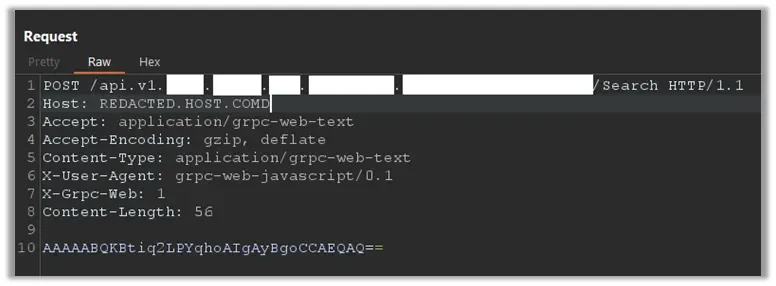
Payload from a real target
Reading the payload format
After decoding the base64 payload and piping the output to xxd, you see hex data. The first 5 bytes of the payload are the entire message length in hex. In the example the length is (16¹ * 1 + 16⁰ * 6 = 22), meaning the entire payload is 22 bytes long.

Hex Output of the Payload
After removing the length prefix, the payload can be piped to Protoscope, which outputs a human-readable, editable version. It looks like JSON but is not exactly JSON. Message fields are separated by field numbers rather than field names, because Protocol Buffers work with field numbers; field names live in the .proto file and stub files.
Exploitation
Step 1: decode, edit and re-encode by hand
Pass the payload to gRPC Coder on standard input with the --decode flag, then pass the tool's output to Protoscope and save it to a file for editing:
echo "[redacted]" | python3 grpc-coder.py --decode | protoscope > out.txt
The decoded file looks like this:
cat out.txt2: {"Amin Nasiri"}3: 547: {"Xenon"}
Edit the out.txt file:
cat out.txt2: {"Amin Nasiri Xenon GRPC"}3: 547: {"<script>alert(origin)</script>"}
Then use Protoscope and pass its output to gRPC Coder with the --encode flag:
protoscope -s out.txt | python3 grpc-coder.py --encode
After that the payload can be sent with Burp Suite:
[redacted]+
This works, but it is time-consuming: manipulating every request this way costs a lot of minutes. That is the reason the Burp extension exists. The author made a video for using the extension, in which a lab sample with client-side XSS protection is exploited.
Step 2: find the JavaScript that carries the gRPC-Web definitions
When an application uses gRPC-Web you may see a main.js or similarly named file that contains the gRPC-Web related files inside itself. To find the correct JS file, search one gRPC-Web route across all Burp Responses, for example search for hidden.sqli.Searcher like this:
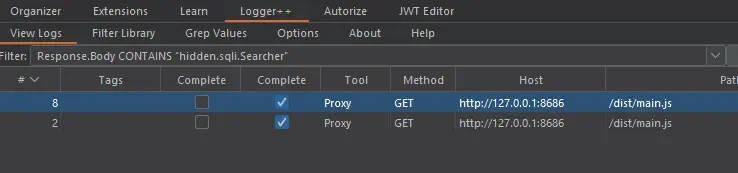
Logger++ Filter for Finding gRPC-Web JavaScript File
After finding the right JS file, download it and scan it with gRPC Scan. The example for the Hidden-SQLi gRPC lab, after webpacking the client.js file, is this:
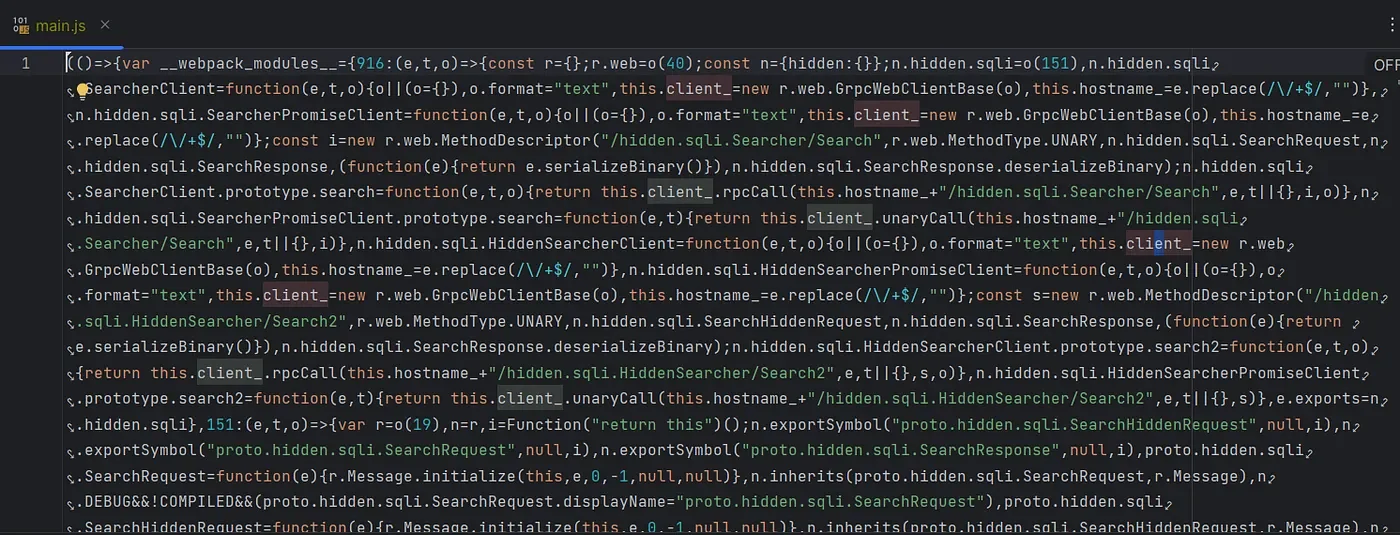
gRPC-Web Webpacked JavaScript File
It is a minified JavaScript file that carries good information about the gRPC back-end endpoints and services. gRPC Scan makes analysing it much easier:
python3 grpc-scan.py --file main.js
The output:
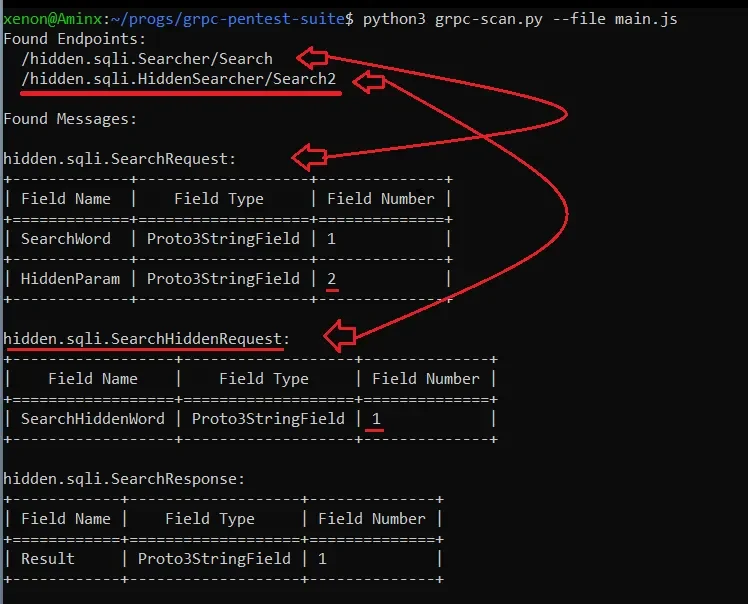
gRPC Scan Tool Output
In the output there are 2 endpoints to which requests can be sent. There are also 3 messages, each with some fields, and each field has a field number and a field type. Field names in the gRPC Scan output are not important when manipulating payloads, because Protobuf works with field numbers; the names are small clues about what a parameter is and how it is used.
One caveat matters here: sometimes the application does not use all endpoints or all message fields, and they may be optional. They have to be fuzzed to find possible vulnerabilities.
Step 3: decode the real payload
At first the payload is decoded:
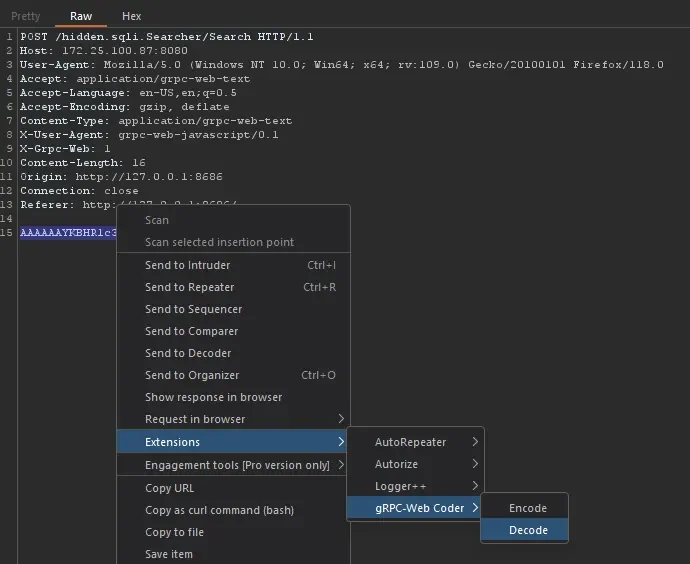
gRPC Scan Decoding Process
The result is this:
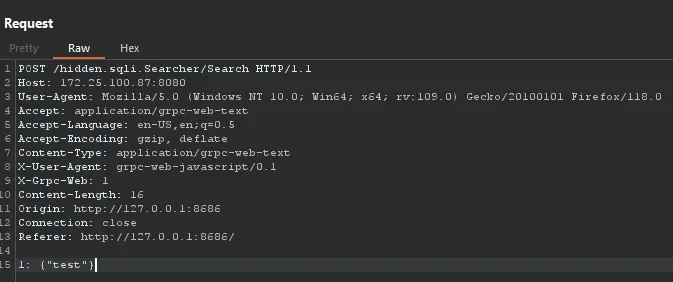
Decoded Payload
Step 4: change the route and inject SQLi
Then the route is changed and the SQLi payload is placed inside it:
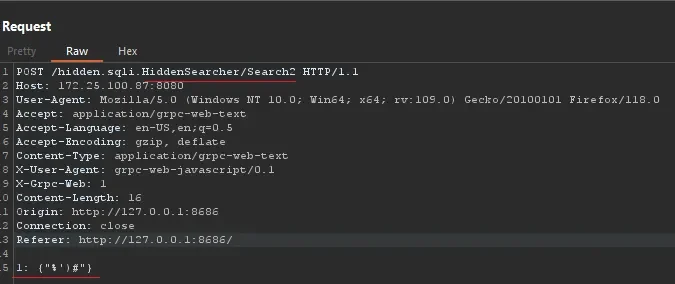
Edit the payload and add SQLi payload inside it
Step 5: encode and send
After making all changes to the payload, it is encoded and sent to the server:
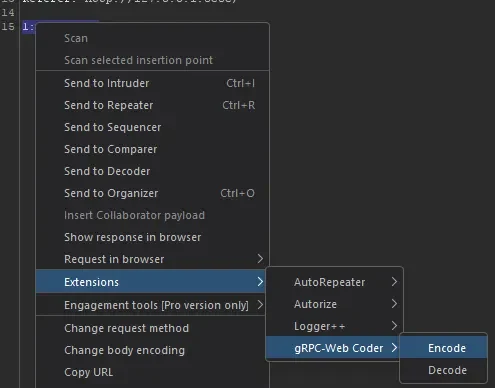
gRPC Coder Extension Payload Encoding Process
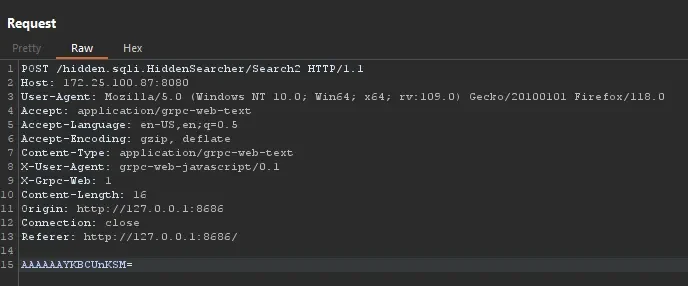
Sending New Encoded Payload
Step 6: decode the response
When the response is decoded with the gRPC Coder Extension, there are no published posts, and the /Search2 route was not protected against SQL injection. The flag is visible in the decoded response.
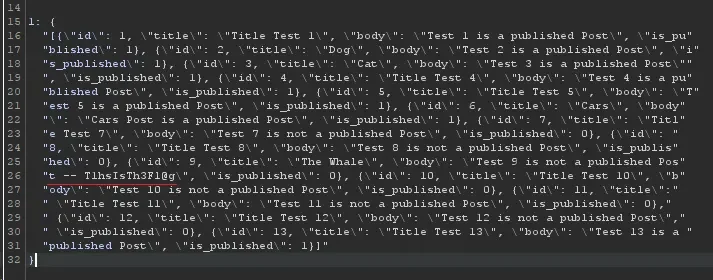
Decoding the Response
The complete video of exploiting the hidden SQLi and XSS is referenced in the article as the "Hacking into gRPC-Web" YouTube video.
Step 7: white-box testing with a .proto file
If you have the .proto file you can use grpcui, but you first have to make a .protoset file and then use it for sending gRPC-Web requests:
protoc --proto_path=. --descriptor_set_out=NAME.protoset --include_imports ./NAME.proto
Then run grpcui:
grpcui -protoset NAME.protoset -plaintext localhost:8080
Open the grpcui generated URL and send your desired requests:
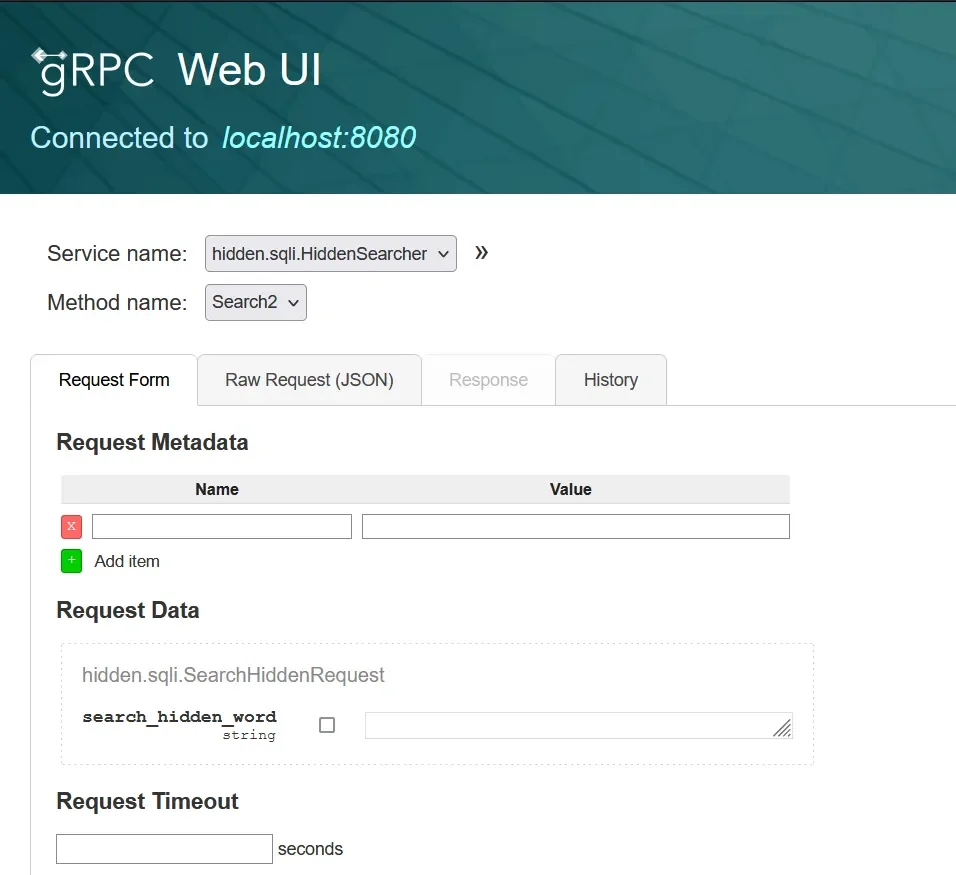
grpcui
Root cause
The report does not analyse the server-side code. What it shows is that a gRPC-Web route, /Search2, accepted a SQL injection payload placed in a message field, and that the route was not protected against SQL injection. The likely reason the issue is easy to miss is on the testing side rather than the code side: the binary, length-prefixed, base64-encoded body hides the parameter, and without decoding it and knowing the field numbers from the webpacked JavaScript, a tester cannot see or edit the value at all. The application's own defences did not stop the payload on that route; the report does not say what defences, if any, existed elsewhere.
Impact
The author found the hidden gRPC-Web parameter SQL injection in a travel agency company. In the lab, the decoded response showed no published posts and revealed the flag, confirming that the injected condition changed the query result. The report does not state the production impact beyond the fact that the route was not protected against SQL injection. The XSS payload shown in the manual encoding example is demonstrated against a lab sample with client-side XSS protection, not against the travel agency.
Fix
The implied requirement is that gRPC-Web routes such as /Search2 must validate and parameterise the values carried in message fields exactly as a JSON or form endpoint would; the transport encoding does not provide any protection.
Variants to test
- Search responses for a gRPC-Web route string. Use a Burp search or Logger++ filter for a service or method name seen in traffic, as with
hidden.sqli.Searcher. A positive result is a JavaScript response containing the webpacked gRPC-Web definitions. - Scan the bundle with gRPC Scan. Run
python3 grpc-scan.py --file main.json the downloaded file. A positive result is a list of endpoints, messages, fields and field types that the visible UI does not use. - Fuzz unused endpoints and optional fields. The report notes that applications may not use all endpoints or all message fields. A positive result is a response that differs from the baseline when an unused field or endpoint is populated.
- Inject into every string field. Decode a captured payload, replace a field value with a test payload, re-encode and send. A positive result is a decoded response that reflects the injected condition, as with the
/Search2route returning no posts and the flag. - Try the same manipulation on responses. gRPC Coder is also described as useful for response manipulation, so decode server responses and edit them before they reach the browser. A positive result is client-side behaviour that changes based on the edited response.
What happened, in plain words
A security researcher was testing a website and hit a wall. The site was built with a technology called gRPC-Web, and the tool he used to inspect and change web traffic, Burp Suite, showed the data the site sent as a long string of meaningless characters. He could not edit a single value the way you would edit a form field or a piece of JSON. He looked for a guide on how to test this kind of site and found nothing complete, so he built his own tools and wrote this up. Along the way he found a real vulnerability, a SQL injection hidden inside one of these unreadable requests, in a travel agency company. He calls it low-hanging fruit: easy to exploit once you can read the request, but easy for other testers to miss because the request looks like noise.
This article walks through the same journey for someone who has never done security testing. Every new term is explained the first time it appears, and every command and payload is shown exactly as it was used, with a plain-language explanation underneath.
Background: what all these words mean
Before the steps, a few ideas. You do not need to memorise them; come back when a term appears.
- A web application is a program you use through your browser. Your browser sends requests to a server (a computer somewhere else), the server sends back responses, and the page you see is built from those responses.
- An API is the part of a web application that accepts requests from programs rather than from a human clicking buttons. Think of a restaurant: the menu and the waiter are the API. You do not walk into the kitchen; you tell the waiter what you want in a fixed format, and food comes back. Web pages often use APIs behind the scenes to load data without reloading the whole page.
- JSON is a simple, human-readable text format for data, looking like
{"name": "Amin"}. Most APIs use it, and it is easy to read and edit by hand. - gRPC is a different way for programs to talk to each other. Instead of readable JSON it uses a compact binary format called Protocol Buffers (often shortened to Protobuf). Binary means the data is stored as raw bytes, not as letters you can read. It is smaller and faster, but a human looking at it sees gibberish.
- gRPC-Web is the version of gRPC that works inside a browser. Browsers cannot speak full gRPC, so gRPC-Web wraps the binary message and encodes it as base64, a way of writing any bytes using only ordinary letters and digits so they can travel safely as text. The result is a long string like
AAAAABYSC0FtaW4.... - Burp Suite is a tool security testers put between their browser and the internet. It records every request and response and lets you pause, edit and resend them. Think of it as a post office that opens every letter, lets you rewrite it, and sends it on.
- A payload in this context means the body of a request, the actual data being sent. In security testing it also means the malicious value you insert, such as a database command or a script.
- SQL injection (SQLi) is a vulnerability where a tester slips database instructions into a value the application trusts. If the application pastes that value straight into a database query, the database may execute the instructions. Imagine a form that asks for your name and the application builds the sentence "Find the customer called NAME". If you type
x OR 1=1as your name, the sentence becomes "Find the customer called x OR 1=1", which matches everyone. That is the idea. - Cross-site scripting (XSS) is a vulnerability where a tester gets a script (JavaScript, the language browsers run) into a page so that it runs in someone else's browser. The classic test value is
<script>alert(origin)</script>, which, if it runs, pops up a box showing the page's origin (its address). - A .proto file is the blueprint that describes the structure of gRPC messages: which fields exist, what number each field has, and what type each field is. Without it, you are looking at binary data with no labels.
- A webpacked JavaScript file is a JavaScript file produced by a build tool called webpack, which bundles many small source files into one large file for the browser to download. It is usually minified, meaning spaces and readable names are stripped out to make it small. It still contains the definitions the browser uses to build gRPC-Web requests, which makes it valuable to a tester.
- A lab is a deliberately vulnerable practice application, built so testers can learn safely. The one used here is called the Hidden-SQLi gRPC lab.
The problem: you cannot edit what you cannot read
Here is one example payload after base64 decoding it. Decoding base64 turns the letters-and-digits string back into the raw bytes it represents.
Hex Output of the Payload
And here is the same thing inside Burp Suite:
Base64 Decoded Payload in Burp Suite
What you are looking at is binary data. There is no name= and no "value". You cannot simply change a character and re-encode it, because the bytes follow the Protocol Buffers rules: each value is preceded by a small tag that says which field it belongs to, and the whole message is preceded by a length. Change one byte and the length or the tags no longer line up. When a payload has several parameters, editing it by hand is effectively impossible in the way editing JSON is.
Here is another payload, this time captured from a real target:
Payload from a real target
There are tools that can send gRPC or gRPC-Web requests, but they have a catch: they need the .proto file. In a black-box test, where you are testing a system you have no inside information about, you do not have the .proto file. All you have is the payload and the webpacked JavaScript files the browser uses to build those requests. The article later shows a little white-box testing, where you do have the .proto file.
Reading the payload format
After decoding the base64 payload and piping the output to the xxd command, you see hex data. xxd is a small program that prints bytes as hexadecimal, a base-16 way of writing numbers using 0 to 9 and a to f. Piping, the | symbol, means "take the output of the program on the left and feed it to the program on the right".
The first 5 bytes of the payload are the entire message length in hex. In the example the length is (16¹ * 1 + 16⁰ * 6 = 22), which means the entire payload is 22 bytes long. In other words, the message starts with a little header saying "I am 22 bytes long", and the real data follows.
Hex Output of the Payload
After removing that length prefix, the payload can be piped to Protoscope, a tool that turns Protobuf bytes into a human-readable, editable form. It looks like JSON but is not exactly JSON. The message fields are separated by field numbers rather than field names, because Protocol Buffers work with field numbers. The names live in the .proto file and in the stub files the browser uses. So 2: means "field number 2", and you have to work out from context or from the JavaScript what field 2 actually is.
The tools: gRPC Pentest Suite
The author built the gRPC Pentest Suite, which contains two command-line tools and one Burp Suite extension:
- gRPC Coder: manipulates payloads and removes the length prefix. It is also useful for examining responses from the server or for manipulating responses. Protoscope must be installed for the suite to be complete and usable.
- gRPC Coder Burp Extension: wraps gRPC Coder so that decoding and encoding a payload takes one click. It handles the content types
application/grpc-web-textandapplication/grpc-web+proto. A content type is a label in a request that tells the server what kind of data is inside, like a label on a parcel. - gRPC Scan: scans JavaScript webpacked gRPC-Web related files and outputs gRPC endpoints, services, methods, messages, fields and field types. An endpoint is a specific address on the server that accepts requests, like a particular counter in a bank. A service is a group of related endpoints, and a method is one operation inside a service. This tool helps find hidden parameters or hidden endpoints, and in some situations its output can be turned into a .proto file.
For the white-box part of the article the author uses grpcui, a tool that provides a web page for sending gRPC requests, and which needs a .proto file.
Step 1: decode, edit and re-encode by hand
The first approach is manual. You pass the payload to gRPC Coder on standard input (the stream of text a program reads when you type into it or pipe into it) with the --decode flag, then pass the tool's output to Protoscope and save it to a file for editing:
echo "[redacted]" | python3 grpc-coder.py --decode | protoscope > out.txt
Line by line:
echo "[redacted]"prints the base64 payload to the screen. This is the raw request body as captured.| python3 grpc-coder.py --decodefeeds that string into gRPC Coder, run with Python 3, and asks it to decode. The tool strips the length prefix and turns the base64 back into bytes.| protoscopefeeds those bytes into Protoscope, which prints them in the readable field-number form.> out.txtsaves the result into a file calledout.txtso it can be edited.
The decoded file looks like this:
cat out.txt2: {"Amin Nasiri"}3: 547: {"Xenon"}
This is the readable form. 2: {"Amin Nasiri"} means field number 2 holds the text Amin Nasiri. 3: 54 means field number 3 holds the number 54. 7: {"Xenon"} means field number 7 holds the text Xenon. The cat out.txt at the start is the command that printed the file; the rest is its contents.
Now edit the file. The author changes the text in field 2 and replaces the value in field 7 with a script:
cat out.txt2: {"Amin Nasiri Xenon GRPC"}3: 547: {"<script>alert(origin)</script>"}
Why? To test whether the server reflects or executes whatever is placed in that field. The <script>alert(origin)</script> value is a classic XSS test: if the application ever shows this value back to a browser without neutralising it, the script runs and a pop-up appears.
Then use Protoscope and pass its output to gRPC Coder with the --encode flag:
protoscope -s out.txt | python3 grpc-coder.py --encode
Line by line:
protoscope -s out.txtreads the edited file and turns the readable form back into raw Protobuf bytes. The-soption tells Protoscope to read from a file rather than from the screen.| python3 grpc-coder.py --encodefeeds those bytes into gRPC Coder and asks it to encode: add the length prefix back and base64-encode the result, so it is ready to send.
After that the payload can be sent with Burp Suite:
[redacted]+
This is the new request body. It looks just as unreadable as the original, but it now carries the edited values. You would paste it into the request in Burp Suite and forward it to the server.
This works, but it is time-consuming: manipulating every request this way costs a lot of minutes. That is the reason the Burp extension exists. The author made a video for using the extension, in which a lab sample with client-side XSS protection is exploited. **Client-side XSS protection means the browser-side code tries to stop scripts from running; the video exploits a lab sample that has this protection.
Step 2: find the JavaScript that carries the gRPC-Web definitions
When an application uses gRPC-Web you may see a main.js or similarly named file that contains the gRPC-Web related files inside itself. That file is the browser's instruction manual for talking to the server: it knows every endpoint and every field number.
To find the correct JS file, search one gRPC-Web route across all Burp Responses, for example search for hidden.sqli.Searcher like this:
Logger++ Filter for Finding gRPC-Web JavaScript File
Logger++ is a Burp Suite extension that records traffic and lets you filter it. The filter looks for the string hidden.sqli.Searcher, which is a service and method name from the lab. Any response containing that string is a candidate: it is a JavaScript file that mentions the gRPC-Web definitions.
After finding the right JS file, download it and scan it with gRPC Scan. The example for the Hidden-SQLi gRPC lab, after webpacking the client.js file, is this:
gRPC-Web Webpacked JavaScript File
It is a minified JavaScript file that carries good information about the gRPC back-end endpoints and services. gRPC Scan makes analysing it much easier:
python3 grpc-scan.py --file main.js
Line by line:
python3 grpc-scan.pyruns the gRPC Scan tool with Python 3.--file main.jstells it which downloaded JavaScript file to analyse.
The output:
gRPC Scan Tool Output
In the output there are 2 endpoints to which requests can be sent. There are also 3 messages, each with some fields, and each field has a field number and a field type. A message is a structured bundle of fields, like a form with several boxes. A field type says whether a field holds text, a number, and so on.
Field names in the gRPC Scan output are not important when manipulating payloads, because Protobuf works with field numbers. The names are small clues about what a parameter is and how it is used. Think of a form where the boxes are numbered but the labels are guesses: the number is what the server reads, the label just helps you guess.
One caveat matters here: sometimes the application does not use all endpoints or all message fields, and they may be optional. They have to be fuzzed, meaning you send many variations and watch for responses that differ, to find possible vulnerabilities. An endpoint the application does not use is exactly the kind of thing to fuzz.
Step 3: decode the real payload
At first the payload is decoded:
gRPC Scan Decoding Process
The result is this:
Decoded Payload
Now the request is readable. This is the moment the wall comes down: what looked like noise is now a small list of numbered fields with values.
Step 4: change the route and inject SQLi
Then the route is changed and the SQLi payload is placed inside it:
Edit the payload and add SQLi payload inside it
The route is changed and the SQLi payload is placed inside it. Why put a SQL injection payload in a field? Because if the server pastes that field's value into a database query without sanitising it, the database will execute the injected condition. The test is whether the response changes in a way that only a database instruction could cause.
Step 5: encode and send
After making all changes to the payload, it is encoded and sent to the server:
gRPC Coder Extension Payload Encoding Process
Sending New Encoded Payload
Encoding puts the length prefix back and turns the bytes into base64, so the request is valid gRPC-Web again. Sending it is the same as sending any request in Burp Suite.
Step 6: decode the response
When the response is decoded with the gRPC Coder Extension, there are no published posts, and the /Search2 route was not protected against SQL injection. The flag is visible in the decoded response.
Decoding the Response
A flag is a marker string that a lab places somewhere only a successful exploit can reach. Seeing it means the injection worked. The decoded response showed no published posts, and the flag was visible. The route accepted the payload and passed it to the database.
The complete video of exploiting the hidden SQLi and XSS is referenced in the article as the "Hacking into gRPC-Web" YouTube video.
Step 7: white-box testing with a .proto file
If you have the .proto file you can use grpcui, but you first have to make a .protoset file and then use it for sending gRPC-Web requests. A .protoset is a compiled, binary form of the .proto blueprint that tools can load directly.
protoc --proto_path=. --descriptor_set_out=NAME.protoset --include_imports ./NAME.proto
Line by line:
protocis the official Protocol Buffers compiler.--proto_path=.tells it to look for files in the current directory (the dot means "here").--descriptor_set_out=NAME.protosettells it to write the compiled blueprint to a file calledNAME.protoset.--include_importstells it to include any other .proto files that this one imports, so the result is complete../NAME.protois the input file.
Then run grpcui:
grpcui -protoset NAME.protoset -plaintext localhost:8080
Line by line:
grpcuistarts the tool.-protoset NAME.protosettells it to load the compiled blueprint.-plaintexttells it not to use encryption for this local connection.localhost:8080is the address of the server:localhostmeans this computer, and8080is the port, a numbered door on the computer.
Open the grpcui generated URL and send your desired requests:
grpcui
With the blueprint loaded, you can open the grpcui generated URL and send your desired requests. This is the white-box advantage: you already know the structure, so you can focus on testing values.
Why the vulnerability was easy to miss
The report does not analyse the server-side code. What it shows is that a gRPC-Web route, /Search2, accepted a SQL injection payload placed in a message field, and that the route was not protected against SQL injection. The likely reason the issue is easy to miss is on the testing side rather than the code side: the binary, length-prefixed, base64-encoded body hides the parameter, and without decoding it and knowing the field numbers from the webpacked JavaScript, a tester cannot see or edit the value at all. The application's own defences did not stop the payload on that route; the report does not say what defences, if any, existed elsewhere.
Impact
The author found the hidden gRPC-Web parameter SQL injection in a travel agency company and submitted the report to them. In the lab, the decoded response showed no published posts and revealed the flag, confirming that the injected condition changed the query result. The report does not state the production impact beyond the fact that the route was not protected against SQL injection. The XSS payload shown in the manual encoding example is demonstrated against a lab sample with client-side XSS protection, not against the travel agency.
Fix
The implied requirement is that gRPC-Web routes such as /Search2 must validate and parameterise the values carried in message fields exactly as a JSON or form endpoint would. Parameterising means sending the value to the database separately from the query text, so the database treats it as data and never as instructions. The transport encoding does not provide any protection: unreadable to a human is not the same as safe.
Variants to test
- Search responses for a gRPC-Web route string. Use a Burp search or Logger++ filter for a service or method name seen in traffic, as with
hidden.sqli.Searcher. A positive result is a JavaScript response containing the webpacked gRPC-Web definitions. - Scan the bundle with gRPC Scan. Run
python3 grpc-scan.py --file main.json the downloaded file. A positive result is a list of endpoints, messages, fields and field types that the visible UI does not use. - Fuzz unused endpoints and optional fields. The report notes that applications may not use all endpoints or all message fields. A positive result is a response that differs from the baseline when an unused field or endpoint is populated.
- Inject into every string field. Decode a captured payload, replace a field value with a test payload, re-encode and send. A positive result is a decoded response that reflects the injected condition, as with the
/Search2route returning no posts and the flag. - Try the same manipulation on responses. gRPC Coder is also described as useful for response manipulation, so decode server responses and edit them before they reach the browser. A positive result is client-side behaviour that changes based on the edited response.
Glossary
- API: the part of a web application that accepts requests from programs rather than from a human clicking buttons.
- Base64: a way of writing any bytes using only ordinary letters and digits so they can travel safely as text.
- Binary: data stored as raw bytes rather than as readable letters.
- Black-box test: testing a system with no inside information about how it is built.
- Burp Suite: a tool that sits between browser and internet, recording, pausing, editing and resending requests and responses.
- Client-side XSS protection: browser-side code that tries to stop scripts from running.
- Content type: a label in a request that tells the server what kind of data is inside.
- Cross-site scripting (XSS): a vulnerability where a tester gets a script into a page so that it runs in someone else's browser.
- Endpoint: a specific address on the server that accepts requests.
- Field number: the numeric tag that identifies a field inside a Protocol Buffers message.
- Field type: what kind of value a field holds, such as text or a number.
- Flag: a marker string a lab places somewhere only a successful exploit can reach.
- Fuzzing: sending many variations of a request and watching for responses that differ.
- gRPC: a way for programs to talk to each other using compact binary messages.
- gRPC-Web: the browser-compatible version of gRPC, which wraps the binary message in base64.
- grpcui: a tool that provides a web page for sending gRPC requests, given a .proto file.
- Hex / hexadecimal: a base-16 way of writing numbers using 0 to 9 and a to f.
- JSON: a simple, human-readable text format for data.
- Lab: a deliberately vulnerable practice application built so testers can learn safely.
- Logger++: a Burp Suite extension that records traffic and lets you filter it.
- Message: a structured bundle of fields in Protocol Buffers, like a form with several boxes.
- Method: one operation inside a gRPC service.
- Minified: JavaScript with spaces and readable names stripped out to make the file small.
- Parameterising: sending a value to a database separately from the query text so it is treated as data, never as instructions.
- Payload: the body of a request, or the malicious value inserted into it.
- Piping: using the
|symbol to feed the output of one program into another. - Port: a numbered door on a computer that a service listens on.
- Protocol Buffers (Protobuf): the compact binary format gRPC uses for messages.
- Protoscope: a tool that turns Protobuf bytes into a readable, editable form and back.
- .proto file: the blueprint describing which fields a gRPC message has, their numbers and their types.
- .protoset: a compiled, binary form of a .proto blueprint that tools can load directly.
- Service: a group of related gRPC endpoints.
- SQL injection (SQLi): a vulnerability where database instructions slipped into a trusted value are executed by the database.
- Standard input: the stream of text a program reads when you type into it or pipe into it.
- Webpacked JavaScript file: a JavaScript file produced by the webpack build tool, bundling many source files into one.
- White-box testing: testing a system with inside information, such as the .proto file.
- xxd: a small program that prints bytes as hexadecimal.



