The Deputy Is Confused About AWS Security Hub
The blog post describes a confused deputy vulnerability in AWS Security Hub integrations where a security product could send findings to an unintended AWS account if the customer provides the wrong account ID. An attacker could sign up to a scanning service and use it to pollute another customer's Security Hub with false findings.
 Published on blog.plerion.com
Update: The AWS Security Hub team got in touch to clarify some of the points below, and get feedback to help customers avoid some of the gotchas herein. The resulting goodness has been sprinkled throughout the post, and we are grateful to AWS for being so proactive about security. <3
The full write-up lives on its author's site
It belongs to its author, so we link to it rather than copy it. The other two tabs are our own rewrites, checked against it.
Context
AWS Security Hub is the service AWS introduced in 2019 as a single dashboard for security issues related to AWS infrastructure. Security products, both commercial and non-commercial, integrate with it so that their findings land in one place instead of a thousand separate dashboards.
The post is written for people building a product that integrates with Security Hub, from the perspective of a vendor (Plerion) describing the confused deputy problem. The core issue is a confused deputy: a customer authorises the vendor's platform to send findings to Security Hub, but the platform does not validate that the account ID it has been given actually belongs to that customer. The account ID is user controlled, and if it ends up in the call to BatchImportFindings, one customer's findings can be delivered to another customer's hub.
The post also covers several smaller quirks of the integration model: account IDs exposed through public product metadata, permissions that survive off-boarding, and user-controlled fields that become links in the AWS web console.
Setup
From the customer side, the normal flow is:
- Find a commercial tool that finds badness in AWS. Security Hub also supports non-commercial tools that are not listed as providers, using a slightly different model.
- Get budget approved for the tool.
- Log into the AWS account and click "Accept findings" on the integration associated with the chosen tool.
- Findings start rolling into Security Hub.
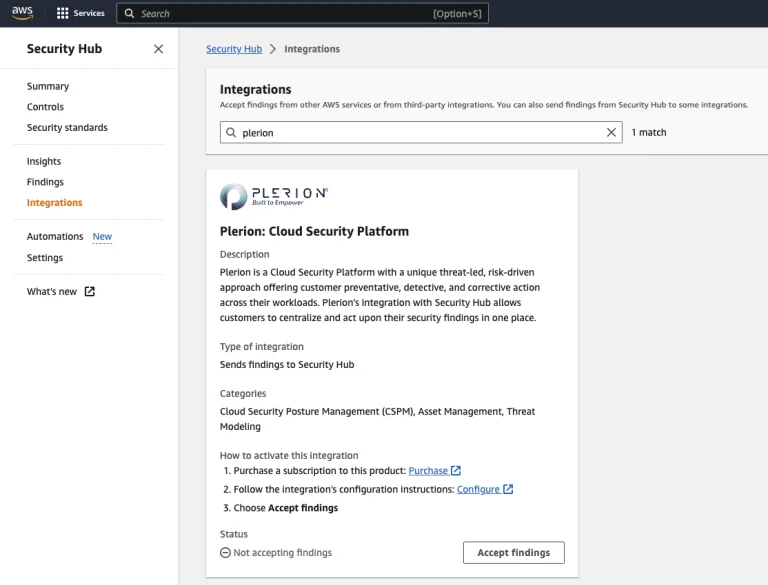
On the vendor side, the customer has given consent for findings to be sent, but the vendor needs to know where to send them. The vendor asks the customer for their AWS account ID and puts it into the scanning pipeline. Findings typically arrive on the customer's dashboard two to five minutes later.
The report notes that asking for the account ID is actually unnecessary, because findings should typically just go to the account they relate to.
Finding it
The problem appears when the account ID supplied by the customer is not the customer's own. The scenario in the post: the customer, perhaps after a long night, gives the vendor their old employer's account ID, one they memorised during a battle with CloudFormation, instead of their current account ID.
If the old employer has never clicked "Accept findings", not much happens. If the old employer has clicked "Accept findings" at any point, the vendor's platform will happily send the new customer's findings into the old employer's Security Hub. That is the confused deputy.
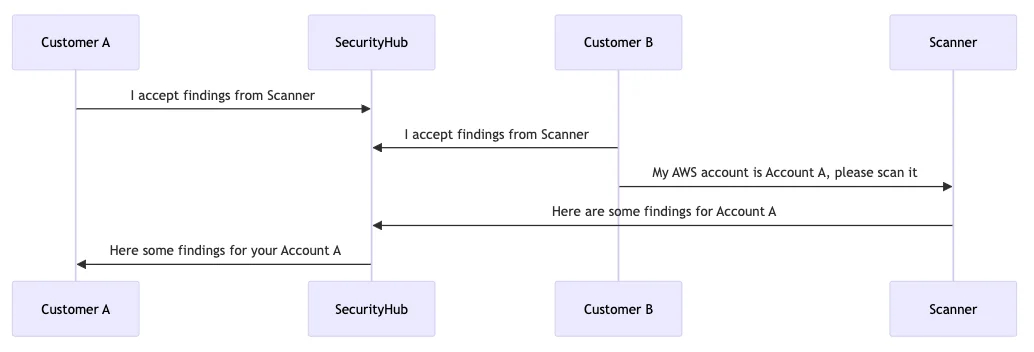
Intentionally or maliciously, one customer's findings go to another customer.
The report notes that for this to happen, the user-controlled account ID has to end up in the call to BatchImportFindings.
Exploitation
Step 1: Enable the integration as a customer
A customer enables import of findings for a product with:
aws securityhub enable-import-findings-for-product --product-arn arn:aws:securityhub:us-east-1::product/plerion/cloud-security-platform
This is the CLI equivalent of clicking "Accept findings". The --product-arn identifies the product whose findings the account will accept. Note that the ARN in this example has an empty account field, which the post later explains is because the account ID stopped being included in the product ARN in 2019.
Step 2: Supply an account ID that is not yours
When the vendor asks where to send findings, the customer provides an account ID. If that ID belongs to an organisation that has previously accepted findings from the same product, the vendor's pipeline will send the findings there. The report frames this as either accidental (the wrong ID given by mistake) or malicious (an attacker signing up to the service to pollute someone else's hub).
The precondition is that the target account has accepted findings from that product at some point. Without that, nothing happens.
Step 3: Discover product ARNs and account IDs
Anyone with an AWS account can enumerate products:
aws securityhub describe-products
This returns a JSON blob. The example in the post looks like this:
{
    "Products": [
        ...
        {
            "ProductArn": "arn:aws:securityhub:us-east-1:123456789012:product/plerion/cloud-security-platform",
            "ProductName": "Cloud Security Platform",
            "CompanyName": "Plerion",
            "Description": "Plerion is a Cloud Security Platform with a unique threat-led, risk-driven approach offering customer preventative, detective, and corrective action across their workloads. Plerion's integration with Security Hub allows customers to centralize and act upon their security findings in one place.",
            "Categories": [
                "Cloud Security Posture Management (CSPM)",
                "Asset Management",
                "Threat Modeling"
            ],
            "IntegrationTypes": [
                "SEND_FINDINGS_TO_SECURITY_HUB"
            ],
            "MarketplaceUrl": "https://aws.amazon.com/marketplace/seller-profile?id=464b7833-edb8-43ee-b083-d8a298b7ba08",
            "ActivationUrl": "https://au.app.plerion.com/resource-center/platform-documentation/integrations/outbound/securityHub",
            "ProductSubscriptionResourcePolicy": "{...}"
        },
        <more products here>
        ...
     ]
}
The call is one that anyone with an AWS account needs to be able to make, and what is returned is essentially public. The ProductArn is therefore public. The post notes that if the ARN includes the vendor's AWS account ID, that too is public, though the account ID stopped being included in the ARN in 2019.
Step 4: Read the subscription resource policy
To scope which account IDs can act on a product's behalf to send findings, and which account IDs can enable the product, AWS generates an IAM policy and returns it in the ProductSubscriptionResourcePolicy parameter. Unescaping it produces JSON like:
{
  "Version": "2012-10-17",
  "Statement": [
    {
      "Effect": "Allow",
      "Principal": {
        "AWS": "123456789012"
      },
      "Action": [
        "securityhub:BatchImportFindings"
      ],
      "Resource": "arn:aws:securityhub:us-east-1:123456789012:product-subscription/plerion/cloud-security-platform",
      "Condition": {
        "StringEquals": {
          "securityhub:TargetAccount": "123456789012"
        }
      }
    },
    <more statements here>
    ...
  ]
}
This exposes not only the vendor's main account ID but also the other account IDs it uses for development and testing of the integration. The post describes this as not ideal but not the end of the world, and says AWS is looking into ways to prevent it or at least make the implications clear in documentation.
Step 5: Extract account IDs in bulk
For people who like one-liners, the post gives this command to pull account IDs for all products:
aws securityhub describe-products | jq '.Products[] | {CompanyName: .CompanyName, ProductName: .ProductName, AccountId: (.ProductArn + " " + .ProductSubscriptionResourcePolicy) | scan("\\d{12}")}'
It concatenates the ProductArn and the ProductSubscriptionResourcePolicy for each product and scans the result for 12-digit sequences, which is the shape of an AWS account ID. The fwd:cloudsec team maintains an open source list of known AWS account IDs and their owners, linked from the post.
Step 6: Keep sending after off-boarding
If a customer stops using the product and the vendor deactivates their account, the vendor can still send findings to that former customer's Security Hub, because the customer gave permission and has not taken it back. The customer can remove permission at any time. The post says AWS is updating documentation to make sure partners include off-boarding guidance for their customers.
Step 7: User-controlled fields become links
Creating a finding uses a call like aws securityhub batch-import-findings, which accepts a large JSON blob. Values from that blob end up displayed in the web console dashboard. Two fields, SourceURL and Resources[].Id, sometimes become links. If a bad person controls them, they can point to bad things, which the post describes as getting rick rolled from the AWS web console.
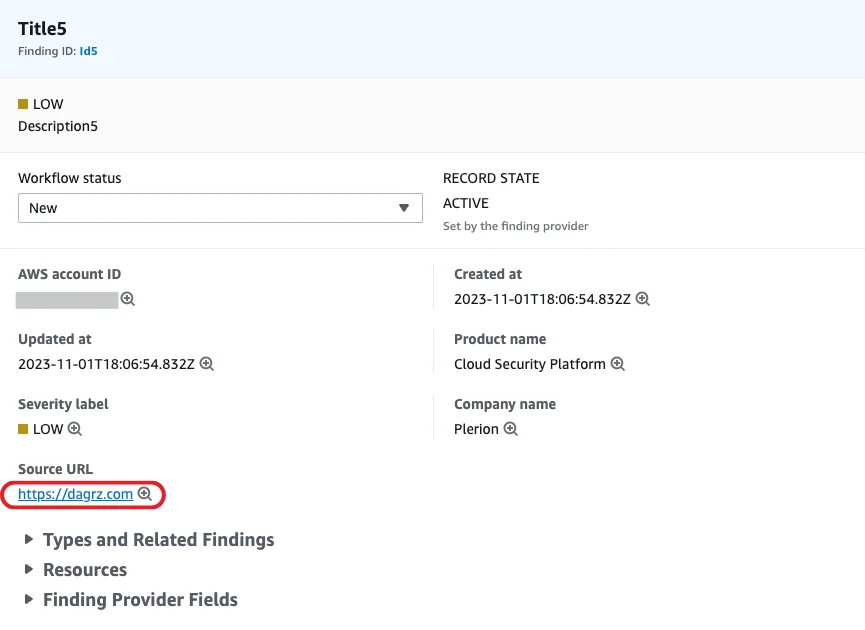
The post says AWS is moving quickly to add validation so this will not be a concern for long.
Root cause
The platform accepts a customer-supplied account ID and uses it as the destination for findings without validating that the customer owns that account. The authorisation model is consent-based: an account that has accepted findings from the product will accept them from the vendor. Consent does not establish that the account belongs to the customer who is currently asking for findings to be sent.
The report notes that as part of the integration process with the Security Hub team, correct generation and sending of findings to the right accounts is reviewed before go live. The problem can still occur if code changes happen after the initial integration, because code and people change over time.
Impact
The security implications are described as not earth shattering but real. An attacker could sign up to a scanning service and use it to pollute someone else's Security Hub with false positives and misleading data. Security teams already deal with noise, and this adds intentionally irrelevant data.
The more important implication is loss of trust: a security product that causes cross-tenant data pollution is not a good look.
The account ID exposure through describe-products and ProductSubscriptionResourcePolicy gives away the vendor's main account ID and its development and testing accounts, which the post frames as unwanted reconnaissance rather than a direct compromise. The link injection in SourceURL and Resources[].Id matters when a bad person controls those fields, so they can point to bad things.
Fix
The post lists practical steps for vendors building Security Hub integrations:
- Include a validation step when asking customers which account to send findings to. Ideally ownership of accounts is already validated, so the customer picks from a list. This step is unnecessary if findings are only ever delivered to the account they are found in, per the AWS reference architecture.
- When generating and sending findings, include standard authorisation logic so data never goes to the wrong tenant. The approach is language dependent, but making it part of the product's security model generalises the protection.
- Consider special purpose AWS accounts for Security Hub integrations rather than existing accounts, so important account IDs are not leaked and the vendor is not exposed to unwanted reconnaissance.
- Update the customer off-boarding process to include un-accepting notifications from the Security Hub product integration, so findings never end up back in a former customer's dashboard.
- Ensure users cannot influence what goes into the
SourceURLandResource.Idfields of findings. They should be system generated only, to prevent them being abused to craft malicious links in the AWS web console.
On the AWS side, the post says AWS is looking into ways to prevent account ID exposure through product metadata or at least make the implications clear in documentation, is updating documentation on off-boarding guidance for partners, and is moving quickly to add validation for the link fields.
Variants to test
- Account ID validation in other integrations. Any product that asks a customer for an account ID and then sends data to it is a candidate. A positive result is that findings or data appear in an account that did not supply the ID and had previously accepted the product.
- Product metadata enumeration. Run
aws securityhub describe-productsagainst other products and inspectProductArnandProductSubscriptionResourcePolicyfor 12-digit account IDs. A positive result is account IDs for accounts the vendor did not intend to publish, especially non-production ones. - Off-boarding. After a customer removes a product from their account, check whether the vendor can still deliver findings. A positive result is findings arriving in the former customer's hub after they stopped using the product.
- Link fields in findings. Submit findings with values in
SourceURLandResources[].Idand check whether they render as clickable links in the console. A positive result is an arbitrary URL becoming clickable in the dashboard. - Post-integration code changes. For products already reviewed by the Security Hub team, check whether later changes reintroduced user-controlled account IDs into
BatchImportFindings. A positive result is the same cross-tenant delivery after a code change.
What happened, in plain words
Imagine a large office building where every company has its own mailbox. A security company offers to send each customer a regular report of problems found in their computer systems, and the building has a single shared noticeboard where all those reports are pinned up. That noticeboard is AWS Security Hub: a service Amazon Web Services (AWS) introduced in 2019 so that security issues about a company's AWS infrastructure all appear in one dashboard instead of being scattered across a thousand separate screens.
A security product plugs into that noticeboard. The customer clicks a button to say "yes, send your reports to my noticeboard", and the product then sends findings there. A finding is simply one item on the report: a problem the scanner noticed.
The mistake described here is what security people call a confused deputy. A deputy is someone you authorise to act on your behalf, like a courier you tell to deliver a parcel to your home address. If the courier will deliver to any address someone writes on the label, without checking that the person writing the label actually lives there, the courier can be tricked into delivering your parcel to a stranger. In this case the product (the deputy) was told an account ID (the address) by the customer, and it sent the findings there without checking that the account really belonged to that customer. An AWS account ID is a 12-digit number that identifies one AWS account, the way a house number identifies one house.
The post was written by a vendor that builds a Security Hub integration and is explaining what can go wrong. It also covers a few smaller oddities of how the integration works: account IDs that leak through public product information, permissions that survive after a customer leaves, and some fields in a finding that turn into clickable links in the AWS web console.
Setup
From the customer's side, the normal flow is:
- Find a commercial tool that finds badness in AWS. Security Hub also supports non-commercial tools that are not listed as providers, using a slightly different model.
- Get budget approved for the tool.
- Log into the AWS account and click "Accept findings" on the integration associated with the chosen tool.
- Findings start rolling into Security Hub.
Clicking it is the customer's way of saying "I agree to receive this product's findings in my Security Hub".
On the vendor side, the customer has given consent for findings to be sent, but the vendor needs to know where to send them. The vendor asks the customer for their AWS account ID and puts it into the scanning pipeline. Findings typically arrive on the customer's dashboard two to five minutes later.
The report notes that asking for the account ID is actually unnecessary, because findings should typically just go to the account they relate to. In other words, if the scanner is looking at account A, the findings about account A should go to account A, and nobody needs to type an address at all.
Finding it
The problem appears when the account ID supplied by the customer is not the customer's own. The scenario in the post: the customer, perhaps after a long night, gives the vendor their old employer's account ID, one they memorised during a battle with CloudFormation, instead of their current account ID. CloudFormation is AWS's tool for describing infrastructure as a template; the point of the joke is that people end up memorising account IDs while wrestling with such tools.
If the old employer has never clicked "Accept findings", not much happens. If the old employer has clicked "Accept findings" at any point, the vendor's platform will happily send the new customer's findings into the old employer's Security Hub. That is the confused deputy.
Intentionally or maliciously, one customer's findings go to another customer.
The report notes that for this to happen, the user-controlled account ID has to end up in the call to BatchImportFindings. That is the AWS operation a product uses to push findings into Security Hub; an API call is simply one program asking another program to do something, the way you press a button in an app and the app asks a server to save your change.
Exploitation
Step 1: Enable the integration as a customer
A customer enables import of findings for a product with:
aws securityhub enable-import-findings-for-product --product-arn arn:aws:securityhub:us-east-1::product/plerion/cloud-security-platform
This is the command-line equivalent of clicking "Accept findings". The command line is a text window where you type instructions instead of clicking buttons. aws is the AWS command-line tool, securityhub is the service being addressed, and enable-import-findings-for-product is the action: turn on the import of findings for a given product. The --product-arn option identifies the product whose findings the account will accept. An ARN (Amazon Resource Name) is AWS's naming scheme for a resource, a long label that says which service, which region, which account and which item it refers to. Note that the ARN in this example has an empty account field, which the post later explains is because the account ID stopped being included in the product ARN in 2019.
Step 2: Supply an account ID that is not yours
When the vendor asks where to send findings, the customer provides an account ID. If that ID belongs to an organisation that has previously accepted findings from the same product, the vendor's pipeline will send the findings there. The report frames this as either accidental (the wrong ID given by mistake) or malicious (an attacker signing up to the service to pollute someone else's hub).
The precondition is that the target account has accepted findings from that product at some point. Without that, nothing happens, because the target account has never agreed to receive anything from this product.
Step 3: Discover product ARNs and account IDs
Anyone with an AWS account can enumerate products:
aws securityhub describe-products
This asks Security Hub for the list of products it knows about. describe-products is a read-only request: it returns information rather than changing anything. This returns a JSON blob. JSON is a text format for structured data, a bit like a very strict shopping list where every item has a label. The example in the post looks like this:
{
    "Products": [
        ...,
        {
            "ProductArn": "arn:aws:securityhub:us-east-1:123456789012:product/plerion/cloud-security-platform",
            "ProductName": "Cloud Security Platform",
            "CompanyName": "Plerion",
            "Description": "Plerion is a Cloud Security Platform with a unique threat-led, risk-driven approach offering customer preventative, detective, and corrective action across their workloads. Plerion's integration with Security Hub allows customers to centralize and act upon their security findings in one place.",
            "Categories": [
                "Cloud Security Posture Management (CSPM)",
                "Asset Management",
                "Threat Modeling"
            ],
            "IntegrationTypes": [
                "SEND_FINDINGS_TO_SECURITY_HUB"
            ],
            "MarketplaceUrl": "https://aws.amazon.com/marketplace/seller-profile?id=464b7833-edb8-43ee-b083-d8a298b7ba08",
            "ActivationUrl": "https://au.app.plerion.com/resource-center/platform-documentation/integrations/outbound/securityHub",
            "ProductSubscriptionResourcePolicy": "{...}"
        },
        <more products here>
        ...
     ]
}
Line by line: the outer braces hold one object, and Products is a list of products. The ... marks entries left out of the example. Each product entry has a ProductArn, the long name that identifies it, which here contains the 12-digit account ID 123456789012. ProductName and CompanyName say what the product is called and who makes it. Description is marketing text. Categories lists the kinds of tool it is, such as Cloud Security Posture Management, which is the category for tools that check cloud configuration for weaknesses. IntegrationTypes says how it plugs in, here SEND_FINDINGS_TO_SECURITY_HUB, meaning it sends findings to Security Hub. MarketplaceUrl and ActivationUrl are web links for buying and setting up the product. ProductSubscriptionResourcePolicy is a permissions document, shown as {...} here and expanded in the next step.
The call is one that anyone with an AWS account needs to be able to make, and what is returned is essentially public. The ProductArn is therefore public. The post notes that if the ARN includes the vendor's AWS account ID, that too is public, though the account ID stopped being included in the ARN in 2019.
Step 4: Read the subscription resource policy
To scope which account IDs can act on a product's behalf to send findings, and which account IDs can enable the product, AWS generates an IAM policy and returns it in the ProductSubscriptionResourcePolicy parameter. IAM stands for Identity and Access Management: it is AWS's system for saying who is allowed to do what. A policy is a written rule, like a building notice that says "only staff with a blue badge may enter the server room". Unescaping it produces JSON like:
{
  "Version": "2012-10-17",
  "Statement": [
    {
      "Effect": "Allow",
      "Principal": {
        "AWS": "123456789012"
      },
      "Action": [
        "securityhub:BatchImportFindings"
      ],
      "Resource": "arn:aws:securityhub:us-east-1:123456789012:product-subscription/plerion/cloud-security-platform",
      "Condition": {
        "StringEquals": {
          "securityhub:TargetAccount": "123456789012"
        }
      }
    },
    <more statements here>
    ...
  ]
}
Line by line: Version is the version of the policy language. Statement is a list of rules. Each rule has an Effect, here Allow, meaning permit rather than deny. Principal says who the rule is about, here the AWS account 123456789012. Action lists what they may do, here securityhub:BatchImportFindings, the operation that pushes findings into Security Hub. Resource names the specific thing the rule applies to, here the product subscription for Plerion's product. Condition adds a restriction: StringEquals with securityhub:TargetAccount equal to 123456789012 means the action is only allowed when the target account is that same account. The <more statements here> and ... mark further rules left out of the example.
This exposes not only the vendor's main account ID but also the other account IDs it uses for development and testing of the integration. The post describes this as not ideal but not the end of the world, and says AWS is looking into ways to prevent it or at least make the implications clear in documentation.
Step 5: Extract account IDs in bulk
For people who like one-liners, the post gives this command to pull account IDs for all products:
aws securityhub describe-products | jq '.Products[] | {CompanyName: .CompanyName, ProductName: .ProductName, AccountId: (.ProductArn + " " + .ProductSubscriptionResourcePolicy) | scan("\\d{12}")}'
Line by line: aws securityhub describe-products fetches the product list as before. The vertical bar | is a pipe: it takes the output of the first command and feeds it to the next one, like passing a document down a line of people. jq is a tool for picking pieces out of JSON. .Products[] means "go through every product in the list". The braces build a small object for each one with CompanyName, ProductName and AccountId. For AccountId, it takes the ProductArn, adds a space, adds the ProductSubscriptionResourcePolicy, and then scan("\\d{12}") searches that combined text for sequences of twelve digits, which is the shape of an AWS account ID. The result is a tidy list of company, product and the account IDs found in its public metadata.
The fwd:cloudsec team maintains an open source list of known AWS account IDs and their owners, linked from the post.
Step 6: Keep sending after off-boarding
If a customer stops using the product and the vendor deactivates their account, the vendor can still send findings to that former customer's Security Hub, because the customer gave permission and has not taken it back. The customer can remove permission at any time. The post says AWS is updating documentation to make sure partners include off-boarding guidance for their customers. Off-boarding is the process of a customer leaving a service, the mirror image of signing up.
Step 7: User-controlled fields become links
Creating a finding uses a call like aws securityhub batch-import-findings, which accepts a large JSON blob. Values from that blob end up displayed in the web console dashboard. Two fields, SourceURL and Resources[].Id, sometimes become links. A field is one labelled piece of data inside a JSON object, and Resources[].Id means the Id field of each entry in the Resources list. If a bad person controls them, they can point to bad things, which the post describes as getting rick rolled from the AWS web console.
The post says AWS is moving quickly to add validation so this will not be a concern for long.
Root cause
The platform accepts a customer-supplied account ID and uses it as the destination for findings without validating that the customer owns that account. The authorisation model is consent-based: an account that has accepted findings from the product will accept them from the vendor. Consent does not establish that the account belongs to the customer who is currently asking for findings to be sent.
The report notes that as part of the integration process with the Security Hub team, correct generation and sending of findings to the right accounts is reviewed before go live. The problem can still occur if code changes happen after the initial integration, because code and people change over time.
Impact
The security implications are described as not earth shattering but real. An attacker could sign up to a scanning service and use it to pollute someone else's Security Hub with false positives and misleading data. A false positive is a warning about a problem that does not actually exist. Security teams already deal with noise, and this adds intentionally irrelevant data.
The more important implication is loss of trust: a security product that causes cross-tenant data pollution is not a good look. A tenant here means one customer's separate space inside a shared service, like one flat in an apartment block; cross-tenant means data crossing from one flat into another.
The account ID exposure through describe-products and ProductSubscriptionResourcePolicy gives away the vendor's main account ID and its development and testing accounts, which the post frames as unwanted reconnaissance rather than a direct compromise. Reconnaissance is the information-gathering phase, like someone walking past your house noting which windows are open.
The link injection in SourceURL and Resources[].Id matters when a bad person controls those fields, so they can point to bad things.
Fix
The post lists practical steps for vendors building Security Hub integrations:
- Include a validation step when asking customers which account to send findings to. Ideally ownership of accounts is already validated, so the customer picks from a list. This step is unnecessary if findings are only ever delivered to the account they are found in, per the AWS reference architecture.
- When generating and sending findings, include standard authorisation logic so data never goes to the wrong tenant. The approach is language dependent, but making it part of the product's security model generalises the protection.
- Consider special purpose AWS accounts for Security Hub integrations rather than existing accounts, so important account IDs are not leaked and the vendor is not exposed to unwanted reconnaissance.
- Update the customer off-boarding process to include un-accepting notifications from the Security Hub product integration, so findings never end up back in a former customer's dashboard.
- Ensure users cannot influence what goes into the
SourceURLandResource.Idfields of findings. They should be system generated only, to prevent them being abused to craft malicious links in the AWS web console.
On the AWS side, the post says AWS is looking into ways to prevent account ID exposure through product metadata or at least make the implications clear in documentation, is updating documentation on off-boarding guidance for partners, and is moving quickly to add validation for the link fields.
Variants to test
- Account ID validation in other integrations. Any product that asks a customer for an account ID and then sends data to it is a candidate. A positive result is that findings or data appear in an account that did not supply the ID and had previously accepted the product.
- Product metadata enumeration. Run
aws securityhub describe-productsagainst other products and inspectProductArnandProductSubscriptionResourcePolicyfor 12-digit account IDs. A positive result is account IDs for accounts the vendor did not intend to publish, especially non-production ones. - Off-boarding. After a customer removes a product from their account, check whether the vendor can still deliver findings. A positive result is findings arriving in the former customer's hub after they stopped using the product.
- Link fields in findings. Submit findings with values in
SourceURLandResources[].Idand check whether they render as clickable links in the console. A positive result is an arbitrary URL becoming clickable in the dashboard. - Post-integration code changes. For products already reviewed by the Security Hub team, check whether later changes reintroduced user-controlled account IDs into
BatchImportFindings. A positive result is the same cross-tenant delivery after a code change.
Glossary
- AWS: Amazon Web Services, the cloud computing platform where these accounts and services live.
- AWS Security Hub: an AWS service that collects security findings from many products into one dashboard.
- Account ID: a 12-digit number that identifies one AWS account.
- API: a way for one program to ask another program to do something, like a menu of requests a service accepts.
- ARN (Amazon Resource Name): AWS's long naming scheme for a resource, saying which service, region, account and item it is.
- BatchImportFindings: the AWS operation a product calls to push findings into Security Hub.
- CloudFormation: AWS's tool for describing infrastructure as a template.
- Command line: a text window where you type instructions instead of clicking buttons.
- Confused deputy: a situation where a trusted program is tricked into using its authority on behalf of the wrong person.
- Consent-based authorisation: a model where permission comes from someone having agreed once, without checking who is asking now.
- Cross-tenant data pollution: one customer's data ending up in another customer's space inside a shared service.
- False positive: a warning about a problem that does not actually exist.
- Finding: one item in a security report, a single problem a scanner noticed.
- IAM (Identity and Access Management): AWS's system for saying who is allowed to do what.
- JSON: a text format for structured data, made of labelled values and lists.
- jq: a command-line tool for picking pieces out of JSON.
- Off-boarding: the process of a customer leaving a service.
- Pipe (
|): a way to feed the output of one command into the next. - Policy: a written rule saying who may do what.
- Principal: the identity a rule is about, such as an AWS account.
- Reconnaissance: the information-gathering phase before an attack, noting what is exposed.
- Tenant: one customer's separate space inside a shared service.
- Web console: the graphical website where you click buttons to manage AWS.

